


You’re tired of controllers that fail after months of use. Stick drift ruins your gaming experience, costs you money, and wastes your time. The good news? You can find Xbox controllers built with Hall Effect sensors and reinforced materials that truly withstand years of play. But not all drift-free options are created equal—some offer wired reliability, others provide wireless convenience, and each has distinct advantages you need to understand to make the right choice.
| GameSir G7 Pro Wireless XBOX Controller,TMR Sticks,Windows,Trigger Stops |

| Premium Wireless Pick | Stick Drift Technology: Mag-Res TMR joysticks with Hall Effect sensors | Connectivity Type: Wireless (2.4G) and wired options | Trigger Technology: Switchable Hall Effect and micro triggers | VIEW LATEST PRICE | Read Our Analysis |
| FLYDIGI VADER 5S Wired Controller for XBOX Series X|S XBOX One Windows |

| Most Customizable | Stick Drift Technology: Hall Effect joysticks with zero deadzone | Connectivity Type: Wired only | Trigger Technology: FORCESWITCH micro-click or Hall Effect linear | VIEW LATEST PRICE | Read Our Analysis |
| DRAKONG The Challenger Wired Hall Effect Gaming Controller for XBOX & PC |

| Best Value Wired | Stick Drift Technology: Hall Effect joysticks | Connectivity Type: Wired USB-C only | Trigger Technology: Impulse Hall Effect triggers | VIEW LATEST PRICE | Read Our Analysis |
| GameSir G7 SE Wired Xbox Controller (White) |

| Best Overall | Stick Drift Technology: Hall Effect joysticks | Connectivity Type: Wired USB only | Trigger Technology: Hall Effect triggers | VIEW LATEST PRICE | Read Our Analysis |
| XBOX Wireless Gaming Controller Carbon Black |
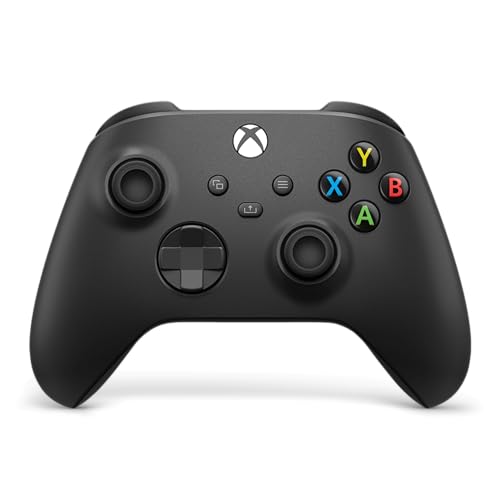
| Official Standard Choice | Stick Drift Technology: Not specified | Connectivity Type: Wireless, Bluetooth, and USB-C | Trigger Technology: Not specified | VIEW LATEST PRICE | Read Our Analysis |
More Details on Our Top Picks
GameSir G7 Pro Wireless XBOX Controller,TMR Sticks,Windows,Trigger Stops
Why settle for controllers that fail you? The GameSir G7 Pro uses Mag-Res TMR joysticks that virtually eliminate stick drift through Hall Effect sensor technology. You get Hall Effect analog triggers with two switching options for precise control. The controller features optical micro switches on ABXY buttons and mechanical switches on the D-pad for tactile feedback. Connect wirelessly via 2.4G to your Xbox Series X|S or PC at 1000Hz polling for ultra-low latency. Customize four remappable buttons through the GameSir Nexus app, adjusting gyro settings and stick curves. The magnetic swappable faceplate lets you personalize appearance. Charge using the included smart auto start-stop station with 1200mAh battery capacity.
- Stick Drift Technology:Mag-Res TMR joysticks with Hall Effect sensors
- Connectivity Type:Wireless (2.4G) and wired options
- Trigger Technology:Switchable Hall Effect and micro triggers
- Programmable Buttons:Four remappable buttons (R5/L5/R4/L4)
- Xbox Compatibility:Xbox Series X|S, Xbox One, Windows
- Audio Jack:Not included
- Additional Feature:1000Hz ultra-low latency
- Additional Feature:Magnetic swappable faceplates
- Additional Feature:Auto start-stop charging station
FLYDIGI VADER 5S Wired Controller for XBOX Series X|S XBOX One Windows
The FLYDIGI VADER 5S is the most customizable controller for players who want to fine-tune every aspect of their setup. Adjust joystick tension from 40gf to 100gf directly on the controller without software or replacements. Hall Effect sticks eliminate drift and deadzone for reliable precision. Switch triggers between micro-click for rapid firing or linear Hall Effect for smooth racing control. Map rear and shoulder buttons to actions like jump or crouch, keeping your thumbs on the sticks. Use the optional software to create game-specific profiles, adjust vibration across four motors, and configure lighting. This wired controller works with Xbox Series X|S, Xbox One, and Windows PC.
- Stick Drift Technology:Hall Effect joysticks with zero deadzone
- Connectivity Type:Wired only
- Trigger Technology:FORCESWITCH micro-click or Hall Effect linear
- Programmable Buttons:Rear and shoulder buttons for remapping
- Xbox Compatibility:Xbox Series X|S, Xbox One, Windows
- Audio Jack:3.5mm audio jack
- Additional Feature:Adjustable joystick tension physically
- Additional Feature:4-motor vibration system
- Additional Feature:Quick in-game adjustments
DRAKONG The Challenger Wired Hall Effect Gaming Controller for XBOX & PC
If you’re seeking reliable wired performance without breaking your budget, Drakong’s Challenger controller delivers value through Hall Effect joysticks that eliminate stick drift entirely. The 250Hz polling rate ensures fast, responsive input across competitive games. You’ll appreciate the textured grip on bumpers and triggers, which prevents slipping during intense sessions. The USB-C connection provides stable, low-latency performance with zero input delay. Programmable back buttons let you customize controls for specific games. The built-in AUX headset jack enables direct audio communication. Compatible with Xbox Series X|S, Xbox One, and Windows 10/11, this 21-button controller works immediately upon connection without additional setup.
- Stick Drift Technology:Hall Effect joysticks
- Connectivity Type:Wired USB-C only
- Trigger Technology:Impulse Hall Effect triggers
- Programmable Buttons:Programmable back buttons
- Xbox Compatibility:Xbox Series X|S, Xbox One, Windows
- Audio Jack:Auxiliary jack included
- Additional Feature:250Hz polling rate
- Additional Feature:Textured laser grip design
- Additional Feature:10-foot USB-C cable
GameSir G7 SE Wired Xbox Controller (White)
GameSir’s G7 SE leads the pack for gamers seeking a wired controller that eliminates stick drift through Hall effect joysticks and triggers. This USB wired controller works with Xbox Series X|S, Xbox One, PC Windows 10+, and Steam without requiring drivers. You’ll experience precise control and longer equipment lifespan thanks to Hall effect technology. The ergonomic design features an ultra-fine textured grip and weighs 250 grams for comfortable extended play. Two back buttons let you customize controls to prevent accidental inputs. A 3.5mm audio jack connects your headset directly. With 4.4 out of 5 stars from over 14,000 reviews, this controller delivers reliability and performance.
- Stick Drift Technology:Hall Effect joysticks
- Connectivity Type:Wired USB only
- Trigger Technology:Hall Effect triggers
- Programmable Buttons:Two back buttons
- Xbox Compatibility:Xbox Series X|S, Xbox One, Windows 10/11
- Audio Jack:3.5mm audio jack
- Additional Feature:Asymmetric vibration grip motor
- Additional Feature:Laser-engraved texture grip
- Additional Feature:Removable USB connection
XBOX Wireless Gaming Controller Carbon Black
Want a controller that works seamlessly across your entire gaming ecosystem? The XBOX Wireless Gaming Controller Carbon Black connects to consoles, PCs, TVs, and mobile devices through USB-C, XBOX Wireless, or Bluetooth. Its hybrid D-pad and textured grips reduce stick drift through durable construction. You’ll get up to 40 hours of battery life using standard AA batteries. The built-in 3.5mm audio jack supports headsets for voice chat. Use the XBOX Accessories app to remap buttons and create custom profiles. This controller’s modernized design delivers precision performance across Android, iOS, Windows, and all Xbox generations.
- Stick Drift Technology:Not specified
- Connectivity Type:Wireless, Bluetooth, and USB-C
- Trigger Technology:Not specified
- Programmable Buttons:Custom remappable controls
- Xbox Compatibility:Xbox Series X|S, Xbox One, Android, iOS, Windows
- Audio Jack:3.5mm audio jack
- Additional Feature:Up to 40-hour battery
- Additional Feature:Cross-device Bluetooth connectivity
- Additional Feature:Share button for content
Factors to Consider When Choosing an Xbox Controller With No Stick Drift

When selecting an Xbox controller without stick drift, you’ll want to evaluate Hall Effect technology, which uses magnetic sensors instead of resistive materials to prevent the common wear that causes drift. Consider the polling rate for responsiveness, decide between wired and wireless options based on your setup, and check whether customization features and button mapping suit your gaming style. Finally, test the ergonomic design to confirm it fits your hand size and grip preference, since comfort directly affects your performance during extended play sessions.
Hall Effect Technology Benefits
Why do Hall Effect joysticks outperform traditional potentiometer-based sticks? They use magnetic sensors instead of physical contact points, eliminating the wear that causes drift. You’ll experience ultra-stable centering because there’s no friction degrading your input over time. The technology provides consistent returns to neutral position across extended gaming sessions without accuracy loss.
Hall Effect joysticks deliver longer lifecycle and higher durability since fewer mechanical components wear out. You’ll notice smoother input with negligible deadzone variation, which enhances your precise aiming and tracking abilities. Combined with Hall Effect triggers, you get drift-free, repeatable inputs for steering and throttle across all game genres. This means you’re investing in a controller that maintains performance quality throughout its lifespan without requiring replacement due to stick degradation.
Polling Rate And Responsiveness
To maximize your controller’s responsiveness, you’ll need to understand how polling rate affects your gaming experience. Polling rate measures how often your controller updates its position data to your Xbox—measured in hertz (Hz). A 1000Hz polling rate delivers the fastest responsiveness, while 250Hz or 125Hz rates still reduce input lag but less dramatically. When you’re playing fast-paced games, higher polling rates make your inputs feel more immediate and precise. Pair your polling rate choice with Hall Effect joysticks, which maintain stable positional data during rapid movements. If you use a wired connection, you’ll experience more consistent polling rates than wireless connections, which occasionally introduce latency fluctuations. Prioritize controllers offering both high polling rates and Hall Effect sensors for optimal input precision and speed.
Wired Versus Wireless Options
Now that you’ve got a handle on polling rates and Hall Effect joysticks, you’ll need to decide whether a wired or wireless controller better suits your needs for drift prevention. Wired controllers connected via USB-C deliver stable, consistent input with no wireless interference or re-sync delays. They maintain reliable polling rates of 250Hz or higher, reducing latency spikes that can mask drift issues. Wireless models may introduce occasional input lag or interference, potentially affecting drift perception even with Hall Effect sensors. However, wireless controllers offer freedom of movement without cable constraints. If drift prevention is your priority, choose a wired option with Hall Effect joysticks and USB-C connection. If mobility matters more, select a wireless controller featuring Hall Effect technology and high polling rates.
Customization And Button Mapping
Customization and button mapping let you adapt your controller to match your gaming style and prevent stick drift from ruining your setup over time. You can adjust sensitivity, deadzone, and stick curves directly on your controller without needing software. Some controllers feature back buttons (R4/L4) that let you reassign actions on the device itself. This approach saves time and keeps your mappings active across all games automatically. For game-specific configurations, use software options to create per-profile button mappings. You’ll store different layouts for different titles without changing your hardware. Wired controllers typically offer more consistent mapping reliability since they eliminate wireless latency issues that can affect button response timing during gameplay.
Ergonomic Design Considerations
How does your controller’s physical design affect stick drift and gameplay performance? Your grip texture and shape directly impact hand fatigue during extended sessions. When your hands tire, they’re more likely to make unintentional micro-movements that register as drift. Select controllers with textured grips that prevent slipping and maintain steady thumb positioning.
Controller weight and balance matter significantly. Heavier, evenly balanced controllers reduce hand strain, minimizing involuntary stick input. Lighter controllers may cause you to grip harder, increasing fatigue and drift susceptibility.
Check the stick’s return-to-center characteristics. Responsive sticks settle faster after movement, reducing drift perception. Adjustable tension options let you customize how quickly sticks reset to neutral, which affects your control consistency during gameplay.
Price Point Comparison
When you’re comparing drift-free Xbox controllers, should you expect to pay more than standard models? Yes. Entry-level drift-free options typically cost 20–30% more than basic controllers. Premium models with Hall Effect sensors, adjustable tension switches, and wireless connectivity can exceed standard prices by 50% or more. Special edition variants command additional premiums due to exclusive artwork and bundled accessories, not superior drift-free technology. Consider your budget alongside desired features: wired USB-C models offer affordability with reliability; 2.4G wireless options cost more but provide low-latency performance across platforms. Evaluate what matters most—basic drift prevention or advanced customization. Compare specific models within your price range to identify the best value for your gaming needs and expected controller lifespan.
Device Compatibility Requirements
Before you purchase a drift-free Xbox controller, you’ll need to confirm it works with your gaming platform. Check whether the controller supports Xbox Series X|S, Xbox One, or Windows PC—your specific console determines compatibility. Visit the manufacturer’s product page to verify platform support before buying. Next, identify your connection preference: wired or wireless. Wired controllers eliminate wireless latency issues, while advanced wireless models offer mobility with minimal performance loss. Finally, confirm the controller uses Hall Effect joysticks and triggers, the core technology preventing drift. These sensors deliver zero-drift performance across all supported platforms. Cross-reference the controller’s specifications against your system requirements to ensure seamless functionality before making your purchase decision.
Final Thoughts
You’ve reviewed five drift-resistant controllers offering different advantages. Pick the GameSir G7 Pro if you want wireless convenience with Hall Effect technology. Choose wired options—FLYDIGI VADER 5S or DRAKONG Challenger—for guaranteed reliability without battery concerns. Select the GameSir G7 SE or Xbox Wireless Controller for budget-friendly alternatives. Prioritize Hall Effect sensors and adjustable tension features. Check your gaming setup’s compatibility before purchasing. Compare warranties and return policies to protect your investment.

Meet Ry, “TechGuru,” a 36-year-old technology enthusiast with a deep passion for tech innovations. With extensive experience, he specializes in gaming hardware and software, and has expertise in gadgets, custom PCs, and audio.
Besides writing about tech and reviewing new products, he enjoys traveling, hiking, and photography. Committed to keeping up with the latest industry trends, he aims to guide readers in making informed tech decisions.