
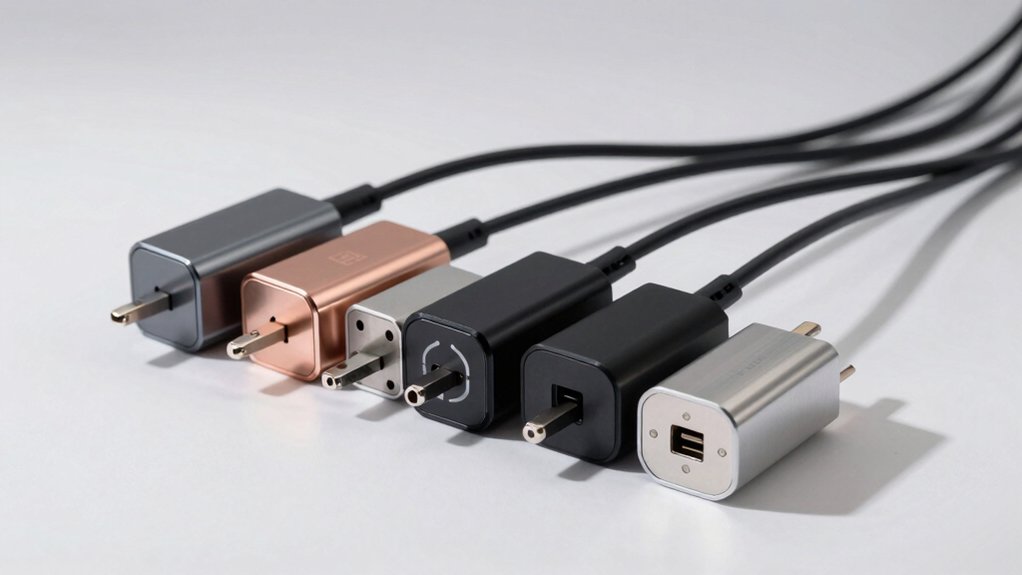

You’ll want a universal laptop charger that handles multiple devices without constant adapter swaps. The right choice depends on tip compatibility, wattage output, and safety certifications. You’re looking at models ranging from 65W to 90W with 16–20 tip sets or USB-C Power Delivery. Before settling on one, you need to understand what specs actually matter for your specific laptops and travel needs.
| 90W Universal AC Adapter Laptop Charger (16 Tips) |

| Most Tips Included | Maximum Power Output: 90W | Input Voltage Range: 100-240V, 50-60Hz | Number of Tips/Connectors Included: 16 tips | VIEW LATEST PRICE | Read Our Analysis |
| 19V 3.42A Universal Laptop Charger 65W Power Supply |

| Budget-Friendly Pick | Maximum Power Output: 65W | Input Voltage Range: 100-240V, 50-60Hz | Number of Tips/Connectors Included: 14 tips + USB port | VIEW LATEST PRICE | Read Our Analysis |
| ZOZO 90W Universal Laptop Charger Power Adapter |
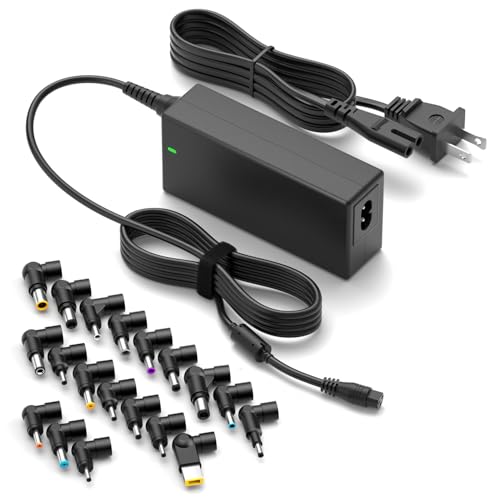
| Best Overall | Maximum Power Output: 90W | Input Voltage Range: 100-240V, 50-60Hz | Number of Tips/Connectors Included: Multiple tips (quantity not specified) | VIEW LATEST PRICE | Read Our Analysis |
| Universal 5V 2A AC/DC Power Adapter with Multiple Tips |

| Low-Power Specialist | Maximum Power Output: 10W | Input Voltage Range: 100-240V, 50-60Hz | Number of Tips/Connectors Included: 11 DC plug tips | VIEW LATEST PRICE | Read Our Analysis |
| Belker 90W Universal Laptop Charger with USB-C (20 Tips) |

| USB-C Future-Ready | Maximum Power Output: 90W | Input Voltage Range: 100-240V, 50-60Hz | Number of Tips/Connectors Included: 20 tips | VIEW LATEST PRICE | Read Our Analysis |
More Details on Our Top Picks
90W Universal AC Adapter Laptop Charger (16 Tips)
Are you tired of carrying multiple chargers for different laptops? The 90W Universal AC Adapter by SZGUDULO eliminates that problem with 16 interchangeable tips. This adapter outputs 15V, 16V, 19V, 19.5V, or 20V, covering Dell, HP, Acer, Asus, Lenovo, and other major brands. The 90W capacity handles most laptops, ultrabooks, and Chromebooks, while two USB ports charge additional devices simultaneously. Input accepts 100–240V worldwide power, making it portable for travel. The wall-mountable design saves desk space. Check your laptop’s voltage requirement before selecting the correct tip. The adapter includes a power cord and carries ETL safety certification. Its 4.4-star rating from 3,635 reviews confirms reliability. Note that devices requiring over 90W need alternative chargers.
- Maximum Power Output:90W
- Input Voltage Range:100-240V, 50-60Hz
- Number of Tips/Connectors Included:16 tips
- Primary Connector Type:DC barrel connector
- Warranty Period:Per Amazon policies (specific period not stated)
- Primary Use Case:Laptops, ultrabooks, Chromebooks
- Additional Feature:Dual USB ports included
- Additional Feature:Wall mount capability
- Additional Feature:ETL listed safety certified
19V 3.42A Universal Laptop Charger 65W Power Supply
If you’ve got multiple laptops and devices with different charging ports, this 19V 3.42A universal charger might be what you’re looking for. The 65W power supply handles input from 100–240V AC and outputs the standard 19V needed for most laptops. You’ll receive 14 interchangeable DC plugs in various sizes, including 5.5×2.5mm, 6.5×4.4mm, and 7.4×5.0mm options. Before purchasing, verify that one of these connector sizes matches your device’s charging port. The charger works with Acer, Toshiba, Samsung, ASUS, HP, Gateway, and Dell models. It comes with a one-year warranty and 30-day return policy through Amazon.
- Maximum Power Output:65W
- Input Voltage Range:100-240V, 50-60Hz
- Number of Tips/Connectors Included:14 tips + USB port
- Primary Connector Type:5.5mm × 2.5mm DC connector
- Warranty Period:1 year
- Primary Use Case:Laptops, Chromebooks, monitors, TVs
- Additional Feature:14 extra DC plugs
- Additional Feature:24-hour customer service response
- Additional Feature:5.5mm × 2.5mm DC connector
ZOZO 90W Universal Laptop Charger Power Adapter
The ZOZO 90W Universal Laptop Charger works with most major laptop brands—HP, Dell, Lenovo, Asus, Acer, Toshiba, Gateway, Samsung, Sony, and Fujitsu—making it your best choice if you own a device from one of these manufacturers or frequently switch between laptops. The adapter outputs 15V to 20V with automatic voltage adjustment, supporting up to 4.5A and 90W maximum power. You’ll receive the adapter, AC power cord, and a tips set covering various connector sizes. Setup requires no configuration—simply plug in the power cord, connect the correct tip to your laptop, and charging begins. The device includes short circuit protection and a charging indicator light. A 12-month warranty covers defects, and the lightweight design makes it travel-friendly.
- Maximum Power Output:90W
- Input Voltage Range:100-240V, 50-60Hz
- Number of Tips/Connectors Included:Multiple tips (quantity not specified)
- Primary Connector Type:Multiple interchangeable tips
- Warranty Period:12 months
- Primary Use Case:Laptops, ultrabooks, Chromebooks
- Additional Feature:Automatic voltage adjustment
- Additional Feature:Short circuit protection
- Additional Feature:Lightweight travel-friendly design
Universal 5V 2A AC/DC Power Adapter with Multiple Tips
Looking for a single charger that’ll work with multiple low-power devices around your home? The Universal 5V 2A AC/DC Power Adapter delivers exactly that with eleven interchangeable DC plug tips. This adapter outputs 5V at up to 2A, handling devices drawing anywhere from 100mA to 2000mA. Before purchasing, verify three things: your device’s DC socket matches the standard 5.5mm x 2.1mm size, confirm power consumption doesn’t exceed 10W, and check that your device uses inner positive polarity. The adapter supports LED lights, routers, speakers, cameras, and tablets. It includes comprehensive protection against overvoltage, overcurrent, and surges. The fireproof shell and heat dissipation board ensure safe operation without fan noise. For longevity, keep usage below 80% of maximum output during extended sessions.
- Maximum Power Output:10W
- Input Voltage Range:100-240V, 50-60Hz
- Number of Tips/Connectors Included:11 DC plug tips
- Primary Connector Type:5.5mm × 2.1mm DC plug
- Warranty Period:Per contact/service (specific period not stated)
- Primary Use Case:Low-power devices (routers, cameras, speakers, tablets)
- Additional Feature:11 DC plug tips
- Additional Feature:CE/FCC/DoE VI certified
- Additional Feature:Fireproof shell with heat dissipation
Belker 90W Universal Laptop Charger with USB-C (20 Tips)
You’ll want the Belker 90W charger if you’re switching between multiple laptop brands or upgrading devices frequently, since its 20 interchangeable tips and USB-C connector eliminate the need to buy separate chargers for Dell, HP, Lenovo, Acer, Asus, and other major manufacturers. The charger delivers up to 90W of power with output options ranging from 5V to 20V, accommodating laptops, tablets, and phones. Its universal compatibility extends to Chromebooks, ThinkPads, XPS models, and Latitude series devices. The package includes the main charger unit, USB-C plug, 20 connectors, and a US power cord. It operates on standard household current (100-240V) and carries a 12-month warranty with a 30-day return policy.
- Maximum Power Output:90W
- Input Voltage Range:100-240V, 50-60Hz
- Number of Tips/Connectors Included:20 tips
- Primary Connector Type:USB-C connector
- Warranty Period:12 months
- Primary Use Case:Laptops, ultrabooks, Chromebooks, tablets, smartphones
- Additional Feature:USB-C universal charger port
- Additional Feature:20-tip plug set
- Additional Feature:FCC/UL certification standards
Factors to Consider When Choosing Universal Laptop Chargers
When you’re selecting a universal laptop charger, you’ll need to evaluate five key factors: the wattage output (typically 65W to 120W depending on your device), the connector types it supports (USB-C, barrel connectors, or proprietary tips), and whether it handles your region’s input voltage (100-240V for international use). You should also assess the charger’s portability by checking its weight and size, since you’ll want something compact if you travel frequently, and verify it has safety certifications like UL, FCC, or CE to ensure it won’t damage your laptop or create fire hazards. These considerations work together to help you find a charger that’s both compatible with your devices and reliable for long-term use.
Power Output Requirements
How do you know which universal charger will actually work with your laptop? Start by checking your laptop’s power requirements, typically listed on the original charger or in your device manual. You’ll find three critical specifications: wattage (W), voltage (V), and current (A). Match the charger’s maximum wattage to or exceed your laptop’s requirement—a 90W charger won’t properly support a device needing 120W. Next, verify the charger offers your specific voltage, such as 19V or 20V, since incorrect voltage causes damage. Finally, confirm the current rating meets your laptop’s draw at that voltage to maintain proper charging speed. Cross-reference all three specifications before purchasing any universal charger to ensure compatibility and safe operation.
Connector Type Compatibility
What connector does your laptop actually use? You’ll find either a DC barrel jack or USB-C port on your device. For DC barrel jacks, measure the tip size—common sizes include 5.5×2.1 mm, 6.5×4.4 mm, and 4.0×1.7 mm. Check your laptop’s manual or specs to confirm the exact dimensions. Next, verify the polarity: most laptops require inner positive and outer negative, though some differ. If your charger includes a tip set with multiple options, select the matching size carefully to avoid damage. For USB-C laptops, ensure your universal charger has a USB-C port. Some models offer both DC output and USB-C, providing flexibility across devices. Always confirm connector type and specifications before connecting power to prevent incompatibility issues.
Input Voltage Range Support
Once you’ve confirmed your laptop’s connector type and polarity requirements, you’ll need to verify the charger’s input voltage range—the electrical standards it can accept from wall outlets. Most universal chargers support 100–240V AC at 50/60 Hz, meaning they’ll work in nearly every country without adjustment. This wide range eliminates the need for multiple chargers when traveling internationally or relocating to different regions. Check your charger’s specifications for explicit voltage and frequency ratings. If a charger doesn’t list input voltage support, it may only function at 110–120V, restricting its use outside North America. Auto-sensing technology in quality chargers automatically matches the local voltage, so you won’t need to manually switch settings. Always verify these specs before purchasing to ensure global compatibility.
Portability And Design
When you’re selecting a universal laptop charger, size and weight matter just as much as power output. Look for chargers with lightweight, compact housings that fit easily into your bag or backpack. Check whether the model includes wall-mount capability, which saves space in cramped workspaces and hotel rooms. Examine the cord assembly—shorter, bundled cords reduce clutter and tangling during transport. Verify that the charger includes a broad tip set of 12–20 tips plus USB-C connectivity. This combination covers most devices while keeping the overall package slim. Confirm the unit’s dimensions and weight before purchasing to ensure it meets your travel requirements. A truly portable charger balances power capacity with minimal bulk, letting you charge multiple devices without sacrificing convenience.
Safety Certifications Matter
Because safety certifications indicate that a charger’s met rigorous testing standards, you’ll want to verify that your universal laptop charger carries recognized credentials before making a purchase. Look for ETL listing, which confirms the charger meets North American safety requirements and reduces shock and fire risks. Check for CE marking to ensure compliance with European Union health, safety, and environmental standards. Verify DoE VI certification, which guarantees energy efficiency and lower standby power consumption. These certifications collectively demonstrate that your charger has proper insulation, overcurrent and overvoltage protection, and reliable short-circuit defense. Before buying, examine the product specifications or packaging for these markings. Prioritize chargers displaying multiple certifications, as they’ve undergone comprehensive testing to protect both your device and your safety.
Warranty And Support Options
While safety certifications protect you from immediate hazards, a strong warranty and responsive customer support protect your investment over time. Check the manufacturer’s warranty period—typically 12 months—and confirm what it covers: defects versus normal wear. Review return policies carefully, noting both timeframes and conditions required for refunds or exchanges. Verify that customer service responds within 24 hours for troubleshooting needs. Confirm whether warranty coverage includes shipping defects or lost parts, and check if product registration is required. Finally, read all stated limitations and exclusions that could void your warranty, such as misuse, improper handling, or tampering. These details determine how well you’re protected if problems arise after purchase.
Device Brand Compatibility
How do you know if a universal charger‘ll work with your specific laptop? Check your device’s manual or power specifications first. Universal chargers support multiple brands—Dell, HP, Lenovo, Acer, and Asus—across various model families like Inspiron, ThinkPad, and Zenbook. Verify the wattage requirement; most universal chargers deliver 15V–20V with up to 90W output. Match your laptop’s wattage needs to the charger’s maximum capacity, never exceeding the device’s rated power. Review the tip compatibility list; universal chargers typically include 16 or 20 interchangeable tips to fit different connector types. For modern laptops, confirm USB-C power delivery compatibility if your device uses USB-C charging. Cross-reference your exact model number against the charger’s compatibility documentation to ensure proper fit and safe operation.
Final Thoughts
You’ll want to select a universal laptop charger that matches your specific needs. Check your laptop’s wattage requirement—go with 90W for power-hungry models. Verify the charger has multiple tip sets or USB-C compatibility for your devices. Confirm it supports 100–240V for travel. Review certifications like ETL and CE. Compare warranty lengths and return policies. Match the charger’s specifications to your laptop brand and power needs before purchasing.

Meet Ry, “TechGuru,” a 36-year-old technology enthusiast with a deep passion for tech innovations. With extensive experience, he specializes in gaming hardware and software, and has expertise in gadgets, custom PCs, and audio.
Besides writing about tech and reviewing new products, he enjoys traveling, hiking, and photography. Committed to keeping up with the latest industry trends, he aims to guide readers in making informed tech decisions.