

If you’re building a PC and need to swap drives frequently, you’ll want a hot-swappable bay that keeps up with your workflow. You’ve got several solid options that prioritize speed and reliability, from compact 2.5″ enclosures to full 5.25″ racks. Each one handles different drive types and connection speeds. The real question is figuring out which setup matches your specific needs—and that depends on a few key factors.
| StarTech.com 5.25in Hot Swap Mobile Rack (HSB100SATBK) |
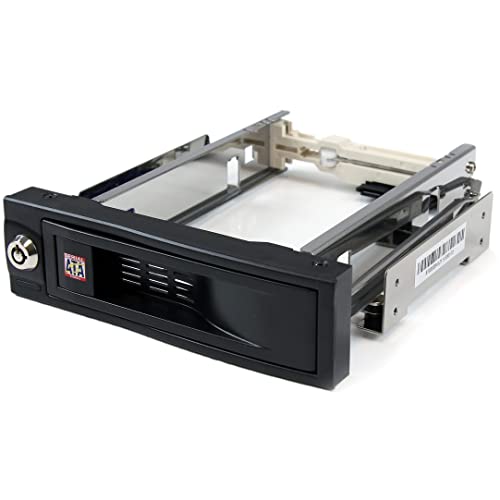
| Best Single-Drive | Hot-Swap Capability: Single 3.5″ SATA drive | Drive Compatibility: 3.5″ SATA HDD only | Installation Design: Trayless with rubber shock absorbers | VIEW LATEST PRICE | Read Our Analysis |
| ICY DOCK 6 Bay 2.5″ HDD/SSD Hot Swap Enclosure |
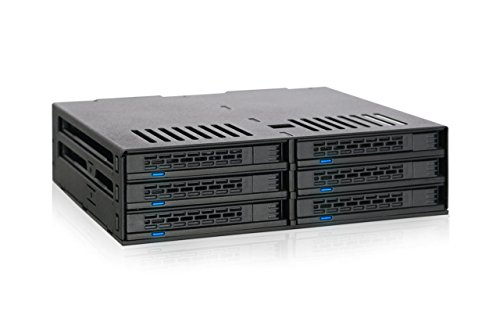
| Best Multi-Bay Capacity | Hot-Swap Capability: Up to 6 x 2.5″ SATA drives | Drive Compatibility: 2.5″ SATA HDD/SSD (5mm-9.5mm heights) | Installation Design: Tool-less hot-swappable bays | VIEW LATEST PRICE | Read Our Analysis |
| Kingwin Universal Hot Swap Mobile Rack for SSD/HDD |

| Best Versatile Compatibility | Hot-Swap Capability: Single 3.5″ or 2.5″ drive | Drive Compatibility: 3.5″ HDD or 2.5″ SSD/HDD | Installation Design: Trayless design | VIEW LATEST PRICE | Read Our Analysis |
| Kingwin Tray-Less Hot Swap Mobile Rack Cage |

| Best Enterprise Solution | Hot-Swap Capability: Two 2.5″ drives simultaneously | Drive Compatibility: 2.5″ SSD/HDD only | Installation Design: Trayless with key lock | VIEW LATEST PRICE | Read Our Analysis |
| Aluminum 2 Bay Hard Drive Enclosure USB 3.0 |

| Best External Storage | Hot-Swap Capability: Two 2.5″ or 3.5″ drives via USB 3.0 | Drive Compatibility: 2.5″ or 3.5″ SATA HDD/SSD | Installation Design: Tool-free tray design with cooling fan | VIEW LATEST PRICE | Read Our Analysis |
More Details on Our Top Picks
StarTech.com 5.25in Hot Swap Mobile Rack (HSB100SATBK)
If you’re working with 3.5-inch SATA drives and need quick access without powering down your system, the StarTech.com HSB100SATBK delivers a straightforward solution. This trayless hot-swap mobile rack fits into your computer’s 5.25-inch bay and lets you insert or remove drives directly without using separate trays. The aluminum construction and internal rubber shock absorbers protect your drives during installation and removal. A lockable drive bay prevents accidental ejection. With over 50,000 insertion cycles rated, this enclosure handles repeated drive changes reliably. The trayless design streamlines the process, reducing time spent on maintenance tasks. Installation is simple—mount the unit in your bay, connect the internal SATA backplane, and you’re ready to swap drives on demand.
- Hot-Swap Capability:Single 3.5″ SATA drive
- Drive Compatibility:3.5″ SATA HDD only
- Installation Design:Trayless with rubber shock absorbers
- Bay Form Factor:5.25″ bay
- Performance/Speed Support:SATA standard (trayless efficiency)
- Durability/Insertion Rating:50,000+ insertion rating; aluminum construction
- Additional Feature:Solid aluminum construction
- Additional Feature:Internal rubber shock absorbers
- Additional Feature:TAA compliant procurement
ICY DOCK 6 Bay 2.5″ HDD/SSD Hot Swap Enclosure
Looking to maximize drive capacity without sacrificing accessibility? The ICY DOCK ExpressCage MB326SP-B fits six 2.5″ SATA drives into a single 5.25″ bay, supporting heights from 5mm to 9.5mm. You’ll install drives tool-lessly into hot-swappable bays, enabling quick replacements without powering down your system. Dual 40mm fans with HIGH, LOW, and AUTO settings keep your drives cool during intensive operations. Two 15-pin SATA power connections supply all six drives simultaneously. This enclosure suits power users and system builders prioritizing efficient storage expansion and rapid drive access in compact spaces.
- Hot-Swap Capability:Up to 6 x 2.5″ SATA drives
- Drive Compatibility:2.5″ SATA HDD/SSD (5mm-9.5mm heights)
- Installation Design:Tool-less hot-swappable bays
- Bay Form Factor:5.25″ bay
- Performance/Speed Support:SATA III 6Gbps
- Durability/Insertion Rating:Dual 40mm cooling fans for thermal management
- Additional Feature:Dual 40mm cooling fans
- Additional Feature:Supports six drives simultaneously
- Additional Feature:Smart fan speed control
Kingwin Universal Hot Swap Mobile Rack for SSD/HDD
The Kingwin Universal Hot Swap Mobile Rack works best for builders who need to swap drives frequently without powering down their system. This unit fits one 5.25″ bay and accepts both 2.5″ SSDs and 3.5″ hard drives. Its tray-less design simplifies installation—you insert drives directly without additional hardware. The patented SATA connector resists scratching and withstands 50,000 insertion cycles, ensuring durability through repeated swaps. You’ll get SATA III speeds up to 6 Gbps for reliable performance. The open-air construction keeps drives cool during operation. Its ABS build quality suits professional environments like servers and desktop systems. Contact the seller if performance issues arise under warranty.
- Hot-Swap Capability:Single 3.5″ or 2.5″ drive
- Drive Compatibility:3.5″ HDD or 2.5″ SSD/HDD
- Installation Design:Trayless design
- Bay Form Factor:5.25″ bay
- Performance/Speed Support:SATA I/II/III up to 6 Gbps
- Durability/Insertion Rating:Patented non-scratch connector; 50k insertion cycles
- Additional Feature:Compatible 2.5″ and 3.5″
- Additional Feature:Open-air ventilation design
- Additional Feature:Professional guarantee service
Kingwin Tray-Less Hot Swap Mobile Rack Cage
Need quick access to multiple drives without tools or trays? The Kingwin Tray-Less Hot Swap Mobile Rack Cage fits one 3.5″ bay and holds two 2.5″ drives simultaneously. You’ll insert bare drives directly into the cage—no separate trays required. The patented connector prevents scratching and withstands 50,000 insertions. Built-in LEDs show power and activity status. A key lock secures your data. The ABS and metal construction manages heat effectively. You can swap drives while your system runs. It’s compatible with all 2.5″ formats: SSDs, mechanical drives, and mixed configurations. Install it in servers, desktops, or backup systems.
- Hot-Swap Capability:Two 2.5″ drives simultaneously
- Drive Compatibility:2.5″ SSD/HDD only
- Installation Design:Trayless with key lock
- Bay Form Factor:3.5″ floppy bay
- Performance/Speed Support:SATA I/II/III and SAS I/II 6 Gbps
- Durability/Insertion Rating:ABS and metal construction; 50k insertion rate; built-in key lock
- Additional Feature:Built-in key lock security
- Additional Feature:LED power/activity indicators
- Additional Feature:SAS I/II support included
Aluminum 2 Bay Hard Drive Enclosure USB 3.0
For PC builders who need simultaneous access to two drives without removing cables, this aluminum 2-bay enclosure delivers hot-swappable functionality with USB 3.0 speed. You can install 2.5″ or 3.5″ SATA drives up to 20TB each using the tool-free tray design. The USB 3.0 interface transfers 1GB files in 3–5 seconds, ten times faster than USB 2.0. A built-in cooling fan maintains drive temperatures during extended use. You’ll connect via USB-A or USB-C, then plug additional enclosures into the host port for daisy chain expansion reaching 120TB across three devices. Windows, Mac, and Linux systems recognize it immediately with no driver installation required.
- Hot-Swap Capability:Two 2.5″ or 3.5″ drives via USB 3.0
- Drive Compatibility:2.5″ or 3.5″ SATA HDD/SSD
- Installation Design:Tool-free tray design with cooling fan
- Bay Form Factor:External USB enclosure (desktop footprint)
- Performance/Speed Support:USB 3.0 (1G file transfer in 3-5 seconds)
- Durability/Insertion Rating:Aluminum-alloy chassis with 2-inch cooling fan
- Additional Feature:Daisy chain expansion capability
- Additional Feature:USB A/C 3.0 interface
- Additional Feature:Supports up to 20TB
Factors to Consider When Choosing Hot-Swappable Drive Bays
When selecting a hot-swappable drive bay, you’ll need to verify drive compatibility with your storage devices, check installation requirements against your case layout, and assess cooling features to prevent thermal issues during extended use. Next, examine the build quality and material durability to ensure longevity, then evaluate capacity options and expansion slots based on your current and future storage needs. These five factors work together to determine whether a specific drive bay will integrate smoothly into your PC and support your performance goals.
Drive Compatibility And Support
What drive form factors does your system actually need? Check your current drives and planned upgrades to determine whether you need 2.5″ SSDs, 3.5″ HDDs, or both. Ensure that your hot-swap enclosure supports your chosen form factor within its chassis bay size. Next, confirm SATA compatibility—most enclosures support SATA I, II, and III, though some offer SAS support for enterprise drives. Match the enclosure’s internal height to your drive specifications, such as 5mm, 7mm, or 9.5mm for 2.5″ drives, to prevent installation issues. Finally, examine the backplane’s power and data connectors. Ensure dual 15-pin SATA power connectors or equivalent configurations deliver stable operation across multiple drives simultaneously.
Installation Speed And Ease
Once you’ve confirmed your drive compatibility and connector support, you’ll want to examine how quickly and easily you can actually swap drives in and out. Trayless designs eliminate mounting steps entirely, letting you insert or remove drives without tools in seconds. Tool-free installation further reduces setup time during maintenance windows. Check whether the enclosure features hot-swap backplanes rated for frequent insertions—connectors rated to 50,000+ cycles ensure durability through repeated swaps. LED indicators on the chassis help you verify power and drive activity instantly, confirming successful installation without opening your system. Some 5.25″ bay enclosures house dual or multiple hot-swap bays, enabling you to change multiple drives simultaneously and cut chassis downtime significantly.
Cooling And Thermal Management
Because multiple drives operating at full capacity generate significant heat, you’ll need to prioritize thermal management when selecting a hot-swappable enclosure. Look for models featuring dual 40mm fans with adjustable cooling modes—HIGH, LOW, and AUTO—that actively regulate temperatures based on drive activity. Choose enclosures with open-air or well-ventilated chassis designs that enhance airflow around 2.5″ or 3.5″ drives during sustained I/O operations. Tray-less or open-frame racks reduce obstructions and promote uniform cooling across all installed drives. For 6-bay or larger enclosures, heat dissipation becomes critical since multiple full-load drives can rapidly increase internal temperatures. Individual drive features like rubber shock absorbers and aluminum housings further contribute to temperature stability and extended drive longevity.
Build Quality And Durability
How durable is your hot-swappable enclosure when you’re inserting and removing drives dozens of times per month? You’ll want to examine three key durability factors. First, check the insertion rating—aim for 50,000+ cycles to ensure the bay handles frequent swaps. Second, evaluate the construction material. Solid aluminum or ABS+metal designs resist chassis flex better than plastic alternatives. Third, assess shock protection. Built-in rubber or foam absorbers cushion your drives during insertion and removal, reducing vibration damage. Additionally, tray-less designs minimize mechanical parts, lowering wear over time. Finally, consider integrated locking mechanisms or key locks for physical protection against tampering. These features work together to extend your enclosure’s lifespan and keep your drives secure during regular hot-swapping operations.
Capacity And Expansion Options
What storage capacity you’ll need determines which hot-swappable bay fits your workflow best. Start by calculating your total storage requirements, then check the maximum drive capacity per bay and total system capacity. Verify whether the enclosure supports 2.5″ or 3.5″ drives, or both for mixed configurations. Next, review expansion capabilities like daisy-chaining multiple enclosures to increase total storage without replacing existing units. Confirm SATA I/II/III or SAS interface support to match your performance needs. Finally, consider whether a tray-less design meets your scalability goals, as it affects how quickly you can swap drives and add storage later. These steps ensure you select an enclosure that grows with your storage demands.
Form Factor And Bay Type
Once you’ve determined your storage capacity needs, you’ll want to examine the physical shape and design of the hot-swappable bay itself, as this directly affects how it fits into your PC case and how quickly you can swap drives.
You’ll encounter two main bay sizes: 5.25-inch and 3.5-inch forms. Choose 5.25-inch bays if your case has available 5.25-inch slots, as these accommodate larger enclosures. Select 3.5-inch bays for compact builds or when you need to fit bays into smaller spaces.
Next, decide between tray-based and trayless designs. Trayless systems let you install drives without tools, saving time during swaps. These support both 2.5-inch and 3.5-inch drives depending on the backplane. Verify your backplane supports SATA III at 6 Gbps for maximum speed compatibility.
Security Features And Protection
When you’re selecting a hot-swappable drive bay, you’ll need to evaluate its security and protection capabilities since trayless designs reduce handling steps but may leave drives more exposed without proper safeguards. Look for built-in lock mechanisms or key locks that prevent unauthorized drive removal. Check that the enclosure features a robust backplane with high insertion cycle ratings—up to 50,000 cycles ensures reliable connections. Choose aluminum or ABS housing with shock absorbers to protect drives from accidental impacts during bay access. Verify that activity LEDs clearly indicate when drives are actively in use, helping you avoid removing drives during operations. These protection layers work together to secure your drives against physical damage and unauthorized access.
Final Thoughts
You’ve reviewed five reliable hot-swappable bays designed for speed. Choose based on your setup: pick StarTech’s HSB100SATBK for single 3.5″ drives, ICY DOCK for multiple 2.5″ drives, Kingwin Universal for mixed sizes, Kingwin Tray-Less for security features, or the Aluminum USB 3.0 enclosure for external expansion. Match the bay’s drive capacity and interface to your system’s needs and budget before purchasing.

Meet Ry, “TechGuru,” a 36-year-old technology enthusiast with a deep passion for tech innovations. With extensive experience, he specializes in gaming hardware and software, and has expertise in gadgets, custom PCs, and audio.
Besides writing about tech and reviewing new products, he enjoys traveling, hiking, and photography. Committed to keeping up with the latest industry trends, he aims to guide readers in making informed tech decisions.