

If you’re upgrading your desk audio setup, you’ll need to evaluate speakers based on specific performance metrics. You should compare wattage output, frequency response ranges, and connectivity options like USB and Bluetooth. You’ll find models ranging from basic stereo systems to powered subwoofer configurations. The right choice depends on your room size, budget, and sound quality expectations. We’ve compiled ten tested models that deliver reliable performance—here’s what you need to know.
| Amazon Basics AC-Powered Desktop Computer Speakers |

| Best Overall | Total Power Output: 10W (4.6W RMS) | Audio Configuration: 2.0 stereo | Connectivity Options: 3.5mm aux input only | VIEW LATEST PRICE | Read Our Analysis |
| Cyber Acoustics CA-2014 Computer Speakers Full Stereo Sound |

| Budget-Friendly Pick | Total Power Output: 4W | Audio Configuration: 2.0 stereo | Connectivity Options: 3.5mm aux input only | VIEW LATEST PRICE | Read Our Analysis |
| Logitech Z150 Multimedia Speakers with Stereo Sound |
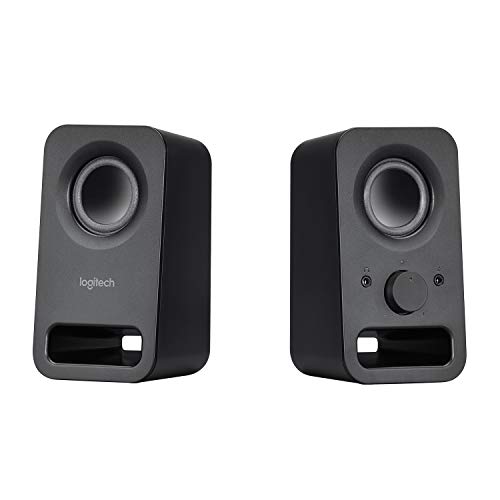
| Best Value | Total Power Output: 6W peak | Audio Configuration: 2.0 stereo | Connectivity Options: 3.5mm aux input only | VIEW LATEST PRICE | Read Our Analysis |
| OHAYO 60W Bluetooth Computer Speakers for Gaming |

| Most Powerful | Total Power Output: 60W | Audio Configuration: 2.0 stereo | Connectivity Options: Bluetooth 5.3, 3.5mm aux, RCA, USB | VIEW LATEST PRICE | Read Our Analysis |
| Cyber Acoustics CA-3090 2.1 Speaker System with Subwoofer |

| Best With Subwoofer | Total Power Output: 18W peak (9W RMS) | Audio Configuration: 2.1 (with subwoofer) | Connectivity Options: 3.5mm aux input only | VIEW LATEST PRICE | Read Our Analysis |
| Logitech Z207 2.0 Stereo Computer Speakers with Bluetooth |

| Best Wireless Option | Total Power Output: 10W max | Audio Configuration: 2.0 stereo | Connectivity Options: Bluetooth 4.2, 3.5mm aux input | VIEW LATEST PRICE | Read Our Analysis |
| Uakinat Computer Speakers with Colorful LED & Volume Control |

| Best RGB Lighting | Total Power Output: Not specified | Audio Configuration: 2.0 stereo | Connectivity Options: USB, 3.5mm aux input | VIEW LATEST PRICE | Read Our Analysis |
| Creative Pebble 2.0 USB-Powered Desktop Speakers |

| Most Compact | Total Power Output: 4.4W max | Audio Configuration: 2.0 stereo | Connectivity Options: USB-powered only | VIEW LATEST PRICE | Read Our Analysis |
| Nylavee Hi-Fi Stereo Computer Speakers with Bluetooth |
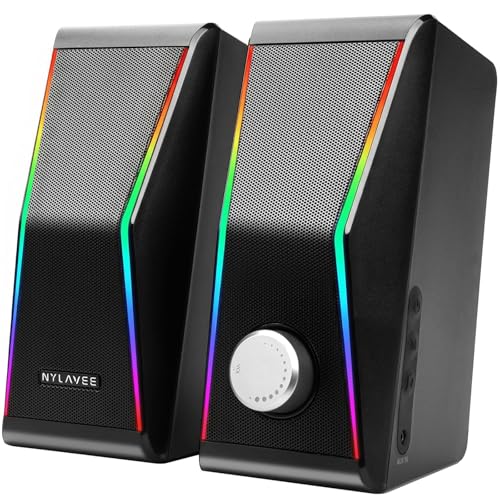
| Best Sound Quality | Total Power Output: 28W peak (14W RMS) | Audio Configuration: 2.0 stereo | Connectivity Options: Bluetooth 5.0, 3.5mm aux input | VIEW LATEST PRICE | Read Our Analysis |
| Redragon GS520 RGB Desktop Stereo Speakers with LED Modes |

| Best Gaming Choice | Total Power Output: Not specified | Audio Configuration: 2.0 stereo | Connectivity Options: USB power, 3.5mm audio input | VIEW LATEST PRICE | Read Our Analysis |
More Details on Our Top Picks
Amazon Basics AC-Powered Desktop Computer Speakers
If you’re looking for an affordable, no-frills speaker system that’ll deliver consistent audio to your desktop or laptop without draining battery power, the Amazon Basics AC-Powered Desktop Computer Speakers are worth considering. Setup takes seconds: plug the unit into a wall outlet, then connect the 3.5mm cable to your device’s audio jack. The 10-watt AC power supply delivers 4.6 watts of total RMS output across two stereo channels with dynamic drivers. The frequency range spans 68 Hz to 20 kHz, covering standard audio needs. A front-mounted control knob adjusts volume and power, while a built-in headphone jack lets you switch between speakers and headphones quickly. At roughly 1.7 pounds and compact dimensions, these speakers fit easily on any desk.
- Total Power Output:10W (4.6W RMS)
- Audio Configuration:2.0 stereo
- Connectivity Options:3.5mm aux input only
- Headphone Jack:Yes (front-mounted)
- Enclosure Material:Not specified
- Warranty Length:Amazon policy (details vary)
- Additional Feature:Dynamic drivers for audio
- Additional Feature:Compact 3×5.3×3.2 inches
- Additional Feature:Front headphone jack access
Cyber Acoustics CA-2014 Computer Speakers Full Stereo Sound
Looking for compact speakers that deliver reliable stereo sound without breaking your budget? The Cyber Acoustics CA-2014 offers a straightforward two-piece 2.0 stereo system designed for desks and small spaces. You’ll connect the speakers to your PC, Mac, or Chromebook using a single 3.5mm cable, then plug the 120V AC adapter into a power outlet. The front panel gives you direct access to power, volume, and a headphone jack for private listening. With 4 watts of output power and magnetically shielded components, these speakers handle music, movies, and calls effectively. The plastic enclosure weighs just 1.5 pounds, making setup quick and effortless. You receive one-year warranty coverage and a 30-day return option, backed by US-based customer service.
- Total Power Output:4W
- Audio Configuration:2.0 stereo
- Connectivity Options:3.5mm aux input only
- Headphone Jack:Yes (front-mounted)
- Enclosure Material:Plastic
- Warranty Length:1 year
- Additional Feature:Magnetically shielded satellite speakers
- Additional Feature:LED power indicator light
- Additional Feature:Cloth grills design
Logitech Z150 Multimedia Speakers with Stereo Sound
The Logitech Z150 delivers clear, room-filling audio for anyone who needs dependable speakers without complexity or high costs. You’ll get 6 watts of peak power through two drivers that produce rich stereo sound suitable for home use. Connect two devices simultaneously using the 3.5mm audio input and auxiliary line—perfect for switching between your smartphone, tablet, or laptop. The front panel knob controls both volume and power, while the integrated headphone jack lets you listen privately when needed. The compact design fits easily on any tabletop, and the durable metal enclosure ensures long-lasting performance. At approximately 4.2 stars from user reviews, these speakers offer reliable sound quality at an accessible price point.
- Total Power Output:6W peak
- Audio Configuration:2.0 stereo
- Connectivity Options:3.5mm aux input only
- Headphone Jack:Yes (front-panel)
- Enclosure Material:Metal
- Warranty Length:Limited (Amazon policy)
- Additional Feature:Connect two devices simultaneously
- Additional Feature:Integrated 2-inch woofer
- Additional Feature:Metal enclosure construction
OHAYO 60W Bluetooth Computer Speakers for Gaming
Want powerful, distortion-free sound for gaming and music without sacrificing desk space? The OHAYO 60W speakers deliver 30W per channel through a compact wooden enclosure designed for desks and shelves. Connect via Bluetooth 5.3, USB, AUX, or RCA inputs to your PC, laptop, phone, or gaming console. The 0.75-inch tweeter produces clear highs while the 3-inch driver handles mids and bass. Adjust volume using the front-panel knob during gameplay. The rear bass port enhances low-end depth for immersive audio. This setup suits gaming sessions, music streaming, and general computer use across various devices and audio sources.
- Total Power Output:60W
- Audio Configuration:2.0 stereo
- Connectivity Options:Bluetooth 5.3, 3.5mm aux, RCA, USB
- Headphone Jack:No
- Enclosure Material:Premium MDF wood
- Warranty Length:2 years
- Additional Feature:Bluetooth 5.3 wireless connectivity
- Additional Feature:Carbon fiber silk dome tweeter
- Additional Feature:Premium MDF wooden enclosure
Cyber Acoustics CA-3090 2.1 Speaker System with Subwoofer
If you’re working with a tight budget but don’t want to sacrifice audio quality for your laptop, desktop, or tablet, the Cyber Acoustics CA-3090 delivers solid performance without the wireless complications or high price tag. This 2.1 speaker system includes a four-inch side-firing subwoofer and two satellite speakers with two-inch drivers, producing 9W RMS output. Setup requires connecting the auxiliary cable to your device and plugging the 110V AC adapter into a wall outlet. Set your device volume to 65–80% before adjusting the control pod for speaker volume and the subwoofer’s dedicated bass control. The flat panel design fits easily on desks, and the one-year warranty covers manufacturing defects.
- Total Power Output:18W peak (9W RMS)
- Audio Configuration:2.1 (with subwoofer)
- Connectivity Options:3.5mm aux input only
- Headphone Jack:No
- Enclosure Material:Polycarbonate and plastic
- Warranty Length:1 year
- Additional Feature:Four-inch side-firing subwoofer
- Additional Feature:Independent bass volume control
- Additional Feature:2.1 channel configuration
Logitech Z207 2.0 Stereo Computer Speakers with Bluetooth
Logitech’s Z207 speakers work best if you’re switching between multiple devices throughout your day and want wireless flexibility without sacrificing desk space. Connect via Bluetooth or the included 3.5mm cable to computers, tablets, or smartphones. Use Easy-Switch technology to pause audio on one device and resume on another instantly. Each speaker houses one powered driver and one passive radiator, delivering 10 watts of stereo sound across a 10-meter wireless range. The compact design measures 4.88 inches deep, fitting easily on crowded desks. Built-in controls manage power, volume, and Bluetooth pairing directly. An on-speaker headphone jack provides quick audio access. Logitech backs these speakers with a 2-year manufacturer warranty.
- Total Power Output:10W max
- Audio Configuration:2.0 stereo
- Connectivity Options:Bluetooth 4.2, 3.5mm aux input
- Headphone Jack:Yes (on-speaker)
- Enclosure Material:Not specified
- Warranty Length:2 years
- Additional Feature:Easy-Switch technology for devices
- Additional Feature:Passive radiator for bass
- Additional Feature:Bluetooth 4.2 wireless range
Uakinat Computer Speakers with Colorful LED & Volume Control
Looking to enhance your gaming setup or movie-watching experience with speakers that deliver clear sound and visual appeal? The Uakinat Computer Speakers offer a practical solution. You’ll connect them via USB cable and 3.5mm audio jack—no drivers required. The in-line volume control lets you adjust sound levels without reaching your computer. You get full-range stereo sound with reinforced 2.0 channels, delivering clear highs and powerful lows. The colorful LED lights add visual interest to your workspace. Setup takes minutes. You’ll receive an 18-month warranty, a 30-day money-back guarantee, and lifetime support. These speakers work with PCs, laptops, and devices with 3.5mm inputs.
- Total Power Output:Not specified
- Audio Configuration:2.0 stereo
- Connectivity Options:USB, 3.5mm aux input
- Headphone Jack:No
- Enclosure Material:Plastic with matte metal panel
- Warranty Length:18 months
- Additional Feature:Colorful LED lighting modes
- Additional Feature:Column-shaped gaming design
- Additional Feature:31.5-inch cable length
Creative Pebble 2.0 USB-Powered Desktop Speakers
The Creative Pebble 2.0 works best for you if you want compact desktop speakers that’ll connect straight to your laptop or computer without requiring a separate power outlet. These USB-powered speakers deliver 4.4 watts of stereo sound through far-field drivers and rear passive radiators positioned at 45 degrees. Simply plug the single USB cable into your device’s port, and you’re ready to use the front-facing volume control for instant adjustments. The speakers measure 4.5 by 4.5 by 4.8 centimeters and weigh 645 grams, making them ideal for limited desk space. With a frequency response range of 100 Hz to 17 kHz and an 86 dB signal-to-noise ratio, you’ll get reliable audio enhancement for everyday computing tasks.
- Total Power Output:4.4W max
- Audio Configuration:2.0 stereo
- Connectivity Options:USB-powered only
- Headphone Jack:No
- Enclosure Material:Plastic
- Warranty Length:Limited (Amazon policy)
- Additional Feature:45° elevated driver design
- Additional Feature:Rear-facing passive radiators
- Additional Feature:USB 5V power only
Nylavee Hi-Fi Stereo Computer Speakers with Bluetooth
If you’re working at a desktop setup where you’ve settled for weak built-in speakers, the Nylavee Hi-Fi Stereo Computer Speakers deliver noticeably better audio without requiring a complete overhaul of your desk space. You’ll get 14W RMS output with four speaker units and two passive radiators, which produces cleaner highs and fuller mids than typical USB-powered alternatives. Connect via Bluetooth 5.0 or the 3.5mm AUX input to your PC, laptop, or PS5. Use the dedicated EQ button to switch between two equalizer modes for relaxed listening or more engaging playback. Control volume with the dedicated knob, and toggle RGB lighting through four ambient modes or turn lights off entirely. The compact 3.2 × 4.0 × 7.5-inch design fits any desk without consuming significant space while delivering balanced sound for music, videos, and gaming.
- Total Power Output:28W peak (14W RMS)
- Audio Configuration:2.0 stereo
- Connectivity Options:Bluetooth 5.0, 3.5mm aux input
- Headphone Jack:No
- Enclosure Material:Not specified
- Warranty Length:Not specified
- Additional Feature:Four speaker units configuration
- Additional Feature:One-button EQ mode selection
- Additional Feature:RGB lights with off
Redragon GS520 RGB Desktop Stereo Speakers with LED Modes
Want desktop speakers that combine clear audio with customizable lighting without the hassle of AC power cords? The Redragon GS520 delivers both through USB power. Connect the 3.5mm cable to your PC, TV, or laptop for immediate setup. Adjust volume using individual buttons on each speaker. Access six LED modes through touch controls on the lighting bar, or disable lighting entirely. The 80-centimeter cable between speakers accommodates standard desk layouts. Its brushed material design fits professional environments. You’ll get enhanced stereo sound from the full-range 2.0 channel drive unit suitable for gaming, media consumption, or everyday computing tasks.
- Total Power Output:Not specified
- Audio Configuration:2.0 stereo
- Connectivity Options:USB power, 3.5mm audio input
- Headphone Jack:No
- Enclosure Material:Plastic with brushed material
- Warranty Length:Not specified
- Additional Feature:Touch-control RGB lighting bar
- Additional Feature:Six selectable LED modes
- Additional Feature:Individual volume up/down buttons
Factors to Consider When Choosing AC Powered Computer Speakers
When you’re choosing AC powered computer speakers, you’ll need to evaluate five key factors: the wattage or power output that matches your room size and listening preference, the frequency response range that determines which sounds the speakers can reproduce, the connectivity options available on your device and speaker, the physical dimensions that fit your desk or setup space, and the control features that let you adjust volume and settings without reaching behind the speakers. Start by checking your computer’s audio output ports—whether you have a 3.5mm jack, USB, or optical connection—then match those to the speaker’s input options to ensure compatibility. Finally, measure your available space and listen to speakers in the wattage range you’re considering, since a 10-watt speaker produces noticeably different sound than a 50-watt model.
Power Output Requirements
How much power do you actually need in your AC-powered computer speakers? Start by matching wattage to your room size and listening distance. For small desks, 4–10W total output works well. Larger rooms benefit from 20W or higher. Next, check the RMS power per channel, which shows sustained output rather than peak levels. A 10W system with 5W per speaker delivers consistent performance without distortion at moderate volumes. Consider your frequency response range too—speakers rated 68 Hz–20 kHz need sufficient amplification to reproduce those frequencies fully. Finally, evaluate your volume control needs. Built-in amplifiers with front-panel controls let you adjust power allocation precisely, preventing excessive strain on your setup during dynamic audio playback.
Audio Frequency Response Range
Once you’ve established your power requirements, the next factor you’ll want to examine is your speaker’s frequency response range—the span of frequencies your AC-powered speakers can actually reproduce. A wider range typically means better detail across bass, midrange, and treble. Look for a lower minimum frequency, like 68 Hz, for deeper bass without boosting. A higher maximum frequency, such as 20 kHz, ensures better treble extension. Compare these specs across models you’re considering. However, remember that frequency response alone doesn’t guarantee accurate sound. You’ll also need to evaluate total harmonic distortion and overall system power alongside the range. Use frequency response as one tool among several when making your final selection.
Connectivity And Input Options
What connection types’ll your AC-powered speakers need to match your devices? First, identify which input options suit your setup. Most AC-powered speakers feature 3.5mm auxiliary jacks, the standard connection for computers and phones. Some models include USB ports, allowing direct digital connections to your computer without an adapter. Bluetooth capability lets you stream wirelessly from compatible devices, eliminating cable clutter. RCA inputs work well if you’re connecting older audio equipment or receivers. Next, check your device’s available outputs. If your computer only has a headphone jack, confirm the speakers have a matching 3.5mm input. For multiple devices, select speakers with several input types so you can switch between sources without unplugging cables. This flexibility ensures seamless integration with your existing equipment.
Physical Size And Space
After you’ve confirmed your speakers have the right connectivity options, measure your available desk or shelf space before making a purchase. Most AC-powered desktop speakers range from 3 to 7 inches wide and 3 to 6.5 inches deep. Compact 2.0 systems typically occupy 4–5 inches in width and 3–4 inches in depth per speaker. Height varies between 3 to 7 inches, which affects how they fit under shelves or on crowded desks. Some models feature low-profile designs with integrated MDF or plastic enclosures to minimize visual bulk. If you’re considering a 2.1 system with a subwoofer, account for notably more floor space—the subwoofer enclosure demands substantially larger dimensions than satellite speakers alone.
Built-In Control Features
How you’ll interact with your speakers day-to-day depends heavily on their control layout. Most AC-powered models feature a front-mounted volume knob or dial, allowing you to adjust sound quickly without accessing software. Some speakers include a dedicated headphone jack on the front panel for private listening when needed. You’ll find a power or standby LED indicator on many units, showing whether your speakers are active or in standby mode. For connectivity, most speakers use a 3.5mm auxiliary input from your audio source, enabling straightforward plug-and-play setup. Certain designs offer separate control pods or inline controls for volume and power management, keeping your cables organized while providing easy manual access to frequently used functions.
Enclosure Material Quality
Why does your speaker’s enclosure matter? Your enclosure material directly shapes sound quality by controlling resonance and vibrations. Choose MDF wood enclosures for clearer midrange and bass response compared to plastic alternatives. Wood and composite materials reduce unwanted coloration that plastic produces due to higher resonance. Next, evaluate enclosure thickness and build quality. Thicker walls and quality mounting reduce vibrations that muddy treble and midrange frequencies. For desktop setups, consider magnetically shielded or metal enclosures to minimize electromagnetic interference while preserving sound integrity. Avoid lightweight plastic enclosures unless budget constraints force your hand—they’ll compromise clarity at higher volumes. Rigid subwoofer and satellite configurations further minimize panel flex. Prioritize wood or composite enclosures for accurate bass response and stable performance across your listening space.
Warranty And Support Coverage
When you’re investing in AC-powered computer speakers, you’ll want to understand what protection comes with your purchase. Most manufacturers provide a one-year warranty covering defects in materials and workmanship. Before buying, check whether your chosen model includes extended warranty options or qualifies for Amazon’s additional protections. Review the specific coverage details—some warranties cover parts and labor, while others cover parts only. You’ll typically need to register your product and provide proof of purchase to activate warranty service. Keep your receipt and original packaging for potential claims. Contact manufacturer support directly if you encounter issues, as they’ll guide you through troubleshooting or warranty replacement processes. Some sellers also offer 30-day return windows for unopened units, giving you an extra safety net.
Final Thoughts
You’ll find the right AC-powered speakers by matching your space and budget to the options reviewed. Check the wattage, frequency response, and connectivity features against your needs. Compare warranty lengths and return policies before purchasing. Test the volume controls and device switching on your preferred model. Install them on your desk away from obstructions, then adjust settings for optimal sound quality in your workspace.

Meet Ry, “TechGuru,” a 36-year-old technology enthusiast with a deep passion for tech innovations. With extensive experience, he specializes in gaming hardware and software, and has expertise in gadgets, custom PCs, and audio.
Besides writing about tech and reviewing new products, he enjoys traveling, hiking, and photography. Committed to keeping up with the latest industry trends, he aims to guide readers in making informed tech decisions.