

If you’re struggling with desk clutter and limited workspace, an under-desk laptop mount offers a practical solution. These mounts secure your device beneath your desk surface, freeing up valuable space while keeping your laptop accessible. You’ll find options with different installation methods—screw-based for permanence or no-drill designs for flexibility—plus features like cable management and heat ventilation. Understanding your specific needs will help you select the right mount, but first, you need to know what these eight top options actually deliver.
| IFCASE Under Desk Laptop Mount Metal Shelf Holder |
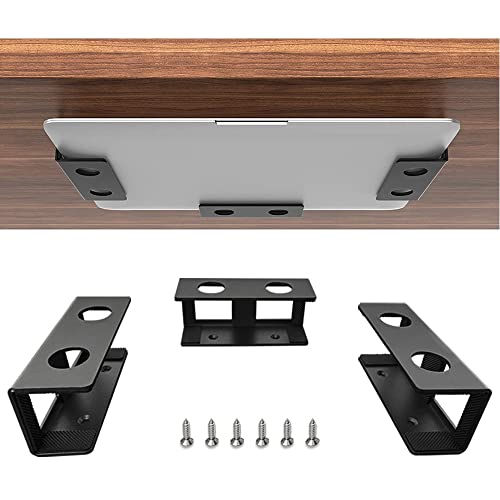
| Durable & Minimalist | Installation Method: Screw-mounted (adhesive + screws) | Device Thickness Capacity: Up to 38 mm (1.5 inches) | Weight Capacity: Not specified | VIEW LATEST PRICE | Read Our Analysis |
| BYMECOST Under Desk Laptop Storage Mount (Black) |

| Premium Load Capacity | Installation Method: Screw-mounted | Device Thickness Capacity: Up to 34.8 mm (1.37 inches) | Weight Capacity: Up to 22 lbs | VIEW LATEST PRICE | Read Our Analysis |
| 2 Pack Under Desk Laptop Mount with Storage |
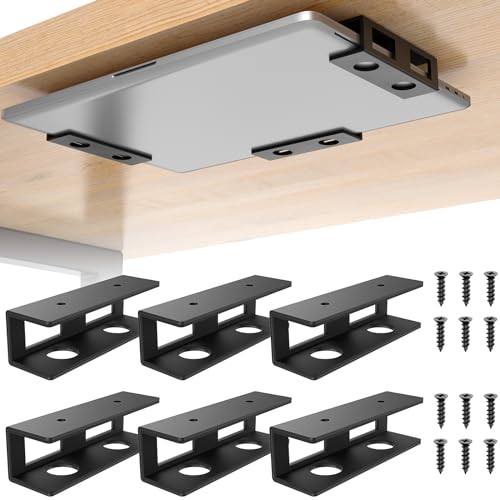
| Best Value Pack | Installation Method: Screw-mounted | Device Thickness Capacity: Up to 30.5 mm (1.2 inches) | Weight Capacity: Up to 30 lbs | VIEW LATEST PRICE | Read Our Analysis |
| No Drill Under Desk Laptop Mount with Storage |

| No-Drill Installation | Installation Method: Clip-mounted (no-drill) | Device Thickness Capacity: Not specified by thickness | Weight Capacity: Up to 44 lbs | VIEW LATEST PRICE | Read Our Analysis |
| ELETIUO Wall & Under Desk Laptop Mount Holder |

| Dual Mount Options | Installation Method: Dual-mounted (adhesive strips or screws) | Device Thickness Capacity: Up to 26 mm (1.02 inches) | Weight Capacity: Not specified | VIEW LATEST PRICE | Read Our Analysis |
| ELETIUO Clear Wall & Under Desk Laptop Mount Holder |
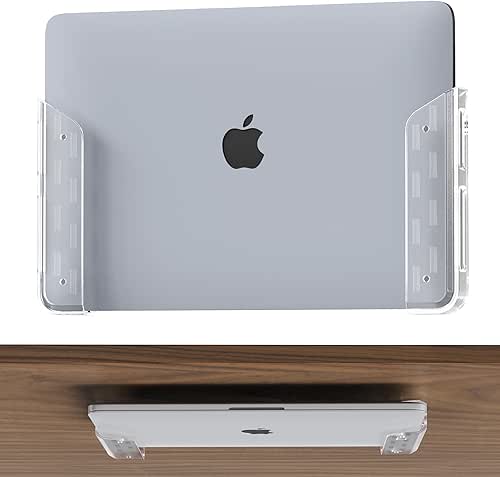
| Sleek & Transparent | Installation Method: Dual-mounted (adhesive strips or screws) | Device Thickness Capacity: Up to 26 mm (1.02 inches) | Weight Capacity: Not specified | VIEW LATEST PRICE | Read Our Analysis |
| Under Desk Laptop Mount Aluminum Holder Dock Station |

| Heavy-Duty Aluminum | Installation Method: Screw-mounted | Device Thickness Capacity: Up to 70 mm (2.7 inches) | Weight Capacity: Not specified | VIEW LATEST PRICE | Read Our Analysis |
| BYMECOST Under Desk Laptop Storage Mount Metal Holder |
| Compact & Versatile | Installation Method: Screw-mounted | Device Thickness Capacity: Up to 53 mm (2.1 inches) | Weight Capacity: Up to 22 lbs | VIEW LATEST PRICE | Read Our Analysis |
More Details on Our Top Picks
IFCASE Under Desk Laptop Mount Metal Shelf Holder
How do you reclaim valuable desk real estate without sacrificing device accessibility? The IFCASE Under Desk Laptop Mount Metal Shelf Holder mounts directly beneath your desk to store laptops and compatible devices like Mac Mini, PlayStation 4 Slim, and cable boxes. Made from hard aluminum with stainless steel hardware, this mount accommodates devices up to 38 mm thick. Anti-scratch silicone pads protect your equipment from damage, while the non-slip surface prevents shifting. Installation requires a desk at least 3/4 inch thick. You’ll secure each bracket with included screws through large-hole designs that allow easy drilling. This solution maximizes space efficiency while keeping your devices within reach and organized.
- Installation Method:Screw-mounted (adhesive + screws)
- Device Thickness Capacity:Up to 38 mm (1.5 inches)
- Weight Capacity:Not specified
- Protective Features:Anti-scratch silicone pads, non-slip surface
- Material Construction:Hard aluminum with stainless steel screws
- Mounting Location Options:Under desk only
- Additional Feature:Premium stainless steel screws
- Additional Feature:Large hole bracket design
- Additional Feature:Minimalist, ergonomic aesthetic
BYMECOST Under Desk Laptop Storage Mount (Black)
If you’re drowning in desktop clutter and struggling to find legroom under your desk, the BYMECOST Under Desk Laptop Storage Mount offers a practical solution that secures your devices while freeing up valuable workspace. This metal mount holds devices up to 1.37 inches thick, including laptops, Mac Mini units, routers, and cable boxes. Installation requires screwing the bracket to your desk (minimum 0.4 inches thick), then placing your device in the holder. Silicone pads protect your equipment from scratches while preventing slipping. The bracket’s air holes support heat dissipation, and its rounded front design adds safety. With a 22-pound weight capacity, this mount organizes your setup securely and efficiently.
- Installation Method:Screw-mounted
- Device Thickness Capacity:Up to 34.8 mm (1.37 inches)
- Weight Capacity:Up to 22 lbs
- Protective Features:Scratch-resistant silicone pads, anti-slip silicone surface
- Material Construction:High-quality metal with powder-coated finish
- Mounting Location Options:Under desk or side-table
- Additional Feature:Air holes for heat dissipation
- Additional Feature:Rounded front end design
- Additional Feature:22 lbs weight capacity
2 Pack Under Desk Laptop Mount with Storage
Looking for a solution that keeps your laptop secure while preserving precious desk and leg space? The FOROIRON 2 Pack Under Desk Laptop Mount delivers reliable performance with its high-grade steel construction and powder-coated finish. Install the mount by measuring your device, positioning it under your desk, and securing the included screws firmly. The anti-scratch felt board protects your laptop from damage, while the anti-slip feature prevents movement. With a 30-pound weight capacity and adjustable bracket spacing, you’ll accommodate laptops under 1.2 inches thick plus cable boxes, modems, and routers. The side cable pass-through keeps cords organized and out of sight.
- Installation Method:Screw-mounted
- Device Thickness Capacity:Up to 30.5 mm (1.2 inches)
- Weight Capacity:Up to 30 lbs
- Protective Features:Anti-scratch felt board, anti-slip feature
- Material Construction:High-grade steel with powder-coated body
- Mounting Location Options:Under desk only
- Additional Feature:Adjustable bracket spacing system
- Additional Feature:Anti-scratch felt board protection
- Additional Feature:Side cable pass-through hole
No Drill Under Desk Laptop Mount with Storage
For those who need extra under-desk storage without committing to permanent installation, the No Drill Under Desk Laptop Mount with Storage offers a clipping design that mounts directly to your desk edge. The metal shelf holds up to 44 pounds and measures 16.7 by 10.1 inches, accommodating laptops, tablets, and peripherals. Anti-scratch pads protect your desk surface. Three cable openings allow you to thread power cords without unplugging devices, creating a charging station beneath your workspace. The hollow metal structure reduces dust and improves airflow. Simply clip it to your desk edge and remove it anytime. Verify your tabletop is at least 20 inches wide and has no crossbars before purchasing.
- Installation Method:Clip-mounted (no-drill)
- Device Thickness Capacity:Not specified by thickness
- Weight Capacity:Up to 44 lbs
- Protective Features:Anti-scratch pads, hollow structure for heat dissipation
- Material Construction:Metal with powder-coated finish
- Mounting Location Options:Under desk only
- Additional Feature:Clip-to-edge installation method
- Additional Feature:3 cable management openings
- Additional Feature:44 lbs weight capacity
ELETIUO Wall & Under Desk Laptop Mount Holder
Need a mount that works with nearly any device you own? The ELETIUO Wall & Under Desk Laptop Mount Holder accommodates laptops, MacBooks, tablets, and keyboards up to 1.02 inches thick. You’ll choose between two installation methods: adhesive strips for light devices requiring no tools, or heavy-duty screws for permanent, secure mounting. The package includes two holders, expansion anchors for concrete and drywall, self-tapping screws, and a screwdriver. Anti-scratch pads protect your devices during insertion. The cut-out design lets you access ports and charge without removal. Install vertically or horizontally on walls, under desks, or shelves to reclaim workspace throughout your home or office.
- Installation Method:Dual-mounted (adhesive strips or screws)
- Device Thickness Capacity:Up to 26 mm (1.02 inches)
- Weight Capacity:Not specified
- Protective Features:Anti-scratch pads, cut-out design for port access
- Material Construction:Plastic with dual mounting hardware
- Mounting Location Options:Wall, under desk, or shelf
- Additional Feature:USPTO patent pending design
- Additional Feature:Dual adhesive/screw options
- Additional Feature:Multiple orientation capabilities
ELETIUO Clear Wall & Under Desk Laptop Mount Holder
The ELETIUO Clear Wall & Under Desk Laptop Mount Holder works best if you want a transparent, minimalist solution that won’t clutter your workspace visually. This mount holds devices up to 1.02 inches thick and includes two installation methods: adhesive strips for temporary, tool-free placement, or screws for permanent mounting. Choose adhesive for lightweight setups; select screws for heavy-duty support. The package provides expansion anchors for drywall and concrete, self-tapping screws, and a screwdriver. Anti-scratch pads protect your device during insertion and removal. The cut-out design grants full access to ports and buttons, allowing you to charge and connect cables without removing your laptop or tablet.
- Installation Method:Dual-mounted (adhesive strips or screws)
- Device Thickness Capacity:Up to 26 mm (1.02 inches)
- Weight Capacity:Not specified
- Protective Features:Anti-scratch pads, cut-out design for port access
- Material Construction:Polycarbonate (transparent) with dual mounting hardware
- Mounting Location Options:Wall, under desk, or shelf
- Additional Feature:Transparent minimalist design aesthetic
- Additional Feature:Polycarbonate construction material
- Additional Feature:Full port access cutout
Under Desk Laptop Mount Aluminum Holder Dock Station
Looking to reclaim valuable desk space without sacrificing device accessibility? This aluminum mount system offers three brackets that secure devices underneath your desk using included screws. You’ll install the mounts flush beneath your desk surface, positioning them to align with screw holes. The design accommodates laptops, Mac Mini M4 docks, and similar devices up to 70mm thick. Since screws position outside the brackets, your device’s top surface stays protected from scratching. The polished aluminum prevents damage to your desk’s underside. Installation takes minimal time on wood desks, and the setup preserves full access to side ports. You’ll receive six standard screws plus two extras, with a two-year warranty included.
- Installation Method:Screw-mounted
- Device Thickness Capacity:Up to 70 mm (2.7 inches)
- Weight Capacity:Not specified
- Protective Features:Polished brackets to prevent scratching
- Material Construction:Aluminum with screws
- Mounting Location Options:Under desk only
- Additional Feature:2.7 inches effective space
- Additional Feature:Three included mounting brackets
- Additional Feature:2 years manufacturer warranty
BYMECOST Under Desk Laptop Storage Mount Metal Holder
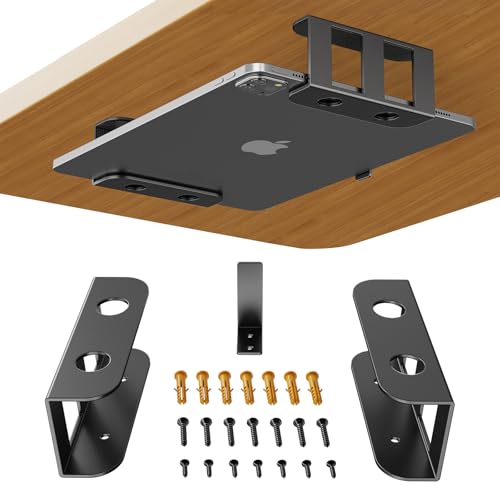
If you’re working with limited desk space and need to store a laptop or similar device safely underneath, the BYMECOST Under Desk Laptop Storage Mount Metal Holder offers a practical solution with flexible installation options. You can mount it on walls, under tables, or on shelves, accommodating table thickness of 0.4 inches or greater. The metal construction holds items up to 22 lbs and fits devices measuring up to 2.1 inches thick. Anti-scratch silicone pads protect your equipment, while air holes enable heat dissipation. Installation uses screws for secure fastening, ensuring stability. This mount keeps your desktop organized and reclaims leg room.
- Installation Method:Screw-mounted
- Device Thickness Capacity:Up to 53 mm (2.1 inches)
- Weight Capacity:Up to 22 lbs
- Protective Features:Anti-scratch silicone pads, anti-slip surface, air holes for heat dissipation
- Material Construction:High-quality metal with powder-coated finish
- Mounting Location Options:Wall, under desk, or shelf
- Additional Feature:2.1 inches thickness capacity
- Additional Feature:Dual wall/shelf mounting options
- Additional Feature:Anti-slip surface technology
Factors to Consider When Choosing an Under Desk Laptop Mount
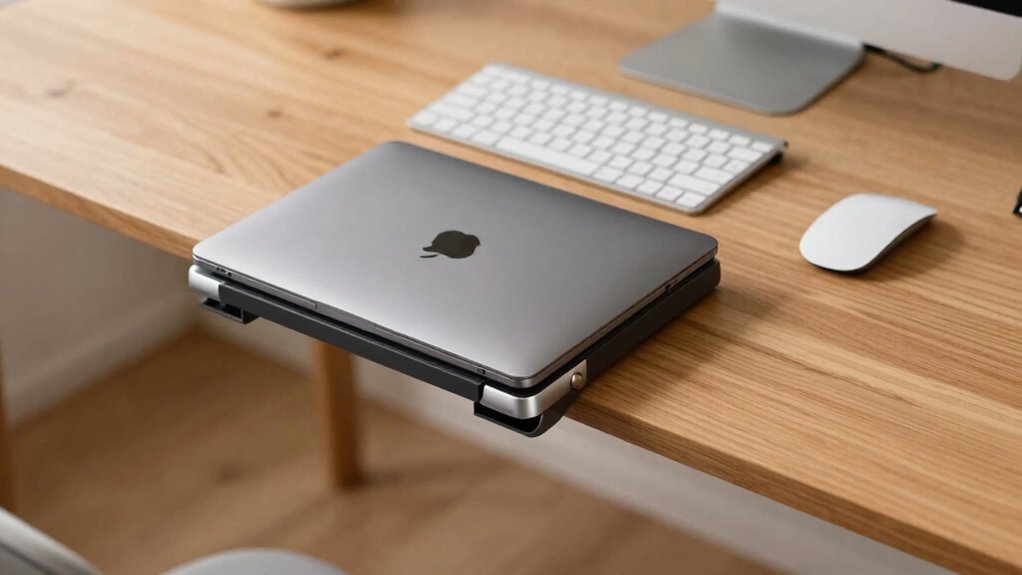
Before you buy an under desk laptop mount, you’ll want to check your device’s thickness and weight against the mount’s specifications, compare installation methods like clamps or adhesive to your desk type, and verify that the mount’s material can handle daily use without sagging or breaking. Consider your desk surface—whether it’s solid wood, laminate, or metal—since different surfaces require different mounting approaches, and some mounts won’t work on thin or hollow desks. Finally, measure your available space and confirm the mount positions your laptop at a comfortable viewing height while leaving room for cables and other workspace needs.
Device Thickness Compatibility
What’s the thinnest or thickest device you’ll mount on your under-desk system? Check your mount’s maximum thickness rating first—most models support devices between 26 mm and 1.5 inches. Verify whether the limit is fixed or adjustable, since adjustable models accommodate both slim and thicker devices. Confirm the mount can secure devices near its upper thickness rating without contact interference or over-tightening risks. Determine if the thickness specification includes protective cases or padding around your laptop. Consider your mounting method’s constraints: clip-based or no-drill options depend on edge thickness accessibility, while other methods require adequate under-desk clearance. Match your device’s envelope dimensions against these specifications to ensure proper fit and secure operation.
Weight Capacity Requirements
How much does your laptop weigh, and are you planning to store additional items on the mount? Most under-desk mounts support between 22 and 30 lbs maximum. First, weigh your laptop alone, then add any accessories like external drives, chargers, or monitors you’ll attach. Check the mount’s weight rating and ensure your total doesn’t exceed it. Heavier devices require mounts with stronger fastening systems. If you’re mounting near the edge, the weight distributes differently than center placement, potentially reducing safe capacity. Verify whether your mount uses screws or adhesive, as adhesive-based systems typically handle less weight over time. Select a mount rated at least 5 lbs above your actual load to maintain safety margins and prevent failure.
Installation Method Preference
Three main installation methods exist for under-desk laptop mounts: no-drill clamps, screw-mounted systems, and dual-option designs. No-drill clamps clip directly to your desk edge and require only anti-scratch pads for protection. This method demands no tools or screws, making installation immediate and reversible. Screw-mounted systems use included screws and power tools to secure mounts permanently beneath your desk. This approach provides stronger load-bearing capacity and increased stability for heavier laptops. Dual-option designs offer both adhesive strips and screws, allowing you to choose temporary or permanent installation based on your needs. Consider your desk material, thickness, and any crossbars when selecting a method. Also evaluate cable management features and ventilation holes to ensure proper heat dissipation during use.
Material And Durability
Material and construction quality directly impact your mount’s longevity and performance. Most under-desk mounts use metal construction—aluminum or steel—for durability and rigid support. You’ll want a powder-coated finish, which enhances corrosion resistance and provides a smooth, wear-resistant surface that resists rust and scratching.
Check that your mount includes anti-scratch silicone pads. These protect your laptop from surface damage and reduce slipping, extending your device’s lifespan. Look for built-in air holes or ventilation design to dissipate heat and prevent overheating during use.
Always verify the rated load capacity, typically 22–30 lbs. Calculate your laptop’s weight plus any accessories, and ensure the total doesn’t exceed the specified capacity. Exceeding this limit compromises structural integrity and risks equipment damage.
Desk Surface Specifications
Your desk’s physical characteristics determine whether a mount will secure properly and perform reliably. First, measure your desk surface thickness, as most mounts require at least 0.4–0.75 inches of material to clamp or screw securely. If your desk is thinner, the mount won’t grip adequately. Next, measure the clearance space beneath your desk, accounting for both the bracket height and your laptop’s dimensions. Verify this space prevents contact with desk legs or underside obstacles. Finally, confirm your desk material can support the mount type you’ve chosen—clamp-based designs work best on solid wood or laminate surfaces, while screw-in options demand sufficient material thickness. Check these specifications before purchasing to avoid installation problems and ensure stable performance.
Cable Management Features
When you’re mounting a laptop under your desk, you’ll want to route power cables, USB cords, and HDMI connections without constantly disconnecting and reconnecting devices. Look for mounts with integrated cable pass-throughs or cut-outs that let cords thread directly through the structure. Choose models featuring multiple cable channels to organize different wire types neatly toward your desk edge or power strip. Verify the mount’s front and back design includes space for managing excess cable slack, preventing bends and kinks that damage cords. Select dust-proof or hollow-structure designs that promote airflow around both cables and devices. Finally, confirm the mount fits your device’s footprint and thickness so cables and ports remain fully accessible without obstruction.
Protection And Safety Pads
How well does your mount protect your device during daily use? Protection pads are essential components that safeguard your laptop and workspace. Look for mounts featuring anti-scratch silicone pads on contact surfaces where your device sits. These pads prevent damage when you insert or remove your laptop daily. Next, check for anti-slip surfaces that keep your mounted device secure and prevent accidental shifting. Quality pads use silicone or felt materials designed to withstand regular weight-bearing without breaking down. Some designs combine anti-scratch pads with cushioned felt layers for enhanced protection. This dual-layer approach minimizes abrasion on both your device and desk surface. Verify that pads cover all contact points—bottom brackets, side clamps, and mounting arms. Durable padding extends the lifespan of your equipment significantly.
Final Thoughts
You’ll find the right under-desk laptop mount by matching your setup needs with the available options. Measure your laptop’s thickness and weight, then select a mount that handles both. Decide between permanent screw-based installations for stability or adhesive strips for flexibility. Check cable management features and ventilation requirements. Install following the manufacturer’s instructions to secure your device safely and reclaim valuable desk space efficiently.

Meet Ry, “TechGuru,” a 36-year-old technology enthusiast with a deep passion for tech innovations. With extensive experience, he specializes in gaming hardware and software, and has expertise in gadgets, custom PCs, and audio.
Besides writing about tech and reviewing new products, he enjoys traveling, hiking, and photography. Committed to keeping up with the latest industry trends, he aims to guide readers in making informed tech decisions.