
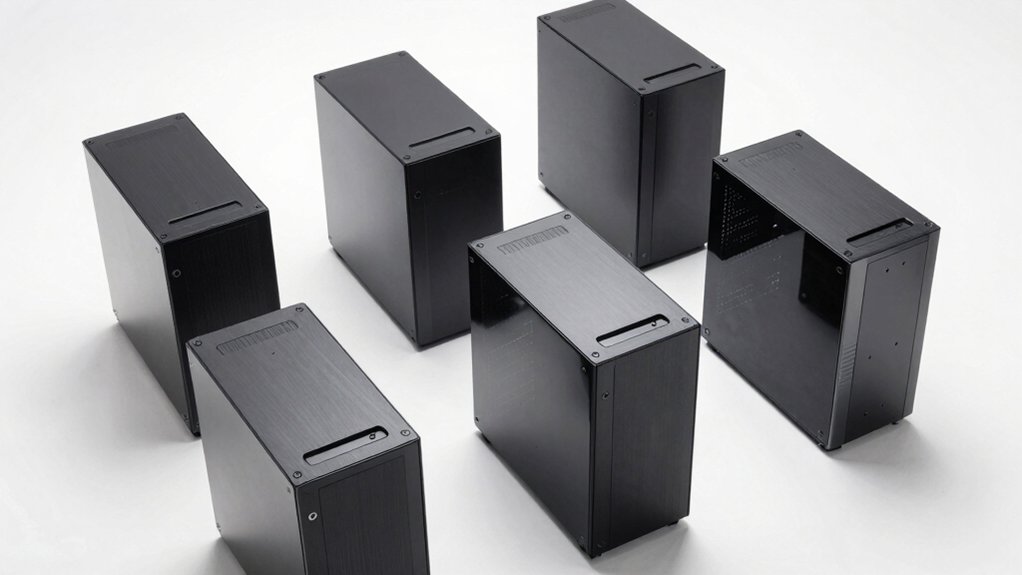

You’re building a PC and don’t want to spend hours wrestling with screws and tight spaces. Tool-less cases solve this problem by letting you swap components quickly without special tools or technical expertise. They feature snap-in panels, rapid-access brackets, and open designs that cut assembly time drastically. But which model actually delivers on this promise? The answer depends on your specific needs.
| DIY PC Test Bench Open Chassis Case Rack |

| Open-Air Enthusiast | Motherboard Compatibility: ATX, Micro ATX, ITX | Cooling Method: Air, Water | Case Type/Form Factor: Mid Tower | VIEW LATEST PRICE | Read Our Analysis |
| LIAN LI O11D MINI V2 Compact ATX Mid-Tower Case |

| Premium Compact Design | Motherboard Compatibility: ATX, M-ATX, Mini-ITX | Cooling Method: Air (optimized airflow design) | Case Type/Form Factor: Compact ATX Mid-Tower | VIEW LATEST PRICE | Read Our Analysis |
| Rosewill Helium Flow White Mid Tower Gaming Case |

| High-Airflow Gaming | Motherboard Compatibility: ATX | Cooling Method: Air | Case Type/Form Factor: Mid Tower Gaming | VIEW LATEST PRICE | Read Our Analysis |
| JONSBO C6 Black Mini MATX Mesh PC Case |

| Ultra-Compact Build | Motherboard Compatibility: ITX, M-ATX | Cooling Method: Air | Case Type/Form Factor: Mini MATX Compact | VIEW LATEST PRICE | Read Our Analysis |
| PC Test Bench Open Air Case for ATX Motherboards |

| Stackable Server Rack | Motherboard Compatibility: EATX, ATX, Micro ATX, ITX | Cooling Method: Air, Water | Case Type/Form Factor: Desktop/Open Air Rack | VIEW LATEST PRICE | Read Our Analysis |
| PC Test Bench Open Air Case for ATX Motherboards |
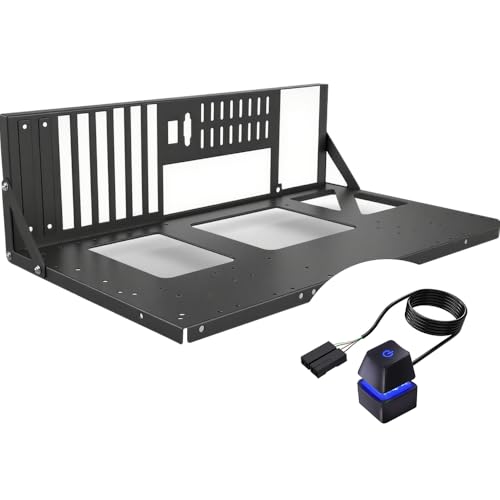
| Budget Test Bench | Motherboard Compatibility: E-ATX, ATX, MATX, ITX | Cooling Method: Air | Case Type/Form Factor: Desktop/Open Air | VIEW LATEST PRICE | Read Our Analysis |
| PC Test Bench Open Air Case ATX/MATX |
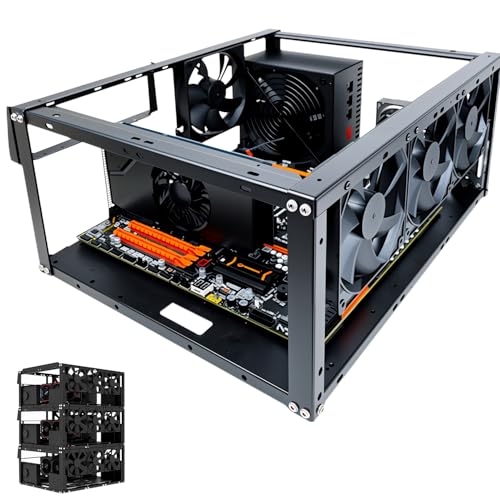
| Professional Workstation | Motherboard Compatibility: EATX, ATX, Micro ATX, ITX | Cooling Method: Air, Water | Case Type/Form Factor: Desktop/Open Air Stackable | VIEW LATEST PRICE | Read Our Analysis |
| JONSBO C6 MAX Micro ATX PC Case Black |
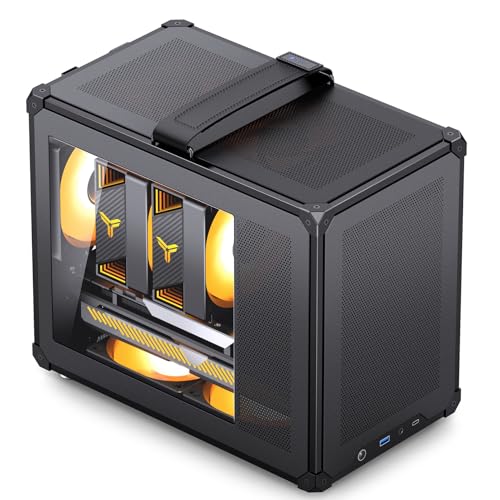
| Mesh Cooling Master | Motherboard Compatibility: Micro ATX, ITX | Cooling Method: Air | Case Type/Form Factor: Micro ATX Mid-Tower | VIEW LATEST PRICE | Read Our Analysis |
| PC Test Bench Open Air Computer Chassis |

| Expandable Open Frame | Motherboard Compatibility: EATX, ATX, Micro ATX, Mini ITX | Cooling Method: Air | Case Type/Form Factor: Desktop/Open Air | VIEW LATEST PRICE | Read Our Analysis |
| ESGAMING Zero M ATX Mini-Tower PC Case (Black) |

| Tempered Glass Mini | Motherboard Compatibility: Micro-ATX, Mini-ITX | Cooling Method: Air | Case Type/Form Factor: ATX Mini-Tower | VIEW LATEST PRICE | Read Our Analysis |
More Details on Our Top Picks
DIY PC Test Bench Open Chassis Case Rack
If you’re building a test bench or need quick access to your PC’s internal components without wrestling with traditional case panels, the ALAMENGDA DIY PC Test Bench Open Chassis Case Rack delivers a straightforward solution. This open-air design supports ATX, Micro ATX, and ITX motherboards up to 305x245mm. The case uses 0.8mm steel construction with a black finish and includes two internal bays for 3.5-inch hard drives. You can install up to eight fans for flexible cooling via air or water methods. The frame accommodates standard ATX power supplies and provides seven expansion slots. With 2 USB 2.0 ports and SSD support, you’ll access components easily for testing or upgrades. The 2-year warranty covers defects, giving you dependable protection for your testing setup.
- Motherboard Compatibility:ATX, Micro ATX, ITX
- Cooling Method:Air, Water
- Case Type/Form Factor:Mid Tower
- Enclosure Material:Alloy Steel, 0.8mm SPCC
- Drive Bay Support:2 internal bays (3.5″)
- Tool-Free Design:Open chassis design
- Additional Feature:Supports 8 cooling fans
- Additional Feature:Open air heat dissipation
- Additional Feature:Stackable design capability
LIAN LI O11D MINI V2 Compact ATX Mid-Tower Case
The Lian Li O11D Mini V2 works best for builders who want a compact case without sacrificing full ATX motherboard and power supply support. The pillar-less tempered glass front and side panels let you see all your components clearly. Install your ATX, M-ATX, or Mini-ITX motherboard, then position your GPU using the horizontal or vertical anti-sag brackets to prevent strain. The 10° slanted bottom design pulls cool air directly toward your GPU. Use the special 24-pin cable brackets to keep your power connections organized. The protruded mesh side panel maintains airflow while fitting standard power supplies in this compact footprint. You’ll get efficient cooling and a clean appearance without needing tools.
- Motherboard Compatibility:ATX, M-ATX, Mini-ITX
- Cooling Method:Air (optimized airflow design)
- Case Type/Form Factor:Compact ATX Mid-Tower
- Enclosure Material:Tempered Glass, Metal
- Drive Bay Support:Not specified
- Tool-Free Design:No specific tool-free mention
- Additional Feature:Pillar-less tempered glass panels
- Additional Feature:10° slanted bottom design
- Additional Feature:GPU anti-sag brackets included
Rosewill Helium Flow White Mid Tower Gaming Case
You’ll appreciate the Rosewill Helium Flow if you’re building a PC for the first time or you want to minimize frustration during assembly and maintenance. The tool-free side panel removes instantly without requiring screwdrivers, giving you quick access to internal components. Its mesh ventilation design pulls cool air through 1mm holes while blocking dust effectively. The spacious interior accommodates GPUs up to 390mm and supports dual 360mm liquid cooling systems. You get one 120mm PWM fan included, expandable internal bays for storage drives, and 40mm clearance from the side panel for cable management without stress.
- Motherboard Compatibility:ATX
- Cooling Method:Air
- Case Type/Form Factor:Mid Tower Gaming
- Enclosure Material:Alloy Steel
- Drive Bay Support:2 internal bays
- Tool-Free Design:Tool-less side panel removal
- Additional Feature:Supports dual 360mm liquid cooling
- Additional Feature:GPU up to 390mm length
- Additional Feature:1mm mesh ventilation holes
JONSBO C6 Black Mini MATX Mesh PC Case
Building a compact system without wrestling with screwdrivers? The JONSBO C6 Black Mini MATX Mesh PC Case delivers tool-free panel access via its upper cover and side panel design. You’ll fit Micro ATX or ITX motherboards inside its 202mm × 266mm × 295.2mm frame. The all-mesh construction supports up to 140mm fans on top and bottom, plus a 120mm front fan for airflow. You can install a 75mm CPU cooler and GPUs up to 255mm. Storage includes one 3.5″ HDD or two 2.5″ SSDs across three internal bays. The USB 3.0 front port and Type-C connector provide modern connectivity without extra hassle.
- Motherboard Compatibility:ITX, M-ATX
- Cooling Method:Air
- Case Type/Form Factor:Mini MATX Compact
- Enclosure Material:Alloy Steel
- Drive Bay Support:3 internal bays (1x 3.5″ HDD, 2x 2.5″ SSD)
- Tool-Free Design:Tool-free upper cover/side panel open
- Additional Feature:All-sides mesh chassis design
- Additional Feature:Type-C front interface included
- Additional Feature:75mm CPU cooler support
PC Test Bench Open Air Case for ATX Motherboards
If you’re building a workstation, server setup, or testing bench that demands flexibility and easy access to components, this open-air case delivers the tool-less convenience you’re after. The JOYJOM PS091 accommodates EATX, ATX, Micro ATX, and ITX motherboards up to 330×330 mm. You’ll find 2 HDD and 3 SSD bays, supporting CPU coolers up to 165 mm and GPUs up to 335 mm with external fan mounting. The case measures 435×340×195 mm and stacks horizontally up to 10 units for server racks. Premium 1.5 mm SPCC panels with 0.8 mm base plates ensure durability. You get 8 standard fan mounting options, plus water cooling support for 360 mm, 240 mm, or 120 mm radiators. The package includes a power button, motherboard spacer wrench, and screws for immediate assembly.
- Motherboard Compatibility:EATX, ATX, Micro ATX, ITX
- Cooling Method:Air, Water
- Case Type/Form Factor:Desktop/Open Air Rack
- Enclosure Material:1.5mm SPCC panels, 0.8mm base plate
- Drive Bay Support:5 internal bays (2x HDD, 3x SSD)
- Tool-Free Design:Horizontal/vertical placement, stackable
- Additional Feature:Stackable up to 10 units
- Additional Feature:310-335mm GPU clearance options
- Additional Feature:165mm CPU cooler height support
PC Test Bench Open Air Case for ATX Motherboards
This open-air case works best for builders who need quick access to their components during testing, upgrades, or showcasing their hardware. The tool-free design lets you install and remove parts without extra equipment. It supports multiple motherboard sizes: ATX, E-ATX, MATX, and ITX. The open frame configuration maximizes airflow, keeping components cooler during intensive work. Dedicated mounting brackets hold your motherboard, power supply, and storage devices securely in place. With a 1200-watt power supply capacity, you’ll handle most standard builds. The compact dimensions measure 16.9″ deep, 10.4″ wide, and 5″ high, making it suitable for workbenches or display shelving.
- Motherboard Compatibility:E-ATX, ATX, MATX, ITX
- Cooling Method:Air
- Case Type/Form Factor:Desktop/Open Air
- Enclosure Material:Alloy Steel, Aluminum
- Drive Bay Support:Multiple bays (2x HDD, 3x SSD)
- Tool-Free Design:Tool-free design
- Additional Feature:1200 watt power supply support
- Additional Feature:Tool-free component access design
- Additional Feature:Open-air display case dual-purpose
PC Test Bench Open Air Case ATX/MATX
The PC Test Bench Open Air Case works best for builders who want easy access to their components and don’t mind sacrificing a fully enclosed design. This ATX/MATX chassis accommodates motherboards up to 330 x 330 mm and supports CPU coolers reaching 165 mm in height. You can install graphics cards up to 335 mm with external fan mounting. The case holds two hard drives and three solid-state drives, plus an ATX power supply up to 300 mm long. Stack up to ten units horizontally for server setups. Choose between eight 120 mm air fans or liquid cooling with a 360 mm radiator and two 240 mm options for thermal management.
- Motherboard Compatibility:EATX, ATX, Micro ATX, ITX
- Cooling Method:Air, Water
- Case Type/Form Factor:Desktop/Open Air Stackable
- Enclosure Material:1.5mm SPCC panels, 0.8mm base plate
- Drive Bay Support:2x HDD, 3x SSD bays
- Tool-Free Design:Stackable up to 10 units
- Additional Feature:Stackable up to 10 units
- Additional Feature:Supports 8x 120mm fans
- Additional Feature:165mm maximum CPU cooler height
JONSBO C6 MAX Micro ATX PC Case Black
Looking to build a compact system without wrestling with screwdrivers? The JONSBO C6 MAX lets you skip most tools. You’ll remove the front panel and side panels by releasing buckles from inside—no screwdriver needed. The motherboard (Micro ATX or ITX) mounts directly, and your PSU slides into the bottom slot. Install your GPU in the first PCIe slot, leaving 335mm length and 65mm thickness clearance. Add storage: one 3.5″ HDD or one 2.5″ SSD. Set up cooling by choosing between a 120mm or 140mm top fan, a rear 120mm, or dual 120mm bottom fans. Connect front USB 3.0, Type-C, and audio. You’re done. The included 2-year warranty covers defects during assembly and use.
- Motherboard Compatibility:Micro ATX, ITX
- Cooling Method:Air
- Case Type/Form Factor:Micro ATX Mid-Tower
- Enclosure Material:Metal, Mesh sides
- Drive Bay Support:3 internal bays (1x 3.5″ HDD, 1x 2.5″ SSD)
- Tool-Free Design:Tool-free disassembly (removable panels)
- Additional Feature:335mm maximum GPU length support
- Additional Feature:Tool-free front/side panel removal
- Additional Feature:Adjustable Magic Hook handle included
PC Test Bench Open Air Computer Chassis
Want a chassis that lets you build and modify your PC without hunting for screwdrivers? The JOYJOM PC077 Open Air Test Bench delivers exactly that. This desktop frame supports EATX, ATX, Micro ATX, and Mini ITX motherboards up to 305x330mm. You’ll accommodate two HDDs and two SSDs in its 3.5-inch bays. The bottom-mounted power supply accepts standard ATX units rated up to 1000 watts. At 440x345x128mm, the compact enclosure fits most workspaces. You access all components from the open frame design, making upgrades straightforward. The SPCC steel construction with sandblasted black paint provides durability while maintaining accessibility.
- Motherboard Compatibility:EATX, ATX, Micro ATX, Mini ITX
- Cooling Method:Air
- Case Type/Form Factor:Desktop/Open Air
- Enclosure Material:SPCC 0.8mm
- Drive Bay Support:4 internal bays (2x HDD, 2x SSD)
- Tool-Free Design:Open frame DIY design
- Additional Feature:1000 watt maximum power output
- Additional Feature:Supports 2 HDDs and SSDs
- Additional Feature:Open-air DIY techbench style assembly
ESGAMING Zero M ATX Mini-Tower PC Case (Black)
If you’re building a compact system with a Micro-ATX or Mini-ITX motherboard and want tool-less assembly without sacrificing visibility, the ESGAMING Zero M delivers a space-efficient design that fits standard ATX power supplies up to 180mm. The case features an 8° angled bottom structure that pulls fresh air underneath, improving internal airflow to cool high-performance GPUs during demanding tasks. You’ll get full-view tempered glass panels on the front and sides, letting you display components and RGB lighting clearly. The extended mesh side panel keeps the overall footprint compact while maintaining compatibility with larger power supplies. Note that the included fan serves display purposes only—you’ll need to install your own cooling fans for actual thermal management during operation.
- Motherboard Compatibility:Micro-ATX, Mini-ITX
- Cooling Method:Air
- Case Type/Form Factor:ATX Mini-Tower
- Enclosure Material:Tempered Glass, Metal with mesh
- Drive Bay Support:Not specified
- Tool-Free Design:Full-view tempered glass design
- Additional Feature:8° angled bottom structure design
- Additional Feature:Full-view tempered glass panoramic design
- Additional Feature:Supports standard ATX 180mm PSUs
Factors to Consider When Choosing a Tool-Less PC Case
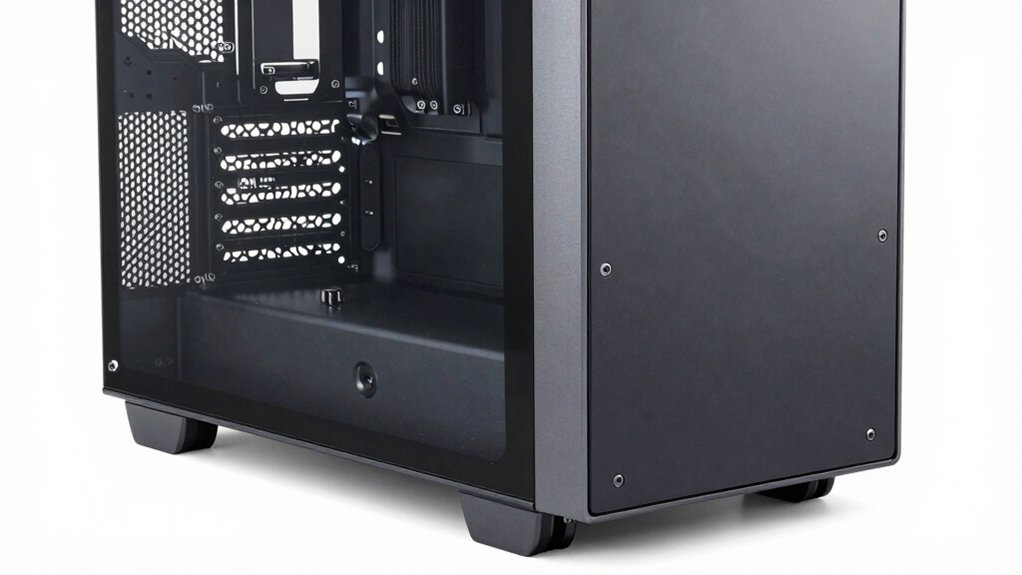
You’ll need to verify that your motherboard size—ATX, Micro-ATX, or Mini-ITX—fits your chosen case before purchasing, as mismatched dimensions will prevent proper installation. Next, evaluate the case’s airflow design by checking fan mount locations, ventilation openings, and internal layout to ensure your components won’t overheat during operation. Finally, measure your graphics card length and compare it against the case’s GPU clearance specifications, accounting for any power connectors or cables that extend from the card’s rear.
Best Tool-Less PC Case
What matters most when selecting a tool-less PC case? First, identify your motherboard size—ATX, M-ATX, or ITX—to ensure proper fitment. Next, verify that the case accommodates your GPU length and CPU cooler height, as these components often require clearance space. Check the panel attachment system: snap-on designs offer speed, while magnetic latches provide durability during repeated access. Evaluate drive mounting options, confirming the case includes tool-free sleds or brackets compatible with your storage drives. Assess cable management features, looking for routing holes and clips that function without fasteners. Finally, consider dust protection against your environment—open-air designs prioritize accessibility but sacrifice filtration. Prioritize cases with standardized, robust mounting brackets to support heavy components reliably throughout ownership.
Factors to Consider When Choosing Tool-Less PC Case
Selecting the right tool-less PC case requires evaluating several key specifications before you commit to a purchase. First, confirm your motherboard size—ATX, Micro-ATX, or ITX—matches the case’s supported form factors. Next, measure your GPU length and verify it doesn’t exceed the case’s maximum (typically 310–335 mm). Check the frame material; 0.8–1.5 mm SPCC steel or aluminum balances durability with airflow. Assess your cooling needs by counting available fan mounts for 120 mm fans or radiators. Evaluate panel types: snap-on designs offer speed, while mesh panels enhance ventilation. Consider whether you need dust filtration or prioritize component visibility and accessibility. Finally, verify drive mounting options support your storage configuration without requiring tools.
Motherboard Compatibility And Support
Before installing your motherboard into a tool-less PC case, you’ll need to confirm that the case supports your motherboard’s form factor. Most open-frame benches accommodate ATX, Micro ATX, and ITX boards, though some accept EATX or have specific footprint limits around 330×330 mm. Check the case’s standoff spacing and mounting brackets to ensure they align with your board’s mounting holes. Verify rear I/O access and CPU cooler height clearance match your motherboard’s layout. Compare your board’s dimensions against the case’s internal width and depth to confirm proper fit. Some cases require additional brackets or adapters for specific motherboard series, so review compatibility lists before purchasing to avoid fitment issues.
Cooling Performance And Airflow
How much airflow you’ll actually achieve depends directly on your case’s design features and fan configuration options. Check whether your case includes perforated panels or mesh fronts that allow unobstructed airflow without blocking fan performance. Verify the maximum number of fans your case supports—cases accommodating up to eight 120mm fans or multiple radiators deliver superior cooling for high-end components. Examine front, top, and bottom intake options to understand cold air pathways. Evaluate whether your case positions the power supply at the bottom with dedicated airflow paths that channel cooler air directly to your GPU and mid-section components. These design elements work together to determine actual cooling effectiveness, not just theoretical capacity.
GPU Length And Clearance
When you’re shopping for a tool-less case, GPU length clearance should rank among your top priorities, since an incompatible graphics card won’t fit no matter how easy the case is to build. Check the manufacturer’s specifications for maximum GPU length, which typically ranges from 310 mm to 335 mm depending on internal fan placement. Verify how drive cages, PSU positioning, and mounting options affect available space. Many cases offer increased clearance when you mount external fans instead of internal ones. Measure your graphics card’s total length before purchasing. Consider cases with dedicated GPU support brackets, which stabilize heavy cards while protecting your motherboard from stress. Always confirm exact measurements against your specific components to avoid costly compatibility issues.
Power Supply Mounting Options
Power supply mounting in tool-less cases works differently than GPU placement because you’re securing a heavy component that’ll draw electrical current to your entire system. Check your case’s maximum PSU length specification—typically 140 to 250 mm, though some designs accommodate up to 300 mm. Verify whether your case includes mounting brackets or if you’ll need separate hardware. Bottom-mounted PSU configurations improve airflow and cable management by positioning the unit away from other components. Confirm that brackets slide into place without requiring screws for final securement, or identify which fasteners you’ll actually need. Match your PSU dimensions against your case’s internal clearance before purchasing to avoid compatibility issues that’ll delay your build.
Drive Bay Configuration Flexibility
What storage capacity you’ll need determines which drive bay configuration matters most for your build. Review the case’s internal bays to count available 3.5″ slots for HDDs and 2.5″ slots for SSDs. Some cases offer multiple bays, allowing you to install both drive types simultaneously, while others provide only single or dual options. Check whether the case supports hot-swap drive trays, which let you swap drives without tools. Verify that bay placement allows proper airflow around your drives to prevent overheating. If you plan future upgrades, choose a case with extra empty bays for expansion. Match the configuration to your current needs plus anticipated storage growth. This prevents buying a case that becomes limiting within months.
Build Quality And Materials
The durability of a tool-less case hinges on material selection and construction methods, since quick-release mechanisms place different stresses on panels and brackets than traditional screw-based assemblies. Look for cases built with 1.5–2.0 mm SPCC or alloy steel, which provide necessary rigidity for mounting hardware. Examine how securely brackets and panels attach without screws—they should resist wobbling when you apply moderate pressure. Check that mesh or perforated panels don’t bend easily, indicating thin material that’ll deteriorate quickly. Evaluate the quality of quick-release mechanisms themselves; they’ll wear faster than screwed connections, so inspect hinges and latches for solid construction. Test-bench designs prioritize access over complete rigidity, so accept that open-frame cases trade some structural strength for convenience.
Final Thoughts
You’ll find the right tool-less case by matching your motherboard size—ATX, micro-ATX, or mini-ITX—with your component needs. Check airflow design, panel access, and bracket compatibility. Compare warranty coverage and accessory inclusions across models like the JONSBO C6 MAX or ESGAMING Zero M. Verify radiator support if you’re water-cooling. Test-bench frames work best for frequent upgrades, while compact towers suit standard builds. Prioritize your swap frequency and space constraints when deciding.

Meet Ry, “TechGuru,” a 36-year-old technology enthusiast with a deep passion for tech innovations. With extensive experience, he specializes in gaming hardware and software, and has expertise in gadgets, custom PCs, and audio.
Besides writing about tech and reviewing new products, he enjoys traveling, hiking, and photography. Committed to keeping up with the latest industry trends, he aims to guide readers in making informed tech decisions.