
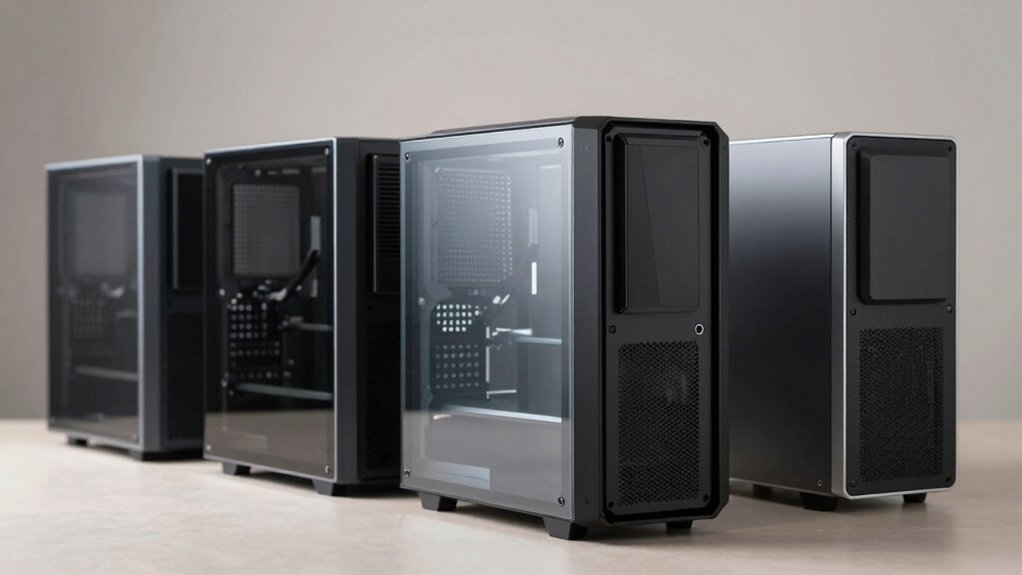

When you’re building a PC, your case choice directly affects how smoothly the assembly process goes. You’ll want a case that offers flexible frame design, tool-free components, and easy cable management to save time and frustration. Cases like the Corsair 4000D RS and Cooler Master QUBE 540 deliver these essentials, but they’re not your only options. Understanding what features matter most will help you find the perfect fit for your build—and there’s more to discover.
| CORSAIR 4000D RS ARGB Mid-Tower ATX PC Case |

| Most Customizable Design | Case Type: Mid-Tower ATX | Motherboard Compatibility: ATX, mATX, ITX | Pre-Installed Fans: 3x RS ARGB PWM | VIEW LATEST PRICE | Read Our Analysis |
| CORSAIR 4000D RS Modular Mid-Tower PC Case |

| Best ARGB Integration | Case Type: Mid-Tower ATX | Motherboard Compatibility: ATX, mATX, ITX | Pre-Installed Fans: 3x RS PWM | VIEW LATEST PRICE | Read Our Analysis |
| MUSETEX ATX PC Gaming Case with ARGB Fans (NN8) |

| Maximum Fan Cooling | Case Type: Mid-Tower ATX | Motherboard Compatibility: ATX, Micro-ATX, Mini-ITX | Pre-Installed Fans: 6x PWM ARGB (120mm) | VIEW LATEST PRICE | Read Our Analysis |
| Cooler Master QUBE 540 ATX Mid-Tower PC Case |

| Most Flexible Layout | Case Type: Mid-Tower ATX | Motherboard Compatibility: ATX, Micro-ATX, Mini-ITX, E-ATX up to 11″ | Pre-Installed Fans: 1x SickleFlow 120mm | VIEW LATEST PRICE | Read Our Analysis |
| NZXT H5 Flow Compact ATX Mid-Tower PC Case |

| Compact GPU Cooling | Case Type: Mid-Tower ATX | Motherboard Compatibility: E-ATX, ATX, Micro-ATX, Mini-ITX | Pre-Installed Fans: 2x 120mm Quiet Airflow | VIEW LATEST PRICE | Read Our Analysis |
| Lian Li A3 Micro ATX Chassis with Wood Panel |

| Space-Efficient Build | Case Type: Micro ATX Compact | Motherboard Compatibility: M-ATX, ITX | Pre-Installed Fans: None included | VIEW LATEST PRICE | Read Our Analysis |
| MUSETEX Y6 ATX Mid Tower Gaming PC Case with ARGB Fans |
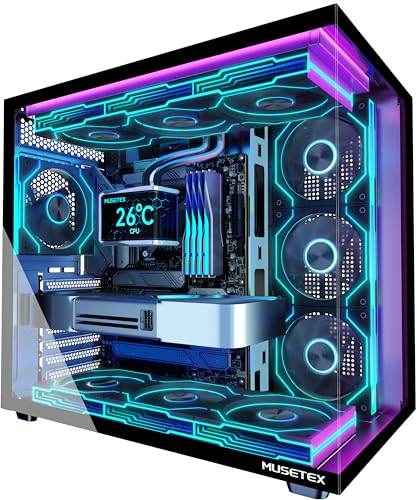
| Premium Visual Display | Case Type: Mid-Tower ATX | Motherboard Compatibility: ATX, Micro-ATX, Mini-ITX | Pre-Installed Fans: 7x Infinity Mirror PWM ARGB | VIEW LATEST PRICE | Read Our Analysis |
| Thermaltake Tower 600 Mid-Tower ATX Case (Blue) |

| Innovative Octagonal Design | Case Type: Mid-Tower ATX | Motherboard Compatibility: ATX, Micro-ATX, Mini-ITX | Pre-Installed Fans: None included | VIEW LATEST PRICE | Read Our Analysis |
| Cooler Master MasterBox Q300L Micro-ATX PC Case |

| Best Budget Compact | Case Type: Mini-Tower Micro-ATX | Motherboard Compatibility: Micro-ATX, Mini-ITX | Pre-Installed Fans: 1x 120mm | VIEW LATEST PRICE | Read Our Analysis |
| ASUS TUF Gaming GT502 ATX Full Tower PC Case |

| Dual-Chamber Performance | Case Type: Mid/Full-Tower Hybrid ATX | Motherboard Compatibility: ATX | Pre-Installed Fans: Not specified | VIEW LATEST PRICE | Read Our Analysis |
More Details on Our Top Picks
CORSAIR 4000D RS ARGB Mid-Tower ATX PC Case
Are you looking for a case that’ll let you customize your build without fighting with mounting systems? The CORSAIR 4000D RS ARGB gives you that flexibility through its FRAME Modular System. You can swap the motherboard tray, front I/O panel, and other components to match your setup. The InfiniRail mounting system lets you position fans up to 200mm on the front and 140mm on top, supporting dual 360mm radiators. You get three RS ARGB fans pre-installed with daisy-chainable connectors for easy control. The case fits ATX, mATX, and ITX motherboards, accommodating powerful GPUs and cooling solutions in its spacious interior.
- Case Type:Mid-Tower ATX
- Motherboard Compatibility:ATX, mATX, ITX
- Pre-Installed Fans:3x RS ARGB PWM
- Radiator Support:Dual 360mm
- Tempered Glass Panels:Internal side panel option
- GPU Clearance:Supports powerful GPUs
- Additional Feature:FRAME Modular customization system
- Additional Feature:InfiniRail multi-point mounting
- Additional Feature:3D Y-Pattern airflow panel
CORSAIR 4000D RS Modular Mid-Tower PC Case
Looking to build a system that grows with your needs? The CORSAIR 4000D RS delivers modularity through its FRAME system, letting you swap components like the motherboard tray and front I/O panel. Start by mounting your motherboard using the reverse-connector design, then configure cooling with the included three RS120 PWM fans. Use the InfiniRail system to position fans across the front or roof, supporting dual 360mm radiators. The 3D Y-Pattern airflow panel directs air efficiently without obstruction. You can remove internal panels for additional side-mounted fans, and the wide internal dimensions accommodate high-performance GPUs. Dust filters protect your components. This mid-tower weighs 8.2 kg and includes two USB 3.0 ports for convenient access.
- Case Type:Mid-Tower ATX
- Motherboard Compatibility:ATX, mATX, ITX
- Pre-Installed Fans:3x RS PWM
- Radiator Support:Dual 360mm
- Tempered Glass Panels:Yes, included
- GPU Clearance:Wide internal dimensions for large cards
- Additional Feature:Reverse-connector motherboard support
- Additional Feature:Zero RPM fan mode
- Additional Feature:Billet aluminum motherboard tray
MUSETEX ATX PC Gaming Case with ARGB Fans (NN8)
If you want a mid-tower case that arrives fully equipped with cooling fans and customizable lighting right out of the box, the MUSETEX NN8 delivers both without requiring you to purchase additional components. The case includes six pre-installed 120mm PWM ARGB fans that you can adjust for silent or high-performance cooling. You’ll customize lighting through your motherboard’s 3PIN RGB header, selecting from 16.8 million color options. The tempered glass side panel opens magnetically for easy access to internal components. You can mount your graphics card vertically or horizontally, and install up to five SSDs plus one HDD. Cable management remains straightforward due to the spacious interior and rear-mounted power supply configuration.
- Case Type:Mid-Tower ATX
- Motherboard Compatibility:ATX, Micro-ATX, Mini-ITX
- Pre-Installed Fans:6x PWM ARGB (120mm)
- Radiator Support:280mm top
- Tempered Glass Panels:Opening side panel
- GPU Clearance:Vertical GPU mounting option
- Additional Feature:Vertical GPU mounting option
- Additional Feature:76% cooling benefit rating
- Additional Feature:Polygonal mesh front panel
Cooler Master QUBE 540 ATX Mid-Tower PC Case
The Cooler Master QUBE 540 delivers exceptional modularity for builders who want to customize their setup without constraints. You’ll appreciate its reversible I/O panel and movable handles, which let you adjust your layout instantly. The case supports GPUs up to 415mm and motherboards from ITX to E-ATX formats up to 11 inches wide. Its mesh-optimized front panel improves airflow, while the interior accepts 140/280/360mm radiators plus multiple fan configurations. You can orient the case horizontally or vertically depending on your space. The tempered glass panel displays your build, and stainless steel construction ensures durability for long-term use.
- Case Type:Mid-Tower ATX
- Motherboard Compatibility:ATX, Micro-ATX, Mini-ITX, E-ATX up to 11″
- Pre-Installed Fans:1x SickleFlow 120mm
- Radiator Support:140/280/360mm
- Tempered Glass Panels:Yes, included
- GPU Clearance:Up to 415mm
- Additional Feature:Flexible horizontal/vertical orientation
- Additional Feature:Reversible I/O panel design
- Additional Feature:3D-printed accessory compatibility
NZXT H5 Flow Compact ATX Mid-Tower PC Case
Want a mid-tower case that prioritizes GPU cooling without sacrificing airflow? The NZXT H5 Flow delivers both through its perforated PSU shroud, which accepts two 120mm intake fans for enhanced cooling. You’ll find ultra-fine mesh panels on the top, front, and side, maximizing airflow while filtering dust effectively. The case supports radiators up to 360mm in front and 240mm on top, giving you flexibility for liquid cooling setups. Inside, you get four internal bays, seven expansion slots, and compatibility with ATX and Micro-ATX motherboards. Two pre-installed 120mm fans handle initial cooling, and wide cable management channels keep your build organized. At 8.86 inches deep by 16.93 wide by 18.31 high, this compact mid-tower fits most setups without consuming excessive desk space.
- Case Type:Mid-Tower ATX
- Motherboard Compatibility:E-ATX, ATX, Micro-ATX, Mini-ITX
- Pre-Installed Fans:2x 120mm Quiet Airflow
- Radiator Support:360mm front, 240mm top
- Tempered Glass Panels:Not mentioned
- GPU Clearance:Not specified
- Additional Feature:Perforated PSU shroud design
- Additional Feature:Wide cable management channels
- Additional Feature:Ultra-fine mesh dust filtration
Lian Li A3 Micro ATX Chassis with Wood Panel
Building a compact PC without sacrificing cooling performance or aesthetic appeal requires a case that balances function with design—and that’s where you’ll find the Lian Li A3-mATX-WD excels. This 26.3-liter chassis supports micro-ATX and ITX motherboards, offering a 415mm GPU clearance and 360mm radiator compatibility. You’ll mount your power supply on the front or side, choosing from ATX, SFX, or SFX-L units. The mesh panels promote airflow while the walnut wood front panel delivers visual refinement. With modular design features and flexible mounting orientation, you’ll arrange components efficiently. Expansion slots and support for up to ten 120mm fans give you cooling flexibility within the compact footprint, making customization straightforward.
- Case Type:Micro ATX Compact
- Motherboard Compatibility:M-ATX, ITX
- Pre-Installed Fans:None included
- Radiator Support:Up to 360mm
- Tempered Glass Panels:No
- GPU Clearance:Up to 415mm
- Additional Feature:Walnut wood front panel
- Additional Feature:415mm GPU clearance support
- Additional Feature:Modular minimalist build design
MUSETEX Y6 ATX Mid Tower Gaming PC Case with ARGB Fans
If you’re prioritizing visibility and pre-configured lighting, the MUSETEX Y6 delivers both through its 270° dual tempered glass panels and seven pre-installed ARGB fans that create continuous gradient rainbow effects without additional setup. You’ll accommodate ATX, Micro-ATX, and Mini-ITX motherboards within its organized internal layout. The case supports graphics cards up to 410mm and CPU coolers reaching 160mm in height. You can install a 360mm liquid cooler on top or position your power supply up to 230mm. The front I/O includes one Type-C port, one USB 3.0, one USB 2.0, and audio connections. You receive three 3.5-inch drive bays, dust filters, and a ten-year warranty covering your investment.
- Case Type:Mid-Tower ATX
- Motherboard Compatibility:ATX, Micro-ATX, Mini-ITX
- Pre-Installed Fans:7x Infinity Mirror PWM ARGB
- Radiator Support:360mm top
- Tempered Glass Panels:270° dual panels
- GPU Clearance:Up to 410mm
- Additional Feature:270° dual tempered glass
- Additional Feature:Anti-vortex fan blade design
- Additional Feature:10-year manufacturer warranty
Thermaltake Tower 600 Mid-Tower ATX Case (Blue)
The Thermaltake Tower 600 stands out for PC builders who prioritize flexibility and modern connectivity in a compact footprint. You’ll appreciate its distinctive octagonal design with three removable tempered glass panels that require no tools. The case supports up to nine fans and radiators up to 420mm, giving you extensive cooling options. Its hidden-connector motherboard support works with ASUS BTF, MSI PROJECT ZERO, and GIGABYTE PROJECT STEALTH boards. You can mount your GPU upright using rotational PCI-e slots. The case accommodates CPU coolers up to 210mm tall and graphics cards up to 400mm long. Internal drive bays include one 3.5-inch slot and two 2.5-inch slots. You receive a three-year manufacturer warranty with this model.
- Case Type:Mid-Tower ATX
- Motherboard Compatibility:ATX, Micro-ATX, Mini-ITX
- Pre-Installed Fans:None included
- Radiator Support:Up to 420mm
- Tempered Glass Panels:3x removable panels
- GPU Clearance:Up to 400mm (280mm with cover)
- Additional Feature:Distinctive octagonal shape design
- Additional Feature:Hidden-connector motherboard support
- Additional Feature:Rotational PCI-e slot mounting
Cooler Master MasterBox Q300L Micro-ATX PC Case
Looking for a compact case that doesn’t sacrifice modularity or airflow? The Cooler Master MasterBox Q300L delivers practical flexibility in a micro-ATX form factor. You’ll adjust the modular I/O panel across six positions on both sides, customizing your build layout. The perforated steel design supports up to five fans and a 240mm liquid cooler, ensuring efficient cooling. Install components with ease: your CPU cooler fits up to 159mm, your GPU extends to 360mm, and your PSU reaches 160mm. You get four expansion slots for upgrades. The transparent side panel showcases your build while magnetic dust filters maintain appearance and cleanliness. One pre-installed 120mm fan gets you started immediately.
- Case Type:Mini-Tower Micro-ATX
- Motherboard Compatibility:Micro-ATX, Mini-ITX
- Pre-Installed Fans:1x 120mm
- Radiator Support:240mm liquid cooler
- Tempered Glass Panels:Transparent side panel
- GPU Clearance:Up to 360mm
- Additional Feature:Modular I/O panel positioning
- Additional Feature:Edge-to-edge transparent panel
- Additional Feature:Magnetic dust filter pattern
ASUS TUF Gaming GT502 ATX Full Tower PC Case
Want a case that adapts to your build’s unique cooling demands? The ASUS TUF Gaming GT502 delivers with its dual-chamber design, separating CPU and GPU cooling zones for independent airflow management. You’ll mount your graphics card vertically or horizontally using the included bracket, accommodating cards up to 400mm. The case supports 360mm and 280mm radiators, letting you configure multi-radiator setups based on your cooling needs. With tempered glass panels on front and sides, you monitor your hardware and thermals directly. Tool-free side panels release via rear buttons, simplifying access during builds and upgrades. The modular design includes four 3.5″ drive bays and seven expansion slots, giving you layout flexibility for your specific components.
- Case Type:Mid/Full-Tower Hybrid ATX
- Motherboard Compatibility:ATX
- Pre-Installed Fans:Not specified
- Radiator Support:360mm and 280mm
- Tempered Glass Panels:Front and side panels
- GPU Clearance:Up to 400mm
- Additional Feature:Dual-chamber independent cooling zones
- Additional Feature:2-way graphics card mounting
- Additional Feature:Tool-free button-release panels
Factors to Consider When Choosing a Modular PC Case
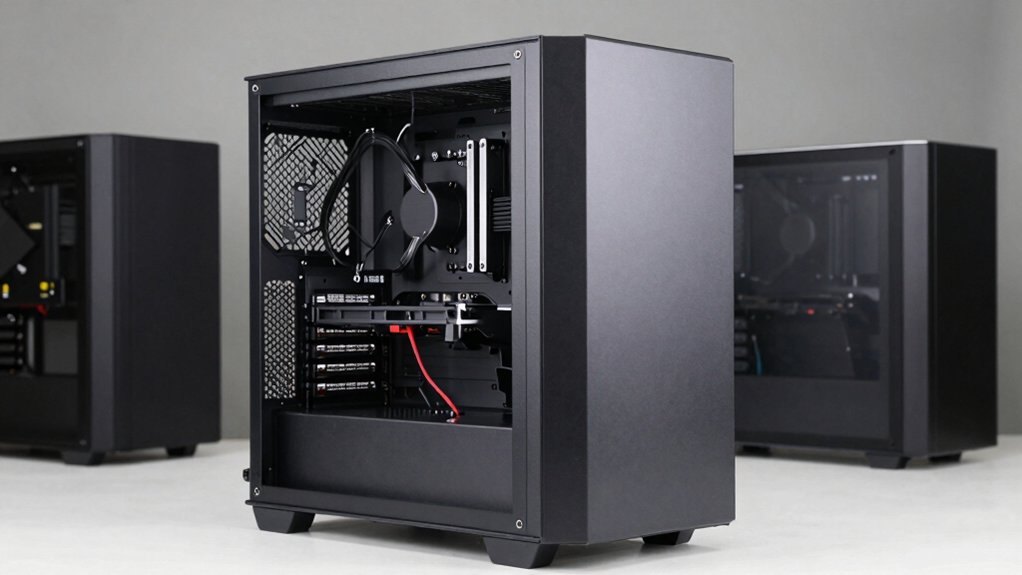
You’ll need to verify your motherboard’s size (ATX, Micro-ATX, or Mini-ITX) matches the case’s compatibility options, then evaluate whether the case supports your cooling system by checking space for air coolers or liquid cooling setups. Next, examine the storage expansion capabilities to confirm the case accommodates your required number of drives, and assess the cable management design to ensure you can route power and data cables without obstruction. Finally, measure your GPU’s length and width against the case’s GPU clearance to guarantee your graphics card fits without blocking other components.
Motherboard Compatibility Options
How do you know if your motherboard will actually fit inside a modular case? Check the case specifications for supported form factors: ATX, mATX, or ITX. Match your motherboard’s size to these options. Next, verify the case’s internal layout dimensions, particularly height and width, to ensure larger boards and extended GPUs fit without clearance problems. Review compatibility notes provided by the manufacturer regarding cable routing and front I/O access for your specific motherboard type. Some modular cases offer interchangeable motherboard trays or reversible I/O panel orientations, giving you mounting flexibility. Finally, confirm the case supports your motherboard’s connector positions and cooling requirements. Taking these steps prevents incompatibility issues and ensures a proper build experience.
Cooling System Flexibility
Once you’ve confirmed your motherboard fits properly, examine the case’s cooling capabilities next. Check the maximum fan sizes the case supports in each location—front, roof, and rear—since larger fans cool more efficiently. Many modular cases accept fans up to 200mm on the front and 140mm on the roof, giving you flexibility. Verify whether the case supports dual radiators, which lets you run multiple cooling solutions simultaneously. Review the front panel design; enhanced airflow patterns like 3D Y-designs minimize obstruction and maximize cooling efficiency. Examine removable or dual-purpose panels that you can reconfigure or remove entirely to expand cooling layouts. Finally, confirm the internal dimensions accommodate your chosen radiator and fan setup without interference. These steps ensure your cooling system functions optimally within your case’s design.
Storage Expansion Capabilities
What storage capacity do you actually need for your build? Start by counting the internal bays your case offers for 3.5″ and 2.5″ drives. Next, check if the case includes removable trays or modular panels that let you swap configurations later. Verify whether radiator placement will consume drive space, especially with larger cooling setups. Examine dust filters and internal layouts to confirm you can access and install drives without obstruction. Finally, confirm the case supports future expansion, allowing you to add more bays or adjust panels for additional storage. This modular approach lets you start with essential drives and upgrade storage capacity as your needs grow without replacing your entire case.
Cable Management Design
After you’ve mapped out your storage needs, you’ll want to examine how your case handles the cables that power and connect those drives alongside your motherboard, power supply, and cooling system. Look for interchangeable motherboard trays and front I/O panels that let you customize cable routing pathways. Check if internal side panels function as cable covers that you can remove for better access. Evaluate the case’s internal dimensions and open layout to confirm they accommodate organized routing of power cables, PSU cables, and water-cooling tubing. Verify that magnetic or clip-on dust filters and removable panels simplify cable management during installation. Consider dual-chamber designs that separate front and rear compartments, isolating cables from critical components for cleaner builds.
GPU Clearance Requirements
How much space does your graphics card actually need? Check your GPU’s length in millimeters, then compare it against the case’s maximum supported clearance, which typically ranges from 310 mm to 415 mm. Account for your front radiator and fan setup—dual 360 mm radiators require more space than single fans, potentially reducing available GPU room. Remove or adjust removable drive cages to maximize clearance if needed. Measure the motherboard tray-to-front clearance carefully, since thick GPU coolers may not fit in tight spaces. Consider vertical GPU mounting if horizontal space is limited, but verify you have adequate clearance above the motherboard tray for riser cables. Always check exact internal dimensions before purchasing to avoid compatibility issues.
Radiator Support Configurations
Your case’s radiator support directly impacts your cooling setup’s effectiveness and flexibility. First, check your case’s front-panel capacity, as most support 360mm radiators while some accommodate 420mm variants. Next, examine roof-mount options, which typically allow 140mm fans or smaller radiators. Consider InfiniRail mounting systems, which offer flexible positioning for fans up to 200mm and optimize radiator placement around your components. Verify motherboard orientation compatibility—upright or reverse-connector layouts affect radiator-block clearance and tubing routing. Finally, evaluate your front panel type: tempered glass panels reduce airflow efficiency compared to mesh alternatives. Dual-radiator configurations work if you have both front and roof space available. Match your radiator choice to these specific mounting points before purchasing your case.
Panel Customization Features
Want to personalize your case’s appearance and functionality without buying a new chassis? Panel customization features let you modify your case’s exterior and interior layout. You can swap motherboard trays and front I/O panels to create different configurations that match your build needs. Remove or reposition the internal side panel to adjust cooling access and component visibility. Replace tempered glass panels on the front or sides to showcase or conceal your components. Adjust the front panel design, like 3D Y-Pattern Airflow designs, to optimize airflow while maintaining your preferred aesthetic. Relocate I/O panels to change how your case connects to peripherals. These modular adjustments transform your case’s function and appearance without requiring a complete replacement, giving you flexibility as your building priorities change.
Final Thoughts
You’ve reviewed ten modular PC cases with different sizes and features. Now select one by matching your motherboard type—ATX, mATX, or ITX—to the case’s supported layouts. Check your GPU length, radiator needs, and storage requirements against each case’s specifications. Prioritize tool-free components and magnetic dust filters for easier builds. Compare prices and availability, then purchase the case that fits your hardware and budget.

Meet Ry, “TechGuru,” a 36-year-old technology enthusiast with a deep passion for tech innovations. With extensive experience, he specializes in gaming hardware and software, and has expertise in gadgets, custom PCs, and audio.
Besides writing about tech and reviewing new products, he enjoys traveling, hiking, and photography. Committed to keeping up with the latest industry trends, he aims to guide readers in making informed tech decisions.