
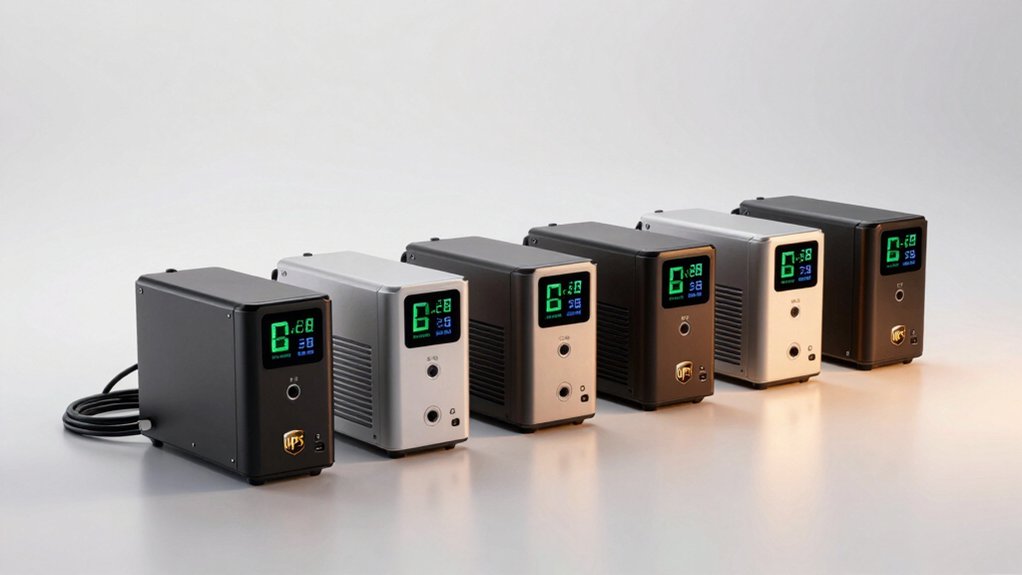

When power outages strike, you need a UPS with an LCD display that shows you exactly what’s happening—runtime remaining, voltage levels, and battery health status. This information lets you plan your next move before your devices go dark. You’ve got several solid options available, each with different strengths in capacity, outlets, and features. Understanding what separates these models helps you pick the right protection.
| CyberPower EC650LCD Battery Backup UPS System |
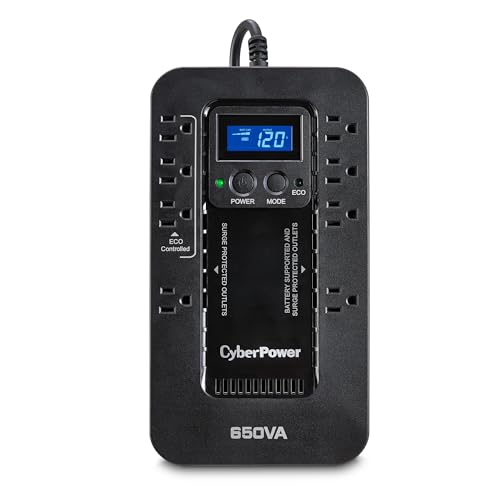
| Budget-Friendly Pick | Power Capacity (VA/W): 650VA / 390W | Total Outlets: 8 outlets | Battery Backup Outlets: 4 outlets | VIEW LATEST PRICE | Read Our Analysis |
| CyberPower CP1500AVRLCD3 Intelligent LCD UPS System |

| Best Overall | Power Capacity (VA/W): 1500VA / 900W | Total Outlets: 12 outlets | Battery Backup Outlets: 6 outlets | VIEW LATEST PRICE | Read Our Analysis |
| APC Back-UPS Pro 1500VA Battery Backup (BX1500M) |

| Professional Grade | Power Capacity (VA/W): 1500VA / 900W | Total Outlets: 10 outlets | Battery Backup Outlets: 5 outlets | VIEW LATEST PRICE | Read Our Analysis |
| Tripp Lite SMART1000LCD 1000VA UPS Battery Backup |

| Best Value | Power Capacity (VA/W): 1000VA / 500W | Total Outlets: 8 outlets | Battery Backup Outlets: 4 outlets | VIEW LATEST PRICE | Read Our Analysis |
| GOLDENMATE 1000VA Lithium UPS Battery Backup System |

| Longest-Lasting Battery | Power Capacity (VA/W): 1000VA / 600W | Total Outlets: 8 outlets | Battery Backup Outlets: 8 outlets | VIEW LATEST PRICE | Read Our Analysis |
More Details on Our Top Picks
CyberPower EC650LCD Battery Backup UPS System
If you’re looking to protect your home office setup, networking equipment, or entertainment system from power outages and electrical surges, the CyberPower EC650LCD delivers reliable backup power with a 650VA/390W capacity that keeps your devices running when the grid fails. The unit features eight outlets: four provide battery backup and surge protection, while four offer surge protection only, with three ECO-controlled outlets. You’ll monitor power conditions through the multifunction LCD panel, which displays real-time battery and electrical information. The ECO MODE feature reduces energy consumption by automatically shutting down peripherals when your computer powers off or enters sleep mode. Download the free PowerPanel Personal Edition software for additional management capabilities. The system includes a three-year warranty covering the battery and offers a $100,000 Connected Equipment Guarantee for added assurance.
- Power Capacity (VA/W):650VA / 390W
- Total Outlets:8 outlets
- Battery Backup Outlets:4 outlets
- Wave Output Type:Simulated sine wave
- Automatic Voltage Regulation (AVR):Not included
- Warranty Coverage:3-year warranty; $100,000 equipment guarantee
- Additional Feature:ECO Mode reduces energy usage
- Additional Feature:$100,000 Connected Equipment Guarantee
- Additional Feature:Multifunction LCD panel display
CyberPower CP1500AVRLCD3 Intelligent LCD UPS System
The CyberPower CP1500AVRLCD3 delivers 1500VA of power and 900W of capacity, making it suitable for home offices and small business setups that need continuous operation during outages. This mini tower unit features twelve outlets—six with battery backup and surge protection, plus six surge-protected outlets for additional devices. You’ll monitor power conditions through its color LCD panel, which displays real-time battery and electrical information. The Automatic Voltage Regulation feature corrects minor power fluctuations without draining the battery. Download the free PowerPanel Personal Edition software to manage your system remotely. The unit includes two USB ports and comes with a 3-year warranty plus a $500,000 Connected Equipment Guarantee for your protection.
- Power Capacity (VA/W):1500VA / 900W
- Total Outlets:12 outlets
- Battery Backup Outlets:6 outlets
- Wave Output Type:Simulated sine wave
- Automatic Voltage Regulation (AVR):Yes, included
- Warranty Coverage:3-year warranty; $500,000 equipment guarantee
- Additional Feature:Color LCD panel alerts
- Additional Feature:Dual USB ports (Type-A/C)
- Additional Feature:$500,000 Connected Equipment Guarantee
APC Back-UPS Pro 1500VA Battery Backup (BX1500M)
Looking for a UPS that handles both your essential devices and peripheral equipment without breaking your budget? The APC Back-UPS Pro 1500VA delivers 1500VA/900W of backup power with up to 19 minutes of runtime at 300W load. You get 10 outlets: five battery-backed outlets for computers and routers, plus five surge-only outlets for peripherals like printers. Automatic Voltage Regulation corrects brownouts and surges automatically. The replaceable battery lets you swap units without downtime. Active PFC compatibility supports gaming PCs. ENERGY STAR certification ensures 92%+ efficiency, lowering your electricity costs compared to standard models. Built-in coaxial and Ethernet protection safeguards connected devices, backed by a $75,000 equipment protection guarantee.
- Power Capacity (VA/W):1500VA / 900W
- Total Outlets:10 outlets
- Battery Backup Outlets:5 outlets
- Wave Output Type:Not specified
- Automatic Voltage Regulation (AVR):Yes, included (corrects 88V+)
- Warranty Coverage:3-year warranty; $75,000 equipment protection
- Additional Feature:Built-in coaxial/Ethernet surge protection
- Additional Feature:Replaceable battery hot-swap capability
- Additional Feature:ENERGY STAR certified (92%+ efficiency)
Tripp Lite SMART1000LCD 1000VA UPS Battery Backup
For users who need reliable backup power with real-time monitoring, the Tripp Lite SMART1000LCD delivers 1000VA/500W capacity across eight outlets—four of which remain powered during outages. The rotatable LCD display shows input voltage, battery status, and overload conditions in real time. Automatic Voltage Regulation corrects power fluctuations between 89V and 120V without draining the battery, protecting your equipment from damage. You’ll get approximately ten minutes of runtime at half load or three minutes at full load. The user-replaceable battery allows you to swap it out without professional help. All eight outlets feature 1038 joules of surge protection. The unit includes a three-year warranty and $250,000 equipment insurance coverage.
- Power Capacity (VA/W):1000VA / 500W
- Total Outlets:8 outlets
- Battery Backup Outlets:4 outlets
- Wave Output Type:Modified sine wave (battery mode); sine wave (AC mode)
- Automatic Voltage Regulation (AVR):Yes, included (corrects 89V-120V)
- Warranty Coverage:3-year warranty; $250,000 equipment insurance
- Additional Feature:Hot-swappable user-replaceable battery
- Additional Feature:Rotatable LCD display panel
- Additional Feature:$250,000 Ultimate Connected Equipment Insurance
GOLDENMATE 1000VA Lithium UPS Battery Backup System
If you’re running computers, workstations, network devices, or telecom equipment that need reliable backup power without constant maintenance, this 1000VA system delivers what you’re looking for. The LiFePO4 battery lasts 10+ years and 5,000+ cycles, reducing ownership costs over 40% compared to lead-acid alternatives. Setup takes minutes—just plug in the AC power cord. Eight outlets with surge protection safeguard your devices during outages and voltage fluctuations. An intelligent LCD panel shows real-time battery and power status. When the mains fail, a buzzer alerts you and the system switches to battery mode. Press the control button once to mute the alarm, or hold it to power on/off. The built-in cooling fan runs quietly under 50 dB during heavy use.
- Power Capacity (VA/W):1000VA / 600W
- Total Outlets:8 outlets
- Battery Backup Outlets:8 outlets
- Wave Output Type:Pure sine wave
- Automatic Voltage Regulation (AVR):Not specified as AVR
- Warranty Coverage:Not specified in summary
- Additional Feature:LiFePO4 battery (10+ years)
- Additional Feature:5000+ charge cycles lifespan
- Additional Feature:Built-in Battery Management System
Factors to Consider When Choosing a UPS With LCD Display
When you’re selecting a UPS with an LCD display, you’ll need to evaluate several key factors that directly affect performance and compatibility with your devices. Consider the power capacity and wattage first—match the UPS’s total wattage to your devices’ combined power requirements to ensure adequate protection during outages. You should also assess the battery backup runtime length, which tells you how long your devices will stay powered, and examine the outlet configuration and quantity to confirm the UPS can accommodate all your equipment.
Best UPS With LCD Display
What information do you actually need to see on your UPS display? You’ll want a screen that shows real-time voltage levels, current load percentage, and remaining runtime estimates. Check whether the model displays battery health status and fault alerts clearly. Some units use color indicators to flag problems visually, making issues easier to spot quickly. Verify that the LCD shows comprehensive metrics rather than just basic on/off status. Consider whether the display supports software integration for advanced monitoring on your computer or mobile device. Test readability in different lighting conditions before purchasing. Confirm the display updates frequently enough to catch power fluctuations. Choose a unit where all essential information appears without requiring menu navigation for basic metrics.
Factors to Consider When Choosing UPS With LCD Display
Now that you understand what information an LCD display should show, you’ll want to evaluate specific features that match your needs and setup. First, assess your physical space: determine whether you need a rotatable display for visibility under desks or in rack installations. Second, consider your monitoring preferences—decide if you want software integration like PowerPanel for detailed event logs or if an onboard LCD alone suffices. Third, evaluate alert options by checking whether audible alarms meet your needs and if mute controls matter in your environment. Fourth, examine display type: color or multi-line LCDs provide clearer battery health and runtime estimates than basic models. Finally, match capacity and runtime specifications to your devices’ power requirements and your acceptable downtime during outages.
Power Capacity And Wattage
How do you know if a UPS can actually power your devices when the electricity goes out? Check the VA and wattage ratings. VA measures total capacity; wattage shows usable power for your equipment. Add up the wattage of all devices you’ll run simultaneously—your computer, monitor, router, and peripherals. Choose a UPS with a wattage rating at least 20–25% higher than this total to provide safety headroom. For example, if your devices need 600 watts total, select a UPS rated for 750 watts minimum. Remember that higher wattage loads drain the battery faster, so actual runtime varies by usage. Battery-backed outlets and AVR features protect against voltage fluctuations, reducing unnecessary drain and extending how long your UPS sustains power during an outage.
Battery Backup Runtime Length
When you’re selecting a UPS with an LCD display, runtime length—the duration your UPS can sustain power during an outage—deserves serious consideration because it directly determines whether your devices stay running long enough to save work, shut down safely, or bridge a brief power disruption. You’ll find that most UPS models deliver 10–19 minutes of backup at typical 300W loads, though full-rated loads reduce this to just minutes. Check the LCD display, which shows real-time runtime estimates based on your current power draw. Larger VA/W-rated units provide longer runtimes at the same load than smaller models. Battery type matters too: lead-acid versus LiFePO4 affects longevity and replaceability, influencing overall backup duration and reliability during extended outages.
Outlet Configuration And Quantity
Two critical decisions shape your UPS’s usefulness: determining how many outlets you need and understanding which outlets provide battery backup versus surge protection only. Most models offer 8 to 12 total outlets. You’ll find that some units dedicate all outlets to battery backup, while others split them—typically 5 battery-backed and 5 surge-only. Battery-backed outlets keep your devices running during outages. Surge-only outlets protect against power spikes but don’t provide backup power. Count your devices first. Prioritize battery backup for essential equipment like computers and modems. Assign surge-only outlets to peripherals. Check the LCD display or physical labels to identify each outlet type. Some units include additional protection through coaxial or Ethernet connections beyond standard outlets.
Automatic Voltage Regulation Features
Beyond selecting outlets, you’ll want to understand how your UPS handles voltage fluctuations that don’t trigger a full outage. Automatic Voltage Regulation (AVR) corrects minor power dips and surges without draining your battery. This feature stabilizes incoming voltage to safe levels, typically maintaining output near 120V during brownouts. When your UPS includes AVR, it reduces unnecessary battery discharge during short voltage sags, extending your runtime when you actually need it. Look for LCD models that display voltage conditions in real time alongside runtime status. By choosing a UPS with AVR capability, you improve overall energy efficiency and protect your devices from damage caused by unstable power. Check product specifications to confirm AVR is included in your model.
Battery Type And Lifespan
Most UPS units rely on one of two battery types: traditional lead-acid or lithium iron phosphate (LiFePO4), and you’ll want to understand how each affects your long-term investment. LiFePO4 batteries offer 10+ years of lifespan and 5000+ charge cycles, markedly reducing your total cost of ownership compared to lead-acid options. Look for models with LCD displays that show battery health status and remaining runtime estimates, giving you clear visibility into your system’s condition. Choose units featuring Battery Management Systems (BMS) that protect against overcharge and discharge, extending battery life. Select models with replaceable or hot-swappable batteries for zero-downtime replacements when needed. Prioritize maintenance-free designs that preserve battery performance without regular servicing requirements.
Final Thoughts
You’ll want to select a UPS based on your power needs and device count. Compare the wattage capacity you require against each model’s specifications. Check that battery-backed outlets match your critical devices. Verify the LCD display shows runtime, voltage, and health status clearly. Confirm the unit has AVR capability and BMS protection if choosing lithium models. Review warranty terms before purchasing. Test the UPS monthly to ensure it’s functioning properly.

Meet Ry, “TechGuru,” a 36-year-old technology enthusiast with a deep passion for tech innovations. With extensive experience, he specializes in gaming hardware and software, and has expertise in gadgets, custom PCs, and audio.
Besides writing about tech and reviewing new products, he enjoys traveling, hiking, and photography. Committed to keeping up with the latest industry trends, he aims to guide readers in making informed tech decisions.