
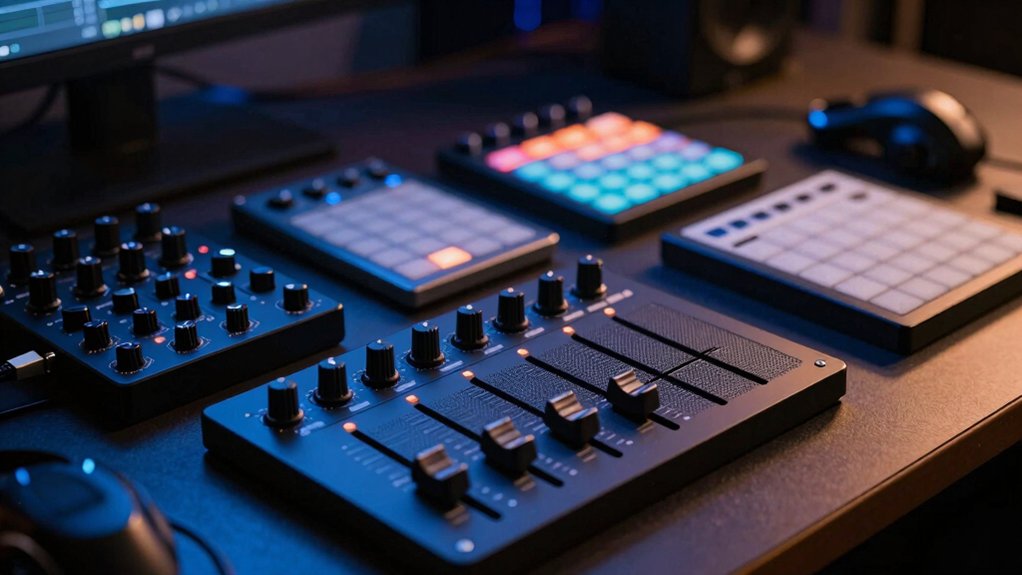

When you’re ready to upgrade your beat-making setup, you’ll need to choose a pad controller that matches your workflow, budget, and software. The right controller combines responsive pads, assignable controls, and seamless DAW integration to streamline your production process. You’ve got options ranging from budget-friendly entry-level units to professional-grade machines with advanced features. Here’s what separates the best from the rest—and why it matters.
| Donner STARRYPAD MIDI Beat Maker Drum Machine Controller |

| Best For Beginners | Pad Count: 16 pads (3 banks = 48 assignable) | Connectivity: USB-C; MIDI In/Out | Velocity Sensitivity & Aftertouch: Velocity-sensitive; adjustable curves | VIEW LATEST PRICE | Read Our Analysis |
| Akai Professional MPD218 USB MIDI Controller with Drum Pads |

| Most Versatile | Pad Count: 16 pads (3 banks = 48 assignable) | Connectivity: USB; compatible with Windows, PC/Mac, iOS | Velocity Sensitivity & Aftertouch: Velocity- and pressure-sensitive pads | VIEW LATEST PRICE | Read Our Analysis |
| Akai Professional APC Mini MK2 USB MIDI Pad Controller |

| Best For Ableton | Pad Count: 64 pads (8×8 RGB matrix) | Connectivity: USB; plug-and-play | Velocity Sensitivity & Aftertouch: Velocity-sensitive | VIEW LATEST PRICE | Read Our Analysis |
| JP-1 MIDI Pad Controller with 16 RGB Pads |

| Most Portable | Pad Count: 16 RGB pads | Connectivity: Wireless connection | Velocity Sensitivity & Aftertouch: Responsive to playing style | VIEW LATEST PRICE | Read Our Analysis |
| Synido TempoPAD MIDI Controller Beat Pad Machine |

| Budget-Friendly Pick | Pad Count: 16 backlit pads (3 banks = 48 assignable) | Connectivity: USB Type-C; MIDI out | Velocity Sensitivity & Aftertouch: Velocity-sensitive; 4 levels | VIEW LATEST PRICE | Read Our Analysis |
| EMP16 MIDI Pad Controller Beat Maker Machine |

| Best All-Around | Pad Count: 16 RGB pads (4 banks = 64 assignable) | Connectivity: Bluetooth 5.0; USB MIDI; standard MIDI In/Out | Velocity Sensitivity & Aftertouch: Velocity-sensitive; aftertouch support | VIEW LATEST PRICE | Read Our Analysis |
| Akai Professional LPD8 USB MIDI Controller with RGB Pads |

| Most Compact | Pad Count: 8 RGB-backlit pads | Connectivity: USB-powered; plug-and-play | Velocity Sensitivity & Aftertouch: Velocity-sensitive | VIEW LATEST PRICE | Read Our Analysis |
| Synido Wireless MIDI Pad Controller for Music Production |

| Best Wireless Option | Pad Count: 16 RGB pads | Connectivity: USB; Bluetooth dual connectivity; MIDI In/Out/Thru | Velocity Sensitivity & Aftertouch: Velocity-sensitive; aftertouch support | VIEW LATEST PRICE | Read Our Analysis |
| Xjam Mobile Studio MIDI Pad Controller with Aftertouch |

| Premium Build Quality | Pad Count: 16 ultra-sensitive pads with aftertouch | Connectivity: USB Type-C; TRS 3.5mm MIDI Out | Velocity Sensitivity & Aftertouch: Velocity-sensitive; polyphonic aftertouch | VIEW LATEST PRICE | Read Our Analysis |
| Akai Professional MPK Mini IV USB-C MIDI Keyboard Controller |

| Best For Keys | Pad Count: 8 RGB MPC pads | Connectivity: USB-C; full-size MIDI Out | Velocity Sensitivity & Aftertouch: Velocity-sensitive; pressure-sensitive | VIEW LATEST PRICE | Read Our Analysis |
| M-AUDIO Oxygen Pro Mini 32-Key MIDI Keyboard Controller |

| Professional Grade | Pad Count: 8 RGB backlit pads | Connectivity: USB connectivity | Velocity Sensitivity & Aftertouch: Velocity-sensitive | VIEW LATEST PRICE | Read Our Analysis |
| Bluetooth Beat Maker Machine MIDI Controller Drum Pad |
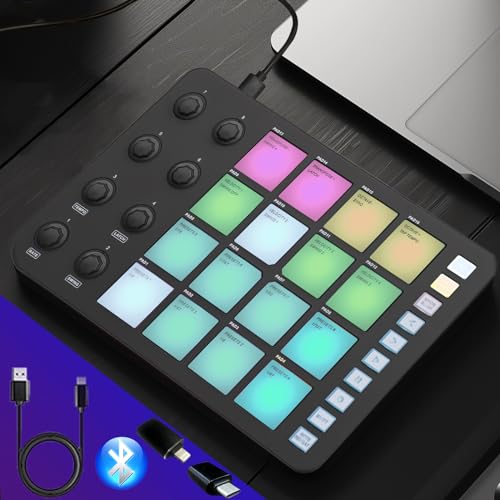
| Best Portability | Pad Count: 16 pressure-sensitive pads (2 banks) | Connectivity: Bluetooth wireless; USB-A to Type-C cable; 3.5mm MIDI output | Velocity Sensitivity & Aftertouch: Pressure-sensitive; velocity detection | VIEW LATEST PRICE | Read Our Analysis |
| Novation Launchpad Pro MK3 MIDI Grid Controller |
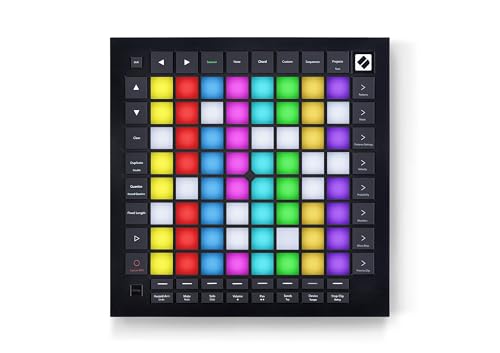
| Best For Professionals | Pad Count: 64 RGB pads (8×8 grid) | Connectivity: MIDI In/Out; USB | Velocity Sensitivity & Aftertouch: Velocity- and pressure-sensitive | VIEW LATEST PRICE | Read Our Analysis |
| Native Instruments Maschine Mikro Mk3 Drum Controller 25707 |

| Editor’s Choice | Pad Count: 16 pads | Connectivity: USB 2.0 | Velocity Sensitivity & Aftertouch: Velocity-sensitive pads | VIEW LATEST PRICE | Read Our Analysis |
| MIDI Controller Beat Maker Machine with 6 Knobs |

| Best Value | Pad Count: 48 pads (3 banks of 16) | Connectivity: USB 2.0; USB cable included | Velocity Sensitivity & Aftertouch: Velocity and pressure-sensitive pads | VIEW LATEST PRICE | Read Our Analysis |
More Details on Our Top Picks
Donner STARRYPAD MIDI Beat Maker Drum Machine Controller
Are you looking for a pad controller that won’t overwhelm you with complexity? The Donner STARRYPAD gives you 16 backlit pads across three switchable banks, providing 48 total assignable pads for drums and samples. You’ll control additional parameters using two faders, two knobs, and three buttons. The device connects via USB-C to your computer or mobile device and requires DAW software to produce sound. You can customize pad colors through the included software editor for quick visual reference during performance. The controller includes Melodics courses and Cubase LE software to help you start producing beats immediately.
- Pad Count:16 pads (3 banks = 48 assignable)
- Connectivity:USB-C; MIDI In/Out
- Velocity Sensitivity & Aftertouch:Velocity-sensitive; adjustable curves
- Included Software/Bundles:Melodics Courses; Cubase LE
- DAW Compatibility:Windows, macOS, Android, iOS (class-compliant)
- Assignable Controls (Knobs/Faders/Buttons):2 faders, 2 knobs, 3 buttons
- Additional Feature:3 pad banks (48 total pads)
- Additional Feature:Customizable 7-color lighting
- Additional Feature:Tap Tempo BPM synchronization
Akai Professional MPD218 USB MIDI Controller with Drum Pads
Need a pad controller that doesn’t lock you into one setup? The Akai MPD218 gives you 16 velocity-sensitive pads across three banks, totaling 48 assignable triggers. You’ll control drums, samples, and basslines with responsive feedback. Six assignable knobs let you adjust parameters in real time. The backlit pads help you see what you’re triggering in low-light studios. Connect via USB to your Mac or PC, then load the included Ableton Live Lite and MPC Beats software to start producing. The lightweight design (2 pounds) means you’ll transport it between sessions without strain. iOS connectivity through a Camera Connection Kit expands your options further.
- Pad Count:16 pads (3 banks = 48 assignable)
- Connectivity:USB; compatible with Windows, PC/Mac, iOS
- Velocity Sensitivity & Aftertouch:Velocity- and pressure-sensitive pads
- Included Software/Bundles:Ableton Live Lite; Drum Synth 500; MPC Beats
- DAW Compatibility:Windows, PC/Mac, iOS
- Assignable Controls (Knobs/Faders/Buttons):6 assignable knobs
- Additional Feature:Thick Fat MPC pads
- Additional Feature:3 pad banks (48 assignable)
- Additional Feature:Compact 2-pound design
Akai Professional APC Mini MK2 USB MIDI Pad Controller
The Akai Professional APC Mini MK2 is purpose-built for Ableton Live users who need immediate clip launching and hands-on mixing. Its 8×8 RGB pad matrix gives you 64 pads for triggering clips directly in your DAW. Connect via USB for plug-and-play operation—no external power required. The nine assignable faders let you control volume, pan, and device parameters in real time. Use Drum Mode to integrate with Ableton’s Drum Rack, or switch to Note Mode with Smart Scale View for melodic playing. The device arrives pre-mapped for Ableton 11 on both Mac and PC, and includes Ableton Live Lite plus virtual instruments: Hybrid 3, Mini Grand, and Velvet.
- Pad Count:64 pads (8×8 RGB matrix)
- Connectivity:USB; plug-and-play
- Velocity Sensitivity & Aftertouch:Velocity-sensitive
- Included Software/Bundles:Ableton Live Lite; Hybrid 3, Mini Grand, Velvet instruments
- DAW Compatibility:Mac and PC
- Assignable Controls (Knobs/Faders/Buttons):9 assignable faders (8 + 1 master)
- Additional Feature:8×8 RGB pad matrix (64 pads)
- Additional Feature:9 assignable faders
- Additional Feature:Smart Scale View integration
JP-1 MIDI Pad Controller with 16 RGB Pads
Looking for a beat-making pad controller you’ll actually carry with you? The JP-1 offers 16 RGB pads in a compact, wireless design that fits in your bag. Connect it to your laptop, tablet, or phone through wireless connection to start producing immediately. The pads respond to your playing style, letting you trigger samples, build loops, and experiment with rhythms in real time. You’ll develop finger-drumming skills while working with popular DAWs and music apps that require minimal setup. This controller works well for beginners exploring music production fundamentals. The portable format means you can create beats at home, in the studio, or anywhere else you need flexibility without cable restrictions.
- Pad Count:16 RGB pads
- Connectivity:Wireless connection
- Velocity Sensitivity & Aftertouch:Responsive to playing style
- Included Software/Bundles:Not specified
- DAW Compatibility:Laptop, tablet, phone (popular DAWs)
- Assignable Controls (Knobs/Faders/Buttons):Not specified
- Additional Feature:Wireless connection enabled
- Additional Feature:Portable home/studio/travel design
- Additional Feature:Beginner-friendly rhythm development
Synido TempoPAD MIDI Controller Beat Pad Machine
Synido’s budget-friendly pick offers beginners and portable musicians a complete beat-making solution without breaking the bank. You’ll get 16 responsive backlit pads, 12 buttons, and 4 assignable knobs across 3 banks for up to 48 pad assignments. Connect via USB Type-C to your laptop, PC, or tablet, then open compatible DAW software like GarageBand, Ableton Live, or FL Studio. The included editor lets you remap pads and customize layouts. You’ll adjust velocity sensitivity across 4 levels and control RGB backlighting through the app. The rubberized bottom keeps it stable during sessions. All cables come included, so you’re ready to start producing immediately.
- Pad Count:16 backlit pads (3 banks = 48 assignable)
- Connectivity:USB Type-C; MIDI out
- Velocity Sensitivity & Aftertouch:Velocity-sensitive; 4 levels
- Included Software/Bundles:Compatible with popular DAWs (software not included)
- DAW Compatibility:Ableton, FL Studio, Logic Pro X, Pro Tools, Cubase, Studio One, Reason, GarageBand, Reaper, Cakewalk, BandLab
- Assignable Controls (Knobs/Faders/Buttons):4 assignable knobs; 12 buttons
- Additional Feature:3 banks (48 assignable pads)
- Additional Feature:4 velocity sensitivity levels
- Additional Feature:Included durable carrying bag
EMP16 MIDI Pad Controller Beat Maker Machine
Want a pad controller that handles everything from bedroom production to live performances? The EMP16 gives you 16 RGB velocity-sensitive pads across 4 banks, expanding to 64 assignable pads total. You’ll customize 4 faders, 5 buttons, and 4 rotary knobs to suit your workflow. Connect via Bluetooth 5.0 to your iPad, iPhone, or Mac, or use USB MIDI for direct DAW integration. The built-in OLED display provides instant feedback without needing a computer editor. Choose between USB power or 2 AA batteries for portability. You’ll gain access to Cubase LE15 and Cubasis LE3 licenses included with purchase. Compatible with Ableton Live, Logic, FL Studio, and most major DAWs.
- Pad Count:16 RGB pads (4 banks = 64 assignable)
- Connectivity:Bluetooth 5.0; USB MIDI; standard MIDI In/Out
- Velocity Sensitivity & Aftertouch:Velocity-sensitive; aftertouch support
- Included Software/Bundles:Cubase LE15 & Cubasis LE3
- DAW Compatibility:PC/iPad/iPhone/iPod touch/Mac; GarageBand, Logic, Studio One, Cubase, Ableton Live, ProTools, FL Studio, Adobe Audition
- Assignable Controls (Knobs/Faders/Buttons):4 assignable faders; 5 assignable buttons; 4 endless rotary knobs
- Additional Feature:OLED display (no PC editor)
- Additional Feature:Bluetooth 5.0 wireless connectivity
- Additional Feature:4 banks (64 assignable pads)
Akai Professional LPD8 USB MIDI Controller with RGB Pads
The most compact pad controller for producers on the move, the Akai Professional LPD8 delivers essential beat-making tools in a 0.4 kg design you’ll carry without burden. Connect the USB cable to your Mac or PC—no drivers required. Use the eight velocity-sensitive RGB pads to trigger samples and loops across Ableton Live, Logic, Cubase, or FL Studio. Assign the eight Q-Link knobs to control DAW parameters and effects in real time. Store four preset configurations for instant recall when switching between projects. The slim design fits alongside your laptop for portable production anywhere.
- Pad Count:8 RGB-backlit pads
- Connectivity:USB-powered; plug-and-play
- Velocity Sensitivity & Aftertouch:Velocity-sensitive
- Included Software/Bundles:Software download card (no dedicated software required)
- DAW Compatibility:Mac, PC; GarageBand, Logic, Studio One, Cubase, Ableton Live, ProTools, Reason, FL Studio, Adobe Audition
- Assignable Controls (Knobs/Faders/Buttons):8 assignable Q-Link knobs
- Additional Feature:8 RGB-backlit MPC pads
- Additional Feature:4 programmable preset slots
- Additional Feature:Laptop-friendly slim design
Synido Wireless MIDI Pad Controller for Music Production
If you’re producing beats across different locations—studio, travel gigs, outdoor sessions—Synido’s wireless MIDI pad controller delivers the connectivity you need without tethering to a power outlet. The 16 RGB velocity-sensitive pads pair with your DAW via USB or Bluetooth, letting you sequence across 16 tracks using the onboard 16-step sequencer. Eight endless rotary knobs and 12 assignable buttons give you real-time control over parameters without host software. The rechargeable battery powers extended mobile sessions, while the compact mint green design fits easily into your gear bag. Works with Ableton Live, FL Studio, Logic Pro X, and other major DAWs across Windows, macOS, iOS, and Android platforms.
- Pad Count:16 RGB pads
- Connectivity:USB; Bluetooth dual connectivity; MIDI In/Out/Thru
- Velocity Sensitivity & Aftertouch:Velocity-sensitive; aftertouch support
- Included Software/Bundles:Compatible with DAWs (software not included)
- DAW Compatibility:Windows, macOS, iOS, Android; Ableton Live, FL Studio, Logic Pro X, Pro Tools, Cubase, Studio One, Reason, GarageBand, Reaper, Cakewalk, BandLab
- Assignable Controls (Knobs/Faders/Buttons):8 endless rotary knobs; 12 assignable buttons
- Additional Feature:16-step onboard sequencer
- Additional Feature:Built-in rechargeable battery
- Additional Feature:16-track sequencing capability
Xjam Mobile Studio MIDI Pad Controller with Aftertouch
Producers working across multiple devices—iPad, iPhone, Mac, and PC—will find Xjam’s premium build quality constructed from an Apple-style ultra-thin aluminum frame that delivers durability without added weight. The 16 velocity-sensitive pads feature polyphonic aftertouch, enabling nuanced control during performance. You can program 48 scene presets and assign functions to each pad: send notes, CC messages, MIDI programs, or MMC commands. The 18 assignable knobs expand your control options. Adjust pad sensitivity to match your playing style. Connect via USB Type-C to any compatible device. Use the included footswitch and sustain pedal ports for hands-free control. The bundled software—Bitwig Studio 8-Track, Cubasis LE, and WaveLab LE—provides immediate production tools for recording and composing.
- Pad Count:16 ultra-sensitive pads with aftertouch
- Connectivity:USB Type-C; TRS 3.5mm MIDI Out
- Velocity Sensitivity & Aftertouch:Velocity-sensitive; polyphonic aftertouch
- Included Software/Bundles:Bitwig Studio 8-Track; Cubasis LE; WaveLab LE
- DAW Compatibility:macOS, iOS, Windows, Android, Linux, Chrome OS; Ableton, Logic, Pro Tools, GarageBand, FL Studio
- Assignable Controls (Knobs/Faders/Buttons):18 assignable knobs; 48 programmable scene presets
- Additional Feature:Ultra-thin aluminum construction
- Additional Feature:48 user-programmable scene presets
- Additional Feature:Footswitch/sustain pedal support
Akai Professional MPK Mini IV USB-C MIDI Keyboard Controller
Want a controller that handles keys, pads, and beat-making in one compact unit? The Akai Professional MPK Mini IV combines 25 velocity-sensitive keys with 8 RGB MPC pads and 8 assignable knobs. You get USB-C connectivity, full MIDI compatibility, and pre-mapped controls for Ableton Live, FL Studio, and Logic Pro. The included Studio Instrument Collection delivers 1,000+ sounds from Akai and Moog. Arpeggiator and Chord modes expand your creative options. At 1 kg with a 10-octave range, you’ll transport this between studio sessions and live performances effortlessly. The 30-day Melodics trial helps you develop pad technique quickly.
- Pad Count:8 RGB MPC pads
- Connectivity:USB-C; full-size MIDI Out
- Velocity Sensitivity & Aftertouch:Velocity-sensitive; pressure-sensitive
- Included Software/Bundles:Studio Instrument Collection (1,000+ sounds); Ableton Live Lite 12; Melodics trial; Splice bundle
- DAW Compatibility:Mac, Windows, iOS, Android; Ableton Live 11/12, FL Studio, Logic Pro, GarageBand, Cubase
- Assignable Controls (Knobs/Faders/Buttons):8 assignable 360° knobs; 8 endless encoders
- Additional Feature:25 velocity-sensitive mini keys
- Additional Feature:Full-color screen display
- Additional Feature:Arpeggiator with Mutate mode
M-AUDIO Oxygen Pro Mini 32-Key MIDI Keyboard Controller
The M-AUDIO Oxygen Pro Mini delivers professional-grade beat-making control in a compact format. You’ll access 32 velocity-sensitive mini keys, 8 RGB backlit drum pads, and 4 assignable knobs for immediate sound manipulation. The auto-mapping feature connects directly to major DAWs like Ableton Live, Logic, and Cubase without manual configuration. You get Smart Chord and Smart Scale modes to simplify melodic composition, plus an arpeggiator for rhythmic variations. The included software bundle provides MPC Beats, Ableton Live Lite, and AIR Music Tech instruments. USB power eliminates external power requirements, and the 1/8 MIDI out enables hardware connectivity. At 2.65 pounds with compact dimensions, you’ll transport this controller easily between studios.
- Pad Count:8 RGB backlit pads
- Connectivity:USB connectivity
- Velocity Sensitivity & Aftertouch:Velocity-sensitive
- Included Software/Bundles:MPC Beats; Ableton Live Lite; AIR Music Tech instruments; Akai MPC Expansion packs
- DAW Compatibility:Windows and macOS; Ableton Live, Cubase, Logic, Studio One, MPC Beats, FL Studio
- Assignable Controls (Knobs/Faders/Buttons):8 RGB backlit pads; 4 assignable knobs, buttons, and faders
- Additional Feature:32 semi-weighted mini keys
- Additional Feature:Smart Chord/Smart Scale modes
- Additional Feature:OLED screen auto-mapping
Bluetooth Beat Maker Machine MIDI Controller Drum Pad
Portable music production demands a controller that travels without sacrificing functionality. The Bluetooth Beat Maker Machine delivers 16 pressure-sensitive pads across two configurable banks, letting you compose, perform, and stream live. Eight 360-degree rotary encoders manage sound layering and adjustments. Connect wirelessly via Bluetooth to your PC, Mac, smartphone, or tablet, or use the included USB cable for wired connection. The 2000mAh battery supports several hours of use. At 9×6×0.8 inches and 1.5 pounds, it’s genuinely portable. Compatible with Ableton Live, FL Studio, Logic Pro, and most DAWs, it requires no drivers—just plug in and map controls. Remember: this controller produces no sound independently; you’ll need DAW software to generate audio output.
- Pad Count:16 pressure-sensitive pads (2 banks)
- Connectivity:Bluetooth wireless; USB-A to Type-C cable; 3.5mm MIDI output
- Velocity Sensitivity & Aftertouch:Pressure-sensitive; velocity detection
- Included Software/Bundles:Compatible with major DAWs (software not included)
- DAW Compatibility:PC, Mac, smartphone, tablet; Ableton Live, FL Studio, Logic Pro, GarageBand, Cubase, Pro Tools
- Assignable Controls (Knobs/Faders/Buttons):8 knobs (360-degree rotary encoders); 10 advanced buttons
- Additional Feature:2000mAh large battery capacity
- Additional Feature:Wireless Bluetooth connectivity
- Additional Feature:2-bank pad configuration
Novation Launchpad Pro MK3 MIDI Grid Controller
Novation’s Launchpad Pro MK3 delivers professional-grade beat-making control through deep Ableton Live integration and expressive pad technology. You’ll access mixer controls, device settings, and transport functions without using your mouse. The 64 RGB pads respond to your velocity and pressure, displaying colors that match your session window. Use the four-track, 32-step sequencer to build patterns with eight-note polyphony, then apply probability and mutation features to transform them. Route MIDI commands to compatible software and hardware simultaneously through custom modes. The dynamic note and scale modes keep your melodies in key, while the grid automatically displays drum racks for percussion work.
- Pad Count:64 RGB pads (8×8 grid)
- Connectivity:MIDI In/Out; USB
- Velocity Sensitivity & Aftertouch:Velocity- and pressure-sensitive
- Included Software/Bundles:Deep Ableton Live integration
- DAW Compatibility:Ableton Live, Logic Pro, hardware workflows
- Assignable Controls (Knobs/Faders/Buttons):Custom Modes for MIDI command routing
- Additional Feature:4-track 32-step sequencer
- Additional Feature:Pattern chaining/mutation features
- Additional Feature:Dynamic note/scale modes
Native Instruments Maschine Mikro Mk3 Drum Controller 25707
Native Instruments’ Maschine Mikro Mk3 stands as our editor’s choice for producers who want to integrate hardware control into their existing DAW workflow without investing in a large, expensive setup. You’ll access four input modes—Drum, Keyboard, Chord, and Step sequencer—across 16 responsive pads. The controller connects via USB 2.0 and works as a standalone instrument or plugin within Ableton Live, Pro Tools, Logic Pro, and FL Studio. With 1.6 GB of factory sounds included, you’ll get samples, loops, presets, and drum kits immediately. System requirements include Intel Core i5, 4 GB RAM, and Windows 10 64-bit or Mac compatibility. The compact design weighs 1.12 kg, making it portable for studio or mobile production.
- Pad Count:16 pads
- Connectivity:USB 2.0
- Velocity Sensitivity & Aftertouch:Velocity-sensitive pads
- Included Software/Bundles:1.6 GB Maschine Factory Selection; Maschine software
- DAW Compatibility:Mac, Windows 10 (64-bit); Ableton Live, Pro Tools, FL Studio, Logic Pro
- Assignable Controls (Knobs/Faders/Buttons):16 pads; multiple input modes
- Additional Feature:1.6 GB factory sample library
- Additional Feature:4 input mode options
- Additional Feature:Step mode sequencer capability
MIDI Controller Beat Maker Machine with 6 Knobs
Looking for a controller that won’t drain your budget? The HXYIG MIDI Controller Beat Maker Machine delivers essential beat-making tools at an affordable price point. You get 48 velocity-sensitive RGB backlit pads organized across three sets of 16, letting you trigger drums and assign functions as needed. The device includes 18 assignable knobs spread across three sets of six, which you customize for your workflow. USB powering means no external adapter required. You’ll connect via the included USB cable to FL Studio, Windows, or Linux systems. At 580 grams, you’ll transport it easily between locations. This compact controller suits beginners establishing their production setup without significant financial commitment.
- Pad Count:48 pads (3 banks of 16)
- Connectivity:USB 2.0; USB cable included
- Velocity Sensitivity & Aftertouch:Velocity and pressure-sensitive pads
- Included Software/Bundles:Production software included
- DAW Compatibility:Windows, Linux; FL Studio
- Assignable Controls (Knobs/Faders/Buttons):18 assignable knobs (3 sets of 6); program selection buttons
- Additional Feature:3 sets (18 total knobs)
- Additional Feature:48 assignable RGB pads
- Additional Feature:Lightweight portable mini design
Factors to Consider When Choosing Pad Controllers for Beat Making
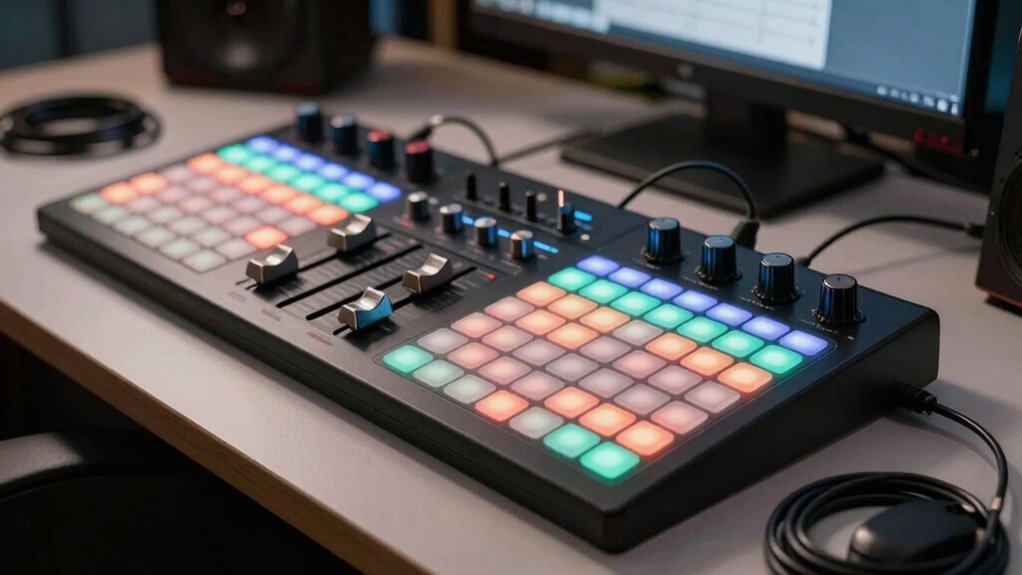
When you’re selecting a pad controller for beat making, you’ll need to evaluate several key factors: pad count and bank options that let you access enough sounds without excessive menu diving, connectivity and compatibility with your DAW and devices, and software bundle inclusions that determine whether you’re getting good value. Start by identifying how many pads you actually need based on your workflow—16 pads work for most producers, but some prefer 32 or 64 with bank switching for more creative flexibility. Check that your controller connects via USB or MIDI to your computer and compatible software, then verify what sounds, samples, or plugins come included in the package so you’re not paying extra for tools you already own.
Best Pad Controllers for Beat Making
Which features matter most in a pad controller depends on your workflow, budget, and setup. Start by identifying how many pads you need—16 pads suit basic beat-making, while 48 pads across 3 banks offer more clip and drum kit organization. Next, determine your software requirements. Check if your DAW works with class-compliant USB MIDI controllers or if you need bundled software like Ableton Live Lite. Then evaluate control surfaces: knobs and faders let you adjust parameters in real time, while note repeat and arpeggiators enhance expressiveness. Consider portability—compact USB-C powered models work for mobile production. Finally, assess velocity sensitivity and aftertouch capabilities for nuanced drum sounds. Match these features to your specific production style and workspace constraints.
Factors to Consider When Choosing Pad Controllers for Beat Making
Once you’ve identified your basic production needs, you’ll want to evaluate five core technical specifications that directly impact performance and workflow. First, assess pad sensitivity and velocity response—how the pads translate your touch into dynamic sound. Second, count the available pads and banks; most controllers offer 16 pads with 2–3 banks, giving you 32–48 total triggers for layering sounds. Third, examine RGB backlighting and color-coding features, which help you navigate and group sounds visually during sessions. Fourth, check connectivity options like USB, Bluetooth, MIDI In/Out, and USB-C for DAW compatibility and device flexibility. Finally, review software integration, including included editors, DAW mappings, and bundled instruments, since these determine how easily you’ll produce and control sounds.
Pad Count And Bank Options
How many pads do you actually need to control your sounds efficiently? Most pad controllers offer 8 to 64 pads, with 16 to 48 pads being standard for beat making. If you work with limited drum kits or single instruments, 16 pads suffice. For complex sequences and multiple drum sounds, 32 to 64 pads work better. Bank switching lets you access additional pad layouts without purchasing extra hardware—three banks give you 48 assignable pads total. Backlit RGB pads help you identify pad groups and bank assignments during live performance. Consider combining pad banks with knobs, faders, and encoders to expand your control options per bank. Larger pad counts reduce layout switching during sessions, keeping your workflow uninterrupted.
Connectivity And Compatibility
The right connection type and software support determine whether your pad controller integrates seamlessly into your setup or creates workflow friction. Check whether you need USB-C, USB-A, or USB-B connectivity based on your computer’s ports. Consider Bluetooth models if you want wireless studio-to-stage flexibility, but verify they still support USB for audio and MIDI transfer. Confirm your DAW—Ableton Live, Logic, or FL Studio—offers direct integration or auto-mapping to skip manual MIDI editing. Review whether the controller supports MIDI In/Out for connecting external gear, footswitches, or expression pedals. Test compatibility across Windows, macOS, iOS, and Android depending on your devices. Always verify editor software availability for adjusting mappings when auto-mapping isn’t available.
Software Bundle Inclusions
What software comes bundled with your pad controller can substantially reduce your initial setup costs and accelerate your production workflow. Many controllers include DAW licenses like Ableton Live Lite, Cubase LE, or MPC Beats to jumpstart production immediately. Check whether bundled software includes time-limited trials for services like Melodics or Splice, and verify activation requirements within your chosen DAW. Compare controller packages based on compatibility with major platforms—Ableton Live, Logic Pro, FL Studio, Cubase, and Pro Tools—to ensure seamless integration. Some devices offer editor apps that synchronize pad lighting with software layouts, enhancing on-screen mapping. Calculate total value by examining whether expansion packs and sample libraries come included or require separate purchases. Assess long-term licensing costs before deciding.
Portability And Build Quality
Your pad controller’s weight and dimensions directly determine whether you’ll actually transport it between studios, venues, and home setups. Controllers weighing under 0.6 kg with compact dimensions around 9×6×0.8 inches fit easily into bags and backpacks. Check the specific measurements before purchasing to ensure desk compatibility at different locations. Lightweight materials like plastic and aluminum frames provide durability without excess weight. Consider power requirements when evaluating portability: battery-powered models offer true wireless freedom, while USB-powered designs need consistent access to power sources. Wireless Bluetooth connectivity reduces cable clutter, though some models still require USB connections for data. Evaluate your typical work environment—if you move frequently between locations, prioritize lighter weight and smaller dimensions. Test the grip comfort during production to ensure you can work effectively during extended sessions.
Control Surface Features
How you’ll interact with your pad controller during production depends largely on its control surface features—the pads, knobs, faders, and buttons that let you manipulate sound in real time. Look for controllers with 8 to 16 RGB-backlit pads that offer velocity and aftertouch sensitivity, allowing you to trigger drums and melodic content expressively. Check for 4–8 assignable knobs and 1–4 faders to tweak parameters, effects, and mixer levels during performance. Multiple banks—typically 3—expand your total pads to 48, giving you access to larger drum kits or scenes. Some units include built-in transport controls, note repeat, arpeggiator, and scale or Drum Rack modes that streamline sequencing. Verify USB connectivity for plug-and-play setup, plus MIDI In/Out options for connecting additional gear.
Final Thoughts
You’ve reviewed 15 pad controllers designed for beat making. To select the right one, compare pad count (16–64), software compatibility with your DAW, and budget. Check whether you need portability, aftertouch sensitivity, or assignable knobs. Test models if possible before purchasing. Entry-level options like the Akai MPD218 suit beginners, while advanced producers benefit from the Native Instruments Maschine Mikro or Novation Launchpad Pro’s expanded features and integration capabilities.

Meet Ry, “TechGuru,” a 36-year-old technology enthusiast with a deep passion for tech innovations. With extensive experience, he specializes in gaming hardware and software, and has expertise in gadgets, custom PCs, and audio.
Besides writing about tech and reviewing new products, he enjoys traveling, hiking, and photography. Committed to keeping up with the latest industry trends, he aims to guide readers in making informed tech decisions.