

If you’re looking to optimize your viewing setup without mounting your TV to the wall, you’ll want to evaluate tabletop stands that balance stability, adjustability, and space efficiency. Your options range from compact 19-inch models to expansive 65-inch designs, each offering distinct features like swivel capabilities, cable management, and safety locks. The right choice depends on your TV size, room layout, and specific functional needs—all factors we’ll break down next.
| PERLESMITH Universal Swivel TV Stand 24-60 inch (PSTVS33) |

| Best Overall | Screen Size Compatibility: 24–60 inches | Weight Capacity: 99 lbs | VESA Compatibility: Up to 400x400mm | VIEW LATEST PRICE | Read Our Analysis |
| WKWKER Universal TV Stand for 27-65 Inch TVs |

| Premium Large Screen | Screen Size Compatibility: 27–65 inches | Weight Capacity: 88 lbs | VESA Compatibility: 75x75mm to 400x400mm | VIEW LATEST PRICE | Read Our Analysis |
| Rfiver Universal TV Stand for 27-60 Inch TVs |

| Best Stability | Screen Size Compatibility: 27–60 inches | Weight Capacity: 88 lbs | VESA Compatibility: Up to 400x400mm | VIEW LATEST PRICE | Read Our Analysis |
| Universal TV Stand for 27-60 Inch TVs |

| Best Value | Screen Size Compatibility: 27–60 inches | Weight Capacity: 88 lbs | VESA Compatibility: 100×100 to 400x400mm | VIEW LATEST PRICE | Read Our Analysis |
| Universal Swivel TV Stand for 19-43 Inch TVs |
| Compact Spaces | Screen Size Compatibility: 19–43 inches | Weight Capacity: 99 lbs | VESA Compatibility: 75×75 to 200x200mm | VIEW LATEST PRICE | Read Our Analysis |
More Details on Our Top Picks
PERLESMITH Universal Swivel TV Stand 24-60 inch (PSTVS33)
If you’re upgrading your living room setup without wall mounting, the PERLESMITH Universal Swivel TV Stand stands out as the top choice for most households. This stand accommodates 24–60 inch TVs up to 99 lbs, fitting LCD, LED, OLED, and Smart TV models. You’ll adjust height across 12 positions using four pillar heights and two bracket heights, raising the mounting plate up to 15.63 inches to match your seating level. The 50° swivel range lets you angle your screen left or right for optimal viewing throughout your room. The 8mm tempered glass base measures 14.17″ x 9.06″, providing stable support without wobbling. Assembly requires no drilling, and two included cable clips keep wiring organized behind the pillar.
- Screen Size Compatibility:24–60 inches
- Weight Capacity:99 lbs
- VESA Compatibility:Up to 400x400mm
- Swivel Range:50° (left/right)
- Height Adjustability:12 positions (4 pillar + 2 bracket heights)
- Base Material:8mm tempered glass
- Additional Feature:Lifetime warranty included
- Additional Feature:Reduces neck/eye strain
- Additional Feature:Cable management clips
WKWKER Universal TV Stand for 27-65 Inch TVs
Need a premium large-screen display solution without wall mounting? The WKWKER Universal TV Stand fits 27-65 inch TVs with VESA patterns up to 400x400mm and supports up to 88 lbs. You’ll get a tempered glass base with non-slip pads that keeps your TV stable on any surface. The stand features ±30° swivel capability for adjustable viewing angles and a 30-degree tilt function for height customization. Its durable steel bracket construction handles significant weight without wobbling. Assembly takes roughly 15 minutes using included screws and accessories. The black alloy steel and metal design suits living rooms, bedrooms, or home theaters. Since it’s freestanding, you can reposition it easily without permanent installation, making it ideal for apartments or temporary setups. WKWKER backs this stand with a 2-year manufacturer warranty.
- Screen Size Compatibility:27–65 inches
- Weight Capacity:88 lbs
- VESA Compatibility:75x75mm to 400x400mm
- Swivel Range:±30° (left/right)
- Height Adjustability:30-degree height adjust
- Base Material:Tempered glass with non-slip pads
- Additional Feature:2-year manufacturer warranty
- Additional Feature:Non-slip pad feet
- Additional Feature:15-minute setup time
Rfiver Universal TV Stand for 27-60 Inch TVs
The Rfiver Universal TV Stand delivers exceptional stability through its reinforced steel legs and center rod design, making it ideal for anyone upgrading from wall mounts or seeking a space-saving entertainment setup. You’ll benefit from six adjustable height settings to position your screen at optimal viewing levels. The stand accommodates TVs from 27 to 60 inches and supports up to 88 pounds, with VESA compatibility up to 400×400 mm. Its heavy-duty tempered glass base includes four non-slip feet that anchor securely to your desktop. The exclusive safety lock prevents accidental TV falls. You can place additional devices like speakers or streaming equipment on the base platform. Setup requires no drilling or wall damage—all necessary fittings come included for immediate installation.
- Screen Size Compatibility:27–60 inches
- Weight Capacity:88 lbs
- VESA Compatibility:Up to 400x400mm
- Swivel Range:No swivel mentioned
- Height Adjustability:6 adjustable height settings
- Base Material:Heavy-duty tempered glass with non-slip feet
- Additional Feature:Exclusive safety lock design
- Additional Feature:Base platform for devices
- Additional Feature:Non-slip feet anchoring
Universal TV Stand for 27-60 Inch TVs
Looking for versatility without premium pricing? This universal stand accommodates 27-60 inch TVs and supports up to 88 lbs. First, verify your TV’s VESA pattern among the eight compatible options (100×100 through 400×400). Next, assemble the tempered glass base using included tools in approximately 15 minutes. Then, mount your TV using the standard hardware provided. Adjust the stand to one of four height levels for optimal viewing. Finally, route cables through the integrated pass-through port for organization. This solution fits most major brands including Samsung, Sony, and LG, making it practical for various setups.
- Screen Size Compatibility:27–60 inches
- Weight Capacity:88 lbs
- VESA Compatibility:100×100 to 400x400mm
- Swivel Range:No swivel mentioned
- Height Adjustability:4 height levels
- Base Material:Black tempered glass
- Additional Feature:Integrated cable pass-through
- Additional Feature:World-class customer support
- Additional Feature:4 height levels
Universal Swivel TV Stand for 19-43 Inch TVs
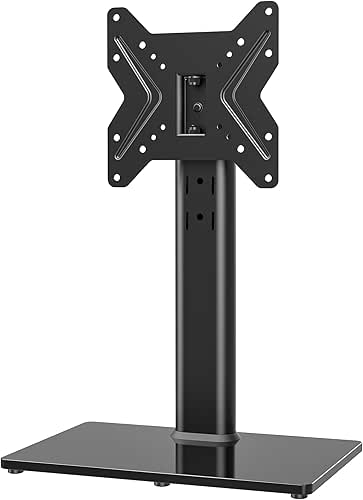
For anyone furnishing compact spaces, you’ll find this universal swivel stand accommodates TVs from 19 to 43 inches while occupying minimal footprint. The 8mm tempered glass base with steel construction supports up to 99 pounds. You’ll adjust the height across four levels to match your viewing preference. The stand swivels 45 degrees left and right for flexible positioning. Assembly takes about 15 minutes using included tools and TV screws. Cable management ports keep wires organized and hidden. The VESA compatibility ranges from 75x75mm to 200x200mm, fitting most major brands including Samsung, LG, and Sony. You’ll appreciate the straightforward setup and sturdy build for everyday use.
- Screen Size Compatibility:19–43 inches
- Weight Capacity:99 lbs
- VESA Compatibility:75×75 to 200x200mm
- Swivel Range:90° total (45° each side)
- Height Adjustability:4 height levels
- Base Material:8mm tempered glass
- Additional Feature:90-degree swivel capability
- Additional Feature:8mm tempered glass
- Additional Feature:Pass-through cable port
Factors to Consider When Choosing a Tabletop TV Stand
You’ll need to verify your TV’s screen size and weight against the stand’s specifications, checking that it supports your model within the listed range and weight capacity limits. Match your TV’s VESA mount pattern—the standard hole spacing on the back—to the stand’s mounting holes, and confirm that the stand offers the height adjustment and swivel range you need for your viewing setup. These compatibility checks prevent installation problems and ensure your TV sits at the right angle and distance from your seating area.
Screen Size Compatibility
What’s the first thing you should verify when selecting a tabletop TV stand? Check that the stand’s size range matches your TV’s screen size. Stands are designed for specific ranges—19–43 inches, 24–60 inches, or 27–65 inches, for example. Using a stand outside its specified range risks overhang or instability.
Next, confirm your TV’s weight falls within the stand’s maximum weight rating. This ensures safe support for your television and any mounted accessories. Then verify VESA compatibility by matching your TV’s mounting hole pattern to the stand’s mounting plate options. Finally, measure the stand’s base footprint and compare it to your TV size. A wider, sturdier base prevents tipping and maintains stability, especially for larger screens on smaller surfaces.
Weight Capacity Limits
Once you’ve confirmed your TV’s screen size and VESA compatibility, the next critical step is checking the stand’s weight capacity. Most tabletop stands support between 88 and 99 pounds, so you’ll need to verify your TV’s weight and add any attached peripherals like sound bars or streaming devices. Exceeding the weight limit causes instability, wobble, or tipping hazards. Check your TV’s manual or manufacturer’s website for the exact weight. Compare this total against the stand’s maximum capacity listed in its specifications. Some stands distinguish between static weight (stationary) and dynamic weight (with movement), so review both if specified. Always keep your combined load at or below the stated maximum to ensure safe, stable operation.
VESA Mount Standards
How do you know if a tabletop stand will actually fit your TV? You need to check your TV’s VESA mount pattern, which measures the distance between mounting holes on the back in millimeters. Common patterns range from 75×75 for smaller models to 400×400 for larger screens. First, locate your TV’s manual or specifications online to find its VESA configuration. Next, compare this pattern to the stand’s maximum VESA compatibility. The stand’s rating must match or exceed your TV’s pattern. Additionally, verify the stand’s weight capacity exceeds your TV’s actual weight. Confirm the mounting holes align properly with your TV’s configuration. This three-step verification—checking VESA pattern, comparing compatibility, and confirming alignment—ensures secure, stable mounting without risk of damage or instability.
Height Adjustment Options
Why should you care about height adjustment options? Proper screen height reduces neck strain and improves viewing comfort during extended use.
Most tabletop stands offer multiple discrete height positions—typically four to six levels—letting you match your screen to your seating arrangement. Some models provide up to 15–16 inches of vertical adjustment through adjustable uprights or pillars, accommodating different furniture heights without requiring remounting.
Check your stand’s height range against your chair or sofa dimensions to ensure comfortable eye alignment with the screen center. Verify that height adjustments work with your TV’s VESA pattern and weight capacity, maintaining secure positioning at every level.
Decide whether you prefer quick, tool-free adjustments or accept more involved assembly for your preferred height. This choice affects both setup time and future flexibility.
Swivel Range Flexibility
Beyond positioning your screen at the right height, you’ll also want to control its horizontal angle. Swivel range indicates how far your TV rotates left and right from its center position. Most tabletop stands offer swivel ranges between ±30° and ±45°, allowing you to angle the screen toward different seating areas. Some premium models feature full 360° rotation for complete room flexibility. When selecting a stand, evaluate your room layout and primary viewing positions. If you sit directly in front of the TV, a limited swivel works fine. For multiple seating angles or room corners, choose wider ranges. Check that the stand maintains stability at extended angles without wobbling, which prevents screen shake during adjustment and ensures consistent picture quality.
Base Stability Features
What makes a tabletop TV stand resistant to wobbling and tipping? You’ll want to examine four key features. First, check the base footprint—a wide base around 14” x 9″ distributes weight effectively and reduces tipping risk. Second, verify the materials: an 8mm tempered glass base combined with heavy-duty steel framework provides essential stability. Third, inspect the feet; non-slip pads prevent sliding and protect your desk surface. Fourth, look for center reinforcement like a reinforced rod or cross-support that lowers the center of gravity. Additionally, consider cable management systems. Organized cables prevent snagging that could destabilize your setup. Most quality stands support 88–99 lbs. By prioritizing these features, you’ll ensure your TV remains secure during adjustments and daily use.
Cable Management Solutions
Once you’ve secured your stand against wobbling, managing the cables running behind and around it becomes your next priority. Look for stands featuring integrated clips or channels along the back pillar and leg assemblies—these keep wires hidden and prevent snagging. Verify the stand includes enough accessible grommets or openings to route power, HDMI, and AV cables without excessive bending or crowding. Check whether the base design offers separate compartments to isolate power cables from signal cables, reducing electromagnetic interference and heat accumulation. Finally, confirm the cable management system doesn’t obstruct VESA mounting patterns or compromise height adjustment and swivel capabilities. A well-designed stand preserves full functionality while maintaining a clean, organized appearance.
Assembly Time Requirements
How much time should you expect to spend setting up your new tabletop TV stand? Most models require 15 to 20 minutes for complete assembly. You’ll attach the base, uprights, and mounting plate using included hardware and straightforward instructions. Many stands feature tool-free or minimal-tool design, eliminating the need for power drills or screwdrivers. Thorough kits come with all necessary screws and mounting components, so you won’t source additional parts elsewhere. Labeled hardware and step-by-step manuals guide you through each stage, reducing setup errors and confusion. Since these stands don’t require wall mounting or drilling, you avoid time-consuming modifications to your space. Plan your assembly in a clear workspace, gather all components beforehand, and follow the manual sequentially for fastest completion.
Final Thoughts
You’ve reviewed five compact tabletop TV stands offering different features for various room sizes. Choose based on your TV’s dimensions, desired swivel range, and stability needs. The PERLESMITH works well for larger screens with its adjustable pillars. The WKWKER suits standard setups with robust VESA compatibility. For smaller TVs, pick the 19-43 inch swivel stand. Verify your TV’s VESA pattern matches the stand before purchasing.

Meet Ry, “TechGuru,” a 36-year-old technology enthusiast with a deep passion for tech innovations. With extensive experience, he specializes in gaming hardware and software, and has expertise in gadgets, custom PCs, and audio.
Besides writing about tech and reviewing new products, he enjoys traveling, hiking, and photography. Committed to keeping up with the latest industry trends, he aims to guide readers in making informed tech decisions.