
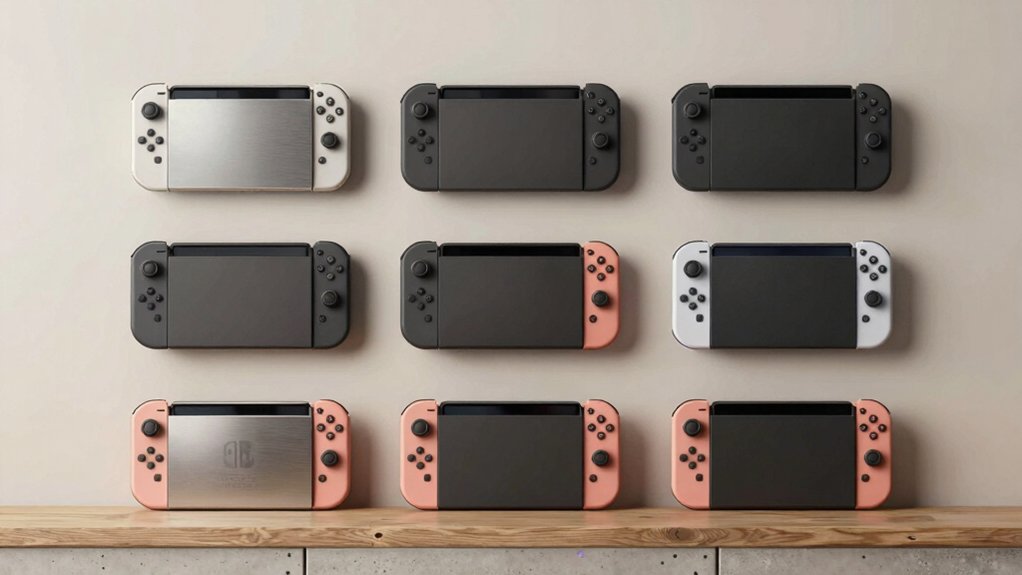

If you’re mounting your Switch 2 on a wall, you’ll need to choose between drill-free options for renters and permanent installations for owners. You’ll also decide whether you want basic mounting or added features like charging docks and game storage. Each mount type offers different benefits for space-saving and aesthetics. Understanding your specific needs—whether cable management or cooling matters most—will determine which solution works best for your setup.
| TotalMount Wall Mount for Nintendo Switch 2 |
| Most Trusted Brand | Primary Function: Wall mount storage with ventilation | Charging Capability: None | RGB/Lighting Features: None | VIEW LATEST PRICE | Read Our Analysis |
| Monzlteck Wall Mount Bracket for Switch 2 Dock |

| Best Metal Construction | Primary Function: Wall mount bracket for dock | Charging Capability: None | RGB/Lighting Features: None | VIEW LATEST PRICE | Read Our Analysis |
| Metal Wall Mount for Nintendo Switch Console & Controllers |

| Most Universal Compatible | Primary Function: Universal wall mount with controller storage | Charging Capability: None | RGB/Lighting Features: None | VIEW LATEST PRICE | Read Our Analysis |
| RGB Switch 2 Wall Mount Kit with Joycon Charger |
![[Switch 2/1/OLED Compatible] RGB Switch 2 (2025) Wall Mount Kit](https://m.media-amazon.com/images/I/51zYlgfjUdL._SL500_.jpg)
| Best All-in-One | Primary Function: Wall mount with charging station and RGB lighting | Charging Capability: Yes (6 Joy-Pads, 2 USB ports) | RGB/Lighting Features: Yes (15 RGB light modes) | VIEW LATEST PRICE | Read Our Analysis |
| FANPL Wall Mount Bracket for Nintendo Switch 2 |

| Best Storage Capacity | Primary Function: Wall mount bracket with accessory storage | Charging Capability: None | RGB/Lighting Features: None | VIEW LATEST PRICE | Read Our Analysis |
| Wall Mount for Nintendo Switch 2 with RGB Light |

| Best Charging Features | Primary Function: Wall mount charging dock with RGB lighting | Charging Capability: Yes (4 Joy-Cons via magnetic ports) | RGB/Lighting Features: Yes (7 RGB light modes) | VIEW LATEST PRICE | Read Our Analysis |
| Mcbazel Metal Wall Mount Kit for Nintendo Switch 2 |
| Best Heat Dissipation | Primary Function: Wall mount kit with heat dissipation | Charging Capability: None | RGB/Lighting Features: None | VIEW LATEST PRICE | Read Our Analysis |
| HIDEit Mounts Uni-SW Nintendo Switch 2 Wall Mount |

| Most Versatile Mount | Primary Function: Universal VESA-compatible wall mount | Charging Capability: None | RGB/Lighting Features: None | VIEW LATEST PRICE | Read Our Analysis |
| Switch 2 Wall Mount Charging Dock with Game Storage |

| Best Budget Option | Primary Function: Wall mount charging dock with game storage | Charging Capability: Yes (4 Joy-Cons via USB Type-C) | RGB/Lighting Features: None | VIEW LATEST PRICE | Read Our Analysis |
More Details on Our Top Picks
TotalMount Wall Mount for Nintendo Switch 2
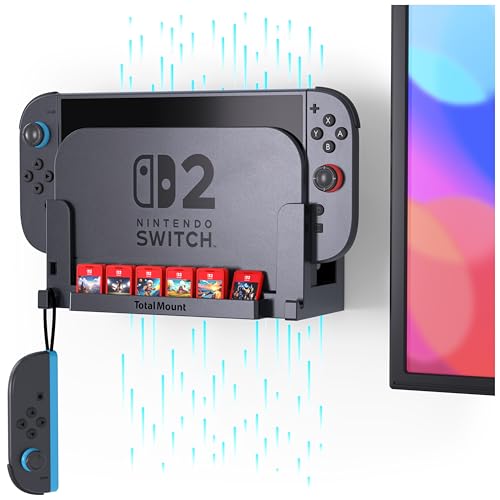
If you’re mounting your Switch 2 by your TV and want the most trusted brand in electronics mounting, the TotalMount Wall Mount delivers secure, vibration-free storage. Installation takes minutes: use the included level, grab a screwdriver, and choose between drill-free or standard mounting options. The premium plastic enclosure won’t interfere with Wi-Fi signals, while built-in dampers eliminate rattling during gameplay. Ventilation channels keep your Switch 2 cool during extended sessions. TotalMount, established in 2007 near Seattle with over 100 patents, backs this mount with a two-year money-back guarantee. You get reliable protection against accidental drops when inserting or removing your device.
- Primary Function:Wall mount storage with ventilation
- Charging Capability:None
- RGB/Lighting Features:None
- Game Card Storage:None
- Material Construction:Premium plastic
- Warranty Length:2 years (money-back guarantee)
- Additional Feature:Built-in level for installation
- Additional Feature:Vibration-reducing dampers included
- Additional Feature:Drill-free mounting option
Monzlteck Wall Mount Bracket for Switch 2 Dock
The Monzlteck Wall Mount Bracket delivers durable metal construction for gamers who want their Switch 2 dock mounted securely without taking up shelf or table space. The black metal bracket features a matte coating that resists scratches and maintains a clean appearance. Installation includes all necessary hardware and takes minimal effort. The left-side positioning organizes cables neatly behind your TV. A controller strap hook provides convenient storage for your controllers. The bracket’s contoured design keeps your Switch 2 dock firmly in place, preventing drops and slips. You’ll receive a five-year warranty with this purchase.
- Primary Function:Wall mount bracket for dock
- Charging Capability:None
- RGB/Lighting Features:None
- Game Card Storage:None
- Material Construction:Metal with matte coating
- Warranty Length:5 years
- Additional Feature:Controller strap hook organizer
- Additional Feature:Scratch-resistant matte coating
- Additional Feature:Left-side cable management
Metal Wall Mount for Nintendo Switch Console & Controllers
Mount your Nintendo Switch 2, standard Switch, or Switch OLED with one universal metal wall mount that accommodates all three models. This mount includes two hooks for controllers and one dedicated holder, letting you secure your console, two Joy-Cons, and one Pro Controller simultaneously. The cushioned strips prevent your dock from shifting, while ventilation holes reduce overheating risks. Installation requires six included screws and takes minutes with the bubble level provided. You can mount the console and controller sections together or separately based on your space. The metal design frees up to 80% of your entertainment center while keeping your system away from children and pets.
- Primary Function:Universal wall mount with controller storage
- Charging Capability:None
- RGB/Lighting Features:None
- Game Card Storage:None
- Material Construction:Metal with cushioned strips
- Warranty Length:Not specified
- Additional Feature:Holds 2 Joy-Cons simultaneously
- Additional Feature:4 cushioned strips included
- Additional Feature:Mount separately or together
RGB Switch 2 Wall Mount Kit with Joycon Charger
Want one wall fixture that charges controllers, stores game cards, and displays your console with customizable lighting? The FASTSNAIL RGB Switch 2 Wall Mount Kit combines an 8-in-1 charging station with 15 RGB light modes. Mount it behind your TV or on a desktop using the included wall plate and anti-slip pads. The station charges up to 6 controllers via two USB 2.0 ports, stores 10 game cards, and holds your Switch console. Switch between 7 monochrome and 8 dynamic color modes by pressing the control button. Long-press for 3 seconds to lock your preferred color. An LED indicator shows orange during charging and blue when fully charged.
- Primary Function:Wall mount with charging station and RGB lighting
- Charging Capability:Yes (6 Joy-Pads, 2 USB ports)
- RGB/Lighting Features:Yes (15 RGB light modes)
- Game Card Storage:Yes (10 card slots)
- Material Construction:Metal and plastic
- Warranty Length:12 months
- Additional Feature:Holds 10 game cards
- Additional Feature:15 RGB light modes
- Additional Feature:Stores 6 Joy-Pad controllers
FANPL Wall Mount Bracket for Nintendo Switch 2
Looking for a wall mount that stores your entire Switch 2 setup? The FANPL Wall Mount Bracket holds your console, docking station, and both Joy-Con and Pro Controllers in three separate compartments. It’s made from composite metal that resists rust and includes a perforated bottom design for heat dissipation when connected to power. Installation varies by wall type: wooden structures require no extra tools, while concrete walls need drilling equipment. You’ll receive the bracket, installation kit, and customer support. With a 4.8-star rating from 21 reviews, it’s compatible with Switch 2, Switch 2017, and Switch OLED models, effectively reducing console clutter.
- Primary Function:Wall mount bracket with accessory storage
- Charging Capability:None
- RGB/Lighting Features:None
- Game Card Storage:None
- Material Construction:Composite metal
- Warranty Length:Not specified
- Additional Feature:Perforated bottom heat dissipation
- Additional Feature:3-compartment storage design
- Additional Feature:Wooden structure installation possible
Wall Mount for Nintendo Switch 2 with RGB Light
Gamers who need simultaneous Joy-Con charging alongside wall-mounted console storage will find superior charging capabilities in this 2-in-1 system. Mount the detachable dock on your wall near the TV or place it on your desk, depending on your space. Snap up to four Joy-Cons into the magnetic charging ports and watch the orange LED indicator confirm charging status. Switch the light to green when controllers reach full charge. Choose from seven RGB modes—breathing, flashing, or solid colors in red, green, blue, or white—then long-press the power button to disable lighting without stopping the charge. Store four game cards in the dedicated slots. This setup keeps your gaming area organized and functional.
- Primary Function:Wall mount charging dock with RGB lighting
- Charging Capability:Yes (4 Joy-Cons via magnetic ports)
- RGB/Lighting Features:Yes (7 RGB light modes)
- Game Card Storage:Yes (4 game card slots)
- Material Construction:Metal and plastic
- Warranty Length:Not specified
- Additional Feature:Magnetic Joy-Con charging ports
- Additional Feature:Detachable charging dock included
- Additional Feature:Holds 4 game cards
Mcbazel Metal Wall Mount Kit for Nintendo Switch 2
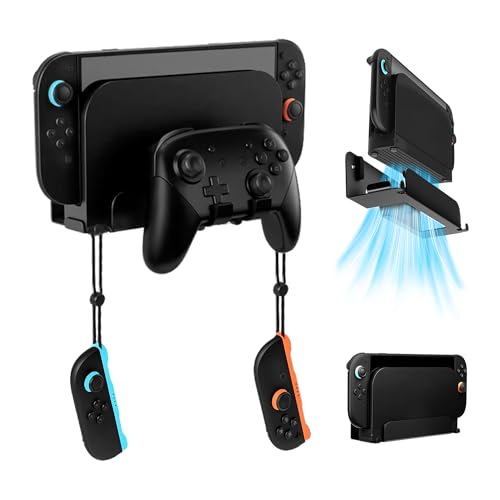
Need superior cooling while mounting your Switch 2 behind your TV? The Mcbazel Metal Wall Mount Kit delivers both functionality and durability. This solid metal bracket features a powder-coated surface that resists rusting and chipping, plus a hollow-out design with a large bottom vent for heat dissipation. Installation requires you to place the bracket horizontally, align it with your wall, then tighten the fixing screws using the included hardware. The kit arrives with essential wall plugs—critical safety components you must use for secure mounting. At 8.35 x 2.76 x 2.56 inches, this black mount accommodates your Switch 2 console, dock, Joy-Cons, and Switch Pro controller, keeping everything organized near your TV.
- Primary Function:Wall mount kit with heat dissipation
- Charging Capability:None
- RGB/Lighting Features:None
- Game Card Storage:None
- Material Construction:Solid metal with powder-coat
- Warranty Length:Not specified
- Additional Feature:Large bottom vent design
- Additional Feature:Powder-coated rust-resistant surface
- Additional Feature:Horizontal dock placement support
HIDEit Mounts Uni-SW Nintendo Switch 2 Wall Mount
The HIDEit Mounts Uni-SW is the most versatile mount for organizing your entertainment setup behind your TV. This American-made steel mount fits Nintendo Switch 2 consoles and other devices within 3-9 inches height and 4-10 inches length. You’ll install it in three easy steps without needing a drill or templates. The 16-gauge cold-rolled steel with powder-coat finish resists rust and scratches while maintaining signal functionality for infrared, RF, and Bluetooth devices. Universal VESA compatibility lets you mount modems, routers, or cable boxes alongside your Switch 2, effectively hiding cords and reducing clutter behind your display.
- Primary Function:Universal VESA-compatible wall mount
- Charging Capability:None
- RGB/Lighting Features:None
- Game Card Storage:None
- Material Construction:16-gauge cold-rolled steel
- Warranty Length:30-day return guarantee
- Additional Feature:VESA-compatible universal mounting
- Additional Feature:Made in USA option
- Additional Feature:Maintains IR/RF signal functionality
Switch 2 Wall Mount Charging Dock with Game Storage
For console owners who want affordable space-saving solutions, this wall mount charging dock combines multiple functions into one compact unit. You’ll mount it behind your TV using five included screws and a liquid level for proper alignment. The dock charges four Joy-Con controllers simultaneously while storing up to four games in dedicated slots. Its lightweight ABS construction supports your Switch 2 securely without requiring a desk stand. The USB Type-C charger delivers 5V, 2A output through a single port. Installation takes minimal time, and the consolidated setup eliminates table clutter while improving airflow around your console for better heat dissipation.
- Primary Function:Wall mount charging dock with game storage
- Charging Capability:Yes (4 Joy-Cons via USB Type-C)
- RGB/Lighting Features:None
- Game Card Storage:Yes (4 game slots)
- Material Construction:ABS plastic
- Warranty Length:30-day return policy
- Additional Feature:Charges 4 Joy-Cons simultaneously
- Additional Feature:Includes liquid level tool
- Additional Feature:4 game card slots
Factors to Consider When Choosing a 2 Switch Wall Mount
When selecting a Switch 2 wall mount, you’ll need to verify compatibility with your specific Switch model, evaluate the material quality and construction durability, assess the installation difficulty for your skill level, and check the heat management features to protect your device. Consider whether the mount accommodates your Switch’s size and weight, uses sturdy materials like reinforced plastic or metal, requires simple adhesive application or complex wall drilling, and includes ventilation slots or spacing to prevent overheating. These factors work together to determine whether a mount will securely hold your console, last through regular use, fit your installation preferences, and keep your device safe during extended play sessions.
Factors to Consider When Choosing Switch 2 Wall Mount
What matters most when selecting a Switch 2 wall mount? First, confirm compatibility specifically with Switch 2—avoid older models designed for the 1st Gen, OLED, or Lite versions. Second, determine your mounting location: behind your TV, on a desktop, or both. Third, examine the mounting type and installation requirements, checking for built-in levels that simplify setup. Fourth, assess material durability by comparing metal versus plastic construction and reviewing weight limits. Fifth, evaluate ventilation features and damper systems that reduce rattling during gameplay. Sixth, verify included hardware: mounting plates, screws, cable management accessories, and installation tools. Finally, check warranty length and customer support options. These factors ensure you select a mount that fits your space, supports your console safely, and lasts long-term.
Compatibility With Switch Models
Before you buy a wall mount, you’ll need to verify which Switch models it actually supports—this step matters because dimensions and dock designs differ across generations. Check the product listing for compatibility labels listing Switch 2, Switch 2017, Switch OLED, or Switch Lite. Some mounts support all models with adjustable mounting options and no port blocking. Others target only Switch 2 or combine Switch 2 with one previous generation to ensure proper dock fit and clearance. A few explicitly exclude certain models like Switch Lite or original OLED due to size differences. Look for triple-function features—charging, storage, and ventilation—that are tailored to your specific Switch model’s dimensions. Matching your device type to the mount’s design prevents installation problems and ensures safe, functional wall mounting.
Material And Construction Quality
How you choose your wall mount’s material directly affects its durability, heat management, and longevity. Metal builds made from steel or alloy provide superior strength and rigid support, making them ideal for heavier devices. Apply powder-coated or rust-resistant finishes to prevent corrosion and chipping over extended use. For ventilation, select metal designs with perforations that enhance airflow and mitigate overheating risks. If you prefer plastic enclosures, choose premium options that won’t interfere with your Switch 2’s Wi-Fi antenna performance. Composite metal combines benefits of both materials, offering balanced durability and heat dissipation. Evaluate your space constraints and climate conditions before deciding. Metal suits humid environments, while quality plastic works well in standard indoor settings. Match material choice to your usage patterns and environmental factors for optimal performance.
Installation Difficulty Level
Installation difficulty can make or break your wall mount experience, so you’ll want to assess several key factors before committing to a purchase. First, check whether the mount requires drilling or offers drill-free installation. Drill-free options simplify setup, though some systems need drilling for secure attachment. Next, verify that the kit includes complete mounting hardware—screws, anchors, and brackets—so you won’t need additional purchases. Look for mounts advertising tool-free adjustments or minimal tool requirements like only a screwdriver. Finally, confirm the installation method matches your wall type, whether drywall with studs or concrete, ensuring proper support and safety. Some mounts include a built-in level to guarantee accurate alignment during installation, which streamlines the process considerably.
Heat Management And Ventilation
Why does your Switch 2’s thermal performance matter when you’re selecting a wall mount? Heat buildup damages hardware and reduces console lifespan. Choose mounts with built-in ventilation channels or perforated designs that promote airflow around your device during gaming sessions. Ventilated metal or plastic enclosures dissipate heat more effectively than solid housings. Look for mounts featuring bottom or side venting paths to enhance natural convection while your console sits docked or stored. Position the mount away from obstructed air pockets to minimize overheating risk. Verify the mount doesn’t block your Switch 2’s heat vents or Wi-Fi antennas, since obstruction compromises both thermal performance and connectivity. These ventilation considerations directly impact your console’s reliability and longevity.
Storage And Accessory Organization
When you’re mounting your Switch 2 on a wall, you’ll want to contemplate how you’ll store and organize all the accessories that come with it. Look for mounts featuring dedicated compartments for Joy-Cons, Pro Controllers, and game cards. These specialized slots keep your items organized and within arm’s reach. Choose models with built-in cable management channels on the left or right side to eliminate tangled wires behind your TV. Multiple storage holders maximize your space efficiency. Verify that cushioned or anti-slip features secure your dock and accessories, preventing drops during access. Ensure you can reach frequently used items without removing the Switch itself. This approach consolidates your gaming setup into one functional, organized location.
Final Thoughts
You’ve reviewed nine wall mount options for your Switch 2. To choose the right one, evaluate your space, mounting surface, and needs. Decide between drill-free and permanent installation. Check if you want charging capability, storage, or RGB features. Verify compatibility with your Switch model. Compare prices and read user reviews. Once you’ve selected your mount, follow the manufacturer’s installation instructions carefully to ensure secure placement and optimal performance.

Meet Ry, “TechGuru,” a 36-year-old technology enthusiast with a deep passion for tech innovations. With extensive experience, he specializes in gaming hardware and software, and has expertise in gadgets, custom PCs, and audio.
Besides writing about tech and reviewing new products, he enjoys traveling, hiking, and photography. Committed to keeping up with the latest industry trends, he aims to guide readers in making informed tech decisions.