

You need a hardware firewall that actually stops threats. To pick the right one, you’ll evaluate throughput, security layers, and total cost. Key features include multi-layered threat prevention, IDS/IPS technology, and concurrent session capacity. You’ll also consider management options and redundancy features. The five models we’re covering offer different strengths—but which one matches your specific network demands?
| TP-Link ER605 V2 Gigabit VPN Router |

| Best for SMBs | VPN Support: Up to 20 LAN-to-LAN IPsec, 16 OpenVPN, 16 L2TP, 16 PPTP connections | Ethernet Ports: Five Gigabit ports (1 WAN, 2 WAN/LAN, 2 LAN) | Firewall Throughput: Up to 1 Gbps WAN/LAN throughput | VIEW LATEST PRICE | Read Our Analysis |
| TP-Link ER707-M2 Multi-Gigabit VPN Router |

| Best Performance | VPN Support: Up to 100 LAN-to-LAN IPsec, 66 OpenVPN, 60 L2TP, 60 PPTP connections | Ethernet Ports: Dual 2.5 Gigabit WAN, 2.5G WAN/LAN, 4 Gigabit WAN/LAN, 1 Gigabit SFP WAN/LAN | Firewall Throughput: High-capacity multi-gigabit throughput with 500,000 concurrent sessions | VIEW LATEST PRICE | Read Our Analysis |
| Ubiquiti Cloud Gateway Ultra (UCG-Ultra) |

| Best Management | VPN Support: Not specified | Ethernet Ports: 5 ports with 1 Gbps connectivity | Firewall Throughput: 1 Gbps routing with IDS/IPS | VIEW LATEST PRICE | Read Our Analysis |
| Protectli Vault FW4B Firewall Micro Appliance Mini PC |
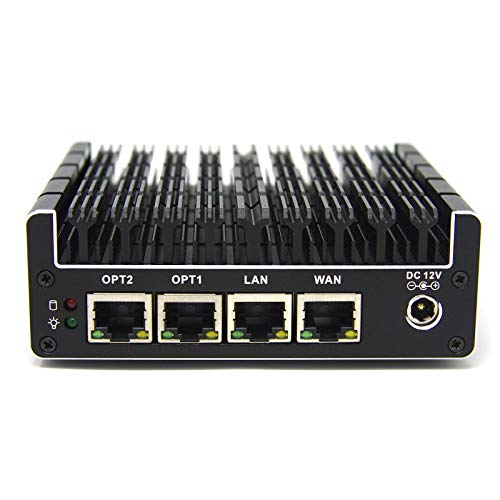
| Best Budget Pick | VPN Support: Compatible with open-source firewall solutions (pfSense, OPNsense, Untangle) | Ethernet Ports: 4x Intel Gigabit Ethernet ports | Firewall Throughput: Varies by OS/software configuration | VIEW LATEST PRICE | Read Our Analysis |
| SonicWall TZ270 Gen7 Firewall SMB Security Appliance |

| Best Enterprise Features | VPN Support: Site-to-site VPN capabilities | Ethernet Ports: Eight Gigabit Ethernet interfaces | Firewall Throughput: Up to 2 Gbps firewall throughput | VIEW LATEST PRICE | Read Our Analysis |
More Details on Our Top Picks
TP-Link ER605 V2 Gigabit VPN Router
How do you protect multiple office locations without overspending on network security? The TP-Link ER605 V2 handles this through multi-WAN capability and integrated Omada SDN management. You’ll connect up to three WAN ports for load balancing and bandwidth optimization across locations. The router supports 20 LAN-to-LAN IPsec connections, letting you link remote offices securely. You’re also covered with advanced firewall policies, DoS defense, and IP/MAC/URL filtering. It delivers 1 Gbps throughput on wired connections and includes VPN pass-through for additional protection. Five Gigabit ports provide flexible configuration for your network layout. The five-year warranty backs your investment in enterprise-grade security without enterprise-level costs.
- VPN Support:Up to 20 LAN-to-LAN IPsec, 16 OpenVPN, 16 L2TP, 16 PPTP connections
- Ethernet Ports:Five Gigabit ports (1 WAN, 2 WAN/LAN, 2 LAN)
- Firewall Throughput:Up to 1 Gbps WAN/LAN throughput
- Multi-WAN/Load Balancing:Up to 3 WAN ports with load balancing capability
- Advanced Threat Protection:DoS defense, IP/MAC/URL filtering, SPI firewall, VPN pass-through
- Warranty:5-year manufacturer warranty
- Additional Feature:USB WAN mobile broadband support
- Additional Feature:Omada SDN integration
- Additional Feature:Up to 3 WAN ports
TP-Link ER707-M2 Multi-Gigabit VPN Router
Want a hardware firewall that handles high-traffic networks without slowing down? The TP-Link ER707-M2 Multi-Gigabit VPN Router delivers. It features dual 2.5 Gigabit WAN ports for flexible connectivity and supports up to 500,000 concurrent sessions, making it suitable for organizations with 1,000+ clients. You’ll get integrated Omada SDN management, allowing you to monitor multiple sites from one interface anywhere. The router handles 100 LAN-to-LAN IPsec connections, 66 OpenVPN tunnels, 60 L2TP, and 60 PPTP connections simultaneously. Its configurable ports—including four Gigabit WAN/LAN slots and one SFP port—let you customize your network setup. USB 2.0 support enables LTE backup through dongles for redundancy. TP-Link includes a five-year warranty and weekday technical support.
- VPN Support:Up to 100 LAN-to-LAN IPsec, 66 OpenVPN, 60 L2TP, 60 PPTP connections
- Ethernet Ports:Dual 2.5 Gigabit WAN, 2.5G WAN/LAN, 4 Gigabit WAN/LAN, 1 Gigabit SFP WAN/LAN
- Firewall Throughput:High-capacity multi-gigabit throughput with 500,000 concurrent sessions
- Multi-WAN/Load Balancing:Dual 2.5 Gigabit WAN ports with load balancing
- Advanced Threat Protection:Omada SDN with centralized management
- Warranty:5-year warranty with free technical support (6am–6pm PST, Monday–Friday)
- Additional Feature:Dual 2.5 Gigabit WAN ports
- Additional Feature:500,000 maximum concurrent sessions
- Additional Feature:Cloud-based centralized management
Ubiquiti Cloud Gateway Ultra (UCG-Ultra)
The Ubiquiti Cloud Gateway Ultra (UCG-Ultra) is your top choice if you’re managing a growing network that demands centralized control without complexity. This device runs UniFi Network Controller software, letting you manage 30+ devices and 300+ clients from one dashboard. You’ll get 1 Gbps routing with built-in IDS/IPS security, multi-WAN load balancing for connection redundancy, and high-level firewall protection. The gateway connects via five Ethernet ports and runs on 24-volt USB-C power. Its internal antenna design keeps your setup clean while delivering reliable wired network coverage for business or enterprise environments.
- VPN Support:Not specified
- Ethernet Ports:5 ports with 1 Gbps connectivity
- Firewall Throughput:1 Gbps routing with IDS/IPS
- Multi-WAN/Load Balancing:Multi-WAN load balancing
- Advanced Threat Protection:High firewall security level with multiple security protocols
- Warranty:Warranty information not available
- Additional Feature:Manages 30+ UniFi devices
- Additional Feature:USB-C powered with adapter
- Additional Feature:0.96 LCM status display
Protectli Vault FW4B Firewall Micro Appliance Mini PC
Looking for a compact firewall that won’t drain your budget? The Protectli Vault FW4B delivers solid protection in a fanless design. You’ll get an Intel Quad Core processor with AES-NI encryption support, 8GB RAM, and 120GB SSD storage. The device features four Gigabit Ethernet ports for network connectivity and supports popular open-source firewalls like pfSense and OPNsense. You install your preferred OS yourself since none comes pre-loaded. The unit measures just 4.5 x 4.3 x 1.5 inches, fitting easily into tight spaces. Protectli backs it with a 30-day money-back guarantee and US-based support. This micro appliance handles essential network security without requiring extensive hardware investment or replacement soon.
- VPN Support:Compatible with open-source firewall solutions (pfSense, OPNsense, Untangle)
- Ethernet Ports:4x Intel Gigabit Ethernet ports
- Firewall Throughput:Varies by OS/software configuration
- Multi-WAN/Load Balancing:Depends on installed OS
- Advanced Threat Protection:AES-NI hardware acceleration, Intel VT-x virtualization
- Warranty:30-day money-back guarantee
- Additional Feature:Intel AES-NI hardware acceleration
- Additional Feature:Fanless, silent convection cooling
- Additional Feature:Open-source OS compatibility
SonicWall TZ270 Gen7 Firewall SMB Security Appliance
Small businesses and branch offices need affordable enterprise-grade security without complexity. The SonicWall TZ270 Gen7 delivers this through eight Gigabit Ethernet interfaces and up to 2 Gbps firewall throughput. You’ll get threat prevention at 750 Mbps, supporting 750,000 concurrent connections for growing cloud usage. The appliance uses Reassembly-Free Deep Packet Inspection and Real-Time Deep Memory Inspection to defend against ransomware and malware. It decrypts TLS 1.3 traffic to inspect encrypted threats. Zero-Touch deployment reduces your IT workload during rollout. Built-in SD-WAN and site-to-site VPN secure hybrid work environments. This entry-level Gen 7 option provides scalable security without included subscriptions, making it cost-effective for expanding networks.
- VPN Support:Site-to-site VPN capabilities
- Ethernet Ports:Eight Gigabit Ethernet interfaces
- Firewall Throughput:Up to 2 Gbps firewall throughput
- Multi-WAN/Load Balancing:Built-in SD-WAN with multi-WAN support
- Advanced Threat Protection:Deep Packet Inspection, Real-Time Memory Inspection, TLS 1.3 decryption, Capture ATP cloud sandboxing
- Warranty:Warranty details not specified
- Additional Feature:Zero-Touch deployment capability
- Additional Feature:Built-in SD-WAN functionality
- Additional Feature:TLS 1.3 traffic decryption
Factors to Consider When Choosing Hardware Firewalls
When you’re selecting a hardware firewall, you’ll need to assess your throughput and performance needs based on your network’s data volume, examine port configuration and flexibility to match your current devices and future growth, and evaluate VPN capacity requirements if your team uses remote connections. Next, you should review the management and deployment options available—whether you prefer cloud-based control, on-premises management, or hybrid approaches—and determine which fits your IT infrastructure. Finally, compare the security feature comprehensiveness across candidates, checking for intrusion prevention, threat detection, content filtering, and other protections your organization requires to meet its risk standards.
Throughput And Performance Needs
How much data will your firewall need to handle? Match your throughput requirements to the maximum data rate your network demands. Vendors typically advertise speeds like 1 Gbps or higher for WAN and LAN throughput to prevent bottlenecks.
Understand that real-world performance drops below advertised speeds when you enable security features. IPS, TLS decryption, and threat prevention all reduce usable throughput. Plan your capacity around these enabled features, not theoretical maximums.
Consider your network’s concurrent connections. Hundreds of thousands of simultaneous connections directly impact performance during heavy, distributed, or cloud-heavy traffic.
For larger networks, evaluate multi-WAN load balancing and failover capabilities. These features affect throughput during aggregated traffic spikes. Size your firewall to handle your expected security workloads, not just peak bandwidth.
Port Configuration And Flexibility
Your firewall’s port configuration determines whether you can support failover connections, load balance traffic across multiple internet links, and segment your network into secure zones. Evaluate how many WAN ports you need for separate internet connections and whether you’ll mix 1 Gbps with multi-gig speeds. Consider USB WAN/LTE ports for mobile backup options that activate when primary connections fail. Assess SFP ports and 10G uplinks if your network requires high-speed core traffic. Decide whether dedicated WAN ports or flexible WAN/LAN ports better suit your security design. Dedicated ports simplify routing but reduce flexibility, while shared ports let you repurpose connections as your network grows. Match your port selection to current demands and anticipated expansion.
VPN Capacity Requirements
What matters most in a hardware firewall’s VPN performance? You need to evaluate concurrent connection capacity, which determines how many remote users can connect simultaneously. Check the specifications for IPsec, L2TP, OpenVPN, and PPTP session limits—aim for at least dozens of tunnels if you support remote work. Next, examine throughput ratings for VPN traffic, typically measured in Gbps. A 1 Gbps aggregate or higher prevents bottlenecks during peak usage. Consider whether the firewall supports multi-WAN load balancing, which distributes encrypted sessions across multiple links and increases total capacity. Finally, verify hardware acceleration features like AES-NI cryptographic engines, which significantly boost encryption and decryption speeds. Match these specifications to your organization’s current user count and projected growth.
Management And Deployment Options
When you’re selecting a hardware firewall, the management and deployment capabilities you choose will directly impact how efficiently your IT team can configure, monitor, and scale the system across your organization. Look for centralized management platforms—either cloud-based or on-premises controllers—that let you oversee multiple sites remotely. SDN integration like Omada or UniFi streamlines policy enforcement and device onboarding. Evaluate zero-touch deployment features, which allow you to provision new devices without sending IT staff on-site. Check compatibility with multiple WAN/LAN ports and load balancing to support multi-site setups reliably. Confirm support for various operating systems and virtualization platforms such as pfSense, OPNsense, or cloud controllers to extend your management workflows effectively.
Security Feature Comprehensiveness
How do you know if a hardware firewall truly protects your network against today’s threats? Look for comprehensive security features that address multiple attack vectors. Check whether the device includes advanced firewall policies, DoS protection, and IP/MAC/URL filtering. Verify VPN support for LAN-to-LAN, OpenVPN, L2TP, and PPTP connections to secure remote access. Examine whether it offers IDS/IPS capabilities and SSL/TLS decryption, including TLS 1.3 support, to inspect encrypted traffic. Confirm anti-malware and ransomware defense features are present. Review the firewall throughput rating—devices with 2 Gbps or higher often bundle advanced threat prevention. Ensure the firewall includes memory inspection (RTDMI) and sandboxing technology like Capture ATP. These layered protections detect and block sophisticated threats while maintaining service availability.
Budget And Total Cost
You’ll find that the true expense of a hardware firewall extends far beyond the initial purchase price. Calculate total cost of ownership by adding the upfront cost, annual licensing fees, subscription services, and support expenses over the device’s expected lifespan. Higher-performance models with multi-Gigabit WAN and advanced threat prevention demand substantially larger budgets. Factor in power consumption and cooling costs for 24/7 operation in your facility. Review warranty length and included support services—longer warranties reduce potential repair and replacement costs. Some firewalls bundle security services or cloud management, lowering separate licensing fees but requiring long-term commitments. Compare these bundled options against purchasing services separately to determine which approach saves money for your specific needs.
Final Thoughts
You’ll want to evaluate each firewall based on your specific needs: throughput requirements, budget, and security features. Compare the TP-Link options for basic protection, Ubiquiti for scalability, Protectli for compact setups, and SonicWall for advanced threat prevention. Check throughput specs, concurrent session capacity, and management options. Calculate total cost including warranties and services. Select the model that matches your network demands and security priorities without overspending on unnecessary features.

Meet Ry, “TechGuru,” a 36-year-old technology enthusiast with a deep passion for tech innovations. With extensive experience, he specializes in gaming hardware and software, and has expertise in gadgets, custom PCs, and audio.
Besides writing about tech and reviewing new products, he enjoys traveling, hiking, and photography. Committed to keeping up with the latest industry trends, he aims to guide readers in making informed tech decisions.