
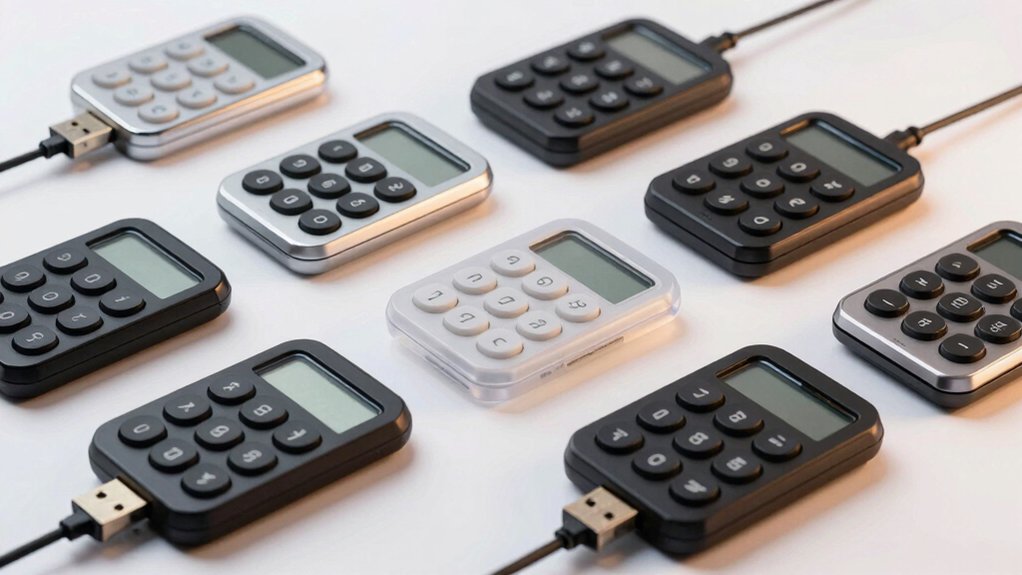

If you spend hours entering data or managing spreadsheets on your laptop, a USB number keypad can transform your workflow. You’ll type numbers faster, reduce mouse reliance, and minimize wrist strain—all while keeping your main keyboard untouched. Whether you need a wired model for reliability or a wireless pad for mobility, you’ve got solid options. The right keypad depends on your specific needs, budget, and work style.
| TechGarden Wired USB Numeric Keypad with Big Print Letters |

| Best for Accessibility | Connection Type: Wired USB | Number of Keys: 19 keys | Power Source: USB powered | VIEW LATEST PRICE | Read Our Analysis |
| NOOX USB Numeric Keypad Portable Mini Keyboard |

| Most Portable | Connection Type: Wired USB | Number of Keys: 18 keys | Power Source: USB powered | VIEW LATEST PRICE | Read Our Analysis |
| Foloda Wireless Numeric Keypad 22 Keys 2.4GHz |
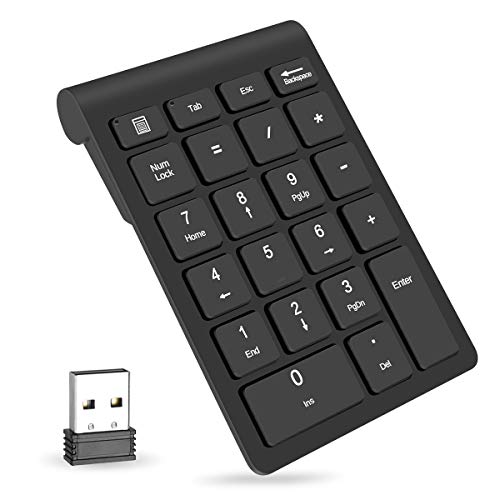
| Most Feature-Rich | Connection Type: Wireless 2.4 GHz | Number of Keys: 22 keys | Power Source: 2 x AAA batteries | VIEW LATEST PRICE | Read Our Analysis |
| NOOX Wireless Numeric Keypad USB 10-Key |

| Best Wireless Option | Connection Type: Wireless 2.4 GHz | Number of Keys: 10 keys | Power Source: Battery powered | VIEW LATEST PRICE | Read Our Analysis |
| Wireless Number Pad with Battery (23 Keys) |

| Best Battery Life | Connection Type: Wireless 2.4 GHz | Number of Keys: 23 keys | Power Source: Battery powered (included) | VIEW LATEST PRICE | Read Our Analysis |
| Nulea Wireless Bluetooth Numeric Keypad USB-C Rechargeable |

| Premium Multi-Device | Connection Type: Wireless Bluetooth 5.0 + 2.4 GHz | Number of Keys: Full-size numeric layout | Power Source: USB-C rechargeable | VIEW LATEST PRICE | Read Our Analysis |
| Kadaon USB Numeric Keypad for Laptop/PC |
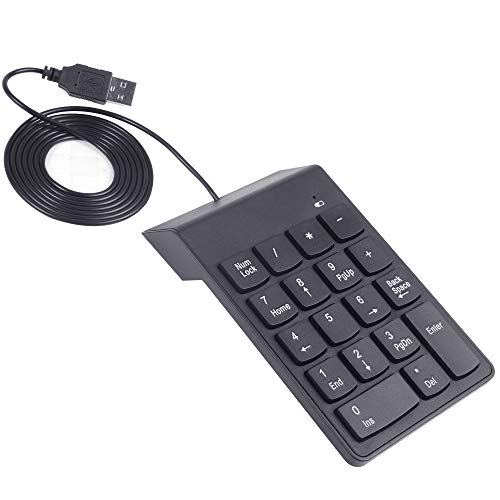
| Best Budget Pick | Connection Type: Wired USB | Number of Keys: 18 keys | Power Source: USB powered | VIEW LATEST PRICE | Read Our Analysis |
| Perixx PPD-202 Wired Numeric Keypad with Big Print |
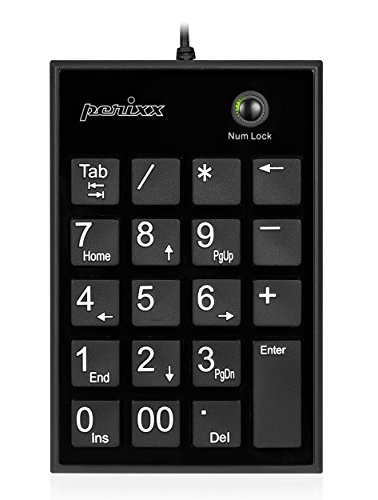
| Best Design | Connection Type: Wired USB | Number of Keys: 19 keys | Power Source: USB powered | VIEW LATEST PRICE | Read Our Analysis |
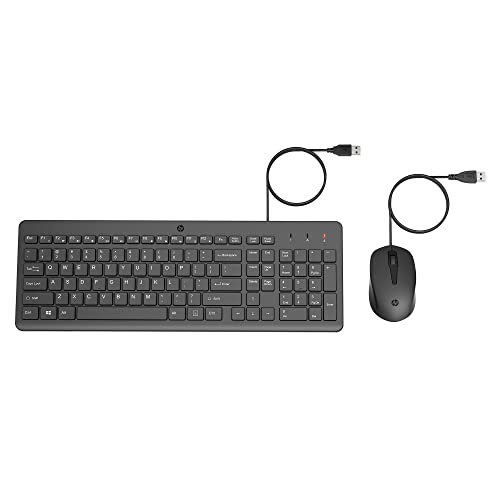
| HP 150 Wired Mouse and Keyboard Combo |
| Best All-in-One | Connection Type: Wired USB | Number of Keys: Full-size keyboard with integrated numeric keypad | Power Source: USB powered | VIEW LATEST PRICE | Read Our Analysis |
More Details on Our Top Picks
TechGarden Wired USB Numeric Keypad with Big Print Letters
Why struggle with cramped laptop keys when you’re entering financial data all day? The TechGarden Wired USB Numeric Keypad solves this problem with 19 full-size keys featuring big print letters for quick number location. You’ll plug it directly into any USB port—no driver installation or batteries required. The ergonomic tilt reduces wrist strain during extended spreadsheet work, while quiet soft-touch keys minimize noise in shared spaces. Compatible with Windows 2000 through 10 and Android devices, it works immediately on desktops, notebooks, and USB-enabled devices. Its lightweight, portable design makes it ideal for school, business travel, or daily household use. You’ll experience faster, more accurate data entry without the frustration of tiny keys.
- Connection Type:Wired USB
- Number of Keys:19 keys
- Power Source:USB powered
- Primary Use Case:Spreadsheets, data entry
- Portability:Lightweight, portable
- Ergonomic Design:Ergonomic tilt, reduces wrist strain
- Additional Feature:Big print letters aid visibility
- Additional Feature:19-key numeric keypad layout
- Additional Feature:No driver installation required
NOOX USB Numeric Keypad Portable Mini Keyboard
Looking for the most portable numeric keypad you can slip into your travel bag? The NOOX USB Numeric Keypad delivers a compact solution weighing just 80 grams with dimensions of 5.51 by 3.35 inches. You’ll plug the device into any USB port—no drivers required—and immediately access its 18 keys for data entry. The 15-degree ergonomic tilt reduces wrist strain during extended use, while the slip-proof base keeps it stable on your desk. Silent key typing prevents distraction in shared workspaces. The keypad works with Windows 98 through 11 and most laptops, though macOS function keys may not fully operate. You can position it for either left or right-handed use, making it versatile for any desk setup.
- Connection Type:Wired USB
- Number of Keys:18 keys
- Power Source:USB powered
- Primary Use Case:Accounting, Excel, tax work
- Portability:Compact, lightweight, 80 grams
- Ergonomic Design:15° ergonomic tilt, slip-proof base
- Additional Feature:Single-color backlighting feature
- Additional Feature:10-key compact slim design
- Additional Feature:Slip-proof base stability
Foloda Wireless Numeric Keypad 22 Keys 2.4GHz
The Foloda Wireless Numeric Keypad’s most feature-rich 22-key layout makes it ideal for accountants, data entry specialists, and financial professionals who need fast numeric input without sacrificing portability. This wireless keypad connects via 2.4 GHz without requiring drivers—just plug the receiver into your laptop or desktop. The keypad includes NumLock, ESC, Tab, Delete, and calculator shortcuts for streamlined workflows. Its ergonomic one-piece design fits comfortably in your hand, while high-quality ABS material reduces key press noise. The auto-sleep function conserves battery life from two AAA batteries, waking instantly when you press any key. At 87 grams, you’ll easily carry it between work locations. It’s compatible with Windows 2000 through Windows 10 systems and works up to 32.8 feet away from your receiver.
- Connection Type:Wireless 2.4 GHz
- Number of Keys:22 keys
- Power Source:2 x AAA batteries
- Primary Use Case:Financial accounting, numeric input
- Portability:Portable, 87 grams
- Ergonomic Design:Ergonomic one-piece layout
- Additional Feature:Direct calculator shortcut access
- Additional Feature:32.8 ft wireless range
- Additional Feature:Auto sleep low-power function
NOOX Wireless Numeric Keypad USB 10-Key
NOOX’s wireless numeric keypad leads the pack for data-entry professionals, accountants, and designers who need responsive number input without desktop clutter. The compact 10-key design features scissor-switch keys that deliver responsive typing with minimal fatigue during extended use. Simply plug the USB receiver into any compatible device—Windows, Chrome OS, Android, or Linux—and start working immediately without software installation. The ambidextrous layout accommodates left and right-handed users equally. Battery power eliminates cable management concerns, while the portable design fits easily into laptop bags. The keypad supports accounting tasks, spreadsheet entry, gaming macros, and design shortcuts across multiple laptop and desktop models.
- Connection Type:Wireless 2.4 GHz
- Number of Keys:10 keys
- Power Source:Battery powered
- Primary Use Case:Accounting, data entry, finance
- Portability:Compact, lightweight, portable
- Ergonomic Design:Ambidextrous, responsive keys
- Additional Feature:Scissor-switch key mechanism
- Additional Feature:USB receiver storage compartment
- Additional Feature:Supports macro gaming shortcuts
Wireless Number Pad with Battery (23 Keys)
Need faster data entry without constant charging interruptions? The LOONASA Wireless Number Pad delivers 23 keys with mechanical-style switches designed for accounting, banking, and financial tasks. Simply unbox the device, insert included batteries, and connect via 2.4G wireless to your laptop or PC. The ambidextrous layout accommodates left or right-hand users, while quiet switches minimize distractions in shared office spaces. At 110 grams, this black plastic keypad fits easily into bags for portable work. USB fallback connectivity ensures compatibility with Surface Pro and desktops. Use this numeric keypad for spreadsheet entry, calculations, and data processing. The lifetime warranty covers defects, making this a reliable 10-key alternative for sustained productivity gains.
- Connection Type:Wireless 2.4 GHz
- Number of Keys:23 keys
- Power Source:Battery powered (included)
- Primary Use Case:Financial accounting, calculations
- Portability:Portable, 110 grams
- Ergonomic Design:Ambidextrous, quiet switches
- Additional Feature:Clicky mechanical-style switches
- Additional Feature:Includes batteries for immediate use
- Additional Feature:Quiet noise-canceling option
Nulea Wireless Bluetooth Numeric Keypad USB-C Rechargeable
Accountants, data analysts, and financial professionals will find this premium multi-device keypad essential for spreadsheet work. The Nulea keypad connects via Bluetooth 5.0 for dual-device pairing or 2.4G wireless mode for plug-and-play setup. Its 280mAh rechargeable battery offers 96-day standby time with USB-C charging. The full-size numeric layout features silent scissor-switch keys with a 7.5° tilt, reducing fatigue during extended data entry. Compatible with Windows 8/10/11, macOS, iOS, Android, and Chrome OS, this lightweight, pocketable design includes an anti-slip base for stability during intensive work sessions.
- Connection Type:Wireless Bluetooth 5.0 + 2.4 GHz
- Number of Keys:Full-size numeric layout
- Power Source:USB-C rechargeable
- Primary Use Case:Data entry, accounting, productivity
- Portability:Thin, light, pocketable
- Ergonomic Design:7.5° tilt, silent scissor keys, anti-slip base
- Additional Feature:Dual-device Bluetooth 5.0 pairing
- Additional Feature:96-day battery standby time
- Additional Feature:USB-C rechargeable only
Kadaon USB Numeric Keypad for Laptop/PC
Why struggle with laptop number entry when you can add a dedicated keypad for under $30? The Kadaon USB Numeric Keypad connects via plug-and-play installation—simply plug it in and start using it immediately. Its 18-key layout supports spreadsheets, accounting, and financial applications efficiently. The ergonomic tilt reduces hand strain during extended data-entry sessions. You’ll appreciate the silent keys and sturdy construction that prevents slipping. The lightweight design makes it portable across different work setups, whether you’re using a laptop or desktop. Its durable key mechanism handles frequent pressing without degradation. This keypad delivers practical functionality for professionals handling numerical tasks regularly.
- Connection Type:Wired USB
- Number of Keys:18 keys
- Power Source:USB powered
- Primary Use Case:Financial, accounting, data entry
- Portability:Mobile-friendly
- Ergonomic Design:Ergonomic tilt
- Additional Feature:18-key numeric keypad layout
- Additional Feature:Slip and fall proof
- Additional Feature:Silent comfortable key feel
Perixx PPD-202 Wired Numeric Keypad with Big Print
The Perixx PPD-202 delivers a slim, full-size numeric keypad designed for users who need faster data entry without sacrificing visibility. This 19-key wired keypad features big print font and silent X-type scissor keys, reducing noise during extended number entry sessions. The compact design measures 5.16 by 3.43 inches, fitting easily beside your laptop without taking up excessive desk space. You’ll connect it via USB 2.0 with an 80-centimeter cable, requiring no software installation. The keypad works immediately after plugging in, compatible with Windows 7 through 11 and newer versions. Its large-letter design helps you locate keys quickly, increasing typing accuracy and speed for accounting, data processing, or administrative tasks.
- Connection Type:Wired USB
- Number of Keys:19 keys
- Power Source:USB powered
- Primary Use Case:Spreadsheets, data entry
- Portability:Slim design (5.16 x 3.43 x 0.79 inches)
- Ergonomic Design:X-type scissor keys, silent operation
- Additional Feature:X-type scissor key switches
- Additional Feature:80 cm cable length
- Additional Feature:Big print font visibility
HP 150 Wired Mouse and Keyboard Combo
Need numeric entry speed without buying separate peripherals? The HP 150 Wired Mouse and Keyboard Combo delivers both input devices in one package. You get a full-sized keyboard featuring a numeric keypad, paired with a 1600 DPI optical mouse. Simply connect the USB-A cable to your laptop or desktop, and you’re ready to work. The keyboard’s low-profile chiclet keys enable fast, accurate typing, while the mouse tracks smoothly on most surfaces. Top-row shortcut keys activate twelve common functions instantly. LED indicators show Num Lock, Caps Lock, and Scroll Lock status. The ergonomic design supports all-day use without hand or wrist strain. This combo eliminates the need for purchasing separate devices.
- Connection Type:Wired USB
- Number of Keys:Full-size keyboard with integrated numeric keypad
- Power Source:USB powered
- Primary Use Case:General office use with numeric input
- Portability:Stationary combo unit
- Ergonomic Design:Ergonomic contours, chiclet keys
- Additional Feature:1600 DPI optical mouse
- Additional Feature:12 function shortcut keys
- Additional Feature:Full-sized keyboard included combo
Factors to Consider When Choosing a USB Number Keypad for Laptop
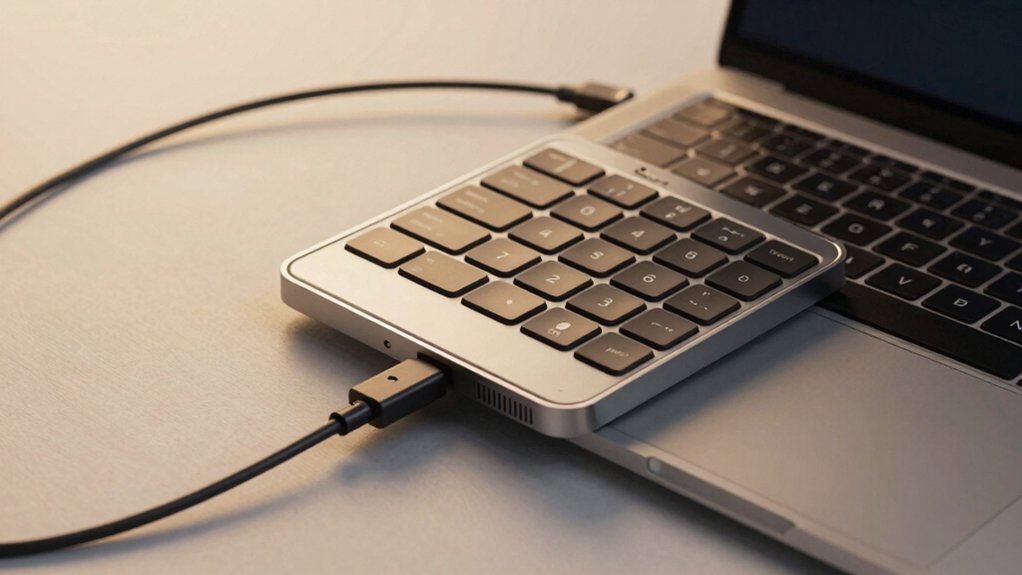
When selecting a USB number keypad for your laptop, you’ll need to evaluate wired versus wireless connectivity based on your desk setup and charging preferences, compare key count and layout options to match your accounting or data entry tasks, and verify compatibility with your operating system before purchasing. Next, assess the ergonomic design and comfort features—such as key travel distance and wrist support—since you’ll use the keypad for extended periods, and consider the portability and size that fits your laptop bag or workspace. These five factors together determine whether a keypad will genuinely improve your productivity or create frustration through poor fit or incompatibility.
Wired vs. Wireless Connectivity
How you connect your USB number keypad to your laptop fundamentally affects your workflow, desk setup, and overall user experience. Wired keypads connect directly via USB, offering stable plug-and-play functionality without batteries or pairing delays. You’ll experience lower latency and consistent performance, which benefits fast numeric input. Wireless keypads operate on 2.4 GHz or Bluetooth connections, providing mobility and a cleaner desk but requiring batteries or charging. You can pair wireless models with multiple devices for added flexibility. Some wireless units include built-in storage for USB receivers and sleep modes that extend battery life. Assess your priorities: choose wired for reliability and zero maintenance, or wireless for portability and multi-device capability.
Key Count and Layout Options
What layout works best for your workflow depends on how much numeric input you’ll perform and where you’ll place the keypad on your desk. Choose a 10-key model if you need basic number entry without extra features. Select an 18-key or 19-key design if you want dedicated function keys and better spacing for faster typing. Pick a 22-key layout when you require navigation shortcuts and calculator functions to minimize mouse use. Consider ambidextrous designs if you alternate hands during long data-entry sessions. Evaluate ergonomic tilt options to reduce wrist strain during extended work. Match your keypad size to your laptop setup—compact models fit tight spaces while larger layouts provide better key legibility. Test the key spacing before purchasing to ensure it matches your typing speed and accuracy needs.
Compatibility With Operating Systems
Before you purchase a USB number keypad, you’ll need to verify that it works with your laptop’s operating system. Most keypads support Windows 7, 8, 10, and 11 with plug-and-play connectivity requiring no driver installation. However, macOS compatibility varies significantly—some models work partially, with number keys functioning but special keys failing. Check product specifications carefully for your OS version. If you use multiple devices, select keypads offering broad compatibility across Windows, macOS, Android, and Chrome OS. For wireless options using 2.4 GHz or Bluetooth, confirm compatibility with your specific OS before buying, as switching between connection types or operating systems may reduce functionality or eliminate certain features entirely.
Ergonomic Design and Comfort
When you’re entering data for hours at a stretch, your wrist and hand comfort directly affect your productivity and long-term health. Look for keypads with an integrated tilt between 7.5° and 15° to reduce wrist strain. Choose ambidextrous or compact designs that accommodate both left- and right-handed users without requiring awkward positioning. Select models with silent or soft-touch scissor switches to minimize noise in shared workspaces. Larger keys and big-print fonts improve accuracy and reduce mispresses during spreadsheet tasks. Built-in features like auto-sleep and low-power modes lighten your hand’s workload during extended sessions. Lightweight construction further decreases fatigue. Prioritize keypads combining these features to maintain comfort and efficiency throughout your workday.
Portability and Size Considerations
How do you determine whether a keypad fits your mobile workflow? Start by checking the weight and dimensions. Look for models under 100 grams and around 5–6 inches long so you can easily store them in your laptop bag. Next, consider the design. Ambidextrous, slim keypads work best in tight spaces and on-the-go setups. Then, evaluate connectivity options. Wireless keypads using 2.4 GHz or Bluetooth eliminate cable clutter, while wired USB models provide plug-and-play stability without charging. Finally, check for built-in storage compartments where you can keep receivers or cables during transport. These features combine to create a truly portable solution that doesn’t compromise your productivity while commuting or working remotely.
Build Quality and Durability
Three key elements determine whether a USB keypad will withstand daily use: shell construction, key mechanisms, and base stability.
First, examine the keypad’s shell for sturdy, high-quality materials that resist cracking and warping. Look for reinforced plastic or metal frames designed for frequent handling.
Second, check the key mechanisms. Scissor-switch keys deliver consistent tactile feedback and resist wear better than dome-switch alternatives. Test that keys respond reliably after extended use without sticking or losing sensitivity.
Third, verify the base has non-slip feet or rubber pads to prevent sliding during rapid data entry. A stable foundation reduces accidental movement that interrupts your workflow.
Additionally, choose wired USB connections over wireless options to eliminate intermittent input issues. Wired models provide dependable performance without battery concerns or signal interference affecting your productivity.
Plug-and-Play Setup Requirements
After confirming your keypad’s durability, you’ll want to verify it actually connects without hassle. Plug-and-play USB keypads require no driver installation or battery setup, meaning you connect them directly to your laptop’s USB port and start using them immediately. First, check that your keypad uses a standard USB-A connection or wireless receiver for direct compatibility. Next, ensure NumLock support is available on your device, as this feature enables efficient numeric input. Verify your operating system—Windows, macOS, or Chrome OS—is compatible with your chosen model, since some keypads offer limited macOS functionality. Finally, confirm the keypad includes features like built-in storage for wireless receivers or ergonomic design that simplifies installation and use right out of the box.
Budget and Value Assessment
What’s the actual cost difference between a basic 10-key pad and a feature-rich 19-key model? You’ll typically spend $15–$25 on a simple wired model versus $40–$60 on advanced versions with backlighting and programmable keys. Calculate price per key to compare fairly: divide total cost by key count. Next, evaluate whether wireless capability justifies extra battery costs and receiver requirements. Check warranty length—longer coverage protects your investment and reduces replacement expenses. Assess weight and portability if you travel; models under 100 grams offer mobility without sacrificing durability. Factor in included features like adjustable tilt angles and key responsiveness, which affect daily usability and long-term satisfaction. Finally, weigh upfront spending against features you’ll actually use to determine genuine value for your workflow.
Final Thoughts
You’ll boost your productivity by selecting a keypad matching your specific needs. Choose wired models for reliability and immediate use, or wireless options for mobility. Verify USB compatibility with your device before purchasing. Test the key layout and switch type to ensure comfort during extended data entry. Confirm the keypad includes a non-slip base and ergonomic design to reduce wrist strain while working.

Meet Ry, “TechGuru,” a 36-year-old technology enthusiast with a deep passion for tech innovations. With extensive experience, he specializes in gaming hardware and software, and has expertise in gadgets, custom PCs, and audio.
Besides writing about tech and reviewing new products, he enjoys traveling, hiking, and photography. Committed to keeping up with the latest industry trends, he aims to guide readers in making informed tech decisions.