

When your Wii remotes fail, you need replacements that work reliably without breaking your budget. You’ve got several solid options available, each with specific strengths in wireless range, motion sensing, and durability. The key is matching what you actually need—whether that’s basic functionality or full nunchuk compatibility—against what each model delivers. Here’s what separates the replacements that genuinely perform from the ones that disappoint.
| MOOGOLE Remote Controller for Nintendo Wii/Wii U (2-Pack) |

| Reliable Standard Choice | Motion Plus Capability: No | Included Accessories: Silicone cases, wrist straps | Quantity of Controllers: 2 remote controllers | VIEW LATEST PRICE | Read Our Analysis |
| YUDEG Wii Remote Controllers Replacement (2-Pack) |

| Best Value Pick | Motion Plus Capability: No | Included Accessories: None specified | Quantity of Controllers: 2 controllers | VIEW LATEST PRICE | Read Our Analysis |
| Motion Plus Wii Controllers with Nunchucks (2-Pack) |
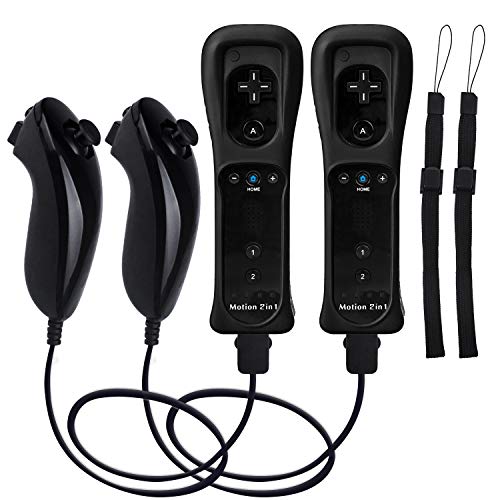
| Premium Motion Control | Motion Plus Capability: Yes, built-in | Included Accessories: Nunchucks | Quantity of Controllers: 2 remote controllers with nunchucks | VIEW LATEST PRICE | Read Our Analysis |
| TIANHOO Remote Controller for Wii & Wii U (2-Pack) |
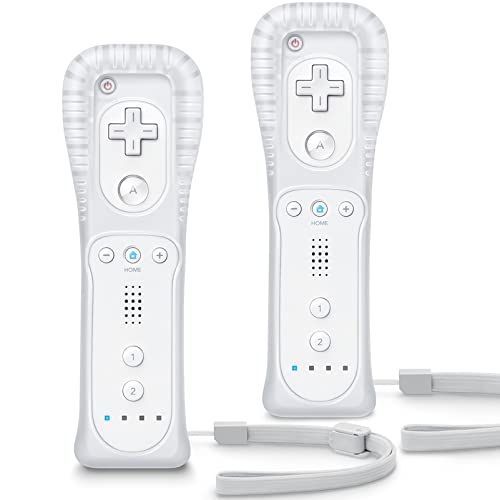
| Best Overall Pick | Motion Plus Capability: No | Included Accessories: Silicone cases, wrist straps | Quantity of Controllers: 2 remote controllers | VIEW LATEST PRICE | Read Our Analysis |
| Motion Plus Wii Remote Controllers with Nunchucks (2-Pack) |

| Advanced Motion Bundle | Motion Plus Capability: Yes, built-in | Included Accessories: Nunchucks | Quantity of Controllers: 2 remote controllers with nunchucks | VIEW LATEST PRICE | Read Our Analysis |
More Details on Our Top Picks
MOOGOLE Remote Controller for Nintendo Wii/Wii U (2-Pack)
If you’re replacing worn controllers, the MOOGOLE 2-Pack offers a reliable standard choice for Wii and Wii U gaming. Each pack includes two remote controllers, silicone cases, and wrist straps. You’ll need to supply two AA batteries per controller. To sync your remotes, press the red SYNC button below the battery compartment, then press the console’s red SYNC button while the controller lights blink. The upgraded chip provides responsive button controls and stable connections. Note that these controllers don’t include MotionPlus functionality, so check your games’ requirements first.
- Motion Plus Capability:No
- Included Accessories:Silicone cases, wrist straps
- Quantity of Controllers:2 remote controllers
- Console Compatibility:Nintendo Wii and Wii U
- Power Source:2 AA batteries (not included)
- Core Functions:Motion control, button response, stable connection
- Additional Feature:Latest upgraded chip technology
- Additional Feature:Sensitive button response
- Additional Feature:Stable wireless connection
YUDEG Wii Remote Controllers Replacement (2-Pack)
You’re looking for affordable replacements that don’t compromise on core functionality. The YUDEG 2-Pack delivers essential features at a reasonable price point. These controllers offer motion-sensing technology for natural hand movement, pointer functions, speakers, and vibration feedback. Setup requires pressing the RED SYNC button, docking the remotes, and plugging into your USB port. You’ll need two AA batteries per controller, which aren’t included. The controllers work best within 15 feet of your console and’re compatible with Wii, Wii U, and Wii Mini systems. YUDEG subjects all products to strict testing before sale, ensuring reliable performance during gameplay sessions.
- Motion Plus Capability:No
- Included Accessories:None specified
- Quantity of Controllers:2 controllers
- Console Compatibility:Wii, Wii U, Wii Mini
- Power Source:2 AA batteries (not included)
- Core Functions:Motion-sensing, pointer, speaker, vibration
- Additional Feature:Ergonomic design for comfort
- Additional Feature:15-foot optimal play distance
- Additional Feature:Strict pre-sale quality testing
Motion Plus Wii Controllers with Nunchucks (2-Pack)
The Motion Plus Wii Controllers with Nunchucks 2-Pack delivers premium motion control for players who want accurate, responsive gameplay across all Wii and Wii U titles. The built-in Motion Plus technology tracks your movements with greater sensitivity than original remotes, enabling realistic gameplay. Each pack includes a nunchuck controller featuring a 3-axis motion sensor and ergonomic grip for comfortable extended play. Setup requires pressing the small button on the controller’s battery area, then the red button under your Wii console’s door. The controllers synchronize quickly with your system. LED indicators display which player is active. Note that the console and batteries aren’t included. These controllers work with every Wii game available.
- Motion Plus Capability:Yes, built-in
- Included Accessories:Nunchucks
- Quantity of Controllers:2 remote controllers with nunchucks
- Console Compatibility:Nintendo Wii and Wii U
- Power Source:AA batteries (not included)
- Core Functions:Motion Plus tracking, motion sensor nunchuck
- Additional Feature:Built-in Motion Plus accuracy
- Additional Feature:3-axis motion sensor nunchuck
- Additional Feature:LED player activity indicators
TIANHOO Remote Controller for Wii & Wii U (2-Pack)
Looking for a budget-friendly solution that covers multiple consoles? The TIANHOO 2-pack gives you wireless controllers compatible with both Wii and Wii U systems. Each controller includes a silicone case and wrist strap for protection. You’ll get 19 buttons, motion sensing, rumble feedback, and a speaker for immersive gameplay. Setup requires two AA batteries per controller and a simple sync process: press SYNC on both the controller and console until they connect. If pairing fails, hold the console SYNC button for 15 seconds to reset, then retry. With a 4.4-star rating from over 2,500 reviews and top rankings in gamepad categories, these controllers deliver reliable performance for casual gaming.
- Motion Plus Capability:No
- Included Accessories:Silicone cases, wrist straps
- Quantity of Controllers:2 remote controllers
- Console Compatibility:Nintendo Wii and Wii U
- Power Source:2 AA batteries (not included)
- Core Functions:Motion-sensing, pointer, speaker, vibration, rumble
- Additional Feature:19 total button configuration
- Additional Feature:#1 rated Wii U gamepad
- Additional Feature:30-day voluntary return policy
Motion Plus Wii Remote Controllers with Nunchucks (2-Pack)
Want an advanced motion bundle that includes everything needed for multiplayer gaming? Motion Plus Wii Remote Controllers with Nunchucks deliver built-in motion detection without extra purchases. You’ll receive two controllers and two nunchucks in one package, compatible with both Wii and Wii U systems. Setup requires pressing the small button on each controller’s battery area, then pressing the red sync button on your console. The nunchuk connects via cable and provides thumb stick and trigger functionality. You’ll need AA batteries to power the controllers. Note that these third-party controllers won’t fit Wii Zapper accessories. TechKen offers a ninety-day warranty covering all button functions and Nintendo compatibility.
- Motion Plus Capability:Yes, built-in
- Included Accessories:Nunchucks
- Quantity of Controllers:2 remote controllers with nunchucks
- Console Compatibility:Wii and Wii U
- Power Source:AA batteries (not included)
- Core Functions:Motion shake, thumb stick, triggers on nunchuk
- Additional Feature:High performance motion shake
- Additional Feature:Nunchuk thumb stick/triggers
- Additional Feature:90-day TechKen warranty
Factors to Consider When Choosing a Wii Remote Controller Replacement
Before you buy a Wii Remote replacement, check three essential factors: whether it’s compatible with your specific console model, whether you need Motion Plus functionality for your games, and what power source it uses. Next, examine what accessories come included—such as nunchucks, straps, or charging cables—and determine if those match your needs or if you’ll need to buy extras separately. Finally, hold the controller if possible to verify it fits your hand comfortably and has buttons positioned where you expect them, since poor ergonomics can make extended gaming sessions uncomfortable.
Compatibility With Your Console
To guarantee a replacement Wii Remote will function with your console, first check whether your system is a Wii, Wii U, or Wii Mini, then verify the remote’s compatibility list matches your model. Next, determine if you need MotionPlus built-in or if a standard remote suits your games. Confirm the remote uses standard AA batteries, which your console supports. Review the pairing instructions to ensure the SYNC button method matches your console’s setup procedure. If you’re considering a bundle, verify whether a Nunchuk is included and compatible with your specific console. Taking these steps prevents purchasing an incompatible remote and ensures reliable performance with your system.
Motion Plus Functionality Needs
Three key factors determine whether you’ll need Motion Plus in your replacement Wii Remote: the games you play, the accuracy level you require, and your budget.
Check your game library first. If you own titles requiring advanced motion tracking, you need Motion Plus functionality. Games without these demands work fine with basic motion sensing remotes marked “No MotionPlus Inside.”
Motion Plus remotes provide precise 3-axis tracking for realistic gameplay. Without this feature, certain games respond sluggishly or won’t function properly. Consider your gaming preferences: casual players may skip Motion Plus, while serious gamers should prioritize it.
Budget matters too. Motion Plus remotes cost more than standard replacements. Weigh whether the enhanced accuracy justifies the extra expense for your specific needs.
Battery Requirements And Power
What role do batteries play in your Wii Remote replacement’s performance? Batteries provide the essential power for motion sensing, vibration, and wireless communication. You’ll need two AA batteries for any replacement remote you choose, and manufacturers don’t include them in the package. Before syncing your remote to your Wii or Wii U console using the red SYNC button, install fresh batteries first. Standard AA batteries work with all listed replacements, so you can use common household options. Monitor your battery life closely because depleted batteries directly impact responsiveness and motion-sensing accuracy. Lower power degrades LED indicators and rumble features, reducing overall performance. Replace batteries when you notice decreased sensitivity or weaker vibrations to maintain optimal functionality.
Included Accessories And Extras
When you’re selecting a replacement Wii Remote, you’ll want to examine what’s bundled with each option because the included accessories directly affect your total cost and convenience. Most bundles include silicone cases and wrist straps for each remote in the pack, which protect your controllers and prevent accidental drops. Some kits come with Nunchuk controllers, particularly Motion Plus 2-pack options, expanding your gaming capabilities without separate purchases. Check whether the model includes MotionPlus technology built-in, as this determines compatibility with certain games and affects which accessories you receive. Review the package contents carefully before buying. Compare total costs by calculating whether buying accessories separately would cost more than purchasing a bundle with everything included. This approach ensures you get the functionality and protection you need upfront.
Ergonomic Design And Comfort
Your hand comfort during gaming directly impacts how long you can play without fatigue or strain. When selecting a replacement controller, examine the contoured shape to ensure it fits your natural hand position. Check for textured surfaces that provide secure grip without slipping during rapid motion controls. Evaluate whether the controller includes a silicone case or protective grip, which cushions your hands during repetitive movements. Test the weight distribution to confirm it doesn’t cause wrist strain during extended sessions. Consider nunchuk attachments with ergonomic grips that complement your primary remote for fluid, comfortable motion. Prioritize controllers featuring contoured designs over flat alternatives, as they reduce hand fatigue significantly. These design elements work together to keep you comfortable and playing longer without discomfort or injury.
Wireless Range And Connection
Because wireless connectivity directly affects your gameplay experience, you’ll need to understand how range and connection quality impact controller performance. Most replacements operate effectively within 15 feet of your console—the optimal distance for stable gameplay. Beyond this range, performance diminishes noticeably.
To establish a connection, locate the red SYNC button on both your console and remote. Press it to pair the devices. Check your remote’s battery level regularly, as weak AA batteries degrade wireless signal strength and responsiveness. Some replacement models lack MotionPlus technology, which may affect range requirements and motion sensitivity. Verify whether your chosen replacement includes this feature before purchasing. Finally, maintain clear line-of-sight between remote and console to ensure consistent connectivity during extended gaming sessions.
Build Quality And Durability
After you’ve confirmed wireless connectivity, the physical construction of your replacement remote becomes your next consideration. Check that the controller features a durable shell or protective silicone case to withstand drops and daily wear. Examine the weight distribution—you’ll want an ergonomic design that feels balanced in your hand to reduce fatigue during extended gaming sessions. Verify the device uses standard AA batteries rather than non-replaceable designs, which simplifies long-term maintenance and reduces costs. Confirm the motion-sensing components are reliable and responsive for consistent input accuracy during gameplay. Finally, ensure the remote includes a wrist strap and secure housing to prevent accidental slips during intense sessions. These durability factors directly impact how long your controller will last.
Budget And Value Proposition
How can you get the most controller for your money? Start by comparing price per remote when buying 2-packs, which lowers your cost per unit considerably. Next, prioritize kits that bundle accessories like silicone cases and wrist straps—you’re gaining value without paying extra. Choose models using AA batteries rather than proprietary ones, reducing long-term expenses. Skip MotionPlus features unless you specifically need them, saving on upfront costs. Verify that setup requires minimal steps to avoid frustration and wasted time. Finally, check the return policy and warranty before purchasing. Look for 30-day return windows and 90-day warranties to protect yourself against defective units. These protections ensure you’re covered if problems arise, maximizing your investment’s actual value over time.
Final Thoughts
You’ll find reliable Wii remote replacements by prioritizing wireless connectivity, motion sensing, and vibration feedback. Choose 2-pack bundles that include nunchuk compatibility and protective cases. Verify the 15-foot range works in your space, confirm AA battery compatibility, and check for a 90-day warranty. Compare prices across affordable options, then select the model matching your gaming needs and budget before purchasing.

Meet Ry, “TechGuru,” a 36-year-old technology enthusiast with a deep passion for tech innovations. With extensive experience, he specializes in gaming hardware and software, and has expertise in gadgets, custom PCs, and audio.
Besides writing about tech and reviewing new products, he enjoys traveling, hiking, and photography. Committed to keeping up with the latest industry trends, he aims to guide readers in making informed tech decisions.