
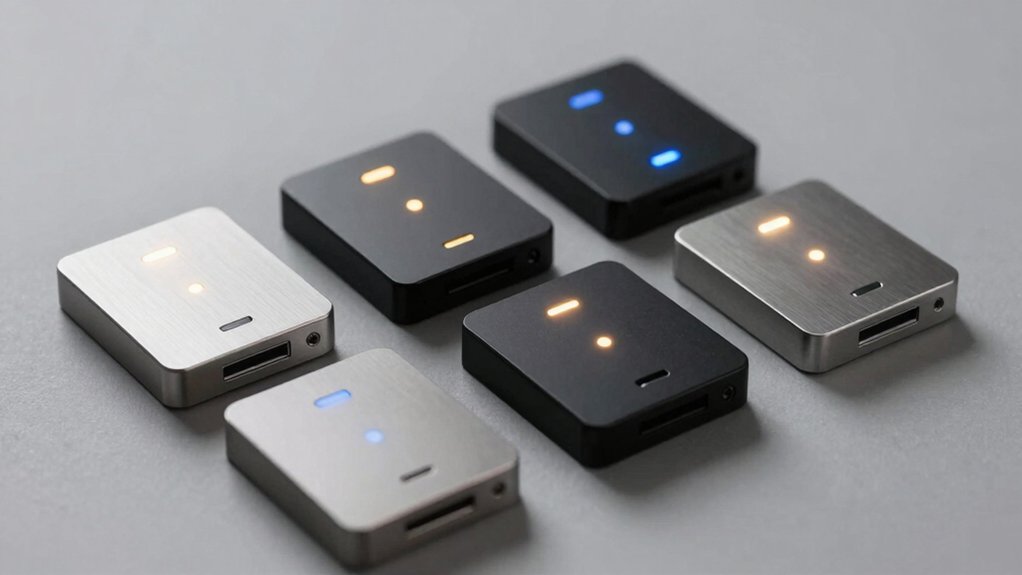

You’re looking to automate your home’s electrical systems, and you need a relay switch that actually works with your existing devices. Whether you’re controlling lights, doors, or appliances, choosing the right smart relay matters. The protocol you pick—Matter, Zigbee, or Wi-Fi—determines compatibility with your hub and voice assistants. Let’s explore five proven options that’ll transform how you manage your home’s power.
| Shelly 1 Mini Gen4 Smart Relay Switch Home Automation |

| Best Overall | Wireless Protocol Support: Wi-Fi, Zigbee, Matter | Voice Assistant Compatibility: Alexa, Google Home, Apple HomeKit, SmartThings | Contact Type: Dry contacts | VIEW LATEST PRICE | Read Our Analysis |
| Smart Home Zigbee Relay Switch for Lights & Doors |

| Budget-Friendly Pick | Wireless Protocol Support: Zigbee 3.0 | Voice Assistant Compatibility: Alexa, Google Home | Contact Type: Dry contact relay | VIEW LATEST PRICE | Read Our Analysis |
| Aqara Dual Relay Module T2 Smart Switch |

| Most Versatile | Wireless Protocol Support: Zigbee | Voice Assistant Compatibility: Alexa, Apple HomeKit, IFTTT, Aqara Home app | Contact Type: Dry contact (potential-free) | VIEW LATEST PRICE | Read Our Analysis |
| Shelly 1 Mini Gen4 Smart Relay Switch (2 Pack) |
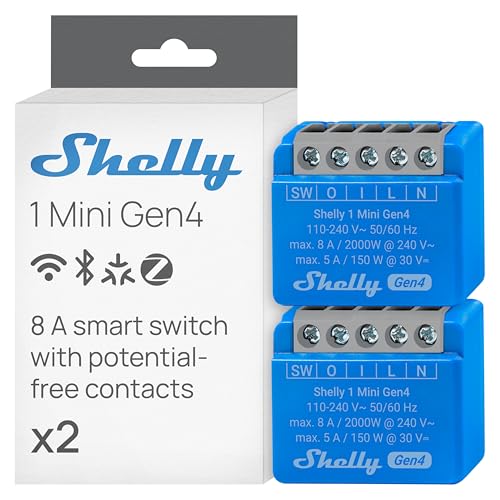
| Best for Bulk | Wireless Protocol Support: Wi-Fi, Zigbee, Matter | Voice Assistant Compatibility: Alexa, Google Home, Apple HomeKit, SmartThings | Contact Type: Dry contacts | VIEW LATEST PRICE | Read Our Analysis |
| SwitchBot WiFi Switch Compatible with Alexa & Apple Home |

| Most Feature-Rich | Wireless Protocol Support: Wi-Fi, Matter | Voice Assistant Compatibility: Alexa, Apple Home, Google Home, SmartThings | Contact Type: Dry contact, normally closed | VIEW LATEST PRICE | Read Our Analysis |
More Details on Our Top Picks
Shelly 1 Mini Gen4 Smart Relay Switch Home Automation
Why choose a relay switch that handles multiple connectivity standards? The Shelly 1 Mini Gen4 offers Wi-Fi, Zigbee, and Matter support without requiring a hub. You’ll control lights, appliances, and garage door openers through Alexa, SmartThings, Google Home, or Apple HomeKit. Its compact design fits into tight spaces and standard switch boxes, making retrofitting straightforward. The device delivers 8A capacity and 2000 watts of power. Installation takes two approaches: plug it into a socket or hide it inside an appliance casing without extra external wiring. Use the Shelly Smart Control App to manage devices remotely, receive event notifications, and create personalized scenes by combining multiple Shelly devices. The 3-year warranty and professional customer support provide reliable backing for your setup.
- Wireless Protocol Support:Wi-Fi, Zigbee, Matter
- Voice Assistant Compatibility:Alexa, Google Home, Apple HomeKit, SmartThings
- Contact Type:Dry contacts
- Current/Load Capacity:8A (2000 watts)
- Hub Requirement:No hub required
- Installation Method:Plug into socket or hide inside appliance casing
- Additional Feature:8 MB memory upgrade
- Additional Feature:3-year device warranty
- Additional Feature:Personalized scene creation
Smart Home Zigbee Relay Switch for Lights & Doors
Looking for a budget-friendly pick that handles both indoor lights and garage doors? The MHCOZY ZigBee Smart Switch offers a 1-channel dry contact relay compatible with Alexa and Google Home. It operates on DC 5-32V or AC 7-32V with a 10A maximum current capacity. You’ll pair it directly with your Tuya ZigBee Hub or Home Assistant without requiring a separate app. Choose between inching mode—which opens the relay briefly before auto-shutting—or self-locking mode for sustained on/off control. Wire it to garage door openers, sprinkler systems, or light circuits. The device includes one-tap pairing, scheduling features, and a 433MHz RF receiver option. Its CE certification and copper alloy contacts ensure reliable operation across -40 to 70 degrees Celsius.
- Wireless Protocol Support:Zigbee 3.0
- Voice Assistant Compatibility:Alexa, Google Home
- Contact Type:Dry contact relay
- Current/Load Capacity:10A max current
- Hub Requirement:Requires Zigbee hub
- Installation Method:Wired installation for various uses
- Additional Feature:Inching/self-locking modes
- Additional Feature:433MHz RF receiver built-in
- Additional Feature:Schedule and timer support
Aqara Dual Relay Module T2 Smart Switch
The Aqara Dual Relay Module T2 offers the most versatile relay switch for users who need flexible control across multiple device types. You’ll connect it to boilers, garage doors, and roller shades through dry contact mode, which requires no potential voltage. Install the compact unit behind existing switches or wall outlets using the included DIN rail mount. The device integrates with Matter, Apple HomeKit, and Alexa, enabling automations through IFTTT or the Aqara Home app. Zigbee connectivity reduces idle power consumption compared to Wi-Fi alternatives. Enable power-off memory to retain the last state after outages, and set custom power limits for automatic shutoff when consumption exceeds your threshold.
- Wireless Protocol Support:Zigbee
- Voice Assistant Compatibility:Alexa, Apple HomeKit, IFTTT, Aqara Home app
- Contact Type:Dry contact (potential-free)
- Current/Load Capacity:Not specified
- Hub Requirement:Requires Matter-compatible Aqara hub
- Installation Method:Behind switch, wall outlet, or DIN rail mount
- Additional Feature:Power-off memory retention
- Additional Feature:Roller shade switch capability
- Additional Feature:Customizable power limit protection
Shelly 1 Mini Gen4 Smart Relay Switch (2 Pack)
Shelly’s 1 Mini Gen4 works well for bulk installations across multiple rooms or properties. You get two compact relay switches that fit into standard switch boxes without external wiring. Install them by plugging into sockets or hiding inside appliances like coffee makers and lamps. Each switch handles up to 8A, supporting lights and small to medium devices. The upgraded processor delivers fast, reliable performance with 8MB memory. Control devices remotely through the Shelly Smart Control App, set up automated events, and create scenes combining multiple units. These switches integrate with Alexa, SmartThings, Google, and Apple HomeKit—no hub required. They’re particularly effective for garage door openers when placed inside or near the motor assembly.
- Wireless Protocol Support:Wi-Fi, Zigbee, Matter
- Voice Assistant Compatibility:Alexa, Google Home, Apple HomeKit, SmartThings
- Contact Type:Dry contacts
- Current/Load Capacity:8A
- Hub Requirement:No hub required
- Installation Method:Plug into socket or hide inside appliance casing
- Additional Feature:8 MB memory upgrade
- Additional Feature:3-year device warranty
- Additional Feature:Remote operation via app
SwitchBot WiFi Switch Compatible with Alexa & Apple Home
Want a relay switch that handles multiple smart home ecosystems without sacrificing features? The SwitchBot WiFi Switch delivers Matter compatibility, allowing you to control lights, fans, and climate systems through Alexa, Apple Home, and Google Home. This 16-amp device features an ESP32 processor for reliable communication and includes an integrated Bluetooth repeater supporting up to ten SwitchBot subdevices. Installation takes ten minutes without rewiring, and the compact design fits standard switch boxes. Add the device to the SwitchBot app first, then enable Matter mode in settings. The switch operates via WiFi without a hub and falls back to local Bluetooth if your internet disconnects, ensuring consistent control.
- Wireless Protocol Support:Wi-Fi, Matter
- Voice Assistant Compatibility:Alexa, Apple Home, Google Home, SmartThings
- Contact Type:Dry contact, normally closed
- Current/Load Capacity:16A (3840 watts)
- Hub Requirement:Hub required for Matter; can work without hub via Bluetooth
- Installation Method:Plug-in, fits most switch boxes without rewiring
- Additional Feature:Integrated Bluetooth repeater
- Additional Feature:Power-measuring relay functionality
- Additional Feature:10-minute fast installation
Factors to Consider When Choosing a Smart Home Relay Switch for Matter or Zigbee
When selecting a smart home relay switch for Matter or Zigbee, you’ll need to evaluate protocol compatibility with your existing devices, check the load capacity and power ratings to match your electrical requirements, and assess installation space to ensure the switch fits your setup. Next, determine whether you’ll need a hub for connectivity and confirm that the switch integrates with your smart home ecosystem, whether that’s Apple Home, Alexa, Google Home, or another platform. Finally, review each switch’s specific features against your priorities, comparing how these five factors align with your home’s infrastructure and automation goals.
Protocol Compatibility And Support
How do you guarantee your relay switch works seamlessly with your smart home ecosystem? First, identify which protocol your hub supports: Matter, Zigbee, or Wi-Fi. Next, verify the relay switch matches that protocol. If you’re using Alexa or Google Home, check their compatibility lists for certified devices. Some relays support multiple protocols, offering flexibility if you’re upgrading ecosystems later. For Zigbee-based relays, confirm your hub includes a Zigbee gateway, as not all hubs have this built in. If choosing a Matter device, ensure your hub has Matter support enabled. Document the relay’s specific protocol requirements before purchasing. This prevents integration failures and eliminates unnecessary hub purchases. Cross-referencing your ecosystem’s supported protocols against the relay’s specifications guarantees successful automation setup.
Load Capacity And Power Ratings
Once you’ve confirmed your relay switch works with your smart home protocol, verify that it can actually handle the electrical load you’re planning to control. Check the device’s load capacity, typically rated in amps (8 A or 10 A), which determines the maximum current it can safely switch. Next, review the power rating in watts—common examples include 2000 W or 3840 W—to ensure compatibility with your appliances. Also confirm the maximum switching voltage, particularly for DC applications, which may reach 32 V. Match these specifications to your intended devices. Higher current ratings require proper wiring and circuit protection. Using a relay exceeding its rated capacity risks overheating and failure, potentially damaging connected equipment.
Installation Flexibility And Space Requirements
Space constraints and mounting options considerably impact whether a relay switch’ll work in your specific setup. Consider compact form factors that fit into tight switch boxes or appliance casings without requiring external wiring. Check if DIN rail mounting suits your equipment rack or service panel layout. Verify the unit fits behind existing wall switches or inside garage door opener housings for discreet integration. Evaluate 1-channel dry-contact relay designs that minimize wiring space and eliminate additional modules. Measure clearance requirements by reviewing low-profile dimensions and self-contained housing specifications. Compare installation locations—wall-mounted, panel-mounted, or retrofit positions—before purchasing. Confirm that behind-fixture placement doesn’t obstruct ventilation or access. Taking these steps ensures your relay switch integrates seamlessly into your existing setup without costly modifications or workarounds.
Hub Requirements And Connectivity Options
After you’ve confirmed your relay switch fits your physical space, you’ll need to evaluate what networking infrastructure supports it. Matter-ready switches operate directly over Matter without requiring a dedicated hub, enabling cross-platform control across Alexa, Google Home, and Apple HomeKit simultaneously. Zigbee switches demand a Zigbee hub or gateway—such as Home Assistant or a Tuya hub—to bridge connections with voice assistants and automations. Some devices offer dual-mode operation, supporting both protocols and reducing hub dependency. Before purchasing, verify your chosen switch’s protocol compatibility and check whether your existing ecosystem already includes the necessary hub. This step determines your overall network topology and integration flexibility moving forward.
Smart Home Ecosystem Integration
Because your relay switch must work seamlessly with your existing devices and voice assistants, you’ll need to evaluate how well it integrates with your chosen ecosystem before making a purchase. Check whether the switch supports Matter, Zigbee, or both protocols. If you’re using Alexa, Google Home, or Apple HomeKit, verify compatibility with your platform. Some multi-protocol switches offer flexibility across ecosystems, reducing hub dependence. Confirm that the device supports your required automations: scheduling, remote control, and in-out modes. Review energy monitoring capabilities if you need consumption tracking. Test whether scene orchestration works with your existing setup. Cross-reference the manufacturer’s compatibility list against your current smart home devices to ensure seamless integration and prevent purchasing incompatible equipment.
Operating Temperature And Environmental Specs
Environmental conditions in your installation space directly affect how well your relay switch’ll perform over time. Start by checking the device’s operating temperature range, typically -40 to 70°C or 40–105°F, to match your environment. Next, verify humidity tolerance, usually 40–80%, especially if you’re installing near bathrooms or outdoor areas. Then confirm the switch handles your specific mounting location—DIN rail, behind a wall switch, or near motors—since these spots experience temperature fluctuations. Look for thermal protection features like overheat shutoffs and temperature-rated housings. Finally, select models with power-off and overload protection to maintain safe operation under variable loads and changing ambient temperatures. These steps ensure reliable performance and prevent equipment damage.
Switching Modes And Functionality Features
Once you’ve confirmed your relay switch’ll handle your environment’s temperature and humidity, you’ll need to examine how it actually controls your loads through its switching modes and features. Check whether the relay uses dry contact (potential-free) relays with normally open or normally closed configurations that suit your wiring setup. Evaluate configurable operational modes like inching, pulse, and power-off memory, which determine the relay’s behavior after commands or power loss. For Zigbee devices, confirm scene control compatibility that lets you automate switching without modifying wall switches. If you’re using Matter, verify the relay works with your Matter-compatible hub. Additionally, assess whether built-in energy limits or arming features automatically disable switching when consumption exceeds your thresholds, preventing equipment damage or overload situations.
Warranty Coverage And Brand Support
Warranty coverage and manufacturer support form the backbone of your long-term investment in a smart home relay switch, so you’ll want to prioritize brands that stand behind their products with substantial protection plans. Look for warranties covering at least three years of device protection, like Shelly 1 Mini Gen4 offers. Verify that warranty terms include both hardware defects and performance reliability under normal use conditions. Check for direct customer support channels—email, phone, or chat access—and confirm availability of detailed user guides and installation manuals. Additionally, research brand ecosystem reliability by confirming ongoing firmware updates and compatibility promises for Matter or Zigbee integration. These factors ensure you’ll receive professional assistance when needed and maintain long-term device functionality.
Final Thoughts
You’ve reviewed five reliable relay switches: Shelly 1 Mini Gen4, MHCOZY ZigBee Smart Switch, Aqara Dual Relay Module T2, and SwitchBot WiFi Switch. To choose correctly, match your needs to each option’s specifications—consider power capacity (8A to 16A), protocol support (Matter, Zigbee, Wi-Fi), installation type (hub requirements), and compatibility with your existing ecosystem (Alexa, Google Home, Apple HomeKit). Select based on your specific automation goals and devices.

Meet Ry, “TechGuru,” a 36-year-old technology enthusiast with a deep passion for tech innovations. With extensive experience, he specializes in gaming hardware and software, and has expertise in gadgets, custom PCs, and audio.
Besides writing about tech and reviewing new products, he enjoys traveling, hiking, and photography. Committed to keeping up with the latest industry trends, he aims to guide readers in making informed tech decisions.