

You’re looking for an optical-to-RCA adapter that actually delivers audio without frustration. Most adapters fail because they lack proper DAC chips or shielding, leaving you with static or no sound at all. The five models we’ve tested handle PCM audio conversion reliably at high bitrates, work plug-and-play with your TV or console, and won’t require driver installations. But choosing the right one depends on your specific setup—here’s how to find it.
| eSynic Optical to RCA Adapter with DAC Chip |

| Audiophile-Grade Quality | Maximum Sampling Rate: 192kHz | Bit Depth: 24-bit | Output Connectors: RCA only | VIEW LATEST PRICE | Read Our Analysis |
| PROZOR Digital to Analog Audio Converter DAC SPDIF |

| Most Versatile | Maximum Sampling Rate: 192kHz | Bit Depth: 24-bit | Output Connectors: RCA + 3.5mm jack | VIEW LATEST PRICE | Read Our Analysis |
| 192kHz Digital to Analog Audio Converter with Optical Cable |

| Best Overall | Maximum Sampling Rate: 192kHz | Bit Depth: 24-bit | Output Connectors: RCA only | VIEW LATEST PRICE | Read Our Analysis |
| PROZOR Digital to Analog Audio Converter DAC Optical |
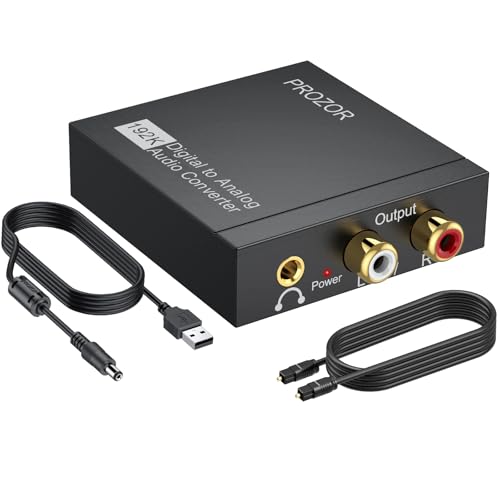
| Best Value | Maximum Sampling Rate: 192kHz | Bit Depth: 24-bit | Output Connectors: RCA + 3.5mm jack | VIEW LATEST PRICE | Read Our Analysis |
| CAMWAY Digital to Analog Audio Converter with Optical Cable |

| Budget-Friendly Pick | Maximum Sampling Rate: 192kHz | Bit Depth: 24-bit | Output Connectors: RCA only | VIEW LATEST PRICE | Read Our Analysis |
More Details on Our Top Picks
eSynic Optical to RCA Adapter with DAC Chip
Do you own vintage audio equipment that lacks digital inputs? The eSynic Optical to RCA Adapter with DAC Chip bridges that gap. This converter accepts optical signals from modern TVs or gaming consoles and outputs analog audio through RCA ports. It features a 24-bit DAC chip supporting up to 192kHz resolution, delivering clearer sound than basic 48kHz models. Setup requires no drivers or external software—simply connect your optical cable, plug in the included USB power adapter, and attach RCA cables to your amplifier. The adapter supports PCM format only, so verify your source device outputs PCM audio before purchasing. The 7-foot fiber optic cable provides flexible placement options for your setup.
- Maximum Sampling Rate:192kHz
- Bit Depth:24-bit
- Output Connectors:RCA only
- Power Source:USB 5V/1A
- Audio Format Support:PCM only
- Cable Length Included:7 ft fiber optic cable
- Additional Feature:Gold-plated RCA ports
- Additional Feature:7 ft extended fiber optic cable
- Additional Feature:Aluminum housing with heat dissipation
PROZOR Digital to Analog Audio Converter DAC SPDIF
The PROZOR 192KHz DAC is the most versatile option if you’re converting digital audio from gaming consoles, Blu-ray players, or home theater systems to analog RCA outputs. It accepts both optical and coaxial inputs while simultaneously outputting to RCA and 3.5mm connections. The aluminum housing shields against interference, and gold-plated connectors ensure reliable signal transmission. You’ll receive an optical cable and USB power cable; connect the 5V adapter to a wall outlet rather than your TV’s USB port. Adjust your TV’s audio output to PCM format through the settings menu, then verify the power light activates. This converter handles sampling rates up to 192KHz with 24-bit depth for clean audio reproduction without requiring driver installation.
- Maximum Sampling Rate:192kHz
- Bit Depth:24-bit
- Output Connectors:RCA + 3.5mm jack
- Power Source:USB 5V/1A
- Audio Format Support:PCM/LPCM only
- Cable Length Included:3 ft optical cable
- Additional Feature:Dual input (Toslink/Coaxial)
- Additional Feature:Simultaneous RCA and 3.5mm output
- Additional Feature:Dual-channel op-amp chipset
192kHz Digital to Analog Audio Converter with Optical Cable
Looking to connect your Toslink optical output directly to a stereo amplifier? This 192kHz DAC converter handles the job with plug-and-play simplicity. Connect your optical cable to the input, then run the RCA outputs to your amplifier. The built-in amplification chipset strengthens the audio signal for clean, clear sound. Before setup, configure your TV or device to output PCM audio—not Dolby AC3 or surround formats, which aren’t compatible. Adjust volume on your amplifier, not the converter. The compact design fits easily in tight spaces, making this a straightforward solution for converting digital optical signals to analog stereo audio reliably.
- Maximum Sampling Rate:192kHz
- Bit Depth:24-bit
- Output Connectors:RCA only
- Power Source:USB (power method not specified)
- Audio Format Support:PCM only
- Cable Length Included:Cable included (length unspecified)
- Additional Feature:Inbuilt audio amplification chipset
- Additional Feature:Compact, lightweight design
- Additional Feature:Professional 24-Bit/192 KHz specs
PROZOR Digital to Analog Audio Converter DAC Optical
PROZOR’s 192kHz converter transforms digital signals into analog audio you’ll actually hear clearly. Connect your optical or coaxial cable from your device to the DAC’s input. Plug the included USB power cable into a certified 5V 1A adapter. Use the RCA or 3.5mm outputs to route audio to your speakers or amplifier. Set your TV’s audio output to PCM/LPCM format to avoid distortion. If volume seems low, adjust settings on your TV or output device rather than the converter itself. The gold-plated RCA connectors ensure stable connections for consistent performance.
- Maximum Sampling Rate:192kHz
- Bit Depth:24-bit
- Output Connectors:RCA + 3.5mm jack
- Power Source:USB 5V/1A
- Audio Format Support:PCM/LPCM only
- Cable Length Included:3 ft optical cable
- Additional Feature:Detachable DAC box upgradeable
- Additional Feature:Gold-plated RCA connectors
- Additional Feature:Aluminum alloy EMI shielding
CAMWAY Digital to Analog Audio Converter with Optical Cable
CAMWAY’s budget-friendly pick offers straightforward digital-to-analog conversion for devices that need RCA audio output. You’ll connect your optical source—like a TV or Blu-ray player—directly to the converter’s Toslink input. The built-in amplifier chip processes your signal and sends stereo audio through the RCA outputs to your speakers or amplifier. It supports sampling rates up to 192kHz and handles 24-bit audio streams. The 5.7-foot cable integrates into most setups without extra adapters. You’ll need to configure your TV to PCM format for compatibility, as it won’t decode Dolby Digital 5.1 surround sound. Setup takes minutes with its plug-and-play design.
- Maximum Sampling Rate:192kHz
- Bit Depth:24-bit
- Output Connectors:RCA only
- Power Source:USB 5.5V
- Audio Format Support:PCM/stereo 2-channel
- Cable Length Included:5.7 ft optical cable
- Additional Feature:Auto mute noise elimination
- Additional Feature:5.7 ft integrated cable design
- Additional Feature:Built-in RCA amplifier chip
Factors to Consider When Choosing an Optical to RCA Adapter
When you’re selecting an optical to RCA adapter, you’ll need to verify that it supports your audio format (stereo PCM, Dolby Digital, or DTS), check the sampling rates and resolution it handles (typically 48 kHz or 192 kHz), and inspect the connector quality to ensure clean signal transmission without interference. You should also determine whether the adapter requires external power, as some models need USB or AC power while others operate passively, and confirm that it matches your specific devices’ connector types (TOSLINK optical input, RCA output). Finally, you’ll want to know if the adapter converts in one direction only (optical to RCA) or if it’s bidirectional, since most adapters work one way and selecting the wrong direction wastes your money.
Audio Format Compatibility
Why does your optical to RCA adapter produce no sound or poor quality audio? The answer often lies in audio format compatibility. Your TV or source device must output PCM or LPCM audio for the adapter to work properly. If your source uses compressed formats like Dolby TrueHD or DTS-HD Master Audio, the adapter won’t decode them, resulting in silence or distortion.
Check your device’s audio settings first. Navigate to the audio output menu and select PCM or LPCM mode instead of surround sound options. Next, verify the adapter supports your desired sample rate and bit depth. Some adapters handle 192kHz/24-bit signals, while others max out at 48kHz or 96kHz. Match these specifications to your source’s capabilities. This ensures reliable audio transmission every time.
Resolution And Sampling Rates
You’ll need to match your adapter’s sampling rate capabilities to your source devices to avoid audio degradation. Check what your TV, game console, or Blu-ray player outputs—typically 48 kHz or 96 kHz. Verify your adapter supports at least that rate; premium models handle 192 kHz for maximum fidelity. Look at the adapter’s specifications and compare them directly to your source’s maximum output. If your source maxes out at 48 kHz but your adapter only supports 44.1 kHz, downsampling occurs and quality suffers. Similarly, confirm the bit depth—24-bit adapters outperform 16-bit ones. Cross-reference your equipment’s documentation to ensure complete compatibility. Mismatched sampling rates cause audio dropout or distortion, so precise matching prevents these problems before they start.
Connector Types And Quality
How do you know which connectors actually deliver clean audio without signal loss? Check that RCA outputs are gold-plated, which resists corrosion and maintains signal integrity over time. Verify that your optical input matches your device’s output type—either Toslink or SPDIF—and confirm PCM/LPCM compatibility to prevent connection issues. Examine whether the adapter includes a built-in DAC and what sampling rates it supports, up to 192kHz at 24-bit depth if you need high-resolution audio. Inspect connector quality by looking for sturdy construction and secure fitting. Finally, confirm power requirements: most models run on USB power at 5V ~1A, though some need external adapters. These specifications directly affect your audio quality and device compatibility.
Power Requirements And Setup
Getting the right power source is essential before you connect anything. Check your adapter’s specifications to determine which power method it uses. Some models draw power directly from the optical port, while others require a separate 5V/1A USB power supply. If your adapter needs USB power, use a certified wall adapter rather than your TV’s USB port, since TV ports often don’t provide reliable power. Plug-and-play models typically need no additional setup, but you should verify your TV’s menu settings. Access your TV’s Digital Audio Output Volume settings and confirm it’s transmitting PCM format. Match your adapter’s input type (optical or coaxial) to your source device and its output connectors (RCA or 3.5mm) to your amplifier. Complete these steps before powering on your system.
Directional Conversion Capability
When selecting an optical to RCA adapter, understand that these devices work in only one direction: they convert optical digital signals into analog RCA output, but they don’t reverse the process or handle bidirectional conversion. This means you cannot use the adapter to send audio from RCA sources back through an optical cable. Before purchasing, verify the adapter supports your specific audio format. PCM-only adapters won’t decode Dolby Digital or DTS signals, so confirm your content uses PCM audio. Check whether the device handles your required bitrate and sample rate—some models limit support to PCM 2.0 or specific frequencies like 24-bit/192kHz. Understanding these directional and format limitations prevents incompatibility issues and ensures reliable operation with your equipment setup.
Shielding And Interference Protection
Why does shielding matter in an optical to RCA adapter? Shielding protects your audio signal from electromagnetic interference that degrades sound quality. When you’re setting up your adapter near power sources or multiple electronics, proper shielding becomes critical.
Look for adapters with metal housings or EMI-shielding materials. These contain electromagnetic noise within the casing, preventing interference from affecting your PCM audio signals. Check that the adapter features internal shielding paired with quality cables to block RF/EMI pickup.
Gold-plated RCA connectors work alongside shielding to maintain signal clarity. They minimize contact resistance and prevent corrosion-related audio degradation.
A well-shielded design eliminates hum and buzz that occurs near adjacent electronics. Metal bodies also dissipate heat effectively, ensuring stable performance during continuous operation.
Cable Length And Flexibility
How you route your cables through your entertainment space directly impacts both performance and convenience. A 7 ft optical cable gives you greater placement flexibility, allowing your source device and DAC box to sit farther apart. However, longer runs may introduce slight signal loss or increase susceptibility to interference if the cable isn’t properly shielded. Measure your actual distance before purchasing—don’t assume you need maximum length. Check whether your adapter includes a detachable cable or has a built-in design. Detachable cables let you choose custom lengths and reroute as needed. Built-in setups simplify initial installation but limit future adjustments. Match the included cable length to your room layout, and verify Toslink compatibility with your source device to avoid compatibility issues.
Output Device Integration Needs
Before you purchase an optical to RCA adapter, you’ll need to verify that it’ll work seamlessly with your existing audio equipment. Check your amplifier’s input connections—confirm whether it accepts RCA jacks or 3.5mm inputs. Next, examine your audio source to identify its output format: PCM/LPCM only or surround sound like Dolby Digital or DTS 5.1. Match the adapter’s decoding capabilities to your source’s format to prevent compatibility issues. Review the adapter’s power requirements, noting whether it needs USB 5V power or draws from the optical port itself. Finally, consider whether built-in amplification, sampling rates up to 192kHz/24-bit, or noise suppression features align with your system’s needs. These steps ensure your adapter integrates properly without requiring additional equipment or modifications.
Final Thoughts
You’ve now reviewed five reliable optical-to-RCA adapters. To choose the right one, match your budget and cable needs—some include detachable cables while others have fixed ones. Verify your audio source outputs PCM/LPCM, not Dolby Digital or DTS. Check USB power requirements for your setup. All five models deliver consistent results with plug-and-play installation, so your decision depends on specific features and price point that fit your situation.

Meet Ry, “TechGuru,” a 36-year-old technology enthusiast with a deep passion for tech innovations. With extensive experience, he specializes in gaming hardware and software, and has expertise in gadgets, custom PCs, and audio.
Besides writing about tech and reviewing new products, he enjoys traveling, hiking, and photography. Committed to keeping up with the latest industry trends, he aims to guide readers in making informed tech decisions.