
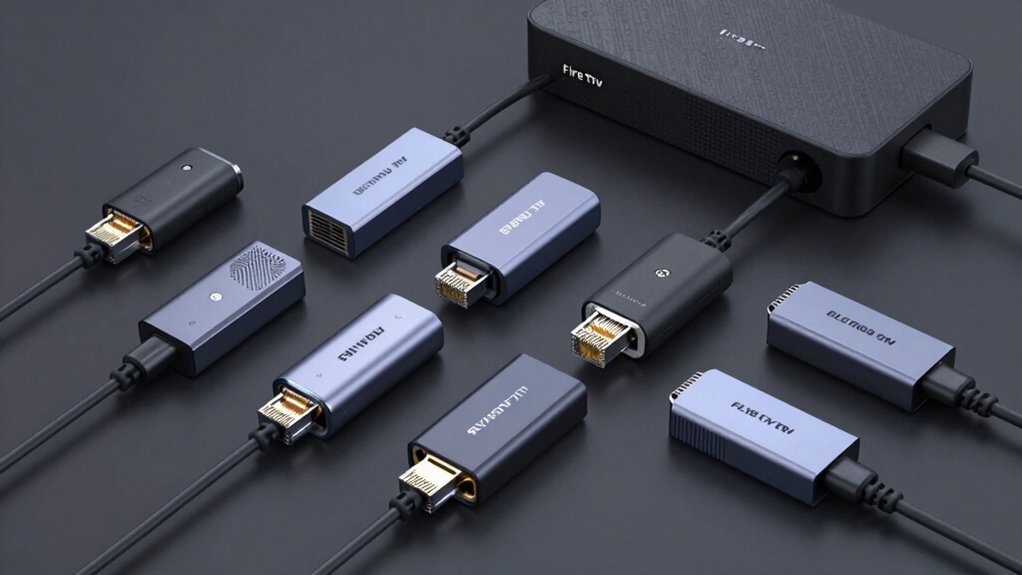

If you’re experiencing buffering or inconsistent streaming on your Fire TV device, you’ll want to switch from Wi-Fi to a wired ethernet connection. An ethernet adapter gives you faster, more stable speeds by connecting directly to your router. You’ve got several options available, each with different speeds and compatibility requirements. Before you pick one, you need to understand what makes each adapter work best for your specific Fire TV model and setup.
| Ethernet Adapter for Amazon Fire TV Devices |
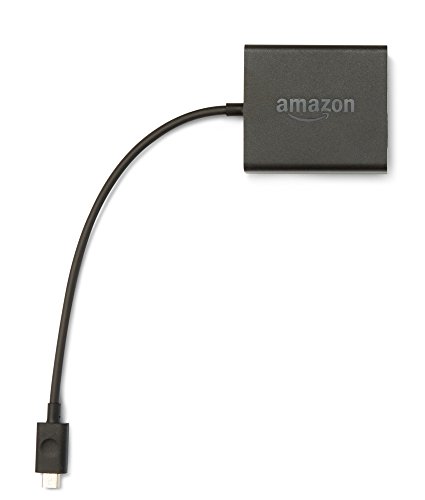
| Official Amazon Solution | Ethernet Speed: 10/100 Mbps | Connector Type: USB to Ethernet | Setup Type: Plug-and-play with direct connection | VIEW LATEST PRICE | Read Our Analysis |
| ELECTOP 1000 Mbps Ethernet Adapter for Fire TV Stick |

| Premium Speed Pick | Ethernet Speed: 1000 Mbps (Gigabit) | Connector Type: Micro USB to RJ45 | Setup Type: Plug-and-play (no drivers) | VIEW LATEST PRICE | Read Our Analysis |
| Electop Micro USB to RJ45 Ethernet Adapter for Fire TV |

| Reliable Standard Choice | Ethernet Speed: 10/100 Mbps | Connector Type: Micro USB to RJ45 | Setup Type: Plug-and-play (no drivers) | VIEW LATEST PRICE | Read Our Analysis |
| Ethernet Adapter for Fire TV Stick and Streaming Devices |

| Budget-Friendly Option | Ethernet Speed: 10/100 Mbps | Connector Type: Micro USB to RJ45 | Setup Type: Plug-and-play (no drivers) | VIEW LATEST PRICE | Read Our Analysis |
| ZEXMTE Ethernet Adapter for Fire TV Stick 4K |

| Best For 4K | Ethernet Speed: 1000 Mbps (Gigabit) | Connector Type: Micro USB to RJ45 | Setup Type: Plug-and-play (no drivers) | VIEW LATEST PRICE | Read Our Analysis |
| Ethernet Adapter for Fire TV Stick & Chromecast |

| Simplest Setup | Ethernet Speed: 10/100 Mbps | Connector Type: Micro USB to RJ45 | Setup Type: Plug-and-play (no drivers) | VIEW LATEST PRICE | Read Our Analysis |
| YEZriler Ethernet Adapter for Fire TV Stick |

| Most Popular | Ethernet Speed: 100 Mbps | Connector Type: Micro USB to RJ45 | Setup Type: Plug-and-play (no drivers) | VIEW LATEST PRICE | Read Our Analysis |
| Wired Ethernet Adapter for Fire Stick & Chromecast |
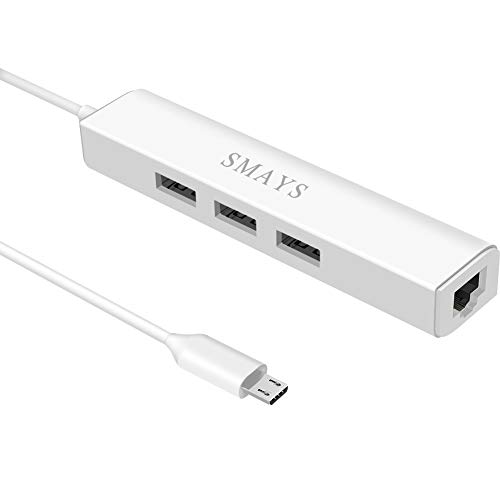
| Most Versatile | Ethernet Speed: 10/100 Mbps | Connector Type: Micro USB OTG with USB hub | Setup Type: Plug-and-play setup with 3 steps | VIEW LATEST PRICE | Read Our Analysis |
| AuviPal 3-in-1 Micro USB Ethernet Adapter OTG Hub |

| Best On-The-Go | Ethernet Speed: 100 Mbps | Connector Type: Micro USB to RJ45 with dual USB ports | Setup Type: Plug-and-play (no drivers) | VIEW LATEST PRICE | Read Our Analysis |
More Details on Our Top Picks
Ethernet Adapter for Amazon Fire TV Devices
Why settle for spotty Wi-Fi when you can get a direct, stable connection? This Ethernet adapter connects your Fire TV device to your router using a wired cable, delivering faster and more reliable internet speeds. Setup is straightforward: plug an Ethernet cable from your router into the adapter, then connect the adapter to your Fire TV via USB. The adapter works with Fire TV Stick Lite, Fire TV Stick, Fire TV Stick 2nd Gen, Fire TV Stick 4K, Fire TV Stick 4K Max, Fire TV Cube, and Amazon Fire TV 3rd Gen. It features a 10/100 Ethernet interface and powers your device simultaneously, eliminating Wi-Fi interference and buffering issues during streaming.
- Ethernet Speed:10/100 Mbps
- Connector Type:USB to Ethernet
- Setup Type:Plug-and-play with direct connection
- Build Material:Standard plastic/connector materials
- Fire TV Stick Compatibility:Lite, Standard, 2nd Gen, 4K, 4K Max, Cube, 3rd Gen
- Additional Features:Direct power and network integration
- Additional Feature:Direct USB power integration
- Additional Feature:Wide device compatibility range
- Additional Feature:Simple plug-and-connect setup
ELECTOP 1000 Mbps Ethernet Adapter for Fire TV Stick
Looking for faster streaming without Wi-Fi interruptions? The ELECTOP 1000 Mbps Ethernet Adapter connects directly to your Fire TV Stick 4K’s Micro USB port, delivering gigabit speeds for smooth playback and reduced latency. Setup takes seconds: plug the adapter into your device, connect an Ethernet cable to your router, and you’re done—no drivers required. The aluminum design dissipates heat while built-in protections guard against voltage surges. An LED indicator shows operational status. Note: this adapter requires a separate power cable for optimal performance and won’t work with Fire Stick 4K Max or USB-C Chromecast models. It’s backed by a 30-day return guarantee.
- Ethernet Speed:1000 Mbps (Gigabit)
- Connector Type:Micro USB to RJ45
- Setup Type:Plug-and-play (no drivers)
- Build Material:Aluminum alloy with heat dissipation
- Fire TV Stick Compatibility:4K only (not 4K Max or Gen 1)
- Additional Features:LED status indicator, protection circuits, adhesive tapes
- Additional Feature:Gigabit 1000 Mbps speed
- Additional Feature:LED working status indicator
- Additional Feature:Over-voltage protection included
Electop Micro USB to RJ45 Ethernet Adapter for Fire TV
The Electop adapter serves as a reliable standard choice for Fire TV Stick 4K users seeking stable, wired internet connections. This Micro USB to RJ45 adapter delivers 10/100 Mbps Ethernet speeds through plug-and-play setup—no drivers required. Connect the Micro USB port to your Fire TV Stick, then attach your Ethernet cable from the router. An additional power cable is recommended for sufficient power delivery. The aluminum design includes an LED status indicator and two adhesive tapes for secure positioning. Note that it’s incompatible with Chromecast with Google TV and VPN services. Verify your device’s Micro USB port before purchasing to ensure compatibility with this straightforward networking solution.
- Ethernet Speed:10/100 Mbps
- Connector Type:Micro USB to RJ45
- Setup Type:Plug-and-play (no drivers)
- Build Material:Aluminum alloy with heat dissipation
- Fire TV Stick Compatibility:4K only (not 4K Max or Gen 1)
- Additional Features:LED status light, adhesive tapes for stability
- Additional Feature:Heat dissipation aluminum alloy
- Additional Feature:LED status light indicator
- Additional Feature:Self-adhesive mounting tapes
Ethernet Adapter for Fire TV Stick and Streaming Devices
Uelkr’s Micro USB to RJ45 Ethernet adapter serves budget-conscious users who want stable wired connections for Fire TV Stick 4K and compatible streaming devices. Simply plug the Micro USB connector into your Fire TV Stick’s port and attach an Ethernet cable from your router. The aluminum alloy design includes self-adhesive tapes to secure the adapter and prevent cable strain. This plug-and-play setup requires no drivers or installation. You’ll get 10/100 Mbps wired speeds with an LED indicator showing connection status. The adapter works with devices featuring Micro USB ports but won’t work with Chromecast with Google TV. Verify your device’s port type before purchasing. You’re covered by a one-year warranty and Amazon’s 30-day return policy.
- Ethernet Speed:10/100 Mbps
- Connector Type:Micro USB to RJ45
- Setup Type:Plug-and-play (no drivers)
- Build Material:Aluminum alloy with heat dissipation
- Fire TV Stick Compatibility:4K only (not 4K Max or Gen 1)
- Additional Features:LED status indicator, adhesive tapes included
- Additional Feature:Self-adhesive cable placement tapes
- Additional Feature:1-year manufacturer warranty
- Additional Feature:Aluminum alloy heat dissipation
ZEXMTE Ethernet Adapter for Fire TV Stick 4K
If you’re streaming 4K content on your Fire TV Stick, you’ll want a wired connection to keep buffering at bay. The ZEXMTE Ethernet Adapter delivers 1000 Mbps speeds directly to your device via its Micro USB connector. Simply plug it in—no drivers needed. A green LED confirms your connection is active; yellow indicates readiness. This adapter works with Fire TV Stick 2/3/4K/4K Max, Google Home Mini, and Chromecast models. The aluminum shell dissipates heat efficiently while protecting against voltage surges and power overloads. Note that it won’t work with Fire TV Cube, Roku devices, or tablets. You’ll get 60 days of warranty coverage.
- Ethernet Speed:1000 Mbps (Gigabit)
- Connector Type:Micro USB to RJ45
- Setup Type:Plug-and-play (no drivers)
- Build Material:Reinforced aluminum alloy
- Fire TV Stick Compatibility:2nd Gen, 3rd Gen, 4K, 4K Max (not Cube)
- Additional Features:Dual LED indicators (green/yellow), protection circuits
- Additional Feature:Dual LED indicator lights
- Additional Feature:60-day free warranty
- Additional Feature:Over-current/over-power protection
Ethernet Adapter for Fire TV Stick & Chromecast
For users who need the simplest setup without drivers or complex installation, this Micro USB to RJ45 Ethernet adapter delivers plug-and-play connectivity. Connect the adapter to your Fire TV Stick’s Micro USB port, then attach an Ethernet cable from your router. You’ll need a separate power cable for the additional Micro USB port. This adapter supports Fire TV Stick Basic, 2nd gen, 4K, and Lite models, plus Google Chromecast 1/2/3/Ultra and Audio versions. It won’t work with Chromecast with Google TV, Roku devices, or Fire TV Stick 4K Max. The aluminum casing dissipates heat effectively while the flexible cable resists fraying. You receive the adapter and manual; the power adapter isn’t included.
- Ethernet Speed:10/100 Mbps
- Connector Type:Micro USB to RJ45
- Setup Type:Plug-and-play (no drivers)
- Build Material:Aluminum alloy with flexible cable
- Fire TV Stick Compatibility:Basic, 2nd Gen, 4K, Lite, 3rd Gen (not 4K Max or Gen 1)
- Additional Features:Flexible soft cable, user manual included
- Additional Feature:Flexible soft cable design
- Additional Feature:1-year product warranty
- Additional Feature:User manual included
YEZriler Ethernet Adapter for Fire TV Stick
The most popular choice among Fire TV users experiencing weak WiFi signals, the YEZriler Ethernet Adapter delivers a stable 100 Mbps wired connection directly to your device. It’s compatible with Fire TV Stick, 4K, 4K Max, Cube, and Chromecast Ultra Audio models. Simply plug the micro USB connector into your Fire TV device and connect an RJ45 Ethernet cable to establish your connection—no drivers or software installation required. The aluminum shell prevents overheating, while indicator lights show your connection status. This adapter works best for streaming movies and games, markedly reducing WiFi interference and lag issues.
- Ethernet Speed:100 Mbps
- Connector Type:Micro USB to RJ45
- Setup Type:Plug-and-play (no drivers)
- Build Material:Aluminum alloy with heat dissipation
- Fire TV Stick Compatibility:Standard, 4K, 4K Max, Cube (not Gen 1)
- Additional Features:Realtek 8152B chip, status indicator lights
- Additional Feature:Realtek 8152B chipset
- Additional Feature:12-month warranty coverage
- Additional Feature:Overheating protection included
Wired Ethernet Adapter for Fire Stick & Chromecast
You’ll find this adapter’s most versatile appeal lies in its dual functionality—it combines stable wired ethernet with a 3-port USB hub, making it ideal for users who want both reliable streaming and expanded device connectivity. Connect the adapter to your Fire Stick, plug the network cable into the adapter, then connect the USB-DC cable to a 5V/2A power source. The adapter supports 10/100 Mbps speeds and works with Fire Stick models, Chromecast Ultra, and TiVo Stream 4K. You can attach external storage, keyboards, mice, or memory card readers to the USB ports. This setup eliminates buffering issues by providing stable wired internet instead of relying on wireless connections.
- Ethernet Speed:10/100 Mbps
- Connector Type:Micro USB OTG with USB hub
- Setup Type:Plug-and-play setup with 3 steps
- Build Material:Standard plastic/connector materials
- Fire TV Stick Compatibility:Lite, 2nd Gen, 3rd Gen, 4K, 4K Max, Cube
- Additional Features:3-port USB hub, external storage access, OTG cable
- Additional Feature:3-port USB 2.0 hub
- Additional Feature:External storage access support
- Additional Feature:OTG cable included
AuviPal 3-in-1 Micro USB Ethernet Adapter OTG Hub
AuviPal’s 3-in-1 Micro USB Ethernet Adapter combines an RJ45 Ethernet port with two USB 2.0 ports in one compact device, making it ideal for travelers who need reliable wired network access without sacrificing USB connectivity. Simply plug the micro USB connector into your Fire TV Stick or compatible device. Connect your Ethernet cable to the RJ45 port for stable network speeds up to 100 Mbps. Simultaneously attach USB peripherals like flash drives or keyboards to the two USB ports. The plug-and-play design requires no drivers or software installation. It supports Windows, macOS, Android, and Linux systems. This adapter works with Fire TV Stick, Raspberry Pi Zero, Chromecast models, and TiVo Stream 4K. Use it in areas with weak Wi-Fi signals for improved streaming performance. The lightweight, ABS enclosure fits easily in travel bags, and AuviPal backs it with a one-year warranty.
- Ethernet Speed:100 Mbps
- Connector Type:Micro USB to RJ45 with dual USB ports
- Setup Type:Plug-and-play (no drivers)
- Build Material:ABS plastic enclosure
- Fire TV Stick Compatibility:Standard, 4K, 4K Max, Cube (not Gen 1)
- Additional Features:2 USB ports included, compact travel-friendly design
- Additional Feature:2 additional USB ports
- Additional Feature:Travel-friendly compact design
- Additional Feature:One-year warranty coverage
Factors to Consider When Choosing an Ethernet Adapter for Fire TV Devices
You’ll need to verify that your chosen adapter works with your specific Fire TV model, whether you’re using a Stick, Cube, or Fire TV Edition device. Check the ethernet speed rating—you’ll want at least 100 Mbps for reliable 4K streaming, though gigabit (1000 Mbps) adapters offer better performance for multiple devices. Consider the power supply method, build quality materials, and whether the adapter includes heat management features, as these factors directly affect your streaming stability and the adapter’s lifespan.
Compatibility With Your Device
How do you know which Ethernet adapter will actually work with your Fire TV device? Start by identifying your exact Fire TV model—whether it’s a Fire TV Stick 4K, Fire TV Cube, or another version. Next, verify the adapter uses Micro USB, not USB-C or USB-A, since Fire TV devices require this specific port type. Check the product specifications for 10/100 Mbps Ethernet support if you need stable streaming speeds. Confirm the adapter isn’t listed as incompatible with your device model to prevent purchasing a non-functional setup. Finally, review whether the adapter needs an additional power cable for sufficient power supply. These compatibility steps ensure you’ll select an adapter that actually works with your specific Fire TV device without wasting time or money on incompatible options.
Ethernet Speed And Performance
When selecting an Ethernet adapter for your Fire TV device, understanding speed ratings and real-world performance is essential. Most adapters support 10/100 Mbps Ethernet, while some models offer gigabit speeds up to 1000 Mbps. Gigabit adapters reduce buffering and improve streaming smoothness compared to standard connections. However, your actual usable speed depends on two factors: your Fire TV’s USB interface and your network environment. USB 2.0 interfaces max out at 480 Mbps, creating a bottleneck even with gigabit-rated adapters. Check your device specifications before purchasing. Additionally, look for LED indicators on the adapter—they verify active connection status and help you quickly assess link stability and speed performance.
Power Supply Requirements
Because many Fire TV Ethernet adapters draw power directly from your device’s Micro USB port, you’ll need to understand how power supply requirements affect performance and reliability. Some adapters require 5V, 2A external power to function properly, especially when the single Micro USB port handles both data and power simultaneously. Without adequate power, you’ll experience reduced network speeds or intermittent connectivity issues. Check your adapter’s specifications before purchasing. If the model requires separate power, obtain a compatible power supply or cable. USB-C and USB 3.0 ports typically aren’t supported, so verify that your Fire TV device uses a standard Micro USB port. Meeting power requirements ensures stable 10/100 Mbps Ethernet performance and prevents operational failures during streaming.
Build Quality And Durability
Durability matters because you’ll want your Ethernet adapter to withstand constant use and the physical environment around your TV setup. Look for models with aluminum alloy casings, which provide excellent heat dissipation and resist wear over time. Choose adapters featuring rugged metal shell designs that handle daily handling and accidental bumps without compromising performance. Check that your adapter includes self-adhesive tapes to secure cables and reduce stress on connectors. Select compact, lightweight models around 5.9 x 3.5 x 0.8 inches to minimize strain on Micro USB and RJ45 ports. Verify that built-in protections guard against over-voltage, over-current, over-power, and short-circuit conditions. These safeguards directly extend your adapter’s lifespan and ensure reliable streaming performance throughout extended use.
Heat Dissipation Technology
Efficient heat management directly affects how well your Ethernet adapter performs during extended streaming sessions. Look for adapters with aluminum alloy or aluminum housing, which dissipates heat passively through the metal enclosure. This design prevents thermal throttling and maintains stable throughput during long viewing periods.
Check product specifications for heat-dissipation materials listed as features. Aluminum construction reduces the external surface temperature, keeping your adapter cool without requiring active cooling fans or power-intensive systems.
When comparing models, prioritize those emphasizing thermal performance alongside Ethernet speed capabilities, whether 10/100 Mbps or 1000 Mbps. Position your adapter in a well-ventilated area to maximize passive cooling effectiveness. This straightforward approach ensures your Fire TV streaming remains uninterrupted and reliable.
Setup Ease And Installation
Once you’ve confirmed your adapter has proper heat management for reliable performance, you’ll want to focus on how straightforward the setup process actually is. Most adapters are plug-and-play, requiring no driver installation. You simply connect the Micro USB port to your Fire TV device and attach an Ethernet cable. Some models need an additional power cable for stable operation, so check your adapter’s specifications first. Use the included adhesive tape or mounting options to secure the adapter and prevent cable disconnections. LED indicators on the adapter show connection status, allowing you to quickly verify successful installation. Before purchasing, confirm your device has a Micro USB port, as adapters don’t work with USB-C devices or certain Fire TV generations.
Protection Features And Safety
Your Fire TV adapter’s safety mechanisms are the foundation of reliable, long-term performance. Look for built-in protections against over-voltage, over-current, over-power, and short-circuit conditions that safeguard both the adapter and your device. Check that the housing uses aluminum alloy or metal materials, which dissipate heat effectively and prevent overheating during extended use.
Verify the adapter supports 5V power input and determine whether an additional power cable is necessary for stable operation. Review warranty coverage, such as 1-year or 60-day guarantees, which reflects the manufacturer’s confidence in protection features and provides recourse if issues arise.
Confirm compatibility specifications carefully, noting any stated limitations like VPN incompatibility, which may indicate specific safety design choices. These details ensure you’re selecting an adapter that protects your investment.
Final Thoughts
You’ve reviewed nine ethernet adapters designed for Fire TV devices. Choose one matching your Fire TV model and USB port type—Micro USB or USB-C. Verify power requirements and confirm the adapter’s speed rating. Check reviews for your specific device. Purchase your selected adapter, connect it to your Fire TV, attach an ethernet cable, and power it on. You’ll experience faster, more stable streaming with reduced buffering immediately.

Meet Ry, “TechGuru,” a 36-year-old technology enthusiast with a deep passion for tech innovations. With extensive experience, he specializes in gaming hardware and software, and has expertise in gadgets, custom PCs, and audio.
Besides writing about tech and reviewing new products, he enjoys traveling, hiking, and photography. Committed to keeping up with the latest industry trends, he aims to guide readers in making informed tech decisions.