
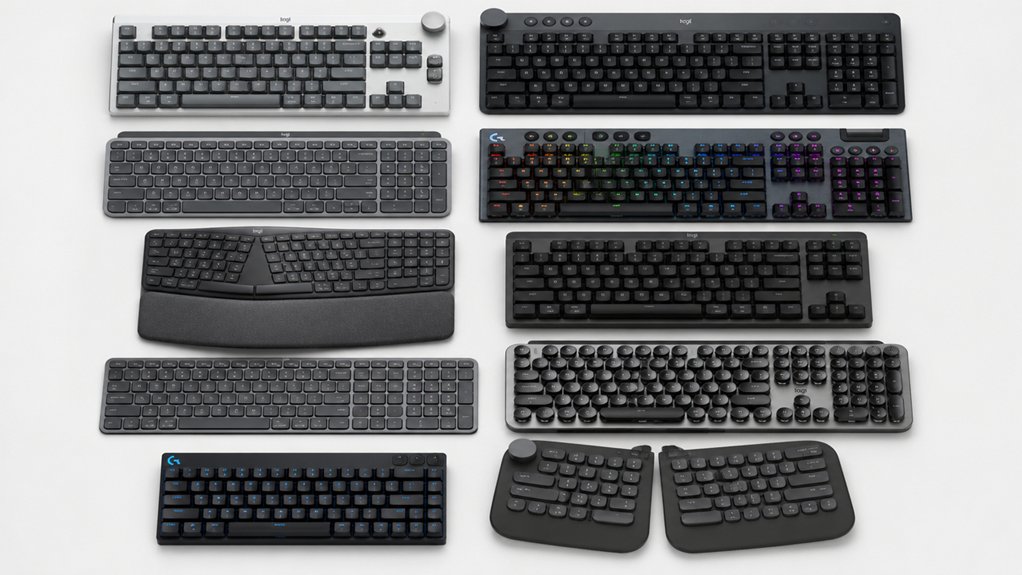

If you’re looking to upgrade your typing experience, you’ll need to evaluate what matters most to you: budget, ergonomics, backlighting, or gaming features. Logitech offers keyboards across multiple price points and use cases, each designed to address specific needs. Understanding your priorities—whether wireless connectivity, multi-device support, or specialized functions—will guide you toward the right choice. Here’s what separates each option and why you should consider…
| Logitech MX Keys S Wireless Keyboard with Backlighting |

| Premium Professional Choice | Connectivity Type: Bluetooth Low Energy + optional Logi Bolt USB receiver | Keyboard Layout: Full-size, 104 keys, QWERTY | Battery Life: Up to 10 days (backlit on); up to 5 months (backlit off) | VIEW LATEST PRICE | Read Our Analysis |
| Logitech MX Keys S Wireless Keyboard Pale Grey |

| Best Overall | Connectivity Type: Bluetooth Low Energy + optional Logi Bolt USB receiver | Keyboard Layout: Full-size, QWERTY | Battery Life: Up to 10 days (backlit on); up to 5 months (backlit off) | VIEW LATEST PRICE | Read Our Analysis |
| Logitech K270 Wireless Keyboard for Windows & PC |

| Budget-Friendly Pick | Connectivity Type: 2.4 GHz wireless USB receiver | Keyboard Layout: Full-size, 104 keys with number pad, QWERTY | Battery Life: 24 months | VIEW LATEST PRICE | Read Our Analysis |
| Logitech MK345 Wireless Keyboard and Mouse Combo |

| Best Value Combo | Connectivity Type: 2.4 GHz wireless USB receiver | Keyboard Layout: Full-size, 104-key QWERTY layout | Battery Life: Keyboard: up to 3 years; Mouse: up to 18 months | VIEW LATEST PRICE | Read Our Analysis |
| Logitech Signature K650 Wireless Keyboard with Wrist Rest |

| Most Comfortable | Connectivity Type: Bluetooth Low Energy + optional Logi Bolt USB receiver | Keyboard Layout: Full-size with numpad, QWERTY | Battery Life: Up to 36 months | VIEW LATEST PRICE | Read Our Analysis |
| Logitech Wave Keys Wireless Ergonomic Keyboard |

| Best Ergonomic | Connectivity Type: Bluetooth + optional Logi Bolt receiver | Keyboard Layout: Compact, 101 keys, QWERTY | Battery Life: 3-year battery life | VIEW LATEST PRICE | Read Our Analysis |
| Logitech Signature Slim K950 Wireless Keyboard |

| Most Versatile | Connectivity Type: Bluetooth + optional Logi Bolt receiver | Keyboard Layout: Full-size, QWERTY | Battery Life: Not specified | VIEW LATEST PRICE | Read Our Analysis |
| Logitech K585 Multi-Device Wireless Keyboard with Cradle |

| Best Multi-Device | Connectivity Type: Bluetooth + 2.4 GHz USB receiver | Keyboard Layout: Full-size, 104-key QWERTY layout | Battery Life: 24-month battery life | VIEW LATEST PRICE | Read Our Analysis |
| Logitech MX Mechanical Wireless Illuminated Keyboard |

| Best Mechanical | Connectivity Type: Bluetooth Low Energy + USB-C + optional Logi Bolt receiver | Keyboard Layout: Full-size, QWERTY | Battery Life: Up to 15 days (backlit on); up to 10 months (backlit off) | VIEW LATEST PRICE | Read Our Analysis |
| Logitech G213 Prodigy RGB Gaming Keyboard |

| Best Gaming | Connectivity Type: Wired USB connection | Keyboard Layout: Full-size, 104 keys, QWERTY | Battery Life: Wired (no battery) | VIEW LATEST PRICE | Read Our Analysis |
More Details on Our Top Picks
Logitech MX Keys S Wireless Keyboard with Backlighting
Looking for a premium professional keyboard that won’t compromise on everyday usability? The MX Keys S delivers a low-profile, full-size design with spherically-dished keys that enable fluid, quiet typing. You’ll appreciate the adaptive backlit keys with adjustable brightness and duration settings. The rechargeable USB-C battery lasts up to ten days with backlighting on or five months with it off. You can pair the keyboard with up to three devices simultaneously across Windows, macOS, Linux, Chrome OS, iOS, iPadAir, and Android. Use the Logi Options+ app to customize Smart Actions, automate multiple tasks with single keystrokes, and monitor battery life. The keyboard weighs 810 grams and features 104 QWERTY keys in an ambidextrous plastic enclosure made partially from recycled content.
- Connectivity Type:Bluetooth Low Energy + optional Logi Bolt USB receiver
- Keyboard Layout:Full-size, 104 keys, QWERTY
- Battery Life:Up to 10 days (backlit on); up to 5 months (backlit off)
- Multi-Device Support:Pairs with up to 3 devices
- Special Design Features:Adaptive backlit keys; low-profile with spherically-dished keys
- Recycled Plastic Content:Graphite 26%; Pale Grey 11%
- Additional Feature:Adaptive illumination with adjustable brightness
- Additional Feature:Smart Actions automation shortcuts
- Additional Feature:Master 3S ecosystem text/file transfer
Logitech MX Keys S Wireless Keyboard Pale Grey
Want a keyboard that delivers professional-grade typing across all your devices? The Logitech MX Keys S Pale Grey combines a low-profile design with spherically-dished keys for quiet, precise typing. Set up multi-device connectivity by pairing up to three devices via Bluetooth or the Logi Bolt USB receiver. Customize your experience through the Logi Options+ app to create Smart Actions—single-keystroke shortcuts that automate repetitive tasks. The adaptive backlighting activates when your hands approach and adjusts brightness to your preference. Charge via USB-C; you’ll get ten days of use with backlighting enabled or five months with it off. This keyboard works across Windows, Mac, Linux, Chrome OS, and mobile devices.
- Connectivity Type:Bluetooth Low Energy + optional Logi Bolt USB receiver
- Keyboard Layout:Full-size, QWERTY
- Battery Life:Up to 10 days (backlit on); up to 5 months (backlit off)
- Multi-Device Support:Multi-device, multi-OS compatible
- Special Design Features:Adaptive backlit keys; low-profile; spherically-dished keys
- Recycled Plastic Content:Graphite 26%; Pale Grey 11%
- Additional Feature:Spherically-dished keys for precision
- Additional Feature:Logi Options+ customization app
- Additional Feature:Cross-computer transfer via Master
Logitech K270 Wireless Keyboard for Windows & PC
The K270 serves as an excellent budget-friendly pick for PC users who need a reliable, full-size keyboard without extra frills. You’ll get a spill-resistant design with UV-coated keys that resist wear. The 2.4 GHz wireless connection reaches up to 33 feet, and setup takes minutes—just plug the USB receiver into your computer. The 24-month battery life means you won’t replace batteries for two years. Eight multimedia hotkeys let you control volume, email, and playback directly. The full-size layout includes a number pad, F-keys, and arrow keys for comfortable typing and navigation.
- Connectivity Type:2.4 GHz wireless USB receiver
- Keyboard Layout:Full-size, 104 keys with number pad, QWERTY
- Battery Life:24 months
- Multi-Device Support:Single device (Windows PC/laptop)
- Special Design Features:Spill-resistant; UV-coated keys; deep-profile
- Recycled Plastic Content:38% certified post-consumer recycled plastic
- Additional Feature:Spill-resistant with UV-coated keys
- Additional Feature:33 ft wireless range capability
- Additional Feature:Eight multimedia hotkeys included
Logitech MK345 Wireless Keyboard and Mouse Combo
Need a keyboard-and-mouse setup that won’t drain your budget? The MK345 delivers both devices in one package with reliable 2.4 GHz wireless connectivity. You’ll get a full-size keyboard with integrated palm rest, spill-resistant design, and media keys for quick access. The right-handed mouse offers comfortable contouring for extended use. Setup requires only plugging in the USB dongle—no drivers needed for Windows 10/11, macOS, or Chrome OS. The keyboard runs three years on two AA batteries, while the mouse lasts eighteen months. This combo prioritizes practicality over premium features, making it suitable for home or office environments where you need dependable performance without extra costs.
- Connectivity Type:2.4 GHz wireless USB receiver
- Keyboard Layout:Full-size, 104-key QWERTY layout
- Battery Life:Keyboard: up to 3 years; Mouse: up to 18 months
- Multi-Device Support:Works with Windows, macOS, Chrome OS
- Special Design Features:Integrated palm rest; spill-resistant
- Recycled Plastic Content:Not specified
- Additional Feature:Integrated palm rest design
- Additional Feature:Right-handed contoured mouse included
- Additional Feature:Keyboard battery life: 3 years
Logitech Signature K650 Wireless Keyboard with Wrist Rest
If you spend hours typing daily, Logitech’s Signature K650 offers the most comfortable full-size keyboard option available. The deep-cushioned keys and integrated soft-touch palm rest reduce strain during extended work sessions. You’ll connect via Bluetooth or the included Logi Bolt USB receiver. The keyboard includes a numpad, spill-resistant design, and quick-access shortcut keys for mic mute, screenshots, and web navigation. Battery life reaches up to 36 months. You can personalize settings through Logi Options+ software on Windows 10 and macOS 10.15 or later. The device works across Windows, macOS, Chrome OS, Linux, iPadOS, iOS, and Android platforms.
- Connectivity Type:Bluetooth Low Energy + optional Logi Bolt USB receiver
- Keyboard Layout:Full-size with numpad, QWERTY
- Battery Life:Up to 36 months
- Multi-Device Support:Bluetooth pairing with multiple devices
- Special Design Features:Deep-cushioned keys with integrated soft-touch palm rest; spill-resistant
- Recycled Plastic Content:Graphite 28%; Off-White 21%
- Additional Feature:Deep-cushioned keys with palm rest
- Additional Feature:Quick-access mic mute/screenshot controls
- Additional Feature:36-month battery life capability
Logitech Wave Keys Wireless Ergonomic Keyboard
Logitech Wave Keys supports all-day typing with its wave-shaped design and cushioned palm rest, making it ideal for anyone who spends hours at a desk and wants to reduce wrist strain. The compact key layout positions your shoulders naturally while the memory foam rest provides consistent wrist support. You’ll connect via Bluetooth or Logi Bolt Receiver and switch easily between your computer, tablet, and phone. The keyboard runs for three years on included batteries. Download the Logi Options+ app to customize shortcuts and streamline your workflow. With 61% recycled plastic construction, you’re choosing a durable, environmentally conscious option compatible with Windows, macOS, and Android devices.
- Connectivity Type:Bluetooth + optional Logi Bolt receiver
- Keyboard Layout:Compact, 101 keys, QWERTY
- Battery Life:3-year battery life
- Multi-Device Support:Easy-Switch between computer, tablet, phone
- Special Design Features:Wave-shaped design; cushioned palm rest with memory foam
- Recycled Plastic Content:Graphite 61%; Off-white 46%
- Additional Feature:Wave-shaped ergonomic design
- Additional Feature:Memory foam cushioned palm rest
- Additional Feature:Lift Vertical Mouse compatibility
Logitech Signature Slim K950 Wireless Keyboard
The Signature Slim K950 stands out as the most versatile choice for anyone switching between multiple devices throughout their day. You’ll tap a single button to move seamlessly between your computer, tablet, and phone using Bluetooth or Logi Bolt connectivity. The keyboard features a full-size laptop-style design with quiet typing for focused work. You can customize keys through the Logi Options+ app on Windows and macOS. Built from recycled plastic—at least 48% post-consumer material—it supports Windows 11, macOS, Chrome OS, Linux, iPadOS, iOS, and Android. One-tap function keys let you control volume, mute audio, or access tools instantly.
- Connectivity Type:Bluetooth + optional Logi Bolt receiver
- Keyboard Layout:Full-size, QWERTY
- Battery Life:Not specified
- Multi-Device Support:Switch typing between three devices with single tap
- Special Design Features:Sleek, laptop-style; quiet typing
- Recycled Plastic Content:Minimum 48% certified post-consumer recycled plastic
- Additional Feature:Single-tap three-device switching
- Additional Feature:Quiet laptop-style typing experience
- Additional Feature:48% post-consumer recycled plastic
Logitech K585 Multi-Device Wireless Keyboard with Cradle
Switching between your laptop, tablet, and phone doesn’t require multiple keyboards—you’ll pair this wireless keyboard with up to three devices simultaneously using Bluetooth or the included 2.4 GHz USB receiver. The built-in cradle holds your device upright for convenient viewing while you type. Its compact 14.7-inch design fits any desk without consuming excess space. The keyboard offers a 104-key QWERTY layout with numeric keypad and twelve programmable function keys you can customize through Logi Options+ software. You’ll experience whisper-quiet, laptop-style typing across Windows, macOS, iOS, Android, and Linux. Two pre-installed batteries deliver 24 months of use with auto-sleep power management.
- Connectivity Type:Bluetooth + 2.4 GHz USB receiver
- Keyboard Layout:Full-size, 104-key QWERTY layout
- Battery Life:24-month battery life
- Multi-Device Support:Easy Switch to pair and switch between multiple devices
- Special Design Features:Built-in cradle for device; whisper-quiet, laptop-like typing
- Recycled Plastic Content:Not specified
- Additional Feature:Built-in device cradle included
- Additional Feature:24-month battery life span
- Additional Feature:Whisper-quiet laptop-like typing
Logitech MX Mechanical Wireless Illuminated Keyboard
Seeking a mechanical keyboard that performs across multiple devices? The Logitech MX Mechanical Wireless Illuminated Keyboard delivers tactile quiet switches with precise feedback. Connect via Bluetooth or Logi Bolt receiver to macOS, Windows, Linux, iOS, and Android devices simultaneously—pairing up to three at once. Customize function keys and backlighting effects through Logi Options+ software. The low-profile full-size design features backlighting that adjusts automatically to ambient light. Charge via USB-C for up to 15 days with backlighting enabled, or 10 months with it disabled. The keyboard contains 45% certified post-consumer recycled plastic, supporting sustainable computing practices.
- Connectivity Type:Bluetooth Low Energy + USB-C + optional Logi Bolt receiver
- Keyboard Layout:Full-size, QWERTY
- Battery Life:Up to 15 days (backlit on); up to 10 months (backlit off)
- Multi-Device Support:Pairs with up to 3 devices
- Special Design Features:Low-profile mechanical switches; adjustable backlighting
- Recycled Plastic Content:Graphite 45% certified post-consumer recycled plastic
- Additional Feature:Tactile quiet mechanical key switches
- Additional Feature:15-day battery with backlighting
- Additional Feature:Flow cross-computer control support
Logitech G213 Prodigy RGB Gaming Keyboard
Gamers who want a full-sized keyboard with responsive, tactile feedback will find the Logitech G213 Prodigy delivers solid gaming performance through its mech-dome keys and anti-ghosting matrix. You’ll benefit from 5 customizable lighting zones with over 16.8 million colors that sync across other Logitech G devices using G Hub software. The spill-resistant design protects against accidental liquid damage, while dedicated media controls let you manage audio and video without leaving your game. You can program macros and adjust lighting preferences directly through G Hub. The keyboard connects via USB with an integrated palm rest and adjustable feet for ergonomic positioning. This option works exclusively with Windows systems and includes a 2-year limited warranty.
- Connectivity Type:Wired USB connection
- Keyboard Layout:Full-size, 104 keys, QWERTY
- Battery Life:Wired (no battery)
- Multi-Device Support:Windows only (single device)
- Special Design Features:Mech-Dome keys; anti-ghosting; integrated palm rest; 5 RGB zones
- Recycled Plastic Content:Not specified
- Additional Feature:16.8M RGB color customization
- Additional Feature:Anti-ghosting gaming matrix technology
- Additional Feature:Logitech G Hub sync capability
Factors to Consider When Choosing a Logitech Keyboard
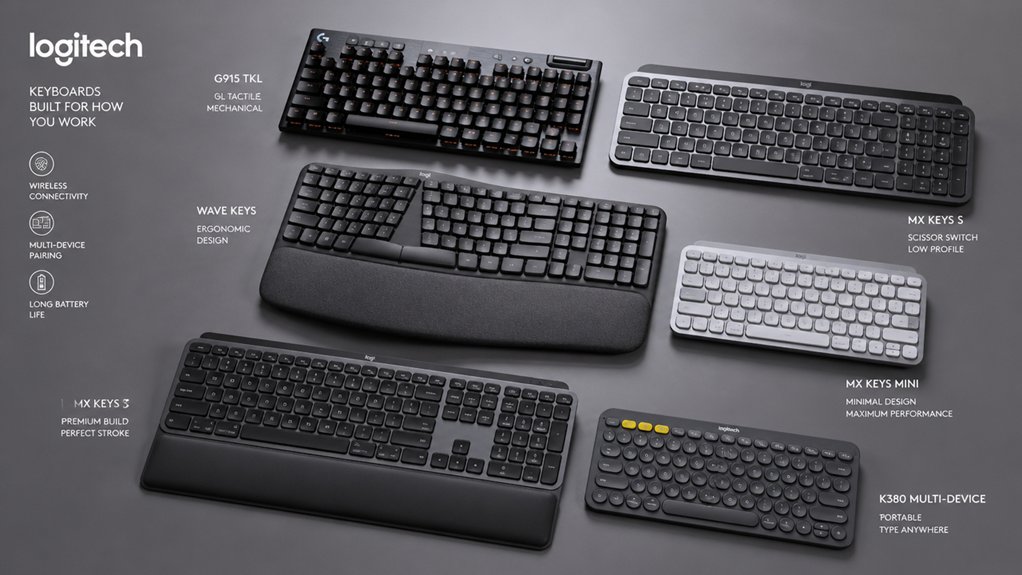
When you’re selecting a Logitech keyboard, you’ll need to evaluate your typing experience and comfort level, check the battery life and charging methods available, and verify the wireless connectivity options that match your devices. Next, confirm that the keyboard supports multi-device compatibility so you can switch between your computer, tablet, or phone without hassle. Finally, review the customization and software features to determine whether programmable keys and lighting adjustments align with your workflow needs.
Typing Experience And Comfort
Comfort shapes your ability to type efficiently and maintain productivity during long work sessions. You’ll want to evaluate key profiles first—low-profile, laptop-like designs with spherically-dished keys deliver fluid, quiet typing. Next, assess switch type. Tactile mechanical switches in models like MX Mechanical provide a distinct bump and reactive reset for controlled input. Then examine ergonomic support. Cushioned palm rests and wave designs keep your wrists in natural positions, reducing strain over extended periods. Finally, consider backlighting features. Integrated adaptive illumination adjusts to your environment, maintaining visibility without disrupting your typing rhythm. By systematically reviewing these elements—key profile, switch feel, wrist support, and lighting—you’ll select a keyboard that supports both comfort and performance.
Battery Life And Charging
How long can you actually use a Logitech keyboard before you’ll need to recharge or replace batteries? Battery life depends on your model and usage. Non-rechargeable keyboards with replaceable batteries last up to 36 months, while rechargeable USB-C models provide 10 days with backlighting on or 5 months with backlighting off. Backlighting significantly drains power, so adjust brightness to extend usage time. Consider your connectivity choice: Bluetooth Low Energy and Logi Bolt USB receivers both affect battery longevity during multi-device switching. Evaluate your needs by identifying how frequently you switch devices and whether backlighting matters for your workspace. Select rechargeable models if you prefer convenience, or replaceable battery options if you want extended intervals between maintenance.
Wireless Connectivity Options
Three primary wireless connectivity methods are available across Logitech’s keyboard lineup: Bluetooth Low Energy, Logi Bolt USB receivers, and traditional Unifying receivers. Bluetooth Low Energy connects directly to your device without additional hardware, supporting Windows, macOS, Linux, Chrome OS, iOS, iPadOS, and Android. Logi Bolt USB receivers provide more robust wireless connections through a dedicated dongle. Unifying receivers, often included in packaging or pre-installed in mice, enable plug-and-play connectivity without setup. Most Logitech keyboards support pairing up to three devices simultaneously, letting you switch between computers, tablets, or phones. Choose Bluetooth for flexibility across platforms, Logi Bolt for stronger signal stability, or Unifying receivers for straightforward plug-and-play installation. Pair your preferred method with Logi Options+ software to unlock Smart Actions and customizable shortcuts.
Multi-Device Compatibility
When you’re juggling work between a laptop, desktop, and tablet, you’ll want a keyboard that keeps pace with your workflow. Logitech keyboards support simultaneous pairing with up to three devices, allowing you to switch between them without reconnecting. Check compatibility with your operating systems—Windows, macOS, Linux, Chrome OS, iOS, iPadOS, and Android are all supported across different models. Connect via Bluetooth Low Energy for wireless freedom or use a Logi Bolt USB receiver for wired connectivity. Some advanced models include Flow or Logi Options+ Smart Actions, enabling you to transfer text and files between computers seamlessly. Verify receiver compatibility before purchasing, as USB receivers aren’t universally compatible across all Logitech devices.
Customization And Software Features
To release the full potential of your Logitech keyboard, you’ll need to download and use the Logi Options+ app, which serves as the control center for customization. Through this software, you can create Smart Actions that automate multiple functions with a single keystroke, significantly improving your workflow efficiency. You can personalize your Fn keys and programmable keys to trigger specific shortcuts tailored to your work habits. The app also lets you adjust illumination settings and monitor battery levels directly from your computer. For advanced features like cross-computer text and file transfer, pair your keyboard with other Logi devices. Note that some customization options require the Logi Bolt USB receiver and specific operating system versions for full compatibility.
Sustainability And Materials
Environmental responsibility shapes how Logitech designs many of its keyboards, and you’ll find recycled materials built into several models across the product line. Check the sustainability specifications for each model to identify recycled plastic content percentages. Graphite variants typically contain up to 45% certified post-consumer recycled plastic, while other color options like Pale Grey offer 11% recycled content, with many models reaching 28% or higher. Review the product materials list to determine whether the keyboard uses aluminum, mixed metal and plastic enclosures, or primarily recycled plastics. Examine packaging details for recycled content information as well. Cross-reference these material choices against your environmental priorities to select a keyboard that aligns with your sustainability values. This approach ensures you make an informed decision based on concrete material data rather than marketing claims alone.
Design And Ergonomic Support
Keyboard design and ergonomic features directly affect your comfort during extended typing sessions, so you’ll want to evaluate how each model supports your wrists, hands, and posture. Look for keyboards with adjustable typing angles, which let you customize the slope to match your preferences. Check if the model includes a built-in or cushioned palm rest—these reduce strain on your wrists during long workdays. Consider split or wave-style designs that encourage natural hand positioning and better spinal alignment. Some Logitech keyboards feature low-profile keys with spherical dishing, promoting fluid typing with less finger travel. Memory foam padding in palm rests provides additional support. Evaluate these features against your typical work duration and any existing wrist or shoulder concerns to select the best fit.
Warranty And Durability
Protection matters when you’re investing in a keyboard you’ll use daily. Most Logitech keyboards come with a 1-year limited hardware warranty covering defects, though gaming and higher-end models sometimes offer 2-year coverage. Check the manufacturer’s website or Amazon listing to confirm your specific model’s terms before purchasing. Review what the warranty actually covers—typically hardware failures, not accidental damage or accessory loss. Durability features also matter. Look for spill-resistant designs, reinforced keycaps, and rechargeable USB-C batteries that reduce long-term maintenance needs. Keyboards with post-consumer recycled plastic enclosures often prove reliable. If you buy through Amazon, familiarize yourself with their return policies as well. Understanding both warranty length and durability specs helps you select a keyboard that matches your usage patterns and budget.
Final Thoughts
You’ve reviewed Logitech’s top keyboard options across different categories. Determine your primary need: premium typing comfort, budget efficiency, gaming performance, or ergonomic support. Match your choice to your workflow—multi-device users benefit from Flow technology, while gamers prioritize the G213’s RGB features. Check battery life, connectivity type (wireless or wired), and key switches. Test your selection’s feel and layout before committing to ensure it meets your typing requirements.

Meet Ry, “TechGuru,” a 36-year-old technology enthusiast with a deep passion for tech innovations. With extensive experience, he specializes in gaming hardware and software, and has expertise in gadgets, custom PCs, and audio.
Besides writing about tech and reviewing new products, he enjoys traveling, hiking, and photography. Committed to keeping up with the latest industry trends, he aims to guide readers in making informed tech decisions.