

When you’re upgrading your network infrastructure, you’ll need to evaluate 25GbE network cards that match your specific requirements. You’ve got several strong options available, from Mellanox ConnectX-4 models offering RDMA capabilities to Intel E810-based adapters supporting multiple speeds. Each card brings different advantages—some excel at virtualization, while others prioritize raw throughput. Before you decide which card fits your setup, you should understand what factors truly matter for your particular needs.
| Vogzone 25GbE NIC Card Mellanox ConnectX-4 Lx |

| Enterprise Virtualization Leader | Max Data Rate: 25GbE | Port Configuration: Dual SFP28 | PCIe Interface: PCIe 3.0 x8 | VIEW LATEST PRICE | Read Our Analysis |
| Vogzone 25Gb PCI-E Network Card with Dual SFP28 Ports |

| Data Center Standard | Max Data Rate: 25GbE | Port Configuration: Dual SFP28 | PCIe Interface: PCIe 4.0 x8 | VIEW LATEST PRICE | Read Our Analysis |
| 10Gtek 25G Ethernet Network Card with 2X SFP28 Ports |

| Best Performance Value | Max Data Rate: 25GbE | Port Configuration: Dual SFP28 | PCIe Interface: PCIe 4.0 x8 | VIEW LATEST PRICE | Read Our Analysis |
| 25GbE NIC Network Card Mellanox ConnectX-4 Dual-SFP28 |
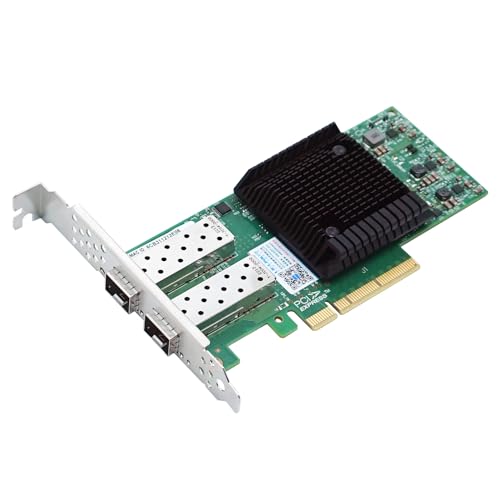
| Most Versatile Option | Max Data Rate: 25GbE | Port Configuration: Dual SFP28 | PCIe Interface: PCIe 3.0 x8 | VIEW LATEST PRICE | Read Our Analysis |
| TP-Link 2.5GB PCIe Network Card (TX201) |

| Budget-Friendly Pick | Max Data Rate: 2.5GbE | Port Configuration: Single RJ45 | PCIe Interface: PCIe standard | VIEW LATEST PRICE | Read Our Analysis |
More Details on Our Top Picks
Vogzone 25GbE NIC Card Mellanox ConnectX-4 Lx
If you’re running virtualized environments with multiple virtual machines that demand high-speed networking without sacrificing CPU resources, the Vogzone 25GbE NIC Card with Mellanox ConnectX-4 Lx chipset delivers the performance you need. This PCIe 3.0 x8 card supports 1GbE, 10GbE, and 25GbE speeds across dual SFP28 ports. You’ll benefit from SR-IOV multi-VM support, which efficiently shares I/O resources among virtual machines while maintaining high bandwidth and low latency. The card’s ASAP² offloads transfer Open vSwitch datapath processing from your CPU to the adapter itself, reducing system overhead. Installation works with Windows, Linux, VMware ESXi, and other major operating systems. Hardware-based I/O isolation ensures scalable, efficient performance across your virtualized infrastructure.
- Max Data Rate:25GbE
- Port Configuration:Dual SFP28
- PCIe Interface:PCIe 3.0 x8
- RDMA Support:RoCE v1/v2
- Virtualization Support:SR-IOV, multi-VM, VirtIO
- Operating System Compatibility:Windows, Linux, VMware ESXi, Citrix XenServer, FreeBSD
- Additional Feature:ASAP² Open vSwitch offloading
- Additional Feature:Hardware-based I/O isolation
- Additional Feature:Infiniband low-latency technology
Vogzone 25Gb PCI-E Network Card with Dual SFP28 Ports
Are you running a data center environment where you need reliable, high-speed connectivity without breaking your budget? The Vogzone 25Gb PCI-E Network Card delivers dual SFP28 ports supporting 1GbE, 10GbE, and 25GbE speeds. This Intel E810-based card fits PCIe x8 slots and runs on Windows, Linux, FreeBSD, and VMware ESXi. You get TCP offloading, RDMA support, and SR-IOV virtualization for server stability. The card includes a low-profile bracket for standard installations. Check your server’s PCIe slot availability and firmware compatibility before purchasing. SFP28 cables must be bought separately based on your distance and speed requirements.
- Max Data Rate:25GbE
- Port Configuration:Dual SFP28
- PCIe Interface:PCIe 4.0 x8
- RDMA Support:iWARP/RDMA
- Virtualization Support:SR-IOV, VMDq
- Operating System Compatibility:Windows, Linux, FreeBSD, VMware ESXi
- Additional Feature:Intel Data Direct I/O Technology
- Additional Feature:On-chip QoS traffic management
- Additional Feature:TCP checksum offloading
10Gtek 25G Ethernet Network Card with 2X SFP28 Ports
The 10Gtek 25G Ethernet Network Card delivers the performance you need when you’re building a high-speed data center, managing virtualized environments, or running demanding storage applications that require dual 25 GbE connectivity. You’ll get two SFP28 ports that support DAC cables, fiber optics, and active optical cables compatible with Intel’s E810 controller. Install this PCIe 4.0 x8 card into your Windows, Linux, or VMware system to enable RoCEv2 RDMA, iWARP, iSCSI, and NFS protocols. The card supports giant frames up to 9.5KB and SR-IOV capability for virtualization. Choose between low-profile and full-height brackets to fit your server chassis. You’ll achieve 25 GbE per port without compatibility concerns across major operating systems.
- Max Data Rate:25GbE
- Port Configuration:Dual SFP28
- PCIe Interface:PCIe 4.0 x8
- RDMA Support:RoCEv2/iWARP
- Virtualization Support:SR-IOV capable
- Operating System Compatibility:Windows 10/11, CentOS 7, Ubuntu 20, VMware ESXi 7.0
- Additional Feature:Giant frame up to 9.5KB
- Additional Feature:DAC and optics compatible
- Additional Feature:PCIe 4.0 x8 interface
25GbE NIC Network Card Mellanox ConnectX-4 Dual-SFP28
Looking to consolidate your data center infrastructure while maintaining high-speed connectivity? The Mellanox ConnectX-4 delivers dual 25G ports through SFP28 connections, supporting 1G, 10G, and 25G speeds. You’ll install this PCIe 3.0 x8 card into your server, then connect your network cables to either port. The card handles NVGRE, VXLAN, and GENEVE encapsulation directly in hardware, reducing CPU overhead. You’ll gain RDMA capabilities, iSCSI support, and Jumbo Frame compatibility for virtualization applications. The device works with Windows Server, Ubuntu, and iPXE environments. You receive 24/7 technical support, a 1-year warranty, and lifetime assistance with your purchase.
- Max Data Rate:25GbE
- Port Configuration:Dual SFP28
- PCIe Interface:PCIe 3.0 x8
- RDMA Support:RoCE v1/v2
- Virtualization Support:Virtualization applications
- Operating System Compatibility:Windows Server, Windows, Ubuntu
- Additional Feature:NVGRE, VXLAN, GENEVE offloading
- Additional Feature:Lifetime technical support included
- Additional Feature:30-day free returns guarantee
TP-Link 2.5GB PCIe Network Card (TX201)
If you’re building a gaming PC or workstation that needs faster network speeds without breaking your budget, the TP-Link TX201 offers 2.5 Gbps performance at a mid-range price point. This PCIe adapter delivers speeds 2.5 times faster than standard Gigabit connections while maintaining backward compatibility with existing 1 Gbps and 100 Mbps networks. The card includes QoS technology to prioritize gaming traffic and reduce network congestion. Installation requires inserting the TX201 into an available PCIe slot, then selecting either the standard or low-profile bracket depending on your case design. Windows 11/10 and Linux systems provide full driver support. You’ll receive a 2-year warranty and access to 24/7 technical support for troubleshooting any connectivity issues.
- Max Data Rate:2.5GbE
- Port Configuration:Single RJ45
- PCIe Interface:PCIe standard
- RDMA Support:None listed
- Virtualization Support:None listed
- Operating System Compatibility:Windows 7-11, Windows Server 2016-2022, Linux
- Additional Feature:QoS gaming performance priority
- Additional Feature:Wake on LAN capability
- Additional Feature:2-year industry-leading warranty
Factors to Consider When Choosing 25GBE Network Cards
When you’re selecting a 25GbE network card, you’ll want to evaluate five critical factors: the chipset and architecture that determines performance, the PCIe generation support that matches your motherboard’s capabilities, the port configuration options that fit your network setup, the operating system compatibility for your existing systems, and RDMA protocol support if you’re running data-intensive applications. Start by checking your motherboard’s PCIe slots and your system’s OS to narrow down compatible models, then verify whether the card’s chipset delivers the throughput you need for your workload. Finally, confirm that the port configuration (single or multiple ports) aligns with your network infrastructure and that RDMA support is included if you’re transferring large datasets frequently.
Chipset and Architecture
The chipset you select fundamentally determines your 25GbE NIC’s performance, capabilities, and compatibility with your infrastructure. You’ll want to evaluate high-performance options like Mellanox ConnectX-4 Lx and Intel E810-series chipsets, which deliver 25 Gbps per port over SFP28 connections. Verify your system supports the required PCIe 3.0 x8 or PCIe 4.0 x8 interfaces. Next, identify which advanced features you need: RDMA support (RoCE v2 or iWARP) for low-latency memory-to-memory transfers, SR-IOV for VM isolation, or DPDK acceleration for user-space networking. Finally, confirm whether dual-port designs fit your deployment requirements for link aggregation and multi-path networking. This methodical evaluation ensures your chosen chipset aligns with both current infrastructure and future performance demands.
PCIe Generation Support
Your chipset choice sets the foundation, but the PCIe generation available on your motherboard determines whether you’ll actually achieve the performance your 25GbE NIC promises. PCIe 3.0 x8 slots deliver up to 8 GB/s bandwidth, while PCIe 4.0 x8 slots provide up to 16 GB/s. For 25GbE NICs, PCIe 4.0 helps prevent bottlenecks when running multiple ports simultaneously. Before purchasing, verify two critical details: confirm your NIC supports PCIe 4.0 x8, then check your motherboard’s available PCIe generation. While most modern NICs downgrade to lower PCIe versions, operating at reduced speeds defeats the purpose. Additionally, PCIe generation affects virtualization features like SR-IOV and DPDK offloads, so ensure certified compatibility between your NIC and host system.
Port Configuration Options
How many simultaneous 25 Gbps connections do you need on a single card? Most 25GbE NICs feature dual SFP28 ports, giving you two separate 25 Gbps lanes per card. You can configure these ports in three ways: run both at 25G for maximum bandwidth, use them at 10G or 1G for backward compatibility, or mix speeds on each port independently. Auto-negotiation adjusts link speeds automatically per port, so you don’t manually set each one. For virtualized environments, SR-IOV and VMDq partition ports into multiple virtual functions, allowing different VMs to share a single card. Choose your configuration based on your network infrastructure and whether you need full 25G speeds or flexible multi-speed support across your deployment.
Operating System Compatibility
Before you select a 25GbE NIC, you’ll need to verify that it supports your operating system and all the features you plan to use. Check whether your NIC works with Windows, Windows Server, Linux distributions like RHEL/CentOS or Ubuntu, VMware ESXi, or FreeBSD. Confirm that drivers and firmware are available for your specific OS version to maintain RDMA, SR-IOV, and iSCSI offload capabilities. Review OS-specific virtualization support requirements, including whether your kernel version includes built-in drivers or requires vendor-provided ones. Verify iPXE and DPDK support for network booting and data-plane acceleration. Finally, consult vendor documentation for any compatibility caveats or firmware notes regarding RoCE versions, DCB, and auto-MDIX functionality on your platform.
RDMA Protocol Support
When you’re evaluating 25GbE NICs, RDMA protocol support should rank high on your checklist because it directly impacts your network’s performance capabilities. Check whether the card supports RoCEv2, which routes traffic across data-center networks, or RoCE v1 for simpler setups. Verify iWARP compatibility if you need RDMA over standard TCP/IP. Confirm the NIC includes necessary hardware offloads for your chosen protocol. Next, make certain your network software stack—such as DPDK, iSER, or NFS RDMA—aligns with the card’s supported protocols. If you’re running virtual machines, prioritize SR-IOV-enabled cards that deliver isolated RDMA channels. This combination eliminates CPU overhead and delivers the low-latency, high-throughput performance 25GbE promises.
Virtualization Capabilities
To maximize your investment in a 25GbE NIC, you’ll want to prioritize virtualization features that let multiple virtual machines share a single physical card without sacrificing performance. SR-IOV technology enables this by providing per-VM virtualization with near-native speeds. Look for VDAs like VMDq that offload network virtualization tasks from your CPU to the NIC itself, reducing processing overhead. Check for RoCE RDMA support on your card—this delivers zero-copy, low-latency communication essential for virtualized environments. Verify that your NIC supports VLAN, VXLAN, GENEVE, or NVGRE offloads to enhance software-defined network reliability. Also confirm iSCSI, iSCSI/FCoE, and DPDK compatibility for optimized virtualized storage performance. These capabilities directly impact how efficiently your virtual infrastructure operates.
Offload Features Performance
How can you guarantee your 25GbE NIC handles demanding workloads without overwhelming your CPU? Look for offload features that shift processing tasks directly to the network card. SR-IOV enables virtual machines to access the NIC independently, reducing CPU overhead. VMDq distributes incoming traffic across multiple queues, improving efficiency. iSCSI and DPDK offload capabilities handle storage and packet processing on the card itself. These features free your CPU to focus on application logic rather than network management. When evaluating 25GbE cards, check the specific offloads supported and match them to your workload. RoCE and iWARP support enables zero-copy data transfers, further minimizing CPU involvement. Jumbo frames up to 9.5KB optimize large-packet flows. Advanced QoS tools maintain stable performance under heavy traffic conditions.
Thermal and Power Requirements
Because 25GbE NICs draw substantially more power than older 1/10GbE adapters, you’ll need to carefully assess your server’s thermal and electrical capacity before selecting a card. Most 25GbE models consume 15W to 40W per PCIe slot depending on offload features like SR-IOV or RoCE. First, verify your power supply has adequate headroom and check your server’s per-slot power delivery limits to avoid throttling. Second, ensure your chassis has active cooling and proper airflow, especially in dense racks where neighboring devices can raise temperatures. Third, confirm whether your enclosure supports passive cooling variants without risk of thermal throttling under sustained workloads. Finally, account for increased onboard processor activity when offload features are enabled, as this directly impacts heat output and cooling demands.
Final Thoughts
You’ll find the right 25GbE card by matching your needs to each option’s specs. Check your motherboard’s PCIe slot type and available power connectors first. Compare port configurations—dual SFP28 ports work for most setups. Verify driver support for your operating system. Consider your budget and performance requirements, then select the card that fits your infrastructure without overspending on unnecessary features.

Meet Ry, “TechGuru,” a 36-year-old technology enthusiast with a deep passion for tech innovations. With extensive experience, he specializes in gaming hardware and software, and has expertise in gadgets, custom PCs, and audio.
Besides writing about tech and reviewing new products, he enjoys traveling, hiking, and photography. Committed to keeping up with the latest industry trends, he aims to guide readers in making informed tech decisions.