
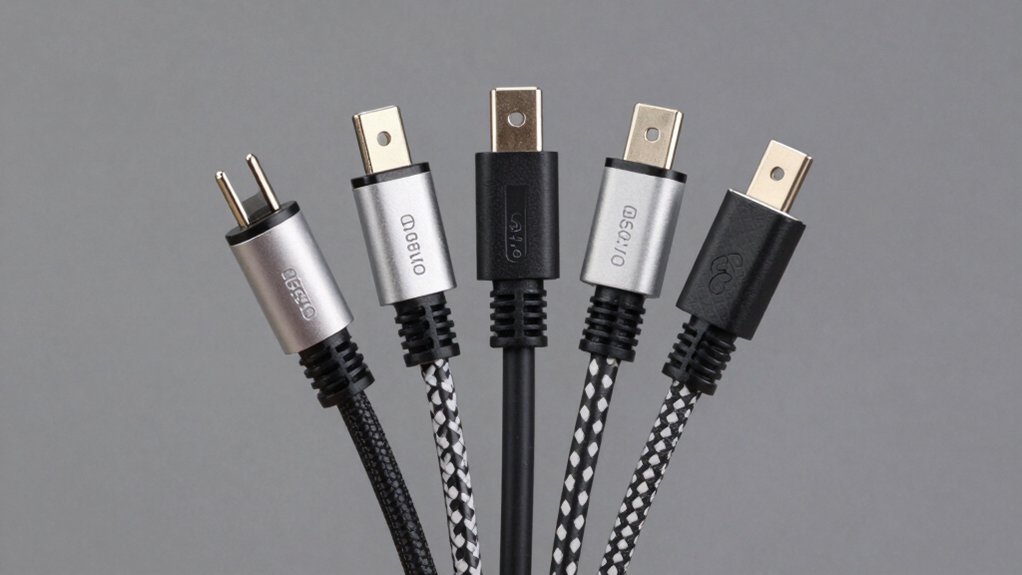

When your ASUS VivoBook or ZenBook loses power, you’ll need a replacement charger that won’t fail you. You face several choices: genuine 19V chargers in 33W, 45W, or 65W ratings, each designed for different models. You must verify your laptop’s connector size—typically 4.0×1.35mm or 3.0×1.1mm—before purchasing. The best options combine multiple connector tips, robust safety protections, and extended warranties. Here’s what separates reliable chargers from disappointing ones.
| Superer Laptop Charger for Asus Vivobook & Zenbook |

| Best Versatility | Maximum Power Output: 65W | Connector Type: Round connectors (switchable, 4 sizes) | Input Voltage Range: 100-240V | VIEW LATEST PRICE | Read Our Analysis |
| Dexpt Charger for Asus Laptop (65W/45W/33W) |

| Most Compatible | Maximum Power Output: 65W | Connector Type: Round connectors (4 detachable sizes) | Input Voltage Range: Not specified | VIEW LATEST PRICE | Read Our Analysis |
| 65W Laptop Charger for Asus Vivobook & Flip |
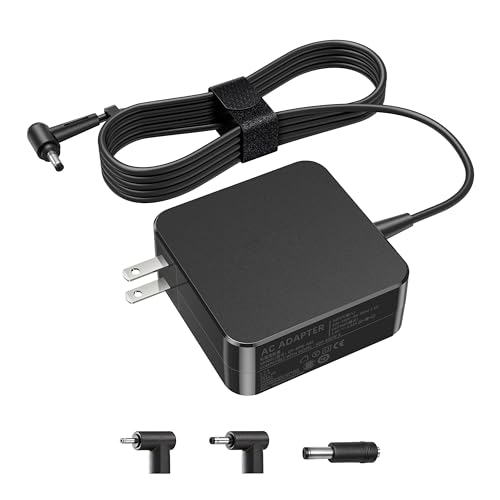
| Widest Model Coverage | Maximum Power Output: 65W | Connector Type: Round connectors (exclusive design) | Input Voltage Range: 100-240V | VIEW LATEST PRICE | Read Our Analysis |
| 65W Vivobook Charger for Asus Laptops |

| Best Value | Maximum Power Output: 65W | Connector Type: Barrel connector (4.0 x 1.35mm only) | Input Voltage Range: AC 100V-240V, 50-60Hz | VIEW LATEST PRICE | Read Our Analysis |
| 65W USB-C Charger for Asus Zenbook Laptops |

| USB-C Innovation | Maximum Power Output: 65W | Connector Type: USB-C connector | Input Voltage Range: 100-240V | VIEW LATEST PRICE | Read Our Analysis |
More Details on Our Top Picks
Superer Laptop Charger for Asus Vivobook & Zenbook
Are you managing multiple ASUS laptops with different power requirements? The Superer Laptop Charger delivers 19V at 3.42A to handle 65W, 45W, and 33W devices. Its switchable round connectors accommodate four different sizes: 3.0×1.1mm, 4.0×1.35mm, 4.5×3.0mm, and 5.5×2.5mm. Simply select the correct connector, plug into your device, and the charging indicator confirms operation. This charger fits VivoBook, ZenBook, Chromebook, and ExpertBook models with round connectors. It won’t work with USB-C, 7.4×5.0mm, or 6.0×3.7mm connections. The 24-month warranty and short circuit protection ensure reliability. Wall-mounting capability offers convenient placement options for stationary use.
- Maximum Power Output:65W
- Connector Type:Round connectors (switchable, 4 sizes)
- Input Voltage Range:100-240V
- Included Connectors/Cables:4 switchable round connectors; extended cable
- Warranty Length:24 months manufacturer warranty
- Safety Protections:Short circuit protection
- Additional Feature:Four switchable round connectors
- Additional Feature:Charging indicator light included
- Additional Feature:Wall-mount capable design
Dexpt Charger for Asus Laptop (65W/45W/33W)
Looking for a charger that’ll work with your standard Vivobook or Zenbook? The Dexpt Charger offers you three power options: 65W, 45W, or 33W output. You’ll receive four detachable round connectors in different sizes, so you can match the right connector to your laptop model. The 7.5-foot cable gives you adequate reach from outlet to device. This charger supports Vivobook, Zenbook, Chromebook, EeeBook, ImagineBook, ExpertBook, and TransformerBook series. However, skip this option if you own a gaming laptop, TUF Gaming model, ROG device, or Zenbook Pro. The manufacturer backs this charger with a one-year warranty, ensuring you’re covered against defects during normal use.
- Maximum Power Output:65W
- Connector Type:Round connectors (4 detachable sizes)
- Input Voltage Range:Not specified
- Included Connectors/Cables:4 detachable round connectors; 7.5 ft cable
- Warranty Length:1 year manufacturer warranty
- Safety Protections:LED indicator for monitoring
- Additional Feature:Extended 7.5 ft cable
- Additional Feature:Four detachable round connectors
- Additional Feature:LED indicator included
65W Laptop Charger for Asus Vivobook & Flip
This 65W charger offers the widest model coverage you’ll find across ASUS’s VivoBook and Flip lineup. The adapter delivers three power outputs: 65W at 19V 3.42A, 45W at 19V 2.37A, and 33W at 19V 1.75A. You can use it with VivoBook 14, 15, and 17 models, plus Flip 14 and 15 variants. The Go series (12, 14, 15) and X-series laptops like X515 and X415 are fully compatible. The round connector design ensures reliable fits across ASUS Vivobook, Zenbook, and Chromebook devices. The included power cord supports 100-240V input, making it suitable for various locations. You’ll appreciate the multi-profile functionality that automatically adjusts power delivery to your specific model.
- Maximum Power Output:65W
- Connector Type:Round connectors (exclusive design)
- Input Voltage Range:100-240V
- Included Connectors/Cables:Power cord included
- Warranty Length:Not specified
- Safety Protections:Not specified
- Additional Feature:Supports multiple power profiles
- Additional Feature:Cross-compatible with ASUS lines
- Additional Feature:Includes power cord
65W Vivobook Charger for Asus Laptops
The 65W Vivobook Charger delivers reliable power at a competitive price point for users with compatible ASUS VivoBook and ZenBook models. First, verify your laptop’s charging port measures 4.0mm x 1.35mm before purchasing, as this charger won’t fit other connector sizes. The unit provides 19V 3.42A output, supporting both 65W and 45W laptops. It includes multiple safety protections against overcharging, overcurrent, overvoltage, and overheating. Input accepts standard wall outlets from 100V-240V at 50-60Hz, making it travel-friendly. Check your laptop’s model against the compatibility list provided to confirm fit. The one-year warranty covers manufacturing defects, and Amazon’s 30-day return guarantee protects your purchase.
- Maximum Power Output:65W
- Connector Type:Barrel connector (4.0 x 1.35mm only)
- Input Voltage Range:AC 100V-240V, 50-60Hz
- Included Connectors/Cables:Power cord included
- Warranty Length:1 year warranty
- Safety Protections:Over-charge, over-current, over-voltage, short-circuit, overheating protection
- Additional Feature:Overcharge and overvoltage protection
- Additional Feature:Overheating safeguard included
- Additional Feature:Strict quality control procedures
65W USB-C Charger for Asus Zenbook Laptops
Want a charger that won’t fail you? This 65W USB-C charger delivers reliable power to your Asus ZenBook, Chromebook, and ExpertBook laptops. The charger outputs 20V at 3.25A, handling both 65W and 45W devices. It’s compatible with ZenBook S 14, 13 Flip S, Chromebook Flip C213 through C436, ExpertBook B2 through B9 series, and Vivobook models UX390, UX490, UX325, and more. The unit passes UL-based safety testing and meets industry standards. Simply connect the USB-C connector to your laptop’s charging port. The input range supports 100–240V worldwide voltage, and the package includes one power cord plus a one-year manufacturer warranty.
- Maximum Power Output:65W
- Connector Type:USB-C connector
- Input Voltage Range:100-240V
- Included Connectors/Cables:Power cord included
- Warranty Length:1 year manufacturer warranty
- Safety Protections:UL-tested; high industry safety standards
- Additional Feature:UL-based safety testing
- Additional Feature:Third-party verification certified
- Additional Feature:USB-C connector design
Factors to Consider When Choosing an Asus Vivobook and Zenbook Power Cord
When selecting a power cord for your ASUS VivoBook or ZenBook, you’ll need to verify the connector type matches your laptop model, check that the power output in watts meets your device’s requirements, and measure the cable length to ensure it reaches from your outlet to your workspace. You should also confirm the cord includes safety certifications like UL or FCC markings, and check the warranty period offered by the manufacturer to protect your investment. Reviewing these five factors systematically will help you find a reliable replacement that won’t damage your laptop or fail prematurely.
Connector Type Compatibility
How do you know which power cord will actually fit your ASUS VivoBook or ZenBook? You’ll need to match the connector size exactly. ASUS models use round barrel connectors in four standard sizes: 3.0×1.1mm, 4.0×1.35mm, 4.5×3.0mm, and 5.5×2.5mm. Check your laptop’s charging port with calipers or your device manual to identify which size you need. The 4.0×1.35mm connector is most common across VivoBook and ZenBook lines. Don’t assume USB-C compatibility—many adapters explicitly don’t work with these models. Verify the wattage class too, typically 33W, 45W, or 65W. Selecting the wrong connector size prevents proper charging and risks equipment damage. Always confirm both specifications before purchasing a replacement cord.
Power Output Requirements
Once you’ve confirmed your connector size matches, you’ll need to verify that your charger delivers the correct wattage and voltage to your device. ASUS VivoBook and ZenBook models typically require 19V output, but wattage varies by model. Check your device’s specifications or original charger label for the exact requirement: 33W, 45W, or 65W are standard options. Match the amperage accordingly—a 65W charger outputs 3.42A at 19V, while a 45W charger provides 2.37A. Using incorrect wattage risks either undercharging your battery or damaging internal components. Don’t assume a higher wattage charger is always better; it must match your device’s specifications precisely. Review your laptop’s manual or manufacturer website to confirm the exact requirements before purchasing a replacement charger.
Cable Length Specifications
What’s the right cable length for your workspace? First, measure the distance from your desk to the nearest wall outlet. Most replacement chargers offer at least 7.5 feet of cord length, which suits typical desk setups. Longer cords reduce your need for extension cables and improve flexibility when outlets sit far from your workspace. However, shorter cables are more portable and resist tangling during transport or storage. Next, consider your specific setup. If you move your laptop frequently, shorter cords pack easier. If your outlet placement is fixed and distant, longer cords eliminate clutter. Finally, verify the stated cord length before purchasing to ensure compatibility with your desk arrangement and outlet location. This step prevents buying incompatible chargers.
Safety Feature Standards
Because your laptop depends on consistent, stable power delivery, you’ll want to prioritize chargers with built-in protections against over-charge, over-current, over-voltage, short-circuiting, and overheating. Check that your charger carries a manufacturer warranty of at least one year, which indicates the product has been tested for reliability and offers post-purchase support. Look for UL certification or third-party safety testing labels on the charger packaging, confirming it’s undergone rigorous evaluation. Verify the connector matches your device’s specifications—for example, a round 4.0×1.35 mm jack or USB-C port—to prevent misfit hazards. Finally, confirm the charger’s input range supports 100–240V and matches your laptop’s voltage and current requirements, such as 19V 3.42A for 65W models, ensuring safe operation.
Warranty Coverage Duration
How long should your ASUS power cord’s warranty last? You’ll find that most chargers come with either a 12-month or 24-month manufacturer warranty. The 24-month option provides better protection for your investment, covering defects and malfunctions for two full years. Before purchasing, check the product page to verify the exact warranty duration for your specific model, since coverage varies by charger type and brand. Note that warranty terms aren’t interchangeable between different ASUS accessories. Some listings also include a 30-day voluntary return guarantee through Amazon, which gives you an additional window to assess the product’s quality. Always confirm warranty details match your product’s item data to ensure you understand what’s covered and for how long.
Device Model Verification
To find the right power cord for your ASUS laptop, you’ll need to identify three critical specifications: your device’s exact model name, its power connector type, and its wattage requirement.
First, locate your laptop’s model number on the bottom case or in System Settings. Confirm whether you own a Vivobook, Zenbook, Chromebook, EeeBook, or ExpertBook, as chargers vary by series.
Next, check your current charger or manual for the connector size—common sizes include 4.0×1.35mm, 3.0×1.1mm, or 2.5×0.7mm. This ensures the replacement fits properly.
Finally, verify your device’s power class: 33W, 45W, or 65W. Using an underpowered charger slows performance; an overpowered one risks damage. Match these three details exactly to the replacement charger’s specifications before purchasing.
Charging Speed Performance
Once you’ve confirmed your laptop’s model and connector type, you’ll want to select a charger that matches your device’s power needs and supports the fastest charging speed available for your machine. Most Asus adapters deliver 19V output with three power options: 65W at 3.42A, 45W at 2.37A, or 33W at 1.75A. Match the wattage to your device’s specifications for optimal performance. If your laptop features USB-C, consider the higher-speed 65W or 45W USB-C options, which deliver up to 20V at 3.25A for faster charging on compatible Zenbook, Chromebook, and ExpertBook models. For round connector models, verify the correct connector size since four different sizes exist across Asus standards, affecting your charging rate.
Budget And Value
When you’re shopping for an ASUS power cord, comparing wattage options gives you the clearest picture of value for your specific model. Check your laptop’s requirements first—65W, 45W, and 33W chargers serve different needs. A 65W option costs more upfront but powers larger ZenBook models faster. Lower wattage chargers suit ultraportable VivoBooks and cost less initially. Next, evaluate USB-C versus round-pin connectors. USB-C chargers offer better future compatibility and work across multiple devices, potentially eliminating future purchases. Review included accessories; multiple detachable connectors increase versatility without extra spending. Finally, compare warranty lengths and return policies. Most chargers include one-year or 24-month coverage. Longer warranties reduce replacement costs over time. Verify the exact barrel size—4.0×1.35mm or similar—to guarantee compatibility before purchasing.
Final Thoughts
You need to match your charger’s wattage (33W, 45W, or 65W) to your specific VivoBook or ZenBook model. Check your original charger’s connector size—4.0×1.35mm or 3.0×1.1mm are common. Verify the 19V output requirement. Buy from reputable brands offering multiple connector tips and 12–24 month warranties. Confirm compatibility before purchasing to avoid damage and ensure your laptop charges reliably.

Meet Ry, “TechGuru,” a 36-year-old technology enthusiast with a deep passion for tech innovations. With extensive experience, he specializes in gaming hardware and software, and has expertise in gadgets, custom PCs, and audio.
Besides writing about tech and reviewing new products, he enjoys traveling, hiking, and photography. Committed to keeping up with the latest industry trends, he aims to guide readers in making informed tech decisions.