
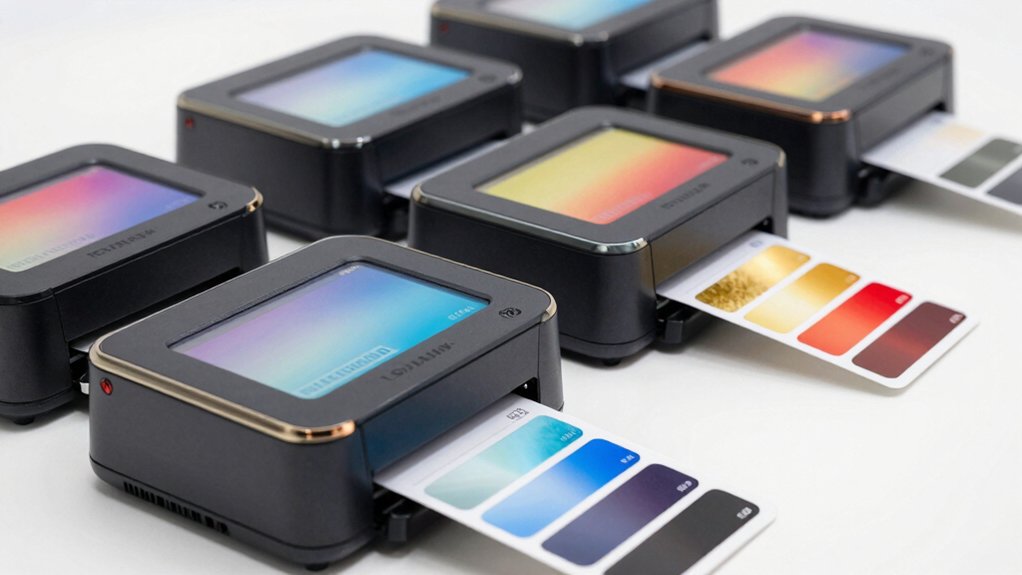

If you need to print color labels for business, retail, or shipping, you’ll want a printer that balances speed, quality, and reliability. You’ve got several solid options available, each with distinct features that suit different needs. The Epson ColorWorks CW-4000 offers professional-grade output, while alternatives like the Brother ColAura and MUNBYN provide different advantages. To find your best fit, you’ll need to understand what each printer does—and what matters most to your operation.
| Epson ColorWorks CW-4000 Matte Inkjet Printer with Auto Cutter |

| Professional Grade | Print Technology: CMYK Pigment Inkjet | Print Resolution: 1200 x 1200 dpi | Built-In Cutter: Yes, integrated auto cutter | VIEW LATEST PRICE | Read Our Analysis |
| QL-E100 Full Color Label Printer with Auto-Cutter |
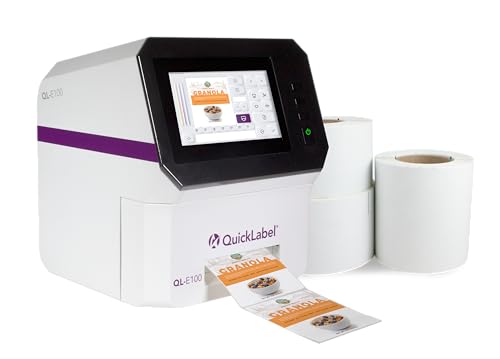
| Best for Beginners | Print Technology: Inkjet Dye-Based Digital | Print Resolution: 300 x 300 dpi | Built-In Cutter: Yes, auto-cutter | VIEW LATEST PRICE | Read Our Analysis |
| Brother ColAura Color Photo and Label Printer,White |

| Best Overall | Print Technology: ZINK Zero Ink Technology | Print Resolution: Not specified | Built-In Cutter: No | VIEW LATEST PRICE | Read Our Analysis |
| Liene PixCut S1 Color Sticker Printer & Cutter Machine |

| Creative DIY Pick | Print Technology: Thermal Dye-Sublimation | Print Resolution: 300 dpi | Built-In Cutter: Yes, precise AI auto-cutting | VIEW LATEST PRICE | Read Our Analysis |
| MUNBYN Bluetooth Thermal Label Printer 4×6 Wireless |

| Best Value | Print Technology: Thermal (203 dpi) | Print Resolution: 203 dpi | Built-In Cutter: No | VIEW LATEST PRICE | Read Our Analysis |
More Details on Our Top Picks
Epson ColorWorks CW-4000 Matte Inkjet Printer with Auto Cutter
The Epson ColorWorks CW-4000 delivers professional-grade color label printing at 1200 x 1200 dpi resolution. This inkjet printer uses CMYK pigment ink to produce vibrant labels up to 4.41 inches wide. The integrated auto cutter streamlines your workflow by automatically trimming printed labels. You’ll achieve print speeds up to 4 inches per second, making high-volume production efficient. The flexible feeding system accepts backfeed media or fan-fold options. Connect via Ethernet, USB 2.0, or optional WiFi. The printer supports ZPL II and ESC languages, ensuring compatibility with Windows, Mac, Linux, and SAP systems. PrecisionCore technology and built-in color correction tools ensure consistent, professional output for GHS and BS5609 label requirements.
- Print Technology:CMYK Pigment Inkjet
- Print Resolution:1200 x 1200 dpi
- Built-In Cutter:Yes, integrated auto cutter
- Supported Label Width:Up to 4.41 inches
- Connectivity Options:Ethernet, USB 2.0, optional WiFi
- Warranty Type:Limited warranty
- Additional Feature:CMYK Pigment Ink Technology
- Additional Feature:PrecisionCore Color Correction
- Additional Feature:GHS/BS5609 Label Compliant
QL-E100 Full Color Label Printer with Auto-Cutter
QuickLabel’s QL-E100 stands out for anyone starting their label-printing journey. This inkjet printer delivers 300 x 300 dpi color output on roll-fed labels measuring 2 to 4 inches wide. You’ll design labels using the included CQL Pro Software, then print directly from your USB stick, internal memory, or Windows computer. The built-in touchscreen lets you control printing without connecting to a PC. An auto-cutter handles trimming automatically, and the printer produces up to 60 pages per minute. The compact design—under 12 inches in height—fits most workspaces. Purchase includes a single-user software license requiring activation. You get a 30-day return guarantee and limited warranty coverage.
- Print Technology:Inkjet Dye-Based Digital
- Print Resolution:300 x 300 dpi
- Built-In Cutter:Yes, auto-cutter
- Supported Label Width:2 to 4 inches
- Connectivity Options:USB, internal memory
- Warranty Type:Limited warranty
- Additional Feature:Built-In Touchscreen Interface
- Additional Feature:Internal Memory Print Capability
- Additional Feature:Single-Pass Color Printing
Brother ColAura Color Photo and Label Printer,White
Looking for a printer that handles labels, photos, and stickers without messy ink cartridges? The Brother ColAura uses ZINK Zero Ink Technology, embedding all colors directly in adhesive-backed paper. You’ll create full-color labels, photos, and stickers for organization, business projects, and home décor. Connect wirelessly from your smartphone or tablet to print from anywhere on your network. The printer requires replacement CZ and CK rolls (models CZ-1001 through CZ-1005 and CK-1000) as consumables. This approach eliminates ink maintenance while delivering rich, vivid prints suitable for personal and professional applications.
- Print Technology:ZINK Zero Ink Technology
- Print Resolution:Not specified
- Built-In Cutter:No
- Supported Label Width:Not specified
- Connectivity Options:Wireless/WiFi
- Warranty Type:Limited warranty
- Additional Feature:ZINK Zero Ink Technology
- Additional Feature:Wireless Mobile App Printing
- Additional Feature:Adhesive-Backed Paper Included
Liene PixCut S1 Color Sticker Printer & Cutter Machine
Want to design custom stickers without needing graphic design skills? The Liene PixCut S1 combines printing and cutting in one device. Use the smartphone app to upload your image, then let the AI automatically extract your subject and guide precise cutting along the edges. The thermal dye-sublimation printer delivers 300 DPI output with 16.7 million colors for vivid results. Four-layer printing with automatic lamination creates waterproof, scratch-resistant stickers. You’ll access 40,000+ free images, fonts, and elements, plus 2,000+ templates—no subscription required. The AI Lab feature transforms selfies into anime or fantasy versions. This setup works for custom labels, phone skins, and gifts without requiring design experience.
- Print Technology:Thermal Dye-Sublimation
- Print Resolution:300 dpi
- Built-In Cutter:Yes, precise AI auto-cutting
- Supported Label Width:Not specified
- Connectivity Options:Bluetooth
- Warranty Type:Limited warranty
- Additional Feature:AI-Powered Auto-Cutting Technology
- Additional Feature:Four-Layer Laminated Waterproof Output
- Additional Feature:40,000+ Free Design Assets
MUNBYN Bluetooth Thermal Label Printer 4×6 Wireless
The MUNBYN Realwriter 130B delivers exceptional value for entrepreneurs managing shipping, branding, or inventory labels without breaking your budget. This 203 dpi thermal printer produces up to 72 pages per minute, eliminating ink costs and outsourcing expenses. Set it up in three steps: connect via Bluetooth or USB, design labels using the free Chrome-based Munbyn Editor or mobile app, then print. Access 2,000+ templates and 3,500+ design elements across 80+ fonts. The printer supports FedEx, UPS, and USPS labels, plus Shopify, Amazon, and Etsy integration. Use genuine Munbyn thermal paper for optimal results and longevity.
- Print Technology:Thermal (203 dpi)
- Print Resolution:203 dpi
- Built-In Cutter:No
- Supported Label Width:1.57–4.3 inches
- Connectivity Options:Bluetooth, USB compatible
- Warranty Type:Limited warranty
- Additional Feature:3,500+ Design Templates Included
- Additional Feature:Multi-Platform App Compatibility
- Additional Feature:80,000+ Trusted Entrepreneur Users
Factors to Consider When Choosing Color Label Printers
When you’re selecting a color label printer, you’ll need to evaluate five key factors: print resolution and quality to ensure your labels meet professional standards, media handling and compatibility to confirm the printer works with your label materials, speed and production volume to match your business output demands, connectivity and software integration to streamline your workflow, and total cost of ownership to understand the full financial investment beyond the initial purchase price. Each factor directly affects whether the printer will perform effectively for your specific needs. Start by ranking these factors based on your priorities, then compare models against your ranked list to find the best fit.
Print Resolution And Quality
How does print resolution affect your label quality? Resolution, measured in dpi (dots per inch), directly determines how sharp your images and text appear. Higher dpi settings produce finer detail and smoother color gradients on your labels.
Color label printers typically range from 300 x 300 dpi to 1200 x 1200 dpi. At 300 dpi, you’ll get acceptable results for basic labels. Move to 600 dpi for improved text clarity and photo realism. At 1200 dpi, you achieve professional-grade output with exceptional detail.
Consider your specific needs before selecting resolution. If you’re printing small text or detailed graphics, choose 600 dpi or higher. For simple designs with larger text, 300 dpi suffices. Remember that higher resolutions slow printing speed, so balance quality against your production timeline.
Media Handling And Compatibility
What label width does your printer need to accommodate? Different models support varying widths—some handle up to 4.41 inches while others print 2–4 inch labels. Identify your packaging requirements first, then match them to printer capabilities.
Next, consider your media supply workflow. Roll-fed systems require specific core sizes and outer diameter limits, while cut-sheet or glued-label formats work differently. Some printers backfeed from external unwinds or accept fan-fold media, which affects throughput and integration ease.
Finally, verify media type compatibility. Your printer’s technology—inkjet pigment, dye-based, or ZINK zero-ink—determines which label stocks and finishes work best. Check adhesive options too: outdoor applications and chemical exposure situations demand specific adhesive types meeting GHS or BS5609 standards for durability and performance.
Speed And Production Volume
Once you’ve confirmed your printer handles the right media types and formats, you’ll need to evaluate how fast it can actually produce labels and whether that speed matches your business needs. Compare print speeds using matching units—inches per second for continuous rolls or pages per minute for sheets—and align these rates with your label size and design complexity. Check the printer’s duty cycle or maximum monthly output to ensure it won’t overtax under your production demands. Single-pass color systems sustain higher volumes than multi-pass alternatives. Review auto-cutter and spool-feed features, as these reduce downtime between jobs and improve steady output during high-volume runs.
Connectivity And Software Integration
Why you’ll choose your printer’s connectivity options depends on your workplace setup and workflow demands. Evaluate whether you need wired Ethernet for stable network access, USB 2.0 for direct computer connection, or Wi-Fi for flexible placement and centralized management. Check that your printer supports Windows, Mac OS, Linux, or SAP to match your existing systems. Review the printer languages it uses—ZPL II and ESC are industry standards—and confirm compatibility with your design software or web-based editors. Determine whether you’ll use the built-in touchscreen for direct control or rely on companion software to reduce external host dependence. Verify that cloud or local design software comes included or free to streamline label creation and template management within your workflow.
Total Cost Of Ownership
Beyond the initial purchase price, you’ll need to calculate your printer’s total cost of ownership—the sum of upfront expenses, ongoing consumables, maintenance, and support fees across the device’s lifespan.
Evaluate ink costs carefully. Pigment-based inks cost more per label but resist fading longer, reducing replacement frequency. Compare consumable expenses across models you’re considering.
Assess media compatibility. Printers supporting widely used label stock and software languages like ZPL II minimize supply costs and compatibility issues.
Factor in speed and duty cycle. Faster printing reduces labor hours and outsourcing needs. Higher duty cycles handle demanding environments without frequent repairs.
Consider built-in features like auto cutters and flexible media handling. These reduce waste and labor, lowering indirect costs in high-volume operations.
Calculate total expenses over five years to identify genuine cost savings.
Final Thoughts
You’ll pick your ideal color label printer by matching your specific needs to each model’s strengths. If you need high-resolution output and wide labels, choose the Epson CW-4000. For touchscreen convenience, select the QL-E100. Want mobile printing? Try Brother ColAura. Need design assistance with cutting? Go with Liene PixCut S1. For e-commerce shipping labels, the MUNBYN delivers speed and connectivity. Compare your budget, required features, and workflow before deciding.

Meet Ry, “TechGuru,” a 36-year-old technology enthusiast with a deep passion for tech innovations. With extensive experience, he specializes in gaming hardware and software, and has expertise in gadgets, custom PCs, and audio.
Besides writing about tech and reviewing new products, he enjoys traveling, hiking, and photography. Committed to keeping up with the latest industry trends, he aims to guide readers in making informed tech decisions.