

When you need to connect multiple Ethernet devices to a single port, you’ll want a reliable selector switch that doesn’t require power or complex setup. You’ve got several solid options available, each designed for different situations. Some switches prioritize simplicity with manual controls, while others emphasize durability and higher speeds. Understanding what each model offers—and knowing which factors matter most for your specific setup—helps you pick the right tool.
| VCELINK 2 Port RJ45 Network Ethernet Switch |

| Best Budget Pick | Maximum Speed: 1000 Mbps (Gigabit) | Power Requirement: Power-free/Passive | Port Configuration: 2-in-1-out or 1-in-2-out | VIEW LATEST PRICE | Read Our Analysis |
| VCELINK RJ45 Ethernet Network Switch Splitter (2-Pack) |
| Best Value Bundle | Maximum Speed: 1000 Mbps (Gigabit) | Power Requirement: Power-free/Passive | Port Configuration: 2-in-1-out or 1-in-2-out | VIEW LATEST PRICE | Read Our Analysis |
| Binardat 10 Gigabit Network Ethernet Switcher |
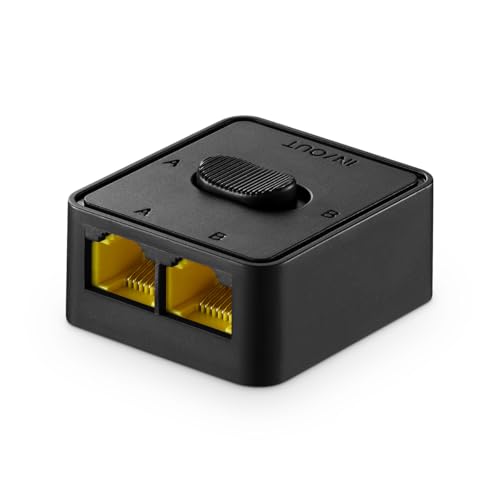
| Best High-Performance | Maximum Speed: 10 Gigabit | Power Requirement: Power-free/Passive | Port Configuration: Bi-directional (1-in, A/B-out or A/B-in, 1-out) | VIEW LATEST PRICE | Read Our Analysis |
| iKKEGOL Mini 2-Port RJ45 Network Switch Splitter |

| Best Compact Design | Maximum Speed: 100 Mbps | Power Requirement: Power-free/Passive | Port Configuration: 2-in-1-out or 1-in-2-out | VIEW LATEST PRICE | Read Our Analysis |
| NETGEAR 5-Port Gigabit Ethernet Switch (GS305) |

| Best Overall | Maximum Speed: 1000 Mbps (Gigabit) | Power Requirement: AC Power (100-240V) | Port Configuration: 5 Gigabit Ethernet ports | VIEW LATEST PRICE | Read Our Analysis |
More Details on Our Top Picks
VCELINK 2 Port RJ45 Network Ethernet Switch
The VCELINK 2 Port RJ45 Network Ethernet Switch delivers affordable network switching without breaking your budget. This power-free device lets you connect two networks to one device or one network to two devices using a mechanical slide switch. You’ll get transmission speeds up to 1000Mbps with Cat5, Cat5e, or Cat6 cables. The nickel-plated brass components reduce signal interference for stable connections. It’s compatible with PoE devices, routers, computers, and surveillance systems. Setup requires no power source—just plug cables into the RJ45 ports and flip the switch to select which connection you need. The compact design fits easily into network setups, and the indicator switches show you which port’s active.
- Maximum Speed:1000 Mbps (Gigabit)
- Power Requirement:Power-free/Passive
- Port Configuration:2-in-1-out or 1-in-2-out
- Cable Compatibility:Cat6, Cat5e, Cat5
- Switching Operation:Mechanical slide switch
- Warranty:18 months
- Additional Feature:Nickel-plated brass components
- Additional Feature:Indicator switches show connection
- Additional Feature:18-month manufacturer warranty
VCELINK RJ45 Ethernet Network Switch Splitter (2-Pack)
Need to connect two networks to one device without buying separate equipment? The VCELINK 2-pack gives you two mechanical switches that work without power. Each unit supports gigabit speeds up to 1000 Mbps and handles Cat6, Cat5e, and Cat5 cables. You’ll slide the switch to toggle between 2-in-1-out mode (connecting two networks to one device) or 1-in-2-out mode (connecting one network to two devices). The nickel-plated brass components ensure durability for routers, computers, and surveillance systems. Note that you can’t access both networks simultaneously or disable both ports at once. An 18-month warranty backs your purchase, and customer support responds within 24 hours.
- Maximum Speed:1000 Mbps (Gigabit)
- Power Requirement:Power-free/Passive
- Port Configuration:2-in-1-out or 1-in-2-out
- Cable Compatibility:Cat6, Cat5e, Cat5
- Switching Operation:Mechanical slide switch
- Warranty:18 months
- Additional Feature:Two units included
- Additional Feature:Physical isolation prevents conflicts
- Additional Feature:Nickel-plated brass durability
Binardat 10 Gigabit Network Ethernet Switcher
For professionals who need high-performance switching without complexity, Binardat’s 10 Gigabit Network Ethernet Switcher delivers straightforward connectivity by letting you toggle between two network sources using a single mechanical button. This passive device requires no power, drivers, or configuration—you’ll simply dial to connect port A or B to your main connection. It supports speeds up to 10G and adapts automatically to 5G, 2.5G, 1G, or 100Mbps rates. The bidirectional design lets you switch either direction: one port feeding two destinations, or two sources feeding one port. Its compact 4.3 x 3.7 x 1.9 cm frame fits desks, cabinets, and tight spaces. You get a 1-year warranty and 30-day return guarantee.
- Maximum Speed:10 Gigabit
- Power Requirement:Power-free/Passive
- Port Configuration:Bi-directional (1-in, A/B-out or A/B-in, 1-out)
- Cable Compatibility:Cat 5, 5e, 6, 6a
- Switching Operation:Mechanical push button
- Warranty:1 year
- Additional Feature:10G/5G/2.5G auto-adaptive
- Additional Feature:Mini compact 4.3cm size
- Additional Feature:Lifelong technical support
iKKEGOL Mini 2-Port RJ45 Network Switch Splitter
Looking to isolate your intranet from external networks without adding power consumption or software overhead? iKKEGOL’s compact 2-port design measures just 3.1″ x 1.96″ x 0.83″, fitting easily on any desk while you manually switch between two networks using a simple push-button mechanism. This 100Mbps switcher operates in 2-in-1-out or 1-in-2-out configurations, letting two computers share one network or one computer access two separate networks. The RJ45 connectors ensure physical isolation between networks with zero electrical interference. Durability reaches 100,000+ switch cycles. At 48 grams with plastic construction and copper contacts, installation requires no power supply or software, making it ideal for quick network separation on your desktop.
- Maximum Speed:100 Mbps
- Power Requirement:Power-free/Passive
- Port Configuration:2-in-1-out or 1-in-2-out
- Cable Compatibility:RJ45
- Switching Operation:Push-button key-press
- Warranty:Not specified
- Additional Feature:100,000+ switch cycle lifespan
- Additional Feature:Key-press button operation
- Additional Feature:White plastic compact design
NETGEAR 5-Port Gigabit Ethernet Switch (GS305)
The NETGEAR GS305 delivers straightforward network expansion for home offices and small workspaces. You get five Gigabit Ethernet ports operating at 1000 Mbps each, enabling simultaneous connections for multiple devices without speed reduction. The unmanaged design means you plug it in and start using it—no configuration required. Its metal case withstands daily use, while the fanless design keeps your workspace quiet. Energy-efficient operation complies with IEEE 802.3az standards, reducing power consumption. LED indicators on each port show connection status at a glance. NETGEAR backs this switch with a three-year limited warranty, making it a reliable choice for expanding your wired network capacity affordably.
- Maximum Speed:1000 Mbps (Gigabit)
- Power Requirement:AC Power (100-240V)
- Port Configuration:5 Gigabit Ethernet ports
- Cable Compatibility:Not specified
- Switching Operation:Non-blocking auto-switching
- Warranty:3 years
- Additional Feature:Desktop/wall mount flexibility
- Additional Feature:Fan-less energy efficient design
- Additional Feature:3-year limited hardware warranty
Factors to Consider When Choosing an Ethernet Selector Switch
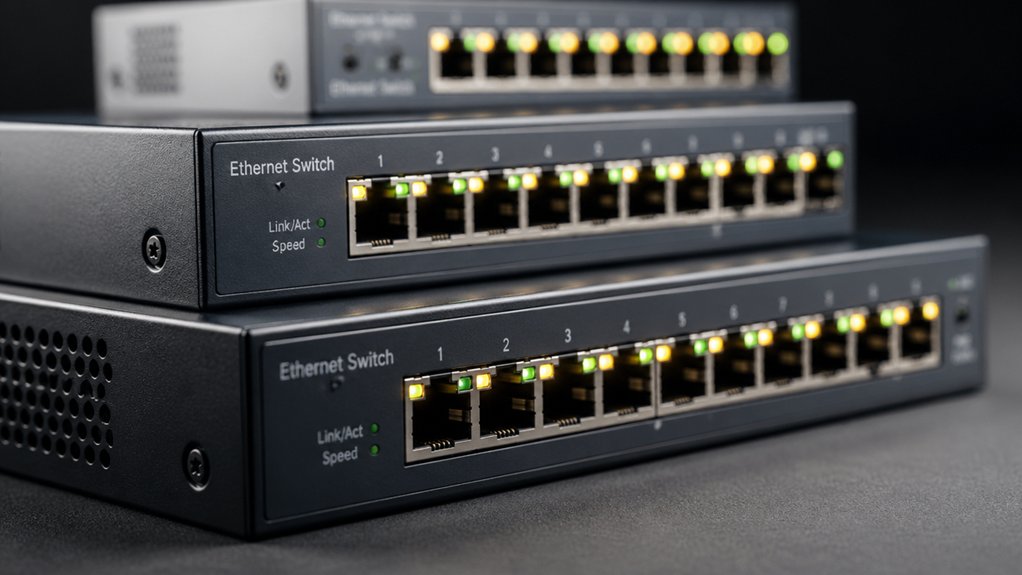
When you’re selecting an Ethernet selector switch, you’ll need to evaluate five critical factors: the speed and performance capabilities that match your network demands, the port configuration options that fit your device count, the physical isolation features that protect your equipment, the durability and build quality that ensure long-term reliability, and the power requirements and design that suit your installation space. Start by determining your required data transfer speed—whether you need gigabit, multi-gigabit, or standard speeds—then count your connected devices to confirm adequate ports, and verify the switch can handle your power budget without overheating. Finally, examine the physical construction and isolation mechanisms to confirm the unit will perform consistently in your specific environment without degradation.
Speed and Performance Capabilities
How fast can your network run? You’ll want to look for devices that support speeds up to 1000 Mbps (1 Gbps) to ensure gigabit performance across your connected devices. Check that your selector switch works with Cat5e or Cat6 cables, which reliably handle up to 1 Gbps and beyond for future-proofing your setup. Confirm the device operates passively without requiring power, maintaining high-speed operation during port switching. Verify that high-quality metal components, such as nickel-plated connectors, minimize interference and stabilize transmission. Finally, guarantee the switch prevents simultaneous internet access across both ports, which preserves predictable performance at your selected connection. This approach guarantees consistent, reliable gigabit speeds when you need them.
Port Configuration Options
Which configuration you’ll need depends on your specific networking setup and how many devices you’re trying to connect. You’ll find two primary options: 2-in 1-out and 1-in 2-out. With 2-in 1-out, you’re connecting two separate networks to a single device, which works when you need to switch between network sources. In 1-in 2-out, one network feeds two devices, useful when you’re distributing a single connection. Most models include mechanical slide switches or buttons that let you manually select between A and B ports without requiring drivers. Only one path remains active at a time, preventing IP conflicts. Choose based on whether you’re consolidating networks or distributing one connection across multiple devices.
Physical Isolation Features
Reliability in network switching depends on physical isolation—the mechanism that keeps only one network path active at any given moment. You’ll find that mechanical switches achieve this isolation without requiring power or drivers, physically separating inputs from outputs. This design prevents IP conflicts and cross-network interference automatically. Look for switches with indicators or port position markers that clearly show which network you’re currently connected to. These visual cues confirm your isolated state at a glance. Even when devices connect to multiple networks simultaneously, the active path remains strictly one-way. Bi-directional or 1-in-2-out configurations let you choose selective connectivity while guaranteeing no simultaneous internet access across multiple ports. This isolation approach ensures network stability.
Durability and Build Quality
Once you’ve confirmed physical isolation in your selector switch, the next step involves examining the materials and construction that’ll keep it working reliably for years. Look for metal or nickel-plated brass components instead of plastic housings—these materials reduce signal interference and withstand repeated use better. Check that the switch features durable mechanical switches or push-button actuators rated for over 100,000 activation cycles. Verify the outer construction is robust enough for your environment, whether desktop or cabinet mounting. Choose models requiring no power, which eliminates a common failure point. Inspect the connector ports for corrosion-resistant plating. Compact, portable designs often indicate quality construction that prioritizes durability. These specifications ensure your ethernet selector switch maintains stable performance through years of regular operation.
Power Requirements and Design
How do you want your ethernet selector switch to operate—with or without external power? Many passive models require no external power source, relying instead on mechanical switching to isolate networks. This design eliminates dependency on power adapters and reduces operational costs.
If you need devices powered by PoE to connect, select models with PoE compatibility. These switches allow PoE-powered devices to function without additional power adapters.
Consider the physical design next. Look for compact, desktop-friendly enclosures made from metal or plastic housings. Check that RJ45, RJ11, and RJ12 interfaces match your network requirements.
Manual switching through buttons or slides enables quick network selection without software configuration. LED indicators on each port show you which network path is active, confirming proper operation instantly.
Cable Compatibility Standards
When you’re selecting an ethernet selector switch, you’ll want to verify that it supports the cabling standards already running through your network. Check whether your installation uses Cat5e, Cat6, or Cat6a cables, then match the selector to that standard. Cat5e handles gigabit speeds reliably, while Cat6 and Cat6a support higher performance. Confirm the selector has RJ45 ports that match your cable connectors and network requirements. Verify the physical port count matches your devices. Don’t assume older cables will perform at advertised speeds—cable quality and environmental conditions affect real-world performance. Select a switch that maintains compatibility with your existing infrastructure without requiring additional drivers or active power for basic cable connections.
Device Compatibility Range
Beyond cable standards, you’ll need to verify that your ethernet selector switch actually supports the speeds your devices require. Check whether your devices operate at 1000 Mbps (Gigabit) or higher speeds like 10G or 2.5G, then confirm your switch matches those specifications. Next, examine interface compatibility—most switches use RJ45 connectors for data transmission, while auxiliary ports like RJ11 or RJ12 serve signaling only and aren’t essential for operation. If you’re using powered devices, determine whether you need PoE support, since not all switches provide this feature. Finally, assess switching capabilities: confirm whether your switch supports bidirectional operation and whether multiple devices can access the internet simultaneously, as many selector switches don’t allow concurrent connections.
Warranty and Support Coverage
Once you’ve confirmed your switch meets your device requirements, you’ll want to protect your investment by examining the warranty and support options available. Check the manufacturer’s warranty period—typically 18 months—and what it specifically covers. Review the vendor’s stated response time for support questions; many promise answers within 24 hours. Confirm the return policy, such as Amazon’s 30-day voluntary returns, in case the product underperform s. Verify whether warranty claims require product registration or original packaging retention. Finally, identify accessible customer support channels and documentation explaining how to initiate warranty service. These steps ensure you understand protection terms before purchasing and can quickly resolve issues if problems arise.
Final Thoughts
You’ve reviewed five solid ethernet selector switches that fit different needs. Choose VCELINK for power-free reliability and PoE support. Select Binardat if you need 10G speed without drivers. Pick iKKEGOL for a compact, durable push-button option. Go with NETGEAR’s GS305 when you need five ports and managed switching. Match your choice to your network setup, port requirements, and budget constraints.

Meet Ry, “TechGuru,” a 36-year-old technology enthusiast with a deep passion for tech innovations. With extensive experience, he specializes in gaming hardware and software, and has expertise in gadgets, custom PCs, and audio.
Besides writing about tech and reviewing new products, he enjoys traveling, hiking, and photography. Committed to keeping up with the latest industry trends, he aims to guide readers in making informed tech decisions.