

You’re starting your gimbal journey, and you need a stabilizer that won’t overwhelm you. The right gimbal combines user-friendly features, reliable tracking, and straightforward setup—so you can focus on shooting rather than troubleshooting. Five models stand out for beginners: the DJI Osmo Mobile 8 and 7P, plus three Hohem options. Each offers portable designs and beginner-focused apps. But which one matches your phone and budget? Let’s explore what sets them apart.
| DJI Osmo Mobile 8 Gimbal Stabilizer with Advanced Tracking |

| All-in-One Powerhouse | Stabilization Technology: 3-axis stabilization | Battery Life: 10 hours | Tracking Capability: Native AI tracking with audio/lighting | VIEW LATEST PRICE | Read Our Analysis |
| DJI Osmo Mobile 7P Gimbal Stabilizer for iPhone & Android |

| Best Overall | Stabilization Technology: 3-axis gimbal stabilization | Battery Life: 10 hours | Tracking Capability: Dual-lens enhanced tracking | VIEW LATEST PRICE | Read Our Analysis |
| Hohem iSteady X3 SE Phone Gimbal Stabilizer |

| Budget-Friendly Pick | Stabilization Technology: iSteady 8.0 (3-axis) | Battery Life: 11 hours | Tracking Capability: AI tracking via Hohem Joy app | VIEW LATEST PRICE | Read Our Analysis |
| Hohem iSteady V3 Ultra Gimbal Stabilizer for iPhone |
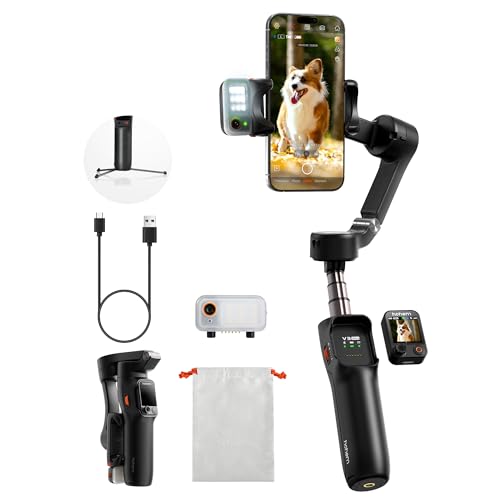
| Most Feature-Rich | Stabilization Technology: iSteady 9.0 (3-axis) | Battery Life: 9 hours | Tracking Capability: AI Auto Tracking (faces, pets, objects) | VIEW LATEST PRICE | Read Our Analysis |
| Hohem iSteady X3 SE Plus Gimbal Stabilizer for iPhone |

| Best Value | Stabilization Technology: iSteady 8.0 (3-axis) | Battery Life: 11 hours | Tracking Capability: AI tracking via Hohem Joy app | VIEW LATEST PRICE | Read Our Analysis |
More Details on Our Top Picks
DJI Osmo Mobile 8 Gimbal Stabilizer with Advanced Tracking
The DJI Osmo Mobile 8 works best for vloggers and content creators who want professional video stabilization without learning complex controls. Simply attach your smartphone to the magnetic clamp, launch the DJI Mimo app, and activate one-tap tracking to follow your movements automatically. The built-in 3-axis stabilization eliminates shaky footage during walking or running shots. You’ll benefit from the integrated lighting and audio features for improved video quality. The 10-hour battery life supports extended recording sessions, while the foldable design fits easily into bags. The extension rod and tripod allow hands-free filming for vlogs and live streams. No additional equipment or technical expertise is required.
- Stabilization Technology:3-axis stabilization
- Battery Life:10 hours
- Tracking Capability:Native AI tracking with audio/lighting
- Built-in Accessories:Extension rod and tripod
- Portability/Foldable Design:Foldable (7.5L × 3.7W × 1.8H cm folded)
- Remote Control:Direct phone connection (no detachable remote)
- Additional Feature:Phone charging while filming
- Additional Feature:Audio and lighting integrated
- Additional Feature:One-tap editing capability
DJI Osmo Mobile 7P Gimbal Stabilizer for iPhone & Android
Want smooth, professional-looking videos without spending hours learning complex camera gear? The DJI Osmo Mobile 7P delivers that result through its 3-axis gimbal stabilization system. You’ll unfold the device to power it on, then use the magnetic phone clamp to attach your smartphone in seconds. The built-in extension rod lets you capture wide selfies and steady vlogs. Dual-lens tracking automatically follows your subject during movement and close-ups. Download the DJI Mimo app from the DJI website to access ShotGuides and One-Tap Edit features that simplify your filming and editing workflow. You’ll get ten hours of operating time per charge, making extended shooting sessions practical.
- Stabilization Technology:3-axis gimbal stabilization
- Battery Life:10 hours
- Tracking Capability:Dual-lens enhanced tracking
- Built-in Accessories:Extension rod and tripod
- Portability/Foldable Design:Built-in foldable design
- Remote Control:No detachable remote mentioned
- Additional Feature:Dual-lens enhanced tracking
- Additional Feature:Mic 2/2 Mini reception
- Additional Feature:ShotGuides and One-Tap Edit
Hohem iSteady X3 SE Phone Gimbal Stabilizer
If you’re searching for a gimbal that won’t overwhelm you with complex controls, the Hohem iSteady X3 SE combines beginner-friendly operation with professional-grade stabilization technology. The iSteady 8.0 system delivers ultra-smooth footage during movement, whether you’re jogging or jumping. You’ll operate the detachable magnetic remote from up to 32.81 feet away to control selfies and videos. The Hohem Joy App enables AI tracking and gesture control for creative content. Weighing 0.79 lbs with a foldable design, you’ll carry it anywhere. Battery lasts 11 hours on a 2-hour charge, supporting all-day filming and travel vlogging. The gimbal accommodates phones up to 0.66 lbs and switches between landscape and portrait modes instantly.
- Stabilization Technology:iSteady 8.0 (3-axis)
- Battery Life:11 hours
- Tracking Capability:AI tracking via Hohem Joy app
- Built-in Accessories:Foldable design (no built-in tripod mentioned)
- Portability/Foldable Design:Portable foldable design (0.79 lbs)
- Remote Control:Detachable magnetic remote (32.81 feet range)
- Additional Feature:11-hour continuous operation
- Additional Feature:Gesture control capability
- Additional Feature:32.81 feet remote range
Hohem iSteady V3 Ultra Gimbal Stabilizer for iPhone
Looking to create smooth, professional-quality videos without spending hours learning complex controls? The Hohem iSteady V3 Ultra delivers stability through its 3-axis iSteady 9.0 technology and AI Auto Tracking. You’ll operate it using the detachable 1.22-inch touchscreen remote, which lets you control tracking, preview footage, and adjust settings from up to 33 feet away. The built-in fill light adjusts brightness and color temperature for quality lighting in any environment. Its 9-hour battery runtime supports extended filming sessions. The gimbal folds to 6.3 inches and weighs 15.1 ounces, making it portable for travel. The included Hohem Joy app provides templates and creative modes designed for beginners. You can stabilize footage while walking or running and capture cinematic perspectives for vlogs, tutorials, and content creation.
- Stabilization Technology:iSteady 9.0 (3-axis)
- Battery Life:9 hours
- Tracking Capability:AI Auto Tracking (faces, pets, objects)
- Built-in Accessories:Extension rod and tripod included
- Portability/Foldable Design:Foldable design (6.3 inches folded)
- Remote Control:Detachable touchscreen remote (1.22″, 33 feet)
- Additional Feature:Smart adjustable fill light
- Additional Feature:360° panning rotation
- Additional Feature:1.22″ touchscreen remote display
Hohem iSteady X3 SE Plus Gimbal Stabilizer for iPhone
The Hohem iSteady X3 SE Plus is built for smartphone users who want professional-quality video without mastering complex equipment. This 3-axis gimbal features the iSteady 8.0 anti-shake system, which stabilizes footage automatically as you record. The extendable 8-inch selfie stick lets you capture low-angle, high-angle, and group shots easily. You’ll operate it one-handed while switching between landscape and portrait modes. The detachable remote controller extends your shooting range to 32 feet via Bluetooth. Use the Hohem Joy app to enable AI tracking, which follows your subject hands-free. With 11-hour battery life, you can film extended projects without recharging. Setup takes minutes, making it ideal for beginners.
- Stabilization Technology:iSteady 8.0 (3-axis)
- Battery Life:11 hours
- Tracking Capability:AI tracking via Hohem Joy app
- Built-in Accessories:8-inch extendable selfie stick
- Portability/Foldable Design:Compact foldable design (0.85 lbs)
- Remote Control:Detachable remote controller (32 feet)
- Additional Feature:11-hour continuous filming battery
- Additional Feature:One-hand operation mode
- Additional Feature:Multiple shooting modes included
Factors to Consider When Choosing a Gimbal for Beginners
When you’re selecting a gimbal as a beginner, you’ll want to evaluate five critical factors: ease of setup so you’re not overwhelmed during your first use, battery life duration to ensure you can film for extended periods without interruption, stabilization technology quality to guarantee smooth footage regardless of your movement, budget and affordability to match your financial constraints, and smartphone compatibility range to confirm the gimbal works with your device. Start by listing your phone model and how long you typically film in one session, then compare gimbals based on setup time (look for models with quick calibration) and stated battery hours. Finally, check the price point against your spending limit and verify that the gimbal’s clamp or mount secures your specific smartphone model.
Ease Of Setup
How much time do you want to spend before you start filming? Choose a gimbal that powers on and starts tracking automatically when you unfold it. This eliminates menu navigation and setup delays. Look for models with foldable designs and built-in extension rods or tripods that reduce the need for extra gear. Select gimbals featuring quick magnetic phone clamps so you can attach your device in seconds. Verify the companion app offers one-tap pairing to connect your phone without complex configurations. Detachable remote controls or touchscreens let you make immediate tracking adjustments without navigating multiple menus. Check that the app includes auto-tracking and pre-made presets so you can begin filming right away. These features combine to minimize setup steps and let you focus on capturing video rather than learning controls.
Battery Life Duration
Once you’ve got your gimbal set up and ready to film, you’ll need to contemplate how long it can run on a single charge. Most beginner gimbals deliver 9 to 11 hours of continuous use per charge, which covers full-day shoots without interruption. Check if your model offers quick-charge capabilities—many recharge completely in about 2 hours, letting you swap batteries between sessions efficiently. Some advanced models include built-in phone charging while you film, extending your usable time without stopping. Consider your filming schedule when selecting a gimbal. For travel vlogging or event coverage, longer battery life reduces dependency on finding power sources. Compare charge times and runtime across models to match your specific project demands and shooting patterns.
Stabilization Technology Quality
What actually keeps your footage smooth when you’re moving? A 3-axis stabilization system compensates for pitch, roll, and yaw movements in real time. Look for advanced stabilization tech like iSteady 8.0, which reduces shake during jogging or jumping for smoother action shots. Higher payload compatibility—supporting larger smartphones—helps maintain stable balance and prevents unintended tilting. Check your gimbal’s specifications to confirm it handles your device’s weight. Longer operation times around 9–11 hours minimize interruptions that degrade stability from fatigue or re-mounting. AI tracking features paired with stable gimbals maintain consistent focus on subjects, contributing to steady framing. Evaluate these stabilization factors together: axis control, advanced technology version, payload capacity, battery duration, and tracking capability. This combination determines how smooth your final footage will be.
Budget And Affordability
Most beginners can find quality gimbals in the $100–$300 price range, which offers a solid balance between cost and essential features like 3-axis stabilization without overspending on advanced capabilities you won’t use yet. Look for bundled kits that include accessories such as tripods, extension rods, and magnetic clamps—these bundles prevent you from making separate purchases that increase your total spending. Research warranty coverage and build durability before buying, as durable models reduce repair and replacement costs during your learning phase. Factor in ongoing expenses like replacement batteries, parts, or app subscriptions when evaluating the true cost. Compare models within your budget by listing their features, accessories included, and warranty terms to identify which option delivers the most value for your investment.
Smartphone Compatibility Range
After you’ve settled on a budget that fits your needs, you’ll want to make certain the gimbal you choose actually works with your phone. Check the gimbal’s specifications for maximum payload weight and supported phone widths. Most gimbals accommodate phones between 2.2 and 3.5 inches wide, but larger devices require higher weight limits. Verify that your phone plus case doesn’t exceed the gimbal’s maximum payload. Look for quick-release clamps or magnetic mounts that adjust without additional adapters. Confirm the gimbal supports your phone’s operating system through its official app. If you use extension rods or have an unusual camera arrangement, select gimbals with adaptable mounts. Review compatibility lists from manufacturers before purchasing to avoid returns and ensure seamless pairing with your specific device.
Final Thoughts
You’ve reviewed five beginner-friendly gimbals that’ll suit your needs. Pick based on your phone type and budget. Start with the DJI Osmo Mobile 8 if you want advanced tracking, or choose a Hohem model for affordability. Download the companion app before purchasing. Practice basic panning and tracking movements first. Check warranty coverage. You’ll master stabilization techniques within weeks of consistent use.

Meet Ry, “TechGuru,” a 36-year-old technology enthusiast with a deep passion for tech innovations. With extensive experience, he specializes in gaming hardware and software, and has expertise in gadgets, custom PCs, and audio.
Besides writing about tech and reviewing new products, he enjoys traveling, hiking, and photography. Committed to keeping up with the latest industry trends, he aims to guide readers in making informed tech decisions.