

When you need your GPU to stay active without a physical monitor connected, you’ll find that HDMI dummy plugs solve this problem efficiently. These small adapters emulate a display through EDID data, tricking your system into thinking a monitor’s attached. They support resolutions up to 4K at 60Hz, require no drivers, and work across Windows, macOS, and Linux. But choosing the right one depends on several factors.
| 3 Pack HDMI Dummy Plug 4K HDR Virtual Monitor |

| Best Value Pack | Maximum Resolution Support: 4K@60Hz (3840×2160) | Setup Requirements: Plug & Play (no drivers/software/power) | Operating System Compatibility: Windows, Mac OS, Linux | VIEW LATEST PRICE | Read Our Analysis |
| DTECH 4K HDMI Dummy Plug Display Emulator Adapter |
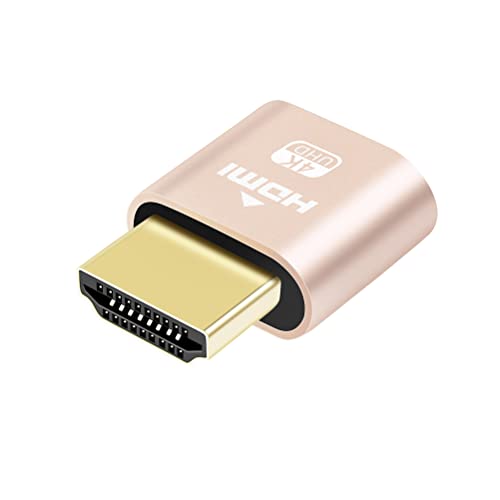
| Best Budget Option | Maximum Resolution Support: 4K@60Hz (4096×2160) | Setup Requirements: Plug & Play (no drivers/power) | Operating System Compatibility: Windows, macOS, Linux | VIEW LATEST PRICE | Read Our Analysis |
| 4K HDR HDMI Dummy Plug Virtual Monitor Emulator |

| Most Versatile | Maximum Resolution Support: 4K@60Hz (3840×2160) | Setup Requirements: Plug & Play (no drivers required) | Operating System Compatibility: Windows, Mac, Mac Mini OSX, Linux | VIEW LATEST PRICE | Read Our Analysis |
| HDMI Dummy Plug Headless Display Emulator (1920×1080) |

| Best Basic Setup | Maximum Resolution Support: 1920×1080@60Hz | Setup Requirements: No drivers or configuration | Operating System Compatibility: Windows, OSX, Linux | VIEW LATEST PRICE | Read Our Analysis |
| HDMI 2.1 Dummy Plug 4K@120Hz Virtual Display Emulator |

| Best Performance | Maximum Resolution Support: 4K@120Hz (3840×2160) | Setup Requirements: Plug & Play (no drivers/software/power) | Operating System Compatibility: Windows, Mac (OSX), Linux | VIEW LATEST PRICE | Read Our Analysis |
| 4K HDR HDMI Dummy Plug Headless Display Emulator |

| Best Overall | Maximum Resolution Support: 4K@60Hz (3840×2160) | Setup Requirements: Plug & Play (no drivers/power) | Operating System Compatibility: Windows, Mac, Mac Mini OSX, Linux | VIEW LATEST PRICE | Read Our Analysis |
| 4K HDMI Dummy Plug Display Emulator Adapter |
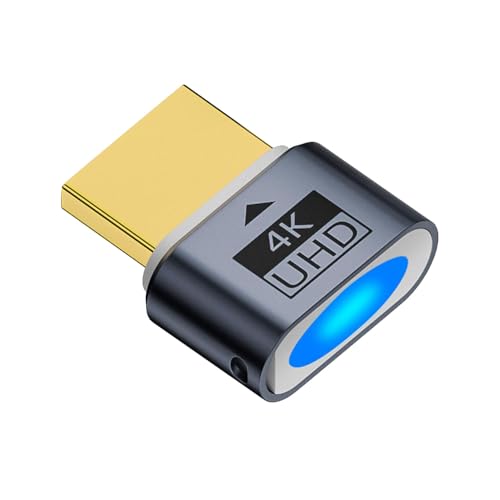
| Professional Grade | Maximum Resolution Support: 4K@60Hz (4096×2160) | Setup Requirements: Plug & Play (no drivers/power) | Operating System Compatibility: Windows, Mac OSX, Linux | VIEW LATEST PRICE | Read Our Analysis |
More Details on Our Top Picks
3 Pack HDMI Dummy Plug 4K HDR Virtual Monitor
The 3-pack HDMI dummy plug from Woieyeks delivers exceptional value for users who need multiple virtual displays without purchasing separate devices. Each plug emulates a monitor, enabling your GPU to function as if a real display were connected. You simply insert the plug into your HDMI port, and your operating system immediately recognizes a virtual display. The adapter supports resolutions up to 4K at 60Hz and works with Windows, Mac, and Linux systems. Installation requires no drivers or software configuration. These plugs solve common problems like black screens during remote sessions and prevent graphics cards from shutting down during mining operations. With gold-plated connectors and low power consumption, you’re getting reliable performance across gaming, streaming, and professional rendering tasks.
- Maximum Resolution Support:4K@60Hz (3840×2160)
- Setup Requirements:Plug & Play (no drivers/software/power)
- Operating System Compatibility:Windows, Mac OS, Linux
- Connector Type:Gold-plated HDMI
- Primary Use Cases:Remote desktop, GPU acceleration, mining, streaming, VR
- Warranty:2-year unconditional warranty
- Additional Feature:3-pack quantity included
- Additional Feature:Gold-plated HDMI interface
- Additional Feature:2-year unconditional warranty
DTECH 4K HDMI Dummy Plug Display Emulator Adapter
Need a virtual display solution without breaking your budget? The DTECH 4K HDMI Dummy Plug Display Emulator Adapter delivers exactly that. This compact adapter emulates high-resolution displays up to 4K 60Hz (4096×2160), enabling full GPU potential on headless systems. You’ll unleash GPU-accelerated remote desktop, GPGPU operations like cryptocurrency mining and rendering, and streaming workflows without monitors or external power. The gold-plated HDMI connector ensures stable signal transmission across Windows, macOS, and Linux systems. Installation requires no drivers—simply plug it in and your system recognizes the virtual display. It’s ideal for servers, colocation farms, remote deployments, and home setups needing reliable headless operation.
- Maximum Resolution Support:4K@60Hz (4096×2160)
- Setup Requirements:Plug & Play (no drivers/power)
- Operating System Compatibility:Windows, macOS, Linux
- Connector Type:Gold-plated HDMI
- Primary Use Cases:Remote desktop, GPGPU, cryptocurrency mining, rendering
- Warranty:Not specified
- Additional Feature:Single unit 1-pack
- Additional Feature:Gold-plated HDMI connector
- Additional Feature:Compact headless ghost adapter
4K HDR HDMI Dummy Plug Virtual Monitor Emulator
Running remote desktops, video editing, or GPU-intensive tasks without a physical monitor? The 4K HDR HDMI Dummy Plug keeps your graphics card active and maintains full resolution performance. This plug-and-play adapter supports resolutions up to 4096×2160@60Hz without requiring drivers. Simply insert it into your HDMI port, and your system detects a virtual monitor immediately. You’ll prevent GPU performance drops and resolution scaling issues. The adapter works with Windows, Mac, Linux, and headless setups like Raspberry Pi. It’s particularly useful for cryptocurrency mining, video rendering, server management, and multi-screen virtual displays in data centers.
- Maximum Resolution Support:4K@60Hz (3840×2160)
- Setup Requirements:Plug & Play (no drivers required)
- Operating System Compatibility:Windows, Mac, Mac Mini OSX, Linux
- Connector Type:HDMI
- Primary Use Cases:Remote desktop, video editing, game development, mining, rendering
- Warranty:Not specified
- Additional Feature:1080P@120Hz support capability
- Additional Feature:Multi-resolution casting flexibility
- Additional Feature:Virtual second screen creation
HDMI Dummy Plug Headless Display Emulator (1920×1080)
Looking to run GPU tasks without a physical monitor? This HDMI dummy plug emulates a 1920×1080 display at 60Hz, functioning identically to a real LCD monitor. Install it into any graphics card with HDMI output—no drivers, configuration, or power cable required. It works across Windows, OSX, and Linux systems. The ultra-compact design makes setup straightforward: plug it in and forget it. This emulator supports GPU-accelerated remote desktop, cryptocurrency mining, and other GPU-intensive applications. Pass-through EDID support ensures compatibility with virtual desktop environments. If your graphics card runs a standard monitor, this dummy plug operates without issues.
- Maximum Resolution Support:1920×1080@60Hz
- Setup Requirements:No drivers or configuration
- Operating System Compatibility:Windows, OSX, Linux
- Connector Type:HDMI 2.0
- Primary Use Cases:GPU-accelerated remote desktop, cryptocurrency mining
- Warranty:Not specified
- Additional Feature:Ultra-compact low profile design
- Additional Feature:Pass-through EDID support
- Additional Feature:Set and forget operation
HDMI 2.1 Dummy Plug 4K@120Hz Virtual Display Emulator
The FUERAN HDMI 2.1 Dummy Plug delivers top-tier performance for anyone running high-resolution remote sessions or headless GPU setups. This plug supports 4K@120Hz, 1440P@120Hz, and 1080P@120Hz resolutions, making it ideal for gaming streams, VR applications, and remote desktop work. You’ll need an HDMI 2.1-capable graphics card to access the highest resolutions. Setup requires no drivers or configuration—simply plug it in. The gold-plated connector ensures stable signal transmission. It works across Windows, Mac, and Linux systems, making it versatile for cryptocurrency mining rigs, video rendering workstations, and screen-sharing scenarios. The 12-month warranty provides reliable protection.
- Maximum Resolution Support:4K@120Hz (3840×2160)
- Setup Requirements:Plug & Play (no drivers/software/power)
- Operating System Compatibility:Windows, Mac (OSX), Linux
- Connector Type:Gold-plated HDMI 2.1
- Primary Use Cases:Remote desktop, streaming, mining, VR, screen sharing
- Warranty:12-month limited warranty
- Additional Feature:4K@120Hz high refresh support
- Additional Feature:Gold-plated stable connector
- Additional Feature:12-month limited warranty
4K HDR HDMI Dummy Plug Headless Display Emulator
FUERAN’s 4K HDR dummy plug stands out for users who need GPU acceleration without a physical monitor. You simply plug it into your HDMI port, and it emulates a virtual display supporting up to 3840×2160@60Hz or 1080p@120Hz. No drivers or external power are required. This adapter works on Windows, Mac, and Linux systems. You can choose from resolution presets including 1024×768, 1280×800, 1920×1080, 1920×1200, or 4K options. It’s ideal for cryptocurrency mining, rendering tasks, remote desktop applications, and headless GPU computing. The plug enables hardware acceleration for TeamViewer and AnyDesk connections.
- Maximum Resolution Support:4K@60Hz (3840×2160)
- Setup Requirements:Plug & Play (no drivers/power)
- Operating System Compatibility:Windows, Mac, Mac Mini OSX, Linux
- Connector Type:HDMI
- Primary Use Cases:Remote desktop, mining, rendering, simulations, GPGPU
- Warranty:12-month warranty
- Additional Feature:HDR support capability included
- Additional Feature:Chromecast virtual screen casting
- Additional Feature:Ghost adapter monitor detection
4K HDMI Dummy Plug Display Emulator Adapter
Need professional-grade display emulation for headless GPU systems? The 4K HDMI Dummy Plug Display Emulator Adapter delivers plug-and-play functionality without drivers or external power. It emulates displays up to 4K 60Hz (4096×2160) and generates a virtual monitor with its own EDID for remote management software like VNC and OBS. You’ll maintain GPU activation for streaming, mining, and rendering tasks. The gold-plated HDMI connector ensures compatibility with Windows, Mac OSX, and Linux systems. Note that it requires a dedicated graphics card—integrated graphics aren’t supported. The 180-day limited warranty and 30-day return guarantee provide purchase confidence for your headless deployment needs.
- Maximum Resolution Support:4K@60Hz (4096×2160)
- Setup Requirements:Plug & Play (no drivers/power)
- Operating System Compatibility:Windows, Mac OSX, Linux
- Connector Type:Gold-plated HDMI
- Primary Use Cases:Remote desktop, streaming, mining, VR, server operations
- Warranty:180-day limited warranty
- Additional Feature:Gold-plated HDMI interface
- Additional Feature:180-day limited warranty
- Additional Feature:Supports discrete graphics cards
Factors to Consider When Choosing an HDMI Dummy Plug
When you’re choosing an HDMI dummy plug, you’ll need to verify that it supports your desired resolution and refresh rate, confirm it’s compatible with your operating system, and check whether your graphics card meets the adapter’s requirements. Next, you should prioritize models offering plug-and-play installation so you don’t need additional drivers or configuration steps. Finally, examine the connector quality and durability of the plug itself, since a well-built adapter will last longer and maintain a stable connection without signal loss.
Resolution and Refresh Rate
How do you know which resolution and refresh rate your HDMI dummy plug should support? First, identify your graphics card’s maximum output capability. Check your GPU specifications for supported resolutions and refresh rates. Next, determine your intended use. For remote desktop or streaming, 1920×1080@60Hz suffices. For GPU-accelerated tasks like rendering or gaming, you’ll want higher specs—consider 1440p or 4K at 120Hz if your card supports it. Third, verify compatibility. HDMI 2.1 plugs support 4K@120Hz, while older versions max out at lower rates. Match your dummy plug’s EDID emulation settings to your GPU’s capabilities to ensure stable headless operation. Finally, confirm the plug lists your exact resolution and refresh rate combination before purchasing.
Operating System Compatibility
Why does your HDMI dummy plug’s OS compatibility matter? You need it to work immediately without extra driver installations or configuration steps. First, verify the dummy plug supports your operating system—Windows 7 through 11, macOS, or Linux versions you’re using. Check the product specifications for explicit OS version compatibility. Second, confirm multi-OS support if you switch between systems for remote desktop or headless GPU tasks. Third, ensure EDID emulation functions stably on your chosen platform, guaranteeing consistent virtual display detection every time you connect. Finally, verify no external power or software installation is required. This plug-and-play functionality prevents compatibility issues and keeps your setup running smoothly without driver conflicts or detection failures across your devices.
Graphics Card Requirements
Your graphics card’s compatibility with an HDMI dummy plug directly affects whether the plug functions correctly and maintains stable GPU performance during headless operation. First, verify that your card’s HDMI output supports the dummy plug’s EDID format, as certain GPUs require specific emulation standards. Next, check whether your card handles the resolutions and refresh rates you need—whether 4K@60Hz, 4K@120Hz, or 1080p@120Hz. Then, determine if your dummy plug is passive or requires external power and drivers for proper EDID emulation. Finally, confirm that the adapter creates a virtual second monitor, keeping your GPU active and preventing performance drops. Research your specific graphics card model’s documentation to ensure full compatibility before purchasing.
Plug-and-Play Installation
Once you’ve confirmed your graphics card’s compatibility, selecting an HDMI dummy plug becomes straightforward because most models require no drivers, software, or external power to function. You simply insert the dummy plug into your GPU’s HDMI port, and it’ll immediately emulate a display through EDID technology. The plug activates automatically—no installation steps needed. Most models support resolutions up to 4K at 60Hz or higher, depending on the specific product you choose. Since they’re hot-swappable, you can connect and disconnect them without restarting your system. They work across Windows, macOS, and Linux platforms without additional configuration. Their compact design makes them portable and easy to store when not in use.
Connector Quality and Durability
The foundation of any reliable HDMI dummy plug rests on its connector construction, which directly affects how long it’ll perform without degradation. Gold-plated HDMI connectors resist corrosion and oxidation, ensuring stable signal transmission over extended periods. This plating prevents tarnishing that can interrupt your display emulation. Check the connector’s build quality by examining whether it uses full-metal housing rather than plastic components. Metal construction dissipates heat more effectively, reducing the risk of internal component failure. Look for plugs rated for multiple insertion cycles, as this indicates durability testing. Since dummy plugs generate minimal heat and require no external power, connector quality becomes your primary durability factor. Verify that your chosen unit specifies robust EDID data implementation, which supports long-term reliable monitor emulation without performance degradation.
Power Consumption Efficiency
Power consumption efficiency matters most when you’re running your HDMI dummy plug continuously on servers, mining rigs, or headless systems where every watt counts over weeks and months of operation. Look for models designed for ultra-low power consumption that require no external power supply or drivers. Check that gold-plated connectors maintain stable signal integrity, preventing connection retries that waste energy on unstable links. Prioritize plug-and-play devices that minimize standby power draw while sustaining virtual display output. Verify the product specifications list actual power consumption rates. Select units marketed for headless functionality, as these emphasize energy-efficient operation specifically for extended server deployments. Avoid models requiring active cooling or additional power adapters, which increase your total energy footprint and operating costs.
Intended Use Cases
Why does your use case matter when selecting an HDMI dummy plug? Your primary application directly determines which specifications you’ll need. If you’re running cryptocurrency mining operations, you’ll prioritize sustained GPU performance without monitor connection. For video rendering workflows, you’ll want models supporting 4K@60Hz or higher to enable efficient remote streaming. Gaming or simulation workloads require stable resolution output to maintain consistent frame rates. Server deployments in colocation facilities need plug-and-play compatibility across Linux, Windows, or macOS without driver installation. Remote desktop users benefit from dummy plugs that unlock higher resolutions for better streaming quality. VNC or OBS workflows require virtual display support to optimize broadcast output. Identify your specific task first, then match the dummy plug’s resolution and refresh rate capabilities to your requirements.
Warranty and Support Coverage
Warranty-and-support provisions directly affect your financial protection if an HDMI dummy plug fails or underperforms after purchase. Most manufacturers offer 12 to 24 months of coverage, labeled as limited or unconditional warranties. Check whether the warranty excludes HDCP-related issues or misuse—coverage typically protects against hardware faults only. Review the fastest support channels available, such as email or phone contact options, to understand response times. Verify return policies aligned with your retailer; many offer 30-day windows. Confirm compatibility notes across Windows, macOS, and Linux systems, as these details affect post-purchase support scope. Compare warranty lengths as indicators of product reliability—longer coverage generally signals manufacturer confidence. Document your purchase receipt and warranty terms immediately for straightforward claim processing if problems arise.
Final Thoughts
You’ll want to select an HDMI dummy plug based on your resolution needs—1080p for basic setups or 4K for advanced work. Check compatibility with your GPU and operating system. Verify EDID emulation quality to ensure stable performance. Compare connector types and housing durability. Once you’ve chosen your model, simply plug it into an available HDMI port; no drivers or setup required. Test your virtual display immediately after installation.

Meet Ry, “TechGuru,” a 36-year-old technology enthusiast with a deep passion for tech innovations. With extensive experience, he specializes in gaming hardware and software, and has expertise in gadgets, custom PCs, and audio.
Besides writing about tech and reviewing new products, he enjoys traveling, hiking, and photography. Committed to keeping up with the latest industry trends, he aims to guide readers in making informed tech decisions.