

You’re likely spending hours at your desk juggling multiple devices, struggling with limited ports, and managing tangled cables. A quality docking station solves these problems by consolidating your connections, expanding your display options, and streamlining your workspace. Lenovo offers several models designed for different needs and budgets. Understanding each option’s capabilities—from power delivery to video outputs—helps you select the right solution. Here’s what you need to know.
| Lenovo ThinkPad USB-C Dock Gen 2 (40AS0090) |

| Universal Compatibility Choice | Display Support: Up to 2x 4K @ 30Hz or 1x 4K @ 60Hz | Power Delivery: 90W | USB Ports: 3 USB ports (10 Gbps data) | VIEW LATEST PRICE | Read Our Analysis |
| Lenovo USB-C Dual Display Travel Dock (7 Ports) |

| Travel-Friendly Green Pick | Display Support: Dual 4K displays via DP 1.4 and HDMI 2.0 | Power Delivery: Up to 100W (optional 135W adapter) | USB Ports: 7 total ports (1x USB-A 3.2, 2x USB-C 10 Gbps) | VIEW LATEST PRICE | Read Our Analysis |
| Lenovo ThinkPad Thunderbolt 3 Dock Gen 2 (40AN0135US) |

| Professional Power Performer | Display Support: Dual UHD 4K displays | Power Delivery: 135W | USB Ports: 5 USB 3.1 ports plus 1 always-on charging port | VIEW LATEST PRICE | Read Our Analysis |
| Lenovo ThinkPad Docking Station Gen 2 USB-C |
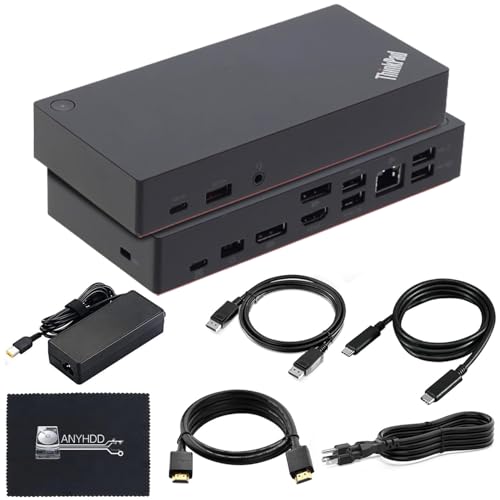
| Best Value Renewed | Display Support: Up to 1x 4K @ 60Hz | Power Delivery: 90W | USB Ports: 5 total USB ports (3x USB 3.1, 2x USB 2.0) | VIEW LATEST PRICE | Read Our Analysis |
| Lenovo USB-C Dual Display Travel Dock with 100W Adapter |
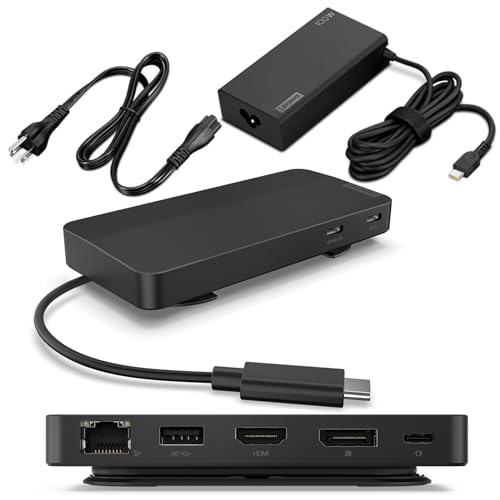
| Dual Display Essential | Display Support: Dual 4K displays via DP 1.4 and HDMI 2.0 | Power Delivery: Up to 100W (optional 135W adapter available) | USB Ports: 7 total ports (1x USB-A 3.2, 2x USB-C 10 Gbps) | VIEW LATEST PRICE | Read Our Analysis |
More Details on Our Top Picks
Lenovo ThinkPad USB-C Dock Gen 2 (40AS0090)
Looking for one cable that handles everything? The Lenovo ThinkPad USB-C Dock Gen 2 (40AS0090) connects your notebook with a single USB-C connection. You get 90W power delivery to charge your laptop, three USB ports for peripherals, and stable wired network access. Display options include one 4K monitor at 60Hz or two 4K monitors at 30Hz. The dock supports legacy devices, so you can attach older USB equipment without adapters. Its compact design measures 6.73 by 3.15 inches and weighs just 11.5 ounces. A three-year warranty covers your investment. This dock works with ThinkPad systems and delivers 10 Gbps USB data speeds for fast file transfers.
- Display Support:Up to 2x 4K @ 30Hz or 1x 4K @ 60Hz
- Power Delivery:90W
- USB Ports:3 USB ports (10 Gbps data)
- Video Connectors:1x HDMI, 1x DisplayPort 1.4
- Ethernet Connectivity:10 Gbps stable wired network
- Warranty:3 years worldwide
- Additional Feature:PXE Boot and Wake-on-LAN
- Additional Feature:Pass-through ThinkPad MAC address
- Additional Feature:10 Gbps USB data transfer
Lenovo USB-C Dual Display Travel Dock (7 Ports)
The Lenovo USB-C Dual Display Travel Dock is your travel-friendly green pick for remote professionals who need dual 4K displays on the go. This 7-port dock supports dual 4K displays via DisplayPort 1.4 and HDMI 2.0, delivering 100W power delivery to your USB-C laptop. You’ll find USB-A 3.2 and USB-C 10 Gbps ports for data transfer, plus an always-on USB-C port that charges devices when your laptop disconnects. The dock weighs just 0.3 pounds with integrated cable management. Made from 66% post-consumer recycled content, it’s Lenovo’s most sustainable docking option, ideal for home, work, and travel environments.
- Display Support:Dual 4K displays via DP 1.4 and HDMI 2.0
- Power Delivery:Up to 100W (optional 135W adapter)
- USB Ports:7 total ports (1x USB-A 3.2, 2x USB-C 10 Gbps)
- Video Connectors:1x DP 1.4, 1x HDMI 2.0
- Ethernet Connectivity:RJ45 10/100/1000M
- Warranty:Manufacturer’s warranty on request
- Additional Feature:66% post-consumer recycled content
- Additional Feature:Always-on USB-C charging port
- Additional Feature:Integrated USB-C cable
Lenovo ThinkPad Thunderbolt 3 Dock Gen 2 (40AN0135US)
Want a professional power performer that handles dual 4K displays and expands your laptop’s connectivity? The ThinkPad Thunderbolt 3 Dock Gen 2 delivers 135W power through one Thunderbolt 3 cable connection. You’ll gain four USB 3.1 ports, dual HDMI and DisplayPort outputs, and Gigabit Ethernet. This dock supports compatible ThinkPad models like T480, X1 Yoga, and P52s. Connect two UHD displays simultaneously for expanded workspace. The included 135W adapter powers both your laptop and peripherals. Use the security-lock slot to secure your dock. Dimensions of 8.66 by 3.15 inches keep it compact on your desk.
- Display Support:Dual UHD 4K displays
- Power Delivery:135W
- USB Ports:5 USB 3.1 ports plus 1 always-on charging port
- Video Connectors:2x HDMI, 2x DisplayPort
- Ethernet Connectivity:RJ45 10Base-T/100Base-TX/1000Base-T
- Warranty:Refer to Lenovo warranty details
- Additional Feature:Thunderbolt 3 Gen 2 compatible
- Additional Feature:3.5mm audio jack included
- Additional Feature:Security-lock slot support
Lenovo ThinkPad Docking Station Gen 2 USB-C
Need expanded connectivity without breaking your budget? The Lenovo ThinkPad Docking Station Gen 2 USB-C delivers solid performance at an accessible price point. You’ll get five USB ports (three USB 3.1 and two USB 2.0), dual DisplayPort outputs, one HDMI port, and Gigabit Ethernet. The dock supports 4K display output at 60Hz and includes a 90W adapter. Check your ThinkPad’s compatibility first—it works with T-series, X-series, and select other models. Simply connect via USB-C, attach your peripherals, and enjoy streamlined productivity. The one-year warranty provides standard protection for your investment.
- Display Support:Up to 1x 4K @ 60Hz
- Power Delivery:90W
- USB Ports:5 total USB ports (3x USB 3.1, 2x USB 2.0)
- Video Connectors:1x HDMI, 2x DisplayPort 1.4
- Ethernet Connectivity:1x Gigabit Ethernet
- Warranty:1 year
- Additional Feature:Combo stereo/microphone audio jack
- Additional Feature:Renewed/refurbished condition option
- Additional Feature:Microfiber cleaning cloth included
Lenovo USB-C Dual Display Travel Dock with 100W Adapter
For remote professionals who need dual display essential connectivity, Lenovo’s USB-C Travel Dock delivers seven ports in a compact, travel-ready form. Connect two 4K displays simultaneously using the DisplayPort 1.4 and HDMI 2.0 outputs. Attach your laptop via USB-C to access one USB-A 3.2 port, two additional USB-C ports, and gigabit Ethernet. The included 100W adapter provides up to 65W power delivery to your device. Use the always-on USB port to charge your phone continuously, even when your laptop disconnects. The dock’s integrated cable and eclipse black design make it ideal for frequent travelers requiring maximum productivity.
- Display Support:Dual 4K displays via DP 1.4 and HDMI 2.0
- Power Delivery:Up to 100W (optional 135W adapter available)
- USB Ports:7 total ports (1x USB-A 3.2, 2x USB-C 10 Gbps)
- Video Connectors:1x DP 1.4, 1x HDMI 2.0
- Ethernet Connectivity:1x RJ45 (10/100/1000M)
- Warranty:Manufacturer’s warranty on request
- Additional Feature:66% post-consumer recycled content
- Additional Feature:Adjustable cable management system
- Additional Feature:Compact travel-optimized form factor
Factors to Consider When Choosing a Lenovo Docking Station
When you’re selecting a Lenovo docking station, you’ll need to evaluate five key factors: display and video output options, power delivery capacity, available ports and connectivity features, compatibility with your specific device, and the station’s design and portability for your workspace. Start by identifying how many monitors you want to connect and what video standards they require, then check the wattage of the power adapter to ensure it supports your laptop’s charging needs. Finally, confirm that the dock’s ports match your peripherals and that it’s physically compatible with your device model.
Display and Video Output
Your docking station’s display capabilities determine how many monitors you can connect and at what resolution. Check whether your dock offers DisplayPort 1.4, HDMI 2.0, or both. DisplayPort 1.4 supports higher bandwidth for 4K displays, while HDMI 2.0 handles standard 4K output. Review your specific model’s configuration: some docks drive two 4K displays simultaneously at 60 Hz, others manage only one 4K display or multiple 1080p displays. Verify that your laptop supports USB-C Alt-Mode or Thunderbolt, since these protocols transmit video signals to connected displays. Match your dock’s output options to your monitor setup and resolution requirements before purchasing.
Power Delivery Capacity
Once you’ve confirmed your display setup, you’ll need to assess whether the dock can supply enough power to your laptop. Check your laptop’s power requirements—typically between 65W and 100W for most models. Standard docks deliver 65W, 90W, or 100W through their built-in adapter. If your laptop demands more power, consider docks offering optional 135W adapters that reliably supply 100W while sharing power among other ports. Insufficient power delivery causes slow charging or no charging during heavy use. Verify the dock supports power pass-through, allowing simultaneous charging and data transfer without performance drops. Always-on USB-C ports charge peripheral devices even when your laptop disconnects. Match the dock’s PD capacity to your specific laptop model and usage patterns for optimal performance.
Port Selection and Connectivity
How many displays do you need to connect, and what types of ports does your current setup require? Count your monitors first, then check their input types—HDMI, DisplayPort, or both. Next, examine your dock’s video outputs to confirm it supports your display configuration, such as dual 4K monitors via DisplayPort 1.4 and HDMI 2.0. Review the total USB ports available: USB-A for older peripherals, USB-C for newer devices, and 10 Gbps ports for high-speed data transfer. Verify an RJ45 Ethernet port exists for wired network connectivity if you need reliable internet. Finally, confirm the dock delivers adequate power to your laptop through USB-C Power Delivery. Match these specifications directly to your workstation demands before purchasing.
Compatibility With Your Device
Before purchasing a Lenovo docking station, you’ll need to verify that it’s compatible with your specific notebook model and connectivity standard. Check whether your laptop requires Thunderbolt 3/4 or USB-C connectivity, as compatibility varies by model. Review Lenovo’s official compatibility lists to confirm support for your ThinkPad generation. Confirm the dock’s power delivery matches your laptop’s charging needs—options typically range from 65W to 135W. Verify that display outputs like HDMI or DisplayPort support your desired resolution and refresh rate, whether 4K@60Hz or 4K@30Hz. Finally, confirm the dock supports USB-C with Alt-Mode or Thunderbolt compatibility for video output and data transfer. Cross-referencing these specifications prevents purchasing an incompatible dock.
Design and Portability
When selecting a Lenovo docking station, you’ll want to evaluate its physical design and how easily it fits into your workflow. Compact models measuring around 4.72 x 2.6 x 0.79 inches and weighing 0.3 pounds offer maximum portability for traveling professionals. Larger docks exceeding 6 inches long suit stationary setups but sacrifice mobility. Look for integrated cable designs or included USB-C/Thunderbolt cables that eliminate extra accessories and reduce setup time. Check whether the dock employs lightweight materials and a slim form factor for easy packing. Single-cable universal docking approaches provide power delivery and data/video through one connection, streamlining your mobile setup. Consider compact power options like 100W PD adapters that balance charging capacity with portable dimensions, ensuring you maintain productivity without sacrificing convenience.
Warranty and Support Coverage
Why’s warranty coverage important when you’re investing in a docking station? Your warranty protects you against defects and malfunctions that occur during normal use. Lenovo docking stations offer varying coverage lengths—typically ranging from 1 to 3 years depending on the model. When comparing options, check whether your warranty covers the power adapter and replacement parts, especially if your dock includes high-wattage power delivery like 90W or 100W. Review the manufacturer’s specific terms rather than relying solely on Amazon’s general policy. Note that Renewed models often carry shorter 1-year warranties than new units. Additionally, confirm support eligibility within your 30-day return window. Firmware updates may affect warranty validity, so register your product and monitor official Lenovo resources for compatibility information.
Final Thoughts
You’ve reviewed five Lenovo docking stations with distinct advantages. Choose the ThinkPad Thunderbolt 3 Dock Gen 2 for maximum power and connectivity. Select the USB-C Dual Display Travel Dock (7 Ports) if you need portability and sustainability. Pick the Gen 2 (40AS0090) for warranty protection and 4K support. Match your decision to your specific needs: stationary setup, travel requirements, display count, and power demands. Verify compatibility with your device before purchasing.

Meet Ry, “TechGuru,” a 36-year-old technology enthusiast with a deep passion for tech innovations. With extensive experience, he specializes in gaming hardware and software, and has expertise in gadgets, custom PCs, and audio.
Besides writing about tech and reviewing new products, he enjoys traveling, hiking, and photography. Committed to keeping up with the latest industry trends, he aims to guide readers in making informed tech decisions.