
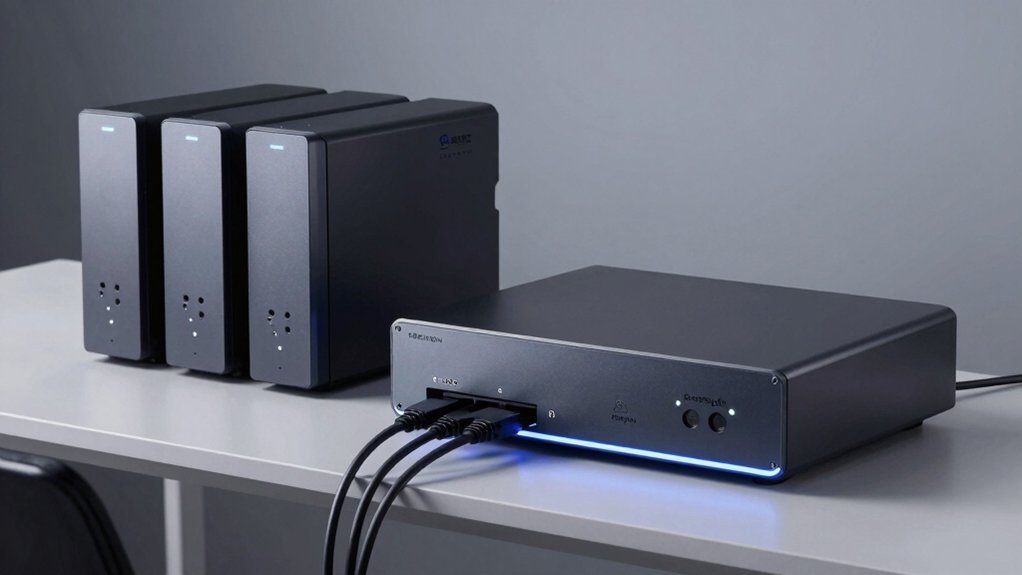

You can cut your NAS energy costs considerably by choosing the right model for your needs. Start by identifying your storage requirements—whether you need a compact 2-bay unit or an enterprise dual-node system. Then evaluate each option’s idle power consumption, CPU efficiency, and cooling design. The difference between models can mean hundreds of dollars annually. Here’s how to find the best fit for your situation.
| UGREEN NAS DH2300 2-Bay Desktop Network Storage |

| Beginner-Friendly Entry Point | Device Type: Entry-level desktop NAS (diskless) | Maximum Storage Capacity: 64TB | Network Connectivity: 1 Gigabit Ethernet (wired only) | VIEW LATEST PRICE | Read Our Analysis |
| Amazon Basics UPS Battery Backup & Surge Protector |

| Essential Power Protection | Device Type: Standby UPS battery backup | Maximum Storage Capacity: N/A (power protection only) | Network Connectivity: N/A (power protection only) | VIEW LATEST PRICE | Read Our Analysis |
| Smart UPS 150W for NAS Systems with Remote Control |

| NAS-Optimized Backup | Device Type: Smart UPS for NAS systems | Maximum Storage Capacity: N/A (power protection only) | Network Connectivity: N/A (power protection only) | VIEW LATEST PRICE | Read Our Analysis |
| QNAP TS-h2490FU 24 Bay Dual Node NAS |

| Enterprise-Grade Performance | Device Type: Enterprise rack-mount NAS | Maximum Storage Capacity: 576TB+ (24 bays × NVMe drives) | Network Connectivity: 4× 25GbE SFP28 + 2× 2.5GbE ports | VIEW LATEST PRICE | Read Our Analysis |
| AOOSTAR WTR PRO AMD R7 5825U Desktop NAS |
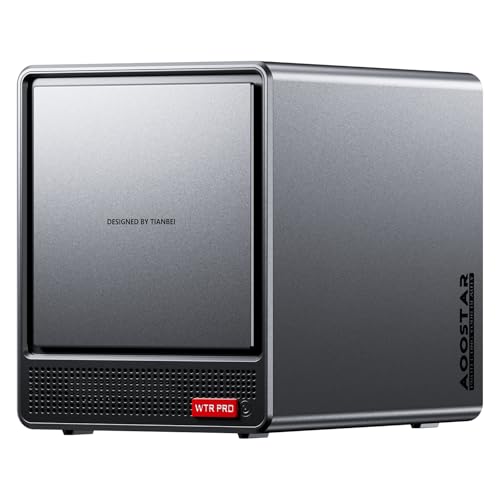
| Versatile Budget Powerhouse | Device Type: Desktop NAS/mini PC hybrid | Maximum Storage Capacity: 96TB (4 HDD bays + 2 NVMe slots) | Network Connectivity: 2× 2.5G LAN + WiFi 6 | VIEW LATEST PRICE | Read Our Analysis |
More Details on Our Top Picks
UGREEN NAS DH2300 2-Bay Desktop Network Storage
Looking for an entry-level NAS that won’t drain your power bill? The UGREEN DH2300 delivers efficient personal storage without excessive energy use. You’ll get 4GB RAM and 1GbE connectivity for basic file backup and photo organization. Setup requires purchasing compatible drives separately—supports up to 64TB capacity. You’ll achieve transfer speeds around 125MB/s for standard tasks. The device includes AI tagging to organize photos by face and location, plus automatic duplicate detection. You’ll access files remotely through the NAS app across Windows, iOS, Android, and macOS. Security features include RAID modes and two-factor authentication. Note: you’ll need a wired Ethernet connection since Wi-Fi requires an external adapter.
- Device Type:Entry-level desktop NAS (diskless)
- Maximum Storage Capacity:64TB
- Network Connectivity:1 Gigabit Ethernet (wired only)
- RAM/Memory:4GB LPDDR4X
- Backup/Power Protection:Local RAID modes + encrypted transfers
- Intended Use Case:Personal/small team file storage and backup
- Additional Feature:AI-powered photo/object tagging
- Additional Feature:Auto-duplicate photo detection
- Additional Feature:Cross-device remote access
Amazon Basics UPS Battery Backup & Surge Protector
A dependable UPS system provides essential power protection for your low-power NAS devices during outages. The Amazon Basics UPS Battery Backup & Surge Protector offers 400VA/255W capacity with six outlets—three surge-protected and three with battery backup. At half load, you’ll get approximately six minutes of runtime; at full load, expect 1.5 minutes. Connect your NAS to a battery-backup outlet, then plug other devices into surge-protected outlets. Check your NAS’s total power consumption beforehand to stay below 80% capacity for optimal performance. Download the included power management software to monitor your system during outages and plan shutdowns accordingly.
- Device Type:Standby UPS battery backup
- Maximum Storage Capacity:N/A (power protection only)
- Network Connectivity:N/A (power protection only)
- RAM/Memory:N/A (power protection only)
- Backup/Power Protection:400VA/255W battery backup (~6 min at half load)
- Intended Use Case:Short-term power continuity for consumer devices
- Additional Feature:6 outlets with mixed protection
- Additional Feature:6-minute half-load runtime
- Additional Feature:Downloadable power management software
Smart UPS 150W for NAS Systems with Remote Control
Want backup power that won’t drain your energy savings? The Smart UPS 150W delivers instant protection for your NAS system with less-than-1ms switching, preventing data loss during outages. Its LiFePO4 battery offers 3,000+ charge cycles—up to 10× longer than standard lithium-ion—reducing replacement costs. Install the smart app to monitor real-time battery levels, voltage, and load from anywhere. Enable Wake-on-LAN for remote power control within your network. The compact 12cm design fits seamlessly into your setup while its intelligent BMS system safeguards against overcharge, over-discharge, and overheating, ensuring reliable performance for Synology, QNAP, TerraMaster, and other NAS systems.
- Device Type:Smart UPS for NAS systems
- Maximum Storage Capacity:N/A (power protection only)
- Network Connectivity:N/A (power protection only)
- RAM/Memory:N/A (power protection only)
- Backup/Power Protection:57.6Wh LiFePO4 battery with <1ms instant backup
- Intended Use Case:Continuous NAS/router/network device protection during outages
- Additional Feature:Sub-1ms instant backup switching
- Additional Feature:Remote Wake-on-LAN capability
- Additional Feature:Real-time smart app monitoring
QNAP TS-h2490FU 24 Bay Dual Node NAS
The QNAP TS-h2490FU delivers enterprise-grade performance for data centers that need high-speed storage without excessive power drain. You’ll access 24 NVMe bays delivering up to 472K IOPS read performance while the AMD EPYC processor manages workloads efficiently. The 128GB ECC RAM handles virtualization and mission-critical backups. QuTS hero’s inline deduplication and compression extend SSD lifespan, reducing replacement costs. Its 25GbE connectivity scales to petabyte-level storage. You’ll benefit from real-time snapshots and SnapSync capabilities, making this system ideal for latency-sensitive applications requiring reliable performance without inflated energy consumption.
- Device Type:Enterprise rack-mount NAS
- Maximum Storage Capacity:576TB+ (24 bays × NVMe drives)
- Network Connectivity:4× 25GbE SFP28 + 2× 2.5GbE ports
- RAM/Memory:128GB DDR4 ECC (up to 4TB supported)
- Backup/Power Protection:Snapshots and SnapSync for data protection
- Intended Use Case:Data center, virtualization, mission-critical backup
- Additional Feature:472K IOPS read performance
- Additional Feature:25GbE network connectivity
- Additional Feature:Inline data deduplication/compression
AOOSTAR WTR PRO AMD R7 5825U Desktop NAS
AOOSTAR’s WTR PRO serves small offices, home labs, and remote workers who need versatile budget powerhouse performance without draining electricity costs. The AMD R7 5825U processor delivers eight cores and sixteen threads while maintaining efficient power usage. You’ll configure up to 96 TB storage across four HDD bays and two NVMe slots, supporting RAID 0, RAID 1, and RAID 5 for data protection. The system handles NAS, virtualization, and Docker simultaneously. Install Ubuntu, Windows 11, or OPNsense directly. With DDR4 RAM expandable to 64 GB total and dual 2.5G LAN ports, you’ll optimize network performance while keeping monthly electricity bills minimal compared to larger enterprise systems.
- Device Type:Desktop NAS/mini PC hybrid
- Maximum Storage Capacity:96TB (4 HDD bays + 2 NVMe slots)
- Network Connectivity:2× 2.5G LAN + WiFi 6
- RAM/Memory:Supports up to 64GB DDR4
- Backup/Power Protection:RAID support (0, 1, 5) for data security
- Intended Use Case:SOHO, home lab, virtualization, soft-routing
- Additional Feature:Built-in WiFi 6 connectivity
- Additional Feature:Multi-screen 4K display support
- Additional Feature:Virtualization-capable (ESXi/PVE)
Factors to Consider When Choosing a Low Power Consumption NAS
You’ll need to evaluate processor efficiency and performance first, as modern CPUs like the AMD R7 5825U balance computing power with lower energy use compared to older models. Next, examine memory requirements, storage capacity versus power draw, and network connectivity options—for example, a NAS with 8GB RAM and 1Gbps networking consumes less energy than one with 32GB RAM and 10Gbps ports that you don’t fully utilize. Finally, review the cooling system design, since efficient fans and passive cooling methods directly reduce your electricity costs by lowering the overall power demand of the unit.
Processor Efficiency And Performance
Balancing CPU power with energy consumption requires understanding how processor features directly impact your NAS’s operating costs. Look for CPUs with dynamic voltage and frequency scaling (DVFS), which automatically adjusts speed and power based on workload demands. Choose processors with efficient instruction sets that accomplish more tasks per watt. Evaluate core count and clock speed together—higher specs increase peak power draw, so match them to your actual storage and application needs rather than pursuing maximum performance. Consider hardware offloads for encryption and deduplication, which shift processing away from your main CPU and reduce overall power consumption. Combine your processor choice with NVMe or all-flash storage to achieve better throughput without proportionally increasing power demands compared to HDD-only configurations.
Memory Requirements And Specifications
How much RAM does your NAS actually need? Start by evaluating your workload: basic file storage requires 4–8 GB, while AI tagging and multiple concurrent services demand 16 GB or more. Check your NAS specifications for RAM type—DDR4 and LPDDR4X offer better power efficiency than older standards. Verify whether your model supports upgradable memory; this lets you add capacity later without replacing the entire unit. Choose ECC RAM for enterprise applications to reduce data corruption, though standard RAM suffices for most home users. Adequate memory prevents excessive swapping, keeping your CPU in low-power idle modes and reducing overall energy consumption. Match your RAM capacity to your actual needs to avoid unnecessary power draw from larger configurations.
Storage Capacity Versus Power Draw
When selecting a low-power NAS, don’t assume that larger storage capacity automatically means higher energy bills—the relationship depends on your drive choices and system configuration. More drives or active NVMe lanes typically increase power consumption, but power-optimized models with aggressive spin-down features can offset this impact. Compare your options: HDD-based arrays consume less power at idle than all-flash NVMe systems, though NVMe delivers better performance per watt under load. RAID configuration matters too—RAID 0 uses different drive activity patterns than RAID 1 or RAID 5, affecting overall consumption. Prioritize models with idle power management and fan speed control. Match capacity to your actual needs rather than maxing out storage, then select drives engineered for energy efficiency to keep your energy bills manageable.
Network Connectivity Options Available
What network speed and redundancy does your low-power NAS actually need? Start by evaluating your data transfer requirements. Standard Gigabit Ethernet suffices for basic backup and file access. If you need faster speeds, consider 2.5GbE or 10GbE options, which reduce transfer times substantially without excessive power consumption. Next, assess your reliability needs. Dual 2.5G LAN ports enable link aggregation, combining connections for increased throughput or failover protection. Check whether your NAS supports wake-on-LAN for remote access efficiency. Finally, verify compatibility with your backup software and remote access tools over your chosen network type. Wired Ethernet is essential—Wi-Fi isn’t reliable for sustained NAS transfers. Match your connectivity to your workflow demands for optimal performance and energy efficiency.
Cooling System Design Impact
Why does your NAS’s cooling system matter for low-power operation? A well-designed cooling system prevents thermal throttling, which forces your NAS to slow down and consume more power when overheating occurs. Look for units with dedicated rear fans—12 cm models in compact systems work efficiently while maintaining low noise at idle. Choose all-metal enclosures with through-ventilation designs over plastic cases; they disperse heat better and reduce power waste from overheating. For high-density NVMe systems, robust cooling becomes critical since higher IOPS increases both heat generation and power draw. Verify that your NAS includes automatic fan control and battery management system protections. These features maintain safe operating temperatures, extending component lifespan and allowing energy-efficient parts like low-voltage RAM to perform sustainably without triggering protective shutdowns.
Battery Backup Compatibility Needs
Your NAS’s ability to stay online during power outages depends on choosing a UPS (uninterruptible power supply) that matches your system’s power demands and runtime requirements. First, calculate your NAS’s wattage and add 20% to account for connected devices. Next, select a UPS with sufficient runtime—typically several minutes at half load—so you can safely shut down everything. Match outlet types carefully: connect your NAS to battery-backed outlets, not just surge-protected ones. Verify the UPS has automatic shutdown software integration to gracefully power down your system without manual intervention. Finally, prioritize models with fast-response protection featuring less than 1 millisecond transfer time, preventing crashes during power interruptions. This combination ensures reliable protection and controlled shutdowns.
Use Case And Workload Demands
How you’ll actually use your NAS determines which low-power features matter most and which performance upgrades you’ll need to justify higher energy consumption. First, identify your primary workload: CPU-intensive tasks like virtualization and databases demand more cores and RAM, while file storage and backups prioritize efficient I/O without excessive power draw. Next, assess your I/O demands and network throughput requirements. High random IOPS or multi-user access justify NVMe or higher-bandwidth interfaces, even if they increase power consumption. Then, evaluate your RAID configuration needs, as different levels affect read/write speeds and power usage. Finally, project your storage growth to avoid frequent migrations that spike energy costs. Match your NAS specifications directly to these requirements rather than oversizing unnecessarily.
Long-Term Operating Cost Analysis
When calculating the true expense of owning a NAS, you’ll need to look beyond the purchase price and examine what the device’ll cost to run over several years. Start by multiplying the NAS’s idle power draw by 8,760 hours annually to estimate yearly electricity consumption. Next, factor in UPS runtime requirements—a 400VA unit running 6 minutes at 200VA load costs less than one supporting full-load operation. Add replacement costs for components like LiFePO4 batteries, which last 3,000+ cycles before degradation requires maintenance. Finally, consider cooling expenses for metal-enclosure systems and high-performance storage arrays, as these demand continuous power investment. Proper UPS sizing prevents costly data loss and disk wear from improper shutdowns, protecting your long-term investment.
Final Thoughts
You’ll cut your energy bills by choosing a NAS with an efficient CPU, low idle power consumption, and solid-state cooling. Match your storage needs to either compact 2-bay units for home use or enterprise dual-node systems for larger operations. Install a compatible UPS to protect against power loss. Enable power management features like wake-on-LAN and data deduplication. These steps reduce operating costs considerably while maintaining reliable backup performance.

Meet Ry, “TechGuru,” a 36-year-old technology enthusiast with a deep passion for tech innovations. With extensive experience, he specializes in gaming hardware and software, and has expertise in gadgets, custom PCs, and audio.
Besides writing about tech and reviewing new products, he enjoys traveling, hiking, and photography. Committed to keeping up with the latest industry trends, he aims to guide readers in making informed tech decisions.