

If your SSD runs hot during gaming or intensive tasks, you’re losing performance and risking drive failure. A low-profile heatsink cuts temperatures by 5–30°C without blocking airflow or requiring extra space. You’ll find aluminum, copper, and graphite options designed for PS5, laptops, and desktops. Each uses thermal pads and mounting clips to stay secure. But which type actually delivers the cooling you need?
| M.2 SSD Heatsink Cooler for PS5/PC (Black) |

| Best Overall | Cooling Performance: 10°C–20°C temperature reduction | Primary Material: Aluminum alloy with silver plating | Quantity Included: 1 heatsink with thermal pad | VIEW LATEST PRICE | Read Our Analysis |
| Laptop NVMe M.2 SSD Heatsink with Thermal Pads (2-Pack) |

| Best For Laptops | Cooling Performance: 10–20°C temperature reduction | Primary Material: 100% copper | Quantity Included: 2-pack heatsinks with thermal pads | VIEW LATEST PRICE | Read Our Analysis |
| ELUTENG M.2 SSD Heatsink with Thermal Pad (4-Pack) |

| Best Value Pack | Cooling Performance: 10°C–25°C temperature reduction | Primary Material: Aluminum alloy with oxidation coating | Quantity Included: 4-pack heatsinks with thermal pads and rubber bands | VIEW LATEST PRICE | Read Our Analysis |
| NVME M.2 SSD Heatsink with Graphite & Copper |

| Premium Performance | Cooling Performance: 10–30°C temperature reduction | Primary Material: Pure copper with graphite coating | Quantity Included: 1 heatsink with thermal pad, rubber rings, bandages | VIEW LATEST PRICE | Read Our Analysis |
| ARCTIC M2 Pro SSD Heatsink Cooler with Thermal Pads |

| Easiest Installation | Cooling Performance: Efficient heat dissipation (specific range not stated) | Primary Material: Aluminum (implied from design) | Quantity Included: 1 heatsink with dual thermal pads | VIEW LATEST PRICE | Read Our Analysis |
| GLOTRENDS M.2 Heatsink Kit with Thermal Pad for SSD |
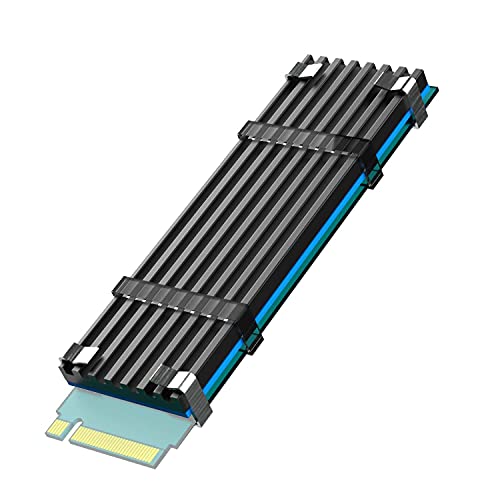
| Console Gaming Pick | Cooling Performance: 5–20°C temperature reduction | Primary Material: Aluminum body | Quantity Included: 1 heatsink with thermal pad, metal clasps, rubber bands | VIEW LATEST PRICE | Read Our Analysis |
| M.2 NVME SSD Graphene Heatsink Cooler |

| Advanced Technology | Cooling Performance: Higher efficiency than aluminum/copper (specific range not stated) | Primary Material: Graphene | Quantity Included: 1 heatsink with silicone thermal pad | VIEW LATEST PRICE | Read Our Analysis |
| 2pcs M.2 SSD Heatsink with Thermal Pad |
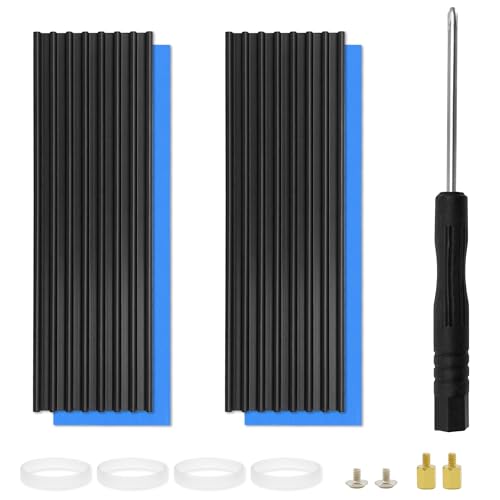
| Best Bundle Deal | Cooling Performance: 10°C–25°C temperature reduction | Primary Material: Aluminum with anodic oxidation treatment | Quantity Included: 2-pack heatsinks with thermal pads, rubber bands, screwdriver, screws | VIEW LATEST PRICE | Read Our Analysis |
More Details on Our Top Picks
M.2 SSD Heatsink Cooler for PS5/PC (Black)
Looking for a heatsink that works across multiple systems? This aluminum alloy cooler fits M.2 NVMe SSDs (2280) on both PS5 and desktop PCs. The double-sided clip design secures your drive while thermal pads transfer heat away, reducing temperatures by 10–20°C depending on your environment. You’ll install it quickly on single-sided M.2 SSDs like Samsung 970 EVO or 980 Pro models. The silver-plated surface reduces static electricity damage. This cooler prevents thermal throttling, maintaining peak performance during intensive tasks. Its broad compatibility with various SSD heights makes it a practical choice for upgrading either gaming or computing systems.
- Cooling Performance:10°C–20°C temperature reduction
- Primary Material:Aluminum alloy with silver plating
- Quantity Included:1 heatsink with thermal pad
- Mounting Method:Double-sided clip design
- SSD Compatibility:M.2 NVMe 2280 (single-sided)
- Profile Height:0.4 inches (3 x 0.95 x 0.4 inches)
- Additional Feature:Silver-plated static reduction
- Additional Feature:Double-sided clip design
- Additional Feature:PS5 installation compatible
Laptop NVMe M.2 SSD Heatsink with Thermal Pads (2-Pack)
Need your laptop’s SSD to stay cool? This 2-pack copper heatsink delivers 10-20°C cooling for M.2 2280 drives. You’ll get two mounting options: rubber rings or high-temperature stickers, both fitting tight laptop spaces with just 1.5mm height. Installation takes minutes. First, clean your SSD surface. Next, apply the included 0.5mm or 1mm thermal pad to match your drive’s unevenness. Finally, attach the polished copper heatsink using your preferred method. Compatible with Samsung 850 EVO, 960 PRO, 970 EVO, and similar models, this heatsink prevents thermal throttling and maintains peak performance during intensive tasks.
- Cooling Performance:10–20°C temperature reduction
- Primary Material:100% copper
- Quantity Included:2-pack heatsinks with thermal pads
- Mounting Method:Rubber ring or high-temperature insulation sticker
- SSD Compatibility:M.2 2280 (laptops and desktops)
- Profile Height:1.5 mm minimal installation height
- Additional Feature:100% pure copper construction
- Additional Feature:Dual mounting method options
- Additional Feature:1.5mm minimal installation height
ELUTENG M.2 SSD Heatsink with Thermal Pad (4-Pack)
The ELUTENG M.2 SSD Heatsink with Thermal Pad (4-Pack) delivers exceptional value when you’re cooling multiple SSDs across your PC or PS5 setup. Each aluminum alloy unit reduces temperatures by 10–25°C through double-sided groove cooling. Install using metal clips and rubber bands for secure, long-lasting mounting on M.2 2280 SSDs. The kit includes four heatsinks, thermal pads, and eight rubber bands. The oxidation coating resists corrosion and wear. Compatible with NVMe, NGFF, and SATA formats, this low-profile design fits standard device spaces without obstruction. Customer support’s available for installation questions.
- Cooling Performance:10°C–25°C temperature reduction
- Primary Material:Aluminum alloy with oxidation coating
- Quantity Included:4-pack heatsinks with thermal pads and rubber bands
- Mounting Method:Metal clips plus rubber bands
- SSD Compatibility:M.2 2280 (PC/PS5)
- Profile Height:Low-profile construction
- Additional Feature:Double-sided groove cooling design
- Additional Feature:Rubber bands resist aging
- Additional Feature:Four-unit kit included
NVME M.2 SSD Heatsink with Graphite & Copper
Want premium performance cooling for your M.2 SSD without bulk? The JOYJOM heatsink delivers 10-30°C cooling using pure copper (401 W/mK thermal conductivity) with graphite coating. Its 70x20x2mm profile fits laptops and PS5 consoles. The grooved design increases heat-dissipation area while the included thermal pad adapts to uneven surfaces. Installation requires attaching the copper heatsink directly to your M.2 2280 SSD using the soft silicone thermal pad. Rubber rings and bandages secure everything. The low-profile thickness prevents throttling and maintains peak performance. Check your device’s clearance before purchasing, as tighter spaces may need verification.
- Cooling Performance:10–30°C temperature reduction
- Primary Material:Pure copper with graphite coating
- Quantity Included:1 heatsink with thermal pad, rubber rings, bandages
- Mounting Method:Rubber rings and bandages
- SSD Compatibility:M.2 2280 (laptop, desktop, PS5)
- Profile Height:2 mm thickness (laptop); 4 mm (desktop)
- Additional Feature:Pure copper graphite coating
- Additional Feature:10-30°C cooling range
- Additional Feature:Protects SSD warranty label
ARCTIC M2 Pro SSD Heatsink Cooler with Thermal Pads
ARCTIC M2 Pro offers the easiest installation among low-profile heatsinks for M.2 2280 SSDs. You’ll skip traditional screws and rubber bands—instead, a click mechanism securely holds your drive between dual heat sinks. The package includes two TP-3 thermal pads that conform to your controller, RAM, and NAND heights, ensuring complete contact. This design works with both single- and double-sided SSDs across PC and gaming consoles. The larger heat sink mass efficiently transfers your SSD’s heat to the environment, preventing thermal throttling during intensive read/write operations. You’ll maintain peak performance without complicated installation steps.
- Cooling Performance:Efficient heat dissipation (specific range not stated)
- Primary Material:Aluminum (implied from design)
- Quantity Included:1 heatsink with dual thermal pads
- Mounting Method:Click mechanism (no screws/rubber bands)
- SSD Compatibility:M.2 2280 (PC and gaming consoles, dual/single-sided)
- Profile Height:Compact design for height differences
- Additional Feature:Click mechanism installation (no tools)
- Additional Feature:Dual and single-sided SSDs
- Additional Feature:TP-3 thermal pad precision
GLOTRENDS M.2 Heatsink Kit with Thermal Pad for SSD
Looking for a console gaming pick that won’t break your budget? The GLOTRENDS M.2 Heatsink Kit delivers practical cooling for your 2280 M.2 SSD. This aluminum heatsink measures 22x70x3mm and reduces temperatures by 5–20°C through passive cooling. You’ll receive two mounting options: metal clasps or rubber bands, allowing flexible installation across various setups. The included thermal pad transfers heat efficiently from your SSD’s control chip to the heatsink body. This kit works with PS5, PS5 Slim, and desktop PCs—but not laptops. Installation takes minutes: apply the thermal pad to your SSD, then secure the heatsink using your preferred mounting method. The aluminum construction combined with the low-viscosity thermal pad maintains peak performance while extending your drive’s lifespan.
- Cooling Performance:5–20°C temperature reduction
- Primary Material:Aluminum body
- Quantity Included:1 heatsink with thermal pad, metal clasps, rubber bands
- Mounting Method:Metal clasps and/or rubber bands
- SSD Compatibility:M.2 2280 (desktop, PS5, PS5 Slim)
- Profile Height:3 mm aluminum body
- Additional Feature:PS5 and PS5 Slim
- Additional Feature:Flexible dual mounting options
- Additional Feature:Not recommended for laptops
M.2 NVME SSD Graphene Heatsink Cooler
The graphene heatsink cooler represents advanced technology engineered for M.2 NVMe SSDs that need thermal management in compact spaces. Graphene conducts heat at 5300 W/m·K, significantly outperforming copper and aluminum alternatives. This cooler fits 2280-sized drives like the 970 EVO and PS5 models. You’ll install the silicone thermal pad between the heatsink and SSD without requiring tools. The professional air duct design increases surface area for efficient heat exchange. Monitor your SSD temperatures before and after installation using temperature software to verify cooling improvements and confirm extended drive lifespan.
- Cooling Performance:Higher efficiency than aluminum/copper (specific range not stated)
- Primary Material:Graphene
- Quantity Included:1 heatsink with silicone thermal pad
- Mounting Method:Silicone thermal pad
- SSD Compatibility:M.2 2280 (laptop and narrow spaces, PS5)
- Profile Height:Suitable for narrow spaces
- Additional Feature:Graphene thermal conductivity (5300 W/m·K)
- Additional Feature:Professional air duct design
- Additional Feature:Grid pattern aesthetic display
2pcs M.2 SSD Heatsink with Thermal Pad
You’ll find this two-piece heatsink bundle deal covers both your primary drive and backup storage needs simultaneously. Each aluminum heatsink fits M.2 2280 NVMe drives like Samsung 970 EVO models. Installation requires placing the thermal pad between your SSD and heatsink, then securing everything with rubber bands. The nano silicon thermal pad adapts to surface irregularities without degrading over time. This low-profile design maintains compatibility with most laptop and desktop configurations, including PlayStation 5 systems. Temperature reductions typically range from 10°C to 25°C depending on your environment, preventing throttling and maintaining peak performance. The package includes screws, a magnetic screwdriver, and four rubber bands for straightforward assembly.
- Cooling Performance:10°C–25°C temperature reduction
- Primary Material:Aluminum with anodic oxidation treatment
- Quantity Included:2-pack heatsinks with thermal pads, rubber bands, screwdriver, screws
- Mounting Method:Rubber bands
- SSD Compatibility:M.2 2280 (laptop, desktop, PlayStation 5)
- Profile Height:Low-profile design
- Additional Feature:Nano silicon grease thermal pad
- Additional Feature:Double-sided groove heat dissipation
- Additional Feature:Magnetic screwdriver included
Factors to Consider When Choosing a Low Profile SSD Heatsink
When you’re selecting a low profile SSD heatsink, you’ll need to evaluate thermal conductivity materials (such as aluminum or copper), verify that the heatsink fits your specific M.2 SSD model and motherboard layout, and check whether the installation method—adhesive thermal pads, clips, or screw mounts—works with your setup. You should also measure your available space, particularly clearance above the drive, to confirm the heatsink won’t interfere with RAM, cooling fans, or your case, and assess the heatsink’s heat dissipation performance through specifications or reviews to ensure it maintains your drive’s peak speeds under heavy use. Make your final choice by matching these factors in order of priority: compatibility first, space constraints second, and thermal performance third.
Thermal Conductivity Materials
Material choice directly impacts how efficiently your heatsink transfers heat away from the SSD, and you’ll find three primary options dominating the market: copper, aluminum, and graphite-enhanced composites.
Copper conducts heat at approximately 401 W/m·K, making it your top performer for thermal transfer. However, it costs more and weighs heavier than alternatives. Aluminum offers lighter weight and lower cost at 237 W/m·K conductivity, though you’ll need larger contact areas or thicker profiles to match copper’s effectiveness.
Graphite-coated copper and graphene-enhanced pads represent integrated solutions that reduce thermal resistance at the interface between your SSD and heatsink. These hybrid designs excel in compact, low-profile form factors by optimizing heat transfer where contact matters most, sometimes outperforming pure metals in real-world applications.
Device Compatibility Requirements
How do you know if a heatsink will actually fit your device? You’ll need to verify three critical factors. First, confirm the SSD size matches your device—M.2 2280 is standard, but some laptops use smaller 2242 models. Second, check the heatsink’s height and profile against your device’s available space, especially for PS5 consoles and thin laptops where clearance is limited. Third, identify your SSD format: NVMe, NGFF, or SATA. Not all heatsinks support all formats. Review your device’s manual or specifications to determine exact requirements. Finally, examine mounting options—clips, rubber bands, or screws—and ensure thermal pads match your SSD’s surface characteristics. Matching these details prevents incompatibility issues and ensures optimal cooling performance.
Installation Method Flexibility
Once you’ve confirmed your device’s compatibility requirements, you’ll want to evaluate how the heatsink actually attaches to your SSD. Look for products offering multiple mounting methods—metal clips, rubber bands, and adhesive options—since different laptops and desktops have varying internal layouts. Metal clips grip the SSD securely without requiring screws, making installation straightforward. Rubber bands provide flexible tension that accommodates both single- and double-sided M.2 drives. Adhesive thermal pads work well when you need a permanent solution for tight spaces. Test the attachment method against your specific device before committing. Verify that whichever option you choose doesn’t obstruct airflow or interfere with surrounding components. The right installation method ensures your heatsink stays firmly positioned during operation while maintaining proper thermal contact throughout your SSD’s lifespan.
Heat Dissipation Performance
What materials conduct heat most effectively? Graphene, copper, and aluminum rank from best to worst thermal conductivity. Choose heatsinks made from copper or graphene for superior heat transfer from your SSD to the cooling structure.
Next, examine the design. Double-sided or groove heatsinks increase contact area and expose more surface to airflow, improving overall cooling efficiency. This design choice directly impacts temperature reduction.
Then, check the thermal pad thickness. Your heatsink should include pads measuring 0.5–1.0 mm, which ensures proper contact across uneven controller and NAND surfaces. This thickness prevents air gaps that reduce heat transfer.
Finally, expect realistic temperature gains. Depending on your environment and mounting method, you’ll see 5–30°C reductions during operation. Monitor actual performance in your specific setup.
Space Constraints Accommodation
When you’re installing a low-profile SSD heatsink, you’ll need to verify that your device’s available space can accommodate the additional thickness. Most heatsinks measure under 3 mm to 4 mm, yet you must check your laptop or desktop’s specifications for maximum clearance limits. Measure the vertical space above your SSD slot carefully, accounting for any covers or components that sit nearby. Some devices require a minimum 1.5 mm clearance to function properly. Select mounting options strategically—double-sided clips and rubber bands secure heatsinks without consuming extra space, unlike screw-based alternatives. Grooved aluminum designs offer efficient heat dissipation while maintaining slim profiles. Calculate the total assembly height by adding the SSD thickness to the heatsink thickness, ensuring the combined measurement doesn’t exceed your device’s available vertical space.
Durability And Longevity
After you’ve confirmed your SSD heatsink fits within your device’s space constraints, you’ll want to evaluate how well it’ll hold up over time. Check the coating material—aluminum, copper, or graphene provides better corrosion protection during heat cycles. Examine the mounting system; dual methods like clips and rubber bands prevent loosening over years of use. Inspect the thermal interface pad thickness, ideally 0.5–1.0 mm with low viscosity, since degradation directly impacts cooling efficiency. Verify the design includes sufficient heat-dissipation features such as grooves or grid patterns to prevent hotspot aging. Finally, assess mounting hardware durability; rubber components age faster, so prioritize aging-resistant materials. These factors directly determine whether your heatsink maintains peak performance across multiple years of operation.
Final Thoughts
You’ll choose the right low-profile SSD heatsink by matching it to your device—PS5, desktop, or laptop. Check your drive’s M.2 length and available clearance first. Pick aluminum for lightweight setups or copper for maximum heat dissipation. Verify thermal pad thickness matches your space constraints. Install the heatsink snugly using clips or adhesive pads, then monitor your drive’s temperature during use to confirm it stays below 70°C for sustained peak performance.

Meet Ry, “TechGuru,” a 36-year-old technology enthusiast with a deep passion for tech innovations. With extensive experience, he specializes in gaming hardware and software, and has expertise in gadgets, custom PCs, and audio.
Besides writing about tech and reviewing new products, he enjoys traveling, hiking, and photography. Committed to keeping up with the latest industry trends, he aims to guide readers in making informed tech decisions.