
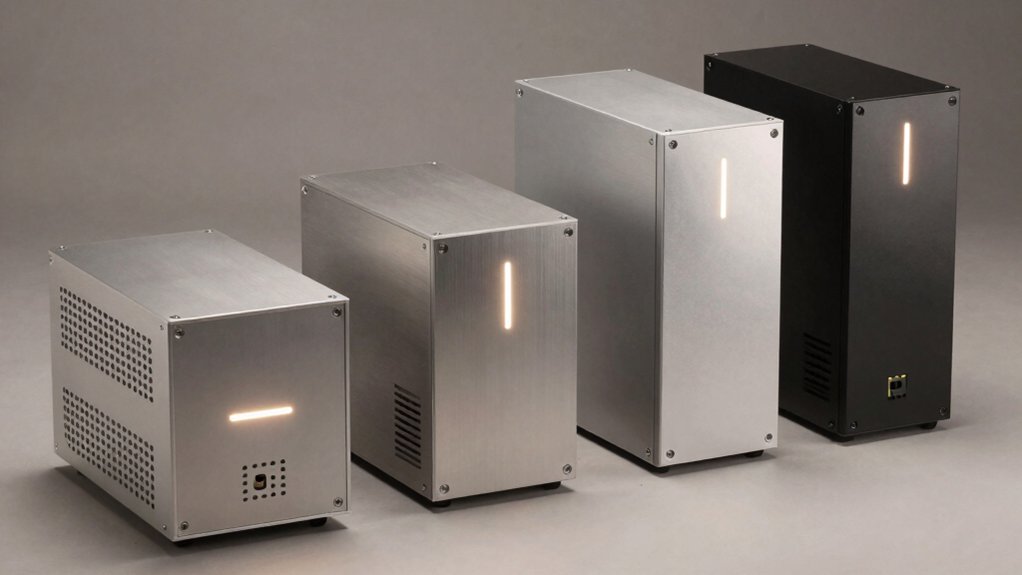

When you need expandable storage without consuming valuable desk space, you’ll want to evaluate mini NAS enclosures carefully. You can choose from compact two-bay units for basic setups or four-bay models for growing data needs. Each option offers different connectivity methods, cooling systems, and drive compatibility. Understanding what factors matter most—thermal management, noise levels, installation ease—will help you select the right solution. Here’s what you should know about the top five models available.
| CENMATE Aluminum 2 Bay Hard Drive Enclosure USB 3.0 |

| Compact & Affordable | Drive Bay Configuration: 2 bays (2.5″/3.5″) | Maximum Total Capacity: 40 TB (or 120 TB with daisy chaining) | Connectivity/Interface: USB 3.0 (Type-A/Type-C) | VIEW LATEST PRICE | Read Our Analysis |
| TERRAMASTER D4-320 4-Bay External Hard Drive Enclosure |

| High-Speed Performance | Drive Bay Configuration: 4 bays (3.5″/2.5″) | Maximum Total Capacity: 120 TB | Connectivity/Interface: USB 3.2 Gen2 10Gbps (Type-C) | VIEW LATEST PRICE | Read Our Analysis |
| JONSBO N4 Black NAS PC Case with 8-Drive Bay |

| Premium Build Quality | Drive Bay Configuration: 8 bays (6×3.5″ HDD, 2×2.5″ SSD) | Maximum Total Capacity: 48 TB (6×8TB HDDs + 2×SSDs) | Connectivity/Interface: USB 3.2 Gen2 Type-C + USB 3.0 | VIEW LATEST PRICE | Read Our Analysis |
| UGREEN NAS DH4300 Plus 4-Bay Desktop Storage |

| Feature-Rich Smart Storage | Drive Bay Configuration: 4 bays (3.5″/2.5″) | Maximum Total Capacity: 128 TB | Connectivity/Interface: 2.5GbE network port + 4K HDMI | VIEW LATEST PRICE | Read Our Analysis |
| Mini-ITX NAS PC K3 Chassis 4 Bay Case |

| DIY Builder’s Choice | Drive Bay Configuration: 4 bays (2.5″/3.5″) | Maximum Total Capacity: Up to 16 TB (4 bays) | Connectivity/Interface: 2× USB ports (front) | VIEW LATEST PRICE | Read Our Analysis |
More Details on Our Top Picks
CENMATE Aluminum 2 Bay Hard Drive Enclosure USB 3.0
If you’re looking to expand your storage without committing to a full network-attached storage system, the CENMATE Aluminum 2 Bay Hard Drive Enclosure offers a straightforward solution for Windows, Mac, and Linux users who need quick access to additional files. This dual-bay enclosure supports both 2.5″ and 3.5″ drives, accommodating up to 20 TB per drive. You’ll install drives using the tool-free tray, then connect via USB 3.0 for plug-and-play operation. The aluminum chassis includes a cooling fan that maintains safe operating temperatures. You can daisy-chain up to three enclosures for 120 TB total storage. Transfer speeds reach 5 Gbps, making file access reasonably quick. The unit measures 7.95 by 5.2 by 3.5 inches, fitting easily beside your desk or monitor.
- Drive Bay Configuration:2 bays (2.5″/3.5″)
- Maximum Total Capacity:40 TB (or 120 TB with daisy chaining)
- Connectivity/Interface:USB 3.0 (Type-A/Type-C)
- Hot-Swap Capability:Yes (all drives)
- Cooling Solution:2-inch built-in fan (~40-50 dB)
- Device Type/Function:DAS (Direct Attached Storage)
- Additional Feature:Tool-free drive installation
- Additional Feature:Daisy chain expansion capability
- Additional Feature:Aluminum-alloy construction
TERRAMASTER D4-320 4-Bay External Hard Drive Enclosure
Looking to expand your storage without the complexity of a full network-attached system? The TERRAMASTER D4-320 offers four bays for 3.5″ or 2.5″ drives, supporting up to 120TB total capacity. You’ll connect it via USB 3.2 Gen2 Type-C, achieving read/write speeds up to 1,016 MB/s with four HDDs installed. The enclosure requires no drivers—simply plug in your compatible drives and begin working immediately. Hot-swappable trays let you replace drives without powering down. A temperature-controlled fan manages heat, while sound-absorbing panels keep noise below 21 dB(A). Note that this is a DAS device without RAID functionality, so each disk operates independently. The compact plastic casing measures 8.74″ by 7.05″ by 6.06″, weighing just 1.3 pounds.
- Drive Bay Configuration:4 bays (3.5″/2.5″)
- Maximum Total Capacity:120 TB
- Connectivity/Interface:USB 3.2 Gen2 10Gbps (Type-C)
- Hot-Swap Capability:Yes (all drives)
- Cooling Solution:Intelligent temperature-controlled fan (<21 dB standby)
- Device Type/Function:DAS (Direct Attached Storage)
- Additional Feature:USB 3.2 Gen2 10Gbps
- Additional Feature:Push-lock tray security
- Additional Feature:Up to 1,016 MB/s transfer
JONSBO N4 Black NAS PC Case with 8-Drive Bay
The JONSBO N4 delivers eight internal drive bays—six 3.5″ HDDs and two 2.5″ SSDs—making it well-suited for users who need substantial storage capacity without occupying significant desk or server rack space. You’ll appreciate its hot-swap functionality on four of the hard drives, enabling quick replacements without powering down. The case accepts ITX and Micro-ATX motherboards, supports up to 230mm GPUs, and includes a 120mm cooling fan for thermal management. Its walnut wood panels combined with 0.7mm steel construction provide durability and aesthetic appeal. With USB 3.2 Gen2 Type-C and USB 3.0 ports on the front, you can easily connect external devices. The SFX PSU requirement and 70mm CPU cooler clearance limit your component options, so verify compatibility before purchasing.
- Drive Bay Configuration:8 bays (6×3.5″ HDD, 2×2.5″ SSD)
- Maximum Total Capacity:48 TB (6×8TB HDDs + 2×SSDs)
- Connectivity/Interface:USB 3.2 Gen2 Type-C + USB 3.0
- Hot-Swap Capability:Partial (4 of 6 HDDs hot-swap)
- Cooling Solution:120mm front intake fan
- Device Type/Function:NAS Case/DIY chassis (requires components)
- Additional Feature:Walnut wood panel design
- Additional Feature:Supports Micro-ATX motherboards
- Additional Feature:Mixed hot-swap/non hot-swap bays
UGREEN NAS DH4300 Plus 4-Bay Desktop Storage
Want to store your entire photo library, video collection, and important files without paying monthly cloud subscription fees? The UGREEN NAS DH4300 Plus offers 128TB capacity with 8GB RAM and a 2.5GbE network port for fast transfers—moving a 1GB file takes roughly three seconds. Set up real-time backups using the AI Album Recognition feature, which automatically organizes photos by people, objects, and pets while detecting duplicates. Access your files across Windows, macOS, Android, iOS, and smart TVs. Local encryption and TRUSTe certification protect your data. Note that drives aren’t included, actual speeds vary based on your router and drives, and you’ll need wired Ethernet connectivity.
- Drive Bay Configuration:4 bays (3.5″/2.5″)
- Maximum Total Capacity:128 TB
- Connectivity/Interface:2.5GbE network port + 4K HDMI
- Hot-Swap Capability:N/A (NAS with software management)
- Cooling Solution:Integrated thermal management (processor-dependent)
- Device Type/Function:NAS (Network Attached Storage)
- Additional Feature:AI photo recognition/classification
- Additional Feature:4K HDMI output
- Additional Feature:TRUSTe certified encryption
Mini-ITX NAS PC K3 Chassis 4 Bay Case
If you’re building a compact NAS system for your home office or small business network, the AUDHEID K3 Chassis delivers a practical four-bay storage solution in a space-efficient form factor. This Mini-ITX case accommodates both 2.5″ and 3.5″ drives, giving you flexibility in drive selection. The chassis supports Mini-ITX motherboards and includes a 12 cm silent rear fan for efficient heat dissipation. Measuring 26.5″ deep by 19″ wide by 18″ high, it fits easily into confined spaces. You get four hard disk trays, a SATA cable, and mounting screws included. The alloy steel construction weighs seven pounds, making it portable for relocation if needed. Customer ratings average 3.9 out of 5 stars based on 62 reviews.
- Drive Bay Configuration:4 bays (2.5″/3.5″)
- Maximum Total Capacity:Up to 16 TB (4 bays)
- Connectivity/Interface:2× USB ports (front)
- Hot-Swap Capability:Yes (all 4 bays)
- Cooling Solution:12cm rear silent fan
- Device Type/Function:DIY NAS chassis (requires components)
- Additional Feature:Mini-ITX motherboard compatible
- Additional Feature:Silent 12cm back fan
- Additional Feature:DIY builder-friendly design
Factors to Consider When Choosing a Mini NAS Enclosure
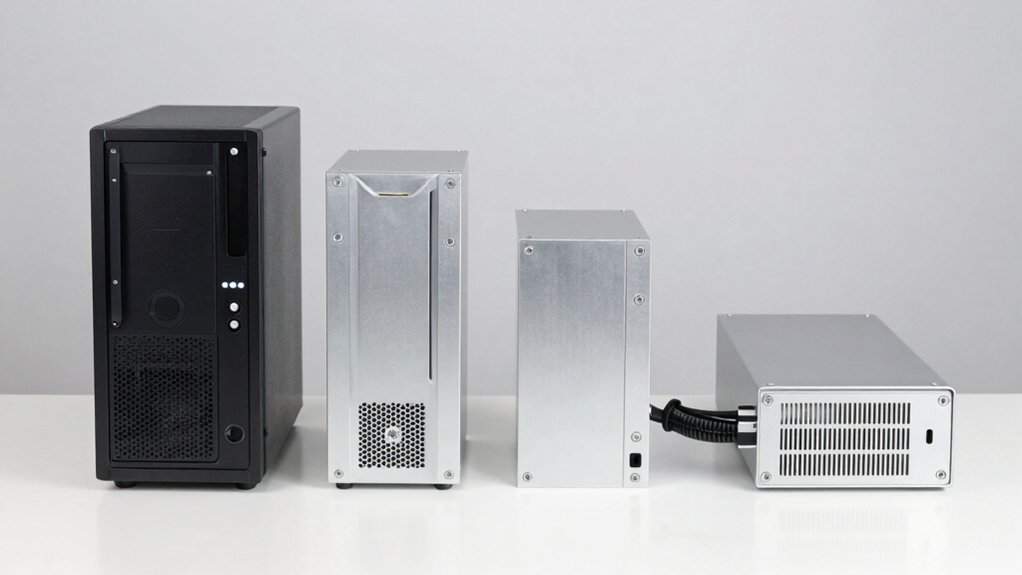
You need to evaluate five key factors before selecting a mini NAS enclosure that fits your needs: storage capacity requirements, drive bay configuration, data transfer speed, cooling and noise levels, and motherboard compatibility. First, determine how much storage you need by calculating your current data volume and expected growth, then match that requirement to the number and size of drive bays the enclosure offers. Second, verify that the enclosure’s cooling system manages heat adequately for your intended use and that noise levels suit your environment, while also confirming the motherboard and components you plan to install will physically fit inside the chassis.
Storage Capacity Requirements
How much storage do you actually need? Start by calculating your total data volume, including current files and anticipated growth over the next two to three years. Next, examine the enclosure’s specifications: determine the number of bays available and the maximum drive capacity each bay supports. A 4-bay enclosure might support 30TB drives for 120TB total capacity, while a 2-bay model may limit you to 20TB per drive. Then factor in your RAID choice—RAID 1 mirrors data, reducing usable capacity by half, whereas RAID 5 or 6 requires additional drives for parity. Finally, consider whether you’ll expand later through daisy-chaining or purchasing additional enclosures. Always plan for at least 20% unused space to maintain system performance and account for formatting overhead.
Drive Bay Configuration
What matters most when selecting a mini NAS enclosure is understanding how many drives it can hold and what types of drives’ll fit inside. Check the bay configuration first—some units accommodate 2 bays while others support 4 or more. Verify whether the enclosure accepts 2.5-inch, 3.5-inch, or mixed-size drives, as this determines your drive options. Next, examine the tray design: tool-free trays simplify drive swaps, while screw-fixed trays require more time but may provide better stability. Look for hot-swappable capabilities if you need to replace drives without shutting down the system. Finally, calculate total capacity by multiplying the number of bays by the largest drive size supported. This ensures your enclosure meets your storage needs now and allows for future expansion.
Data Transfer Speed
When evaluating a mini NAS enclosure, data transfer speed determines how quickly you’ll move files between your drives and computer. Check the enclosure’s connection type first. USB 3.0 supports up to 5 Gbps, while USB 3.2 Gen2 reaches 10 Gbps for faster transfers. If your enclosure supports Thunderbolt via USB-C, you’ll achieve sustained speeds beyond standard USB limits. Next, consider the drive type you’ll install. SSDs deliver optimally higher sequential read/write speeds than HDDs, directly affecting overall performance. Finally, verify the enclosure’s thermal management. Internal cooling and fan systems prevent throttling, which can reduce sustained transfer rates under heavy use. A four-drive DAS enclosure can reach approximately 1,016 MB/s under optimal conditions.
Cooling And Noise
Why you’ll want to pay attention to cooling and noise depends largely on where you’ll place your mini NAS enclosure and how intensively you’ll use it. Active cooling with built-in fans maintains lower drive temperatures during heavy I/O operations, preventing thermal throttling when multiple drives work simultaneously. However, fan-cooled enclosures typically produce 40–50 decibels of noise, which may disturb quiet office or bedroom environments. If you need silent operation, consider models with temperature-controlled fans or sound-absorbing panels that reduce noise during idle periods. Understand the trade-off: prioritize active cooling for demanding multi-bay setups, or choose low-noise designs for light-use installations in noise-sensitive spaces. Verify your enclosure’s ventilation features match your workload intensity and placement location.
Motherboard Compatibility
Beyond managing heat and sound, you’ll need to verify that your chosen enclosure can physically accommodate your motherboard and its components. First, confirm the chassis supports your motherboard’s form factor—ITX or Micro-ATX. Next, measure your CPU cooler’s height and check that it fits without hitting drive bays or the enclosure’s top panel. Verify the internal layout accommodates your planned drives, whether 2.5″ or 3.5″, and that they don’t obstruct motherboard components. Check power supply mounting space and ensure cables can reach your motherboard’s power connectors without strain. Finally, assess whether the chassis’s fan placement and airflow design match your cooling requirements. These compatibility checks prevent costly installation problems and ensure stable, long-term operation.
Power Supply Specifications
How you’ll power your mini NAS enclosure directly impacts its reliability and performance, so you’ll need to evaluate several key specifications before making your choice. First, determine whether you need an external power supply or can use host-supplied power through USB. Check the wattage rating required to support your drives operating simultaneously—2.5″ drives demand less power than 3.5″ models, and SSDs generally consume less than HDDs. If your enclosure includes a cooling fan, factor in its power draw. For multi-bay setups with daisy-chaining capabilities, verify whether connected devices need independent power delivery. Review the interface type (USB-C or USB 3.x) to confirm it supports your total power requirements. Document these specifications to ensure your power infrastructure matches your storage configuration.
Expansion And Scalability
When you’re selecting a mini NAS enclosure, you’ll want to evaluate its expansion potential to ensure it can grow with your storage needs. Check the maximum number of drive bays available, whether four, eight, or more, to understand how many drives you can install. Verify that the enclosure supports mixed drive types, allowing both 3.5″ and 2.5″ HDDs and SSDs for flexible upgrades. Confirm per-drive capacity limits and total supported storage to plan long-term growth accurately. Look for hot-swappable drives and tool-free trays to replace drives without shutting down your system. Finally, investigate daisy-chain or multi-device options if you need to scale beyond a single enclosure’s capacity without adding full NAS features.
Connectivity Options
The way your mini NAS enclosure connects to your devices directly affects how you’ll access your storage and share files across your network. You’ll find two main connection types: USB-based and network-enabled options. USB 3.0/3.1/3.2 connections offer direct attachment with data rates up to 10 Gbps, ideal for single-device access without networking requirements. Some models include Thunderbolt compatibility for even faster speeds on compatible computers. Network-enabled enclosures use Ethernet ports like 2.5 GbE, allowing multiple devices simultaneous access across your local network. Choose USB connectivity for dedicated, high-speed direct connections. Select Ethernet-based systems when you need shared access from multiple computers or devices. Hot-swappable drive trays on either type let you swap drives without powering down.
Final Thoughts
You’ve reviewed five capable mini NAS enclosures. Now match your choice to your needs: pick the CENMATE for basic two-bay setups, the TERRAMASTER or UGREEN for four-bay expandability, or the JONSBO for maximum drive capacity. Consider your space, budget, and cooling requirements. Install your drives, connect via USB or network, and configure your storage system. You’ll gain centralized access to your files across devices.

Meet Ry, “TechGuru,” a 36-year-old technology enthusiast with a deep passion for tech innovations. With extensive experience, he specializes in gaming hardware and software, and has expertise in gadgets, custom PCs, and audio.
Besides writing about tech and reviewing new products, he enjoys traveling, hiking, and photography. Committed to keeping up with the latest industry trends, he aims to guide readers in making informed tech decisions.