
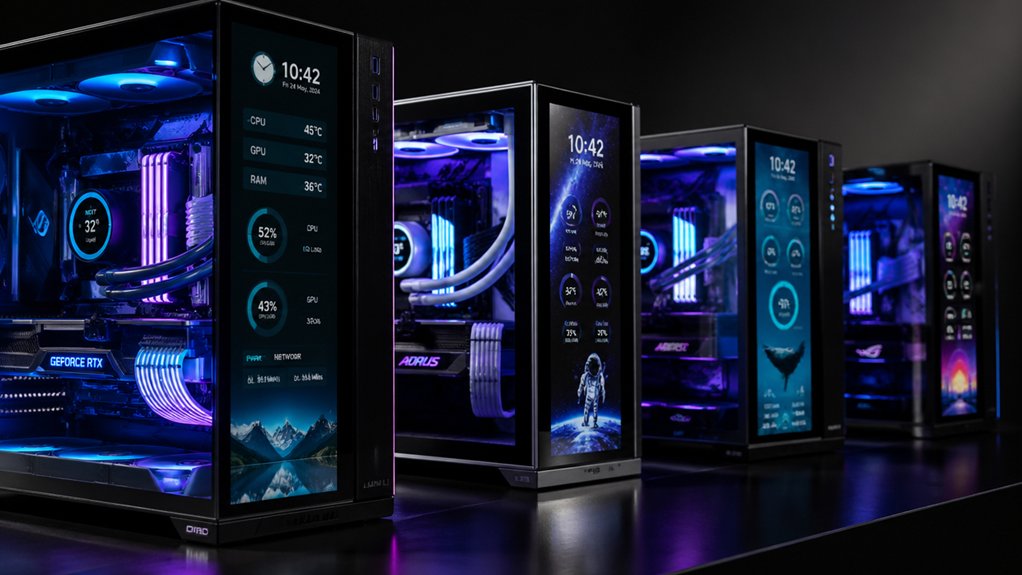

When you’re building or upgrading your PC, choosing a case with an integrated LCD screen lets you display real-time system stats, custom images, or hardware monitoring data directly on your build. You’ll find options ranging from compact 6.86-inch displays to expansive 14.9-inch touchscreens, each offering different resolutions and software capabilities. The right choice depends on your specific needs—whether you prioritize ease of use, display size, or advanced customization features. Here’s what you need to know to pick the perfect case.
| Hyte Y70 Touch Dual Chamber ATX Mid Tower Case |

| Premium All-in-One | Display Size: 14.9 inches | Motherboard Compatibility: ATX | Maximum GPU Length Support: 4-slot vertical graphics support (length unspecified) | VIEW LATEST PRICE | Read Our Analysis |
| Lian Li Universal Screen PC Temperature Display Panel |

| Compact Display Option | Display Size: 8.8 inches | Motherboard Compatibility: Universal (any computer setup) | Maximum GPU Length Support: N/A (universal secondary display) | VIEW LATEST PRICE | Read Our Analysis |
| Thermalright A70 Vision ATX Gaming Case with LCD Display |

| Best Panoramic View | Display Size: 9.16 inches | Motherboard Compatibility: ATX, Micro-ATX, Mini-ITX | Maximum GPU Length Support: Up to 420mm | VIEW LATEST PRICE | Read Our Analysis |
| Thermalright A70 Vision White ATX Gaming Case with LCD Display |

| Best White Edition | Display Size: 9.16 inches | Motherboard Compatibility: ATX, Micro-ATX, Mini-ITX | Maximum GPU Length Support: Up to 420mm | VIEW LATEST PRICE | Read Our Analysis |
| Cooler Master MasterFrame 360 Stage LCD PC Case |
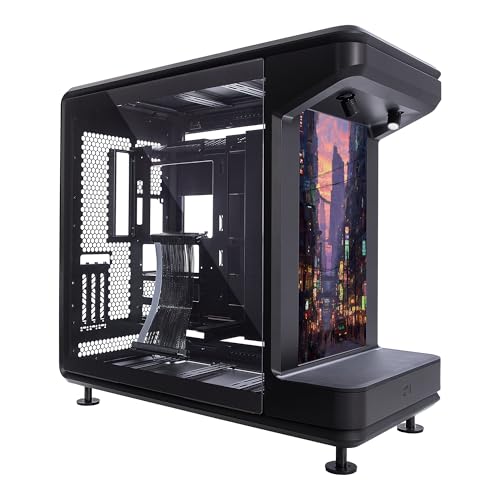
| Open-Frame Showcase | Display Size: Front-facing LCD (size unspecified) | Motherboard Compatibility: Mini-ITX, Micro-ATX, ATX | Maximum GPU Length Support: Up to 430mm | VIEW LATEST PRICE | Read Our Analysis |
| ALSEYE StarArk Full Tower Gaming PC Case with LCD Screen |

| Full Tower Powerhouse | Display Size: 9.16 inches | Motherboard Compatibility: E-ATX, ATX | Maximum GPU Length Support: Not specified | VIEW LATEST PRICE | Read Our Analysis |
| Thermalright Trofeo Vision LCD Black Edition Case |
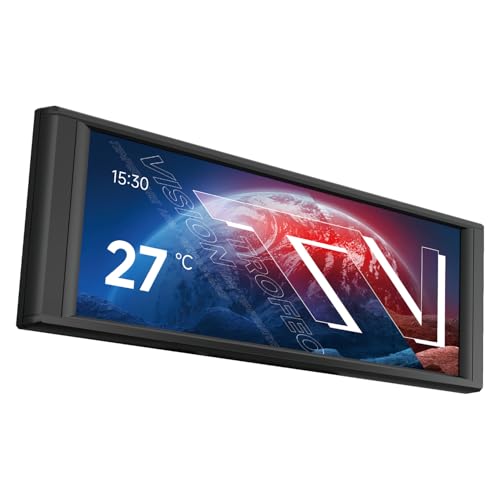
| Minimalist Display Panel | Display Size: 6.86 inches | Motherboard Compatibility: Not specified | Maximum GPU Length Support: N/A (display only) | VIEW LATEST PRICE | Read Our Analysis |
| GAMDIAS ATX Mid Tower Gaming PC Case Tempered Glass |

| Budget-Friendly Pick | Display Size: Embedded monitor (size unspecified) | Motherboard Compatibility: ATX | Maximum GPU Length Support: Up to 340mm | VIEW LATEST PRICE | Read Our Analysis |
| Thermaltake Tower 600 Mid-Tower ATX Case |

| Unique Octagonal Design | Display Size: Optional horizontal display kit (size unspecified) | Motherboard Compatibility: ASUS BTF, MSI PROJECT ZERO, GIGABYTE PROJECT STEALTH | Maximum GPU Length Support: Three-way VGA installations (length unspecified) | VIEW LATEST PRICE | Read Our Analysis |
| darkFlash ATX Mid-Tower PC Case with Glass (L280) |
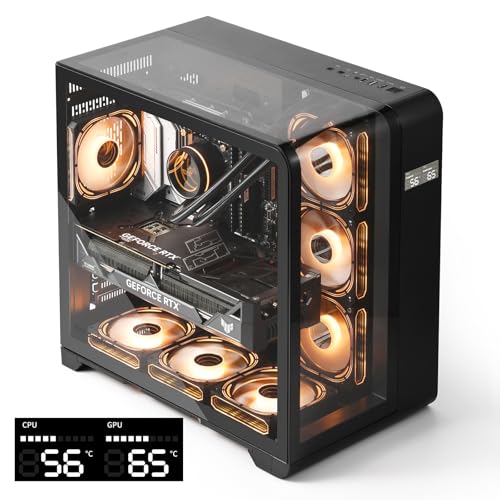
| Curved Glass Beauty | Display Size: Built-in screen (size unspecified) | Motherboard Compatibility: ATX | Maximum GPU Length Support: Up to 410mm | VIEW LATEST PRICE | Read Our Analysis |
More Details on Our Top Picks
Hyte Y70 Touch Dual Chamber ATX Mid Tower Case
The Hyte Y70 Touch is a premium all-in-one case that combines cutting-edge design with integrated display technology. You’ll get a 14.9″ touchscreen with 2.5K resolution built directly into the chassis, which you can customize using HYTE Nexus software. The dual-chamber design keeps cables hidden while displaying your GPU vertically through panoramic glass panels. You can fit up to 360mm radiators on the side or top, supporting extensive water-cooling setups. The case accommodates four PCIe slots and includes a PCIe 4.0 riser for vertical GPU mounting. Choose from four colorways: Snow White, Panda, Black Cherry, or Pitch Black. It’s available with a 3-year manufacturer warranty and Amazon’s return policy.
- Display Size:14.9 inches
- Motherboard Compatibility:ATX
- Maximum GPU Length Support:4-slot vertical graphics support (length unspecified)
- Cooling Method Support:Air and Water
- Maximum Radiator Support:360mm
- Tempered Glass Panels:3-piece panoramic glass window
- Additional Feature:14.9″ integrated LCD touchscreen
- Additional Feature:Dual-chamber interior design
- Additional Feature:Vertical 4-slot GPU support
Lian Li Universal Screen PC Temperature Display Panel
Looking for a compact display option that fits any build without taking up valuable case real estate? The Lian Li 8.8″ Universal Screen serves as an independent secondary monitor powered via USB. You can mount it on fan frames, case panels, or flat surfaces using adjustive pads and height-tilt adjustments. The diffused ARGB lighting synchronizes through L-Connect 3 software. Upload custom videos and photos, or use preset templates to display hardware stats and temperatures in °C or °F. The screen connects through a 9-pin port or Type-A USB without occupying GPU ports, making it ideal for gaming or workstation setups requiring hardware monitoring without cluttering your build.
- Display Size:8.8 inches
- Motherboard Compatibility:Universal (any computer setup)
- Maximum GPU Length Support:N/A (universal secondary display)
- Cooling Method Support:N/A (secondary display)
- Maximum Radiator Support:N/A (secondary display)
- Tempered Glass Panels:N/A (secondary display)
- Additional Feature:Customizable ARGB frame lighting
- Additional Feature:Upload custom videos/photos
- Additional Feature:Independent secondary monitor
Thermalright A70 Vision ATX Gaming Case with LCD Display
Want your PC’s internal components fully visible from every angle? The Thermalright A70 Vision delivers a 270° panoramic view through three-sided tempered glass panels. Its 9.16-inch LCD display runs at 1920×480 resolution, supporting multiple themes, image displays, and screen mirroring via TRCC software. You’ll fit ATX, M-ATX, or Mini-ITX motherboards while routing cables internally and concealing liquid cooling tubing. The case accommodates GPUs up to 420mm, CPU coolers to 168.4mm, and features eight 120mm fan positions for optimal airflow. A front USB Type-C 3.0 port delivers 10Gbps connectivity, and the detachable GPU bracket prevents sagging on larger graphics cards.
- Display Size:9.16 inches
- Motherboard Compatibility:ATX, Micro-ATX, Mini-ITX
- Maximum GPU Length Support:Up to 420mm
- Cooling Method Support:Air
- Maximum Radiator Support:Up to 360mm
- Tempered Glass Panels:Three-sided tempered glass
- Additional Feature:270° panoramic perspective
- Additional Feature:Pillar-free three-sided glass
- Additional Feature:Detachable adjustable GPU bracket
Thermalright A70 Vision White ATX Gaming Case with LCD Display
Thermalright’s A70 Vision White stands out as the premier white edition for builders who want an LCD display integrated directly into their case design. The 9.16-inch LCD screen supports multiple themes and displays images or videos through TRCC software screen mirroring. You’ll get a panoramic 270° three-sided glass view without pillars, showcasing your build. The case accommodates ATX, Micro ATX, and Mini ITX motherboards with eight 120mm fan mounting positions for efficient cooling. Its four-direction airflow design maintains low temperatures during heavy loads. The front panel includes Type-C 3.0 connectivity, audio jack, and USB ports. You benefit from tool-free tempered glass installation and adjustable GPU bracket support up to 420mm length.
- Display Size:9.16 inches
- Motherboard Compatibility:ATX, Micro-ATX, Mini-ITX
- Maximum GPU Length Support:Up to 420mm
- Cooling Method Support:Air
- Maximum Radiator Support:Up to 360mm
- Tempered Glass Panels:Three-sided tempered glass
- Additional Feature:Magnetic 9.16-inch LCD display
- Additional Feature:Tool-free snap-fit design
- Additional Feature:Four-direction airflow system
Cooler Master MasterFrame 360 Stage LCD PC Case
The Cooler Master MasterFrame 360 STAGE LCD’s open-frame showcase design suits builders who want their components and custom LCD display fully visible. You’ll support ATX, Micro-ATX, and Mini-ITX motherboards while mounting GPUs up to 430mm vertically using the PCIe 5.0 riser cable. Install up to twelve 120mm fans or radiators up to 360mm for efficient cooling. Upload custom JPG or MP4 files via MicroSD to display on the front LCD screen. The case fits PSUs up to 210mm and provides 110mm cable-routing clearance, keeping wiring organized behind the stage design.
- Display Size:Front-facing LCD (size unspecified)
- Motherboard Compatibility:Mini-ITX, Micro-ATX, ATX
- Maximum GPU Length Support:Up to 430mm
- Cooling Method Support:Air and Custom Liquid Cooling
- Maximum Radiator Support:Up to 360mm
- Tempered Glass Panels:Tempered glass
- Additional Feature:Stage-inspired open-frame design
- Additional Feature:PCIe 5.0 riser cable
- Additional Feature:Custom playback mode support
ALSEYE StarArk Full Tower Gaming PC Case with LCD Screen
If you’re building a high-performance system that demands ample space, this full tower powerhouse delivers with its 9.16-inch integrated LCD screen for real-time hardware monitoring and custom visuals. The StarArk supports E-ATX and ATX motherboards with 100mm CPU coolers, accommodating four HDD bays and four SSD bays for expansive storage. Its cooling setup includes three 120mm rear fans plus a 200mm bottom fan with PWM control, alongside 360mm rear radiator compatibility. The 3mm SPCC steel chassis features dual-tone acrylic and tempered glass panels with a spaceship design. Front connectivity includes USB Type-C, two USB 3.0 ports, and HD audio. Dimensions measure 563x520x1000mm, providing substantial build room.
- Display Size:9.16 inches
- Motherboard Compatibility:E-ATX, ATX
- Maximum GPU Length Support:Not specified
- Cooling Method Support:Air
- Maximum Radiator Support:360mm rear radiator
- Tempered Glass Panels:Dual-tone acrylic/tempered glass panels
- Additional Feature:Ark spaceship design aesthetic
- Additional Feature:4x HDD and 4x SSD bays
- Additional Feature:Dual-tone acrylic/tempered glass
Thermalright Trofeo Vision LCD Black Edition Case
Want a minimalist display panel that doesn’t compromise on visual impact? The Thermalright Trofeo Vision LCD Black Edition features a 6.86-inch full-color LCD screen with 1280×480 resolution and IPS technology. You’ll install it using the magnetic design—no screws required. Download TRCC software from Thermalright’s official site to access three function modules: Theme Background, Screen Mirroring, and Video Player. The Video Player supports lossless, uncompressed playback for extended videos. You can position the screen flexibly within your chassis thanks to magnetic attachment compatibility with Trofeo Vision water cooling radiators. The glossy display delivers 2000:1 contrast with a 2ms response time, weighing only 286 grams.
- Display Size:6.86 inches
- Motherboard Compatibility:Not specified
- Maximum GPU Length Support:N/A (display only)
- Cooling Method Support:N/A (display only)
- Maximum Radiator Support:N/A (display only)
- Tempered Glass Panels:N/A (display only)
- Additional Feature:6.86-inch IPS LCD display
- Additional Feature:Magnetic panel easy install
- Additional Feature:Video player lossless playback
GAMDIAS ATX Mid Tower Gaming PC Case Tempered Glass
GAMDIAS’s ATLAS E1 serves as your budget-friendly pick for mid-tower gaming builds that demand both performance monitoring and visual appeal. The embedded temperature display shows real-time CPU, GPU, and ambient readings through ZEUS CAST software, letting you switch modes via the I/O port. Three preinstalled ARGB fans deliver reliable airflow while providing customizable lighting through your motherboard or LED button. The tempered glass panels give you a clear view of your components. You’ll fit ATX motherboards, air coolers up to 160mm, and graphics cards up to 340mm. The case supports top 240mm and rear 120mm radiators for liquid cooling options when you need enhanced thermal performance.
- Display Size:Embedded monitor (size unspecified)
- Motherboard Compatibility:ATX
- Maximum GPU Length Support:Up to 340mm
- Cooling Method Support:Air
- Maximum Radiator Support:Top 240mm and rear 120mm
- Tempered Glass Panels:Panoramic glass panels
- Additional Feature:Three built-in ARGB fans
- Additional Feature:CPU/GPU/AMB temperature modes
- Additional Feature:Clasp mechanism glass removal
Thermaltake Tower 600 Mid-Tower ATX Case
The Thermaltake Tower 600 Mid-Tower ATX Case’s unique octagonal design makes it ideal for builders who want their PC to stand out visually. You’ll benefit from three removable tempered glass panels that require no tools for access. The case supports up to nine fans and 420mm radiators for effective cooling. Install your GPU using rotational PCIe slots and the floating bracket for positioning flexibility. Compatible with ASUS BTF, MSI PROJECT ZERO, and GIGABYTE PROJECT STEALTH motherboards, you’ll achieve clean cable management through hidden-connector support. The optional horizontal display kit lets you alter presentation style. This model (CA-1Z1-00M1WN-00) includes a three-year warranty, making it a reliable choice for custom builds.
- Display Size:Optional horizontal display kit (size unspecified)
- Motherboard Compatibility:ASUS BTF, MSI PROJECT ZERO, GIGABYTE PROJECT STEALTH
- Maximum GPU Length Support:Three-way VGA installations (length unspecified)
- Cooling Method Support:Air
- Maximum Radiator Support:Up to 420mm
- Tempered Glass Panels:Three tempered glass panels
- Additional Feature:Distinctive octagonal case shape
- Additional Feature:Rotational PCIe slots
- Additional Feature:Hidden-connector motherboard support
darkFlash ATX Mid-Tower PC Case with Glass (L280)
For builders who want a curved glass beauty that displays system metrics without extra purchases, darkFlash’s L280 delivers real-time monitoring through its built-in digital screen. You’ll fit large 410mm GPUs and 360mm radiators inside the spacious mid-tower design. The three-glass layout provides visibility of your components while the integrated display shows CPU and GPU temperatures. Four pre-installed PWM ARGB fans manage airflow for both air and water cooling setups. You get 5 internal bays for storage, supporting up to 3 SSDs and 2 HDDs. The snap-on design simplifies cable management and installation. A bottom dust filter maintains cleanliness, and four USB 3.0 ports plus a Type-C front port offer connectivity options.
- Display Size:Built-in screen (size unspecified)
- Motherboard Compatibility:ATX
- Maximum GPU Length Support:Up to 410mm
- Cooling Method Support:Air and Water
- Maximum Radiator Support:360mm
- Tempered Glass Panels:Three side glass curved full view
- Additional Feature:Curved full-view glass design
- Additional Feature:4 pre-installed PWM ARGB fans
- Additional Feature:Real-time CPU/GPU monitoring display
Factors to Consider When Choosing a PC Case With LCD Screen
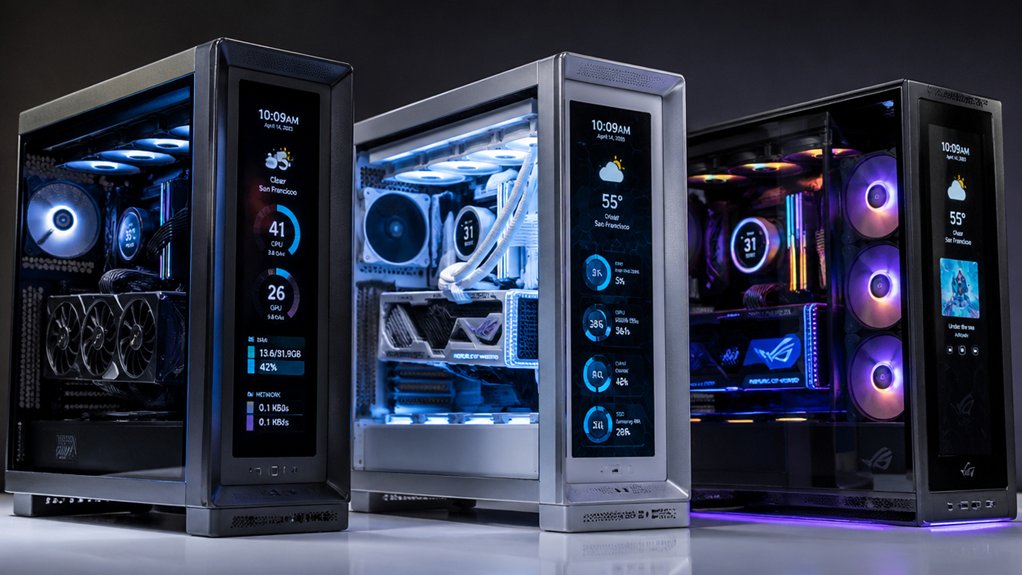
When you’re selecting a PC case with an LCD screen, you’ll need to evaluate five critical factors that directly impact your build’s performance and appearance. First, check the display size and resolution to ensure it’s large enough to show system stats clearly, then verify the cooling capacity and airflow meet your components’ thermal requirements, confirm motherboard compatibility with your selected form factor, measure your GPU length against the case’s support limits, and finally review the software control features to see what customization options you can access. Making these assessments in order will help you choose a case that fits both your hardware specifications and your aesthetic preferences.
Display Size And Resolution
How do you choose between a compact 6.86-inch display and a sprawling 14.9-inch screen for your PC case? First, measure your case’s available space to determine what fits. Next, consider your viewing distance—larger screens work better when you sit farther away. Then, evaluate resolution options. Standard resolutions like 1280×480 provide adequate clarity for basic monitoring. Higher resolutions such as 1920×480 deliver sharper visuals with better detail. Some displays offer 2.5K-like effective resolution through tall aspect ratios, giving you more vertical information. Finally, assess your primary use. If you’ll display system stats and media, a mid-range screen around 10 inches balances visibility and space. For dedicated secondary monitoring, opt for larger sizes with higher resolution to maximize usability and visual quality.
Cooling Capacity And Airflow
After you’ve selected your display size and resolution, you’ll want to verify that your case can handle the thermal demands of your components without the screen obstructing airflow. Check the case’s fan mounting positions—look for support of eight 120mm fans or 360mm radiator compatibility. Examine whether the design includes large mesh panels or multi-directional airflow layouts that enhance intake and exhaust paths. Confirm liquid cooling support if you’re pairing high-heat GPUs and CPUs, as many cases support up to 360–420mm radiators. Review internal features like bottom cold floor cooling and detachable GPU brackets that minimize heat buildup. Compare these cooling specifications directly against your hardware’s thermal output to ensure adequate heat dissipation without performance throttling.
Motherboard Compatibility Options
Three primary motherboard form factors—ATX, Micro-ATX, and Mini-ITX—determine whether your motherboard will fit inside an LCD-screen case, so you’ll need to verify that your chosen case explicitly supports your motherboard’s size before purchasing. Check the case specifications for your exact form factor, since internal mounting trays align with standard standoff spacing patterns specific to each size. Some cases support extended layouts like E-ATX, which accommodates larger boards. Beyond form factor, consider clearance around the LCD module and cable routing areas. Detachable GPU brackets and hidden management systems affect whether tall CPU coolers or large motherboards fit alongside the display. Pre-mounted USB and HD audio headers may align with typical I/O layouts, streamlining your build process and reducing compatibility headaches.
GPU Length Support
When you’re selecting an LCD-screen case, you’ll need to verify that your graphics card will actually fit inside, since the display integration often reduces the available space. Check the case’s maximum GPU length specification in millimeters—most quality models support 420mm or longer. Measure your graphics card’s total length, including any multi-slot or triple-slot cooler configurations. If your card exceeds the stated limit, you’ll risk clearance problems or inability to close the case.
Some cases offer adjustable or detachable GPU brackets that accommodate longer cards while managing sag and cable routing. Open-frame designs typically optimize visibility but still specify maximum GPU lengths. Before purchasing, match your card’s exact dimensions against the case’s documented GPU length support to ensure proper fit and functionality.
Software Control Features
What software options does your case’s LCD screen require, and will they work with your operating system?
Most LCD cases rely on integrated software suites—HYTE Nexus or L-Connect 3—to customize display content, themes, and system monitoring data. Before purchasing, verify compatibility with your operating system. L-Connect 3, for example, doesn’t support Linux, so Linux users should confirm alternative options exist.
Evaluate the software’s capabilities. Some platforms let you upload custom images and videos or mirror PC content via tools like TRCC. Others offer preset themes and modular information layouts instead.
Check whether the display operates independently as a secondary monitor without consuming GPU ports. Finally, confirm that the same software manages both LCD content and ARGB lighting synchronization, streamlining your control setup.
Final Thoughts
You’ll want to prioritize three factors: screen size, resolution quality, and monitoring software compatibility. First, decide your budget range—cases span from budget-friendly to premium. Next, confirm the display fits your case dimensions and supports the stats you need tracked. Finally, verify the software works with your system. Compare specifications across models, then select the case matching your setup requirements and aesthetic preferences.

Meet Ry, “TechGuru,” a 36-year-old technology enthusiast with a deep passion for tech innovations. With extensive experience, he specializes in gaming hardware and software, and has expertise in gadgets, custom PCs, and audio.
Besides writing about tech and reviewing new products, he enjoys traveling, hiking, and photography. Committed to keeping up with the latest industry trends, he aims to guide readers in making informed tech decisions.