

You spend hours at your desk, and your monitor’s position directly affects your posture and productivity. A monitor riser stand elevates your screen to eye level, reducing neck strain while creating valuable storage space underneath. These stands come in various styles and weight capacities, each with different features like drawers, pen holders, and adjustable heights. To find the right one for your setup, you’ll need to evaluate several key factors that determine whether it’ll actually work for you.
| WALI Computer Monitor Stand with Underneath Storage (STT003) |

| Best Overall | Weight Capacity: 44 lbs (20 kg) | Height Adjustment Options: 3 levels (3.9″, 4.7″, 5.5″) | Material Type: Polished metal | VIEW LATEST PRICE | Read Our Analysis |
| TEAMIX 20 Inch Monitor Stand Riser with Storage |

| Best Value | Weight Capacity: 80 lbs | Height Adjustment Options: Fixed height (4″) | Material Type: MDF wood board | VIEW LATEST PRICE | Read Our Analysis |
| WESTREE Dual Monitor Stand Riser (Rustic Brown) |
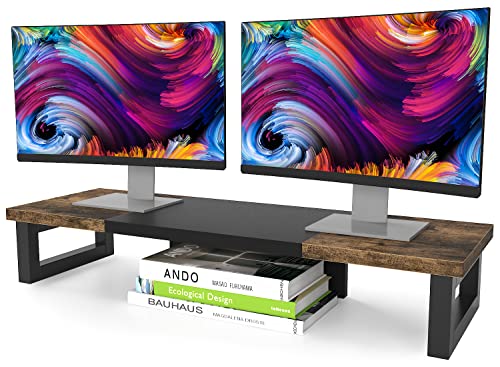
| Most Versatile | Weight Capacity: 149.9 lbs | Height Adjustment Options: Fixed height (4.92″) | Material Type: Wood and steel | VIEW LATEST PRICE | Read Our Analysis |
| Gianotter Dual Monitor Stand Riser with Drawer & Pen Holders |

| Best Organization | Weight Capacity: Not specified | Height Adjustment Options: Fixed height (not specified) | Material Type: Metal | VIEW LATEST PRICE | Read Our Analysis |
| Computer Monitor Stand Riser with Phone Holder (2-Pack) |

| Best Budget Pick | Weight Capacity: 44 lbs | Height Adjustment Options: 3 levels (4.13″, 4.92″, 5.7″) | Material Type: Cold-rolled steel | VIEW LATEST PRICE | Read Our Analysis |
| HUANUO Monitor Stand Riser 3 Height Adjustable |
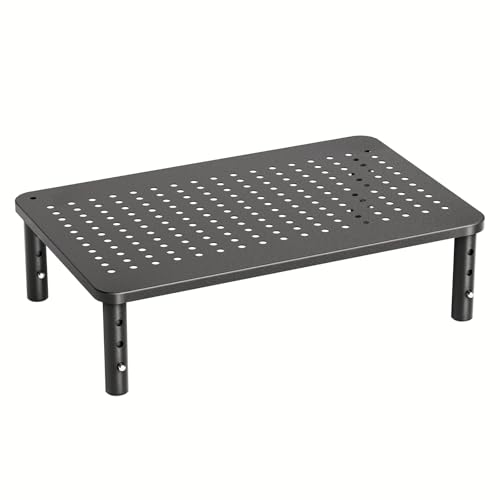
| Best For Beginners | Weight Capacity: 44 lbs | Height Adjustment Options: 3 levels (3.94″, 4.72″, 5.51″) | Material Type: Powder-coated steel | VIEW LATEST PRICE | Read Our Analysis |
| Amazon Basics Height Adjustable Monitor Stand with Storage |

| Most Affordable | Weight Capacity: 22 lbs (10 kg) | Height Adjustment Options: 3 levels (2.87″, 4.25″, 4.9″) | Material Type: ABS plastic | VIEW LATEST PRICE | Read Our Analysis |
| BONTEC Dual Monitor Stand with Smartphone Holder |

| Best Dual Setup | Weight Capacity: Not specified | Height Adjustment Options: Adjustable length (31.5″ to 42.5″) | Material Type: Steel (material not fully specified) | VIEW LATEST PRICE | Read Our Analysis |
| Dual Monitor Stand for Desk (Black) |

| Zero-Assembly Pick | Weight Capacity: Not specified | Height Adjustment Options: Fixed height (4.27″) | Material Type: High-strength carbon steel | VIEW LATEST PRICE | Read Our Analysis |
| Zimilar 2-Tier Monitor Stand with Storage |
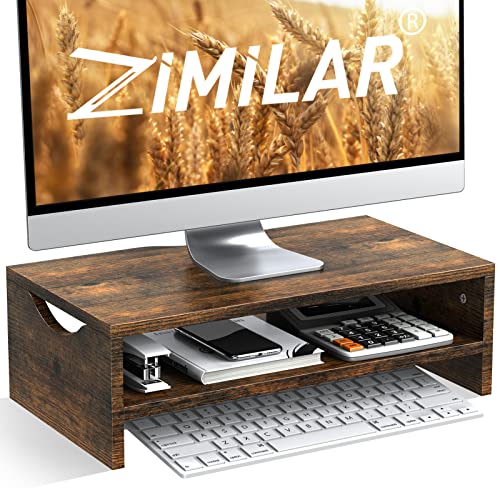
| Best Storage Space | Weight Capacity: 44 lbs | Height Adjustment Options: Fixed height (5.3″) | Material Type: High-grade MDF | VIEW LATEST PRICE | Read Our Analysis |
More Details on Our Top Picks
WALI Computer Monitor Stand with Underneath Storage (STT003)
Why settle for a cluttered desk when you’re raising your monitor? The WALI STT003 monitor stand offers three height adjustments—3.9″, 4.7″, or 5.5″—so you can position your screen at eye level to reduce neck strain. The stand’s metal construction supports up to 44 lbs, accommodating most monitors and laptops. Rubber pads grip your desk surface, preventing slipping. You’ll gain storage space underneath for keyboards, documents, or office supplies. The ventilated platform allows airflow around your equipment. Assembly is required, but the stand comes with a 10-year warranty and US-based customer support available seven days weekly.
- Weight Capacity:44 lbs (20 kg)
- Height Adjustment Options:3 levels (3.9″, 4.7″, 5.5″)
- Material Type:Polished metal
- Monitor Capacity:Single monitor/laptop/device
- Under-Platform Storage:Yes (integrated storage space)
- Assembly Required:Yes (requires assembly)
- Additional Feature:Ventilated platform with vented holes
- Additional Feature:Rubber pads prevent surface damage
- Additional Feature:10-year warranty coverage
TEAMIX 20 Inch Monitor Stand Riser with Storage
Looking to elevate your monitor while reclaiming desk space? The TEAMIX 20 Inch Monitor Stand Riser delivers both functions efficiently. This MDF wood stand measures 20 x 9.5 x 4 inches and supports screens up to 50 inches and laptops up to 20 inches, holding up to 80 pounds total. The 2.95-inch inner height accommodates keyboards and notebooks underneath, organizing your workspace. Its modern, minimal design integrates seamlessly with most desk setups. Assembly’s straightforward, and the sturdy construction ensures durability. You’ll reduce eye, neck, and back strain by positioning your monitor at proper eye level. The stand comes backed by a 100% after-sale guarantee, making it a reliable investment for home offices or gift-giving occasions.
- Weight Capacity:80 lbs
- Height Adjustment Options:Fixed height (4″)
- Material Type:MDF wood board
- Monitor Capacity:Single (up to ~20″ laptops and ~50″ screens)
- Under-Platform Storage:Yes (keyboard, notebook space)
- Assembly Required:Yes (easy assembly)
- Additional Feature:Supports screens up to 50″
- Additional Feature:MDF wood construction
- Additional Feature:100% after-sale guarantee
WESTREE Dual Monitor Stand Riser (Rustic Brown)
The WESTREE Dual Monitor Stand Riser is most versatile for professionals who need reliable elevation and storage in one unit. This rustic brown stand measures 35.8 x 10.2 x 4.92 inches and supports two monitors simultaneously using a sturdy steel frame. You’ll benefit from its ergonomic design, which raises your screens to eye level and reduces neck strain. The stand includes anti-slip pads for stability and features under-structure storage for office supplies. Assembly takes minimal time with pre-drilled holes and included tools. It handles up to 149.9 pounds, making it suitable for monitors, printers, laptops, or TVs. Amazon’s 30-day return guarantee backs your purchase.
- Weight Capacity:149.9 lbs
- Height Adjustment Options:Fixed height (4.92″)
- Material Type:Wood and steel
- Monitor Capacity:Dual monitors
- Under-Platform Storage:Yes (office supplies storage)
- Assembly Required:Yes (easy assembly with tools included)
- Additional Feature:Supports 2 monitors simultaneously
- Additional Feature:Wood and steel construction
- Additional Feature:Heavy-duty thick steel legs
Gianotter Dual Monitor Stand Riser with Drawer & Pen Holders
Professionals managing cluttered desks’ll find superior organization through Gianotter’s patented dual monitor stand, which combines ergonomic elevation with integrated storage. The stand requires no assembly—unbox it and place it directly on your desk. You’ll gain two magnetic pen holders and a drawer for storing accessories and office supplies. The elevated design raises your monitors to eye level, reducing neck and eye strain while improving posture. High-strength metal construction supports your monitors securely. The stand frees under-surface space where you can position your keyboard and mouse, maximizing your available workspace efficiently.
- Weight Capacity:Not specified
- Height Adjustment Options:Fixed height (not specified)
- Material Type:Metal
- Monitor Capacity:Dual monitors
- Under-Platform Storage:Yes (drawer and pen holders)
- Assembly Required:No (no assembly required)
- Additional Feature:Two magnetic pen holders
- Additional Feature:No assembly required
- Additional Feature:USPTO patented product
Computer Monitor Stand Riser with Phone Holder (2-Pack)
Are you struggling with neck pain from screen time? This 2-pack monitor stand riser adjusts to three heights: 4.13, 4.92, or 5.7 inches. Press the leg buttons to set your preferred height for your desk setup. The large 14.6 x 9.3 desktop accommodates most monitors while the under-platform storage holds books and supplies. Built from cold-rolled steel with a waterproof coating, it supports up to 44 lbs and includes 150 heat dissipation holes. Rubber pads prevent slipping on any surface. You’ll assemble both stands in under 30 seconds by screwing legs onto the platform—no tools required. Stack both stands for doubled storage capacity, or use them separately as shelves or plant stands.
- Weight Capacity:44 lbs
- Height Adjustment Options:3 levels (4.13″, 4.92″, 5.7″)
- Material Type:Cold-rolled steel
- Monitor Capacity:Single monitor/laptop
- Under-Platform Storage:Yes (for books and items)
- Assembly Required:No (tool-free assembly under 30 seconds)
- Additional Feature:Phone holder included
- Additional Feature:2-pack stackable configuration
- Additional Feature:150 heat dissipation holes
HUANUO Monitor Stand Riser 3 Height Adjustable
Need a straightforward way to organize your desk while improving your monitor’s airflow? The HUANUO Monitor Stand Riser 3 offers three height settings—3.94″, 4.72″, and 5.51″—so you’ll adjust via leg buttons to find your ideal viewing angle. Its powder-coated steel platform features ventilation to prevent laptop overheating. You’ll gain storage space underneath for supplies using the 12.40″ x 7.09″ area. The stand supports items up to 44 lbs, including monitors, laptops under 15.6″, and printers. Anti-slip rubber pads protect your desk surface. Assembly requires no tools—you simply attach four legs to preassembled bolts. Stack two stands to expand workspace.
- Weight Capacity:44 lbs
- Height Adjustment Options:3 levels (3.94″, 4.72″, 5.51″)
- Material Type:Powder-coated steel
- Monitor Capacity:Single (up to 15.6″ laptops)
- Under-Platform Storage:Yes (12.40″ x 7.09″ platform)
- Assembly Required:No (no tools required)
- Additional Feature:Supports up to 15.6″ laptops
- Additional Feature:Powder-coated steel construction
- Additional Feature:Stack two stands functionality
Amazon Basics Height Adjustable Monitor Stand with Storage
Looking to organize your desk without breaking your budget? The Amazon Basics Height Adjustable Monitor Stand with Storage offers three height options: 2.87, 4.25, and 4.9 inches. Choose your preferred height to reduce neck and eye strain during work. The stand accommodates monitors, laptops, and printers up to 22 pounds. Non-skid feet prevent wobbling and keep equipment secure. Use the under-stand storage space measuring 11.6 x 11 x 4 inches to store office supplies and eliminate desk clutter. The durable ABS plastic construction ensures long-lasting use in office, home, or school environments.
- Weight Capacity:22 lbs (10 kg)
- Height Adjustment Options:3 levels (2.87″, 4.25″, 4.9″)
- Material Type:ABS plastic
- Monitor Capacity:Single (monitors, laptops, printers)
- Under-Platform Storage:Yes (11.6″ x 11″ x 4″ space)
- Assembly Required:No (stackable legs, no assembly)
- Additional Feature:ABS plastic durable construction
- Additional Feature:Supports up to 22 lbs
- Additional Feature:Non-skid feet stability
BONTEC Dual Monitor Stand with Smartphone Holder
The BONTEC dual monitor stand serves professionals and gamers who need dual-monitor ergonomics without sacrificing desk space. You’ll adjust the stand’s height from 31.5 to 42.5 inches to position both monitors at eye level, reducing neck and back strain. The large storage compartment underneath holds keyboards, mice, files, and gaming devices, keeping your workspace organized. A dedicated smartphone holder slot keeps your phone accessible. Cable management openings route cords neatly behind the stand. You’ll assemble the stand in three minutes using included screws. The non-slip base prevents shifting on your desk, ensuring stability during work or gaming sessions.
- Weight Capacity:Not specified
- Height Adjustment Options:Adjustable length (31.5″ to 42.5″)
- Material Type:Steel (material not fully specified)
- Monitor Capacity:Dual monitors
- Under-Platform Storage:Yes (large compartments for keyboard, mouse, files)
- Assembly Required:Yes (approximately 3 minutes)
- Additional Feature:Smartphone holder slot included
- Additional Feature:Adjustable length 31.5-42.5″
- Additional Feature:Cable management opening
Dual Monitor Stand for Desk (Black)
Want to reclaim desktop space while improving your viewing position? The OUTIOE Dual Monitor Stand delivers both benefits without assembly. This black carbon steel riser elevates your monitors to eye level, reducing neck strain and expanding storage underneath. The adjustable side shelves customize your setup’s width, accommodating various desk sizes. Anti-slip rubber strips and foot pads keep everything stable and protect your surface. At 40 inches wide and weighing 2.31 kilograms, it supports monitors, laptops, and printers. You’ll unbox it and start using it immediately—no tools required. The powder-coated finish resists wear while maintaining a professional appearance for home and office environments.
- Weight Capacity:Not specified
- Height Adjustment Options:Fixed height (4.27″)
- Material Type:High-strength carbon steel
- Monitor Capacity:Dual monitors
- Under-Platform Storage:Yes (elevated desktop storage with adjustable shelves)
- Assembly Required:No (zero assembly required)
- Additional Feature:Adjustable width side shelves
- Additional Feature:Carbon steel powder-coated finish
- Additional Feature:Zero assembly required
Zimilar 2-Tier Monitor Stand with Storage
If you’re juggling multiple items on your desk, you’ll find the Zimilar 2-Tier Monitor Stand offers superior storage space while elevating your screen to eye level. The 16.5 x 9-inch platform raises your monitor about 5.3 inches, reducing neck and back strain. You can store books, notebooks, earphones, and power banks on the lower tier, freeing valuable desk space. Built from high-grade MDF, it supports up to 44 pounds and handles daily use reliably. Assembly takes minutes with the included manual. Clean it by wiping with a wet cloth. Suitable for home offices, classrooms, and meeting rooms, this stand organizes your workspace while improving ergonomics.
- Weight Capacity:44 lbs
- Height Adjustment Options:Fixed height (5.3″)
- Material Type:High-grade MDF
- Monitor Capacity:Single (PC screens, laptops, printers)
- Under-Platform Storage:Yes (2-tier configuration for extra storage)
- Assembly Required:Yes (easy assembly in minutes)
- Additional Feature:2-tier configuration design
- Additional Feature:High-grade MDF material
- Additional Feature:Raises screen 5.3 inches
Factors to Consider When Choosing a PC Monitor Riser Stand
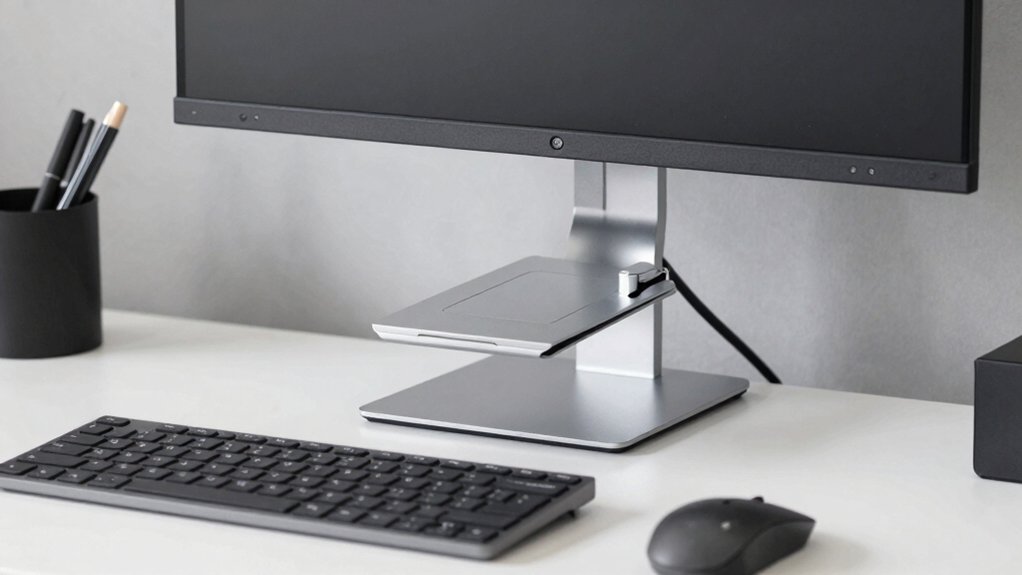
When selecting a PC monitor riser stand, you’ll need to evaluate five key factors: first, check the weight capacity to ensure it supports your monitor’s pounds, second, review the height adjustability options to position your screen at eye level, third, examine the material and durability to confirm it’ll withstand daily use, fourth, assess whether you need storage compartments for cables and supplies, and fifth, consider the ergonomic design benefits that reduce neck and back strain. Start by measuring your monitor’s weight and dimensions, then compare these specs against the stand’s maximum capacity and adjustable height range. Finally, decide which features matter most to your workspace, whether that’s storage drawers, a sturdy metal frame, or a design that tilts and swivels for comfort.
Weight Capacity Requirements
How much weight can your monitor riser actually hold? You’ll find weight capacities ranging from 22 lbs to 149.9 lbs depending on the model. First, weigh your monitor, stand, and any attached accessories combined. Next, match this total to the riser’s capacity. For dual-monitor setups, verify that each monitor’s weight stays within the distributed capacity per shelf. Check whether the stated limit applies per shelf or total load. Heavier-duty stands use metal construction and reinforced legs to support higher weights safely. If you’re stacking stands or adding under-platform storage, confirm the combined weight doesn’t exceed the maximum. This step prevents sagging, tipping, and potential equipment damage during daily use.
Height Adjustability Options
Your monitor riser stand’s height adjustability directly affects your viewing comfort and posture throughout the day. Most stands offer three or more fixed height options, ranging from 2.87 inches to 5.5 inches, allowing you to position your screen at eye level. When selecting a stand, check whether it uses tool-free mechanisms like buttons or screws for easy adjustments between heights. If you need greater elevation, you can stack multiple units together for additional storage flexibility. Before purchasing, verify the stand’s load capacity—typically between 22 and 80 pounds—to ensure it supports your monitor’s weight at your chosen height. Matching your screen’s top to eye level reduces neck strain and improves ergonomics during extended work sessions.
Material And Durability
What material you choose for your monitor riser stand directly impacts its durability, load capacity, and how long it’ll last in your workspace. Metal stands—either steel or aluminum—offer superior strength and support 44–149.9 pounds depending on design. They typically feature powder-coated or polished finishes that resist scratches and corrosion effectively. Wood and MDF options provide lighter aesthetics but reduced durability and lower load capacity. Consider vented designs that promote airflow and heat dissipation, protecting your equipment over time. Check that your stand includes anti-slip pads or rubber feet made from durable materials. These prevent surface damage to your desk and improve stability during use. Match the material and construction to your monitor’s weight and your workspace needs.
Storage And Organization
Beyond selecting durable materials that’ll support your monitor safely, you’ll want to evaluate how a riser stand can help organize your workspace. Under-platform storage space consolidates items like keyboards, mice, and documents below your elevated monitor, freeing valuable desk surface. Check the platform dimensions—such as 14.6 x 9.3 inches—to confirm adequate space for your needs. Review weight capacity limits to ensure stable storage without exceeding maximum loads. Some models include built-in organizers like pen holders and drawers for pens, papers, and small accessories. Compare storage options across models to determine which compartments match your requirements. This strategic consolidation reduces clutter and keeps frequently used items within immediate reach, improving both accessibility and desk efficiency.
Ergonomic Design Benefits
An elevated monitor riser reduces neck strain by positioning your screen at eye level, which aligns with proper sitting posture and minimizes the need to look down during work sessions. Select a riser with adjustable height options—typically 3.9″, 4.7″, or 5.5″—to match your seated or standing ergonomics precisely. Choose models featuring ventilated or perforated platforms that promote airflow, keeping your devices cooler during extended use. Verify the riser has a stable, non-slip base with protective padding to prevent desk damage and monitor wobble. Consider risers with under-platform storage to organize your workspace efficiently, reducing awkward reaching motions that strain your shoulders. These design features work together to establish a healthier workstation that supports proper alignment and reduces injury risk throughout your workday.
Assembly And Installation
How you’ll set up your monitor riser depends on the assembly requirements, which range from zero-assembly models to those needing screws and hardware. Zero-assembly stands arrive fully constructed—you unbox them and place them on your desk immediately. Other models require you to attach legs, shelves, or support brackets using included screws and a screwdriver. Pre-drilled holes simplify this process by eliminating drilling steps. Most manufacturers provide detailed instruction sheets with numbered steps and diagrams. You’ll typically spend between five and thirty minutes on assembly, depending on complexity. Check product specifications before purchasing to confirm whether you’ll need tools from your own collection or if everything arrives included. This information helps you plan your setup timeline and ensures you’re prepared for installation.
Monitor Compatibility Size
Once you’ve assembled your monitor riser, you’ll need to verify that it’ll actually support your specific monitor. Check the riser’s maximum screen size specification, which typically ranges from 20 to 50 inches. Measure your monitor’s width or diagonal to confirm it falls within this limit. Next, locate your monitor’s weight and compare it against the riser’s weight capacity—most stands support 44 to 80 pounds. Account for mounting hardware when calculating total load. If your monitor uses a VESA mount pattern, confirm the riser supports that standard or offers direct platform mounting. Finally, measure your monitor’s base footprint and verify it’ll fit on the riser’s platform, which typically measures 14 to 16 inches wide and 9 to 10 inches deep.
Final Thoughts
You’ll transform your desk by selecting a monitor riser that matches your storage needs, weight capacity, and space. Measure your desk dimensions first, then decide between metal or MDF construction based on durability preferences. Verify the stand supports your monitor’s weight and offers the height adjustment you need. Install anti-slip pads, position your monitor at eye level, and organize cables underneath to reduce neck strain and boost productivity immediately.

Meet Ry, “TechGuru,” a 36-year-old technology enthusiast with a deep passion for tech innovations. With extensive experience, he specializes in gaming hardware and software, and has expertise in gadgets, custom PCs, and audio.
Besides writing about tech and reviewing new products, he enjoys traveling, hiking, and photography. Committed to keeping up with the latest industry trends, he aims to guide readers in making informed tech decisions.