

When you’re setting up network infrastructure, you need a reliable PoE injector that matches your equipment’s power demands and installation environment. You’ll find options ranging from basic PoE+ adapters to advanced PoE++ injectors that handle higher wattage devices. Each model offers different features—metal housings, auto-detection, wall-mount capabilities—that affect performance and durability. Understanding what separates these injectors helps you choose the right tool for your specific deployment needs.
| TRENDnet Gigabit Power Over Ethernet Plus Injector (TPE-115GI) |
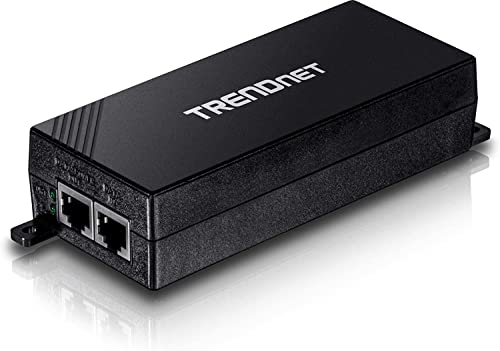
| Government-Compliant Choice | Maximum Power Output: 30W (PoE+) | PoE Standards Supported: 802.3af (15.4W) and PoE+ (30W) | Installation Type: Wall-mountable | VIEW LATEST PRICE | Read Our Analysis |
| TRENDnet Gigabit PoE++ Injector (TPE-119GI) |

| Maximum Power Delivery | Maximum Power Output: 95W (PoE++) | PoE Standards Supported: 802.3af (15.4W), PoE+ (30W), and PoE++ (95W) | Installation Type: Wall-mount design | VIEW LATEST PRICE | Read Our Analysis |
| Gigabit PoE Injector 48V Power Adapter with Ethernet Cable |

| Budget-Friendly Pick | Maximum Power Output: 24W | PoE Standards Supported: 802.3af/at (15.4W-30W) | Installation Type: External form factor | VIEW LATEST PRICE | Read Our Analysis |
| TP-Link TL-PI30G Gigabit PoE+ Injector Adapter |

| Best Overall | Maximum Power Output: 30W (PoE+) | PoE Standards Supported: 802.3af (15.4W) and 802.3at (30W) | Installation Type: Desktop/Wall-Mount | VIEW LATEST PRICE | Read Our Analysis |
| Ubiquiti PoE+ Adapter 30 W White – UACC-POE+-2,5G |
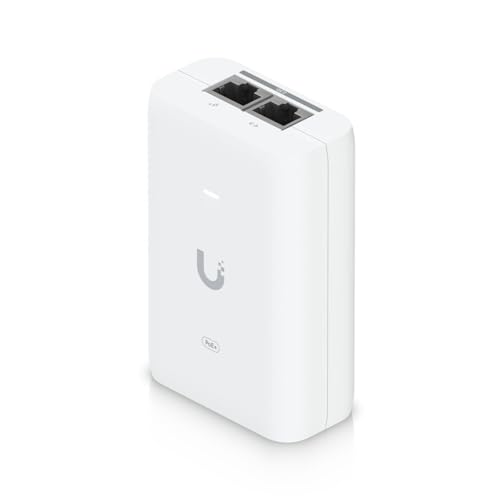
| High-Speed Performance | Maximum Power Output: 30W (PoE+) | PoE Standards Supported: PoE+ (30W) | Installation Type: Compact desktop design | VIEW LATEST PRICE | Read Our Analysis |
More Details on Our Top Picks
TRENDnet Gigabit Power Over Ethernet Plus Injector (TPE-115GI)
If you’re running PoE devices like IP cameras, wireless access points, or VoIP phones on a non-PoE network switch, the TRENDnet TPE-115GI delivers both data and power through a single Ethernet cable, eliminating the need for separate power outlets at each device location. This injector supplies up to 30W of power while maintaining full Gigabit Ethernet speeds across distances up to 100 meters. The unit automatically detects whether your device requires standard PoE (15.4W) or PoE+ (30W), adjusting power delivery accordingly. Its metal housing and wall-mountable design support flexible installation in network closets or equipment racks. The TPE-115GI includes a three-year warranty and carries NDAA compliance for government installations.
- Maximum Power Output:30W (PoE+)
- PoE Standards Supported:802.3af (15.4W) and PoE+ (30W)
- Installation Type:Wall-mountable
- Ethernet Cable Distance:Up to 100 meters (328 ft)
- Setup Requirements:Auto-sensing; no configuration
- Warranty/Support:3-year TRENDnet warranty; English-speaking tech support
- Additional Feature:Auto-sensing PoE/PoE+ delivery
- Additional Feature:Government NDAA/TAA compliant
- Additional Feature:Metal housing construction
TRENDnet Gigabit PoE++ Injector (TPE-119GI)
The TRENDnet TPE-119GI stands out for users who need straightforward, no-configuration power delivery across their network. This injector supports PoE, PoE Plus, and PoE++ standards up to 95W, automatically detecting which wattage your device requires. You’ll connect your data source to the input port and plug your powered device into the output port—setup takes seconds. The unit delivers power reliably up to 100 meters, making it suitable for various installation scenarios. Its metal enclosure provides durability, while the wall-mount design fits different environments. Three years of manufacturer protection and accessible tech support ensure long-term reliability.
- Maximum Power Output:95W (PoE++)
- PoE Standards Supported:802.3af (15.4W), PoE+ (30W), and PoE++ (95W)
- Installation Type:Wall-mount design
- Ethernet Cable Distance:Up to 100 meters (328 ft)
- Setup Requirements:Plug-and-play; no configuration
- Warranty/Support:3-year TRENDnet warranty; English-speaking tech support
- Additional Feature:Supports up to 95W
- Additional Feature:Zero-configuration plug-and-play
- Additional Feature:Auto-sensing PoE++ technology
Gigabit PoE Injector 48V Power Adapter with Ethernet Cable
You’ll find this Litbla injector works best when you’re adding power to existing network devices that don’t have built-in PoE support—like wireless access points, IP cameras, or office phones. The 48V output delivers 24 watts, handling IEEE 802.3af/at devices without configuration. Simply connect your power source, plug in the included 3-foot Cat 6 cable, and attach it to your non-PoE device. The injector supports gigabit speeds up to 1,000 Mbps and extends connections 100 meters. Built-in protections guard against overvoltage, overcurrent, and short circuits. This external adapter includes a one-year warranty with unlimited technical support, making it practical for security systems, smart homes, and office networks.
- Maximum Power Output:24W
- PoE Standards Supported:802.3af/at (15.4W-30W)
- Installation Type:External form factor
- Ethernet Cable Distance:Up to 100 meters (328 ft)
- Setup Requirements:Plug & play; no configuration
- Warranty/Support:1-year replacement warranty; unlimited technical support
- Additional Feature:Includes 3FT Cat 6 cable
- Additional Feature:Multi-device protection (overvoltage/overcurrent/short circuit)
- Additional Feature:110-240V universal input voltage
TP-Link TL-PI30G Gigabit PoE+ Injector Adapter
TP-Link’s TL-PI30G stands out for network administrators and installers who need to power PoE devices in locations without existing electrical outlets. This IEEE 802.3at/af compliant injector delivers up to 30W of power over a single Ethernet cable, supporting both PoE+ and backward-compatible 802.3af devices. Setup requires no configuration—simply connect your non-PoE network source to the input port, plug in power, and attach your PoE device to the output port. The injector transmits data and electricity up to 328 feet, making it ideal for deploying IP cameras or wireless access points across large areas where power lines aren’t available.
- Maximum Power Output:30W (PoE+)
- PoE Standards Supported:802.3af (15.4W) and 802.3at (30W)
- Installation Type:Desktop/Wall-Mount
- Ethernet Cable Distance:Up to 100 meters (328 ft)
- Setup Requirements:Plug and Play; no software installation
- Warranty/Support:Standard manufacturer support (details not specified)
- Additional Feature:Desktop/wall-mount flexibility
- Additional Feature:Auto-detect power delivery
- Additional Feature:Expands network to unpowered areas
Ubiquiti PoE+ Adapter 30 W White – UACC-POE+-2,5G
Ubiquiti’s PoE+ Adapter delivers 30W of power at 48V DC through a compact form factor, making it ideal if you’re upgrading network infrastructure in confined spaces where traditional injectors won’t fit. This adapter supports up to 2.5 GbE, enabling high-speed data transmission for demanding applications. It uses two wire pairs for flexible power delivery and achieves over 87% efficiency, reducing energy waste. The device includes differential and common surge protection, safeguarding your equipment during power fluctuations. With dimensions of just 93 x 62 x 35 mm and weighing 156 grams, you’ll install it quickly in tight installations. The adapter’s operational range spans 0–40°C, covering standard indoor environments. Certified by CE, FCC, and UL, it meets rigorous safety standards for reliable network performance.
- Maximum Power Output:30W (PoE+)
- PoE Standards Supported:PoE+ (30W)
- Installation Type:Compact desktop design
- Ethernet Cable Distance:Standard Ethernet distance (up to 100 meters)
- Setup Requirements:Plug-and-play installation
- Warranty/Support:Manufacturer warranty included
- Additional Feature:2.5 GbE support capability
- Additional Feature:Two wire pair power delivery
- Additional Feature:>87% power efficiency rating
Factors to Consider When Choosing POE Injectors
When you’re selecting a PoE injector, you’ll need to evaluate five critical factors: your device’s power output requirements (measured in watts), compatibility with your network’s standards (such as PoE, PoE+, or PoE++), the maximum cable distance your installation demands, whether you need flexible mounting options, and whether the injector holds the certifications your setup requires. Start by checking your powered device’s wattage specification, then verify that your chosen injector meets or exceeds that requirement while matching your network standard. Finally, confirm the injector supports your cable run length and installation environment before making your purchase.
Power Output Requirements
How much power does your connected device actually need? Check your device’s documentation for its power requirement in watts. Match this figure to your injector’s output capacity. Standard PoE injectors deliver up to 15.4 W, while PoE+ models supply up to 30 W. High-demand devices require PoE++ injectors offering up to 95 W. Select an injector with wattage that meets or exceeds your device’s requirement. Under-powering peripherals causes malfunction or failure. If you’re uncertain about future needs, choose an injector with higher capacity for flexibility. Verify compatibility with your device’s power standard—802.3af, 802.3at, or PoE++. This ensures reliable operation and prevents equipment damage from insufficient power delivery.
Device Compatibility Standards
Since your PoE injector must match your device’s power standard, you’ll need to identify which IEEE specification your equipment requires—802.3af, 802.3at (PoE+), or 802.3bt (PoE++)—before making a purchase. Check your device’s documentation or specifications sheet to find the required standard and wattage. Once you’ve identified the standard, select an injector that supports it. Auto-sensing injectors automatically detect your device’s power needs and deliver the correct wattage, preventing damage from insufficient or excessive power. If you’re using multiple device types, choose an injector with backward compatibility, which allows older 802.3af devices to operate on newer PoE+ or PoE++ injectors. This compatibility prevents you from purchasing separate injectors for different device generations.
Cable Distance Capabilities
You’ll want to verify that your PoE injector can transmit data and power across the distance between your equipment and power source, since most standard setups support transmission up to 100 meters (328 feet) over a single Ethernet cable. This 100-meter limit applies to both PoE and PoE+ configurations, so you can deploy cameras, access points, or IP phones flexibly away from power outlets within this range.
Gigabit Ethernet ports maintain full-speed operation throughout the entire 100-meter distance. If your installation requires longer cable runs, you’ll need external extension methods or media converters to bridge the gap. Document your cable distances during the planning phase to confirm adequate coverage before purchasing equipment and installing connections.
Installation Flexibility Options
Where’ll your PoE injector fit best in your space? Consider your physical environment first. Wall-mountable designs free up rack space and let you position the injector near your PoE devices, reducing cable runs. Desktop or portable models work for temporary setups or testing situations where you need to reposition equipment frequently. An integrated power supply eliminates separate AC adapters, simplifying your cable management and reducing clutter around your installation area. Metal enclosures provide durability for industrial or outdoor environments where equipment faces harsh conditions. Choose auto-sensing wattage compatibility to ensure correct power delivery across PoE, PoE+, and PoE++ devices without manual adjustments. Match your injector’s form factor to your deployment type—permanent installations benefit from wall-mounted or rack options, while temporary projects suit portable designs.
Compliance And Certifications
Why does compliance matter when you’re selecting a PoE injector? Compliance ensures your equipment meets government and safety standards required for official installations. Check for NDAA and TAA compliance if you’re supplying U.S. or Canadian government facilities. Verify CE, FCC, and UL certifications to confirm the injector meets electromagnetic compatibility and regional safety requirements. Review the manufacturer warranty, typically three years, which indicates long-term product support and reliability. Confirm IEEE 802.3af/at/PoE++ standard compliance to guarantee backward compatibility with your existing network devices. Examine specifications for rugged metal housing and wall-mountability features that enhance durability in demanding environments. Document all certifications before purchasing to streamline procurement approval processes and avoid installation delays.
Warranty And Support
What coverage period protects your PoE injector investment? Most manufacturers offer a 3-year warranty as standard, providing long-term device protection. You’ll want to verify coverage details by model and region, since terms vary.
Support availability matters equally. Check whether your injector includes unlimited technical support or limited 1-year to 3-year coverage periods. English-speaking support is typically available during normal business hours to assist with setup and troubleshooting.
For government installations in the U.S. and Canada, confirm NDAA and TAA compliance. These certifications provide warranty-related assurances required for federal projects.
Review replacement policies carefully. Warranty notes specify conditions for device replacement under the protection period. Compare these terms across models before purchasing to ensure your chosen injector meets your operational and compliance requirements.
Form Factor And Size
Your PoE injector’s physical design directly affects where you’ll install it and how efficiently your network operates. Most compact external units measure around 3.5 x 2 x 1.2 inches, fitting easily into tight spaces near your network equipment. If you’re mounting equipment in racks or on walls, choose wall-mountable housings or metal enclosures for stability and durability. Consider integrated power supplies, which eliminate separate power bricks and reduce your overall footprint. Weights typically range from under 100 grams to 170 grams, making units portable for temporary deployments. Select your form factor based on your installation location, cable management needs, and distance requirements up to 100 meters. This ensures optimal placement flexibility and reliable network operation.
Surge Protection Features
How critical is surge protection in your PoE injector selection? This feature directly safeguards your connected devices from voltage spikes and short circuits. You’ll want to verify that your injector includes both differential and common-mode surge protection, which work together to handle power surges from external events. Check the surge protection ratings against relevant safety standards to ensure they match your device’s power requirements. If you operate in environments with unstable electrical conditions or frequent interference, prioritize surge-rated designs for enhanced reliability. Review the injector’s operating temperature range and protection specifications to confirm safe performance under load. Always cross-reference the surge protection certifications with your equipment’s needs before purchasing, preventing costly damage and downtime.
Final Thoughts
To select the right PoE injector for your network, match the device’s power requirements with the injector’s wattage output. Check compatibility between your equipment and the injector’s specifications. Consider wall-mount versus desktop options based on your installation space. Verify NDAA/TAA compliance if you’re working in government environments. Review warranty coverage and surge protection features. Test auto-detection capability to ensure seamless device recognition before full deployment.

Meet Ry, “TechGuru,” a 36-year-old technology enthusiast with a deep passion for tech innovations. With extensive experience, he specializes in gaming hardware and software, and has expertise in gadgets, custom PCs, and audio.
Besides writing about tech and reviewing new products, he enjoys traveling, hiking, and photography. Committed to keeping up with the latest industry trends, he aims to guide readers in making informed tech decisions.