

You’ll find that choosing the right portable projection screen depends on understanding your specific needs—whether you’re setting up for a backyard movie night, outdoor event, or business presentation. Screen size, stand stability, assembly time, and portability matter most. This guide walks you through five top options, from compact 60-inch tripod models to expansive 150-inch displays, so you can determine which features align with your situation.
| Portable Projector Screen with Stand 80 Inch |
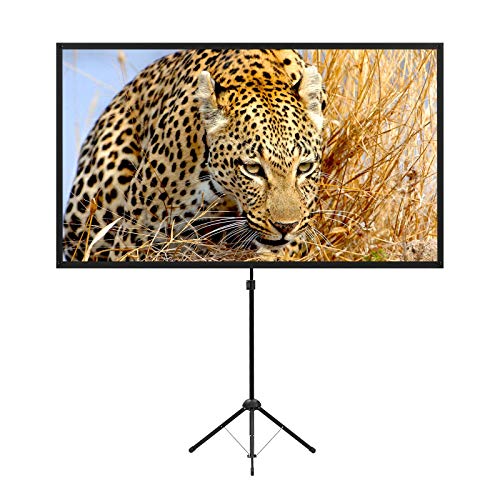
| Lightweight Champion | Screen Size: 80 inches | Aspect Ratio: 16:9 | Screen Surface: Matte glass fiber with 1.2 gain | VIEW LATEST PRICE | Read Our Analysis |
| PropVue 84″ Projector Screen with Stand |

| Most Versatile | Screen Size: 84 inches | Aspect Ratio: 16:9 HD | Screen Surface: Matte PVC with 1.1 gain | VIEW LATEST PRICE | Read Our Analysis |
| TOWOND 150 Inch Projector Screen with Stand & Carry Bag |

| Best for Large Venues | Screen Size: 150 inches | Aspect Ratio: 1:1 and 16:9 | Screen Surface: Matte polyester, wrinkle-free | VIEW LATEST PRICE | Read Our Analysis |
| Projector Screen with Stand 60 Inch Tripod |

| Compact & Portable | Screen Size: 60 inches | Aspect Ratio: 16:9 HD | Screen Surface: Matte PVC with 1.1 gain | VIEW LATEST PRICE | Read Our Analysis |
| Portable Projector Screen with Stand 80 Inch 4K |

| Best Overall | Screen Size: 80 inches | Aspect Ratio: 16:9 HD | Screen Surface: Glossy polyester, wrinkle-free | VIEW LATEST PRICE | Read Our Analysis |
More Details on Our Top Picks
Portable Projector Screen with Stand 80 Inch
If you’re looking for a projection screen you can set up anywhere in under two minutes, the excelimage Excel-XW80 80-inch portable screen delivers exactly that capability. The tripod stand features adjustable, stretchable legs that stabilize on any surface, while four aluminum tubes with spring tension keep the matte screen flat and taut. You’ll appreciate the 1.2 gain glass fiber fabric that produces bright, clear images indoors or outdoors. The 16:9 format works with most content, and the 160-degree viewing angle accommodates multiple viewers. At 8.5 pounds with a carrying bag, you transport it easily between locations. Assembly requires only a few steps, making setup straightforward for classrooms, backyards, or living rooms.
- Screen Size:80 inches
- Aspect Ratio:16:9
- Screen Surface:Matte glass fiber with 1.2 gain
- Viewing Angle:160 degrees
- Weight:8.5 pounds
- Setup Time:Within 2 minutes
- Additional Feature:High gain glass fiber screen
- Additional Feature:Four aluminum tube stability
- Additional Feature:160-degree viewing angle
PropVue 84″ Projector Screen with Stand
Want a projection screen that you can set up anywhere in minutes without tools or expertise? The PropVue 84-inch screen delivers exactly that. You’ll assemble it in three simple steps using its tripod stand with wide legs that ensure stability. The matte PVC surface provides wrinkle-free projection with a 1.1 gain reflection and 160-degree viewing angle, making it suitable for home theaters, classrooms, and outdoor events. At 15 pounds, you’ll transport it easily in the included carry bag with tight straps. The 16:9 HD aspect ratio works for movies, gaming, presentations, and sports viewing. You can adjust the height to fit your space requirements. This screen handles both indoor and outdoor use across various venues.
- Screen Size:84 inches
- Aspect Ratio:16:9 HD
- Screen Surface:Matte PVC with 1.1 gain
- Viewing Angle:160 degrees
- Weight:15 pounds
- Setup Time:3-step assembly
- Additional Feature:Wrinkle-free matte PVC
- Additional Feature:Wide tripod leg stability
- Additional Feature:3-step quick assembly
TOWOND 150 Inch Projector Screen with Stand & Carry Bag
The TOWOND 150-inch projector screen works best for anyone who needs a large, portable display that you can set up and move between locations without specialized tools or equipment. You’ll assemble the foldable stand in approximately two minutes using the included cross bars, ground nails, and ropes—no tools required. The matte polyester surface supports both front and rear projection with a 160° viewing angle, accommodating 1:1 and 16:9 aspect ratios. At 11.5 pounds with a carry bag, you’ll transport it easily in your vehicle for backyard events, camping trips, or business presentations. The wrinkle-free design maintains image quality through repeated use and storage.
- Screen Size:150 inches
- Aspect Ratio:1:1 and 16:9
- Screen Surface:Matte polyester, wrinkle-free
- Viewing Angle:160 degrees
- Weight:11.5 pounds
- Setup Time:Approximately 2 minutes
- Additional Feature:Dual aspect ratio support
- Additional Feature:Front and rear projection
- Additional Feature:Tool-free foldable stand
Projector Screen with Stand 60 Inch Tripod
Looking for a projection screen that you can set up anywhere without mounting hardware? The PropVue 60-inch tripod screen delivers portability with a stable, adjustable stand. You’ll appreciate the wrinkle-free matte PVC surface that displays sharp 16:9 HD images across a 160-degree viewing angle. Assembly takes three simple steps, and the wide-leg tripod base keeps the screen steady during use. At 11 pounds, you’ll transport it easily using the included carry bag with tight straps. This screen works indoors or outdoors for presentations, movies, gaming, or events. Height adjustment lets you customize setups for different venues like classrooms, backyards, or auditoriums.
- Screen Size:60 inches
- Aspect Ratio:16:9 HD
- Screen Surface:Matte PVC with 1.1 gain
- Viewing Angle:160 degrees
- Weight:11 pounds
- Setup Time:3-step easy assembly
- Additional Feature:1.1 gain reflection surface
- Additional Feature:Adjustable height versatility
- Additional Feature:Multiple mounting bracket options
Portable Projector Screen with Stand 80 Inch 4K
If you’re planning outdoor movie nights, camping trips, or backyard gatherings where you need a screen that’s genuinely portable yet delivers clear, sharp images, the AODIOU 80-inch projector screen offers the practical combination of easy transport and reliable performance. The aluminum frame weighs just 5.62 pounds and folds into a compact carrying bag for convenient movement. Set up takes minutes without tools—simply unfold the tripod mount and extend the high-quality polyester screen. The 70-by-40-inch display maintains a 16:9 aspect ratio, ensuring properly proportioned images. Install the included rope, hanging hook, and water bag to stabilize the screen against wind. The glossy finish and 160-degree viewing angle accommodate both daytime and nighttime use across multiple locations.
- Screen Size:80 inches
- Aspect Ratio:16:9 HD
- Screen Surface:Glossy polyester, wrinkle-free
- Viewing Angle:160 degrees
- Weight:5.62 pounds
- Setup Time:Tool-free assembly
- Additional Feature:4K movie screen compatible
- Additional Feature:Rope and water bag included
- Additional Feature:Washable high-quality polyester
Factors to Consider When Choosing Portable Projection Screens
When you’re choosing a portable projection screen, you’ll need to evaluate screen size and dimensions based on your viewing distance, compare aspect ratios (typically 16:9 or 4:3) to match your content, and assess the weight and portability of the unit for transport and storage. Next, examine the setup time and assembly process—some screens deploy in seconds while others require multiple steps and tools—and check the product specifications to understand how long installation takes. Finally, review the viewing angle coverage to confirm that people seated at different positions can see the image clearly without distortion or color shifts.
Screen Size and Dimensions
How do you know which screen size will work best for your space? Start by measuring your viewing distance and the available wall or outdoor area. Common portable sizes include 60“, 80″, 84”, and 150“, all measured diagonally. For a 16:9 aspect ratio screen, calculate the width and height using these diagonals to verify fit. A 60″ screen works in smaller rooms, while 150″ screens need substantial space and sturdy support. Check the stated dimensions against your room or outdoor area. Next, consider weight and portability—screens range from 8.5 lb to 15 lb. Heavier models require more setup time but offer larger viewing areas. Match screen size to your viewing distance: closer viewers need smaller screens, distant viewers benefit from larger ones.
Aspect Ratio and Resolution
What aspect ratio does your projector support? This question matters because mismatched ratios cause black bars or stretched images. Most portable projectors output 16:9, which aligns with modern HD and 4K content. Check your projector’s specifications first.
Next, match your screen’s native aspect ratio to your projector’s output. A 16:9 screen prevents letterboxing for standard home cinema and gaming content. If you plan viewing ultra-wide content, verify your projector handles alternative ratios before purchasing.
Resolution compatibility works alongside aspect ratio. A 4K-capable screen displays higher detail only if your projector and content both support 4K. Confirm all three components—screen, projector, and content—share compatible specifications. This alignment maximizes image quality and eliminates distortion across your viewing experience.
Weight and Portability
Portable projection screens typically weigh between 8.5 and 15 pounds, a range that directly affects how easily you’ll carry and set up your screen at different locations. Choose foldable or retractable designs with included carrying bags to improve transportability for outdoor use. Select frames made from aluminum or PVC materials, which reduce bulk and weight while maintaining stability. Keep in mind that larger screens (80–150 inches) add considerable weight, requiring sturdier tripods or stands despite portability claims. Prioritize quick-assembly designs that require only 3 steps or take about 2 minutes to set up, minimizing setup time when you’re moving between locations. This combination of lightweight materials and fast assembly ensures you can transport and deploy your screen efficiently.
Setup Time and Assembly
When you’re evaluating portable projection screens, setup time shouldn’t be an afterthought—it directly impacts whether you’ll actually use your screen at different locations. Most models feature tool-free assembly requiring just a few minutes. You’ll extend legs, attach the frame, and tighten the screen fabric in straightforward steps. Foldable frames and retractable tripods reduce setup time compared to rigid constructions with more components. Quick-connect mechanisms using internal elastic cords speed assembly to near-instant completion. Check whether your screen includes a carrying bag and accessories like stakes, ropes, and straps—these facilitate faster setup and secure transport. Count the total components before purchasing; fewer parts mean quicker deployment. Review the specific assembly sequence in product documentation to confirm the process matches your comfort level and available time.
Viewing Angle Coverage
Once you’ve confirmed your screen deploys quickly and assembles without tools, you’ll want to evaluate how well viewers positioned away from center can see the image. Look for screens with a 160-degree viewing angle, which enables clear images from off-center seating. Choose wrinkle-free matte or non-iron surfaces that maintain consistent quality across wide zones. Avoid high-gain fabrics above 1.2 gain, as these reduce brightness consistency at extreme angles. Check whether the screen uses front or rear projection, since each affects contrast and brightness distribution differently. Finally, inspect the frame construction—multiple support tubes and proper tensioning prevent surface warping that compromises image uniformity across varied viewing positions.
Material Quality and Durability
How do you know if a screen’s materials will hold up over months or years of use? Examine the fabric first—polyester or matte PVC screens with wrinkle-free finishes resist creasing and maintain flatness. Check the frame construction; aluminum or sturdy tripod bases provide durable support that won’t bend under weight. For foldable designs, verify the frame maintains consistent tension when extended, preventing sagging that compromises image quality. Consider your environment next. If you’ll use the screen outdoors, prioritize enclosures made from aluminum or PVC for weather resistance. For indoor use, standard materials work adequately. Finally, inspect whether the screen has a front or rear projection surface—each requires different fabric construction to keep the surface uniformly flat and image quality consistent over repeated use and storage cycles.
Indoor and Outdoor Versatility
Beyond selecting durable materials, you’ll want to assess whether a screen performs equally well in your living room and your backyard, since the best portable screens adapt to both environments without sacrificing image quality. For indoor use, prioritize lightweight, compact screens with 60–80 inch dimensions and quick 3-step assembly. Choose matte finishes with 160° viewing angles to deliver consistent brightness and color accuracy in controlled lighting. For outdoor settings, select screens with sturdy tripod stands, wind stabilization features, and weather-resistant aluminum enclosures. Verify the screen finish—matte surfaces reduce glare in bright sunlight while glossy options enhance contrast indoors. Confirm carry bags and foldable designs support portability across classrooms, backyards, and living rooms. Test viewing angles before purchasing to ensure image quality remains steady regardless of location.
Final Thoughts
You’ve reviewed five portable projection screens offering different sizes and features. Choose based on your space: select 60-inch or 80-inch models for standard rooms, the 84-inch PropVue for versatility, or the 150-inch TOWOND for large outdoor events. Verify stand stability, viewing angles, and assembly time before purchasing. All options include carry bags for transport. Match your projector’s brightness and resolution to your screen choice for optimal image quality.

Meet Ry, “TechGuru,” a 36-year-old technology enthusiast with a deep passion for tech innovations. With extensive experience, he specializes in gaming hardware and software, and has expertise in gadgets, custom PCs, and audio.
Besides writing about tech and reviewing new products, he enjoys traveling, hiking, and photography. Committed to keeping up with the latest industry trends, he aims to guide readers in making informed tech decisions.