

When your motherboard fails to boot, you need accurate diagnostics fast. Post code readers display error codes that tell you exactly what’s wrong—whether it’s a CPU problem, RAM issue, or power supply failure. You’ve got several reliable options available, each with different features and price points. The right choice depends on what you’re testing and how much information you need to gather, so understanding your options matters.
| PC Computer PSU Motherboard Diagnostic Tester Kit |

| Best Starter Kit | Primary Interface Type: PCI/ISA slots | Diagnostic Display Method: 4 Digital/8 LED display with BIOS speaker | Target User Level: Beginners/students/hobbyists | VIEW LATEST PRICE | Read Our Analysis |
| POCREATION Tablet PCI Motherboard Analyzer Diagnostic Tester Post Test |
| Professional Grade | Primary Interface Type: POST interfaces (most motherboards) | Diagnostic Display Method: LCD post test display | Target User Level: Professional repair technicians | VIEW LATEST PRICE | Read Our Analysis |
| V8 PCIe USB Motherboard Diagnostic Tester Card |
| Most Versatile | Primary Interface Type: PCIe USB ports | Diagnostic Display Method: Android app via USB (no traditional LED display) | Target User Level: Technicians/students/DIY enthusiasts/professionals | VIEW LATEST PRICE | Read Our Analysis |
| Comimark Mini 3-in-1 PC Diagnostic Test Card |
| Best Compact Option | Primary Interface Type: PCI/PCI-E/LPC slots | Diagnostic Display Method: LED indicators (model specs mention digital display) | Target User Level: Computer technicians/DIY enthusiasts | VIEW LATEST PRICE | Read Our Analysis |
| Fafeicy Motherboard Diagnostic Card LPC Debug Tester |

| Best Visual Diagnostics | Primary Interface Type: LPC/PCIe slots | Diagnostic Display Method: Colored LED indicators with digital tube display | Target User Level: PC technicians/professionals | VIEW LATEST PRICE | Read Our Analysis |
More Details on Our Top Picks
PC Computer PSU Motherboard Diagnostic Tester Kit
Are you troubleshooting an older computer that won’t power on, won’t display, or won’t complete POST? This diagnostic kit tests your PSU and motherboard without swapping parts. It includes a PCI test board with BIOS speaker for beep codes, a laptop test board, a motherboard power switch cable, and an ATX PSU tester for 20/24-pin connectors. Confirm your motherboard has a PCI slot before use—don’t force pins into the tester. The kit stores everything in a portable carrying case. You’ll receive instruction PDFs and a paper manual with step-by-step code explanations. The seller provides free lifetime support.
- Primary Interface Type:PCI/ISA slots
- Diagnostic Display Method:4 Digital/8 LED display with BIOS speaker
- Target User Level:Beginners/students/hobbyists
- Device Compatibility Range:Old PCs/laptops with PCI slots
- Included Documentation:Pictorial user guide, printed manual, downloadable PDFs
- Warranty/Support:Free lifetime service from 29-year experienced seller
- Additional Feature:Includes ATX PSU tester component
- Additional Feature:Portable all-in-one carrying case
- Additional Feature:Anti-static wrist strap included
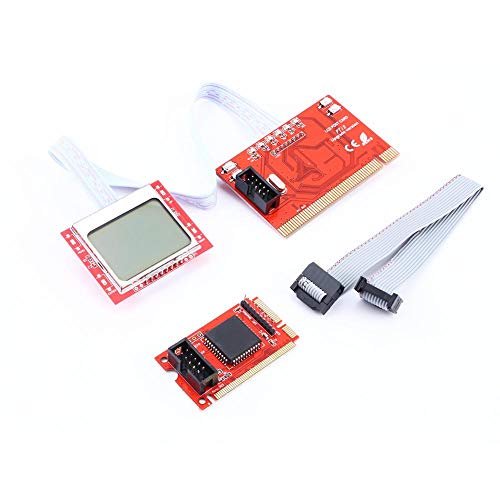
POCREATION Tablet PCI Motherboard Analyzer Diagnostic Tester Post Test
If you’re a computer repair technician who needs real-time diagnostics during the POST (Power-On Self-Test) phase, the POCREATION Tablet PCI Motherboard Analyzer (PTI8) delivers the professional-grade monitoring you require. This 2011 diagnostic tool uses multi-POST technology to monitor POST interfaces across most motherboards. You’ll access real-time voltage monitoring and key professional functions that handle hundreds of diagnostic codes from authoritative institutions. The PTI8 features upgraded chip solutions built on the proven PTI6 foundation with architectural improvements. Its three-level architecture supports diverse motherboard models and brands, making it practical for technicians working with varied equipment. The device provides PC LCD post test capabilities, enabling you to identify and troubleshoot motherboard issues efficiently during startup sequences without guesswork or delays.
- Primary Interface Type:POST interfaces (most motherboards)
- Diagnostic Display Method:LCD post test display
- Target User Level:Professional repair technicians
- Device Compatibility Range:Most popular motherboard brands
- Included Documentation:Professional documentation (implied)
- Warranty/Support:Professional support (implied)
- Additional Feature:Real-time voltage monitoring capability
- Additional Feature:Handles hundreds diagnostic codes
- Additional Feature:Three-level architecture design
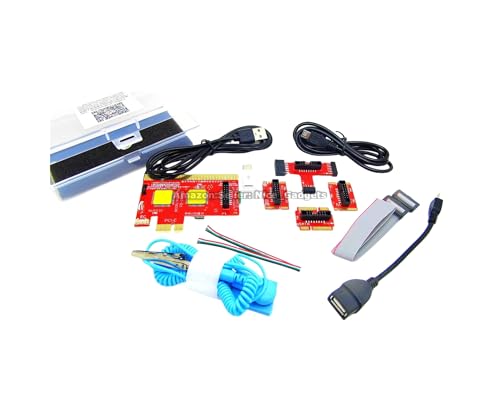
V8 PCIe USB Motherboard Diagnostic Tester Card
The V8 PCIe USB Motherboard Diagnostic Tester Card works best for PC technicians, IT professionals, and DIY enthusiasts who need to pinpoint motherboard faults without replacing components unnecessarily. You’ll download the Android app—choose either 64-bit for newer devices or 32-bit for older ones—then connect the tester’s USB cable to your motherboard port and the onboard cable to a charger. Run the auto-scan through the app to display POST results directly on your Android device. Between tests, unplug the USB connection and restart to clear cached data, ensuring accurate readings. This all-in-one diagnostic tool supports desktops, laptops, Macs, tablets, and servers, delivering fast fault identification that reduces unnecessary component replacement.
- Primary Interface Type:PCIe USB ports
- Diagnostic Display Method:Android app via USB (no traditional LED display)
- Target User Level:Technicians/students/DIY enthusiasts/professionals
- Device Compatibility Range:Desktops/laptops/servers/Macs/Android devices/tablets
- Included Documentation:Printed instruction folder, PDFs, Android app, video instructions
- Warranty/Support:Tested by 29-year experienced IT professionals
- Additional Feature:Multi-port USB support (multiple types)
- Additional Feature:Android app result display
- Additional Feature:Universal device compatibility (desktops/laptops/tablets)
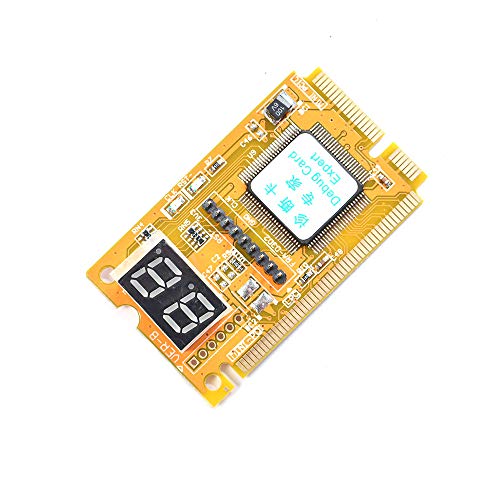
Comimark Mini 3-in-1 PC Diagnostic Test Card
Computer technicians and DIY enthusiasts who need quick, reliable diagnostics across multiple motherboard interfaces will find the Comimark Mini 3-in-1 PC Diagnostic Test Card valuable for troubleshooting. This compact tester supports PCI, PCI-E, and LPC interfaces, enabling you to identify hardware problems efficiently. The card works with Intel H61 Express Platform motherboards and handles DDR, DDR2, and DDR3 RAM configurations. You’ll insert it into the appropriate slot, then read the diagnostic codes to pinpoint failing components. Its straightforward design means you won’t struggle with complicated procedures. The card comes with a 30-day return window and includes warranty coverage. At 3.5 stars from 31 reviews, it offers dependable functionality for standard motherboard diagnostics without unnecessary complexity.
- Primary Interface Type:PCI/PCI-E/LPC slots
- Diagnostic Display Method:LED indicators (model specs mention digital display)
- Target User Level:Computer technicians/DIY enthusiasts
- Device Compatibility Range:PCs and laptops
- Included Documentation:Product page warranty information
- Warranty/Support:Standard warranty (details on product page)
- Additional Feature:Supports DDR/DDR2/DDR3 RAM
- Additional Feature:Triple interface (PCI/PCI-E/LPC)
- Additional Feature:Intel H61 Express Platform compatible
Fafeicy Motherboard Diagnostic Card LPC Debug Tester
Need a straightforward way to pinpoint hardware failures during motherboard troubleshooting? The Fafeicy Motherboard Diagnostic Card LPC Debug Tester identifies CPU, DRAM, VGA, and hard disk faults using colored LED indicators. You’ll insert this PCIe card into your motherboard’s slot and observe the digital tube display, which shows real-time diagnostic data through flashing decimal points. The card displays standby power status and PCIe reset information for comprehensive system analysis. It’s compatible with PCI and select GIGABYTE motherboards. The compact PCB design suits quick maintenance tasks. You’ll receive one diagnostic card and a user manual. A 90-day manufacturer warranty covers defects, making this tool practical for technicians conducting routine computer assembly checks.
- Primary Interface Type:LPC/PCIe slots
- Diagnostic Display Method:Colored LED indicators with digital tube display
- Target User Level:PC technicians/professionals
- Device Compatibility Range:GIGABYTE PCIe motherboards/laptops
- Included Documentation:User manual included
- Warranty/Support:90-day manufacturer warranty
- Additional Feature:Colored LED fault indicators
- Additional Feature:Flashing decimal point diagnostics
- Additional Feature:PCIe reset status display
Factors to Consider When Choosing a Post Code Reader for Motherboards
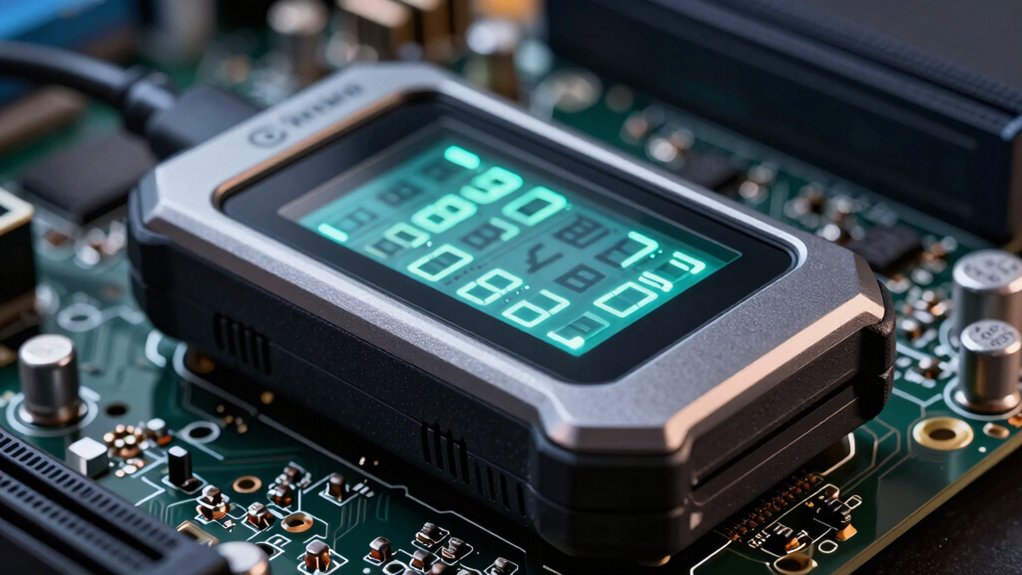
When you’re selecting a post code reader for your motherboard, you’ll need to verify motherboard slot compatibility first, then confirm that the device covers the diagnostic codes your system produces, and finally check the display interface type to ensure you can read results easily. Next, you should match the reader’s device support range to your specific hardware components and confirm it offers real-time monitoring if you need to track POST codes as they occur during startup. These five factors work together to determine whether a post code reader will give you the accurate diagnostics you need for troubleshooting.
Motherboard Slot Compatibility
How do you know if a post code reader will actually work with your motherboard? First, identify your motherboard’s slot type: PCI, PCIe, or LPC. Check your motherboard manual or specifications to confirm which slot generation you’re using. Next, verify that your post code reader supports that specific slot type, since many testers work with only one. PCI-only readers won’t function in PCIe slots, and vice versa. Examine the physical connectors on both your motherboard and the reader to ensure they match. For older boards using ISA or SDRAM slots, confirm your reader includes legacy interface support. Finally, check that any wiring or adapters included with the tester align with your motherboard’s connectors. Mismatched hardware causes misreads and potential damage.
Diagnostic Code Coverage
What’s the point of a post code reader if it can’t interpret the codes your motherboard actually displays? You need broad diagnostic coverage that includes common POST stages, CPU/DRAM/VGA errors, and boot device codes. Check whether the reader supports platform-specific codes for PCI/PCIe and LPC components across multiple motherboard brands. Cross-brand compatibility matters because different manufacturers use varying code systems. Look for readers that include external reference databases or come with accompanying documentation that translates codes into actionable diagnostics. Verify the reader’s firmware updates regularly to ensure it recognizes newer codes. Choose models with clear human-readable interpretations so you understand exactly what each code means without guessing.
Display Interface Type
Your choice of display interface directly affects how you’ll read and interpret POST codes during troubleshooting. You’ll encounter three main interface types: built-in displays, beep code systems, and external software solutions. Built-in LEDs or 2-inch displays show codes directly on the card itself, requiring no additional setup. Beep code systems produce audio signals that you decode using a reference guide—useful when visual displays aren’t available. External software interfaces require you to connect the reader to your Android device or PC, then launch a companion app or dashboard to view results. Evaluate your setup’s compatibility with each interface type. If you prefer immediate visual feedback without extra devices, choose built-in displays. For flexibility across platforms, select readers with software support.
Device Support Range
Once you’ve selected your display interface, the next step involves confirming that the post code reader actually works with your specific motherboard. You’ll need to verify compatibility with your motherboard’s POST interfaces and diagnostic codes across your intended range of models. Check the manufacturer’s specifications to see which bus interfaces the reader supports—PCI, PCIe, LPC, and ISA are common options. Match these against your motherboard’s available slots. Additionally, confirm whether the device can read the diagnostic codes your particular motherboard generates. Some readers work universally across multiple brands, while others target specific manufacturers like ASUS, Gigabyte, or MSI. Before purchasing, cross-reference the reader’s supported models list with your equipment to avoid compatibility issues that render the tool useless for your diagnostics.
Real-Time Monitoring Capability
The ability to monitor POST events as they happen—rather than reviewing them after the fact—separates adequate post code readers from genuinely useful diagnostic tools. You’ll want a device that displays live voltage, current, and temperature readings alongside POST codes simultaneously. This real-time pairing lets you identify power delivery issues, timing faults, or instability the moment they occur. Look for readers with synchronized dashboards combining both datasets on one screen for quick analysis. This capability proves especially valuable when diagnosing intermittent faults that may not show up in single test runs. Continuous monitoring captures transient events that static readings miss entirely. Choose a device offering immediate feedback correlating specific POST codes with sensor data so you can pinpoint problems faster.
Portability And Storage
How’ll you transport and store your post code reader between job sites? First, check the device’s weight and dimensions to confirm it fits your carrying case or toolbox. Second, verify the kit includes a portable carrying case or pouch that organizes cables, adapters, and manuals. Third, confirm the reader operates standalone without requiring a laptop, improving on-site mobility. Fourth, select all-in-one kits with integrated power supplies and short, labeled cables to reduce bulk and setup time. Finally, inspect durability features like rubberized cases, anti-static straps, and shielded connectors that protect equipment during frequent transport. These practical steps ensure your post code reader stays organized, protected, and ready for immediate use at any worksite.
Final Thoughts
You’ve reviewed five reliable post code readers that help diagnose motherboard problems. Choose based on your needs: select the PC Computer kit if you need a complete testing setup, the Comimark if you want multiple interface support, the Fafeicy for straightforward LED diagnostics, the POCREATION for real-time voltage monitoring, or the V8 for Android app connectivity. Match your choice to your troubleshooting requirements and motherboard type.

Meet Ry, “TechGuru,” a 36-year-old technology enthusiast with a deep passion for tech innovations. With extensive experience, he specializes in gaming hardware and software, and has expertise in gadgets, custom PCs, and audio.
Besides writing about tech and reviewing new products, he enjoys traveling, hiking, and photography. Committed to keeping up with the latest industry trends, he aims to guide readers in making informed tech decisions.