
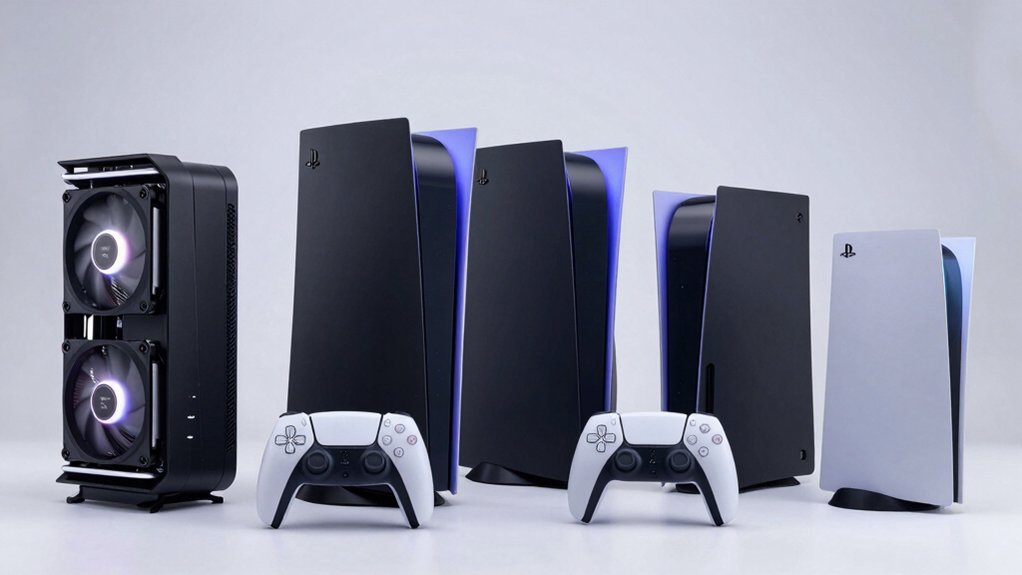

Your PS5 needs proper cooling to maintain performance during extended gaming sessions. Cooling stations combine active fan systems with dual controller charging and USB connectivity, creating an organized setup that protects your console from overheating. You’ll find options ranging from basic cooling fans to complete stand-mounted systems with RGB lighting. Each model offers different features and price points. Understanding what matters most for your setup—whether that’s charging speed, noise level, or design—helps you choose the right solution.
| PS5 Cooling Station with Dual Controller Charger |

| Most Features | Cooling Fan Levels: 3 levels with silent fan speeds | Controller Charging Capacity: Dual controller charger (2 controllers) | PS5 Compatibility: PS5, PS5 Slim, PS5 Pro (all editions) | VIEW LATEST PRICE | Read Our Analysis |
| PS5 Stand with Cooling Station & Controller Charger |

| Fastest Charging | Cooling Fan Levels: 3-level cooling fan with 1.63-inch turbo | Controller Charging Capacity: Dual high-speed charger (2 controllers simultaneously) | PS5 Compatibility: PS5, PS5 Slim, PS5 Pro (all editions) | VIEW LATEST PRICE | Read Our Analysis |
| PS5 Stand Cooling Station with RGB Lights & Charger |
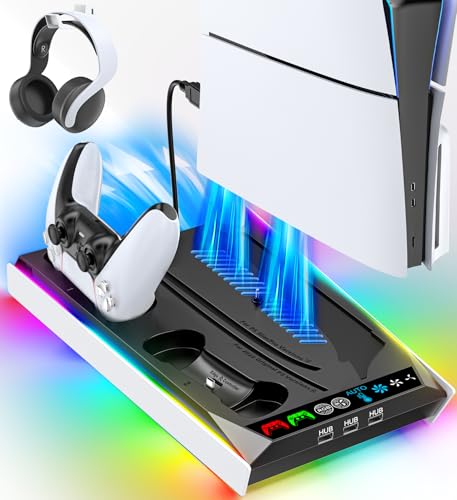
| Best Design | Cooling Fan Levels: 3-level auto adjustable fan | Controller Charging Capacity: Single moveable USB charging port (1 controller) | PS5 Compatibility: PS5, PS5 Slim, PS5 Pro (all editions) | VIEW LATEST PRICE | Read Our Analysis |
| KIWIHOME Cooling Fan for PS5 with Auto Speed |

| Budget Pick | Cooling Fan Levels: Auto speed adjustment with constant/auto modes | Controller Charging Capacity: USB passthrough port (no dedicated charging) | PS5 Compatibility: PS5 2020 only (Disc & Digital, not Slim/Pro) | VIEW LATEST PRICE | Read Our Analysis |
| MEQI PS5 Cooling Fan with LED & USB Hubs |

| Best Value | Cooling Fan Levels: 2 wind speed settings | Controller Charging Capacity: USB passthrough port (no dedicated charging) | PS5 Compatibility: PS5 Disc & Digital editions | VIEW LATEST PRICE | Read Our Analysis |
More Details on Our Top Picks
PS5 Cooling Station with Dual Controller Charger
The PS5 Cooling Station with Dual Controller Charger offers the most features you’ll find in a single cooling solution. You’ll charge two DualSense controllers in three hours using the built-in charger with LED indicators showing status. The three-speed silent fan keeps your console cool, with color-coded LEDs displaying fan levels. You can customize the RGB lighting ring by pressing the button to cycle through four modes and eight colors, or long-press to disable it. Two USB-A hub ports let you power additional devices. The organizer holds your console, controllers, headset, and twelve game disks securely with included mounting hardware, compatible with all PS5 models.
- Cooling Fan Levels:3 levels with silent fan speeds
- Controller Charging Capacity:Dual controller charger (2 controllers)
- PS5 Compatibility:PS5, PS5 Slim, PS5 Pro (all editions)
- USB Ports/Hubs:3 total USB ports (2 USB A hub ports)
- RGB/LED Lighting:RGB lighting ring with 4 modes, 8 colors
- Warranty Period:1 year warranty
- Additional Feature:Secure console mounting screw
- Additional Feature:Integrated game disk storage (12)
- Additional Feature:Built-in headset holder
PS5 Stand with Cooling Station & Controller Charger
Looking for fastest charging alongside console cooling? The OIVO PS5 Stand combines a three-level cooling fan with dual controller charging. Place your PS5 on the stand and position the 1.63-inch turbo fan to draw hot air from the bottom while dissipating it outward. Connect your two DualSense controllers to the built-in charger ports; they’ll reach full capacity in under two hours. Use the touch switch to adjust cooling intensity based on your gaming session length. The stand stores fourteen game discs, headsets, and accessories, keeping your setup organized. Built-in safety features prevent overcharging, overheating, and voltage issues. This all-in-one solution works with Digital Edition, Disc Edition, PS5 Slim, and PS5 Pro models.
- Cooling Fan Levels:3-level cooling fan with 1.63-inch turbo
- Controller Charging Capacity:Dual high-speed charger (2 controllers simultaneously)
- PS5 Compatibility:PS5, PS5 Slim, PS5 Pro (all editions)
- USB Ports/Hubs:4 built-in charging ports
- RGB/LED Lighting:Breathing LED indicators for charging status
- Warranty Period:Product warranty available (duration not specified)
- Additional Feature:Stores 14 game discs
- Additional Feature:Protective chip extends battery
- Additional Feature:Enlarged 1.63-inch turbo fan
PS5 Stand Cooling Station with RGB Lights & Charger
Want your PS5, PS5 Slim, or PS5 Pro to stay cool while you charge controllers and devices simultaneously? The Rysker P5328X-PRO cooling station delivers this functionality. Its auto-adjustable 3-level fan keeps your console temperature optimal during gameplay. You’ll charge your PS5 controller in 3.5 hours or Edge controller in 2.5 hours using the moveable USB charging port. The station includes three integrated USB hubs for powering additional devices. Power the unit through your PS5’s back USB port, a wall socket, or PC hub. Sturdy security screws ensure stability. RGB lighting adds aesthetic appeal. A 2-year warranty and 30-day return guarantee protect your investment.
- Cooling Fan Levels:3-level auto adjustable fan
- Controller Charging Capacity:Single moveable USB charging port (1 controller)
- PS5 Compatibility:PS5, PS5 Slim, PS5 Pro (all editions)
- USB Ports/Hubs:3 integrated USB hubs on side
- RGB/LED Lighting:RGB lights with multiple display options
- Warranty Period:2-year warranty
- Additional Feature:Dedicated media remote slot
- Additional Feature:Concealed built-in cables
- Additional Feature:Supports Edge controller charging
KIWIHOME Cooling Fan for PS5 with Auto Speed
If you’re seeking an affordable cooling solution that doesn’t drain your wallet, KIWIHOME’s auto-speed fan delivers practical thermal management for your 2020 PS5. The fan plugs directly into your console’s USB port—no extra power supply needed. It monitors temperature and adjusts fan speed automatically, or you can switch to constant mode. The USB3.0 passthrough port lets you charge controllers without losing connectivity. At 28.8 decibels, it runs quietly. Installation takes seconds: insert the USB cable, secure the elastic lock, and position the console vertically or horizontally with space behind it for airflow. Note: this model doesn’t fit PS5 Slim or Pro versions.
- Cooling Fan Levels:Auto speed adjustment with constant/auto modes
- Controller Charging Capacity:USB passthrough port (no dedicated charging)
- PS5 Compatibility:PS5 2020 only (Disc & Digital, not Slim/Pro)
- USB Ports/Hubs:USB 3.0 passthrough port
- RGB/LED Lighting:Blue LED indicator
- Warranty Period:Product warranty available (duration not specified)
- Additional Feature:Auto temperature monitoring/adjustment
- Additional Feature:Ultra-quiet 28.8 dB operation
- Additional Feature:Elastic lock dual orientation
MEQI PS5 Cooling Fan with LED & USB Hubs
The MEQI PS5 Cooling Fan delivers reliable thermal management for gamers who need straightforward cooling without extra cost. This model features three fans with two speed settings to match your cooling demands. You’ll attach it using elastic lock hooks that grip either vertical or horizontal PS5 orientations. The fan operates quietly even at maximum efficiency and includes a blue LED indicator. Power requirements are minimal—just 5 volts and 5 watts via USB. The passthrough USB port lets you charge controllers and keyboards, though it doesn’t support data transfer. Built from durable, heat-resistant ABS material, this cooler works with both Disc and Digital PS5 editions. Customer ratings average 4.2 out of 5 stars across 326 reviews.
- Cooling Fan Levels:2 wind speed settings
- Controller Charging Capacity:USB passthrough port (no dedicated charging)
- PS5 Compatibility:PS5 Disc & Digital editions
- USB Ports/Hubs:USB 3.0 hubs included with passthrough
- RGB/LED Lighting:Blue LED when working
- Warranty Period:Product warranty available (duration not specified)
- Additional Feature:Three-fan efficient cooling system
- Additional Feature:Mute turbofan technology
- Additional Feature:Lightweight ABS construction
Factors to Consider When Choosing PS5 Cooling Stations
When selecting a PS5 cooling station, you’ll need to verify compatibility with your specific PS5 model (standard or Digital), evaluate the cooling performance through fan specifications and thermal efficiency ratings, and check whether the unit offers controller charging capabilities that suit your setup. Consider the storage and organization features available, such as game disc holders or cable management systems, to determine if the station maximizes your gaming space. Finally, examine the power options and connectivity features, including USB hub ports and power delivery specifications, to ensure the cooling station integrates smoothly with your existing devices and console configuration.
Compatibility With PS5 Models
Before you purchase a cooling station, you’ll need to verify that it works with your specific PS5 model, as compatibility varies markedly across different versions. Check the product description to confirm support for your console—whether you own the Disc, Digital, Slim Disc, Slim Digital, or Pro edition. Some cooling stations only fit older PS5 designs and won’t work with Slim or Pro models. Verify that the stand accommodates your preferred orientation: vertical, horizontal, or both. Additionally, confirm that any included USB hub and charging ports match your controllers and peripherals without overloading power limits. Review mounting options to ensure secure installation with your exact PS5 variant. This step prevents fit problems and connection issues before purchase.
Cooling Performance And Efficiency
Since your PS5 generates significant heat during extended gaming sessions, you’ll want to prioritize cooling stations with multi-level or auto-adjusting fans that respond to temperature changes. Look for units featuring three-speed settings or turbo modes that automatically adjust based on your console’s internal temperature. Bottom-mounted or directional cooling designs work best because they draw hot air away from your PS5 and dissipate it efficiently in multiple directions. Check the specifications for temperature monitoring features that display real-time readings. Verify noise levels stay under 30 dB(A) to ensure cooling effectiveness doesn’t create distracting fan noise. Additionally, confirm the station includes built-in USB hubs or pass-through ports that won’t block airflow while powering your accessories. These features work together to maintain optimal performance during long gaming sessions.
Controller Charging Capabilities
How important is it that your cooling station charges both controllers simultaneously? You’ll want to verify the charger supports dual DualSense controllers with charging times of 2–3 hours. Check the LED indicators: red signals active charging, while blue indicates full charge or standby mode. This lets you monitor battery status instantly without powering on your console.
Confirm the station includes protection features against overcharging, overcurrent, overvoltage, and overheating to preserve your controller batteries long-term. Determine whether the charger uses USB-C or USB-A connections and whether it draws power from your PS5 console or requires a separate hub.
Ensure the stand provides dedicated charging ports designed specifically for PS5 controllers, not generic USB slots that won’t properly seat your devices.
Storage And Organization Features
A well-designed cooling station doesn’t just cool your console—it also keeps your entire gaming setup organized and clutter-free. Look for stations with dedicated slots or compartments for controllers, headsets, and game discs. This reduces clutter around your entertainment area. Check if the station includes a built-in USB hub with multiple ports to charge controllers and peripherals simultaneously while keeping cables organized and hidden. Verify the design accommodates all PS5 variants—Disc, Digital, Slim, and Pro models—so you’re not limited if you upgrade. Additionally, examine whether the stand provides designated holders for remotes and small accessories. A secure mounting system and screw storage compartments help keep console components stable and organized. These organizational features transform your cooling station into a complete gaming hub.
Power Options And Connectivity
What power delivery method will work best for your setup? You’ll find most PS5 cooling stations operate through either 5V DC input or direct USB port connections. Tabletop mounts typically use 5V DC power, while others connect directly to your console’s USB ports or external hubs. Consider your desk layout when choosing between these options.
Built-in USB hubs provide 2–4 ports for charging controllers and powering accessories simultaneously. You can connect multiple devices without requiring separate power outlets. Some models include dedicated charging functions with overcharge and overcurrent protection, safeguarding your equipment.
Check the fan speed levels available—most offer 2–3 settings with LED indicators showing cooling intensity. Match the connectivity features to your peripheral needs before purchasing, ensuring compatibility with your existing devices and available power sources.
Build Quality And Warranty
The durability of your cooling station depends on three core elements: material construction, structural stability, and manufacturer backing through warranty coverage. First, check that the stand uses ABS plastic with reinforced joints, which withstands repeated docking cycles without cracking. Second, verify the mounting hardware includes security screws and alignment features that prevent wobble during operation. Examine cable management and concealed wiring to reduce wear and snagging hazards. Third, confirm the warranty covers at least one year against manufacturing defects and premature failure. Request product documentation listing all included components—panels, screws, and locking mechanisms. Compare warranty terms across models before purchasing. This three-step approach ensures your investment remains stable and protected long-term.
Final Thoughts
You’ve reviewed five cooling stations that protect your PS5 while charging controllers and powering peripherals. Select based on your console model—Slim, Pro, or standard. Prioritize multi-speed fans for silent operation, dual charging ports, and USB connectivity. Verify warranty coverage and anti-overcharge features. Proper cooling extends your console’s lifespan and maintains performance during extended gaming sessions. Install your chosen station, connect power, and monitor LED indicators for optimal operation.

Meet Ry, “TechGuru,” a 36-year-old technology enthusiast with a deep passion for tech innovations. With extensive experience, he specializes in gaming hardware and software, and has expertise in gadgets, custom PCs, and audio.
Besides writing about tech and reviewing new products, he enjoys traveling, hiking, and photography. Committed to keeping up with the latest industry trends, he aims to guide readers in making informed tech decisions.