

If you work in a shared office space, you know how disruptive constant mouse clicking can be. You’ll want a quiet-click mouse that reduces noise by about 90% while maintaining reliability. You have several solid options available, each with different features like compact designs, extended battery life, and wireless connectivity. The right choice depends on your hand size, preferred connection type, and workspace needs—so let’s examine what makes each model distinct.
| Logitech M330 Silent Wireless Mouse with USB Receiver |

| Best Budget Option | Click Noise Reduction: 90% reduction via SilentTouch Technology | Battery Life: 18 months (1 x AA) | Wireless Connectivity: 2.4GHz USB receiver (33 ft range) | VIEW LATEST PRICE | Read Our Analysis |
| Logitech Signature M550 Wireless Mouse for Small Hands |

| Best for Small Hands | Click Noise Reduction: 90% reduction via SilentTouch Technology | Battery Life: 24 months (1 x AA) | Wireless Connectivity: Bluetooth Low Energy or Logi Bolt USB receiver | VIEW LATEST PRICE | Read Our Analysis |
| Logitech M240 Silent Bluetooth Wireless Mouse |

| Most Portable | Click Noise Reduction: 90% reduction with same click feel | Battery Life: 18 months (1 x AA) | Wireless Connectivity: Bluetooth wireless (33 ft range) | VIEW LATEST PRICE | Read Our Analysis |
| Uiosmuph LED Wireless Rechargeable Silent Mouse (Matte Black) |
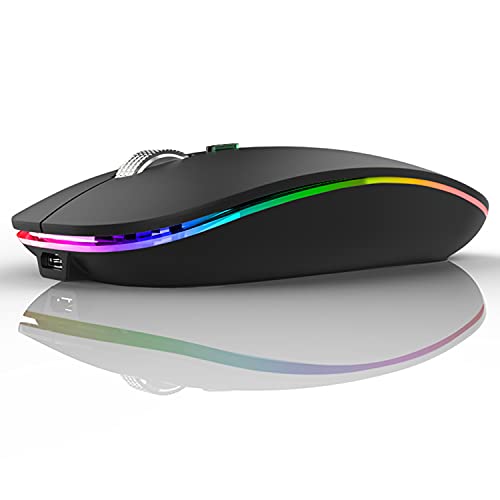
| Best Rechargeable | Click Noise Reduction: Silent button design | Battery Life: Rechargeable built-in battery | Wireless Connectivity: 2.4GHz USB receiver via USB-A/USB-C | VIEW LATEST PRICE | Read Our Analysis |
| Logitech Signature M650 Wireless Mouse for Small Hands |

| Best Overall | Click Noise Reduction: 90% reduction via SilentTouch Technology | Battery Life: 24 months (1 x AA) | Wireless Connectivity: Bluetooth Low Energy or Logi Bolt USB receiver | VIEW LATEST PRICE | Read Our Analysis |
More Details on Our Top Picks
Logitech M330 Silent Wireless Mouse with USB Receiver
If you’re tired of disruptive clicking sounds interrupting your workday or bothering colleagues in a shared office, the Logitech M330 Silent Wireless Mouse delivers a practical solution with its SilentTouch Technology, which reduces clicking noise by over 90 percent. The naturally shaped contoured grip provides sustained comfort for right-handed users during extended work sessions. Its advanced optical tracking ensures high-performance precision and smart cursor control across most surfaces. The wireless range extends up to 33 feet, allowing flexible positioning away from your computer. With an 18-month battery life and included AA battery, you’ll minimize maintenance interruptions. The plug-and-play USB receiver works with Windows, macOS, ChromeOS, and Linux systems. Auto-sleep mode conserves power when inactive. This lightweight mouse combines functionality with environmental responsibility through recycled plastic construction.
- Click Noise Reduction:90% reduction via SilentTouch Technology
- Battery Life:18 months (1 x AA)
- Wireless Connectivity:2.4GHz USB receiver (33 ft range)
- Hand Size Fit:Right-handed users
- Operating System Compatibility:Windows, macOS, ChromeOS, Linux
- Recycled Materials Content:76% (Black), 58% (Grey)
- Additional Feature:18-month battery life
- Additional Feature:33-foot wireless range
- Additional Feature:Post-consumer recycled plastic
Logitech Signature M550 Wireless Mouse for Small Hands
Are you looking for a quiet mouse that fits your smaller hand size without sacrificing performance? The Logitech Signature M550 delivers both. Its contoured design with soft thumb area and rubber side grips keeps your hand secure during extended use. You’ll experience 90 percent less click noise through SilentTouch technology, ideal for shared workspaces. Switch between line-by-line scrolling for documents and fast scrolling for web pages using SmartWheel. Connect via Bluetooth or the included Logi Bolt USB receiver across Windows, macOS, Linux, Chrome OS, iPadOS, and Android. One AA battery powers the mouse for 24 months, minimizing replacement frequency.
- Click Noise Reduction:90% reduction via SilentTouch Technology
- Battery Life:24 months (1 x AA)
- Wireless Connectivity:Bluetooth Low Energy or Logi Bolt USB receiver
- Hand Size Fit:Small to medium hands
- Operating System Compatibility:Windows, macOS, Linux, Chrome OS, iPadOS, Android
- Recycled Materials Content:65% (Graphite), 26% (Off-White/Rose)
- Additional Feature:SmartWheel line-by-line scrolling
- Additional Feature:Dual connectivity (Bluetooth/USB)
- Additional Feature:24-month battery life
Logitech M240 Silent Bluetooth Wireless Mouse
The Logitech M240 works best for remote workers and office employees who want silent clicking without sacrificing comfort or battery life. This mouse reduces click sound by 90% while maintaining the same click feel, minimizing distractions in shared workspaces. Its slim, ambidextrous design fits both left and right hands naturally, making it suitable for any user. The Bluetooth connection pairs instantly without requiring a dongle, and it works across Windows, macOS, Linux, ChromeOS, iPadOS, and Android. With an 18-month battery life and reliable connectivity up to 10 meters, you’ll experience extended usage between charges and dependable wireless performance throughout your workday.
- Click Noise Reduction:90% reduction with same click feel
- Battery Life:18 months (1 x AA)
- Wireless Connectivity:Bluetooth wireless (33 ft range)
- Hand Size Fit:Ambidextrous design
- Operating System Compatibility:Windows, macOS, Linux, ChromeOS, iPadOS, Android
- Recycled Materials Content:48% (Graphite), 37% (Off-White/Rose)
- Additional Feature:No dongle required
- Additional Feature:Ambidextrous design
- Additional Feature:10-meter Bluetooth range
Uiosmuph LED Wireless Rechargeable Silent Mouse (Matte Black)
Looking for a lightweight, travel-friendly silent mouse that won’t disturb your office environment? The Uiosmuph G12 delivers exactly that. This 2.4-ounce mouse features silent button technology on both left and right clicks, eliminating workplace noise. Its slim profile fits easily into laptop bags for portability. You’ll appreciate the rechargeable battery that requires no replacements and the USB C adapter supporting both connection types. The 800 DPI optical sensor provides responsive tracking for daily tasks. LED rainbow lighting with an on-off switch lets you customize your setup. Compatible with Windows, Mac, Linux, and Chromebooks, this mouse works across multiple platforms. With 4.4 out of 5 stars from nearly 75,000 reviews, users consistently rate it highly for quiet operation and reliable performance.
- Click Noise Reduction:Silent button design
- Battery Life:Rechargeable built-in battery
- Wireless Connectivity:2.4GHz USB receiver via USB-A/USB-C
- Hand Size Fit:Ambidextrous design
- Operating System Compatibility:Windows 7/8/10/XP, Vista, Linux, macOS, Chrome OS
- Recycled Materials Content:Not specified
- Additional Feature:Built-in rechargeable battery
- Additional Feature:Rainbow LED lighting
- Additional Feature:USB-C compatibility
Logitech Signature M650 Wireless Mouse for Small Hands
If you’ve got smaller hands and spend your workday in a shared office space, the Logitech Signature M650 Wireless Mouse delivers the quiet performance you need without the distraction. The SilentTouch technology reduces click noise by 90%, making it ideal for open offices. You’ll get up to 24 months of battery life from a single AA battery. Connect via Bluetooth or the Logi Bolt USB receiver to Windows, Mac, Chromebook, or Linux devices. Customize the side buttons through Logitech Options+ on Windows and macOS. The lightweight design includes a rubber grip for comfort during extended use. You can choose between right-handed and left-handed versions to match your preference.
- Click Noise Reduction:90% reduction via SilentTouch Technology
- Battery Life:24 months (1 x AA)
- Wireless Connectivity:Bluetooth Low Energy or Logi Bolt USB receiver
- Hand Size Fit:Small to medium hands
- Operating System Compatibility:Windows, macOS, Linux, ChromeOS, iPadOS, Android
- Recycled Materials Content:64% (Graphite/Black), 26% (Off-White/Rose)
- Additional Feature:SmartWheel adaptive scrolling
- Additional Feature:Customizable side buttons
- Additional Feature:24-month battery life
Factors to Consider When Choosing a Quiet Click Mouse
When you’re selecting a quiet click mouse, you’ll want to evaluate noise reduction technology first, since different mechanisms—like membrane switches or dampening materials—deliver varying levels of sound suppression for your office environment. Next, assess comfort and ergonomics by testing grip styles and hand sizes, check battery life expectations to avoid frequent replacements, confirm compatibility with your operating system and devices, and examine build quality materials to ensure durability and consistent performance over time.
Noise Reduction Technology
What makes a mouse truly quiet? The technology behind noise reduction. Most modern quiet mice use SilentClick or SilentTouch mechanisms that reduce click noise by approximately 90%. These systems work by dampening the sound when you press the buttons, maintaining the tactile feedback you expect without the distraction.
You’ll find this technology implemented consistently across devices through standardized firmware or driver updates, ensuring reliable performance wherever you use your mouse. The effectiveness depends partly on your work surface and how you click, so test your mouse on the desk where you’ll actually use it.
When selecting a quiet mouse, check whether the noise reduction applies to both left and right buttons. Ambidextrous designs typically support this feature across all button actions, making them suitable for any user.
Comfort And Ergonomics
While noise reduction keeps your workspace peaceful, comfort determines whether you’ll actually use your quiet mouse for eight hours straight without hand pain or fatigue. Look for an ambidextrous or contoured shape that supports your natural grip. Choose a model with a soft thumb area and rubberized grip to reduce hand strain during extended sessions. Verify the mouse fits your hand size—small-to-medium hands benefit from snug, ergonomic profiles. Select lightweight construction to minimize wrist and finger effort during movement. Test the mouse’s height and width before purchasing to ensure your palm rests comfortably without bending your wrist at awkward angles. Proper ergonomics prevent repetitive strain injuries and maintain productivity throughout your workday.
Battery Life Longevity
Because you’ll use your quiet mouse daily, battery longevity directly impacts how often you’ll need to replace or recharge it. Most models run 18 to 24 months on a single AA battery with typical use. Check whether your mouse includes disposable batteries or a rechargeable option—rechargeable models eliminate replacement frequency but require charging based on your usage patterns. Auto sleep modes reduce energy consumption when idle, extending runtime markedly. Review manufacturer claims carefully, as real-world performance often differs. High-DPI settings, constant wireless activity, and additional features drain batteries faster than advertised. Calculate your maintenance needs by comparing battery type, power-saving features, and your actual daily usage before purchasing to ensure your quiet mouse fits your workflow without frequent interruptions for battery changes.
Platform Compatibility Options
Once you’ve confirmed your quiet mouse will run long enough between charges, you’ll want to guarantee it actually works with your devices. Check whether the mouse connects via Bluetooth Low Energy or USB receiver—both offer reliable pairing across platforms. Verify compatibility with your specific operating systems: Windows 11, macOS, Linux, ChromeOS, iPadOS, and Android. Some models support multi-device switching, letting you connect to multiple devices simultaneously. If you use a Chromebook, look for Chromebook certification or official compatibility notation. Review what’s included in the package: USB receivers often come built-in or separately, and some models include USB-C adapters for broader device support. Confirming these details prevents purchasing incompatible equipment.
Build Quality Materials
The materials used in your quiet mouse directly affect its durability, comfort, and long-term performance. Look for mice constructed with durable plastics that incorporate post-consumer recycled content, which provide both sustainability and reliable feel. Check the weight specification—aim for designs under a few ounces to minimize finger fatigue during extended work sessions. Examine whether the shell uses ambidextrous or contoured shapes; these designs balance comfort with usability for all-day use. Inspect the grip surface for texture and material quality, ensuring it resists wear from daily handling. Verify that internal components use quality mechanisms, particularly the switch assembly for consistent clicking performance. Review product ratings regarding long-term durability to confirm the materials withstand repeated use. These factors combined determine whether your mouse remains comfortable and functional throughout its lifespan.
Wireless Range Performance
How much distance do you actually need between your quiet mouse and your computer? Most 2.4 GHz USB receiver mice work reliably up to 10 meters (33 feet), while Bluetooth models offer similar practical range. However, real-world performance depends on your setup. Place your USB receiver close to your mouse for stable connectivity—preferably within direct line of sight. Obstacles like walls, metal objects, and wireless interference reduce effective range significantly. If you use multiple devices, check which connection type is active, as Bluetooth and proprietary receivers perform differently. Test your mouse at your actual desk distance before purchasing. For typical office use, standard wireless range exceeds what you’ll need, so prioritize connection stability over maximum distance.
Final Thoughts
You’ve reviewed five quiet-click mice that reduce noise by 90%. Choose based on your needs: pick the M330 or M650 for standard use, the M550 or M650 if you have smaller hands, or the M240 for Bluetooth preference. Consider battery life, wireless range, and device compatibility. Test your selection in your work environment to confirm the noise reduction meets your office requirements.

Meet Ry, “TechGuru,” a 36-year-old technology enthusiast with a deep passion for tech innovations. With extensive experience, he specializes in gaming hardware and software, and has expertise in gadgets, custom PCs, and audio.
Besides writing about tech and reviewing new products, he enjoys traveling, hiking, and photography. Committed to keeping up with the latest industry trends, he aims to guide readers in making informed tech decisions.