

When you’re building or upgrading your PC, controlling fan speed directly impacts both noise levels and cooling performance. You’ll face choices between PWM controllers, variable voltage models, and hub-based systems—each with distinct advantages for different setups. The right controller balances your cooling needs with acoustic comfort, but finding it requires understanding what specs actually matter. Here’s what you need to know to make the smartest choice.
| ARCTIC Case Fan Hub – 10-fold PWM Fan Distributor with SATA Power – Black |

| Best for Expansion | Fan Capacity: 10 fans | Speed Control Range: Synchronous PWM control | Power Input: SATA + 4-pin fan header | VIEW LATEST PRICE | Read Our Analysis |
| Computer Fan 120mm Variable Speed with Controller |

| Best Budget Option | Fan Capacity: 1 fan | Speed Control Range: 700–2800 RPM (variable) | Power Input: AC 120V/110V/220V via outlet | VIEW LATEST PRICE | Read Our Analysis |
| 12V PC Fan Speed Controller with Power Supply |

| Best All-Purpose Controller | Fan Capacity: 4 fans | Speed Control Range: 3–12V adjustable | Power Input: AC 100–240V | VIEW LATEST PRICE | Read Our Analysis |
| Noctua NA-FC1 4-Pin PWM Fan Controller (Black) |

| Most Reliable Choice | Fan Capacity: 3 fans | Speed Control Range: Manual speed reduction with “no stop” mode | Power Input: 12V DC motherboard header | VIEW LATEST PRICE | Read Our Analysis |
| 120mm AC Powered Variable Speed Fan with Controller |
| Best Value Performer | Fan Capacity: 1 fan | Speed Control Range: 3–12V adjustable (off to full) | Power Input: AC 100–240V | VIEW LATEST PRICE | Read Our Analysis |
More Details on Our Top Picks
ARCTIC Case Fan Hub – 10-fold PWM Fan Distributor with SATA Power – Black
If your motherboard doesn’t have enough fan headers to connect all your case fans, the ARCTIC Case Fan Hub solves that problem directly. This hub expands your options by adding nine additional 4-pin PWM outputs to your system. You connect it to your motherboard’s single fan header and power it through a SATA cable from your PSU. The hub then distributes the PWM signal equally to all ten connected fans, controlling them synchronously. It reads RPM data from the first slot and reports it back to your system. Each port supports up to 1 ampere of current. The compact design fits inside your case, reducing cable clutter and simplifying your build.
- Fan Capacity:10 fans
- Speed Control Range:Synchronous PWM control
- Power Input:SATA + 4-pin fan header
- Connector Type:10 x 4-pin PWM sockets
- Operating Noise Level:Not specified
- Maximum Power Output:1 A per port (up to 4.5 A input)
- Additional Feature:Synchronous PWM control across fans
- Additional Feature:SATA power input integration
- Additional Feature:6-year manufacturer warranty
Computer Fan 120mm Variable Speed with Controller
You’ll want the 120mm variable speed fan with controller when you’re managing cooling across multiple device types—whether you’re setting up a PC, server cabinet, DVR, or router—and need adjustable performance without constant noise. The Easy Cloud multi-speed controller lets you adjust RPM from 700 to 2800, giving you direct control over airflow and sound output. With dual-ball bearings rated for 50,000 hours and noise under 41 dB, you’re getting reliable, quiet operation. The fan works with 120V, 110V, or 220V outlets through the controller, and delivers 95.8 CFM airflow. At 3.3W power consumption, it won’t notably increase your energy costs while maintaining proper equipment temperature.
- Fan Capacity:1 fan
- Speed Control Range:700–2800 RPM (variable)
- Power Input:AC 120V/110V/220V via outlet
- Connector Type:Single 12V fan connector
- Operating Noise Level:<41 dB
- Maximum Power Output:3.3W
- Additional Feature:50,000-hour lifespan rating
- Additional Feature:Dual-ball bearing construction
- Additional Feature:Multi-voltage AC compatibility
12V PC Fan Speed Controller with Power Supply
The Tokatuker 12V PC Fan Speed Controller with Power Supply works best for anyone managing multiple cooling devices across different setups, whether that’s a desktop PC, gaming console, AV receiver, or amplifier. You’ll connect your AC power source to the included adapter, then attach up to four fans using the 4-way splitter cable. The adjustable dial lets you control speed from 3V to 12V, giving you direct command over noise levels and airflow balance. With a maximum output of 3A and 36W power rating, this controller handles simultaneous operation of multiple devices. The cables extend to 5.5 feet total, providing flexibility in equipment placement. You’ll maintain stable operating temperatures while reducing fan noise during periods when maximum cooling isn’t necessary.
- Fan Capacity:4 fans
- Speed Control Range:3–12V adjustable
- Power Input:AC 100–240V
- Connector Type:3-pin or 4-pin compatible
- Operating Noise Level:Not specified
- Maximum Power Output:36W max (3A output)
- Additional Feature:36W adjustable power supply
- Additional Feature:4-way fan splitter included
- Additional Feature:Wide AC input range
Noctua NA-FC1 4-Pin PWM Fan Controller (Black)
Looking to control multiple high-speed PWM fans without complicating your setup? The Noctua NA-FC1 lets you manage up to three 4-pin PWM fans from a single controller. This compact black unit measures just 25 x 21 x 48 mm and features an LED display for easy monitoring. Connect your fans using the included 3-way splitter cable, then adjust speeds manually or sync with your motherboard’s automatic fan control. The “no stop” mode prevents fan speeds from dropping below 300 rpm, which avoids BIOS errors. With its 6-year warranty and 4.8-star rating from over 2,500 reviews, this controller delivers reliable performance for high-speed industrial fans and standard models alike.
- Fan Capacity:3 fans
- Speed Control Range:Manual speed reduction with “no stop” mode
- Power Input:12V DC motherboard header
- Connector Type:4-pin PWM with 3-way splitter
- Operating Noise Level:Not specified
- Maximum Power Output:Not specified
- Additional Feature:300 RPM minimum speed mode
- Additional Feature:3-way splitter cable included
- Additional Feature:6-year manufacturer warranty
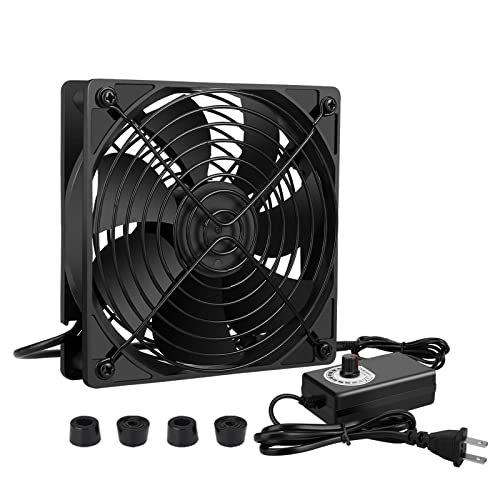
120mm AC Powered Variable Speed Fan with Controller
If you’re setting up DIY cooling for gaming systems, electronics receivers, or high-heat equipment without access to a dedicated cooling system, this 120mm AC-powered fan offers straightforward speed control through its variable controller. The fan operates at up to 3000 RPM and delivers 95 CFM of airflow while consuming only 4.0 watts. Its dual ball bearing construction supports a 65,000-hour lifespan, ensuring stable long-term operation. You adjust fan speed by turning the controller dial from off to full power across its 3V to 12V range. The unit accepts standard AC input from 100V to 240V, 50/60 Hz, making it compatible with most outlets globally. At 38 decibels, it runs quietly during operation. Install the fan using its included protective grills and connect the 5.5 x 2.1 mm plug to the controller for immediate cooling.
- Fan Capacity:1 fan
- Speed Control Range:3–12V adjustable (off to full)
- Power Input:AC 100–240V
- Connector Type:5.5 x 2.1 mm female plug
- Operating Noise Level:38 dB
- Maximum Power Output:4.0W
- Additional Feature:65,000-hour lifespan rating
- Additional Feature:38 decibels noise level
- Additional Feature:Dual-ball bearing construction
Factors to Consider When Choosing a Quiet Fan Controller
When selecting a quiet fan controller, you’ll need to evaluate noise level specifications in decibels, compare PWM (pulse width modulation) versus DC control methods to determine which operates more silently for your setup, and verify that the controller’s fan compatibility matches your existing fans’ connector types and voltage requirements. Next, check that your power supply can handle the controller’s wattage demands and confirm the speed range adjustability offers the granular control you need for your specific cooling requirements. These factors work together to ensure you get effective temperature management without unwanted noise disruption.
Noise Level Specifications
How do you know if a fan controller will actually run quietly? Check the decibel (dB) rating listed in the specifications. Many controllers specify a maximum noise threshold, such as less than 41 dB, which lets you compare quietness across models directly. However, dB ratings alone don’t tell the complete story. You should also examine the RPM range the controller operates within. Lower RPM settings typically produce less noise, though they may reduce cooling power. Review whether the controller includes features like “No stop” mode or automatic speed reduction, which maintain quieter operation during low-demand periods. Compare both the dB specifications and RPM ranges together, since the relationship between fan speed and noise isn’t always proportional.
PWM Versus DC Control
Beyond noise specifications and RPM ranges, you’ll need to understand the two primary control methods that determine how a fan controller adjusts speed: PWM and DC control. PWM modulates the duty cycle of a signal to synchronize multiple fans from a single header while preserving torque at lower speeds. DC control varies the supply voltage between 0–12V, which adjusts speed but may cause noise or instability at lower voltages if your fans aren’t designed for wide voltage variation. Consider your fan types when choosing: PWM-capable fans work best with PWM controllers for consistent airflow, while non-PWM fans require DC control. Some controllers support both methods, giving you flexibility to match your specific cooling setup and fan compatibility needs.
Fan Compatibility Requirements
Start by identifying your fan connector types—either 3-pin or 4-pin PWM—because your controller must match exactly to guarantee proper speed control and prevent connection errors. Next, check the controller’s maximum current per channel and total load capacity to avoid overloading your system. Most controllers support a few amps per port with specified totals across all ports. Then verify whether you need PWM signaling compatibility for motherboard control or prefer independent manual adjustment. Count how many fans you’ll manage and confirm the controller has enough channels, plus any included splitter cables for expansion. Finally, confirm the controller operates within your voltage domain—typically 12V DC from your PSU—and review any RPM or noise specifications that affect your setup’s performance.
Power Supply Capacity
What’s the right power supply capacity for your fan controller? You need to match the controller’s power supply capacity to your total fan current draw, then add a 20–30% safety margin. First, check your controller’s maximum current rating—typically 3A or 4A total. Next, add up each fan’s current requirement. Then verify the input voltage range matches your setup: AC models accept 100–240V, while DC models use 12V. Also check per-port limits, which often cap at 1A per port to prevent individual outputs from overloading. Finally, confirm your controller has adequate power delivery through its SATA or AC adapter connection. This ensures stable voltage and prevents system failures.
Speed Range Adjustability
Once you’ve confirmed your power supply can handle your fans, you’ll want to examine how much control you actually have over fan speed. Check whether the controller uses linear voltage adjustment (3–12 V) or PWM control, as PWM typically delivers smoother, finer speed increments without artifacts. Review the controller’s RPM range—look for models spanning 700–2800 RPM to balance quiet operation at low speeds with adequate cooling capacity when needed. Verify that the controller includes a minimum RPM protection feature to prevent your fans from stopping completely, which could trigger system errors. Compare noise specifications at various RPM levels to understand how quiet the system actually runs during normal operation.
Build Quality Materials
How much durability you’ll actually get from a fan controller depends heavily on its casing material and internal components. Look for controllers with metal or reinforced plastic housings that resist damage from bumps and temperature fluctuations. Check internal build quality by examining copper elements and multi-pin connectors, which handle electrical load better than cheaper alternatives.
Verify connector types—4-pin PWM sockets and multi-splitter cables provide reliable contact and signal integrity. Review warranty length as an indicator of manufacturer confidence; six-year warranties typically reflect solid construction standards.
Select controllers featuring dual-ball bearings rated for thousands of operating hours. Confirm compact dimensions (25–55 mm) fit your case without compromising airflow around other components. These specifications directly impact longevity and performance reliability in your system.
Warranty Coverage Duration
When you’re investing in a quiet fan controller, shouldn’t you know exactly what protection you’re getting? Warranty coverage duration directly reflects manufacturer confidence in product durability. You’ll find warranties ranging from standard one-year coverage to extended six-year periods from brands like Noctua and ARCTIC. Longer warranties typically indicate superior build quality and reliability. Before purchasing, verify the exact warranty length and coverage scope for your specific model. Check whether the warranty covers manufacturing defects, DOA issues, and unopened versus opened boxes. Note that warranty terms may differ between marketplace vendors and direct manufacturer listings. Always confirm coverage details with the seller or manufacturer to understand your protection timeline and what qualifies for replacement or repair.
Final Thoughts
You’ll select a quiet fan controller by checking for PWM control, stable voltage output, and per-port current limits. Verify the RPM range fits your cooling needs, typically 700–2800 RPM. Review noise specifications at various speeds. Confirm the brand offers a multi-year warranty. Match the controller’s power connector to your system, then mount it securely. Test your setup under load to confirm silent operation meets your cooling requirements.

Meet Ry, “TechGuru,” a 36-year-old technology enthusiast with a deep passion for tech innovations. With extensive experience, he specializes in gaming hardware and software, and has expertise in gadgets, custom PCs, and audio.
Besides writing about tech and reviewing new products, he enjoys traveling, hiking, and photography. Committed to keeping up with the latest industry trends, he aims to guide readers in making informed tech decisions.