

You need a scanner with reliable TWAIN drivers to streamline your document workflow. Whether you’re handling high-volume enterprise scanning, managing office files, or working remotely, choosing the right scanner directly impacts your productivity and integration capabilities. This guide walks you through ten proven scanners that deliver consistent performance across systems. You’ll discover what separates enterprise-grade models from portable options—and which features actually matter for your specific needs.
| Epson Workforce ES-865 High Speed Document Scanner |
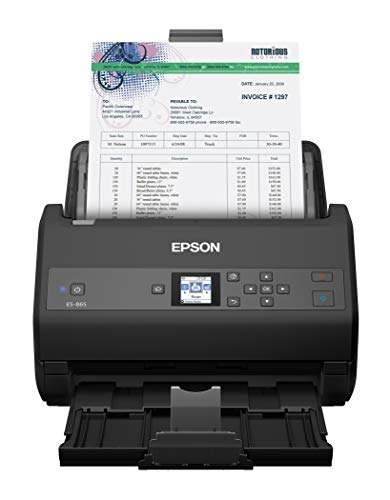
| Best Overall | TWAIN Driver Support: Yes, included TWAIN driver | OCR Capability: Yes, built-in Nuance OCR | Cloud Integration: Yes, Evernote, Dropbox, Google Drive | VIEW LATEST PRICE | Read Our Analysis |
| Epson Workforce ES-400 II Color Document Scanner |

| Best Value | TWAIN Driver Support: Yes, TWAIN driver for compatibility | OCR Capability: Yes, OCR for searchable PDFs | Cloud Integration: Yes, Dropbox, Evernote, Google Drive, OneDrive | VIEW LATEST PRICE | Read Our Analysis |
| RICOH SP-1130Ne Color Duplex Document Scanner |

| Best Mid-Range | TWAIN Driver Support: Yes, TWAIN-compatible | OCR Capability: Yes, PaperStream software with OCR | Cloud Integration: Yes, email, local folder, cloud services | VIEW LATEST PRICE | Read Our Analysis |
| Epson WorkForce ES-50 Portable Sheet-Fed Document Scanner for PC and Mac |

| Best Portable | TWAIN Driver Support: Yes, included TWAIN driver | OCR Capability: Yes, Nuance OCR included | Cloud Integration: Yes, scan to cloud services | VIEW LATEST PRICE | Read Our Analysis |
| Epson Workforce ES-580W Wireless Document Scanner |

| Best Wireless | TWAIN Driver Support: Yes, included TWAIN driver | OCR Capability: Yes, OCR for searchable PDFs | Cloud Integration: Yes, Dropbox, Evernote, Google Drive, OneDrive | VIEW LATEST PRICE | Read Our Analysis |
| Canon imageFORMULA R40 Document Scanner with Auto Feeder |

| Best For Receipts | TWAIN Driver Support: Yes, TWAIN compatible | OCR Capability: Yes, CaptureOnTouch software | Cloud Integration: Yes, QuickBooks Online integration | VIEW LATEST PRICE | Read Our Analysis |
| Brother DS-640 Compact Mobile Document Scanner (Model: DS640) |

| Most Compact | TWAIN Driver Support: Yes, TWAIN/WIA drivers | OCR Capability: Yes, OCR and document management included | Cloud Integration: Yes, multiple cloud destinations | VIEW LATEST PRICE | Read Our Analysis |
| Canon imageFORMULA R10 Portable Document Scanner |

| Best Mobile | TWAIN Driver Support: Yes, TWAIN compatible | OCR Capability: Yes, built-in software with OCR | Cloud Integration: Yes, searchable PDF and cloud output | VIEW LATEST PRICE | Read Our Analysis |
| Driver License Scanner with Age Verification |

| Specialized Tool | TWAIN Driver Support: Yes, fully TWAIN compatible | OCR Capability: No OCR (ID scanner only) | Cloud Integration: No (ID scanner only) | VIEW LATEST PRICE | Read Our Analysis |
| Epson Perfection V19 II Flatbed Scanner 4800 DPI |

| Best Photo Scanner | TWAIN Driver Support: Not specified (flatbed scanner) | OCR Capability: Yes, Epson ScanSmart with OCR | Cloud Integration: Yes, PDF and email options | VIEW LATEST PRICE | Read Our Analysis |
More Details on Our Top Picks
Epson Workforce ES-865 High Speed Document Scanner
Are you processing high volumes of documents daily and need a scanner that keeps pace with your workload? The Epson Workforce ES-865 delivers 65 ppm color scanning speed with duplex capability, handling 7,000 sheets daily. Its 100-page automatic feeder accommodates business cards and ID documents with dual-sided scanning in one pass. The included ScanSmart software and built-in Nuance OCR create searchable PDFs or editable Word files. Connect via USB to your Windows or Mac computer and access the TWAIN driver for seamless software integration. Export directly to cloud services like Dropbox or Google Drive. At 600 dpi resolution with 24-bit color depth, this scanner efficiently processes your document volume while maintaining quality output.
- TWAIN Driver Support:Yes, included TWAIN driver
- OCR Capability:Yes, built-in Nuance OCR
- Cloud Integration:Yes, Evernote, Dropbox, Google Drive
- Automatic Document Feeder (ADF):Yes, 100-sheet ADF
- Windows and Mac Compatibility:Yes, Windows 7/8/8.1/10 and macOS
- Resolution (DPI):600 dpi
- Additional Feature:7,000 sheets daily duty cycle
- Additional Feature:Dual-sided single-pass scanning
- Additional Feature:Optional Accounting Edition export
Epson Workforce ES-400 II Color Document Scanner
Looking to streamline your office scanning without sacrificing speed or quality? The Epson Workforce ES-400 II delivers reliable performance with its 50-sheet Auto Document Feeder and 35 pages-per-minute duplex scanning capability. You’ll benefit from built-in TWAIN driver compatibility, which integrates seamlessly with most document-management software. The scanner includes automatic image correction features—blank page skip, background removal, dirt detection, and paper-skew correction—to ensure clean, professional results. OCR functionality converts your scans into searchable PDFs and editable Word or Excel files. You can save files locally, email them directly, or upload to Dropbox, Google Drive, OneDrive, and Evernote using the included Epson ScanSmart Software.
- TWAIN Driver Support:Yes, TWAIN driver for compatibility
- OCR Capability:Yes, OCR for searchable PDFs
- Cloud Integration:Yes, Dropbox, Evernote, Google Drive, OneDrive
- Automatic Document Feeder (ADF):Yes, 50-sheet ADF
- Windows and Mac Compatibility:Yes, PC and Mac compatible
- Resolution (DPI):300 dpi
- Additional Feature:Auto crop and blank skip
- Additional Feature:50-sheet Auto Document Feeder
- Additional Feature:Background removal and dirt detection
RICOH SP-1130Ne Color Duplex Document Scanner
The RICOH SP-1130Ne delivers reliable document scanning for small offices and businesses that need to process high volumes of mixed media quickly. This scanner handles 30 pages per minute at 600 dpi resolution, with a 50-sheet automatic feeder that reduces manual intervention. You’ll scan business cards, ID cards, receipts, and standard paper from 2.0 x 2.9 inches up to 8.5 x 14 inches. The TWAIN driver integrates with your existing software, and you can route scanned files directly to email, cloud storage, or local folders using PaperStream ClickScan. Setup requires only USB or Ethernet connection, making it immediately operational for workflow integration.
- TWAIN Driver Support:Yes, TWAIN-compatible
- OCR Capability:Yes, PaperStream software with OCR
- Cloud Integration:Yes, email, local folder, cloud services
- Automatic Document Feeder (ADF):Yes, 50-sheet ADF
- Windows and Mac Compatibility:Yes, Windows 7+ and macOS 10.15+
- Resolution (DPI):600 dpi
- Additional Feature:Compact one-push button scanning
- Additional Feature:Ethernet and USB connectivity
- Additional Feature:Business card and ID support
Epson WorkForce ES-50 Portable Sheet-Fed Document Scanner for PC and Mac
If you need to scan documents on the go without sacrificing speed or quality, the Epson WorkForce ES-50 delivers portability and performance in one lightweight package. This USB-powered scanner weighs just 9.44 ounces and scans single pages in 5.5 seconds. It handles various document types, including IDs, receipts, and pages up to 8.5 x 72 inches. The included TWAIN driver works with both Windows and Mac systems, integrating with your existing imaging software. Use the automatic feeding mode for multi-page scans saved as one file. The bundled Epson ScanSmart Software and Nuance OCR create searchable PDFs and editable Word or Excel documents. You can also scan directly to cloud services for convenient file storage and access.
- TWAIN Driver Support:Yes, included TWAIN driver
- OCR Capability:Yes, Nuance OCR included
- Cloud Integration:Yes, scan to cloud services
- Automatic Document Feeder (ADF):No (sheet-fed portable)
- Windows and Mac Compatibility:Yes, PC and Mac compatible
- Resolution (DPI):Not specified
- Additional Feature:USB powered, no batteries
- Additional Feature:Scans up to 72 inches
- Additional Feature:Lightest mobile sheet-fed scanner
Epson Workforce ES-580W Wireless Document Scanner
Need a scanner that works without tethering you to a computer? The ES-580W delivers wireless scanning with a 4.3″ touchscreen, letting you send scans directly to your smartphone, tablet, or cloud services like Dropbox and Google Drive. You’ll handle 100 sheets at once with its Auto Document Feeder, scanning both sides in a single pass at 35 pages per minute. The scanner creates searchable PDFs using OCR technology and converts documents to editable Word or Excel files. You can save directly to USB or email without a computer. It’s compatible with PC and Mac systems, making it practical for organizing documents across multiple platforms and storage locations.
- TWAIN Driver Support:Yes, included TWAIN driver
- OCR Capability:Yes, OCR for searchable PDFs
- Cloud Integration:Yes, Dropbox, Evernote, Google Drive, OneDrive
- Automatic Document Feeder (ADF):Yes, 100-sheet ADF
- Windows and Mac Compatibility:Yes, PC and Mac compatible
- Resolution (DPI):Not specified
- Additional Feature:4.3″ touchscreen wireless scanning
- Additional Feature:No computer needed operation
- Additional Feature:100-sheet Auto Document Feeder
Canon imageFORMULA R40 Document Scanner with Auto Feeder
Who’s drowning in receipts and invoices that need organizing? The Canon imageFORMULA R40 scans up to 40 pages per minute with its auto document feeder, handling batches efficiently. You’ll get 600 dpi optical resolution for clear, searchable files. The included software extracts key data—payee, amount, date—automatically. Then you upload directly to QuickBooks Online or compatible cloud services using the CaptureOnTouch plugin. Setup takes minutes on Windows 10, 11, or macOS 11, 12. The 40-sheet capacity means fewer refills during scanning sessions. USB connectivity keeps installation straightforward. This scanner transforms paper chaos into organized digital records.
- TWAIN Driver Support:Yes, TWAIN compatible
- OCR Capability:Yes, CaptureOnTouch software
- Cloud Integration:Yes, QuickBooks Online integration
- Automatic Document Feeder (ADF):Yes, 40-sheet ADF
- Windows and Mac Compatibility:Yes, Windows 10/11 and macOS 11/12
- Resolution (DPI):600 dpi
- Additional Feature:QuickBooks Online direct upload
- Additional Feature:Receipt and invoice data extraction
- Additional Feature:40 pages per minute speed
Brother DS-640 Compact Mobile Document Scanner (Model: DS640)
The Brother DS-640 works best for professionals and students who scan documents while traveling or working remotely. This compact scanner weighs just 1.5 pounds and measures under 12 inches long, fitting easily into your bag or pocket. It scans up to 16 pages per minute in color and black & white, supporting documents up to 72 inches long. The scanner connects via USB 3.0 directly to your PC or laptop without requiring an outlet. You’ll access TWAIN drivers on Windows or ICA drivers on Mac to integrate the scanner into your workflow. The included OCR software converts scanned documents into editable Word files and routes them to email, cloud services, or file storage. One-year warranty coverage protects your investment.
- TWAIN Driver Support:Yes, TWAIN/WIA drivers
- OCR Capability:Yes, OCR and document management included
- Cloud Integration:Yes, multiple cloud destinations
- Automatic Document Feeder (ADF):No (single sheet mobile)
- Windows and Mac Compatibility:Yes, Windows, Mac, and Linux
- Resolution (DPI):300 dpi
- Additional Feature:Ultra-compact 1.5 pound design
- Additional Feature:Micro USB 3.0 powered
- Additional Feature:Supports 72-inch long documents
Canon imageFORMULA R10 Portable Document Scanner
When you’re scanning documents across multiple locations—whether you’re working from home, traveling between offices, or managing paperwork in a classroom—you’ll want a scanner that doesn’t require a permanent desk setup. The Canon imageFORMULA R10 delivers portability with its lightweight design and USB power connection. It scans both sides of documents simultaneously at 12 pages per minute, handling receipts, business cards, and legal documents. The 20-sheet automatic feeder reduces manual feeding interruptions. Built-in software creates searchable PDFs without installation, and automatic updates keep your system current. Windows and Mac compatibility ensures broad accessibility across devices.
- TWAIN Driver Support:Yes, TWAIN compatible
- OCR Capability:Yes, built-in software with OCR
- Cloud Integration:Yes, searchable PDF and cloud output
- Automatic Document Feeder (ADF):Yes, 20-sheet ADF
- Windows and Mac Compatibility:Yes, Windows and Mac
- Resolution (DPI):600 dpi
- Additional Feature:ENERGY STAR certified efficiency
- Additional Feature:Built-in auto-updating software
- Additional Feature:20-sheet automatic feeder capacity
Driver License Scanner with Age Verification
Need a scanner that automatically verifies a customer’s age while capturing driver’s license data? This TWAIN-compatible scanner reads 2D barcodes from USA and Canadian driver licenses, extracting information directly into your banking, medical, or healthcare application. The compact device scans one side at a time at 600 dpi resolution in under two seconds per card. Use the included Scan-ID Full Version software to manage your card database and automatically flag customers who don’t meet minimum age requirements. For non-driver IDs, manually enter the data. The scanner accepts cards up to 4 by 9 inches and connects via single USB port.
- TWAIN Driver Support:Yes, fully TWAIN compatible
- OCR Capability:No OCR (ID scanner only)
- Cloud Integration:No (ID scanner only)
- Automatic Document Feeder (ADF):No (card scanner only)
- Windows and Mac Compatibility:Windows only (not Mac)
- Resolution (DPI):600 dpi
- Additional Feature:Automatic age verification flagging
- Additional Feature:2D barcode extraction capability
- Additional Feature:2 seconds per card scanning
Epson Perfection V19 II Flatbed Scanner 4800 DPI
Looking to scan documents and photos quickly without breaking your budget? The Epson Perfection V19 II delivers 4800 dpi optical resolution, letting you capture fine details in your scans. This USB-powered flatbed scanner weighs just 3.1 pounds and features a removable lid that accommodates bulky items like books and artwork. You’ll scan letter-sized documents in approximately 10 seconds at 300 dpi. The included ScanSmart software converts your scans to searchable PDFs and editable Word or Excel files using OCR technology. One-touch buttons streamline your workflow, directing scans to PDF or email instantly. The built-in kickstand enables vertical storage, maximizing your desk space. Windows 7 or newer systems support this scanner through USB connection.
- TWAIN Driver Support:Not specified (flatbed scanner)
- OCR Capability:Yes, Epson ScanSmart with OCR
- Cloud Integration:Yes, PDF and email options
- Automatic Document Feeder (ADF):No (flatbed scanner)
- Windows and Mac Compatibility:Yes, Windows 7+ and macOS
- Resolution (DPI):4800 dpi
- Additional Feature:4800 DPI optical resolution
- Additional Feature:High-rise removable lid design
- Additional Feature:Easy Photo Fix technology
Factors to Consider When Choosing a Scanner With Twain Drivers
When selecting a scanner with TWAIN drivers, you’ll need to verify that the driver’s compatible with your operating system and software applications before purchasing. Consider your scanning volume and choose a document feeder capacity that matches your workflow, then evaluate resolution quality (measured in DPI) based on whether you’re scanning text documents or detailed images. Finally, compare the OCR features and bundled software across models to ensure they’ll handle your specific scanning tasks efficiently.
TWAIN Driver Compatibility
What makes TWAIN drivers essential when selecting a scanner? They determine whether your device will work with your software and operating system. Start by identifying your OS—Windows or macOS—then verify the driver supports your specific version. Check the scanner manufacturer’s website for driver downloads and installation instructions. Next, confirm the driver enables your needed features: duplex scanning, OCR capabilities, or cloud uploads. Test the driver’s compatibility with your primary scanning applications before purchasing. Review user forums for reports of driver stability and performance issues. Finally, ensure the manufacturer provides ongoing driver updates for future OS compatibility. This verification process prevents costly incompatibilities and ensures your scanner integrates smoothly into your workflow.
Scanning Speed Requirements
Since scanning speed directly impacts how quickly you can process documents, you’ll want to evaluate your volume needs before selecting a scanner with TWAIN drivers. Consider your daily document count: high-volume operations benefit from duplex scanners offering 65 ppm, while moderate workflows function adequately with 30–40 ppm models. One-pass duplex technology captures both sides simultaneously, effectively doubling throughput compared to single-pass alternatives. Check manufacturer specifications for your target scanner’s speed rating, then calculate realistic processing times for your typical batch sizes. Match speed capacity to your workload demands—oversized capacity wastes budget, while undersized capacity creates bottlenecks. Verify that your chosen TWAIN-compatible scanner delivers the speed tier your operation requires for optimal efficiency and productivity.
Document Feeder Capacity
How much paper can your scanner hold before you’ll need to reload? Document feeder capacity directly impacts your scanning workflow. Models with 50-sheet capacity suit occasional scanning tasks, while 100-sheet capacity handles larger batch jobs with fewer interruptions. Check the maximum paper size and weight specifications your ADF supports, as these limits determine which documents you can feed automatically. One-pass duplex scanning accelerates two-sided document processing when your scanner includes this feature. Feed protection systems like skew correction minimize jams during high-volume runs, protecting your equipment and maintaining productivity. When selecting a scanner, verify your TWAIN driver fully supports the ADF’s duplex and capacity features. Match the feeder capacity to your typical job volume: smaller capacity for light use, larger capacity for frequent batch scanning.
Resolution and Image Quality
Resolution and image quality are fundamental specs you’ll need to evaluate when selecting a TWAIN-compatible scanner. Check your scanner’s optical resolution, typically measured in dpi (dots per inch), such as 600 dpi or higher. This directly affects detail and sharpness in your scanned images. Next, examine color depth options—24-bit color for photographs or 8-bit grayscale for documents. These settings determine tonal range and fidelity. Match your scanner’s native specs with compatible software settings to ensure consistent results. Consider output formats like TIFF, JPEG, or PDF, which affect file size and clarity. Higher resolution paired with appropriate compression settings produces sharper, more detailed scans suitable for your specific needs.
Software and OCR Features
When you’re evaluating a scanner with TWAIN drivers, you’ll want to examine the bundled software and OCR capabilities that come with it, since these tools directly impact your scanning workflow and output quality. Check whether the scanner includes OCR software like ScanSmart, PaperStream, or Nuance OCR to convert scanned images into editable text. Verify that the software supports multiple output formats—PDF, JPEG, Word, and Excel—so you can save files in your preferred format. Look for one-button interfaces that streamline the scanning process by letting you select OCR settings, assign file names, and choose destinations without multiple steps. Confirm the software offers both cloud and local saving options to match your storage preferences and security requirements.
Connectivity Options Available
What connection type does your scanner need to work best with your devices and software?
USB-connected scanners offer the most straightforward integration for TWAIN drivers. They plug directly into your Windows or macOS computer, allowing the built-in TWAIN driver to function immediately without additional setup. Network-connected scanners work through your Wi-Fi or Ethernet, expanding accessibility across multiple devices on the same network. Before purchasing, verify that your chosen scanner includes a TWAIN driver compatible with your operating system. Check the manufacturer’s website for driver availability. Mobile or compact scanners may rely on vendor-specific drivers rather than standard TWAIN, so confirm compatibility beforehand. If you’re building a cloud-first workflow, select scanners with both TWAIN support and cloud-enabled software integration to ensure seamless data transfer between scanning and cloud storage.
Portability Versus Stationary Use
Once you’ve determined your connectivity needs, consider how you’ll physically use your scanner—whether you’ll move it between locations or keep it in one place. Portable scanners weigh 1.0–2.0 pounds with compact designs, making them ideal for traveling between offices or working in multiple spaces. They typically handle single-sheet or small-batch scanning. Stationary models feature larger paper capacities, faster processing speeds, and 50–100+ page automatic document feeders suited for high-volume in-office work. Portable units draw power from your computer via USB, while stationary scanners may require external power supplies. Regardless of portability type, verify TWAIN driver availability for your specific model before purchasing, since driver support determines software compatibility, not physical design.
Warranty and Support Coverage
Three critical elements deserve your attention when evaluating warranty and support for a scanner with TWAIN drivers: the warranty duration, what it actually covers, and how you’ll access help if problems arise. First, confirm the warranty length—most manufacturers offer one-year limited coverage. Next, verify what’s included: does it cover hardware defects, software issues, or both? Then, identify your support channels. You can contact the manufacturer directly for driver updates and technical assistance, or rely on Amazon’s return policy for defective units within 30 days. Finally, check whether firmware updates are available to maintain TWAIN compatibility as operating systems evolve. Document these details before purchasing to ensure you’re protected against malfunctions and driver incompatibility issues.
Final Thoughts
When you’re selecting a scanner with TWAIN drivers, you’ll want to match your needs to the right model. If you scan documents frequently, choose a high-speed option like the ES-865. For occasional office use, the ES-400 II works well. Portable models suit travel. Check driver compatibility with your operating system, verify cloud integration options, and confirm wireless capabilities if you need them. Compare these factors against your budget and workflow requirements.

Meet Ry, “TechGuru,” a 36-year-old technology enthusiast with a deep passion for tech innovations. With extensive experience, he specializes in gaming hardware and software, and has expertise in gadgets, custom PCs, and audio.
Besides writing about tech and reviewing new products, he enjoys traveling, hiking, and photography. Committed to keeping up with the latest industry trends, he aims to guide readers in making informed tech decisions.