

When you’re upgrading your remote meeting setup, you’ll need to evaluate smart video conference cameras based on your space size, budget, and technical requirements. You can choose from ultra-wide designs that capture entire rooms, 360-degree systems for complete coverage, or AI-powered models that track speakers automatically. Each option offers different features like beamforming mics, privacy shutters, and platform compatibility. Understanding your specific needs will help you select the right system, but there’s more to consider before making your decision.
| Yealink UVC40 E2 4K Conference Room Camera System |

| Professional Grade | Video Resolution: Ultra HD 4K | Field of View: 120° super-wide | Audio System: 8 microphone array with noise cancellation | VIEW LATEST PRICE | Read Our Analysis |
| Meeting Owl 4+ 360-Degree 4K Video Conference Camera |

| Best Overall | Video Resolution: 4K | Field of View: 360° | Audio System: 360° audio pickup up to 18 feet | VIEW LATEST PRICE | Read Our Analysis |
| TONGVEO All-in-One Conference Room Video Camera System |

| Best Budget Pick | Video Resolution: Full HD 1080p | Field of View: 114° wide | Audio System: Full-duplex microphone array with Bluetooth speakerphone | VIEW LATEST PRICE | Read Our Analysis |
| TOUCAN 360-Degree Video Conference Camera 1080p HD |
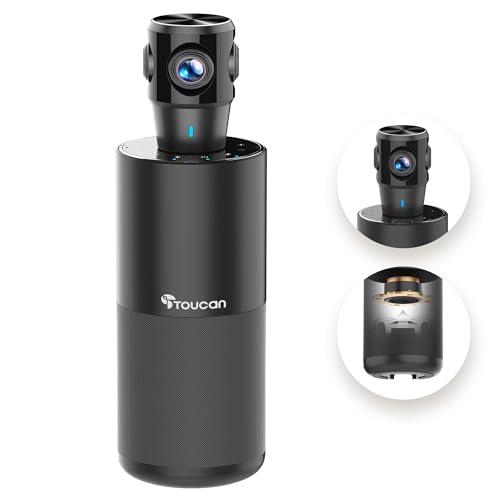
| Most Affordable | Video Resolution: 1080p HD | Field of View: 360° | Audio System: Superior microphone with clear audio | VIEW LATEST PRICE | Read Our Analysis |
| Logitech MeetUp Video Conferencing System 4K Ultra HD |

| Best For Huddle | Video Resolution: Ultra HD 4K | Field of View: 120° wide | Audio System: 3 beamforming microphones with integrated speaker | VIEW LATEST PRICE | Read Our Analysis |
| TONGVEO 20x Zoom Conference Room Camera System Bundle |

| Best For Large | Video Resolution: Full HD 1080p | Field of View: Adjustable PTZ (350° horizontal/180° vertical) | Audio System: 360° omnidirectional microphone array with wireless speakerphone | VIEW LATEST PRICE | Read Our Analysis |
| TB5 Video Conferencing System 4K Ultra Wide Angle |

| Best Value | Video Resolution: Ultra 4K | Field of View: 120° ultra-wide angle | Audio System: 4 microphone arrays with stereo speakers | VIEW LATEST PRICE | Read Our Analysis |
| KanDao Meeting Pro 360-Degree Video Conference Camera |

| Best Standalone | Video Resolution: 1080p | Field of View: 360° dual 195° lenses | Audio System: 8-mic array with 5W speaker | VIEW LATEST PRICE | Read Our Analysis |
| NexiGo Meeting 360 Ultra Gen 3 Conference Camera |

| Most Advanced | Video Resolution: 8K capture/1080p output | Field of View: 360° dual 195° lenses | Audio System: 8 omnidirectional mics with integrated speakers | VIEW LATEST PRICE | Read Our Analysis |
More Details on Our Top Picks
Yealink UVC40 E2 4K Conference Room Camera System
Looking for professional-grade video conferencing that works straight out of the box? The Yealink UVC40 E2 delivers 4K resolution with a 120° field of view, capturing all meeting participants clearly. Its AI features auto-frame speakers and track active participants, keeping focus on who’s talking. The eight-microphone array handles noise cancellation and echo reduction effectively, while beamforming ensures clear two-way audio. You’ll get an electric lens cap that closes automatically when not in use, protecting privacy. Install it using included wall or TV mounts for quick deployment. The system integrates with most platforms as a standard UAC/UVC device, enabling remote management through your network.
- Video Resolution:Ultra HD 4K
- Field of View:120° super-wide
- Audio System:8 microphone array with noise cancellation
- AI-Assisted Features:Auto framing and speaker tracking
- Setup/Connectivity:USB/UVC standard; wall and TV mounts included
- Platform Compatibility:Compatible with most platforms
- Additional Feature:Auto-opening electric lens cap
- Additional Feature:8-microphone beamforming array
- Additional Feature:Reserved mic interface support
Meeting Owl 4+ 360-Degree 4K Video Conference Camera
The Meeting Owl 4+ stands out for teams that need to capture every participant in large or oddly-shaped rooms without installing multiple cameras. You’ll get 360° video in 4K with audio coverage extending 18 feet. The camera automatically focuses on speaking participants, enhancing hybrid discussions. Setup takes about six minutes—just plug it in via USB. For larger spaces, you can pair two units, add an Owl Bar, or install an Expansion Mic. The system integrates with Whiteboard Owl and works with Teams, Zoom, Google Meet, and Webex. Administrators manage settings through The Nest platform, enabling bulk registration and default configurations across your organization.
- Video Resolution:4K
- Field of View:360°
- Audio System:360° audio pickup up to 18 feet
- AI-Assisted Features:Automatic speaker focus with visual/audio cues
- Setup/Connectivity:Plug-and-play USB device; ~6 minutes setup
- Platform Compatibility:Zoom, GoToMeeting, Google Meet, Cisco Webex, Microsoft Teams
- Additional Feature:360° audio up to 18 feet
- Additional Feature:Expandable with Owl Bar accessory
- Additional Feature:Whiteboard Owl integration option
TONGVEO All-in-One Conference Room Video Camera System
Want a single camera-and-speaker setup that won’t drain your budget? The TONGVEO system combines a 1080p AI auto-tracking camera with a Bluetooth conference speaker. Plug the camera into your laptop via USB 3.0—no drivers needed. Connect the wireless speaker through USB, Bluetooth, or a wireless dongle. The camera tracks speakers automatically and rotates 350° horizontally and 180° vertically. The speaker covers rooms up to 40 square meters and runs 6–8 hours per charge. You’ll get full-duplex audio with echo cancellation across Zoom, Teams, WebEx, and other platforms. This setup works on Windows 7 and Mac OS 10.10 or higher.
- Video Resolution:Full HD 1080p
- Field of View:114° wide
- Audio System:Full-duplex microphone array with Bluetooth speakerphone
- AI-Assisted Features:AI auto-tracking with face recognition
- Setup/Connectivity:Plug-and-play USB 3.0; optional HDMI to Smart TV
- Platform Compatibility:Zoom, Teams, WebEx, OBS, FaceTime, YouTube
- Additional Feature:Simultaneous HDMI and USB outputs
- Additional Feature:3x optical zoom capability
- Additional Feature:6-8 hour battery runtime
TOUCAN 360-Degree Video Conference Camera 1080p HD
Need a camera that captures your entire conference room without blind spots? The TOUCAN 360-degree camera delivers omni-directional shooting, so you’ll see facial expressions and gestures from any position in the room. Its 1080p HD resolution provides crystal-clear visuals for presentations and video conferences. The superior microphone captures voices with precision, ensuring everyone’s heard clearly. Setup takes minutes—just connect it to your computer or conference device via plug-and-play functionality. The camera works with Zoom, Microsoft Teams, and other platforms. It adapts to rooms of any size, from small offices to large halls, delivering consistent video and audio quality throughout your meetings.
- Video Resolution:1080p HD
- Field of View:360°
- Audio System:Superior microphone with clear audio
- AI-Assisted Features:Automatic speaker focus
- Setup/Connectivity:Plug-and-play connectivity
- Platform Compatibility:Zoom, Microsoft Teams, and other platforms
- Additional Feature:Omni-directional shooting capability
- Additional Feature:Crystal-clear visual quality
- Additional Feature:Adaptable to all room sizes
Logitech MeetUp Video Conferencing System 4K Ultra HD
Logitech’s MeetUp system delivers 4K Ultra HD video and three beamforming microphones ideal for small conference rooms and huddle spaces where you need compact, all-in-one technology. You’ll get a 120° field of view with motorized pan/tilt controls up to 170°, plus 5x HD zoom for flexible framing. The system connects via USB for plug-and-play setup with Windows, macOS, and Chrome OS devices. You can mount it on walls, credenzas, or TV stands. Audio reaches up to 4 meters with your standard setup, or extend it to 5 meters by purchasing an optional Expansion Mic separately. The MeetUp works with Zoom, WebEx, Skype for Business, and other major conferencing platforms.
- Video Resolution:Ultra HD 4K
- Field of View:120° wide
- Audio System:3 beamforming microphones with integrated speaker
- AI-Assisted Features:Motorized pan/tilt with optional zoom controls
- Setup/Connectivity:USB plug-and-play with multiple mounting options
- Platform Compatibility:Zoom, WebEx, Skype for Business, LifeSize Cloud, Vidyo
- Additional Feature:5x HD zoom with motorized pan/tilt
- Additional Feature:Logitech Sync device management platform
- Additional Feature:Expandable with optional expansion mic
TONGVEO 20x Zoom Conference Room Camera System Bundle
The TONGVEO 20x Zoom Conference Room Camera System Bundle works ideally for large meeting rooms that need integrated video and audio conferencing. The bundle pairs a wired PTZ camera with a wireless speakerphone, delivering Full HD 1080p video at 60fps and 360° omnidirectional audio pickup up to 20 feet away. The camera’s 20x optical zoom and 350° horizontal rotation handle distant subjects and room coverage. Connect via USB 3.0 or HDMI to your laptop, desktop, or Smart TV. The speakerphone’s 8000mAh battery runs up to 17 hours, supporting Zoom, Teams, WebEx, and other platforms without requiring drivers.
- Video Resolution:Full HD 1080p
- Field of View:Adjustable PTZ (350° horizontal/180° vertical)
- Audio System:360° omnidirectional microphone array with wireless speakerphone
- AI-Assisted Features:Auto focus and tracking capabilities
- Setup/Connectivity:USB 3.0 and HDMI outputs with optional direct TV connection
- Platform Compatibility:Zoom, Teams, OBS, Lync, WebEx, BlueJeans, Facebook Messenger
- Additional Feature:20x optical zoom capability
- Additional Feature:17-hour battery runtime speaker
- Additional Feature:360° omnidirectional microphone array
TB5 Video Conferencing System 4K Ultra Wide Angle
RayBit’s TB5 delivers outstanding value for small-to-medium conference rooms seeking professional-grade video and audio without premium pricing. The system features 4K video, 120° wide-angle coverage, and AI-powered speaker tracking that frames participants automatically. Setup requires simply connecting via USB-C or USB-A to your PC, Mac, or compatible device. The 4 integrated microphone arrays with noise reduction and echo cancellation ensure clear audio capture across the entire room. Built-in stereo speakers deliver crisp sound output. Compatible with Teams, Zoom, and Skype, the TB5 works immediately without complex installation, making it ideal for quick deployment in existing meeting spaces.
- Video Resolution:Ultra 4K
- Field of View:120° ultra-wide angle
- Audio System:4 microphone arrays with stereo speakers
- AI-Assisted Features:Auto framing, AI face & speaker tracking with 6X ePTZ zoom
- Setup/Connectivity:Plug-and-play USB-C or USB-A
- Platform Compatibility:Teams, Zoom, Skype, and other leading platforms
- Additional Feature:6x ePTZ zoom capability
- Additional Feature:Intelligent voice enhancement technology
- Additional Feature:5-inch built-in display screen
KanDao Meeting Pro 360-Degree Video Conference Camera
Need a conference camera that doesn’t require a separate computer to operate? The KanDao Meeting Pro delivers 360° coverage using dual 195° wide-angle lenses, capturing your entire conference room. Its built-in Android OS runs independently, so you’ll plug it in and start meeting immediately. The camera features AI face and voice tracking to highlight active speakers automatically. You’ll get 1080p video output compatible with Teams, Zoom, and Google Meet. An 8-microphone array picks up audio from 18 feet away with noise and echo cancellation. Use the five smart modes—Discussion, Global, Presentation, Patrol, and Custom—to adjust your view. Record locally to an SD card, and control everything through the included remote.
- Video Resolution:1080p
- Field of View:360° dual 195° lenses
- Audio System:8-mic array with 5W speaker
- AI-Assisted Features:AI face and voice tracking with 5 smart modes
- Setup/Connectivity:Plug-and-play standalone system with built-in Android OS
- Platform Compatibility:Teams, Zoom, Google Meet
- Additional Feature:Five smart viewing modes
- Additional Feature:Built-in Android OS standalone
- Additional Feature:Remote control included/featured
NexiGo Meeting 360 Ultra Gen 3 Conference Camera
Looking to outfit a medium or large meeting room with the most advanced all-in-one camera solution? The NexiGo Meeting 360 Ultra Gen 3 delivers 8K capture through dual 195-degree lenses creating 360-degree panoramic coverage. Eight omnidirectional microphones pick up audio from 18 feet away with noise and echo suppression built in. You’ll connect the camera directly to your TV or PC—no external computer required—then download Zoom, Google Meet, Teams, or Skype from the integrated app store. The AI framing and auto-tracking features automatically focus on active speakers. Privacy covers protect your lenses when meetings end.
- Video Resolution:8K capture/1080p output
- Field of View:360° dual 195° lenses
- Audio System:8 omnidirectional mics with integrated speakers
- AI-Assisted Features:AI framing and auto tracking with multi-camera support
- Setup/Connectivity:Built-in OS; connects to PC, TV, or internet router
- Platform Compatibility:Zoom, Skype, Slack, GoToMeeting, Microsoft Teams, Webex, BlueJeans
- Additional Feature:8K capture resolution capability
- Additional Feature:Up to four simultaneous cameras
- Additional Feature:Built-in App Store ecosystem
Factors to Consider When Choosing Smart Video Conference Camera Systems
You’ll need to evaluate five key factors before selecting a system: field of view coverage (how much of your room the camera captures), audio quality and microphone capabilities (whether built-in mics work or you need external ones), setup and deployment ease (how quickly you can install and configure the system), platform compatibility and integration (whether it works with your existing software like Zoom or Microsoft Teams), and room size and scalability (whether the system can handle your current space and grow with your needs). Start by measuring your conference room and identifying which video conferencing platforms your team uses most frequently. Then assess your audio requirements and technical skill level to determine whether you need a simple plug-and-play option or can handle more complex installation.
Field Of View Coverage
How wide should your camera’s viewing angle be? Field of view (FOV) determines the area your camera captures, typically ranging from 120° to 360°. Consider your room size first. For small to medium rooms, a wider FOV reduces the need to reposition your camera constantly. Ultra-wide or 360° systems provide full-room coverage but may create edge distortion. To maintain focus on active speakers, pair wide FOV cameras with AI framing and speaker tracking features. For large spaces or lecture-style rooms, use multiple cameras or panoramic 360° solutions to eliminate blind spots. Evaluate your specific layout. If participants sit in a concentrated area, standard FOV works adequately. If people move around the room, invest in wider coverage to capture all activity without adjustments.
Audio Quality And Microphones
What makes audio quality just as critical as video in your conference setup? Clear communication depends on reliable microphone systems and noise reduction. Look for camera systems with multiple microphone arrays and beamforming technology to capture voices across the entire meeting space. Choose systems that include noise cancellation and echo reduction to eliminate background distractions and improve speech clarity. Verify the microphone coverage range—typically 4–20 feet—and check if expansion microphones are available for larger rooms. Select systems with speaker tracking and auto-framing features that synchronize audio focus with the active speaker. Confirm connectivity options including USB, USB-C, PoE, or wireless dongles match your conferencing platform requirements. These specifications ensure reliable, professional-grade audio performance throughout your meetings.
Setup And Deployment Ease
Three critical factors streamline your camera system’s deployment: connection type, platform compatibility, and scalability options.
First, select your connection method. USB or USB-C plug-and-play options get you from unboxing to your first meeting in minutes without driver installation. Some systems include built-in operating systems, eliminating external hardware requirements.
Second, verify platform compatibility. Your system should work directly with Zoom, Teams, Webex, and Google Meet to avoid complex setup procedures across different services.
Third, plan for growth. Choose systems offering expansion options like additional microphones or cameras. Built-in management tools enable bulk registration and device management, making it simple to scale your setup for larger rooms later.
Wireless or battery-powered components affect placement flexibility during installation, so account for these constraints before purchasing.
Platform Compatibility And Integration
Once you’ve sorted out your camera’s physical setup and deployment, you’ll want to confirm it actually works with the software your team uses every day. Check whether your camera is certified or tested for Zoom, Microsoft Teams, WebEx, Google Meet, or GoTo. Verify cross-platform compatibility with Windows, macOS, ChromeOS, and Linux. Confirm USB-C or USB-A connectivity matches your existing hardware. Test that the camera supports universal conferencing apps rather than just one platform. Look for systems offering HDMI and USB outputs for flexible integration with displays and PCs. Finally, if you’re managing multiple rooms, verify the camera includes remote management and bulk registration capabilities through a centralized portal to simplify IT administration and deployment across your organization.
Room Size And Scalability
How you’ll set up your camera system depends directly on the physical dimensions and layout of your meeting space. For small to medium rooms, choose cameras with a 120° field of view and compact all-in-one designs to minimize equipment footprint. For larger rooms, select long-range PTZ cameras with 20x zoom or 360-degree audio arrays to ensure full coverage. Consider expandable setups with add-on microphones or paired devices when scaling from medium to large spaces. PTZ cameras with 350° horizontal rotation and adjustable vertical tilt maintain proper framing in rooms with changing seating arrangements. For irregularly shaped or oversized rooms, implement multi-camera configurations or room-wide audio pickup systems. Match your equipment choice to your actual space dimensions and expected participant numbers before purchasing.
Final Thoughts
You’ll find the right smart conference camera by matching your room size, budget, and platform needs. Review each system’s specs—resolution, field of view, and mic quality. Check compatibility with Zoom, Teams, or Webex. Consider whether you need 360-degree capture or ultra-wide angles. Test installation requirements and management tools. Compare pricing against features you’ll actually use. Your choice determines meeting quality for your organization.

Meet Ry, “TechGuru,” a 36-year-old technology enthusiast with a deep passion for tech innovations. With extensive experience, he specializes in gaming hardware and software, and has expertise in gadgets, custom PCs, and audio.
Besides writing about tech and reviewing new products, he enjoys traveling, hiking, and photography. Committed to keeping up with the latest industry trends, he aims to guide readers in making informed tech decisions.