

You’re looking to upgrade your gaming setup with a mouse that matches what pro gamers actually choose. SteelSeries offers several models built for competitive play, each with specific strengths like precision tracking, wireless reliability, and customizable buttons. Understanding what each mouse delivers—from sensor quality to durability features—helps you pick the right fit for your gaming style. Here’s what you need to know about five top contenders.
| SteelSeries Rival 3 Gen 2 Gaming Mouse 8500 DPI |

| Best Lightweight Performance | DPI/CPI Range: Up to 8,500 DPI | Weight: 77g | Click Durability: 60 million clicks | VIEW LATEST PRICE | Read Our Analysis |
| SteelSeries Aerox 3 Wireless Gaming Mouse Shadow |

| Best Wireless All-Rounder | DPI/CPI Range: Up to 26,000 DPI | Weight: 68g | Click Durability: 80 million clicks | VIEW LATEST PRICE | Read Our Analysis |
| SteelSeries Rival 650 Quantum Wireless Gaming Mouse |
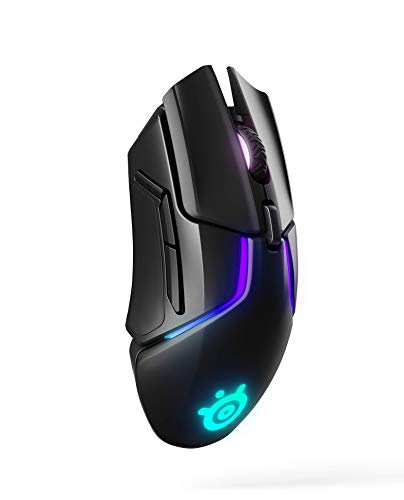
| Best Customization Options | DPI/CPI Range: Up to 12,000 CPI | Weight: 5.76 ounces (163g) | Click Durability: 60 million clicks | VIEW LATEST PRICE | Read Our Analysis |
| SteelSeries Aerox 9 Wireless RGB Gaming Mouse |

| Best MMO Gaming | DPI/CPI Range: Up to 18,000 DPI | Weight: 89g | Click Durability: IP54 dust/water resistant switches | VIEW LATEST PRICE | Read Our Analysis |
| SteelSeries Esports FPS Gaming Mouse Prime Edition |
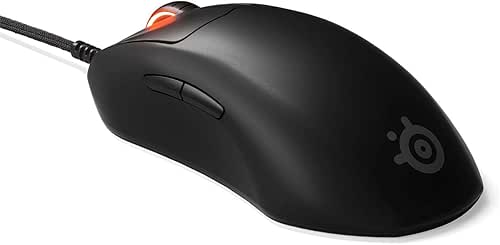
| Best FPS Pro | DPI/CPI Range: Up to 18,000 CPI | Weight: 69g | Click Durability: 100 million clicks | VIEW LATEST PRICE | Read Our Analysis |
More Details on Our Top Picks
SteelSeries Rival 3 Gen 2 Gaming Mouse 8500 DPI
Looking for a mouse that doesn’t weigh you down? The SteelSeries Rival 3 Gen 2 delivers performance without bulk at just 77 grams. Its 8500 DPI TrueMove Core Optical Sensor provides true 1-to-1 tracking, ensuring your movements translate precisely on-screen. You’ll experience near-instant 1.35ms click latency, critical for competitive gaming. The mouse features built-to-last switches rated for 60 million clicks, meaning durability through extended play sessions. Its SUPER MESH PARACORD cable reduces drag while improving flexibility. PTFE feet glide smoothly across surfaces. Three-zone RGB lighting lets you customize aesthetics to match your setup. This combination of lightweight design, responsive tracking, and solid durability makes it a reliable choice for gamers prioritizing speed and accuracy.
- DPI/CPI Range:Up to 8,500 DPI
- Weight:77g
- Click Durability:60 million clicks
- RGB Lighting:3-zone RGB
- Connectivity:Wired (mesh paracord cable)
- Programmable Buttons:Standard gaming buttons
- Additional Feature:1.35ms click latency
- Additional Feature:SUPER MESH PARACORD cable
- Additional Feature:TRUE 1-to-1 tracking
SteelSeries Aerox 3 Wireless Gaming Mouse Shadow
Want a mouse that handles competitive gaming, everyday work, and cross-device switching without compromise? The Aerox 3 Wireless Gen 2 delivers exactly that. This 68-gram mouse features a 26K optical sensor reaching 26,000 DPI with 4000Hz polling for 0.25ms response time—essential for FPS precision. You’ll get 120 hours of battery on 2.4GHz wireless or 200 hours via Bluetooth, letting you switch between devices seamlessly. The IP54 rating protects against water and dust, while 80 million-click mechanical switches ensure durability. Six programmable buttons and SteelSeries GG software let you customize sensitivity and RGB lighting across three zones for your setup.
- DPI/CPI Range:Up to 26,000 DPI
- Weight:68g
- Click Durability:80 million clicks
- RGB Lighting:3-zone RGB customizable
- Connectivity:2.4GHz wireless, Bluetooth 5.0, USB-C
- Programmable Buttons:6 programmable buttons
- Additional Feature:4000Hz wireless polling rate
- Additional Feature:120-hour battery life
- Additional Feature:AquaBarrier IP54 protection
SteelSeries Rival 650 Quantum Wireless Gaming Mouse
Need a wireless mouse you can customize to your exact preferences? The Rival 650 Quantum delivers lag-free performance through Quantum Wireless technology with a 24+ hour battery life. You’ll adjust lift-off distance between 0.5–2 millimeters and choose from 256 weight configurations to match your grip style. Dual optical sensors provide true 1-to-1 tracking up to 12,000 CPI. The mouse includes 8-zone RGB lighting, 60-million-click switches, and works on Windows, Mac, and Linux. A 15-minute rapid charge gives you 10 hours of gameplay. Professional esports athletes rely on this mouse for competitive tournaments and ranked matches.
- DPI/CPI Range:Up to 12,000 CPI
- Weight:5.76 ounces (163g)
- Click Durability:60 million clicks
- RGB Lighting:8-zone RGB
- Connectivity:Quantum Wireless (lag-free)
- Programmable Buttons:Standard gaming buttons
- Additional Feature:256 weight tuning configurations
- Additional Feature:24+ hour battery life
- Additional Feature:Adjustable lift-off distance
SteelSeries Aerox 9 Wireless RGB Gaming Mouse
The SteelSeries Aerox 9 Wireless delivers MMO and MOBA gaming through its 18 programmable buttons and 12-button side panel. You’ll experience pixel-perfect accuracy with the TrueMove Air optical sensor reaching 18,000 DPI. The holey design keeps weight at just 89 grams, reducing fatigue during extended sessions. Its AquaBarrier IP54 protection shields against water, dust, and dirt. Golden Micro switches resist wear and environmental damage. Connectivity options include Bluetooth 5.0 and 2.4 GHz Quantum 2.0 wireless with a 5-meter range. The 180-hour battery life minimizes charging interruptions. You’ll access full compatibility across Windows 8.1+, macOS 10.13+, Linux, and ChromeOS platforms.
- DPI/CPI Range:Up to 18,000 DPI
- Weight:89g
- Click Durability:IP54 dust/water resistant switches
- RGB Lighting:RGB customizable
- Connectivity:2.4GHz Quantum 2.0, Bluetooth 5.0
- Programmable Buttons:18 programmable buttons (12-button side panel)
- Additional Feature:18 programmable buttons
- Additional Feature:180-hour battery life
- Additional Feature:Ambidextrous ergonomic design
SteelSeries Esports FPS Gaming Mouse Prime Edition
Looking for a mouse that FPS pros actually trust? The SteelSeries Prime Edition delivers professional-grade performance through its lightweight 69g design and TrueMove Pro Sensor, which offers 18K CPI precision for accurate aiming. The optical magnetic switches provide faster click response and 100 million click durability. You’ll find five programmable buttons to customize your control setup, supporting finger, palm, and claw grip styles for sustained comfort during demanding gameplay. The mouse works on both PC and Mac, making it accessible regardless of your platform. RGB lighting lets you match your setup aesthetics while maintaining the performance standards that esports professionals require.
- DPI/CPI Range:Up to 18,000 CPI
- Weight:69g
- Click Durability:100 million clicks
- RGB Lighting:RGB customizable
- Connectivity:Wired
- Programmable Buttons:5 programmable buttons
- Additional Feature:100 million click durability
- Additional Feature:Optical Magnetic Switches technology
- Additional Feature:Esports pro-developed design
Factors to Consider When Choosing a Steelseries Gaming Mouse
When you’re selecting a SteelSeries gaming mouse, you’ll want to evaluate five key factors: the sensor’s DPI and accuracy for precise aiming, the weight and ergonomics that match your grip style and hand size, and the battery life duration if you’re choosing a wireless model. You should also check the durability specifications, particularly the click lifespan rating, which tells you how many million clicks the mouse buttons can withstand before failing. Finally, consider your connectivity needs by reviewing whether you prefer wireless options for freedom of movement or wired connections for guaranteed low latency.
Sensor DPI And Accuracy
How does your mouse’s sensor sensitivity affect your competitive performance? Your mouse’s DPI setting directly controls cursor responsiveness. Higher DPI values, ranging from 18,000 to 26,000 CPI, enable precise micro-adjustments essential for aiming and tracking. SteelSeries uses optical sensors like TrueMove Pro, which deliver 1-to-1 tracking without acceleration or interpolation. This means your physical movement translates directly to on-screen cursor movement. Stability features including 450 IPS and 50G acceleration maintain accuracy during rapid, wide-range movements. You should adjust your DPI based on your gaming style and preference. Lower DPI suits deliberate, controlled movements, while higher DPI accommodates faster reactions. Additionally, verify your mouse’s lift-off distance settings to ensure consistent tracking throughout gameplay.
Weight And Ergonomics
Most SteelSeries gaming mice weigh between 68 and 77 grams, and this weight range directly impacts your comfort during extended play sessions and your ability to execute precise movements. Lighter models, around 68–69g, reduce fatigue and enable quick mobility for fast-paced games. Heavier options near 77g provide stability for steady tracking during precision aiming. Choose your grip style first: ambidextrous designs work for any hand, while right-handed shapes optimize palm, claw, or fingertip grips. Some SteelSeries mice offer customizable weight configurations, letting you adjust balance and center of gravity to match your preferences. Ultra-light wireless models pair responsiveness with minimal drag. Test different weights to find your ideal balance between mobility and control for your specific play style.
Battery Life Duration
Your choice of weight and grip style affects how you’ll use the mouse physically, but battery life determines how often you’ll need to charge it. When evaluating SteelSeries wireless mice, compare advertised battery durations across connection types. Bluetooth models typically offer up to 200 hours per charge, while 2.4GHz wireless provides around 120 hours. Check if your preferred model includes quick-charge technology, which delivers several hours of usable battery from just 15 minutes of charging. Consider multi-device compatibility features that let you switch between devices without draining a single battery. Review your typical gaming sessions and daily usage patterns to match them against the mouse’s battery specifications. This ensures your mouse remains powered during competitive play without frequent interruptions.
Durability And Click Lifespan
When you’re investing in a gaming mouse, how long will its switches actually last under competitive use? Check the manufacturer’s click durability rating, typically measured in millions of clicks. SteelSeries gaming mice often feature 60 million to 100 million click lifespans on main buttons, with some side buttons rated separately. Examine the switch technology: optical switches generally outlast mechanical alternatives due to their design. Review the build materials listed in specifications—reinforced plastics and IP-rated enclosures protect internal components during intense gameplay. Compare durability ratings across models you’re considering, then match them to your usage intensity. Pro gamers prioritize mice offering consistent 1-to-1 tracking throughout their lifespan, ensuring reliable performance doesn’t degrade over time. Select a model whose durability rating aligns with your competitive commitment level.
Wireless Connectivity Options
How do you decide between wireless technologies that’ll keep your gaming mouse responsive without tethering you to your desk?
You’ll find two main options: 2.4 GHz wireless and Bluetooth 5.0. Choose 2.4 GHz wireless for low-latency gaming with polling rates reaching 4000 Hz, delivering faster response times during competitive play. Select Bluetooth 5.0 when you need cross-device connectivity across multiple platforms.
Many SteelSeries models offer dual connectivity, letting you switch between both technologies seamlessly. Check battery life specifications—wireless modes often exceed 100 hours, while Bluetooth provides extended endurance.
Consider IP-rated protection like IP54 when evaluating reliability. This waterproof and dust-resistant rating ensures your wireless mouse maintains consistent performance in various gaming environments.
Match your technology choice to your gaming setup and performance requirements.
Programmable Buttons Available
Programmable button counts vary considerably across SteelSeries gaming mice, ranging from 6 to 18 customizable inputs depending on the model you select. You can assign macros, DPI profiles, and specific functions to each button using SteelSeries GG software. Some models include dedicated side panels—such as 12-button configurations—to expand your input options for MMO and MOBA gameplay. On-device memory stores multiple profiles, letting you switch between different button layouts instantly without reconfiguring settings. High-end options offer six or more programmable buttons with per-button sensitivity adjustments to optimize performance for particular in-game tasks. Evaluate how many buttons you actually need based on your game genre and playstyle before purchasing.
RGB Lighting Customization
Beyond button customization, you’ll want to contemplate how a SteelSeries mouse handles lighting effects. Most SteelSeries mice feature 3-zone RGB lighting that you can control through the SteelSeries GG software. You can adjust color, brightness, and effects for each zone independently or sync them together. If you’re building a cohesive setup, you’ll appreciate that SteelSeries lets you sync your mouse lighting with other compatible devices. Some models offer programmable profiles that automatically switch lighting when you launch different games. To get started, download SteelSeries GG, select your mouse model, navigate to the RGB section, and customize your zones. Test various color combinations and effects to match your preferences and gaming environment. This approach ensures your mouse lighting complements your overall setup.
Final Thoughts
You’ll find your ideal SteelSeries mouse by matching your priorities to each model’s strengths. If you need precision and durability on a budget, choose the Rival 3 Gen 2. For wireless performance with protection, pick the Aerox 3. Want true 1-to-1 tracking? Get the Rival 650. Need extensive customization? Select the Aerox 9. Prioritize esports reliability? Go with the Prime Edition. Evaluate your grip style, sensitivity needs, and connectivity preferences before purchasing.

Meet Ry, “TechGuru,” a 36-year-old technology enthusiast with a deep passion for tech innovations. With extensive experience, he specializes in gaming hardware and software, and has expertise in gadgets, custom PCs, and audio.
Besides writing about tech and reviewing new products, he enjoys traveling, hiking, and photography. Committed to keeping up with the latest industry trends, he aims to guide readers in making informed tech decisions.