
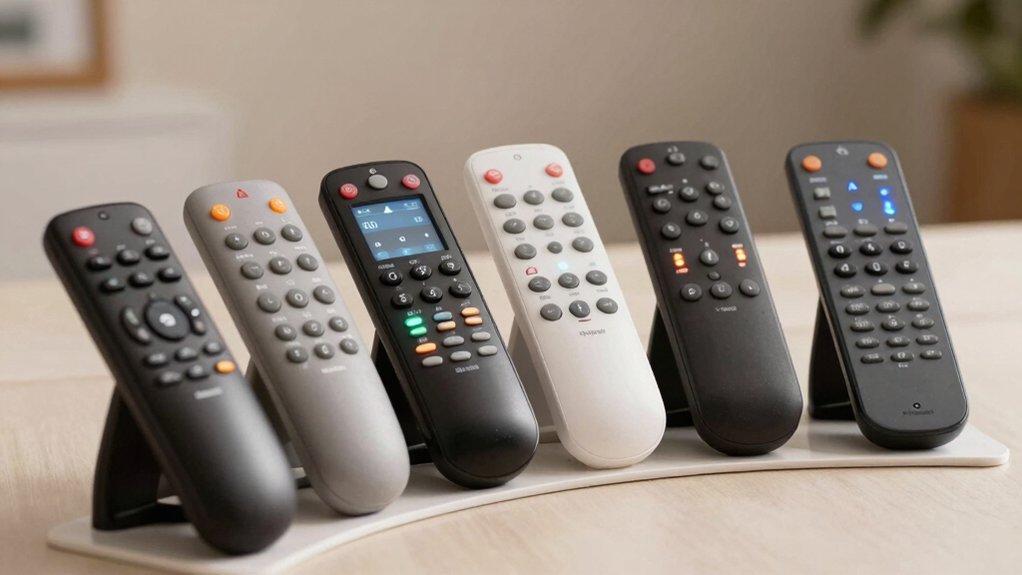

Finding the right TV remote can make a real difference in how you enjoy your programs. You’ll want to contemplate factors like button size, ease of programming, and features that match your needs. Six remotes stand out for seniors seeking straightforward show access: options range from color-coded buttons to backlit designs and learning modes. Each has distinct advantages depending on your TV type and preference for customization. To discover which one suits you best, explore what sets them apart.
| Flipper Big Button Universal TV Remote for Seniors |

| Best for Simplicity | Control Type: IR (Infrared); TV + cable box | Button Design: Large color-coded tactile buttons; 3 functions | Range: 30 feet line-of-sight | VIEW LATEST PRICE | Read Our Analysis |
| Learning Big Button Universal TV Remote with Backlit |
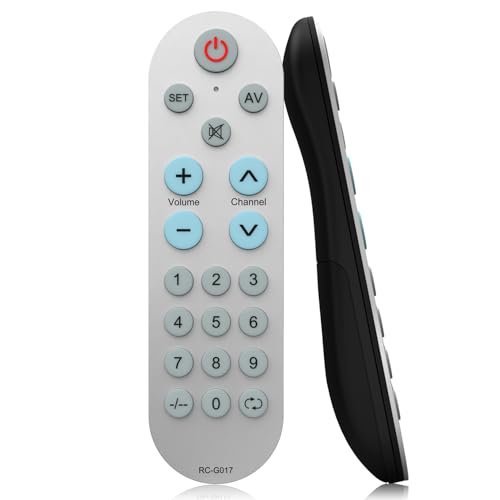
| Most Customizable | Control Type: IR (Infrared); universal learning | Button Design: Big buttons; backlit | Range: 10 meters (33 feet) | VIEW LATEST PRICE | Read Our Analysis |
| EZclicker Big Button Universal TV Remote (Black) |

| Easiest Setup | Control Type: IR (Infrared); TV only | Button Design: Extra-large enter button; 13 buttons total | Range: 45 feet | VIEW LATEST PRICE | Read Our Analysis |
| Big Button Universal Remote for All TVs |
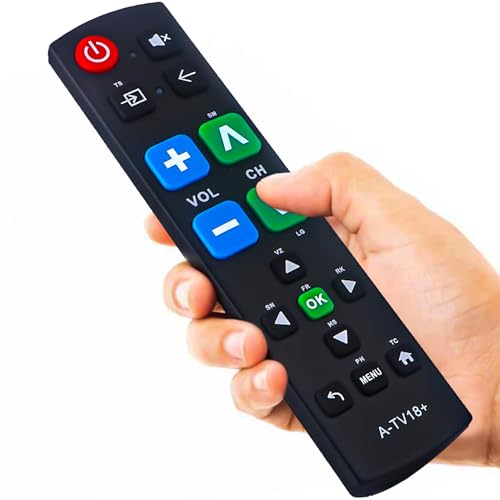
| Best Budget Pick | Control Type: IR (Infrared); TV only | Button Design: Extra-large enter button; big button controls | Range: Not specified | VIEW LATEST PRICE | Read Our Analysis |
| EZclicker TV Remote for Seniors Big Button |

| Most Popular | Control Type: IR (Infrared); TV only | Button Design: Easy big-button design; 10 buttons total | Range: 45 feet | VIEW LATEST PRICE | Read Our Analysis |
| Universal Big Button Backlit TV Remote (DT-R08B) |
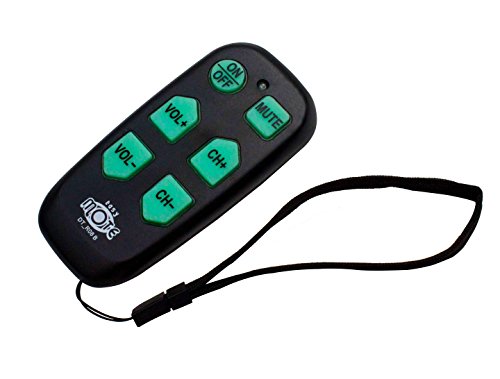
| Best Learning Remote | Control Type: IR (Infrared); TV + cable box | Button Design: 6 large bright backlit buttons | Range: 50 feet | VIEW LATEST PRICE | Read Our Analysis |
More Details on Our Top Picks
Flipper Big Button Universal TV Remote for Seniors
If you’re looking for a remote that strips away complexity and focuses on the essentials, the Flipper Big Button Universal TV Remote is designed specifically for seniors, people with dementia or Alzheimer’s, and anyone with low vision. The remote features large, color-coded tactile buttons limited to three core functions: On/Off, Channel Up/Down, Volume Up/Down, and Mute. You can program up to 25 favorite channels for quick access, eliminating the need to scroll through options. The remote works with most cable providers including Xfinity, Spectrum, and DirecTV, plus major TV brands like Samsung and LG. Setup requires direct line of sight to your devices, and you’ll need two AA batteries. Note that this remote doesn’t support streaming services or modern streaming boxes.
- Control Type:IR (Infrared); TV + cable box
- Button Design:Large color-coded tactile buttons; 3 functions
- Range:30 feet line-of-sight
- Setup/Programming:Pre-programmed; up to 25 favorites customizable
- Battery Type:2 AA batteries (not included)
- Warranty:Amazon 30-day return guarantee
- Additional Feature:Stores up to 25 favorites
- Additional Feature:Supports 3 IR devices maximum
- Additional Feature:Silicon cover hides unused buttons
Learning Big Button Universal TV Remote with Backlit
This remote works best for you if you’re a senior, elderly person, or someone with partial vision loss who needs a straightforward way to control your TV without complexity. You can set it up two ways: enter a four-digit code for your TV brand, or use the learning function to copy buttons from your original remote. The backlit buttons help you see clearly in dim rooms. It supports up to 20 devices and works with most IR televisions at distances up to 10 meters. You’ll need your original remote for the learning method. Contact customer support within 12 hours if you’re unsure about compatibility.
- Control Type:IR (Infrared); universal learning
- Button Design:Big buttons; backlit
- Range:10 meters (33 feet)
- Setup/Programming:Code setup or learning function from original remote
- Battery Type:Not specified (not included)
- Warranty:Amazon 30-day return guarantee; 1-year manufacturer
- Additional Feature:All buttons programmable via learning
- Additional Feature:Supports up to 20 devices
- Additional Feature:Backlit button visibility feature
EZclicker Big Button Universal TV Remote (Black)
The EZclicker Big Button Universal TV Remote works best for seniors who struggle with standard remote controls due to limited dexterity or vision problems. This remote features thirteen buttons with tactile feedback and an extra-large enter button for easier pressing. To program it, turn on your TV, point the remote at it, then press Mute and Volume+ together for up to sixty seconds until the volume changes. The remote works with major TV brands and reaches up to forty-five feet away. It measures seven by two by one inch, making it compact and lightweight for comfortable handling. You’ll need two AAA batteries, which aren’t included.
- Control Type:IR (Infrared); TV only
- Button Design:Extra-large enter button; 13 buttons total
- Range:45 feet
- Setup/Programming:Easy auto-program (Mute + Volume+ for 60 seconds)
- Battery Type:2 AAA batteries (not included)
- Warranty:5-year manufacturer warranty; Amazon 30-day return
- Additional Feature:5-year manufacturer warranty included
- Additional Feature:45 feet maximum range capability
- Additional Feature:13 total button controls
Big Button Universal Remote for All TVs
Looking for a remote that doesn’t require you to squint at tiny buttons or struggle with complicated setup? The Big Button Universal Remote for All TVs works with Samsung, LG, VIZIO, Sony, Hisense, Philips, Panasonic, and Sharp models. Insert batteries and immediately start controlling your TV—no programming needed. The oversized enter button and tactile feedback let you navigate channels and volume without confusion. This remote isn’t compatible with streaming devices or cable boxes, only televisions. You’ll receive excellent after-sale support and a free replacement within 90 days if issues arise. Direct customer service responds within 12 hours to answer your questions.
- Control Type:IR (Infrared); TV only
- Button Design:Extra-large enter button; big button controls
- Range:Not specified
- Setup/Programming:No programming needed; immediate use
- Battery Type:Not specified (not included)
- Warranty:90-day free replacement warranty
- Additional Feature:No programming needed required
- Additional Feature:90-day free replacement warranty
- Additional Feature:Works immediately with Samsung TVs
EZclicker TV Remote for Seniors Big Button
If you’re looking for a remote that works exclusively with your TV and doesn’t require programming for multiple devices, the EZclicker TV Remote for Seniors Big Button offers straightforward simplicity. This blue remote features ten large buttons with tactile feedback, making it easy to operate with limited dexterity or vision. It works with major TV brands at distances up to 45 feet. Programming takes minutes: turn on your TV, point the remote, then press Mute and Volume+ together for up to 60 seconds until the volume changes. The compact design measures 6 by 2 by 1 inches and weighs just 0.08 kilograms. It requires two AAA batteries and includes a five-year warranty.
- Control Type:IR (Infrared); TV only
- Button Design:Easy big-button design; 10 buttons total
- Range:45 feet
- Setup/Programming:Easy auto-program (Mute + Volume+ for 60 seconds)
- Battery Type:2 AAA batteries (not included)
- Warranty:5-year manufacturer warranty; Amazon 30-day return
- Additional Feature:10 button simplified design
- Additional Feature:45 feet maximum range capability
- Additional Feature:5-year manufacturer warranty included
Universal Big Button Backlit TV Remote (DT-R08B)
Want a remote that works with both your TV and cable box without switching between devices? The DT-R08B combines both functions into one six-button remote. Its backlit buttons display clear, large text you can read in dim lighting. To set it up, use the Quick Search feature to scan for your TV codes within seconds. If you need custom controls, activate Learning Mode and teach the remote commands from your original remote. The device reaches up to 50 feet and includes a wrist strap for secure handling. You’ll need two AA batteries, which aren’t included. This remote suits seniors, caregivers, and visually impaired users across home and facility settings.
- Control Type:IR (Infrared); TV + cable box
- Button Design:6 large bright backlit buttons
- Range:50 feet
- Setup/Programming:Quick search code scanning or learning mode
- Battery Type:2 AA batteries (not included)
- Warranty:Amazon 30-day return guarantee
- Additional Feature:Controls TV and cable boxes
- Additional Feature:50 feet maximum range capability
- Additional Feature:Strong wrist strap included
Factors to Consider When Choosing TV Remotes for Elderly
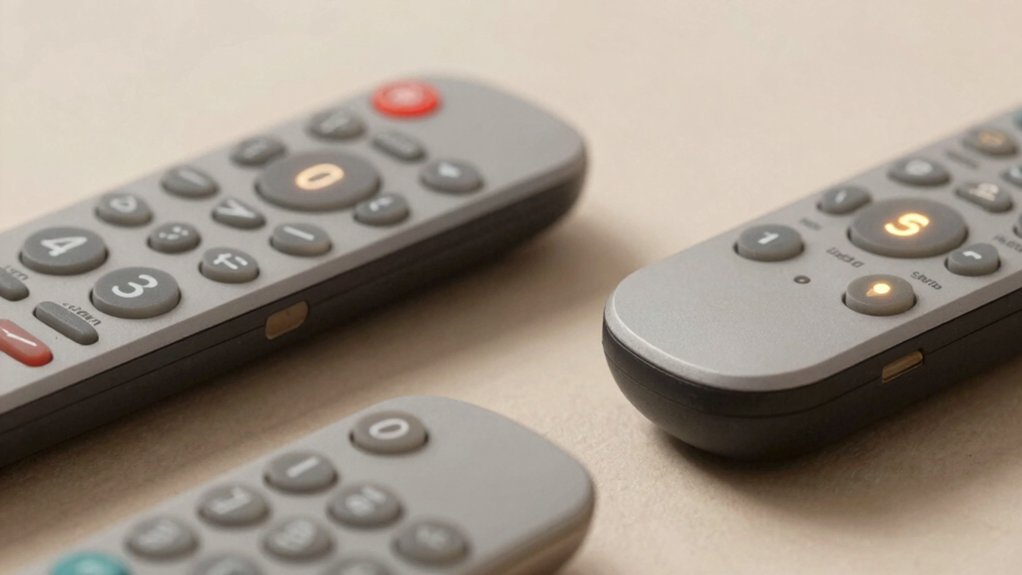
When you’re selecting a TV remote for an elderly person, you’ll want to evaluate button size and design first, as larger, clearly labeled buttons reduce confusion and mistakes during regular use. Next, check the remote’s compatibility with your specific TV brand and confirm that setup and programming don’t require complicated steps or technical knowledge. You should also assess visual clarity features like backlit buttons and high-contrast displays, along with the remote’s range and whether it requires a direct line of sight to function properly.
Button Size And Design
The physical layout of a remote’s buttons directly impacts how easily you can navigate your TV, especially if you’ve experienced changes in vision or hand strength. Look for remotes with larger buttons that provide tactile feedback when pressed, allowing you to feel confirmation without looking. Extra-wide enter and main buttons reduce the precision required for targeting, making accidental presses less likely. Choose remotes featuring high-contrast button labels with backlit illumination to improve visibility in dim lighting. Select models offering customizable 10–13 buttons rather than cluttered layouts with 50+ options, which cause confusion. Verify that buttons display clear, legible text with distinct color-coding so you’ll quickly identify frequently used functions and develop reliable muscle memory for common tasks.
Easy Setup And Programming
How simple’s your remote’s setup process? Look for models featuring single-button programming or automatic code scanning. These options eliminate trial-and-error frustration and get you controlling your TV quickly.
Learning mode remotes offer another advantage: they duplicate your original remote’s commands directly. You’ll point the learning remote at your old one, press buttons, and transfer the settings seamlessly.
Check that your remote provides clear feedback during setup. LED indicators or on-screen prompts confirm when programming succeeds, preventing confusion about whether you’ve completed steps correctly.
Examine the instruction manual before purchasing. Straightforward, numbered steps with diagrams indicate a user-friendly setup process. Avoid remotes requiring multiple complicated stages or unclear technical language.
These setup features reduce setup time from hours to minutes, letting you start using your remote immediately.
Compatibility With TV Brands
Does your remote work with your specific TV? You’ll need to verify compatibility before purchasing. Start by identifying your TV’s brand and model number, typically found on the back or in your manual. Next, check whether the remote supports universal IR compatibility or covers your specific brand. Some remotes work only with certain manufacturers like Samsung, LG, or Sony, while universal remotes control multiple brands. Review the remote’s code library—look for documentation listing hundreds of supported brands and models. Confirm whether it handles only TVs or also controls set-top boxes and cable equipment. Finally, verify learning capability, which allows the remote to copy signals from your original remote. This ensures functionality with your exact TV model.
Visual Clarity Features
Once you’ve confirmed your remote works with your TV, you’ll want to evaluate its visual clarity features—the design elements that help you see and use buttons without strain. Look for backlit or illuminated keycaps that improve legibility in dim lighting. Check that buttons are extra-large with high-contrast colors, making them easier to distinguish. Verify the labels use bold, clear symbols like arrows, volume controls, and mute icons for quick identification. Examine button spacing to ensure adequate distance between keys, preventing accidental presses of adjacent buttons. Finally, confirm the remote uses a consistent, intuitive layout across all functions. These visual features work together to reduce mistakes and help you navigate efficiently without frustration or eyestrain.
Range And Line Of Sight
Why does your remote sometimes fail to respond even when you’re pointing it at the TV? The answer lies in range and line of sight. Most elderly-focused remotes operate using infrared signals that require a direct, unobstructed path to function properly. Your remote typically works within 30 to 50 feet, depending on the model. Position yourself so nothing blocks the signal between remote and TV. If walls or furniture obstruct your view, consider using an IR extender to redirect the signal around obstacles. Check your remote’s manual for maximum range specifications. Test your setup by standing at various distances and angles to confirm reliable operation. A clear line of sight reduces errors and ensures consistent performance when changing channels or searching for shows.
Battery Life Considerations
Beyond ensuring your remote has a clear path to your TV, you’ll want to think about how long the batteries will actually last. Check whether the remote requires AA or AAA batteries, since these are widely available and easy to replace. Simpler remotes with fewer functions typically use less power and need fewer battery changes. Before purchasing, verify whether batteries come included or if you’ll buy them separately. Consider alkaline versus rechargeable options—alkaline batteries offer convenience, while rechargeable batteries reduce long-term costs. Heavier remotes or those with backlighting drain batteries faster, so factor this into your decision. Test the remote’s battery life expectations against your daily usage patterns to determine replacement frequency and overall maintenance demands.
Durability And Warranty Coverage
A remote’s durability and warranty protection directly impact how long you’ll actually use it before needing a replacement. Look for remotes with oversized, tactile buttons and solid construction—these features reduce accidental presses and withstand drops better than flimsy models. Check the warranty length; aim for multiple years rather than one year or less. Verify the replacement process: straightforward options like 90-day or longer return policies minimize downtime when issues arise. Confirm battery availability before purchasing, since frequent replacements affect long-term usability and cost. Finally, prioritize remotes with proven compatibility and upgrade options such as learning or backlit features. This approach prevents early obsolescence and reduces how often you’ll need replacements.
Device Limitation Awareness
Before you buy a remote, you’ll need to check what devices it can actually control in your home setup. Many remotes support only a fixed maximum number of devices—typically 3 to 20—so you must count your components first. List your TV, set-top box, streaming device, and sound system to determine how many controls you need.
Next, verify compatibility with each brand and model you own. Some remotes won’t work with streaming services or certain streaming boxes, limiting their usefulness. Check the product specifications against your exact equipment.
Finally, confirm whether the remote requires infrared line-of-sight or offers wireless capability. If your setup places devices behind furniture or in different rooms, line-of-sight remotes won’t function properly. Matching device limitations to your actual home configuration prevents frustration and wasted purchases.
Final Thoughts
You’ve reviewed six big button remotes designed for seniors. Each option offers distinct features: some require no programming, others include backlighting or learning modes. Select based on your specific needs. If you want simplicity, choose the no-programming model. If you need customization, pick a learning remote. Consider your TV compatibility and hand dexterity level. Test the remote’s button size and spacing before purchasing to ensure comfortable use.

Meet Ry, “TechGuru,” a 36-year-old technology enthusiast with a deep passion for tech innovations. With extensive experience, he specializes in gaming hardware and software, and has expertise in gadgets, custom PCs, and audio.
Besides writing about tech and reviewing new products, he enjoys traveling, hiking, and photography. Committed to keeping up with the latest industry trends, he aims to guide readers in making informed tech decisions.