
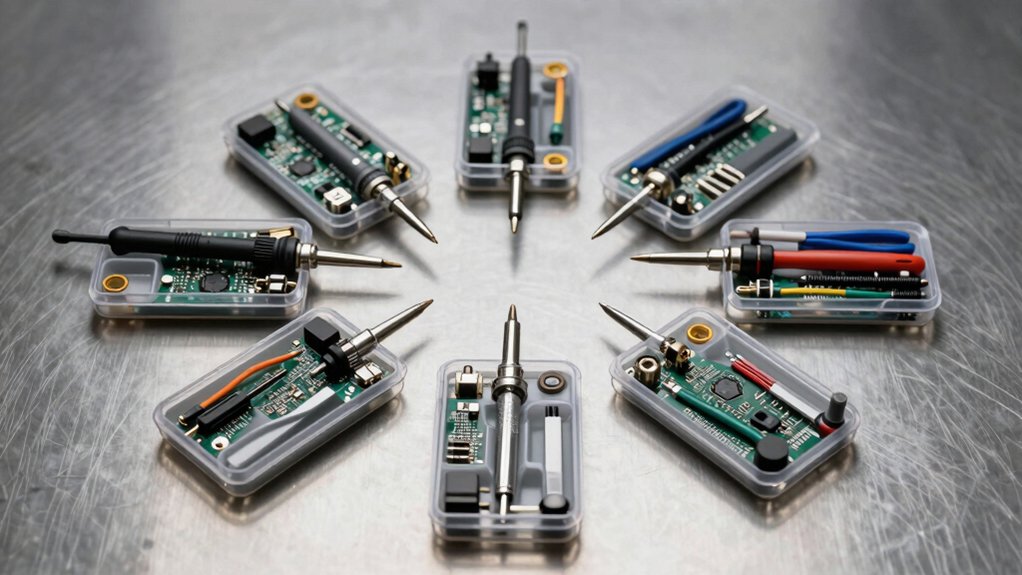

When your USB cables fray or connectors fail, you don’t need to replace your entire device. You can fix common tech problems in minutes with the right repair kit. Whether you’re dealing with loose connections, damaged plugs, or broken adapters, specific kits address each issue directly. The seven options we’ve compiled offer different solutions—from solderless adapters to complete connector assortments—so you’ll find exactly what suits your situation.
| Solderless USB 2.0 Connector Adapter Kit (Male+Female) |

| Best Complete Kit | Installation Method: Solderless screw terminal | Connector Type: USB Type A male + female adapter | Pin Configuration: 5-pin terminal design | VIEW LATEST PRICE | Read Our Analysis |
| BlingKingdom USB Type A Male Jack Connectors (5-Pack) |
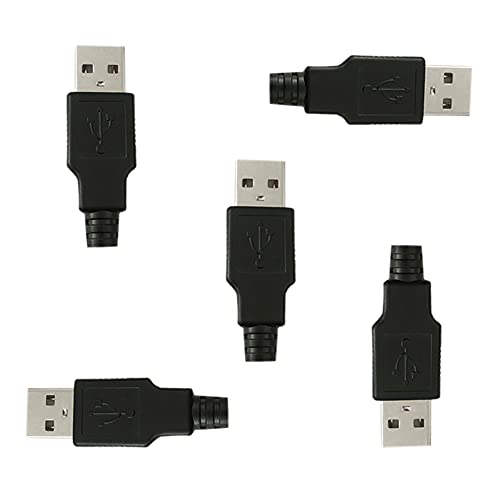
| Bulk Soldering Option | Installation Method: Solder type | Connector Type: USB Type A male jack connector | Pin Configuration: 4-pin connector | VIEW LATEST PRICE | Read Our Analysis |
| 4Pcs USB 2.0 Male Plug Power Data Cable |
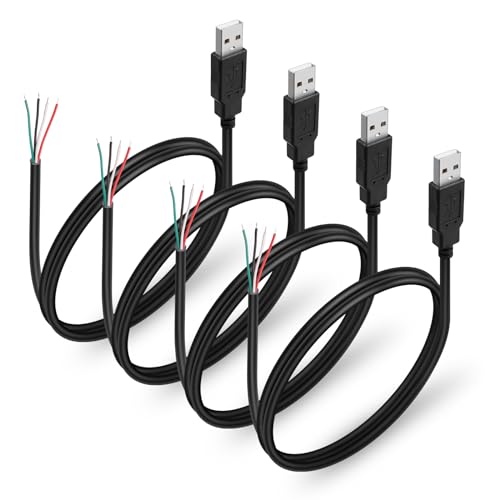
| Pre-Made Cable Solution | Installation Method: Bare wire (solder required) | Connector Type: USB Type A male plug with bare wire | Pin Configuration: 4-pin bare wire | VIEW LATEST PRICE | Read Our Analysis |
| XMSJSIY USB 2.0 Screw Terminal Block Adapter (2-Pack) |
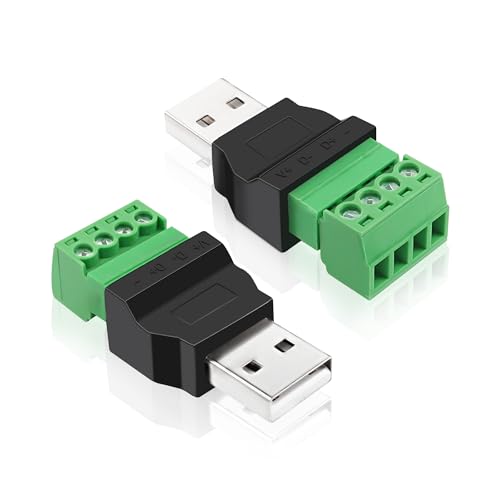
| Best Solderless Design | Installation Method: Solderless screw terminal | Connector Type: USB Type A male to screw terminal | Pin Configuration: 4-pin screw terminal | VIEW LATEST PRICE | Read Our Analysis |
| USB Pigtail Cable Power Wire 2-Pack (1.64ft) |

| Budget-Friendly Pick | Installation Method: Bare wire (solder required) | Connector Type: USB male pigtail cable | Pin Configuration: 4-pin bare wire | VIEW LATEST PRICE | Read Our Analysis |
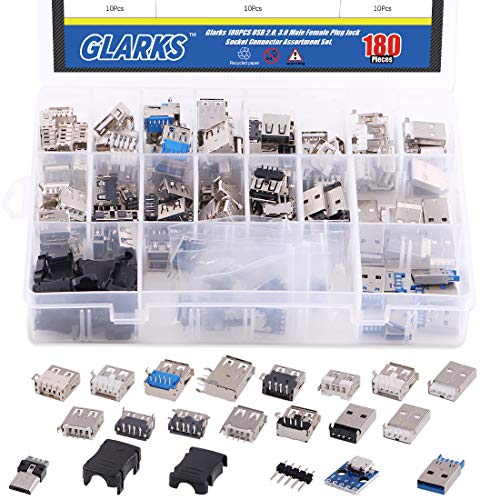
| Glarks 180Pcs Micro Sockets USB Connector Assortment Set |
| Most Versatile Assortment | Installation Method: Solder type | Connector Type: USB A male/female connectors (assortment) | Pin Configuration: Multiple connector types (15 kinds) | VIEW LATEST PRICE | Read Our Analysis |
| QIANRENON USB 2.0 Solderless Adapter Terminal Block Connector |

| Professional-Grade Adapter | Installation Method: Solderless screw terminal | Connector Type: USB Type A male to 5-pin terminal | Pin Configuration: 5-pin terminal design | VIEW LATEST PRICE | Read Our Analysis |
More Details on Our Top Picks
Solderless USB 2.0 Connector Adapter Kit (Male+Female)
If you’re repairing USB cables without soldering equipment, the Solderless USB 2.0 Connector Adapter Kit offers a practical solution through its 5-pin screw terminal design. Connect the red wire to V+, white to D+, green to D-, and black to ground, then secure the shielded wire separately. The kit includes one male and one female connector, supporting 16-28 AWG wire gauges. Nickel-plated interfaces and pure copper conductors ensure reliable signal transmission with strong oxidation resistance. This adapter works with flash drives, keyboards, mice, cameras, printers, and most USB devices, making it ideal for quick cable repairs or extensions without soldering tools.
- Installation Method:Solderless screw terminal
- Connector Type:USB Type A male + female adapter
- Pin Configuration:5-pin terminal design
- Quantity per Kit:1 male + 1 female connector
- Data Transfer Speed:USB 2.0 compatible
- Primary Materials:Nickel-plated interfaces, pure copper conductors
- Additional Feature:Nickel-plated oxidation resistance
- Additional Feature:Supports 16-28 AWG
- Additional Feature:Male + Female pair
BlingKingdom USB Type A Male Jack Connectors (5-Pack)
The BlingKingdom 5-pack is your best choice if you’re building or repairing USB devices and need reliable male connectors for soldering projects. Each set contains four pins designed for direct soldering to your cable wires. Start by cutting your USB cable end, then strip the insulation from each wire carefully. Solder each wire to its corresponding pin using appropriate heat and solder. Once complete, snap the two-part black plastic shell together securely to insulate and protect your joints. The 3mm cable exit accommodates standard USB cables. These connectors work with most computers, laptops, and power banks, making them essential for DIY USB power supplies and breadboard applications.
- Installation Method:Solder type
- Connector Type:USB Type A male jack connector
- Pin Configuration:4-pin connector
- Quantity per Kit:5-pack
- Data Transfer Speed:USB 2.0 compatible
- Primary Materials:High-quality metal with black plastic shell
- Additional Feature:Two-part plastic shell design
- Additional Feature:3mm cable exit
- Additional Feature:Solder type assembly
4Pcs USB 2.0 Male Plug Power Data Cable
Looking to repair USB devices without soldering expertise or specialized equipment? The 4Pcs USB 2.0 Male Plug Power Data Cable offers a practical solution. Each kit includes four USB A male connectors with bare wire ends, allowing you to replace damaged cables on laptops, LED lamps, fans, and charging devices. The tinned copper tails strip easily for twisting or soldering onto circuit boards and power adapters. These cables support 5V 2A charging and USB 2.0 data speeds up to 480 Mbps. The shielded construction with pure copper cores reduces signal loss and electromagnetic interference. Simply identify the four pins—power, ground, and data lines—then connect them to your device’s corresponding terminals.
- Installation Method:Bare wire (solder required)
- Connector Type:USB Type A male plug with bare wire
- Pin Configuration:4-pin bare wire
- Quantity per Kit:4 pieces
- Data Transfer Speed:480 Mbps (USB 2.0)
- Primary Materials:Pure copper conductor, PVC insulation
- Additional Feature:Tinned tails for soldering
- Additional Feature:5V 2A fast charging
- Additional Feature:Shielded EMI/RFI protection
XMSJSIY USB 2.0 Screw Terminal Block Adapter (2-Pack)
You’ll find this adapter especially useful when you need to repair or extend USB cables without soldering equipment. This 2-pack contains USB 2.0 A male screw terminal adapters that connect directly to your cables’ four pins: V+, D+, D-, and ground. Simply strip your cable’s outer insulation, identify each wire, and insert them into the corresponding terminals using a small screwdriver. The pure copper conductors and nickel-plated interface resist oxidation and maintain reliable connections. Install these adapters on USB drives, keyboards, mice, cameras, and phones. The flame-retardant plastic housing and integrated groove design keep connections tight and secure, eliminating the need for expensive soldering tools.
- Installation Method:Solderless screw terminal
- Connector Type:USB Type A male to screw terminal
- Pin Configuration:4-pin screw terminal
- Quantity per Kit:2-pack
- Data Transfer Speed:USB 2.0 standard
- Primary Materials:Pure copper conductor, nickel-plated interface
- Additional Feature:Integrated molding terminal groove
- Additional Feature:Extends USB cable length
- Additional Feature:Anti-loosening bolt design
USB Pigtail Cable Power Wire 2-Pack (1.64ft)
For DIY repair projects and custom electronics builds, this 2-pack of USB pigtail cables offers bare wire ends that you can solder directly into circuits without additional preparation. Each cable measures 0.5 meters and features 24AWG pure copper conductors rated for 2A at 5V, making them suitable for LED strips, USB fans, and mini lamps. The pre-stripped and tinned wire ends eliminate setup steps, letting you begin soldering immediately. UL-recognized insulation ensures fire resistance and electrical safety. Use these cables to repair broken USB connections, modify power supplies, or build custom circuit panels. The compact length reduces clutter while the 2-pack quantity covers multiple projects efficiently.
- Installation Method:Bare wire (solder required)
- Connector Type:USB male pigtail cable
- Pin Configuration:4-pin bare wire
- Quantity per Kit:2-pack
- Data Transfer Speed:USB 2.0 compatible
- Primary Materials:Pure copper 24AWG, PVC-insulated
- Additional Feature:Pre-stripped tinned wire
- Additional Feature:0.5M compact length
- Additional Feature:UL recognized fire resistant
Glarks 180Pcs Micro Sockets USB Connector Assortment Set
Do you need a thorough collection of USB connectors to repair or build custom cables without purchasing individual components? The Glarks 180-piece set provides fifteen different USB jack types in black and white. You’ll find USB A female and male connectors with gold-plated brass contacts for reliable connections. The environment-friendly plastic shells ensure durability during repeated use. Assembly requires no extra tools, though soldering may be necessary for some applications. This assortment works with computers, phones, mice, keyboards, and chargers. Store the compact, lightweight set in your repair kit for quick access when you need replacements or custom cable solutions.
- Installation Method:Solder type
- Connector Type:USB A male/female connectors (assortment)
- Pin Configuration:Multiple connector types (15 kinds)
- Quantity per Kit:180 pieces
- Data Transfer Speed:USB 2.0 compatible
- Primary Materials:Gold-plashed brass contacts, environment-friendly plastic
- Additional Feature:Gold-plashed brass contacts
- Additional Feature:15 different connector kinds
- Additional Feature:Environment-friendly plastic shell
QIANRENON USB 2.0 Solderless Adapter Terminal Block Connector
If you’re repairing a damaged USB cable without soldering equipment, the QIANRENON USB 2.0 Solderless Adapter Terminal Block Connector offers a practical solution that doesn’t require heat tools or special skills. This metal-housed adapter accepts USB 2.0 male connectors and features five screw terminals for wire attachment. You’ll connect the cable’s four wires—VBUS (5V), D+, D-, and GND—to their corresponding terminals using only a screwdriver. The adapter supports 480 Mbps data transfer and 5A charging, making it suitable for keyboards, mice, printers, and charging cables. Simply strip the cable wires, insert them into the appropriate terminals, and tighten the screws securely.
- Installation Method:Solderless screw terminal
- Connector Type:USB Type A male to 5-pin terminal
- Pin Configuration:5-pin terminal design
- Quantity per Kit:Single unit
- Data Transfer Speed:480 Mbps (USB 2.0)
- Primary Materials:Metal shell, 5-pin screw terminal design
- Additional Feature:Metal housing ground protection
- Additional Feature:480 Mbps data transfer
- Additional Feature:Screw-locking shell installation
Factors to Consider When Choosing a USB Repair Kit
You’ll need to verify that the kit’s connector type matches your device’s USB version (Type-A, Type-B, Type-C, or Micro-USB) before purchasing. Decide whether you prefer soldering, which requires heat equipment and skill, or solderless options that use terminal blocks for faster assembly without special tools. Check the cable gauge specifications, shielding quality for signal protection, and total component quantity in the package to ensure you’re getting adequate value for your repair needs.
Connector Type Compatibility
What’s the first thing you should check before buying a USB repair kit? Identify your device’s connector type. USB repair kits come in different configurations: USB A male, USB A female, or USB A jack connectors. Match the kit’s connector to your device’s port type to avoid incompatibility.
Next, confirm the pin count. Standard USB A connectors use 4 pins, while some solderless options feature 5 pins. Your cable’s wiring scheme must align with the connector’s pin configuration to prevent miswiring during repair.
Finally, decide between soldered and solderless options. Solderless connectors use screw terminals or bolt connections for quick assembly without tools or heating equipment. Soldered connectors require soldering equipment but offer stronger, more permanent connections for heavy-use applications.
Soldering Vs. Solderless
When you’re deciding between soldering and solderless repair kits, consider your available tools, the repair’s permanence, and how you’ll use the device afterward. Soldered connections create permanent, mechanically strong joints with lower electrical resistance, making them ideal for devices you won’t modify again. However, soldering requires a heating tool and risks damaging nearby components if you’re inexperienced. Solderless kits use screw terminals or clamps for quick assembly without heat tools, perfect for field repairs and prototyping. The trade-off is slightly higher electrical resistance and potential loosening from vibration over time. Choose soldering for durability and performance in fixed applications. Select solderless options when you need speed, reversibility, or lack proper soldering equipment.
Cable Gauge Requirements
How do you know which wire gauge to use in your USB repair kit? You’ll match the gauge to your device’s power requirements. For power lines, use 24 AWG wire, which safely handles up to 2 A at 5 V—sufficient for most low-power USB devices. For data lines, use 28 AWG wire, the standard for signal transmission. Before purchasing a kit, verify that your chosen gauges fit within your adapter’s terminal clamp range. Check that the conductor size doesn’t exceed your plug’s rated specifications. If you’re extending cables longer distances, thicker gauges minimize voltage drop and protect data signal stability. Always match the kit’s available gauges to your specific device load to ensure safe, reliable repairs.
Shielding And Signal Protection
While selecting the right wire gauge protects your device from power overload, shielding and signal protection work alongside those gauges to keep your data transmission clean and reliable. When you choose a repair kit, look for shielded wires and metal housings that reduce EMI/RFI interference. Pure copper conductors combined with shielding enhance conductivity while minimizing signal loss over DIY cables. Verify that gold- or nickel-plated interfaces pair with the shielding to reduce corrosion at connectors, improving long-term signal reliability. Check that your kit includes a screw-terminal or solderless design that maintains a solid shield connection. This prevents ground loops and ensures consistent USB performance. The insulation quality must accommodate shielding effectiveness without adding excessive bulk to your final assembly.
Quantity And Package Value
The quantity of USB connectors and cables included in your repair kit directly determines how many repairs you can complete before reordering. Single-pair kits containing just 2 pieces work for occasional fixes, while bulk sets with 180 pieces support ongoing projects without frequent restocking. Multi-pack offerings like 5-set bundles or 2-pack cables let you handle multiple simultaneous repairs efficiently. Bulk assortments reduce per-unit costs significantly, making them ideal for classrooms or large DIY operations. Calculate your actual repair volume first: count expected monthly repairs, then choose a kit size matching that demand. Storage requirements also factor in—larger quantities need proper organization systems. Matching kit size to your project scope prevents both shortage delays and wasteful overstocking.
Material Quality And Durability
Beyond counting pieces in your kit, you’ll want to examine what those components are actually made of, since material quality directly affects how long your repairs last and how safely they perform. Look for solderless adapters with nickel-plated interfaces that resist oxidation and maintain reliable connections over time. Choose cables and connectors using pure copper conductors, which provide lower resistance and better conductivity than alternatives. Prioritize flame-retardant insulation and robust plastic or metal housings for improved durability and safety. Verify that shielding and braided or solid grounds are included to reduce EMI/RFI interference and preserve signal integrity. Check for durable construction features like secure screw-terminals, reinforced shells, and corrosion-resistant plating. These specifications directly extend your kit’s service life and repair reliability.
Final Thoughts
You’ve now reviewed seven practical USB repair kits that address common connector and cable issues. Select a kit based on your specific problem: choose solderless adapters for quick fixes, connector packs for replacements, or assortment sets for multiple repair types. Match the kit to your USB version and connector type. Keep your chosen kit accessible for future repairs, ensuring you’ll handle tech problems efficiently without costly replacements.

Meet Ry, “TechGuru,” a 36-year-old technology enthusiast with a deep passion for tech innovations. With extensive experience, he specializes in gaming hardware and software, and has expertise in gadgets, custom PCs, and audio.
Besides writing about tech and reviewing new products, he enjoys traveling, hiking, and photography. Committed to keeping up with the latest industry trends, he aims to guide readers in making informed tech decisions.