
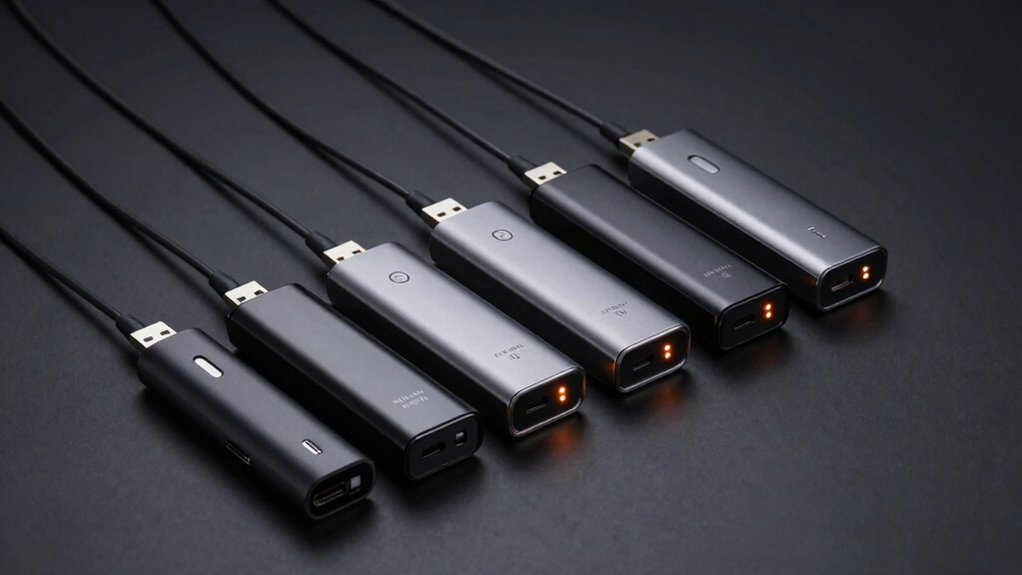

If you’re ready to stream live TV through your computer or mobile device, you’ll need to pick the right USB TV tuner. You’ve got several solid options available, each with different strengths: the Hauppauge WinTV-DualHD handles dual recordings simultaneously, while Mygica models offer flexibility across Windows and Android. The OWERSLYN converter box combines OTA reception with DVR scheduling. Before you choose, you’ll want to understand what each tuner does and which features matter most for your setup.
| HAUPPAUGE WinTV-DualHD Dual USB 2.0 HD TV Tuner for Windows PC 1595,Black |
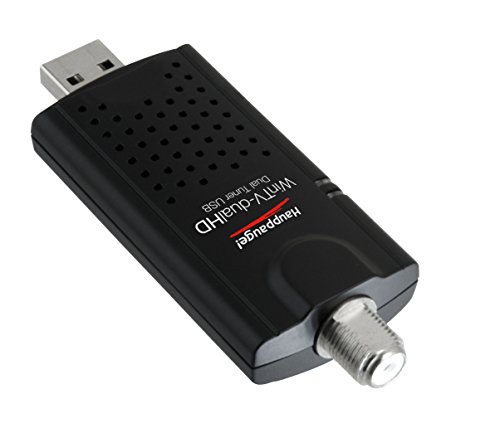
| Most Versatile PC Tuner | Video Resolution Support: HD (1080P capable via software) | Recording Capability: Dual-channel simultaneous recording | Operating System Compatibility: Windows 10, 8, 7, Vista | VIEW LATEST PRICE | Read Our Analysis |
| OWERSLYN 1080P Digital Converter Box with TV Tuner |

| Most Compact Design | Video Resolution Support: 1080P HD | Recording Capability: Real-time DVR recording with timer scheduling | Operating System Compatibility: Not specified (appears universal with HDMI/RCA outputs) | VIEW LATEST PRICE | Read Our Analysis |
| Mygica A681B Analog USB TV Tuner Card Antenna |

| Cross-Platform Compatible | Video Resolution Support: 1080P HDTV | Recording Capability: Recording via HiDTV software | Operating System Compatibility: Windows 7, 10, 11; Linux Ubuntu 20.04.1 | VIEW LATEST PRICE | Read Our Analysis |
| Mygica A681B USB TV Tuner Card HDTV Adapter |

| Best Windows Performance | Video Resolution Support: 1080P HDTV | Recording Capability: Recording via HiDTV software | Operating System Compatibility: Windows 7, 10, 11; Linux Ubuntu 20.04.1 | VIEW LATEST PRICE | Read Our Analysis |
| USB Type-C TV Tuner Card for Android Devices |

| Best Mobile Solution | Video Resolution Support: ATSC digital TV (resolution varies by broadcast) | Recording Capability: Recording capability included | Operating System Compatibility: Android devices (phones and tablets) | VIEW LATEST PRICE | Read Our Analysis |
More Details on Our Top Picks
HAUPPAUGE WinTV-DualHD Dual USB 2.0 HD TV Tuner for Windows PC 1595,Black
If you’re looking to record one TV channel while watching another without interruption, the Hauppauge WinTV-DualHD delivers the dual-tuner capability you need. This USB 2.0 device supports both ATSC over-the-air and QAM cable TV signals, letting you capture HD content simultaneously on two channels. Connect it to your Windows PC (10, 8, or 7) with the included USB extension cable and antenna. The WinTV v10 software manages recording and playback. You’ll need a 3.0 GHz processor minimum. Compatible with Plex Media Server when you have a Plex Pass, this tuner provides flexible viewing options including picture-in-picture mode. The package includes a remote control, portable antenna, and activation code.
- Video Resolution Support:HD (1080P capable via software)
- Recording Capability:Dual-channel simultaneous recording
- Operating System Compatibility:Windows 10, 8, 7, Vista
- Tuner Type:Dual ATSC/QAM tuners
- Internet Requirement:Internet not required for TV reception
- Antenna:Portable TV antenna included
- Additional Feature:Dual simultaneous channel recording/viewing
- Additional Feature:Picture-in-picture capability
- Additional Feature:2-year limited warranty
OWERSLYN 1080P Digital Converter Box with TV Tuner
The OWERSLYN 1080P Digital Converter Box works best for you if you’re cutting cable costs and want to watch free over-the-air broadcasts in HD without paying monthly subscription fees. Connect an external antenna to receive ATSC signals, then plug the device into your TV’s HDMI port. Power it using your TV’s USB port or a separate 5V charger. The included 2-in-1 remote controls the tuner directly. You’ll access 1080P HD resolution through HDMI, 3RCA, or component outputs. Record programs in real-time or schedule future recordings using the built-in DVR function. Access USB storage to play videos, music, and photos alongside your recorded content.
- Video Resolution Support:1080P HD
- Recording Capability:Real-time DVR recording with timer scheduling
- Operating System Compatibility:Not specified (appears universal with HDMI/RCA outputs)
- Tuner Type:ATSC tuner
- Internet Requirement:Internet not required for TV reception
- Antenna:External antenna required (sold separately)
- Additional Feature:75% smaller compact design
- Additional Feature:Real-time DVR recording capability
- Additional Feature:Lifetime customer support included
Mygica A681B Analog USB TV Tuner Card Antenna
Want to watch digital TV on your Windows computer or Android device without relying on WiFi? The Mygica A681B delivers exactly that. This portable USB tuner supports 1080P HDTV and works with Windows 7, 10, and 11, plus Android devices. First, download the latest driver and HiDTV playback software from Mygica’s official website. Install both before connecting the tuner. The software lets you watch live broadcasts and record programs for later viewing. Note that this tuner isn’t compatible with MacBooks. It functions in the United States, Canada, Mexico, and South Korea. Most setup problems stem from incomplete driver installation, so follow installation instructions carefully. Contact vendor support if issues persist.
- Video Resolution Support:1080P HDTV
- Recording Capability:Recording via HiDTV software
- Operating System Compatibility:Windows 7, 10, 11; Linux Ubuntu 20.04.1
- Tuner Type:ATSC tuner
- Internet Requirement:WiFi not required after installation
- Antenna:Antenna included
- Additional Feature:Cross-platform Android compatibility
- Additional Feature:HiDTV recording/playback software
- Additional Feature:Linux Ubuntu support included
Mygica A681B USB TV Tuner Card HDTV Adapter
Looking for a portable way to watch live TV on your computer without needing an internet connection? The Mygica A681B USB TV Tuner Card HDTV Adapter delivers this capability. You’ll connect the device to your desktop or laptop via USB 2.0, then download drivers and playback software from Mygica’s official website. The tuner supports 1080P HDTV and enables recording and playback through HiDTV software. It works on Windows 7, Windows 10, Windows 11, and Linux Ubuntu 20.04.1. You can also use it with Android TV and Android car systems after installing required software. Most setup issues stem from improper driver installation, so follow instructions carefully. Contact your seller if problems persist.
- Video Resolution Support:1080P HDTV
- Recording Capability:Recording via HiDTV software
- Operating System Compatibility:Windows 7, 10, 11; Linux Ubuntu 20.04.1
- Tuner Type:ATSC tuner
- Internet Requirement:WiFi not required after installation
- Antenna:Antenna included
- Additional Feature:Multiple OS support flexibility
- Additional Feature:Portable 1080P design
- Additional Feature:Regional availability four countries
USB Type-C TV Tuner Card for Android Devices
If you’re an Android user who wants to watch live TV without relying on mobile data or WiFi, a USB Type-C TV tuner card delivers broadcast television directly to your phone or tablet through over-the-air ATSC signals. You’ll appreciate the plug-and-play design—simply connect the compact device to your phone’s USB port, attach the rope antenna, and you’re ready to watch. No driver installation’s required. Download the free PAD TV HD app from your player store to control stations and access channels. You can watch live broadcasts anywhere: football games during your commute, sports events on the subway, or breaking news on the go. This tuner card works with most Android devices and offers high sensitivity and compatibility for reliable reception.
- Video Resolution Support:ATSC digital TV (resolution varies by broadcast)
- Recording Capability:Recording capability included
- Operating System Compatibility:Android devices (phones and tablets)
- Tuner Type:ATSC tuner
- Internet Requirement:No 3G/4G/WiFi required
- Antenna:Rope antenna design included
- Additional Feature:No driver installation required
- Additional Feature:Rope antenna design included
- Additional Feature:On-the-go mobile viewing
Factors to Consider When Choosing USB TV Tuners
When you’re selecting a USB TV tuner, you’ll need to verify that the device works with your operating system, check whether it supports the broadcast standards in your area, and confirm your device has the correct USB port type available. Next, review the video output options—such as HDMI or composite connections—to ensure compatibility with your display, and examine the recording and playback features to determine if you can save programs and watch them later. These factors combined will help you match a tuner’s capabilities to your specific streaming and viewing needs.
Operating System Compatibility
Which operating system does your computer run? Your answer determines which USB TV tuner you can actually use. Check your device’s specifications first—manufacturers list supported operating systems like Windows 7/8/10/11, Linux, or Android. Don’t assume compatibility; verify it before purchasing. Next, confirm that drivers and playback software are available for download on your system. Some tuners require manufacturer-provided applications to function properly, so missing software means the device won’t work. If you use MacOS, note whether the tuner explicitly supports it, since many don’t. Additionally, review minimum CPU or RAM requirements listed alongside OS support. For cross-platform needs, research which apps work on your systems—options like HiDTV or Plex may differ across platforms. Match your operating system precisely to avoid incompatible purchases.
Tuner Type And Reception
Beyond confirming your operating system will support the tuner hardware, you’ll need to verify that the tuner type itself matches your local broadcast standards and your viewing goals. ATSC tuners receive over-the-air digital TV in North America, while QAM tuners capture unencrypted digital cable signals. Check your region’s broadcast format before purchasing. Next, consider whether you need dual tuners, which allow you to record one channel while watching another simultaneously. Finally, evaluate reception quality by examining antenna requirements. External antennas and coax inputs directly impact signal strength. Verify your tuner supports the resolution you need—some handle 1080p while others cap at lower resolutions. Proper antenna placement ensures reliable reception and consistent streaming performance.
USB Connectivity Requirements
How well your USB TV tuner performs depends largely on the connectivity standard you choose. USB 2.0 handles basic single-tuner setups, while USB 3.0 supports high-definition streams and multi-channel recording simultaneously. Check your computer’s available USB ports before purchasing.
Next, verify driver compatibility with your operating system. Some tuners require specific drivers for Windows or Linux, affecting plug-and-play functionality. Download drivers beforehand if needed.
Consider power requirements carefully. Many tuners draw significant power and may need an external powered hub or extension cable for stable operation. Connect powered devices to a hub rather than directly to your computer’s port.
Finally, examine cable length and quality. Longer USB cables can introduce signal degradation and latency during live TV viewing. Keep cables under ten feet when possible for optimal performance.
Video Output Options
Once you’ve confirmed your USB connectivity and power setup, you’ll need to evaluate what video output options the tuner provides, as this directly affects which displays you can connect it to. Most USB tuners offer HDMI, USB, component, or 3RCA outputs. HDMI outputs deliver 1080p HD quality and work with modern TVs and monitors. Component outputs suit older displays requiring separate video and audio cables. 3RCA composite connections are legacy options for standard-definition viewing. Some tuners bundle multiple output types—HDMI plus 3RCA—to maximize compatibility. Check which cables come included with your tuner model. This determines whether you’ll need to purchase adapters separately. Match the tuner’s outputs to your display’s available inputs before purchasing.
Recording And Playback Features
What recording capabilities does your tuner actually offer? Recording depends on your host software and available disk space, not the tuner hardware itself. Many USB tuners don’t include built-in hard drives, so you’ll rely on your PC or external storage to save programs. Check whether your tuner’s bundled software supports live pause and timeshift features, which let you replay previously watched content during playback. Dual-tuner models let you record two channels simultaneously or view them in picture-in-picture mode, giving you flexible recording options. Before purchasing, verify software compatibility and required drivers for your system. Confirm your storage capacity meets your recording needs, as video files consume significant space depending on quality and duration.
Physical Size And Portability
Size matters when you’re choosing a USB TV tuner for your home entertainment setup. Compact models measuring 1.25 x 0.5 x 3.5 inches fit easily behind TVs or desktops, keeping your space organized. These tuners typically weigh only a few ounces, making them ideal for travel or relocating between rooms.
When evaluating portability, consider models that include a short USB extension cable. This accessory improves placement flexibility and lets you position the tuner away from your device without adding bulk to your setup.
Mini tuners that are 75% smaller than full-sized units reduce clutter markedly. They’re easier to transport and store than external alternatives.
Some compact models feature 2-in-1 learning remotes with integrated IR receivers. This design maintains a clean, single-device setup while preserving functionality.
Final Thoughts
You’ve reviewed five USB TV tuner options with distinct features. Match your choice to your needs: pick the Hauppauge for dual simultaneous recordings, the Mygica for portability across devices, the OWERSLYN for DVR scheduling, or a USB Type-C tuner for Android mobility. Consider your PC or mobile setup, desired recording capacity, and compatibility before purchasing. Each tuner delivers 1080P streaming when paired with appropriate software and antennas.

Meet Ry, “TechGuru,” a 36-year-old technology enthusiast with a deep passion for tech innovations. With extensive experience, he specializes in gaming hardware and software, and has expertise in gadgets, custom PCs, and audio.
Besides writing about tech and reviewing new products, he enjoys traveling, hiking, and photography. Committed to keeping up with the latest industry trends, he aims to guide readers in making informed tech decisions.