

You’re looking to upgrade your garage door with WiFi capability, but you’re not sure which adapter fits your existing system. The good news is that several universal options work across different brands without requiring a complete replacement. Each solution offers remote access and alerts through your smartphone. Before you choose, you’ll need to understand what these adapters do differently and which one matches your setup.
| eKyro Smart Garage Door Opener WiFi Remote Controller |
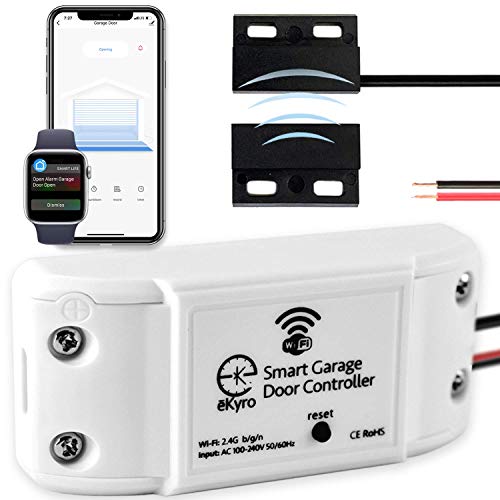
| Universal Compatibility Leader | Voice Assistant Compatibility: Alexa, Google Home, Siri | Remote Access Method: Mobile app, remote monitoring via phone | Door Status Monitoring: Door left open alert and remote monitoring | VIEW LATEST PRICE | Read Our Analysis |
| CHAMBERLAIN Smart Garage Control WiFi Hub and Sensor |
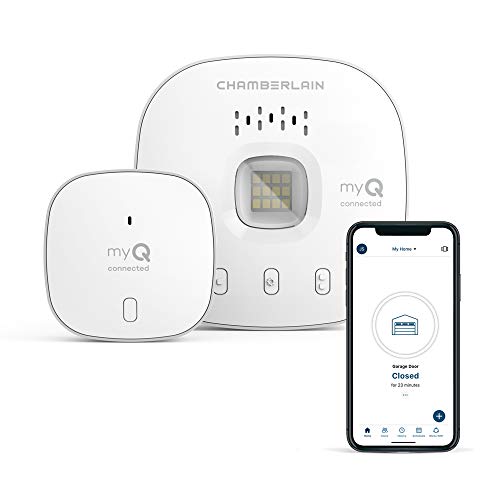
| Best for Amazon Integration | Voice Assistant Compatibility: Amazon Alexa, Google Assistant | Remote Access Method: Free myQ app (iPhone/Android) | Door Status Monitoring: Real-time alerts for door status and events | VIEW LATEST PRICE | Read Our Analysis |
| Genie Aladdin Connect Smartphone Garage Door Opener |

| Multi-Door Ready | Voice Assistant Compatibility: Amazon Alexa, Google Assistant | Remote Access Method: Free Aladdin Connect app (iPhone/Android) | Door Status Monitoring: Real-time status monitoring and operation records | VIEW LATEST PRICE | Read Our Analysis |
| Meross Smart Garage Door Opener HomeKit Compatible |
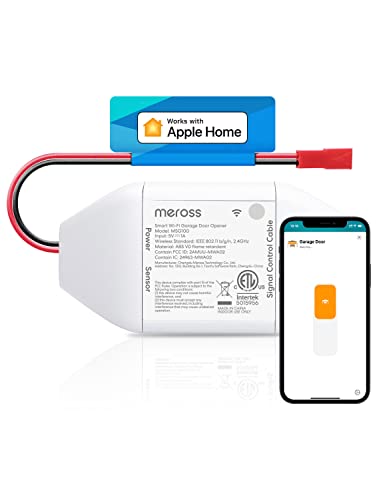
| Apple HomeKit Specialist | Voice Assistant Compatibility: Apple HomeKit, Siri, Alexa, Google Assistant, SmartThings | Remote Access Method: Meross app from anywhere with internet | Door Status Monitoring: Status monitoring with operation records and notifications | VIEW LATEST PRICE | Read Our Analysis |
| Switchbot WiFi Smart Garage Door Opener Matter Certified |

| Matter Certified Standard | Voice Assistant Compatibility: Alexa, Google Home, Siri, SmartThings | Remote Access Method: SwitchBot app with real-time alerts | Door Status Monitoring: Real-time alerts and status monitoring | VIEW LATEST PRICE | Read Our Analysis |
More Details on Our Top Picks
eKyro Smart Garage Door Opener WiFi Remote Controller
Want a WiFi garage door opener that works with almost any system? The eKyro Smart Garage Door Opener EKGD221 is a universal remote controller that connects your existing opener to Alexa, Google Home, and your smartphone. You’ll get mobile access, scheduling, and automatic door-closing features at no monthly cost. Each door needs its own controller unit. Most openers are compatible, though adapters may be required for certain models—Ryobi doors aren’t supported. Contact eKyro if you’re unsure about your opener’s compatibility. The device weighs 12.3 ounces and measures 7.09 x 4.53 x 1.61 inches, mounting easily near your garage door motor.
- Voice Assistant Compatibility:Alexa, Google Home, Siri
- Remote Access Method:Mobile app, remote monitoring via phone
- Door Status Monitoring:Door left open alert and remote monitoring
- Automatic Close Scheduling:Door closing automation and scheduling
- WiFi Connectivity:WiFi enabled remote controller
- Multi-Door Support:Pair multiple eKyro Openers; each door requires own controller
- Additional Feature:Door left open alerts
- Additional Feature:No monthly subscription fees
- Additional Feature:Universal adapter compatibility
CHAMBERLAIN Smart Garage Control WiFi Hub and Sensor
The Chamberlain Smart Garage Control WiFi Hub excels for homeowners who need seamless Amazon Key In-Garage Delivery integration. This 3-pack system works with most garage door openers manufactured after 1993, though it’s incompatible with certain Linear and older Chamberlain models featuring yellow learn buttons. You’ll control your garage remotely through the free myQ app on iPhone or Android, receive real-time alerts about door status and visitors, and share access with family and service personnel. Setup requires a 2.4 GHz WiFi router within 50 feet of your garage. The hub includes a built-in media door sensor, Bluetooth connectivity for easier installation, and schedules for automatic door closing.
- Voice Assistant Compatibility:Amazon Alexa, Google Assistant
- Remote Access Method:Free myQ app (iPhone/Android)
- Door Status Monitoring:Real-time alerts for door status and events
- Automatic Close Scheduling:Set close schedules
- WiFi Connectivity:2.4 GHz Wi-Fi (802.11 B/G/N)
- Multi-Door Support:Compatible with most garage door openers (sectional doors)
- Additional Feature:Amazon Key In-Garage Delivery
- Additional Feature:Guest access control sharing
- Additional Feature:Built-in media door sensor
Genie Aladdin Connect Smartphone Garage Door Opener
Genie’s Aladdin Connect kit lets you monitor and control your garage door from your smartphone, making it ideal for homeowners who want remote access and real-time alerts—and it’s built to handle multiple doors. The system works with Amazon Alexa and Google Assistant, giving you voice control options. Setup is straightforward: install the hardware kit and download the free Aladdin Connect app. You’ll receive notifications when your door opens or closes and can set automatic closing schedules for added security. The door sensor detects unauthorized tampering, and you can create virtual keys for temporary or permanent access to family, friends, or service workers. One sensor comes included; purchase additional sensors separately if you’re managing multiple doors. Your WiFi router must support WPA2/WPA security for compatibility.
- Voice Assistant Compatibility:Amazon Alexa, Google Assistant
- Remote Access Method:Free Aladdin Connect app (iPhone/Android)
- Door Status Monitoring:Real-time status monitoring and operation records
- Automatic Close Scheduling:Schedule auto-close times; auto-close after set duration
- WiFi Connectivity:WiFi (802.11 b/g/n, 2.4GHz)
- Multi-Door Support:Compatibility with up to 3 doors (additional sensors sold separately)
- Additional Feature:Virtual keys for guests
- Additional Feature:Unauthorized manual tampering detection
- Additional Feature:Time-based auto-close automation
Meross Smart Garage Door Opener HomeKit Compatible
If you’re invested in Apple’s ecosystem, Meross MSG100HK stands as the Apple HomeKit specialist among garage door adapters. This remote works with over 1,600 opener models and integrates with Siri, CarPlay, Alexa, and Google Assistant without requiring a hub. Installation is straightforward: mount the device near your garage door opener and connect it to your 2.4 GHz WiFi network. You’ll access remote control through the Meross app, receive notifications for door status changes, and maintain full functionality of your original wall buttons and remotes. No monthly fees apply, and local control operates during network outages.
- Voice Assistant Compatibility:Apple HomeKit, Siri, Alexa, Google Assistant, SmartThings
- Remote Access Method:Meross app from anywhere with internet
- Door Status Monitoring:Status monitoring with operation records and notifications
- Automatic Close Scheduling:Time-based automation and overnight reminders
- WiFi Connectivity:2.4 GHz WiFi connectivity
- Multi-Door Support:Compatible with 200+ brands and 1600+ opener models
- Additional Feature:Local control during outages
- Additional Feature:Operation records in app
- Additional Feature:Security+ 1.0/2.0 protocol support
Switchbot WiFi Smart Garage Door Opener Matter Certified
SwitchBot’s WiFi Smart Garage Door Opener—Matter certified for seamless smart home integration—works best for you if you want remote access without replacing your existing garage door system. You’ll connect two wires (positive and negative) directly to your garage door opener motor. The device supports voice commands through Alexa, Google Home, and Siri, plus it’s compatible with over 200 smart home brands. You’ll receive real-time alerts and can set auto-close timers and schedules through the SwitchBot app. Installation takes minutes, and the included door sensor with a 7-meter cable provides additional functionality. No hub is required, though WiFi connectivity is necessary for remote access.
- Voice Assistant Compatibility:Alexa, Google Home, Siri, SmartThings
- Remote Access Method:SwitchBot app with real-time alerts
- Door Status Monitoring:Real-time alerts and status monitoring
- Automatic Close Scheduling:Auto-close timers and schedules
- WiFi Connectivity:2.4 GHz WiFi; Bluetooth for offline control
- Multi-Door Support:Compatible with over 200 brands and various opener models
- Additional Feature:Matter certified smart home
- Additional Feature:Bluetooth offline control capability
- Additional Feature:Compatible with 200+ brands
Factors to Consider When Choosing a WiFi Garage Door Opener Adapter
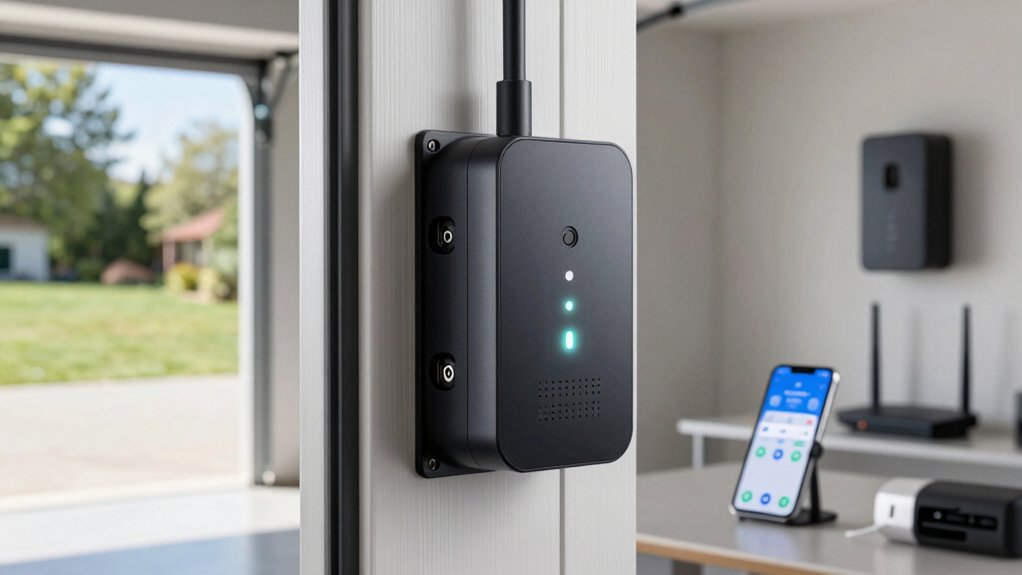
Before you purchase a WiFi garage door opener adapter, you’ll need to verify that it’s compatible with your specific opener brand, check whether it supports the security protocols your home network uses, and confirm it can transmit a signal throughout your garage and driveway. You should also assess how difficult the installation process is for your skill level, whether you’ll need professional help, and which smart home ecosystems the adapter integrates with—such as Apple HomeKit, Google Home, or Alexa. These five factors will help you narrow down your options and select an adapter that fits your technical requirements and home setup.
Opener Brand Compatibility
How do you know whether a WiFi adapter’ll work with your garage door opener? First, identify your opener’s brand and model number. Check the adapter’s compatibility list against your specific model. Some adapters support universal systems, while others target specific brands only. Next, verify your opener’s manufacturing date—most adapters require post-1993 models with standard safety sensors. Contact the adapter’s vendor if you can’t find your model listed. Confirm whether the adapter includes necessary wiring accessories or if you’ll purchase them separately. Review the opener’s documentation for safety sensor specifications. Document your findings before purchasing. This verification step prevents buying incompatible equipment and ensures your system functions safely with smart home integration.
Security Protocol Support
Since data encryption and transmission methods directly affect your adapter’s resistance to hacking and unauthorized access, you’ll want to prioritize security protocol support when making your selection. Check that your adapter supports WPA2 or WPA3 for Wi-Fi connections and TLS for remote access and cloud services. Verify Security+ compatibility—look for 1.0 or 2.0 support, as 3.0 exclusions may limit future device interoperability. Additionally, choose adapters offering local control capabilities alongside cloud access. This dual functionality reduces exposure to remote attack vectors if your internet connection fails. During setup, protect your Bluetooth pairing and network authentication carefully to prevent unauthorized access. These concrete security measures create a resilient system resistant to interception and tampering.
WiFi Range Requirements
Your adapter’s security is only effective if it maintains a reliable connection between your router and garage door opener. Most adapters operate on 2.4 GHz WiFi networks with an effective range of approximately 50 feet. However, walls, metal structures, and electronic interference reduce this distance significantly. Measure the distance from your router to your garage to determine if you’re within range. If your garage exceeds 50 feet, install a WiFi extender or repeater to strengthen the signal. Some adapters include Bluetooth as a backup for setup and emergency access when your network fails. Test your connection before installation to ensure consistent, dropout-free performance. A strong signal enables real-time monitoring and remote control without interruptions.
Installation Difficulty Level
What’s involved in getting your WiFi garage door opener adapter up and running? Installation difficulty depends on your specific model and opener type. Single-door setups with plug-and-play adapters require minimal effort, while two-wire connections to the opener motor demand more technical knowledge. You’ll need to check your opener’s compatibility first, as some brands require extra adapters. Many systems involve mounting sensors or adding a door position sensor, which adds extra setup steps. After hardware installation, you’ll link the wireless hub to your 2.4 GHz Wi-Fi network—ensure your router signal reaches within 50 feet for reliable pairing. Finally, you’ll complete software setup by connecting your app account and granting remote access permissions for voice assistants.
Smart Home Ecosystem Integration
Once you’ve completed the hardware and software setup, you’ll need to ensure your adapter works smoothly with the smart home devices you already own. Check whether the adapter supports your ecosystem—HomeKit, Alexa, Google Assistant, or Matter. Verify that it’s certified for your specific platform to avoid needing extra bridge devices. Confirm the adapter uses 2.4 GHz WiFi and supports WPA2/WPA3 security protocols for reliable network integration. Review whether the system offers multi-user access and guest keys for household members. Confirm automation routine compatibility so you can synchronize control across your existing smart home setup. Finally, check compatibility notes for your specific door brand and model to guarantee proper integration.
Remote Access Capabilities
How do you control your garage door when you’re away from home? You’ll want an adapter that provides mobile app or web interface access so you can operate your door remotely. First, verify the system offers real-time door status monitoring and instant notifications for open/close events and security alerts. Next, determine whether you need constant internet connectivity or if local-only operation during outages matters to you. Check that the adapter uses secure authentication and encrypted communication to protect your commands and status data from unauthorized access. Finally, confirm compatibility with your home network—typically 2.4 GHz Wi-Fi—and integration with platforms you already use, such as iOS or Android apps and voice assistants, ensuring seamless control across your devices.
Sensor Accuracy Standards
Why does sensor accuracy matter for your garage door opener adapter? You need real-time position sensing that detects whether your door is fully open or fully closed with error margins of just a few inches. Most adapters use magnetic reed switches or door position sensors that must align properly with your door’s movement range.
Check that your adapter’s latency stays under a few seconds so you receive timely alerts and automation triggers. Verify the sensor can flag misalignment or drift that causes false open/close readings. Confirm the adapter’s calibration procedures work consistently across your specific opener model and installation setup. These standards ensure reliable status updates and prevent automation failures that compromise your home’s security.
Warranty And Support Options
What’s covered under your adapter’s warranty can make the difference between a simple replacement and an expensive repair bill. Check whether the manufacturer offers a standard warranty—most models include one year of coverage for electronics and sensors. Review the specific coverage scope to understand what’s protected and what’s excluded. Register your device promptly if required to activate warranty benefits. Identify available support channels: phone, email, or online chat. Verify response times for warranty claims before purchasing. Beyond manufacturer protection, confirm your retailer offers a return window, typically 30 days. Ask about optional extended warranties and their cost relative to your adapter’s price. Compare total protection costs across brands to find the best value for your investment.
Final Thoughts
You’ll want to select a WiFi garage door opener adapter based on your current system’s compatibility, desired features, and budget. Check your garage door model against each adapter’s requirements. Prioritize options offering local control, reliable alerts, and voice assistant integration. Compare subscription costs and installation complexity. Once you’ve identified compatible models, review their security features and warranty terms before purchasing to ensure you’re getting the best fit for your needs.

Meet Ry, “TechGuru,” a 36-year-old technology enthusiast with a deep passion for tech innovations. With extensive experience, he specializes in gaming hardware and software, and has expertise in gadgets, custom PCs, and audio.
Besides writing about tech and reviewing new products, he enjoys traveling, hiking, and photography. Committed to keeping up with the latest industry trends, he aims to guide readers in making informed tech decisions.