

You need WiFi timer outlets that actually work for your smart home. These devices let you schedule when appliances turn on and off remotely, save energy, and sync with Alexa or Google Home. But not all outlets deliver the same reliability, compatibility, or features. Finding the right one means checking for 2.4 GHz support, app controls, safety certifications, and durability—details that determine whether your setup runs smoothly or frustrates you constantly. Here’s what separates the best from the rest.
| GHome Smart 5G WiFi Plug Alexa Compatible (4-Pack) |

| Dual-Band Powerhouse | Voice Assistant Compatibility: Amazon Alexa & Google Assistant | Maximum Power Rating: 1800W (15A @ 120V) | WiFi Connectivity: Dual-band (5GHz & 2.4GHz) | VIEW LATEST PRICE | Read Our Analysis |
| Govee Smart Plug WiFi Outlet Alexa Compatible (4-Pack) |

| Most Compact | Voice Assistant Compatibility: Amazon Alexa & Google Assistant | Maximum Power Rating: 1200W (10A @ 120V) | WiFi Connectivity: 2.4GHz only | VIEW LATEST PRICE | Read Our Analysis |
| GHome Smart Plug WiFi Compatible Alexa Google Home |

| Budget-Friendly Pick | Voice Assistant Compatibility: Amazon Alexa & Google Assistant | Maximum Power Rating: Not specified | WiFi Connectivity: 2.4GHz only | VIEW LATEST PRICE | Read Our Analysis |
| BN-LINK WiFi Smart Plug Outlet with Timer (4-Pack) |
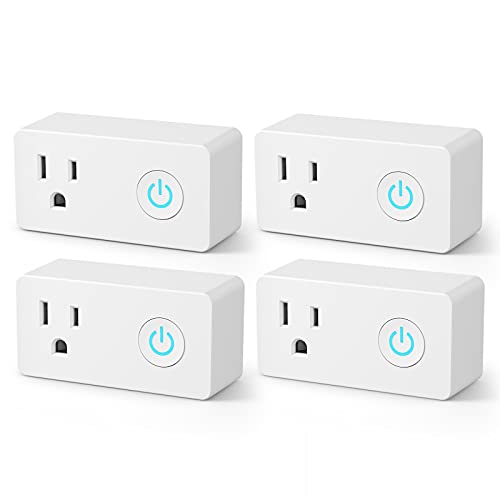
| Best Overall | Voice Assistant Compatibility: Amazon Alexa & Google Assistant | Maximum Power Rating: 1875W (15A @ 125V) | WiFi Connectivity: 2.4GHz only | VIEW LATEST PRICE | Read Our Analysis |
| Kasa Outdoor Smart Plug Wi-Fi Outlet Timer (KP401) |

| Best for Outdoors | Voice Assistant Compatibility: Amazon Alexa & Google Assistant | Maximum Power Rating: 1875W (15A @ 120V) | WiFi Connectivity: 2.4GHz only | VIEW LATEST PRICE | Read Our Analysis |
More Details on Our Top Picks
GHome Smart 5G WiFi Plug Alexa Compatible (4-Pack)
If you’re looking to automate heavy-duty appliances like coffee makers and other devices drawing more than 10 amps, the GHome Smart 5G WiFi Plug delivers the electrical capacity you’ll need. This 4-pack of 15A outlets handles up to 1800W, supporting both 5GHz and 2.4GHz WiFi bands. Setup requires connecting to the GHome app first, then linking to Alexa or Google Assistant for voice control. You’ll schedule on/off times for energy savings and prevent device overcharging. The plugs mount on walls or standard outlets with IP40-rated plastic construction. Each compact unit measures 2.1 x 2.1 x 1.1 inches. ETL and FCC certification confirms safety compliance for reliable smart home automation.
- Voice Assistant Compatibility:Amazon Alexa & Google Assistant
- Maximum Power Rating:1800W (15A @ 120V)
- WiFi Connectivity:Dual-band (5GHz & 2.4GHz)
- Hub Required:No hub required
- Timer & Scheduling:Outlet timer with automated schedules
- Group Control Capability:Yes, control multiple outlets in groups
- Additional Feature:Dual-band 5GHz and 2.4GHz WiFi
- Additional Feature:Heavy-duty 1800W capacity
- Additional Feature:Wall-mount compatible design
Govee Smart Plug WiFi Outlet Alexa Compatible (4-Pack)
The Govee Smart Plug WiFi Outlet Alexa Compatible (4-Pack) works best for households that want to automate multiple devices across different rooms without installing a dedicated hub. You’ll control each outlet through the Govee Home app or voice commands via Alexa and Google Assistant. Set schedules to power devices on and off automatically, which saves energy when you’re away. Group multiple plugs together to manage them with one command. Each plug handles up to 1200W at 120V, supports 2.4 GHz WiFi only, and measures compactly to avoid blocking adjacent outlets. Install them by plugging into standard wall sockets, then pair via the H5083 code and share access with family members through the app for simultaneous control.
- Voice Assistant Compatibility:Amazon Alexa & Google Assistant
- Maximum Power Rating:1200W (10A @ 120V)
- WiFi Connectivity:2.4GHz only
- Hub Required:No hub required
- Timer & Scheduling:Scheduling with automatic on/off
- Group Control Capability:Yes, group control for multiple plugs
- Additional Feature:Bluetooth connection option
- Additional Feature:Compact space-saving footprint
- Additional Feature:Family sharing via app
GHome Smart Plug WiFi Compatible Alexa Google Home
You’ll want the GHome Smart Plug if you need voice control compatibility with your existing smart home ecosystem. First, connect the plug to your 2.4GHz WiFi network, then download the GHome App to complete setup. Use the app to create schedules and timers for devices like lamps and fans, automating when they turn on and off. Group multiple plugs together to control several appliances simultaneously. Share access with family members through the app. Remember that you must connect through the GHome App before using Alexa or Google Assistant—direct connections to those services aren’t available. The plug requires no separate hub and carries ETL and FCC certification.
- Voice Assistant Compatibility:Amazon Alexa & Google Assistant
- Maximum Power Rating:Not specified
- WiFi Connectivity:2.4GHz only
- Hub Required:No hub required
- Timer & Scheduling:Timer and schedule functions
- Group Control Capability:Yes, group control available
- Additional Feature:Compatible with Smart Life app
- Additional Feature:Suitable for decorative lighting
- Additional Feature:No hub required setup
BN-LINK WiFi Smart Plug Outlet with Timer (4-Pack)
Want a smart outlet system that works without requiring a separate hub? The BN-LINK WiFi Smart Plug Outlet with Timer (4-Pack) connects directly to your 2.4 GHz network. You’ll control devices through the BN-LINK app or voice commands via Alexa and Google Assistant. Set up scheduling to automatically turn electronics on or off at specific times—perfect for lamps, fans, and humidifiers. Share access with family members for convenient household management. Each outlet handles up to 1875 watts and carries ETL certification for safety. The 4-pack format lets you outfit multiple rooms simultaneously, providing thorough smart home coverage without additional equipment.
- Voice Assistant Compatibility:Amazon Alexa & Google Assistant
- Maximum Power Rating:1875W (15A @ 125V)
- WiFi Connectivity:2.4GHz only
- Hub Required:No hub required
- Timer & Scheduling:Smart scheduling with timer functions
- Group Control Capability:Yes, group and share control
- Additional Feature:1875W maximum power rating
- Additional Feature:Dusk/dawn scheduling automation
- Additional Feature:Secured 2.4GHz connection
Kasa Outdoor Smart Plug Wi-Fi Outlet Timer (KP401)
If you’re looking to automate outdoor lighting, pool equipment, or seasonal decorations without installing a smart home hub, the Kasa Outdoor Smart Plug Wi-Fi Outlet Timer (KP401) delivers reliable performance with IP64 weather resistance and a 300-foot Wi-Fi range. You’ll set it up by plugging in the unit, opening the Kasa app, and following the onscreen instructions on your 2.4GHz Wi-Fi network. The outlet handles up to 15A/1875W and includes a waterproof cover for protection when unused. Control your devices remotely via the app from anywhere, or use voice commands with Alexa or Google Home. Schedule automatic on/off times and sunset/sunrise offsets to match natural daylight patterns. ETL certification confirms safety for outdoor use.
- Voice Assistant Compatibility:Amazon Alexa & Google Assistant
- Maximum Power Rating:1875W (15A @ 120V)
- WiFi Connectivity:2.4GHz only
- Hub Required:No hub required
- Timer & Scheduling:Countdown timer with sunset/sunrise automation
- Group Control Capability:Single outlet (no multi-outlet grouping mentioned)
- Additional Feature:IP64 weather resistance rating
- Additional Feature:300-foot WiFi range
- Additional Feature:Sunset/sunrise offset scheduling
Factors to Consider When Choosing Wifi Timer Outlets
When selecting a WiFi timer outlet, you’ll need to evaluate the power rating and capacity to ensure it handles your devices’ electrical demands, check the WiFi connectivity options to confirm compatibility with your home network, and verify voice assistant compatibility with systems like Alexa or Google Home that you already use. Next, examine the app control features to determine whether the outlet offers scheduling, remote access, and monitoring capabilities that match your needs. Finally, confirm that the outlet carries safety certifications such as UL or ETL, which guarantee it meets electrical safety standards and protects your home from potential hazards.
Power Rating and Capacity
How do you know whether a WiFi timer outlet can handle the devices you’re plugging into it? Check the outlet’s electrical rating label first, which typically shows 120V and 15A for standard models. This means the outlet safely handles 1875 watts maximum. Next, calculate your total power draw by adding the wattages of all devices you’ll run simultaneously on that outlet. If you’re powering a coffee maker rated at 1200 watts plus other devices, you’re nearing capacity. For heavy-duty appliances, look for outlets rated 10A or higher to prevent breaker trips. Match the outlet’s amperage and wattage specifications to your actual usage pattern before purchasing. This ensures safe, reliable operation.
WiFi Connectivity Options
Your outlet’s wireless capabilities determine how you’ll control it remotely and whether it’ll work seamlessly with your existing smart home setup. Most outlets connect directly to your 2.4 GHz Wi‑Fi network without requiring a separate hub, simplifying installation. Some models support dual-band operation on both 2.4 GHz and 5 GHz frequencies, offering greater flexibility depending on your router. You’ll typically use a mobile app like Kasa, Govee, or GHome for initial setup before connecting to voice assistants like Alexa or Google Assistant. Several outlets use Bluetooth during setup for stability, then switch to Wi‑Fi for remote access and automation. Check your router’s frequency band compatibility before purchasing, as some outlets don’t support 5G-only networks.
Voice Assistant Compatibility
Would you like to control your outlets with voice commands, or do you prefer using only your phone app? Most WiFi timer outlets support Amazon Alexa or Google Assistant, but you’ll need to complete setup steps first. Many models require linking to a companion app—such as Smart Life, Kasa, or Govee Home—before voice control activates. Check your outlet’s specifications to confirm which assistant it supports, since not all devices work with every platform. Pay attention to WiFi frequency requirements: some plugs only function on 2.4 GHz networks and won’t connect to 5 GHz bands. Once linked, you can use voice commands to turn outlets on or off and group multiple devices for streamlined control.
App Control Features
Once you’ve confirmed voice assistant compatibility, the app itself becomes your primary tool for managing timers, schedules, and remote access. You’ll need to connect your outlet to a 2.4 GHz Wi‑Fi network, then pair it through the vendor’s app—whether that’s GHome, Govee Home, Tuya/Smart Life, or Kasa. The app enables remote control from anywhere, letting you automate on/off functions even when you’re away. Group control features let you manage multiple outlets with a single action or schedule, organizing them by room. Many apps also offer sharing capabilities, allowing you to grant family members control for simultaneous outlet management. Evaluate each app’s interface for ease of use and the specific scheduling options it provides before purchasing.
Safety Certifications
What certifications should you look for when evaluating WiFi timer outlets? Check for ETL and FCC markings on the device packaging or product documentation. ETL certification confirms the outlet has passed electrical safety and fire resistance tests. FCC certification verifies it won’t cause electromagnetic interference with other devices. Dual certification indicates broader compliance with U.S. safety standards. These certifications also validate manufacturer claims about electrical ratings, such as 120V/15A capacity. Verified certifications are essential for safe household use and often required for warranty coverage. Before purchasing, confirm the outlet displays these marks and matches your home’s electrical specifications. Legitimate sellers typically provide certification details in product listings or upon request.
Weather Resistance Needs
If you’re planning to use a WiFi timer outlet outdoors, you’ll need to evaluate its weather resistance capabilities before making a purchase. Start by checking the IP rating—look for IP64 or higher, which protects against dust and water exposure. Next, verify that the outlet includes a waterproof cover that shields controls and sockets when not in use. Examine the plug and housing materials to confirm they’ll withstand sun exposure, rain, and humidity without cracking or corroding. Additionally, test the Wi-Fi connectivity in your outdoor location to ensure it maintains reliable 2.4 GHz or 4–5 GHz signals. Finally, confirm the device operates safely across your area’s temperature range. These checks guarantee your outlet functions dependably in outdoor conditions year-round.
Setup Complexity and Requirements
How straightforward is the initial setup for your chosen WiFi timer outlet? Most models don’t require a hub, but you’ll need to check your network type first. Many plugs operate only on 2.4 GHz Wi‑Fi, not 5 GHz, so verify your router supports this frequency before purchasing. Some outlets use Bluetooth for initial setup alongside Wi‑Fi, while others rely solely on Wi‑Fi connection. You may need to download a dedicated mobile app—such as GHome—before linking the plug to Alexa or Google Home. After connecting, grouping outlets, sharing access with household members, and enabling remote control all require stable network access and ongoing app authentication. Test your home network compatibility during setup to avoid installation delays.
Final Thoughts
You’ve reviewed five reliable WiFi timer outlets designed for smart homes. Now select based on your specific needs: choose the GHome 5G or Govee for budget-friendly 4-packs, pick the standard GHome for single-outlet flexibility, go with BN-LINK for basic timer functions, or invest in Kasa Outdoor for weather-resistant external use. Verify each option supports your voice assistant and offers the scheduling features you require before purchasing.

Meet Ry, “TechGuru,” a 36-year-old technology enthusiast with a deep passion for tech innovations. With extensive experience, he specializes in gaming hardware and software, and has expertise in gadgets, custom PCs, and audio.
Besides writing about tech and reviewing new products, he enjoys traveling, hiking, and photography. Committed to keeping up with the latest industry trends, he aims to guide readers in making informed tech decisions.