
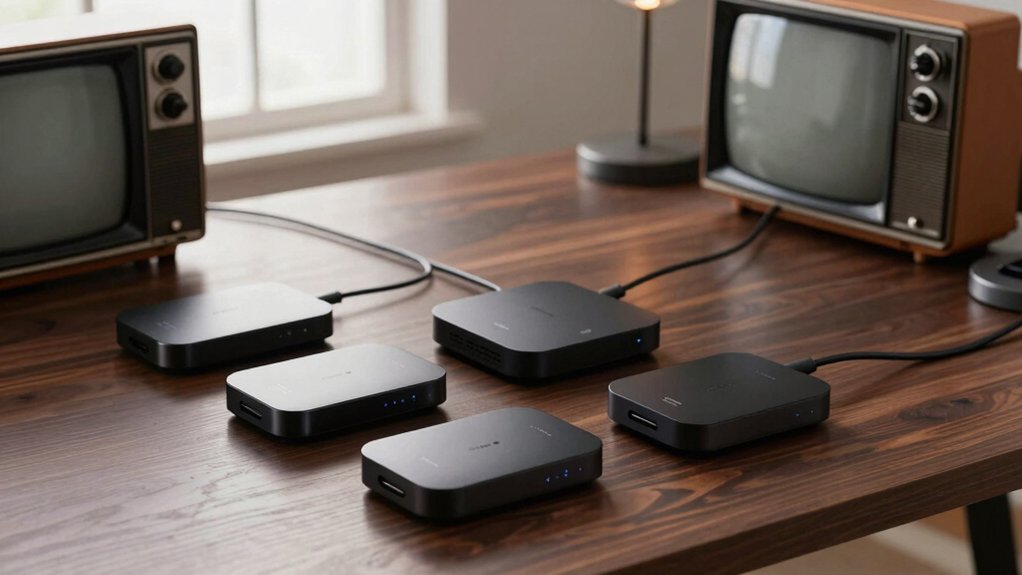

If you want to control an old TV with modern ease, these 5 smart IR blaster hubs are worth considering. You’ll get 2.4GHz Wi‑Fi, learning modes or cloud libraries for legacy codes, and voice support to simplify routines. But the right pick depends on your setup, line‑of‑sight needs, and how you value speed versus local control—so you’ll want to weigh a few key details before you commit.
| BroadLink RM4mini Smart IR Remote Hub with WiFi |

| Best All-Around IR Hub | Type: IR blaster hub | Connectivity: Wi‑Fi (2.4GHz) | Power: USB power (adapter not included) | VIEW LATEST PRICE | Read Our Analysis |
| SwitchBot Hub Mini: Wi-Fi IR Remote for Alexa/Google Home |

| Easy Setup Favorite | Type: IR remote hub | Connectivity: Wi‑Fi (2.4GHz) | Power: USB-powered | VIEW LATEST PRICE | Read Our Analysis |
| Broadlink RM4 Pro Smart IR/RF Remote Hub with Wi-Fi |

| IR + RF Powerhouse | Type: IR/RF remote hub | Connectivity: Wi‑Fi (2.4GHz) | Power: USB power (5V 1A adapter required) | VIEW LATEST PRICE | Read Our Analysis |
| MOES WiFi Smart IR Remote Controller with Alexa |

| DIY Learning King | Type: IR remote controller | Connectivity: Wi‑Fi (2.4GHz) | Power: USB power (adapter included) | VIEW LATEST PRICE | Read Our Analysis |
| SwitchBot Hub Mini IR Blaster with Wi-Fi (White) |
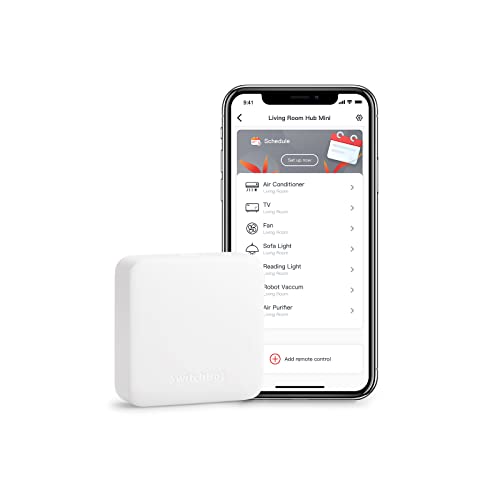
| Simple Switcher Bundle | Type: IR blaster hub | Connectivity: Wi‑Fi (2.4GHz) | Power: USB-powered | VIEW LATEST PRICE | Read Our Analysis |
More Details on Our Top Picks
BroadLink RM4mini Smart IR Remote Hub with WiFi
The BroadLink RM4mini shines if you want a compact, Wi‑Fi–based IR hub that covers 50,000+ devices and lets you control TVs, ACs, and more from one app. You’ll get a 2.4GHz Wi‑Fi IR hub that supports 38kHz IR devices like TV, AC, set-top boxes, and more, with cloud updates to keep the library current. If there’s no cloud match, you can program or learn buttons. It’s IR only, not RF, and requires line‑of‑sight to devices. Use the free BroadLink app with Alexa, Google Assistant, or IFTTT, plus optional Siri. For compatibility, ensure 2.4GHz Wi‑Fi and avoid 5V1A adapters.
- Type:IR blaster hub
- Connectivity:Wi‑Fi (2.4GHz)
- Power:USB power (adapter not included)
- Protocols Supported:IR only
- App/Control:BroadLink app (iOS/Android) + voice/IFTTT
- Use Case Focus:Controller for TVs/ACs and other IR devices
- Additional Feature:Cloud IR library updates
- Additional Feature:2.4GHz Wi‑Fi required
- Additional Feature:External temp/humidity display
SwitchBot Hub Mini: Wi-Fi IR Remote for Alexa/Google Home
SwitchBot Hub Mini is your best pick if you want a compact, Wi‑Fi IR remote that works with Alexa and Google Home right out of the box, with quick 5‑second smart learning to mimic your existing remote. The core device is a USB‑powered IR blaster, easy setup via the SwitchBot App, and it operates on 2.4GHz Wi‑Fi. You can pair it with SwitchBot Remote for curtains via Bluetooth, and it controls TVs, STBs, ACs, fans, VCRs, DVDs, and other IR appliances in one app. It connects to the SwitchBot ecosystem, supports cloud services, and accepts voice commands through major assistants. Save energy with scenes and remote checks.
- Type:IR remote hub
- Connectivity:Wi‑Fi (2.4GHz)
- Power:USB-powered
- Protocols Supported:IR only
- App/Control:SwitchBot app + voice/IFTTT
- Use Case Focus:Universal IR control for household devices
- Additional Feature:SwitchBot learning mode
- Additional Feature:All devices in one app
- Additional Feature:Local Bluetooth pairing with SwitchBot Remote
Broadlink RM4 Pro Smart IR/RF Remote Hub with Wi-Fi
If you want broad compatibility and easy voice control, the Broadlink RM4 Pro is a strong pick, thanks to its 2.4GHz Wi-Fi, Alexa/Google Assistant support, and the ability to learn or program IR/RF commands when cloud matches aren’t available. It handles 38KHz IR devices and 433MHz RF fixed-code devices, with online IR library updates and optional button programming. You’ll control TVs, ACs, and more via the BroadLink app, plus scenes, timers, and routines. It’s 5V 1A USB-powered (adapter not included) and works with IFTTT; note 5GHz networks aren’t supported and some motors may not be compatible. 1-year warranty.
- Type:IR/RF remote hub
- Connectivity:Wi‑Fi (2.4GHz)
- Power:USB power (5V 1A adapter required)
- Protocols Supported:IR and RF (433MHz)
- App/Control:BroadLink app + voice/IFTTT + Siri via IFTTT
- Use Case Focus:IR/RF control for broad device range (IR+RF)
- Additional Feature:433MHz RF fixed code
- Additional Feature:IR/RF dual control
- Additional Feature:18/38KHz IR compatibility (IR details)
MOES WiFi Smart IR Remote Controller with Alexa
Looking for an all-in-one IR hub you can control from anywhere? The MOES WiFi Smart IR Remote Controller sits between you and your old devices, blasting IR for AC, TV, DVD, and more without a hub. It uses 2.4G WiFi only and includes a USB 2.0 adapter plus UL-certified power supply. No hub required, and it learns from your original remotes for devices like fireplaces or heaters. Control via the Smart Life app, with remote access and Alexa or Google Assistant voice help. Note: IR beams don’t pass walls, and 2.4G WiFi is required. Check compatibility in the app.
- Type:IR remote controller
- Connectivity:Wi‑Fi (2.4GHz)
- Power:USB power (adapter included)
- Protocols Supported:IR only
- App/Control:Smart Life/Tuya app + voice
- Use Case Focus:All-in-one IR control for common home devices
- Additional Feature:DIY programmable learning
- Additional Feature:No hub required
- Additional Feature:IR signals cannot pass walls
SwitchBot Hub Mini IR Blaster with Wi-Fi (White)
The SwitchBot Hub Mini IR Blaster with Wi-Fi is your best bet if you want a compact, all-in-one hub that controls multiple infrared devices—from TV to air conditioner—through a single app. It uses 2.4GHz Wi-Fi, is USB-powered, and portable, so you can place it anywhere. Setup is quick in the SwitchBot App, with smart learning that mimics your existing remote in about 5 seconds. Manage every IR device—TV, AC, etc.—in one place, and enjoy cloud integration for seamless control. Works with Alexa, Google, Siri, and IFTTT, and helps you save energy via scenes and remote access.
- Type:IR blaster hub
- Connectivity:Wi‑Fi (2.4GHz)
- Power:USB-powered
- Protocols Supported:IR only
- App/Control:SwitchBot app + voice/IFTTT
- Use Case Focus:All-in-one IR control hub for multiple devices
- Additional Feature:Smart learning mode
- Additional Feature:Cloud service integration
- Additional Feature:Remotely verify via app
Factors to Consider When Choosing Smart IR Blaster Hubs for Older TVS

When choosing a smart IR blaster for an older TV, you’ll want to check IR vs RF compatibility to ensure your devices respond reliably. Consider line-of-sight needs, 2.4GHz Wi‑Fi requirements, and how broad the device library is for your setup. Also look for learning button capability to capture commands from remotes you still use.
IR Vs RF Compatibility
Deciding between IR and RF compatibility hinges on where your devices live and how you want to control them. IR remotes run at 38 kHz and are widely compatible with many older TVs and AV gear, while RF remotes use radio frequencies (like 433 MHz) and aren’t guaranteed to match every legacy system. An IR-only hub can’t reach devices blocked by line-of-sight, whereas RF-enabled hubs can sometimes reach through walls or furniture, depending on hardware. Older TVs typically respond to IR commands for power, volume, and input, so you’ll want a hub with a robust IR library and learning mode. RF compatibility is hardware-specific and may not map to all legacy remotes, potentially limiting control without supported RF protocols. A dual IR/RF hub with updates and learning boosts broad compatibility.
Line-of-Sight Requirement
Line-of-sight matters more than you might expect with smart IR blaster hubs. For reliable transmission, your IR blaster needs an unobstructed path to the TV. Obstructions like walls, furniture, or metal objects can block signals and cause commands to fail. In practice, some setups use a single IR unit per room to reduce interference and boost reliability. Certain devices note that signals don’t pass through obstacles, so placement is crucial for older TVs. When choosing a hub, prioritize clear line-of-sight so you don’t waste time troubleshooting. Position the hub and any extenders with direct visibility to the target TV, and test from typical viewing angles. This focus helps ensure consistent performance without recourse to constant readjustment.
2.4GHz Wi‑Fi Needs
If you’re shopping for a smart IR blaster hub for an older TV, you’ll want to know that all the tested options run exclusively on 2.4GHz Wi‑Fi, with no 5GHz support. A stable 2.4GHz connection is required for initial setup and ongoing control, since these devices don’t typically work over 5G bands. Mesh networks are generally not supported, so a direct 2.4GHz link between hub and router improves reliability. Some hubs require a 2.4GHz-capable network and may restrict password characters or network configurations during setup. USB power adapters are commonly recommended for 2.4GHz hubs to ensure consistent operation and avoid power-related connectivity issues. Plan your network layout to minimize interference and keep the hub on a dedicated 2.4GHz channel whenever possible.
Device Library Coverage
A strong IR library is your first line of defense when choosing a smart IR blaster hub for older TVs. Look for a hub with a large, regularly updated library that covers 38kHz remotes common to older TVs, set-top boxes, DVD players, and VCRs. If you can’t find a match, ensure the device can learn new IR codes via programmable learning mode. Check whether the hub supports only IR or both IR and RF, since older TVs use IR but peripherals may need RF compatibility. Confirm the hub can store and recall multiple device profiles to handle different brands and generations without constant reconfiguration. Verify that library updates are receivable online to maintain compatibility with legacy remotes and any discontinued codes.
Learning Button Capability
Learning button capability lets you copy functions from an existing remote when a cloud-labeled command isn’t available. This feature lets the hub replicate a button’s IR signal so you can control old TVs without hunting for a cloud option. A learning mode usually completes the replication in just a few seconds per button, so you won’t wait long to set up your shortcuts. Not every device or button type is learnable, since some remotes use atypical codes or rapid IR bursts that challenge accuracy. Successful learning hinges on a clear line-of-sight and proper alignment between the original remote and the hub’s sensor. After learning, the copied button acts like a native IR command within the hub’s app, usable in scenes and automations.
App Ecosystem
Choosing the right app ecosystem matters because it shapes how easily you program and control your older TV. When selecting an IR blaster, check which apps you’ll use for setup and control, since some hubs rely on BroadLink or SwitchBot, while others lean on Smart Life/Tuya. This difference affects how readily your older TV’s IR codes become programmable. Expect cloud library updates to keep compatibility with legacy remotes, but know that learning mode lets you copy codes if a cloud match isn’t available. Consider whether you prefer local control for quicker responses or cloud control that might add latency. Also weigh voice integrations (Alexa, Google Assistant, Siri/IFTTT) for simple power or volume commands.
Power and Setup Needs
Power and setup hurdles can make or break your experience with smart IR hubs for older TVs. First, check that your Wi‑Fi is 2.4 GHz only, since 5 GHz support isn’t universal and can complicate initial setup. Clear line-of-sight matters, so position the hub where signals can reach the remote in front of the TV, not behind walls. Expect USB power needs—usually 5V 1A or a compatible USB adapter—so have a suitable power source handy. Many hubs either learn buttons or rely on a cloud IR library; if there’s no match, you’ll need to program or teach the remote. Some models add RF or learning modes, but avoid those that rely on RF for strictly IR TVs.
Final Thoughts
If you’re upgrading an old TV, these IR blaster hubs give you solid options. Prioritize local control for snappy responses, and double‑check 38kHz support and line‑of‑sight placement. The BroadLink models nail broad compatibility, while SwitchBot options blend ease with strong app support. MOES offers a straightforward setup, and both brands cover Alexa/Google/Siri voices. Pick based on your home ecosystem, room layout, and whether you need IR/RF or simple learning modes for legacy remotes.

Meet Ry, “TechGuru,” a 36-year-old technology enthusiast with a deep passion for tech innovations. With extensive experience, he specializes in gaming hardware and software, and has expertise in gadgets, custom PCs, and audio.
Besides writing about tech and reviewing new products, he enjoys traveling, hiking, and photography. Committed to keeping up with the latest industry trends, he aims to guide readers in making informed tech decisions.