

If you’re building a retro gaming setup, you’ll need to evaluate mini PCs based on specific hardware requirements. You should prioritize processors like AMD Ryzen chips, adequate RAM for smooth emulation, and fast NVMe storage for your ROM libraries. You’ve got multiple options ranging from budget-friendly consoles to powerful desktop replacements. The right choice depends on your games, display setup, and portability needs—but how do you know which specs actually matter?
| BOSGAME P4 Light Gaming Mini PC Ryzen 7 |

| Best Overall | Primary Processor: AMD Ryzen 7 5825U (8-core/16-thread) | RAM Configuration: 32GB DDR4 (expandable to 64GB) | Storage: 1TB PCIe 3.0 NVMe SSD (dual M.2 slots) | VIEW LATEST PRICE | Read Our Analysis |
| AYANEO AM01 Retro Mini PC AMD Ryzen 7 |

| Most Compact Design | Primary Processor: AMD Ryzen 7 5825U (8-core/16-thread) | RAM Configuration: Up to 64GB DDR4 (barebone) | Storage: 1x M.2 2280 NVMe/SATA + 1x 2.5″ SATA bay | VIEW LATEST PRICE | Read Our Analysis |
| BOSGAME E2 Mini PC with AMD Ryzen 5 |

| Best Value | Primary Processor: AMD Ryzen 5 3550H (4-core/8-thread) | RAM Configuration: 16GB DDR4 | Storage: 512GB SSD | VIEW LATEST PRICE | Read Our Analysis |
| Portable Retro Game Emulator Console 500GB 14.5K+ Games |
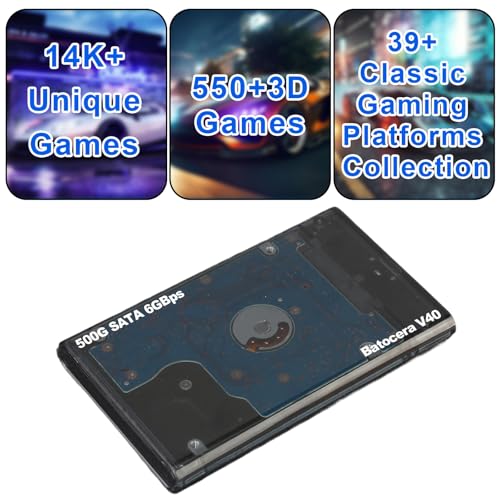
| Plug & Play Ready | Primary Processor: Not applicable (emulator console) | RAM Configuration: N/A (USB device) | Storage: 500GB pre-loaded games | VIEW LATEST PRICE | Read Our Analysis |
| KAMRUI Pinova P2 Mini PC 16GB RAM 512GB SSD |

| Best Budget Pick | Primary Processor: AMD Ryzen 4300U (4-core/4-thread) | RAM Configuration: 16GB DDR4 (expandable to 64GB) | Storage: 512GB M.2 SSD (expandable to 4TB) | VIEW LATEST PRICE | Read Our Analysis |
| HIGOLEPC Mini PC Win 11 Pro Celeron N5095 |

| Lightweight Productivity | Primary Processor: Intel Celeron N5095 (4-core) | RAM Configuration: 16GB DDR4 | Storage: 128GB eMMC (upgradable to 256GB) | VIEW LATEST PRICE | Read Our Analysis |
| KAMRUI Hyper H1 Mini Gaming PC (AMD Ryzen 7) |

| Best Performance | Primary Processor: AMD Ryzen 7 7735HS (8-core/16-thread) | RAM Configuration: 24GB LPDDR5 | Storage: 1TB M.2 NVMe PCIe 3.0×4 SSD (2 slots) | VIEW LATEST PRICE | Read Our Analysis |
| Hyper-base-tiny Portable Game Console with 8371 Games |

| Most Portable Gaming | Primary Processor: Not applicable (portable game console) | RAM Configuration: 64GB U disk | Storage: 64GB U disk with 8371 games | VIEW LATEST PRICE | Read Our Analysis |
| KAMRUI E3B Mini PC AMD Ryzen 5 7430U |

| Best Expandability | Primary Processor: AMD Ryzen 5 7430U (6-core/12-thread) | RAM Configuration: 16GB DDR4 (expandable to 64GB) | Storage: Dual M.2 2280 slots (up to 4TB) | VIEW LATEST PRICE | Read Our Analysis |
| Miyoo Mini Plus Retro Gaming Console 64GB |

| Best Handheld Experience | Primary Processor: Not applicable (retro gaming console) | RAM Configuration: 64GB memory card | Storage: 64GB memory card included | VIEW LATEST PRICE | Read Our Analysis |
More Details on Our Top Picks
BOSGAME P4 Light Gaming Mini PC Ryzen 7
Why should you consider the BOSGAME P4 if you’re looking to play classic PlayStation 3 games on modern hardware? The P4 features a Ryzen 7 5825U processor with 32GB RAM and supports PS3 emulation through RCPS3. You’ll connect it to modern displays via triple outputs—HDMI 2.0, DisplayPort, or USB-C—all supporting 4K resolution at 60Hz. The 1TB PCIe NVMe SSD stores your games and emulator files. WiFi 6E and dual 2.5GbE LAN ports ensure stable connectivity. Install Windows 11 Pro or Linux, download RCPS3, configure your controller, and launch your favorite titles. The compact form factor fits any setup while delivering the processing power needed for smooth emulation.
- Primary Processor:AMD Ryzen 7 5825U (8-core/16-thread)
- RAM Configuration:32GB DDR4 (expandable to 64GB)
- Storage:1TB PCIe 3.0 NVMe SSD (dual M.2 slots)
- Display Output Capability:Triple 4K@60Hz (HDMI 2.0, DisplayPort, USB-C)
- Wireless Connectivity:WiFi 6E + Bluetooth 5.2
- Form Factor:Desktop-style compact mini PC
- Additional Feature:PS3 emulator support
- Additional Feature:Triple 4K@60Hz displays
- Additional Feature:3-year factory support
AYANEO AM01 Retro Mini PC AMD Ryzen 7
The AYANEO AM01 Retro Mini PC with AMD Ryzen 7 5825U is built for users who want a compact system that handles retro gaming alongside modern tasks without sacrificing performance or taking up desk space. This barebone kit measures just 132×132×60.5mm and weighs 486g, so you’ll fit it anywhere. You’ll upgrade it by installing RAM up to 64GB across two DDR4 slots and adding an SSD through either M.2 or 2.5″ SATA bays. The 8-core processor delivers smooth gameplay and 4K media playback. Connect displays via HDMI 2.0 or DisplayPort 1.4, link to networks through Gigabit Ethernet or WiFi 6, and attach peripherals through USB 3.2 Gen2 ports. The cooling system keeps noise minimal during extended sessions, making it ideal for gaming, office work, or media centers.
- Primary Processor:AMD Ryzen 7 5825U (8-core/16-thread)
- RAM Configuration:Up to 64GB DDR4 (barebone)
- Storage:1x M.2 2280 NVMe/SATA + 1x 2.5″ SATA bay
- Display Output Capability:4K output (HDMI 2.0, DP 1.4, USB-C)
- Wireless Connectivity:WiFi 6 + Bluetooth 5.2
- Form Factor:Retro-inspired mini PC (132×132×60.5mm, 486g)
- Additional Feature:Retro-inspired compact design
- Additional Feature:35W turbo fan cooling
- Additional Feature:Wake-on-LAN capability
BOSGAME E2 Mini PC with AMD Ryzen 5
Looking for a mini PC that handles 4K streaming, video conferencing, and light design work without breaking your budget? The BOSGAME E2 delivers exactly that. Its AMD Ryzen 5 3550H processor with Radeon Vega 8 graphics supports 4K@60Hz playback across three displays simultaneously via HDMI, DisplayPort, and USB-C. The 16GB DDR4 RAM and 512GB SSD enable smooth multitasking and fast file transfers. Wi-Fi 5 and Gigabit Ethernet provide stable connections for streaming and video calls. This configuration handles office productivity, home entertainment, and casual photo editing efficiently, making it suitable for users prioritizing versatility over gaming performance.
- Primary Processor:AMD Ryzen 5 3550H (4-core/8-thread)
- RAM Configuration:16GB DDR4
- Storage:512GB SSD
- Display Output Capability:Triple 4K display (HDMI, DisplayPort, USB-C)
- Wireless Connectivity:WiFi 5 (dual-band) + Bluetooth 5.0
- Form Factor:Compact mini PC
- Additional Feature:4K triple display support
- Additional Feature:Vega 8 graphics integration
- Additional Feature:Light photo editing capable
Portable Retro Game Emulator Console 500GB 14.5K+ Games
If you’re seeking an instant retro gaming setup without complicated installations, this portable emulator console delivers what you need: 14,000+ games across 39 legendary systems, ready to play in five seconds. Connect the Type-C USB 3.1 cable to your Windows or Mac computer and boot from the USB drive. The console runs Batocera v40, requiring no driver installations on Windows or Linux. You’ll access 550+ premium 3D titles alongside classic games. Transfer speeds reach 200MB/s, loading a 1GB game in about five seconds. Advanced sleep mode protects the hard drive, extending its lifespan threefold compared to standard timers. Free technical support with 24-hour response guarantees help when you need it.
- Primary Processor:Not applicable (emulator console)
- RAM Configuration:N/A (USB device)
- Storage:500GB pre-loaded games
- Display Output Capability:N/A (USB boot device)
- Wireless Connectivity:N/A (wired USB boot)
- Form Factor:Plug-and-play USB device (500GB)
- Additional Feature:14,000+ NO-DUPLICATE games
- Additional Feature:5-second plug-and-play setup
- Additional Feature:200MB/s USB 3.1 transfer
KAMRUI Pinova P2 Mini PC 16GB RAM 512GB SSD
Want a compact machine that handles multitasking, video editing, and casual gaming without consuming desk space? The KAMRUI Pinova P2 delivers with its AMD Ryzen 4300U processor and 16GB DDR4 RAM. You’ll get 512GB of SSD storage, expandable to 4TB across two M.2 slots. The system supports triple 4K displays via HDMI 2.0, DisplayPort 1.4, and USB-C connections. Its compact 5.05-inch case weighs 1.87 pounds, mounting on walls or monitor stands. The integrated Radeon graphics handles casual gaming and video tasks adequately. Dual SO-DIMM slots let you upgrade RAM to 64GB if needed. Quiet cooling keeps performance steady under load, making this portable unit suitable for home or office environments.
- Primary Processor:AMD Ryzen 4300U (4-core/4-thread)
- RAM Configuration:16GB DDR4 (expandable to 64GB)
- Storage:512GB M.2 SSD (expandable to 4TB)
- Display Output Capability:Triple 4K (HDMI 2.0, DP 1.4, USB-C)
- Wireless Connectivity:WiFi + Bluetooth (specs not detailed)
- Form Factor:Ultra-portable mini PC (5.05×5.05×1.73″, 1.87 lbs)
- Additional Feature:Lifetime technical support
- Additional Feature:VESA wall-mount option
- Additional Feature:Up to 4TB storage
HIGOLEPC Mini PC Win 11 Pro Celeron N5095
The HIGOLEPC Mini PC Win 11 Pro Celeron N5095 works best for users who need a compact, versatile device that handles both business tasks and entertainment without consuming much desk space. Its Celeron N5095 processor and 16GB DDR4 RAM deliver stable performance for lightweight applications. You’ll benefit from the built-in fan that reduces noise and prevents overheating. The touch screen capability lets you interact directly with Windows 11 Pro. Connect peripherals using the four USB 3.0 ports, HDMI 2.0, or USB-C. Use Wi-Fi 5.0 dual-band or Gigabit Ethernet for reliable internet connectivity. The expandable storage and remote desktop access make it practical for productivity and casual use.
- Primary Processor:Intel Celeron N5095 (4-core)
- RAM Configuration:16GB DDR4
- Storage:128GB eMMC (upgradable to 256GB)
- Display Output Capability:Touch screen with USB-C (no specs listed)
- Wireless Connectivity:WiFi 5.0 (dual-band) + Bluetooth 4.2
- Form Factor:Mini PC with touch screen capability
- Additional Feature:Built-in touch screen capability
- Additional Feature:5-hour battery backup
- Additional Feature:Remote desktop access enabled
KAMRUI Hyper H1 Mini Gaming PC (AMD Ryzen 7)
Looking to maximize performance in a space-constrained setup? The KAMRUI Hyper H1 delivers with its AMD Ryzen 7 7735HS processor, offering 8 cores and 16 threads for demanding tasks. You’ll get 24GB LPDDR5 memory and 1TB NVMe storage, expandable to 4TB across two M.2 slots. The integrated Radeon Graphics supports triple 4K displays via DP1.4, HDMI 2.0, and USB-C. Dual cooling fans maintain stable performance without thermal throttling. You can connect via WiFi 6, Bluetooth 5.2, and 2.5Gbps Ethernet. Its compact 12.9cm form factor includes VESA mounting, making it ideal for office work, content creation, and gaming applications.
- Primary Processor:AMD Ryzen 7 7735HS (8-core/16-thread)
- RAM Configuration:24GB LPDDR5
- Storage:1TB M.2 NVMe PCIe 3.0×4 SSD (2 slots)
- Display Output Capability:Triple 4K@60Hz (DP 1.4, HDMI 2.0, USB-C)
- Wireless Connectivity:WiFi 6 + Bluetooth 5.2
- Form Factor:Ultra-compact gaming mini PC (12.9×12.9×5.1cm, includes VESA mount)
- Additional Feature:24GB LPDDR5 memory
- Additional Feature:Dual cooling fan radiator
- Additional Feature:2-year after-sales service
Hyper-base-tiny Portable Game Console with 8371 Games
If you’re traveling frequently or need a compact gaming solution that doesn’t require a dedicated setup, this portable console delivers what you’re after. The device includes 8,371 pre-loaded games spanning classic retro, arcade, 3D, and racing titles across 15 emulators. You’ll manage your library by adding or deleting games through the included 64GB USB disk, which transfers data at 30 mb/s. The EmulationStation interface lets you customize your experience fully. You can connect the console to Windows PCs, laptops, or mini PCs for expanded functionality. Its plug-and-play design means you’re gaming within minutes of setup, making it ideal for on-the-go entertainment.
- Primary Processor:Not applicable (portable game console)
- RAM Configuration:64GB U disk
- Storage:64GB U disk with 8371 games
- Display Output Capability:N/A (portable device)
- Wireless Connectivity:N/A (standalone console)
- Form Factor:Portable handheld console (64GB)
- Additional Feature:8371 built-in games
- Additional Feature:15 classic emulators included
- Additional Feature:Customizable game system interface
KAMRUI E3B Mini PC AMD Ryzen 5 7430U
Want a compact machine that handles both retro gaming and modern productivity without breaking a sweat? The KAMRUI E3B delivers with its AMD Ryzen 5 7430U processor, offering 25% better single-thread performance than older models for smooth emulation and browsing. You’ll get 16GB DDR4 RAM expandable to 64GB, two M.2 storage slots supporting up to 4TB total, and AMD Radeon RX Vega 7 graphics. Connect three 4K displays simultaneously using DP 1.4b, HDMI 2.0, or Type-C outputs. WiFi 6 and Bluetooth 5.2 ensure reliable wireless connectivity. The thorough port selection—including USB 3.2 Gen2, Ethernet, and audio jack—accommodates all your peripherals and gaming controllers seamlessly.
- Primary Processor:AMD Ryzen 5 7430U (6-core/12-thread)
- RAM Configuration:16GB DDR4 (expandable to 64GB)
- Storage:Dual M.2 2280 slots (up to 4TB)
- Display Output Capability:Triple 4K (DP 1.4b, HDMI 2.0, USB-C)
- Wireless Connectivity:WiFi 6 + Bluetooth 5.2
- Form Factor:Compact mini PC form factor
- Additional Feature:Triple 4K display outputs
- Additional Feature:25% faster single-thread performance
- Additional Feature:Full-function Type-C charging
Miyoo Mini Plus Retro Gaming Console 64GB
The Miyoo Mini Plus delivers a portable retro gaming experience for anyone seeking authentic emulation in a compact, battery-powered device. You’ll get a 3.5-inch IPS screen with 640×480 resolution and a pre-loaded 64GB memory card containing games across adventure, shooting, action, and racing genres. The device runs an open-source Linux system, allowing you to download and add additional games using built-in emulators. Its 3000mAh battery provides 5-6 hours of gameplay, while the C-type charging port enables convenient recharging anywhere. The narrow-frame design maximizes screen visibility. You can search your game library directly on the console. Contact support via email using your order number if you encounter issues.
- Primary Processor:Not applicable (retro gaming console)
- RAM Configuration:64GB memory card
- Storage:64GB memory card included
- Display Output Capability:3.5-inch IPS screen (640×480)
- Wireless Connectivity:N/A (offline gaming)
- Form Factor:Portable handheld console (3.5″ screen, 3000mAh battery)
- Additional Feature:3.5-inch IPS screen
- Additional Feature:3000mAh battery (5-6hrs)
- Additional Feature:Open-source Linux system
Factors to Consider When Choosing Mini PCs for Retro Gaming
Before you buy a mini PC for retro gaming, you’ll need to evaluate five key factors that directly affect your gaming experience. First, assess the processing power you need based on which consoles you want to emulate, then check the storage capacity and whether you can expand it for your game library. Next, verify that the device offers the display outputs you require—whether HDMI, USB-C, or other connections—and examine its cooling system to ensure it won’t overheat during extended gaming sessions, all while deciding how much portability matters compared to raw performance for your specific situation.
Processing Power Requirements
How much processing power do you actually need for smooth retro gaming on a mini PC? You’ll want at least a quad-core CPU with multi-threading capabilities to handle emulation without lag. Look for processors with boost clocks reaching 4.5 GHz or higher—these improve CPU-bound emulation performance and UI responsiveness. Pair your CPU with an integrated GPU featuring Vega or Radeon cores clocked around 1800–2200 MHz to support 4K output and demanding titles. Don’t overlook RAM: invest in 16 GB or more to run multiple emulators simultaneously and accommodate higher internal RAM demands. Finally, ensure adequate cooling to prevent thermal throttling during extended gaming sessions. These specifications work together to deliver reliable, sustained performance across your entire retro gaming library.
Storage Capacity And Expandability
Storage capacity and expandability are critical considerations when selecting a mini PC for retro gaming, since you’ll need adequate space for large ROM collections and future additions. Start by choosing devices with dual M.2 slots or combined M.2 and 2.5″ drive bays, which allow you to add storage without replacing existing drives. Aim for minimum total capacity of 512GB to 1TB to accommodate extensive ROM libraries and emulator data. Next, verify that bundled storage is user-replaceable and confirm NVMe PCIe SSD support for faster load times. Finally, check the manufacturer’s documentation for documented upgrade paths, including RAM and additional storage options, ensuring your mini PC can grow with your gaming needs without requiring replacement.
Display Output Connectivity Options
When you’re setting up a mini PC for retro gaming, what display connections does it actually offer? Check for triple outputs: HDMI 2.0, DisplayPort, and USB-C with DisplayPort Alt Mode. Each should support 4K at 60Hz (3840×2160 resolution). Verify that your USB-C port handles both power delivery and video output simultaneously, eliminating the need for separate cables. Confirm the system supports multi-display configurations through native drivers or software updates. Test each output individually before connecting all three displays to ensure stable performance. This setup allows you to run retro games across multiple monitors without bandwidth bottlenecks. Prioritize mini PCs that clearly specify maximum resolution per port, guaranteeing your gaming setup won’t experience performance drops during extended play sessions.
Cooling And Thermal Management
Why does thermal management matter for your retro gaming mini PC? Extended gaming sessions generate heat that can throttle performance and shorten component lifespan. You’ll want to prioritize mini PCs equipped with dual fans and copper heat pipes, which actively cool critical components during sustained use. Check the chassis design—enhanced aluminum construction with large surface areas dissipates heat more effectively than plastic alternatives. Verify that airflow paths are optimized around PCIe slots and storage drives. Look for models featuring whisper-quiet operation, indicating efficient cooling that won’t distract during gameplay. Additionally, confirm the unit includes auto power-down features to prevent overheating during idle periods. These specifications ensure stable GPU and CPU clocks during 4K or multi-emulator workloads without thermal throttling interrupting your gaming experience.
Portability Versus Performance Balance
Once you’ve confirmed your mini PC can handle thermal stress during extended gaming, you’ll face a practical choice: how much portability do you need versus how much raw performance you want? Lighter, fanless models weigh less and run quietly, but they’ll throttle under demanding emulation titles. Mid-range options with 16–32GB RAM and fast NVMe storage offer the best balance—they’re still portable yet handle most retro games smoothly. High-performance builds with multi-core CPUs and dedicated graphics deliver superior frame rates and compatibility, though they’re heavier and generate more heat. Consider your typical gaming environment. If you game mainly at home, prioritize performance. If you travel frequently, choose a compact model with adequate specs for your favorite titles.
Operating System Compatibility
Your choice of operating system directly affects how well your mini PC’ll run retro games, so you need to verify compatibility before purchasing. First, determine which OS you’ll use: Windows 11/10, Linux distributions, or Batocera. Next, confirm the mini PC’s BIOS/UEFI supports USB booting, which you’ll need for loading emulation software. Then, check driver availability for your chosen OS, since GPU and CPU performance depend on proper driver support. Finally, research whether the device receives ongoing updates or community support to maintain compatibility with newer emulators. Consider how your OS choice impacts features like Wake-on-LAN or remote access, which affect gameplay management. These steps ensure your mini PC’ll reliably support your retro gaming setup.
Final Thoughts
You’ve reviewed ten mini PC options for retro gaming. Now pick one that matches your budget and needs. Check the CPU power, GPU capability, storage capacity, and cooling system. Verify it supports your preferred operating system. Compare video outputs to your display setup. Buy from reputable retailers with return policies. Install your emulation software and ROM library. Test performance before committing to heavy use.

Meet Ry, “TechGuru,” a 36-year-old technology enthusiast with a deep passion for tech innovations. With extensive experience, he specializes in gaming hardware and software, and has expertise in gadgets, custom PCs, and audio.
Besides writing about tech and reviewing new products, he enjoys traveling, hiking, and photography. Committed to keeping up with the latest industry trends, he aims to guide readers in making informed tech decisions.