

You spend hours at your desk each day, and your wrists, neck, and shoulders likely feel the strain. An under-desk keyboard tray can fix this. These trays mount beneath your desk to position your keyboard and mouse at the right height and angle for comfortable typing. They come in different sizes, materials, and mounting styles—each with specific benefits. Understanding your desk type and what features matter most will help you choose the right one.
| VIVO Large Keyboard Tray Under Desk Pull Out (MOUNT-KB05E) |

| Best Overall | Mounting Type: C-clamp mount | Platform Dimensions: 27″ x 11″ (33″ including clamps) | Height Adjustability: Fixed (no height adjustment) | VIEW LATEST PRICE | Read Our Analysis |
| HUANUO Ergonomic Under Desk Keyboard & Mouse Tray |

| Most Adjustable | Mounting Type: Sliding track mount | Platform Dimensions: 25″ x 9.84″ | Height Adjustability: 6.3 inches total adjustment | VIEW LATEST PRICE | Read Our Analysis |
| VIVO Adjustable Ergonomic Under Desk Keyboard Tray (MOUNT-KB03B) |

| Best Value | Mounting Type: Sliding track mount | Platform Dimensions: 25″ x 10″ | Height Adjustability: 5 height adjustments | VIEW LATEST PRICE | Read Our Analysis |
| Fellowes Office Suites Underdesk Keyboard Drawer Black/Silver (9140305) |
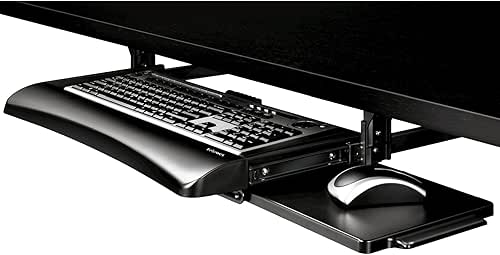
| Budget-Friendly Pick | Mounting Type: Bolt/screw mount | Platform Dimensions: 20″ x 7.625″ | Height Adjustability: 3 height adjustments | VIEW LATEST PRICE | Read Our Analysis |
| BONTEC KMT01 Under Desk Keyboard Tray with C-Clamp |

| Most Durable | Mounting Type: C-clamp mount | Platform Dimensions: 25.6″ x 11.8″ | Height Adjustability: Fixed (no height adjustment) | VIEW LATEST PRICE | Read Our Analysis |
| Klearlook Under Desk Keyboard Tray with Wrist Rest |

| Best Organization | Mounting Type: C-clamp mount | Platform Dimensions: Generously sized (exact dimensions not specified) | Height Adjustability: Not adjustable | VIEW LATEST PRICE | Read Our Analysis |
| AX WABER Under Desk Keyboard Tray with C Clamp |

| Professional Grade | Mounting Type: C-clamp mount | Platform Dimensions: 27.3″ x 11″ (32.5″ including clamps) | Height Adjustability: Fixed (no height adjustment) | VIEW LATEST PRICE | Read Our Analysis |
| Klearlook Adjustable Ergonomic Keyboard Tray with Wrist Rest |

| Most Versatile | Mounting Type: Adjustable arm mount | Platform Dimensions: Varies (above/under-desk dual option) | Height Adjustability: 237° vertical arm adjustment | VIEW LATEST PRICE | Read Our Analysis |
| Solid Steel Under Desk Keyboard Tray with Mouse Platform |

| Premium Build Quality | Mounting Type: Bolt/screw mount | Platform Dimensions: 28″ x 11″ | Height Adjustability: 3 preset settings up to 1.4 inches | VIEW LATEST PRICE | Read Our Analysis |
| Keyboard Tray Under Desk with Storage Drawer |

| Best Storage Solution | Mounting Type: Sliding track mount | Platform Dimensions: Platform size not specified | Height Adjustability: Up to 5.1 inches adjustment | VIEW LATEST PRICE | Read Our Analysis |
| Mount-It Under Desk Keyboard Tray with Mouse Platform |

| Heavy-Duty Mount | Mounting Type: Bolt-on mount | Platform Dimensions: 20.5″ x 11″ | Height Adjustability: Up to 5.5 inches adjustment | VIEW LATEST PRICE | Read Our Analysis |
| Ergonomic Under Desk Keyboard Tray with Storage Drawer |

| Best Ergonomic Design | Mounting Type: Sliding track mount | Platform Dimensions: 25″ x 11″ | Height Adjustability: Up to 6.1 inches adjustment | VIEW LATEST PRICE | Read Our Analysis |
| Suptek Under Desk Keyboard Tray with C Clamp Mount |

| Best C-Clamp System | Mounting Type: C-clamp mount | Platform Dimensions: 25.6″ x 11.8″ (30″ including clamps) | Height Adjustability: Fixed (no height adjustment) | VIEW LATEST PRICE | Read Our Analysis |
| VEVOR Adjustable Under-Desk Keyboard Tray with Slide-Out Design |

| Most Adjustable Height | Mounting Type: Sliding track mount | Platform Dimensions: 25″ x 9.8″ | Height Adjustability: 7.5 inches adjustment | VIEW LATEST PRICE | Read Our Analysis |
| VIVO Adjustable Under Desk Keyboard Tray (Mount-KBTM1) |

| Advanced Tilting Design | Mounting Type: Sliding track mount | Platform Dimensions: 26.8″ x 11.8″ | Height Adjustability: 6.3 inches adjustment | VIEW LATEST PRICE | Read Our Analysis |
More Details on Our Top Picks
VIVO Large Keyboard Tray Under Desk Pull Out (MOUNT-KB05E)
Are you struggling to find desk space while maintaining proper typing posture? The VIVO Large Keyboard Tray pulls out from underneath your desk, freeing up surface area. The 27-inch platform holds up to 11 pounds and extends 8.5 inches from your desk edge. Installation requires a C-clamp mount system that attaches to desks with surfaces no thicker than 1.25 inches. The clamps span 32.5 inches total, so verify your desk width accommodates this measurement. Avoid beveled-edge desks, which aren’t compatible. Once mounted, you’ll reduce wrist and shoulder strain by positioning your keyboard at a comfortable typing angle, improving your daily comfort and workspace efficiency.
- Mounting Type:C-clamp mount
- Platform Dimensions:27″ x 11″ (33″ including clamps)
- Height Adjustability:Fixed (no height adjustment)
- Rotation/Tilt Capability:Fixed (no rotation/tilt)
- Weight Capacity:11 lbs
- Additional Accessories Included:C-clamp mount system only
- Additional Feature:C-clamp mounting system
- Additional Feature:Supports up to 11 lbs
- Additional Feature:Maximum 8.5″ extension
HUANUO Ergonomic Under Desk Keyboard & Mouse Tray
If you’re working at a desk where space is limited and you want to reduce strain on your wrists and arms, the HUANUO Ergonomic Under Desk Keyboard & Mouse Tray delivers the adjustability you’ll need. The 25″ x 9.84″ surface accommodates all keyboard and mouse sizes. You’ll gain 6.3 inches of height adjustment and can tilt the platform up 6 degrees or down 22 degrees to match your posture. The tray swivels 180 degrees left and right for positioning flexibility. When not in use, you’ll slide it completely under your desk to reclaim workspace. Installation requires minimal effort with included hardware. Before purchasing, verify your desk has at least 14.17″ clearance under the desktop and 25″ width clearance for full functionality.
- Mounting Type:Sliding track mount
- Platform Dimensions:25″ x 9.84″
- Height Adjustability:6.3 inches total adjustment
- Rotation/Tilt Capability:180° swivel; 6° up, 22° down tilt
- Weight Capacity:Not specified
- Additional Accessories Included:Wrist rest
- Additional Feature:180° swivel capability
- Additional Feature:Includes wrist rest pad
- Additional Feature:6.3″ height adjustment
VIVO Adjustable Ergonomic Under Desk Keyboard Tray (MOUNT-KB03B)
The VIVO Adjustable Ergonomic Under Desk Keyboard Tray (MOUNT-KB03B) works best for anyone who spends extended hours typing and wants to reduce wrist soreness through proper positioning. This under-desk mount features a 25 x 10 deluxe universal tray that accommodates most keyboards and mice. You’ll find the keyboard slides smoothly along a 14.25-inch track for precise positioning. The tray offers five height adjustments and full side-to-side rotation, allowing you to customize your setup. Installation requires standard mounting hardware included in your package. If you’re installing on a height-adjustable desk, you’ll need the MOUNT-SPACER01 adapter separately. Ensure your desk has minimum 5/8-inch thickness and can support the 10-pound tray weight. Supportive rubber padding reduces pressure on your wrists during extended typing sessions.
- Mounting Type:Sliding track mount
- Platform Dimensions:25″ x 10″
- Height Adjustability:5 height adjustments
- Rotation/Tilt Capability:Full side-to-side rotation; 5 adjustments
- Weight Capacity:10 lbs (tray weight)
- Additional Accessories Included:Supportive rubber padding
- Additional Feature:Supportive rubber padding
- Additional Feature:Full side-to-side rotations
- Additional Feature:5 height adjustment settings
Fellowes Office Suites Underdesk Keyboard Drawer Black/Silver (9140305)
Looking to reclaim desktop space while improving your typing position? The Fellowes Office Suites Underdesk Keyboard Drawer offers a straightforward solution. This adjustable unit slides underneath your desk, requiring 23.5 inches of width and 14.5 inches of depth for installation. The spacious platform accommodates keyboards up to 20 inches wide and 7 5/8 inches deep. You’ll adjust the height using three preset positions to match your preferred work angle. The mouse tray attaches to either the right or left side of the keyboard tray or stores underneath. Before installing, ensure your desk area is free from crossbars or supports that’ll interfere with mounting hardware. This impact-resistant design keeps your workspace organized and your keyboard accessible.
- Mounting Type:Bolt/screw mount
- Platform Dimensions:20″ x 7.625″
- Height Adjustability:3 height adjustments
- Rotation/Tilt Capability:No rotation/tilt capability
- Weight Capacity:Not specified
- Additional Accessories Included:Mouse tray
- Additional Feature:Three height adjustments
- Additional Feature:Removable mouse tray option
- Additional Feature:Fits 20″ wide keyboards
BONTEC KMT01 Under Desk Keyboard Tray with C-Clamp
For users seeking a no-drill solution to reclaim desktop real estate, the BONTEC KMT01 delivers a straightforward clamp-based installation that doesn’t require permanent desk modifications. The C-clamps secure firmly to desks up to 1.97 inches thick, creating a wobble-free platform. You’ll need a flat, unobstructed desk underside with at least 31.3 inches of width and 11.4 inches of depth. The 25.6-inch-wide platform supports standard keyboards and mice up to 11 pounds, sliding smoothly in and out. Protective pads prevent scratches while stabilizing the tray. However, curved or beveled desk edges and crossbeams underneath will prevent proper installation, so verify compatibility before purchasing.
- Mounting Type:C-clamp mount
- Platform Dimensions:25.6″ x 11.8″
- Height Adjustability:Fixed (no height adjustment)
- Rotation/Tilt Capability:Fixed (no rotation/tilt)
- Weight Capacity:11 lbs
- Additional Accessories Included:Protective pads
- Additional Feature:No-drill C-clamp installation
- Additional Feature:Protective pad protection
- Additional Feature:Supports up to 11 lbs
Klearlook Under Desk Keyboard Tray with Wrist Rest
If you’re spending hours at your desk and experiencing wrist or neck strain, the Klearlook Under Desk Keyboard Tray with Wrist Rest addresses these discomfort issues through its adjustable tilt angle feature, which lets you position your keyboard at the optimal angle for your typing posture. The C-clamp fixture secures the tray to your desk edge, while the 360° swivel allows you to store it under your desk when not in use. You’ll benefit from the built-in drawer for supplies, dedicated phone slot, and headphone hanger that keep your workspace organized. The generously sized platform accommodates various keyboard and mouse combinations on a smooth surface for precise control. Robust construction minimizes wobbling during use, ensuring stable performance throughout your workday.
- Mounting Type:C-clamp mount
- Platform Dimensions:Generously sized (exact dimensions not specified)
- Height Adjustability:Not adjustable
- Rotation/Tilt Capability:360° swivel
- Weight Capacity:Not specified
- Additional Accessories Included:Mouse pad; built-in drawer; phone slot; headphone hanger
- Additional Feature:360° swivel capability
- Additional Feature:Built-in storage drawer
- Additional Feature:Phone slot and headphone hanger
AX WABER Under Desk Keyboard Tray with C Clamp
The AX WABER model AX01WB01 works best for you if you’re working at a desk where space is limited and you need to position your keyboard and mouse out of the way. This tray measures 27.3 inches with clamps extending to 32.5 inches total, fitting desks up to 1.9 inches thick. The platform slides out 5.7 inches from your desk edge, supporting up to 11 pounds. Installation requires mounting the sturdy C-clamps, which comes with all necessary hardware. The tray reduces wrist and shoulder strain through proper typing angles. Avoid beveled desk edges, as they’re incompatible with this model. You’ll appreciate the easy slide-in and slide-out operation for quick access and storage.
- Mounting Type:C-clamp mount
- Platform Dimensions:27.3″ x 11″ (32.5″ including clamps)
- Height Adjustability:Fixed (no height adjustment)
- Rotation/Tilt Capability:Fixed (no rotation/tilt)
- Weight Capacity:11 lbs
- Additional Accessories Included:Clamp mount system
- Additional Feature:Extends up to 5.7″
- Additional Feature:Supports up to 11 lbs
- Additional Feature:Adjustable C-clamp system
Klearlook Adjustable Ergonomic Keyboard Tray with Wrist Rest
Looking to reduce neck and wrist strain while working at your desk? The Klearlook keyboard tray offers dual installation options—position it above your desk or slide it underneath for space-saving storage. You’ll adjust the tray’s angle, rotation, and tilt to match your typing position. The included wrist rest supports your hands during extended work sessions. A built-in drawer, phone slot, and headphone hanger keep your workspace organized. The mouse pad accommodates various setups, while durable construction minimizes wobble. You can use this tray in home offices, gaming spaces, or traditional workplaces for comfortable browsing and typing sessions.
- Mounting Type:Adjustable arm mount
- Platform Dimensions:Varies (above/under-desk dual option)
- Height Adjustability:237° vertical arm adjustment
- Rotation/Tilt Capability:360° horizontal rotation; 180° tilt
- Weight Capacity:Not specified
- Additional Accessories Included:Wrist rest; built-in drawer; phone slot; headphone hanger
- Additional Feature:Dual above/under-desk use
- Additional Feature:360° horizontal rotation
- Additional Feature:237° vertical arm adjustment
Solid Steel Under Desk Keyboard Tray with Mouse Platform
Need to eliminate neck and shoulder strain while reclaiming desktop space? The Ciao Stilista Model KRKB-1 offers a practical solution. This 1mm steel tray mounts underneath your desk and slides out when needed, then pushes back to keep your work surface clear. The integrated 360° rotating mouse platform positions both peripherals ergonomically. You’ll adjust the height using three preset settings up to 1.4 inches to match your desk thickness. Installation requires screwing the tray under your desk—approximately 15 minutes with a drill for pilot holes. The industrial-grade galvanized slide tracks ensure smooth, quiet operation without sticking. Note that this tray isn’t compatible with glass, marble, or desks with existing drawers. At 5 pounds, it provides stable support without excessive weight.
- Mounting Type:Bolt/screw mount
- Platform Dimensions:28″ x 11″
- Height Adjustability:3 preset settings up to 1.4 inches
- Rotation/Tilt Capability:No rotation/tilt specified
- Weight Capacity:Not specified
- Additional Accessories Included:360° rotating mouse platform
- Additional Feature:Premium 1mm steel construction
- Additional Feature:3 preset height settings
- Additional Feature:360° rotating mouse platform
Keyboard Tray Under Desk with Storage Drawer
If you’re working at a standard office desk and want to improve your typing posture without replacing your furniture, an under-desk keyboard tray with storage is your solution. First, verify your desk meets the requirements: at least 28 inches long, 0.61 inches thick, and without beveled edges. Install the tray using included hardware, then adjust the height up to 5.1 inches, rotate it 180° horizontally, and tilt it 30° vertically for optimal arm alignment. The tray extends 9.8 inches maximum from your desk edge. Position it to reduce wrist and shoulder stress during typing. The built-in storage drawer keeps supplies organized, while the glowing mouse pad enhances visibility and improves mouse control on your work surface.
- Mounting Type:Sliding track mount
- Platform Dimensions:Platform size not specified
- Height Adjustability:Up to 5.1 inches adjustment
- Rotation/Tilt Capability:180° horizontal rotation; 30° vertical tilt
- Weight Capacity:Not specified
- Additional Accessories Included:Glowing mouse pad
- Additional Feature:180° horizontal rotation
- Additional Feature:Extends 9.8 inches max
- Additional Feature:Glowing mouse pad included
Mount-It Under Desk Keyboard Tray with Mouse Platform
The Mount-It Under Desk Keyboard Tray with Mouse Platform works best for professionals and home office workers who want to reclaim desktop real estate while maintaining proper ergonomic support throughout the day. This 20.5″ × 11″ tray slides smoothly along a 17.25″ steel track, positioning your keyboard and mouse within comfortable reach. The integrated wrist rest pads reduce strain during extended typing sessions. You’ll adjust the height up to 5.5 inches and customize tilt and swivel angles for your ideal typing position. Installation requires bolt-on mounting directly to your desk underside—measure your under-desk clearance first to confirm compatibility. The heavy-duty construction resists wobbling, ensuring stable daily professional use.
- Mounting Type:Bolt-on mount
- Platform Dimensions:20.5″ x 11″
- Height Adjustability:Up to 5.5 inches adjustment
- Rotation/Tilt Capability:Left-right swivel; height/tilt adjustable
- Weight Capacity:Not specified
- Additional Accessories Included:Ergonomic wrist rest; mouse platform
- Additional Feature:Bolt-on installation method
- Additional Feature:Integrated wrist rest pads
- Additional Feature:17.25″ slide track length
Ergonomic Under Desk Keyboard Tray with Storage Drawer
Want your workspace to support both comfort and organization? This keyboard tray combines ergonomic adjustability with practical storage. The 25×11-inch surface accommodates both keyboard and mouse, while the 11.8-inch slide-out drawer stores pens, cables, and notes. You’ll adjust height up to 6.1 inches, rotate 180 degrees horizontally, and tilt 15 degrees vertically for ideal wrist alignment. The included wrist rest minimizes strain. Installation takes three simple steps on desks at least 0.71 inches thick. It supports up to 11 pounds and works with standard desks and standing desks. This design maximizes workspace efficiency while keeping your desk organized and clutter-free.
- Mounting Type:Sliding track mount
- Platform Dimensions:25″ x 11″
- Height Adjustability:Up to 6.1 inches adjustment
- Rotation/Tilt Capability:180° horizontal rotation; 15° vertical tilt
- Weight Capacity:11 lbs
- Additional Accessories Included:Wrist rest; storage drawer
- Additional Feature:180° horizontal rotation
- Additional Feature:15° vertical tilt capability
- Additional Feature:Storage drawer underneath included
Suptek Under Desk Keyboard Tray with C Clamp Mount
Looking to reclaim desktop real estate while improving your typing posture? The Suptek keyboard tray slides under your desk and pulls out when you need it. The 25.6-inch platform holds your keyboard, mouse, and small accessories. Dual steel C-clamps attach securely to desks up to 1.57 inches thick, and non-slip pads protect your surface. You’ll gain ergonomic benefits by supporting a neutral or negative typing position, which reduces arm and shoulder strain. The tray holds up to 11 pounds and includes an edge stopper to prevent items from falling. Installation requires no drilling—just attach the clamps and adjust. This option won’t work for corner or curved desks.
- Mounting Type:C-clamp mount
- Platform Dimensions:25.6″ x 11.8″ (30″ including clamps)
- Height Adjustability:Fixed (no height adjustment)
- Rotation/Tilt Capability:Fixed (no rotation/tilt)
- Weight Capacity:11 lbs
- Additional Accessories Included:Non-slip pads; edge stopper
- Additional Feature:Updated smooth slide system
- Additional Feature:Edge stopper safety feature
- Additional Feature:Non-slip pad protection
VEVOR Adjustable Under-Desk Keyboard Tray with Slide-Out Design
If you’re working at a desk where space is limited and you need your keyboard and mouse within arm’s reach without cluttering your work surface, VEVOR’s adjustable under-desk keyboard tray offers a practical solution. The 25 x 9.8-inch surface accommodates standard keyboards, mice, and accessories while keeping your main desk clear. You’ll adjust the tray’s height up to 7.5 inches and tilt it 38 degrees vertically for proper positioning. The 180-degree horizontal swivel lets you rotate the tray to your preferred angle. A included wrist rest supports natural typing posture. You turn a knob to make adjustments without requiring tools. When you’re finished, you slide the tray back under your desk for storage. The setup works with wooden tables and includes all necessary hardware for installation.
- Mounting Type:Sliding track mount
- Platform Dimensions:25″ x 9.8″
- Height Adjustability:7.5 inches adjustment
- Rotation/Tilt Capability:180° horizontal swivel; 38° vertical tilt
- Weight Capacity:Not specified
- Additional Accessories Included:Wrist rest
- Additional Feature:7.5 inches height adjustment
- Additional Feature:38° vertical tilt angle
- Additional Feature:Prevents keyboard sliding feature
VIVO Adjustable Under Desk Keyboard Tray (Mount-KBTM1)
The VIVO Adjustable Under Desk Keyboard Tray (Mount-KBTM1) is your solution if you’re working at a standard desk and need to reclaim surface space while improving your typing posture. This 27 x 12 inch tray mounts underneath your desk, freeing up valuable work area. The two-part design lets you adjust the keyboard section from +15° to -90° and the mouse section from +38° to -150°, allowing you to find your ideal typing angle. You’ll get 6.3 inches of height adjustment and full 360° rotation for precise positioning. The plush foam padding cushions your wrists during extended typing sessions. Installation works on desks at least 0.7 inches thick, and assembly requires no special tools. The smooth gliding track lets you retract the tray under your desk when you need more legroom.
- Mounting Type:Sliding track mount
- Platform Dimensions:26.8″ x 11.8″
- Height Adjustability:6.3 inches adjustment
- Rotation/Tilt Capability:360° rotation; +15° to -90° keyboard tilt; +38° to -150° mouse tray tilt
- Weight Capacity:Not specified
- Additional Accessories Included:Plush foam padding; separate mouse tray
- Additional Feature:2-part tilting design
- Additional Feature:Plush foam padding included
- Additional Feature:Separate mouse tray section
Factors to Consider When Choosing Under Desk Keyboard Mouse Trays
You’ll need to evaluate five key factors before purchasing an under desk keyboard mouse tray: desk compatibility and thickness, installation method and hardware, adjustability and range of motion, platform size and weight capacity, and ergonomic features and comfort. Start by measuring your desk thickness and checking the tray’s compatibility specifications, then examine whether you prefer clamp-based or screw-based installation for your workspace setup. Finally, assess the tray’s adjustment range, weight limits, and comfort features like wrist supports or cushioning to ensure it matches your work style and physical needs.
Desk Compatibility And Thickness
What desk specifications matter most when selecting an under-desk keyboard tray? You need to verify your desk’s thickness first. Most clamp-on trays accommodate desks up to 1.9 inches thick, though some accept only 0.6 to 1.25 inches. Check your desk’s exact measurement before purchasing.
Next, examine your desk’s edge shape. Beveled or curved edges often won’t work with standard trays, which require flat surfaces for secure mounting. Inspect the underside of your desk for obstructions like crossbars or support beams that could block tray movement.
Finally, measure your desk’s underside clearance. You’ll need at least 31 to 35 inches of width and 11 to 12 inches of depth for full slide-out functionality. Verify adequate spacing from the desk edge—typically 14 to 16 inches minimum—to allow complete extension.
Installation Method And Hardware
Once you’ve confirmed your desk’s thickness and clearance, you’ll need to choose an installation method that matches both your desk’s structure and your comfort with permanent modifications. C-clamp mounting works on desks up to 1.97 inches thick and requires no drilling, but you must verify adequate clamp clearance. Bolt-on designs demand permanent desk modification and underside access, yet they deliver superior stability with minimal wobble. Some trays use slide-out tracks ranging from 14–17.25 inches for smooth extension. Your choice directly affects weight capacity, typically around 11 lbs, and under-desk clearance. Consider desk beams and crossbars when selecting hardware. Match the installation method to your desk’s construction and your willingness to make permanent changes before purchasing.
Adjustability And Range Of Motion
How much flexibility do you need in your typing setup? Look for trays offering multi-axis adjustability: height ranges up to 5–6 inches, tilt angles between 15–38 degrees, and left-right swivel capabilities, often 180 degrees or more. A full 360-degree rotation provides maximum positioning options for alternative work angles. Check the horizontal reach and extension from your desk edge, typically 5 to 9.8 inches, to verify comfortable arm alignment. Dual-platform designs with separate keyboard and mouse trays maintain ergonomic reach better than combined surfaces. Verify that vertical adjustment and tilt remain stable during typing and mouse use without wobbling. These adjustable features let you customize your posture and reduce strain throughout your workday.
Platform Size And Weight Capacity
You’ll need to match your tray’s platform dimensions to your keyboard and mouse to assure they fit properly and function well. Common trays measure 25–27 inches wide and 9–12 inches deep. Larger platforms, around 27.3 inches long or 25.6 inches wide, accommodate full-size keyboards and extra accessories but require adequate under-desk space. Check your weight capacity next—most trays support approximately 11 pounds maximum. Calculate your combined keyboard, mouse, and accessory weight to stay within this limit. Verify the tray’s maximum desk thickness requirement, typically 1.25 to 1.97 inches, to ensure secure mounting on your desk edge. If your tray includes built-in storage like drawers or wrist rests, account for reduced usable platform space and weight distribution when planning your setup.
Ergonomic Features And Comfort
What adjustments matter most when selecting a keyboard tray for your workspace? Start by checking the tilt range—you’ll want up to 38° vertical adjustment to position your wrists neutrally. Next, verify height adjustability of 5–6 inches so your elbows align properly and reduce shoulder strain. Consider rotation options: 360° side-to-side movement and 180°–360° reach accommodate both left- and right-handed users. Examine wrist support features like built-in rests or padded surfaces that decrease pressure during extended typing. Finally, inspect the tray’s design for tilting capability with foam padding and non-slip edge stoppers. These elements work together to maintain stable, neutral wrist angles, preventing fatigue and discomfort throughout your workday.
Space-Saving Design Benefits
When desk space runs short, repositioning your keyboard and mouse beneath the desk surface reclaims valuable real estate for monitors, documents, or other work materials. Under-desk trays extend only 5–9.8 inches from your desk edge, preserving legroom while maximizing usable surface area. Sliding tracks measuring 14–17 inches allow you to retract the tray completely when you’re not typing, keeping your workspace uncluttered. Clamped or bolt-on mounting systems attach securely without drilling holes, eliminating permanent modifications to your desk. These trays support up to 11 pounds, easily accommodating your keyboard, mouse, and wrist rest. By consolidating accessories below the desk, you’ll create a cleaner, more organized workstation layout while maintaining comfortable typing and mousing positions throughout your workday.
Final Thoughts
You’ll want to select an under desk keyboard tray that matches your desk type and space constraints. Measure your desk depth and check for mounting compatibility—clamp, bolt, or pull-out styles each suit different setups. Prioritize adjustable height and tilt features to maintain neutral wrist positioning. Verify the platform accommodates your keyboard and mouse. Test rotation capabilities if you need flexibility. Proper installation ensures long-term comfort and prevents repetitive strain injuries during daily work.

Meet Ry, “TechGuru,” a 36-year-old technology enthusiast with a deep passion for tech innovations. With extensive experience, he specializes in gaming hardware and software, and has expertise in gadgets, custom PCs, and audio.
Besides writing about tech and reviewing new products, he enjoys traveling, hiking, and photography. Committed to keeping up with the latest industry trends, he aims to guide readers in making informed tech decisions.