

When your gaming sessions suffer from weak WiFi signals and high latency, a quality extender can restore your competitive edge. You’ll want to choose between AC and WiFi 6 models, each offering different speed levels and coverage areas. The right device requires specific features like Gigabit Ethernet ports, dual-band support, and smart roaming capabilities. But which extender actually delivers the performance your games demand, and how do you install it correctly?
| TP-Link AC1200 WiFi Extender (RE315) |

| Budget-Friendly Pick | Total Bandwidth: 1.2 Gbps | Maximum Coverage Area: 1,500 sq. ft | Device Capacity: 32 devices | VIEW LATEST PRICE | Read Our Analysis |
| AX3000 WiFi 6 Range Extender with Gigabit Ethernet |

| Best Coverage | Total Bandwidth: 3.0 Gbps | Maximum Coverage Area: 13,888 sq. ft | Device Capacity: 100+ devices | VIEW LATEST PRICE | Read Our Analysis |
| TP-Link AC1900 WiFi Range Extender RE550 |

| Best Value | Total Bandwidth: 1.9 Gbps | Maximum Coverage Area: 2,100 sq. ft | Device Capacity: 32 devices | VIEW LATEST PRICE | Read Our Analysis |
| TP-Link AX3000 WiFi 6 Range Extender (RE715X) |

| Editor’s Choice | Total Bandwidth: 3.0 Gbps | Maximum Coverage Area: 2,400 sq. ft | Device Capacity: 64 devices | VIEW LATEST PRICE | Read Our Analysis |
| WiFi Extender Signal Booster up to 5000 sq.ft |

| Most Affordable | Total Bandwidth: 0.3 Gbps | Maximum Coverage Area: 5,000 sq. ft | Device Capacity: 50 devices | VIEW LATEST PRICE | Read Our Analysis |
| TP-Link BE3200 Wi-Fi 7 Range Extender (RE223BE) |
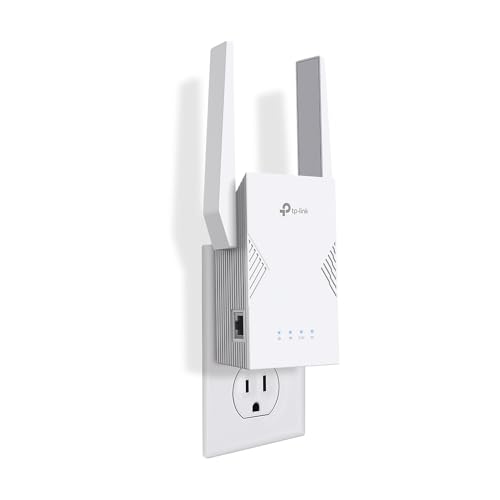
| Best Overall | Total Bandwidth: 3.2 Gbps | Maximum Coverage Area: 2,400 sq. ft | Device Capacity: 64 devices | VIEW LATEST PRICE | Read Our Analysis |
| NPET AC1200 Dual Band WiFi Extender with Ethernet Ports |

| Most Versatile | Total Bandwidth: 1.2 Gbps | Maximum Coverage Area: 7,000 sq. ft | Device Capacity: 32 devices | VIEW LATEST PRICE | Read Our Analysis |
More Details on Our Top Picks
TP-Link AC1200 WiFi Extender (RE315)
If you’re gaming in a room far from your router and need to beef up your signal without spending heavily, the TP-Link AC1200 WiFi Extender (RE315) deserves your attention. This 2023 Engadget Best Budget Pick delivers 1.2Gbps total bandwidth across dual bands: 867 Mbps on 5GHz and 300 Mbps on 2.4GHz. Setup takes minutes using the TP-Link Tether app on Android or iOS. The device covers up to 1,500 square feet and supports 32 devices. Its wired Ethernet port provides reliable connection for gaming consoles. External antennas optimize coverage. Note that extenders enhance signal reach, not core internet speed—performance depends on your existing connection quality.
- Total Bandwidth:1.2 Gbps
- Maximum Coverage Area:1,500 sq. ft
- Device Capacity:32 devices
- Ethernet Port:1 port (standard speed)
- WiFi Standard:AC (802.11ac)
- Security Protocols:CISA Secure-by-Design pledge
- Additional Feature:One-touch setup simplicity
- Additional Feature:Adaptive Path Selection technology
- Additional Feature:Covers up to 1500 sq.ft.
AX3000 WiFi 6 Range Extender with Gigabit Ethernet
The 2026 AX3000 WiFi 6 Range Extender works well if you’re dealing with dead zones across a large home or need to extend coverage to a gaming setup in a distant room. This dual-band extender covers up to 13,888 square feet and supports over 100 devices simultaneously. You’ll benefit from its Gigabit Ethernet port, which delivers up to 10x faster wired speeds for gaming consoles, PCs, and smart TVs. Setup takes about three minutes through your smartphone or browser without requiring an app. The four-antenna design reduces dead zones while maintaining stable connections across multiple WiFi standards, including WiFi 6. Security features include WEP, WPA, WPA2, and 802.1X protocols to protect your network.
- Total Bandwidth:3.0 Gbps
- Maximum Coverage Area:13,888 sq. ft
- Device Capacity:100+ devices
- Ethernet Port:Gigabit Ethernet port
- WiFi Standard:WiFi 6 (802.11ax)
- Security Protocols:WEP/WPA/WPA2/802.1X
- Additional Feature:WiFi 6 acceleration technology
- Additional Feature:10x faster wired connectivity
- Additional Feature:Supports 100+ devices
TP-Link AC1900 WiFi Range Extender RE550
TP-Link’s AC1900 model delivers dual-band WiFi with up to 1.9 Gbps total bandwidth across a 2,100 sq. ft. coverage area, making it well-suited for gamers who need reliable connectivity across multiple rooms without sacrificing signal strength. You’ll connect the extender using the Tether app, which guides you through setup and helps you locate the optimal placement via its signal indicator. The gigabit Ethernet port lets you connect gaming devices directly for maximum speed and stability. Three adjustable external antennas customize coverage to your space. Note that you’ll experience speeds roughly 50% of your base connection, so the extender improves coverage reliability rather than increasing bandwidth. The device supports up to 32 simultaneous connections and works with most routers, though it isn’t compatible with certain mesh systems like Deco.
- Total Bandwidth:1.9 Gbps
- Maximum Coverage Area:2,100 sq. ft
- Device Capacity:32 devices
- Ethernet Port:Gigabit Ethernet port
- WiFi Standard:AC (802.11ac)
- Security Protocols:CISA Secure-by-Design pledge
- Additional Feature:AP mode hotspot conversion
- Additional Feature:Three adjustable external antennas
- Additional Feature:Smart adaptive roaming feature
TP-Link AX3000 WiFi 6 Range Extender (RE715X)
Want aWiFi 6 extender that works seamlessly with your existing router without requiring a complete system overhaul? The RE715X delivers 3 Gbps total bandwidth across dual bands—2404 Mbps on 5 GHz and 574 Mbps on 2.4 GHz. You’ll gain coverage up to 2400 square feet while supporting 64 devices simultaneously. Set it up using the TP-Link Tether app, then position it where the signal indicator shows optimal placement. Enable EasyMesh or OneMesh for whole-home coverage, or use AP mode via the Gigabit Ethernet port to convert a wired connection into a wireless hotspot. The device handles gaming demands through OFDMA, MU-MIMO, and beamforming technologies that reduce latency and improve reliability.
- Total Bandwidth:3.0 Gbps
- Maximum Coverage Area:2,400 sq. ft
- Device Capacity:64 devices
- Ethernet Port:Gigabit Ethernet port
- WiFi Standard:WiFi 6 (802.11ax)
- Security Protocols:CISA Secure-by-Design pledge; WPA3
- Additional Feature:PCMag Editor’s Choice award
- Additional Feature:OFDMA and MU-MIMO support
- Additional Feature:Intelligent signal indicator placement
WiFi Extender Signal Booster up to 5000 sq.ft
Need to cover your entire home with stable wireless signal while supporting dozens of connected devices? This extender delivers 360° coverage across 5000 square feet and handles up to 50 devices simultaneously. Set it up in two modes: AP mode for wired networks or Repeater mode to extend your existing wireless. Use one-tap WPS setup or browser-based configuration on iOS and Android. The dual-band system provides 300 Mbps on 2.4 GHz with stable speeds via Ethernet connection. Connect smartphones, laptops, tablets, smart speakers, and gaming consoles without speed drops. The compact plug-wall design installs anywhere at home. WPA/WPA2 security protocols protect your network from unauthorized access.
- Total Bandwidth:0.3 Gbps
- Maximum Coverage Area:5,000 sq. ft
- Device Capacity:50 devices
- Ethernet Port:1 port (standard speed)
- WiFi Standard:AC (802.11ac)
- Security Protocols:WEP/WPA/WPA2
- Additional Feature:360° full coverage design
- Additional Feature:1-tap WPS setup option
- Additional Feature:Compact plug-wall form factor
TP-Link BE3200 Wi-Fi 7 Range Extender (RE223BE)
The RE223BE’s Wi-Fi 7 technology delivers up to 3.2 Gbps total bandwidth across dual bands, making it ideal if you’re gaming in rooms far from your router and experiencing lag or disconnections. Position the extender midway between your router and gaming area to maximize coverage across 2400 square feet. Connect it to your Wi-Fi 7 router to enable MLO features that boost multi-band performance. The four external antennas provide beamforming to direct signals toward your devices. Use the Tether app to configure settings, monitor connected devices, and enable parental controls if needed. The 1 Gbps Ethernet port lets you hardwire your gaming console for stable, wired connections.
- Total Bandwidth:3.2 Gbps
- Maximum Coverage Area:2,400 sq. ft
- Device Capacity:64 devices
- Ethernet Port:1 Gbps Ethernet port
- WiFi Standard:WiFi 7 (802.11be)
- Security Protocols:WPA3; WPA2; IP/MAC filtering
- Additional Feature:Multi-Link Operation (MLO) technology
- Additional Feature:Optimized for 4K/8K streaming
- Additional Feature:Cloud management and parental controls
NPET AC1200 Dual Band WiFi Extender with Ethernet Ports
If you’re gaming across multiple rooms and your main router can’t reach your setup, the NPET AC1200 offers a practical solution with its dual Gigabit Ethernet ports and three operational modes. Choose Repeater mode to extend your existing network, AP mode for a separate stable connection, or Router mode for independent operation. The 1.2 Gbps speed supports HD streaming and online gaming without lag. Four adjustable antennas strengthen signal coverage across 7,000 square feet. Connect two wired devices simultaneously using the Ethernet ports for maximum stability. Setup takes under three minutes with LED guidance. The compact Type-C design fits wall or desk placement without consuming outlet space.
- Total Bandwidth:1.2 Gbps
- Maximum Coverage Area:7,000 sq. ft
- Device Capacity:32 devices
- Ethernet Port:2 Gigabit Ethernet ports
- WiFi Standard:AC (802.11ac)
- Security Protocols:WEP/WPA/WPA2
- Additional Feature:3-in-1 flexible networking modes
- Additional Feature:Dual Gigabit Ethernet ports
- Additional Feature:USB-C connectivity design
Factors to Consider When Choosing a WiFi Extender for Gaming
When selecting a WiFi extender for gaming, you’ll want to evaluate five key factors: bandwidth and speed performance to handle your gaming demands, low latency connection quality to reduce lag during gameplay, device capacity and support to connect all your gaming equipment, coverage area requirements to ensure signal reaches your gaming space, and dual-band signal strength to provide reliable 5GHz and 2.4GHz options. Check your extender’s specifications for speed ratings (typically measured in Mbps), ping times under 50ms, the maximum number of connected devices, the square footage it covers, and whether it offers simultaneous dual-band transmission. These factors directly impact your gaming experience, so compare extenders across all five categories before making your purchase.
Bandwidth and Speed Performance
Why does bandwidth matter for gaming, and how do you evaluate it when shopping for a WiFi extender?
Bandwidth directly impacts your download and upload speeds. Look for extenders offering AX or Wi-Fi 6 standards with speeds up to 3.2 Gbps, which reduce data transfer bottlenecks during gameplay. Dual-band models split traffic between 2.4 GHz and 5 GHz bands; prioritize the 5 GHz band for gaming since it delivers faster, lower-latency connections.
Check for OFDMA, MU-MIMO, and beamforming technologies—these features stabilize performance across multiple devices simultaneously. Understand that real-world speeds typically reach 50% or less of advertised speeds when extending wirelessly. Maximize performance by positioning your extender close to your router and using a Gigabit Ethernet port for wired backhaul when available.
Low Latency Connection Quality
How much latency you experience during gaming depends largely on how quickly your extender processes data and hands off your connection between devices. Choose extenders with Smart Adaptive Roaming and seamless handoff features to minimize processing delays. Wi-Fi 6 and 7 extenders support OFDMA and MU-MIMO, which reduce network contention and lower per-device latency in busy gaming environments. For maximum stability, connect your extender to your router using a Gigabit Ethernet port instead of wireless backhaul, which eliminates potential bottlenecks. Wide, consistent signal coverage prevents latency spikes caused by weak or fluctuating signals. Consider switching your extender to AP or Router mode to create a dedicated access point, avoiding backhaul contention that can increase lag during gameplay.
Device Capacity and Support
You’ll want to prioritize device capacity when selecting a gaming WiFi extender, since your household’s total connected devices directly impacts network performance and gaming stability. Look for extenders supporting 100 or more devices to prevent bottlenecks when multiple gaming clients and peripherals connect simultaneously. Check product specifications for advertised device capacity—models offering 64 or higher ratings ensure stable performance during peak usage. Dual-band support with MU-MIMO technology allows your extender to handle concurrent gaming traffic efficiently across both 2.4 GHz and 5 GHz frequencies. Include Gigabit Ethernet ports in your selection, which provide wired backhaul options for consoles and PCs requiring the lowest latency. Verify Smart Adaptive Roaming capabilities to maintain seamless connections as you move throughout your gaming area without dropping signal or experiencing lag spikes.
Coverage Area Requirements
Beyond managing device capacity, selecting an extender that covers your gaming space properly determines whether you’ll maintain strong, consistent signals throughout your home. Coverage ranges vary greatly, from 2,100 square feet to 13,888 square feet, directly affecting how many rooms stay connected without dropouts. Measure your gaming area and add 20 percent to account for walls and obstacles that reduce signal strength. Choose extenders with multiple external antennas and OFDMA/MU-MIMO technology, which distribute bandwidth more efficiently across wider spaces. Remember that real-world coverage typically falls short of manufacturer claims, so plan conservatively. For larger homes exceeding 7,000 square feet, consider mesh systems or multiple access points instead of single extenders to maintain low latency and even signal distribution.
Dual-Band Signal Strength
What’s the difference between a dual-band extender that delivers real gaming performance and one that merely advertises impressive total bandwidth? Real gaming performance depends on the 5 GHz band’s actual throughput, not combined specifications. You should look for extenders offering 867 Mbps or higher on the 5 GHz link specifically. Check antenna design and placement—stronger antennas prevent congestion between bands and maintain low latency. Verify the extender uses adaptive roaming or smart path selection to keep your gaming device connected to the optimal band as you move. The 2.4 GHz band handles longer range while 5 GHz supports faster speeds, but you need both working together effectively for consistent gaming performance throughout your home.
Wired Ethernet Port Options
While dual-band signal strength handles your wireless coverage needs, a wired Ethernet port transforms how your extender supports gaming by removing wireless congestion entirely. Verify your extender has a true Gigabit port operating at 1000 Mbps, not slower speeds that create bottlenecks. Some models offer dual Gigabit ports, letting you connect two devices simultaneously for enhanced stability. Connect your gaming console or PC directly to the port via Ethernet cable to establish a wired backhaul, which preserves bandwidth for other wireless devices. Confirm the Ethernet port remains active when using mesh configurations like EasyMesh or OneMesh, ensuring consistent performance during device handoffs. In AP mode, the Ethernet connection converts into a wireless hotspot, supporting stable local gaming setups without relying entirely on wireless transmission.
Mesh Compatibility Features
How does your extender integrate with your existing network setup? You’ll want to verify mesh compatibility before purchasing. Check if your extender supports EasyMesh, which works with third-party routers, or OneMesh, TP-Link’s proprietary system. Some devices labeled as mesh-compatible won’t work with specific brands like Deco, causing gaming latency issues. Review the extender’s specifications against your current router model. Enable AP mode and seamless roaming features on compatible devices to improve handoff between nodes during gameplay. Test the connection before committing to extended play sessions. Confirm that all devices in your network support the same mesh standard. This preparation prevents performance drops when you move between rooms while gaming.
Final Thoughts
You’ll improve your gaming connection by selecting an extender that matches your setup. Choose dual-band or WiFi 6 models with Gigabit Ethernet ports and 1 Gbps+ speeds. Place your extender halfway between your router and gaming area for optimal signal. Use wired backhaul when possible to reduce latency. Test your connection after setup and adjust placement if you’re experiencing lag or drops.

Meet Ry, “TechGuru,” a 36-year-old technology enthusiast with a deep passion for tech innovations. With extensive experience, he specializes in gaming hardware and software, and has expertise in gadgets, custom PCs, and audio.
Besides writing about tech and reviewing new products, he enjoys traveling, hiking, and photography. Committed to keeping up with the latest industry trends, he aims to guide readers in making informed tech decisions.