
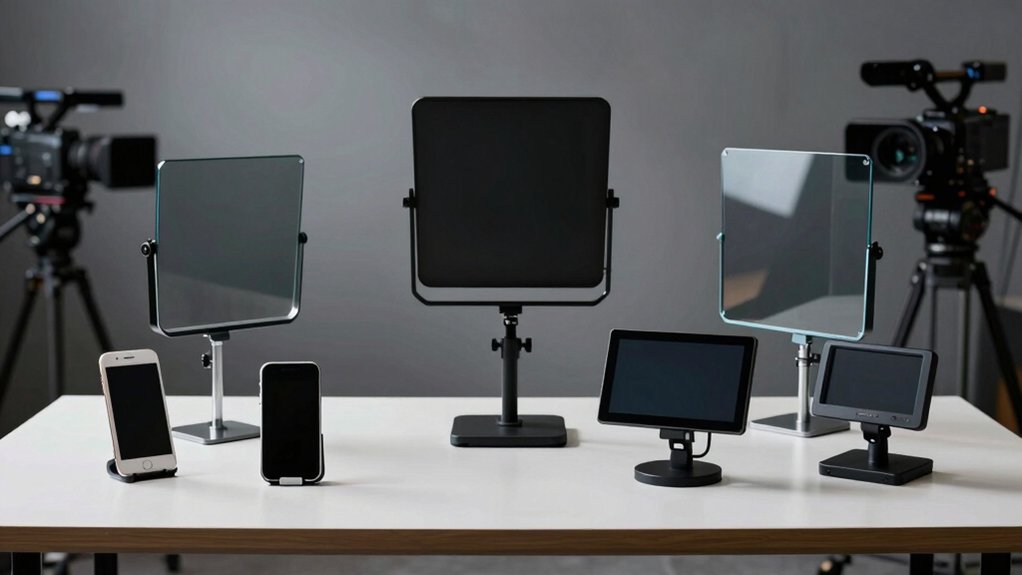

When you’re presenting on Zoom, reading from your screen breaks eye contact and reduces your credibility. A teleprompter fixes this by displaying your script at camera level, so you maintain natural eye contact while speaking. You’ll find options ranging from budget-friendly smartphone models to professional-grade setups. The right choice depends on your device type, budget, and setup space—but here’s what separates the top performers.
| Elgato Prompter Teleprompter for YouTube Twitch Zoom |

| Best For Streamers | Device Compatibility: Mac/PC with built-in display; DSLR, webcams, smartphones | Portability: Desktop-based with monitor display | Display/Optics Quality: Built-in LCD display; drag-and-drop window support | VIEW LATEST PRICE | Read Our Analysis |
| Glide Gear TMP 75 Teleprompter with Carry Case |

| Most Portable | Device Compatibility: Smartphones, DSLR, mirrorless cameras, webcams | Portability: Lightweight (2 lbs); includes carry bag | Display/Optics Quality: Industry-standard 5 x 5.4 70/30 beam-splitting glass | VIEW LATEST PRICE | Read Our Analysis |
| Teleprompter Kit for iPhone & Android with Tripod |
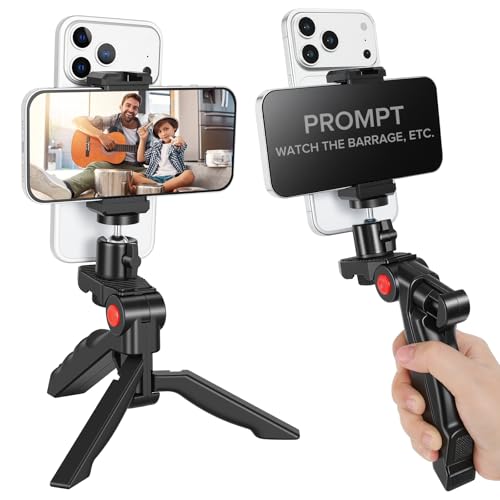
| Best Dual-Camera Setup | Device Compatibility: iPhone & Android smartphones | Portability: Adjustable tripod with easy storage and transport | Display/Optics Quality: Smartphone/tablet screen display | VIEW LATEST PRICE | Read Our Analysis |
| Desview T12S 12.9 inch Metal Teleprompter with Carry Case |
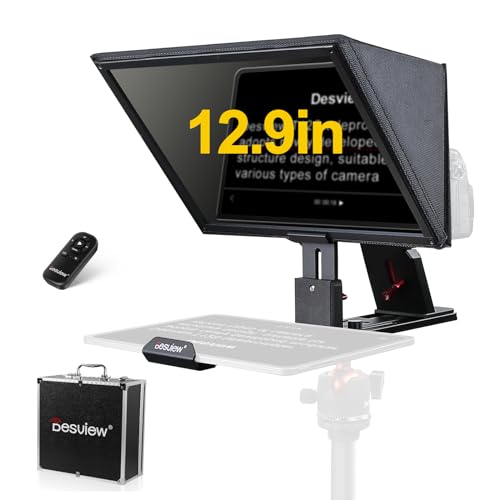
| Best Overall | Device Compatibility: DSLR, mirrorless cameras, camcorders; iPad/tablets up to 12.9″ | Portability: Aluminum carry case included | Display/Optics Quality: 12.9″ color-neutral mirror with anti-reflective coating; no ghosting | VIEW LATEST PRICE | Read Our Analysis |
| i2 12-inch All-Metal Teleprompter with Remote Control |
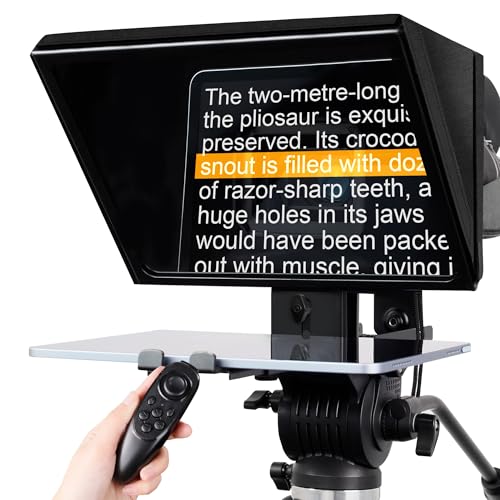
| Best Value | Device Compatibility: Cameras, camcorders; tablets up to 12.9″ | Portability: Lightweight, compact form; easy to carry and store | Display/Optics Quality: High-quality tempered optical glass | VIEW LATEST PRICE | Read Our Analysis |
| LENSGO TC7S Portable Teleprompter for Phone & Android |

| Best Budget Pick | Device Compatibility: Smartphones (iPhone & Android); mini tablets below 8″ | Portability: Ultra-light, folds in 1 second; compact | Display/Optics Quality: Industry-standard beam splitter glass with special coating | VIEW LATEST PRICE | Read Our Analysis |
| Desview P13 Portable Teleprompter for 12.9″ Tablets |

| Best For Professionals | Device Compatibility: DSLR/mirrorless cameras; tablets up to 12.9″ | Portability: Lightweight (1.7 kg), foldable; includes storage bag | Display/Optics Quality: Reflection-free text display for 12.9″ tablets | VIEW LATEST PRICE | Read Our Analysis |
| AMBITFUL Portable Teleprompter Kit with Remote Control |

| Best For DSLRs | Device Compatibility: DSLR cameras, smartphones | Portability: Compact, portable mini teleprompter | Display/Optics Quality: Clear text via advanced light reflection technology | VIEW LATEST PRICE | Read Our Analysis |
More Details on Our Top Picks
Elgato Prompter Teleprompter for YouTube Twitch Zoom
If you’re streaming on multiple platforms or juggling several windows during calls, the Elgato Prompter offers a built-in display that eliminates the need for extra tablets or smartphone screens. You can drag and drop any window or app directly onto its monitor, allowing you to read scripts, monitor Twitch chat, or review other content while maintaining eye contact with your camera. The setup is straightforward: attach your camera and plug the device into your PC or Mac. It works with DSLRs, webcams, and smartphones. You’ll need DisplayLink software on Mac or DisplayLink Presenter on Android. The Camera Hub app lets you adjust text appearance, and Stream Deck integration enhances your workflow further.
- Device Compatibility:Mac/PC with built-in display; DSLR, webcams, smartphones
- Portability:Desktop-based with monitor display
- Display/Optics Quality:Built-in LCD display; drag-and-drop window support
- Remote Control:Desktop control via PC/Mac
- Mobile App Support:Camera Hub app available; DisplayLink software
- Build Quality/Materials:Built-in display unit with integrated design
- Additional Feature:Built-in display eliminates tablets
- Additional Feature:Stream Deck workflow integration
- Additional Feature:Drag-and-drop window functionality
Glide Gear TMP 75 Teleprompter with Carry Case
The Glide Gear TMP 75 works best for creators who need a lightweight, portable teleprompter that’s ready to use immediately without assembly. This all-metal unit weighs just 2 lbs and fits easily into your camera setup via 15mm rails. The 5 x 5.4 beam-splitting glass displays your script while you maintain eye contact with your audience. Load your script into any smartphone app with mirror text capability, then position your phone behind the glass. The teleprompter works with DSLRs, mirrorless cameras, and webcams. Its included carry bag protects the unit during transport. No iPad support limits tablet users, but universal smartphone compatibility makes this option accessible for most creators needing professional prompting solutions.
- Device Compatibility:Smartphones, DSLR, mirrorless cameras, webcams
- Portability:Lightweight (2 lbs); includes carry bag
- Display/Optics Quality:Industry-standard 5 x 5.4 70/30 beam-splitting glass
- Remote Control:No remote control included
- Mobile App Support:Compatible with apps offering mirror text feature; no app included
- Build Quality/Materials:All-metal durable construction
- Additional Feature:70/30 beam-splitting glass
- Additional Feature:Pre-assembled with 15mm rails
- Additional Feature:Includes protective hood/bag
Teleprompter Kit for iPhone & Android with Tripod
Need to deliver scripts smoothly during live streams without memorizing every word? This dual-camera teleprompter kit supports your phone and displays scripts in real time while you broadcast. Mount your device on the adjustable tripod, which rotates up to 120° and features a 360° pan/tilt head for positioning. The dual phone holder lets you display your script on one device while recording with another camera. You’ll view audience comments simultaneously, enabling seamless interaction during live streams. The ergonomic grip works for handheld or tabletop use. Cold shoe interfaces accommodate additional accessories. Storage and transport remain simple, making this kit practical for vlogging, YouTube, TikTok, and live streaming across platforms.
- Device Compatibility:iPhone & Android smartphones
- Portability:Adjustable tripod with easy storage and transport
- Display/Optics Quality:Smartphone/tablet screen display
- Remote Control:No remote control included
- Mobile App Support:Real-time comment/chat display functionality
- Build Quality/Materials:Metal tripod with phone holders
- Additional Feature:Dual-camera mount setup
- Additional Feature:360° pan/tilt rotation
- Additional Feature:Real-time audience comment display
Desview T12S 12.9 inch Metal Teleprompter with Carry Case
Looking to maintain eye contact with your camera during video conferences and presentations? The Desview T12S offers a 12.9-inch metal teleprompter designed for this exact purpose. You’ll position your iPad or tablet behind the semi-transparent beamsplitter mirror, which reflects your script while allowing the camera to capture you clearly. The color-neutral mirror prevents image ghosting and performs well in bright outdoor conditions. Download the free Desview app on iOS or Android to control your script’s scrolling speed via the included Bluetooth remote. The aluminum construction provides durability, and the protective carry case enables easy transport. Setup takes minutes, letting you focus on delivering confident, natural-looking presentations without memorizing lines.
- Device Compatibility:DSLR, mirrorless cameras, camcorders; iPad/tablets up to 12.9″
- Portability:Aluminum carry case included
- Display/Optics Quality:12.9″ color-neutral mirror with anti-reflective coating; no ghosting
- Remote Control:Bluetooth remote control included (battery not included)
- Mobile App Support:Free Desview app (iOS & Google Play); on-the-fly script editing
- Build Quality/Materials:Aluminum alloy construction
- Additional Feature:Accommodates up to 12.9″ tablets
- Additional Feature:Backside anti-reflective coating
- Additional Feature:Color-neutral mirror/no ghosting
i2 12-inch All-Metal Teleprompter with Remote Control
Want a teleprompter that’ll handle both your smartphone setup and larger devices without sacrificing durability? The i2 12-inch all-metal model delivers solid construction with its tempered optical glass and sturdy metal frame. You’ll appreciate its compatibility with tablets up to 12.9 inches and most cameras. Before using it, remove the protective film from both glass sides. Control your text display remotely using the included remote control and dedicated app, which lets you adjust content efficiently during recordings. The compact, lightweight design makes transport straightforward for various shooting locations. You’ll also receive after-sales consulting support to resolve any issues that arise during operation.
- Device Compatibility:Cameras, camcorders; tablets up to 12.9″
- Portability:Lightweight, compact form; easy to carry and store
- Display/Optics Quality:High-quality tempered optical glass
- Remote Control:Remote control equipped
- Mobile App Support:Dedicated teleprompter app for text control
- Build Quality/Materials:All-metal construction with tempered optical glass
- Additional Feature:Tempered optical glass quality
- Additional Feature:Supports 12.9-inch tablets/monitors
- Additional Feature:After-sales consulting support
LENSGO TC7S Portable Teleprompter for Phone & Android
If you’re constantly on the move while recording content—whether you’re vlogging, teaching online, or conducting interviews—the LENSGO TC7S offers a portable solution that folds in one second and fits in a bag. The teleprompter uses high-definition glass and a beam splitter to display your script clearly while you look directly at your phone’s camera. You can control playback through a Bluetooth remote paired with the free TCQI app, adjusting speed, font, and background color as needed. The device accommodates all smartphones and tablets under eight inches, supporting both vertical and horizontal orientations. To input scripts, you’ll either type directly into the app, upload a text document from your phone, or select an image. This setup eliminates the need to memorize lines during live streams or recordings.
- Device Compatibility:Smartphones (iPhone & Android); mini tablets below 8″
- Portability:Ultra-light, folds in 1 second; compact
- Display/Optics Quality:Industry-standard beam splitter glass with special coating
- Remote Control:Bluetooth remote control with free TCQI app
- Mobile App Support:Free TCQI app (iOS & Android); TXT document support
- Build Quality/Materials:Industry-standard glass with beam splitter
- Additional Feature:One-second fold design
- Additional Feature:Supports vertical/horizontal placement
- Additional Feature:Phone lens shading ring
Desview P13 Portable Teleprompter for 12.9″ Tablets
The Desview P13 works best for content creators who need a lightweight, foldable teleprompter that travels between recording locations. This device supports tablets up to 12.9 inches and connects wirelessly via Bluetooth for remote control of playback speed, pause, and page navigation. The built-in sun hood reduces glare during outdoor filming. You’ll import scripts as TXT or DOCX files into the Desview app, adjust fonts and mirroring settings, and position the 1.7 kg unit on your camera via its universal 1/4 screw mount. The adjustable height extends up to 245 mm, accommodating various filming angles and camera setups.
- Device Compatibility:DSLR/mirrorless cameras; tablets up to 12.9″
- Portability:Lightweight (1.7 kg), foldable; includes storage bag
- Display/Optics Quality:Reflection-free text display for 12.9″ tablets
- Remote Control:Wireless Bluetooth remote control
- Mobile App Support:Desview Teleprompter APP; TXT/DOCX imports
- Build Quality/Materials:Lightweight aluminum/metal foldable frame
- Additional Feature:Foldable sun hood included
- Additional Feature:Height adjustable 30-40mm
- Additional Feature:TXT/DOCX file import support
AMBITFUL Portable Teleprompter Kit with Remote Control
For content creators who need a compact teleprompter that works with both cameras and smartphones, the AMBITFUL Portable Teleprompter Kit with Remote Control delivers the essential features you’re looking for. Mount your device using the smartphone expansion plate for phones 2.2–3.2 inches wide, or attach camera adapter rings in sizes 49–77mm for DSLR compatibility. Position the teleprompter on a desktop tripod using the 1/4-inch screw hole. The adjustable height of 13.5–17cm accommodates various shooting angles. Add microphones or lights via the integrated cold shoe. Use wide-angle lenses of 35mm or longer for optimal text readability through the advanced light reflection technology.
- Device Compatibility:DSLR cameras, smartphones
- Portability:Compact, portable mini teleprompter
- Display/Optics Quality:Clear text via advanced light reflection technology
- Remote Control:Remote control included
- Mobile App Support:No app mentioned
- Build Quality/Materials:Durable metal construction with adapter rings
- Additional Feature:Multiple camera adapter rings
- Additional Feature:Integrated cold shoe accessory
- Additional Feature:Wide-angle lens compatible (35mm+)
Factors to Consider When Choosing a Teleprompter for Zoom Calls
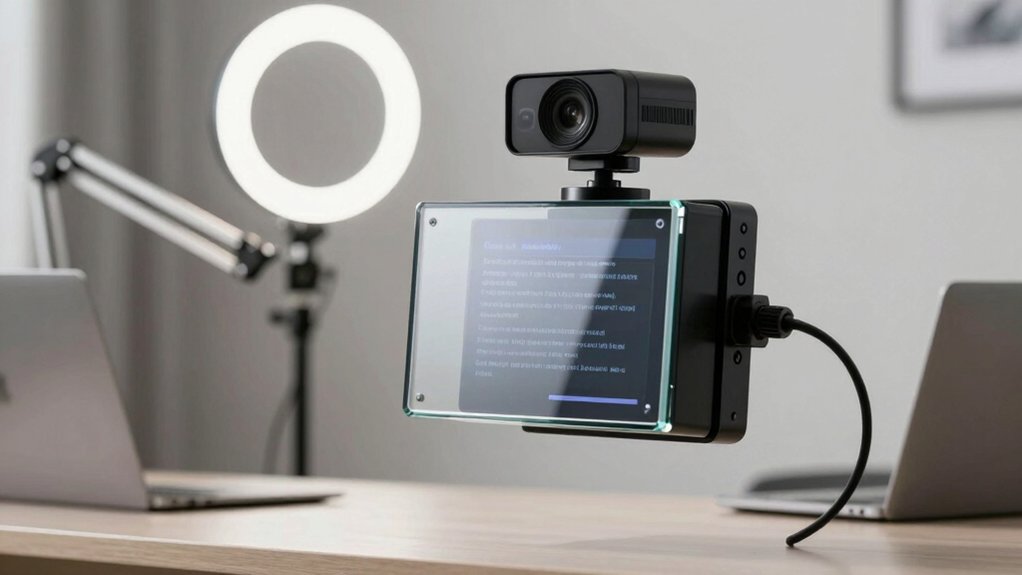
Before you purchase a teleprompter for your Zoom calls, you’ll want to evaluate five key factors: eye contact maintenance (how well the device positions text at camera level), display size requirements (whether you need a 7-inch, 10-inch, or 15-inch screen), camera compatibility needs (ensuring the teleprompter works with your specific setup), setup ease and speed (how quickly you can install and start using it), and budget considerations (comparing costs against your available funds). Each factor directly impacts your ability to deliver professional-looking video content, so assess which ones matter most for your particular situation. Start by identifying your camera type and available space, then narrow your options based on your budget and the eye contact quality each model provides.
Eye Contact Maintenance
Maintaining natural eye contact during Zoom calls requires you to understand how a teleprompter’s optical design affects your gaze. Semi-transparent beamsplitter glass projects your script directly into your line of sight, so you’re looking at the text while facing the camera simultaneously. This setup preserves your eye contact without forcing you to glance downward or sideways.
You’ll also want to consider real-time text control features. Remote controls or companion apps let you adjust scrolling speed and font size without breaking your gaze. A glare-reducing hood or anti-reflective coating prevents bright lighting from washing out your text, keeping prompts readable and maintaining your focus on the camera throughout your presentation.
Display Size Requirements
What size display should you choose for your Zoom teleprompter? A 12.9-inch tablet-compatible teleprompter gives you ample reading space for longer sessions without constant scrolling. Larger displays let you fit more text on screen, which reduces eye movement and keeps your gaze focused on the camera lens. You’ll need to adjust text size based on your reading distance. If you’re sitting close to the teleprompter, smaller text works fine. At greater distances, you’ll need larger text to maintain readability. Choose a teleprompter that accommodates tablets or monitors so you can easily adjust text size to match your setup. This flexibility ensures you can read comfortably throughout your entire Zoom call without straining or refocusing repeatedly.
Camera Compatibility Needs
Your teleprompter won’t work effectively if it doesn’t match your camera setup, so you’ll need to verify compatibility before purchasing. First, identify your camera type: DSLR, mirrorless, webcam, or smartphone. Next, confirm the teleprompter has a 1/4-inch screw mount and appropriate rails or clamps for secure attachment to your rig. Then, check if it accommodates your lens class—wide-angle or standard—without causing vignetting or reflections during video calls. Finally, ensure the unit supports your preferred display option: tablet, phone, or built-in screen. A proper fit prevents equipment damage, maintains stable positioning during Zoom calls, and keeps your setup professional and reliable throughout your meeting.
Setup Ease And Speed
Once you’ve confirmed your camera will work with a teleprompter, you’ll want to choose a model that sets up quickly so you’re not scrambling minutes before your Zoom call starts. Look for units with pre-assembled components and minimal tools required. Plug-and-play models eliminate extra apps and complex installations. Desktop or monitor-style displays work immediately without setup delays. Direct attachment to your existing camera or tripod reduces alignment time and positioning work. Built-in or easily paired remote controls let you adjust prompts during calls without breaking eye contact. Foldable or compact designs speed transport between locations. Lightweight builds allow independent setup without assistance. Choose teleprompters offering these features to minimize preparation time and start your calls promptly.
Budget Considerations
How much you’ll spend on a teleprompter depends on the features and display size you need for your Zoom calls. Basic handheld kits cost less than feature-rich units with 12.9-inch tablet support, so match your budget to your display requirements. Consider whether built-in displays justify higher upfront costs by eliminating separate device purchases. Look for models with Bluetooth remotes and mobile apps included, as these reduce additional software expenses. Evaluate out-of-box readiness—pre-assembled units save setup time and prevent extra accessory costs. If you present remotely frequently, prioritize models with carrying cases to protect your investment. Calculate total ownership costs by combining the unit price with any necessary accessories, software, or replacement parts you’ll likely need over time.
Portability And Storage
After calculating your total investment in a teleprompter, you’ll want to contemplate how easily you can move and store it between meetings. Look for lightweight, compact models with foldable designs that fit into standard bags or cases. Check if your chosen unit includes a protective carrying case, which prevents damage during transport and setup changes. Verify that mounting options—such as 1/4-inch screw holes—allow quick attachment to tripods or desks without additional tools. Consider construction materials like all-metal or durable alloy frames, which withstand repeated handling and travel stress. Additionally, confirm that your teleprompter accommodates your device size, whether tablet or smartphone. These features combined ensure your setup moves efficiently between locations while remaining protected and functional.
Software Integration Features
What software capabilities does your teleprompter actually offer? You’ll want direct integration with Zoom that displays your script while showing chat messages in real time. This means you can read prompts and monitor audience questions without switching windows or breaking eye contact with the camera.
Check that the teleprompter’s companion app lets you edit text remotely and adjust font sizes on the fly. Confirm it’s compatible with your operating system—Mac or Windows—and identify any required software like DisplayLink or dedicated teleprompter apps.
Prioritize models offering speed control and layout customization so you can match your speaking pace and adjust the display for Zoom’s video format. These features reduce setup time and let you focus on delivering your message smoothly during calls.
Text Visibility In Lighting
Lighting conditions directly affect whether you can read your teleprompter script during Zoom calls, so you’ll need to evaluate the glass quality and coatings that make text legible. Choose a teleprompter with high-contrast beamsplitter glass and neutral color rendering to prevent tinted or washed-out scripts under varied lighting. Look for anti-reflective coatings on the surface to minimize glare and ghosting that reduce readability when facing your camera. Select models with backside coatings that reduce reflections, which helps maintain clear visibility in bright indoor lighting or daylight behind the camera. Consider larger semi-transparent beamsplitter mirrors—12.9 inches or comparable—for easier reading from a distance while preserving eye contact. Prioritize adjustable brightness, font size, and scrolling speed controls to adapt to fluctuating on-screen lighting during your calls.
Final Thoughts
You’ll want to match your teleprompter to your specific setup. If you’re using a camera, choose the Elgato Prompter or Glide Gear TMP 75. For phone-based calls, pick the Teleprompter Kit for iPhone/Android or LENSGO TC7S. Consider your budget, display size needs, and portability requirements. Test your equipment before important calls. Start with setup instructions provided by each manufacturer to ensure proper alignment and readability.

Meet Ry, “TechGuru,” a 36-year-old technology enthusiast with a deep passion for tech innovations. With extensive experience, he specializes in gaming hardware and software, and has expertise in gadgets, custom PCs, and audio.
Besides writing about tech and reviewing new products, he enjoys traveling, hiking, and photography. Committed to keeping up with the latest industry trends, he aims to guide readers in making informed tech decisions.