
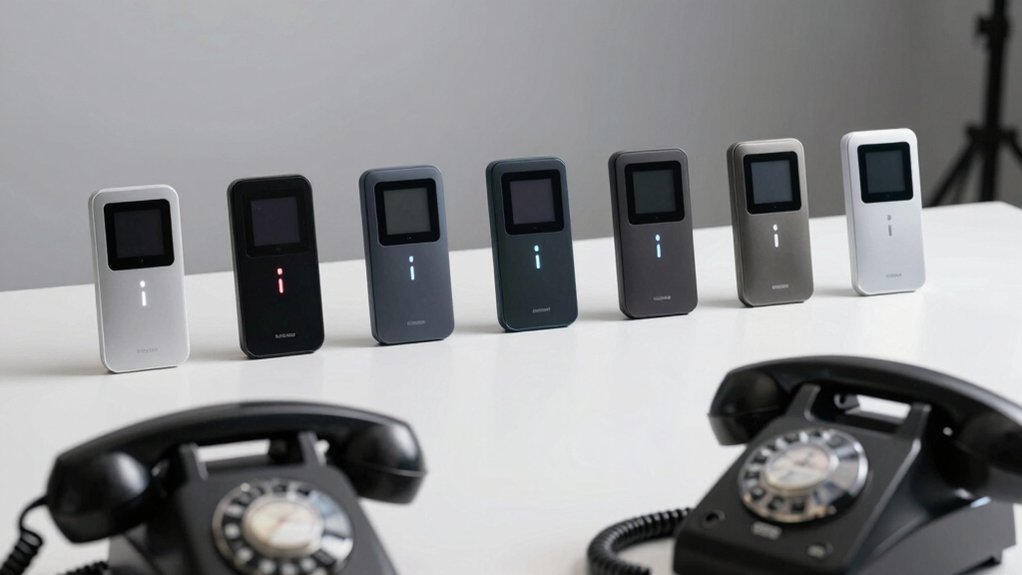

If you’re tired of robocalls interrupting your day, you’ll want to know which landline blockers actually deliver results. Seven proven options exist that plug directly into your phone line, require no power setup, and let you block calls by number, area code, or prefix. Each device offers different features—from dedicated blocking buttons to customizable whitelists. Understanding what separates the most effective blockers from mediocre ones requires examining specific factors.
| CPR V100K Call Blocker for Landline Phones |

| Most Comprehensive | Preloaded Block Database: 100,000 verified scam/nuisance numbers | Manual Blocking Capacity: Up to 10,000 additional numbers | Power Requirements: No mains power; plugs into phone line | VIEW LATEST PRICE | Read Our Analysis |
| Enf860 Call Blocker for Landline Phones with Blacklist/Whitelist |

| Best Customization | Preloaded Block Database: Many spam numbers from repeated complaints | Manual Blocking Capacity: 4,000+ numbers in NUMBER LIST | Power Requirements: No mains power; plugs into phone line | VIEW LATEST PRICE | Read Our Analysis |
| Digitone ProSeries 3 Call Blocker for Landline Phones |

| Best Overall | Preloaded Block Database: Millions of known unwanted numbers | Manual Blocking Capacity: Dual block buttons for name or number | Power Requirements: Mains powered (corded connection) | VIEW LATEST PRICE | Read Our Analysis |
| Enf510 Call Blocker for Landline Phones |
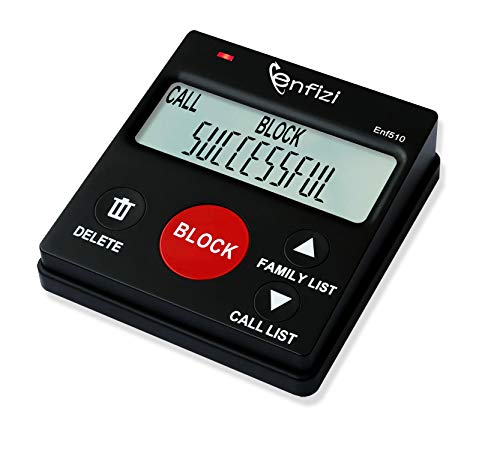
| Budget-Friendly Pick | Preloaded Block Database: 4,000+ most complained numbers | Manual Blocking Capacity: 3,000+ manual blocking capacity | Power Requirements: No mains power; plugs into phone line | VIEW LATEST PRICE | Read Our Analysis |
| Call Blocker for Landline Phones with Caller ID |

| Best For Seniors | Preloaded Block Database: Not specified | Manual Blocking Capacity: 2,000-number storage capacity | Power Requirements: Not specified | VIEW LATEST PRICE | Read Our Analysis |
| Panasonic Cordless Phone with Call Block (KX-TGF944B) |

| Best Multi-Feature | Preloaded Block Database: 14,000 pre-installed block numbers | Manual Blocking Capacity: 2,000 additional numbers via 1-touch Call Block | Power Requirements: Corded electric and battery-powered | VIEW LATEST PRICE | Read Our Analysis |
| CPR V10000 Call Blocker for Landline Phones |

| Best Whitelist Control | Preloaded Block Database: 10,000 known scam numbers | Manual Blocking Capacity: Up to 2,000 numbers manually | Power Requirements: Not specified | VIEW LATEST PRICE | Read Our Analysis |
More Details on Our Top Picks
CPR V100K Call Blocker for Landline Phones
If you’re looking for a robocall blocker that works immediately without subscriptions, apps, or complicated setup, the CPR V100K Call Blocker is worth considering. This device connects directly to your landline and requires no power supply. It comes preloaded with 100,000 verified scam and nuisance numbers, offering instant protection. You can manually block up to 10,000 additional numbers using the large “BLOCK NOW” button. The device works with traditional analog landlines from AT&T, Verizon, Frontier, CenturyLink, and Brightspeed, but not with VoIP services. It requires active Caller ID service to function. The CPR V100K includes a 3-year warranty and lifetime customer support.
- Preloaded Block Database:100,000 verified scam/nuisance numbers
- Manual Blocking Capacity:Up to 10,000 additional numbers
- Power Requirements:No mains power; plugs into phone line
- Caller ID Requirements:Requires Caller ID service
- Whitelist/Allow List Capability:Can be paired with phone provider’s spam filtering
- Phone Handset Compatibility:Traditional analog landline phones only
- Additional Feature:100,000 preloaded verified numbers
- Additional Feature:Large “BLOCK NOW” button design
- Additional Feature:3-year manufacturer warranty included
Enf860 Call Blocker for Landline Phones with Blacklist/Whitelist
The Enf860 Call Blocker works best for you if you want a straightforward device that requires no power outlet and lets you control exactly which calls reach your phone. Plug it directly into your analog telephone line to start blocking spam. You can manually add over 4,000 numbers to your custom database or block entire area codes and number prefixes like 800 or 855. Switch between BLOCK mode and FAMILY mode anytime without losing data. In FAMILY mode, only callers on your approved list get through. The device also blocks international, private, and out-of-area calls by default. Verify your carrier provides Caller ID service before setup.
- Preloaded Block Database:Many spam numbers from repeated complaints
- Manual Blocking Capacity:4,000+ numbers in NUMBER LIST
- Power Requirements:No mains power; plugs into phone line
- Caller ID Requirements:Requires Caller ID service with analog line
- Whitelist/Allow List Capability:FAMILY mode blocks all not in FAMILY LIST
- Phone Handset Compatibility:Analog lines only; no internet-based/digital phones
- Additional Feature:Dual BLOCK/FAMILY mode switching
- Additional Feature:256-name blocking capability
- Additional Feature:Area code/prefix blocking options
Digitone ProSeries 3 Call Blocker for Landline Phones
Need a call blocker that stops spam before it rings your phone? The Digitone ProSeries 3 uses Caller ID to automatically block unwanted calls without ringing. You can block calls remotely by dialing *2#, or use two dedicated buttons on the device to block by name or number. Access your call history and double-tap any entry to block that caller. Use the Green Invite Button to whitelist trusted contacts who’ll ring normally. The device works with analog corded phones, cordless phones, and faxes across most US providers and internationally. Installation requires no equipment replacement—simply connect it to your existing landline setup.
- Preloaded Block Database:Millions of known unwanted numbers
- Manual Blocking Capacity:Dual block buttons for name or number
- Power Requirements:Mains powered (corded connection)
- Caller ID Requirements:Requires Caller ID Name and Number service
- Whitelist/Allow List Capability:White List allows trusted callers to ring normally
- Phone Handset Compatibility:Analog Corded, Cordless Phones, or Fax
- Additional Feature:Remote blocking via *2# dialing
- Additional Feature:Large back-lit display screen
- Additional Feature:International coverage (Canada, Mexico, Europe)
Enf510 Call Blocker for Landline Phones
Looking for a straightforward device that works with your existing landline without requiring power or internet? The Enf510 plugs directly into your telephone line and blocks calls using a preloaded database of 4,000+ numbers plus your manual additions. You can block entire area codes, specific prefixes like 800 or 855, international calls, and private numbers. Create a Family List to allow specific numbers through. To block a call, press the BLOCK button on the device or press # then 6 on your phone. The display shows only the caller’s number, not their name, and works with answering machines and cordless phones.
- Preloaded Block Database:4,000+ most complained numbers
- Manual Blocking Capacity:3,000+ manual blocking capacity
- Power Requirements:No mains power; plugs into phone line
- Caller ID Requirements:Requires Caller ID service
- Whitelist/Allow List Capability:FAMILY LIST allows listed numbers to bypass database
- Phone Handset Compatibility:Analog telephones, answering machines, cordless phones
- Additional Feature:Compatible with answering machines
- Additional Feature:3000+ manual blocking capacity
- Additional Feature:FAMILY LIST bypass feature
Call Blocker for Landline Phones with Caller ID
If you’re tired of spam interrupting your home phone calls, a call blocker with caller ID gives you immediate control over which numbers reach your phone. This device stores up to 2,000 blocked numbers, letting you blacklist unwanted callers with one touch. You’ll also block international area codes and overseas scammers through global filtering. The senior-friendly design features a simple six-button layout and clear LCD screen, eliminating confusing menus. Beyond blocking live calls, it stops unwanted voicemails. Setup requires no manual—just add numbers to your blacklist as needed. Direct support’s available if you encounter questions about operation or features.
- Preloaded Block Database:Not specified
- Manual Blocking Capacity:2,000-number storage capacity
- Power Requirements:Not specified
- Caller ID Requirements:Caller ID with LCD screen display
- Whitelist/Allow List Capability:Not specified
- Phone Handset Compatibility:Landline phones (not specified further)
- Additional Feature:Blocks unwanted voicemails feature
- Additional Feature:Global international area code filtering
- Additional Feature:Senior-friendly 6-button layout
Panasonic Cordless Phone with Call Block (KX-TGF944B)
The Panasonic KX-TGF944B works best for households that need robocall blocking across multiple rooms, since it comes with four cordless handsets and features 14,000 pre-installed blocked numbers plus the ability to manually block 2,000 additional numbers through one-touch Call Block. You’ll benefit from its Advanced Call Blocking feature, which automatically filters telemarketing calls. The One-Ring Scam Alert displays confirmation when you return one-ring calls, helping you identify suspicious patterns. With 2-Way Recording capability, you can document unwanted calls for reference. The integrated answering machine stores messages up to 10 hours of talk time, and caller ID with bilingual support shows who’s calling before you answer.
- Preloaded Block Database:14,000 pre-installed block numbers
- Manual Blocking Capacity:2,000 additional numbers via 1-touch Call Block
- Power Requirements:Corded electric and battery-powered
- Caller ID Requirements:Caller ID (50 items); bilingual support
- Whitelist/Allow List Capability:Not specified
- Phone Handset Compatibility:Cordless phone system with 4 handsets
- Additional Feature:Link2Cell Bluetooth pairing capability
- Additional Feature:2-way conversation recording feature
- Additional Feature:One-Ring Scam Alert detection
CPR V10000 Call Blocker for Landline Phones
Want a straightforward device that doesn’t require monthly subscriptions or Wi-Fi setup? The CPR V10000 blocks up to 2,000 numbers manually plus 10,000 preloaded scam numbers. By default, it operates in Block mode, stopping calls instantly with one tap. You can switch to Allow mode by pressing and holding the ALLOW LIST button until “SUCCESSFUL” appears, which lets only trusted numbers ring through. Add allowed numbers directly from recent calls or manually using your phone keypad. The device works with analog and VOIP landlines but requires Caller ID service from your provider.
- Preloaded Block Database:10,000 known scam numbers
- Manual Blocking Capacity:Up to 2,000 numbers manually
- Power Requirements:Not specified
- Caller ID Requirements:CALLER ID SERVICE required from network provider
- Whitelist/Allow List Capability:Allow Mode (Whitelist) for trusted numbers
- Phone Handset Compatibility:Landlines (analog); not for business VOIP
- Additional Feature:10,000 preloaded scam numbers
- Additional Feature:ALLOW mode whitelist switching
- Additional Feature:Works with VOIP landlines
Factors to Consider When Choosing a Robocall Blocker for Landlines
Before selecting a robocall blocker for your landline, you’ll need to verify it’s compatible with your phone service and check the size of its blocking database to ensure it catches the calls you want stopped. Consider whether you want manual blocking capacity so you can add specific numbers yourself, and evaluate how easy the installation process is for your technical skill level. You should also review what operating modes the device offers, such as screening calls before they ring through or blocking them silently, so you can choose the blocking style that works best for your household.
Compatibility With Your Service
How do you know if a robocall blocker will actually work with your landline setup? First, confirm your phone service uses a traditional analog line with active Caller ID service from your carrier. Next, verify the blocker doesn’t require mains power—it should plug directly into your phone jack. Then, check whether it supports your specific configuration: single line, multiple lines, cordless phones, or fax machines. Also, confirm it won’t integrate with internet-based services like Vonage or Ooma if you use those. Finally, ask your provider whether the blocker works alongside their existing spam filtering for added protection. These steps ensure compatibility before purchasing, preventing wasted money on incompatible devices.
Blocking Database Size
The size of a robocall blocker’s database determines how much protection you’ll have from day one. A larger preloaded database gives you immediate defense against known spam numbers without waiting for updates. Check how many numbers each blocker stores—some models offer millions by combining preloaded lists with ongoing updates, while others cap at thousands.
Next, review custom-number capacity. Many blockers let you add 2,000 to 4,000+ numbers yourself, expanding protection beyond preloaded entries. This matters if you receive repeated calls from specific numbers.
Finally, consider whitelist or dual-mode features. These let you limit blocking to a curated set of numbers, controlling how the database interacts with unlisted callers. Match the database size and storage capacity to your calling patterns and protection needs.
Manual Blocking Capacity
While preloaded databases handle many known spam numbers automatically, you’ll want to add your own blocked numbers as new unwanted calls arrive. Manual blocking capacity determines how many individual numbers you can personally add to your blacklist. Some models allow you to block 4,000 or more numbers, giving you significant control over your call filtering. When selecting a blocker, check whether it lets you input specific numbers or names, and whether blocks take effect immediately or require confirmation. This feature proves essential because scammers frequently use variant numbers that escape preloaded databases. By choosing a blocker with robust manual blocking capacity, you can continuously update your list as new unwanted callers emerge, ensuring personalized protection beyond standard filters.
Ease Of Installation
Most robocall blockers for landlines plug directly into your existing phone jack without requiring mains power or external adapters, making setup straightforward. You simply disconnect your phone from the wall jack, connect the blocker unit, then plug your phone into the blocker. The entire process takes under two minutes.
No installation software or technical configuration is needed. Many units activate immediately upon connection, drawing power directly from the telephone line itself. Some blockers include preloaded spam lists that begin protecting you right away. If your model offers selectable modes—such as block, allow, or family list settings—you’ll access these through dedicated physical buttons on the device rather than a smartphone app. This button-based approach eliminates the need for wireless connectivity or app downloads, further simplifying your setup experience.
Available Operating Modes
Beyond the straightforward setup process, you’ll want to understand what blocking modes your device actually offers, since they determine how aggressively it filters calls. Most blockers provide a standard Block mode that prevents marked numbers from ringing. Some models add an Allow or Whitelist mode for additional control. Family or Invite/List modes work differently—they only let pre-approved numbers ring while blocking everything else by default. Check whether your device supports manual blocking by number, name, or area code. Verify if it includes dedicated Block/Allow buttons for quick management. Confirm whether you can block calls remotely or on-device using codes or buttons. Finally, understand how mode switches affect your saved lists to avoid losing data during transitions.
Display And User Interface
What should you look for in a robocall blocker’s display and controls?
You need a clear LCD or back-lit display to easily read caller IDs and manage your block lists. Check whether the model shows only caller numbers or displays both names and numbers when available. Look for large, dedicated buttons labeled BLOCK, ALLOW, or CALL BLOCK so you can quickly add numbers without navigating complex menus.
On-screen prompts and simple menus guide you through adding numbers or names to blacklists and whitelists. Verify the device stores blocked numbers and maintains readable call history, allowing you to review and update your blocking rules over time. A straightforward interface ensures you can manage settings without frustration, especially if you prefer direct control over incoming calls.
Long-Term Support Options
How’ll you know if a robocall blocker will still work for you five years from now? Check the manufacturer’s warranty length—aim for three years or longer. Verify that the company provides free firmware and database updates to recognize new scam numbers without charging extra fees. Look for dedicated customer support channels listed in the box or on their website, ensuring you can reach someone if problems arise during setup or configuration. Examine the hardware durability specifications and maintenance guidelines to understand replacement part availability. Confirm that support covers ongoing assistance with mode adjustments, manual blocking features, and troubleshooting across multiple years of ownership. These protections guarantee your device remains effective and supported long-term.
Final Thoughts
You can effectively block robocalls on your landline by choosing a device that matches your needs. Select a blocker with blacklist and whitelist features, then plug it into your analog line—no power required. Enable Block mode, add known spam numbers or area codes, and regularly update your blocked list. Check your call history to identify new threats, and adjust settings as scams evolve.

Meet Ry, “TechGuru,” a 36-year-old technology enthusiast with a deep passion for tech innovations. With extensive experience, he specializes in gaming hardware and software, and has expertise in gadgets, custom PCs, and audio.
Besides writing about tech and reviewing new products, he enjoys traveling, hiking, and photography. Committed to keeping up with the latest industry trends, he aims to guide readers in making informed tech decisions.